
WooCommerce Hide Price For Guest Plugin | Hide Price Until Login
The WooCommerce Hide Price For Guest plugin is an intelligent solution for online shops using WooCommerce, designed to make your store more exclusive and boost customer interaction. It hides the price and “Add to Cart” button from people not signed in, encouraging them to create an account or log in to view prices.
This approach helps increase the number of registered users, allowing you to understand your customers better and personalize their shopping experience. The plugin is user-friendly, letting shop owners choose which products or categories to apply these settings. It also lets you modify the message inviting visitors to sign up or log in, ensuring it fits well with your store’s style and messaging.
Ideal for making your store feel more private and encouraging customer loyalty, this plugin is an excellent addition to any WooCommerce site looking to improve customer engagement.
Admin End of the WooCommerce Hide Price For Guest Plugin
General Configuration
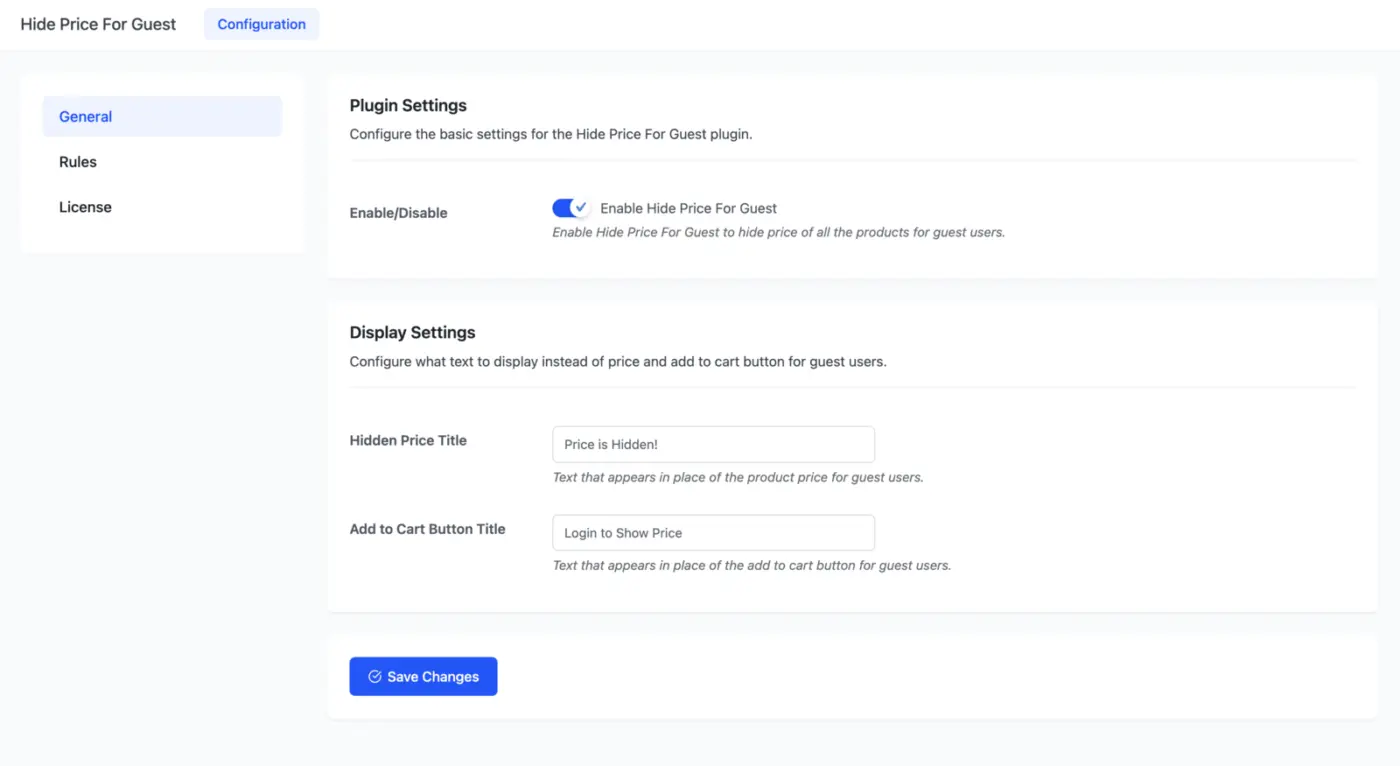
Plugin Settings
Enable Hide Price For Guest to hide the price of all the products for guest users.
Display Settings
Configure what text to display instead of price and add to cart button for guest users.
- Hidden Price Title: Text that appears in place of the product price for guest users.
- Add to Cart Button Title: Text that appears in place of the add to cart button for guest users.
Rules
The admin can also configure rules by clicking on the Rules Tab, as seen in the screenshot below. Based on these rules, he/she can reveal a product’s price and add to cart button to guest/unregistered users in the shop.
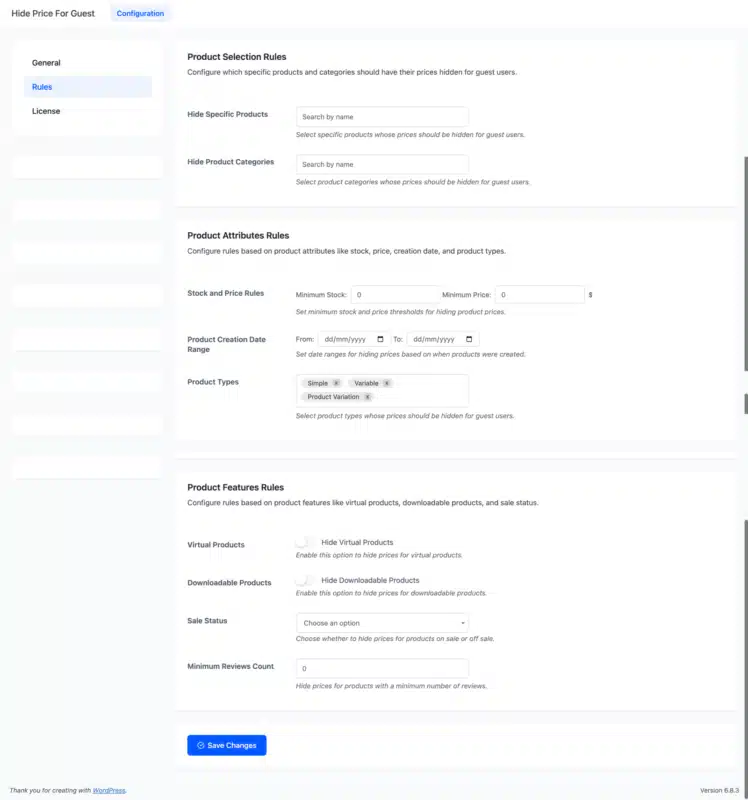
Product Selection Rules
Configure which specific products and categories should have their prices hidden for guest users.
- Hide Specific Products: Select specific products whose prices should be hidden for guest users.
- Hide Product Categories: Select product categories whose prices should be hidden for guest users.
Product Attributes Rules
Configure rules based on product attributes like stock, price, creation date, and product types.
- Stock and Price Rules: Set minimum stock and price thresholds for hiding product prices.
- Product Creation Date Range: Set date ranges for hiding prices based on when products were created.
- Product Types: Select product types whose prices should be hidden for guest users.
Product Features Rules
Configure rules based on product features like virtual products, downloadable products, and sale status.
- Virtual Products: Enable this option to hide prices for virtual products.
- Downloadable Products: Enable this option to hide prices for downloadable products.
- Sale Status: Choose whether to hide prices for products on sale or off sale.
- Minimum Reviews Count: Hide prices for products with a minimum number of reviews.
Guest or Unregistered Users’ End
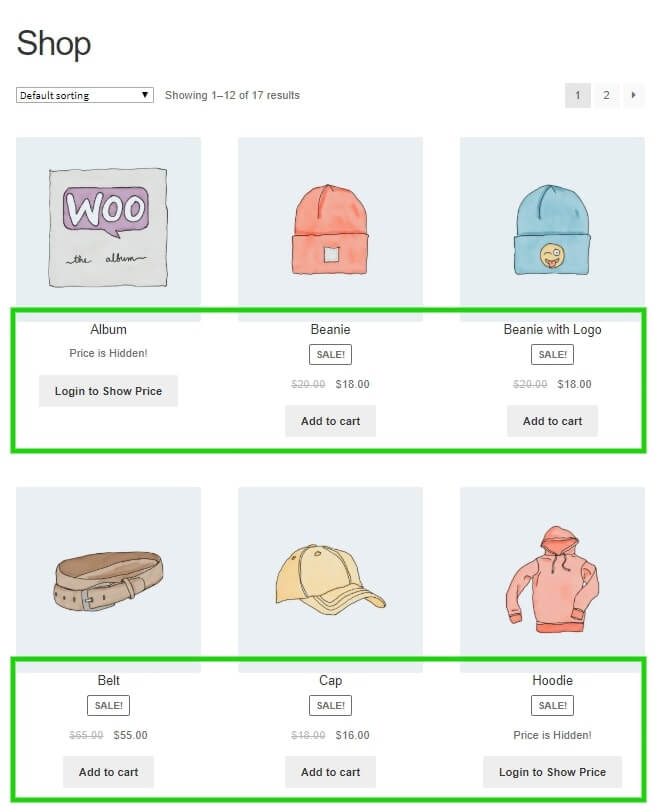
Guest or unregistered users cannot view the Product Price and Add to Cart options on the shop, category, and single product pages. Instead, they will see the custom text set by the Admin from the back-end setup. Before logging in, the Price and Add to Cart buttons will stay hidden.
Some product pricing and add-to-cart buttons are shown before login because the admin has defined rules in the back-end to display the price and add-to-cart buttons for specific products before login or to guest/unregistered users. The user must log in to show the price and add to the cart option for all the products.
5 reviews for WooCommerce Hide Price For Guest Plugin | Hide Price Until Login
Only logged in customers who have purchased this plugin may leave a review.
Customer-Friendly Refund Policy
Our refund policy is designed to ensure your satisfaction and peace of mind. Get a full refund if things do not work out well for you.
smsab2864 – Verified Buyer
Excellent Support
The support is excellent. Quick, reliable, and very helpful whenever needed.
dewitjes – Verified Buyer
Great Plugin with Super Fast Support
Great plugin with awesome support from the team. My query was answered within minutes and resolved very quickly. Highly recommended!
jovanbojovic – Verified Buyer
Outstanding Custom Work and Timely Delivery
The custom work done by their PHP developers for my WordPress website was outstanding. They even completed everything before the promised time, which was really impressive. I’m very glad I found them and look forward to working with them again in the future.
bravejanette – Verified Buyer
Great Team and Excellent Support
The DevDiggers team was great to work with. They not only delivered a high-quality plugin but also helped with customization and fixed a critical issue on my site. The support was quick and very helpful. I would definitely recommend them and use their services again.
~Janette
johntsc – Verified Buyer
Fantastic plugin!
Fantastic plugin! It has really improved my workflow and made things much easier. Highly recommended.