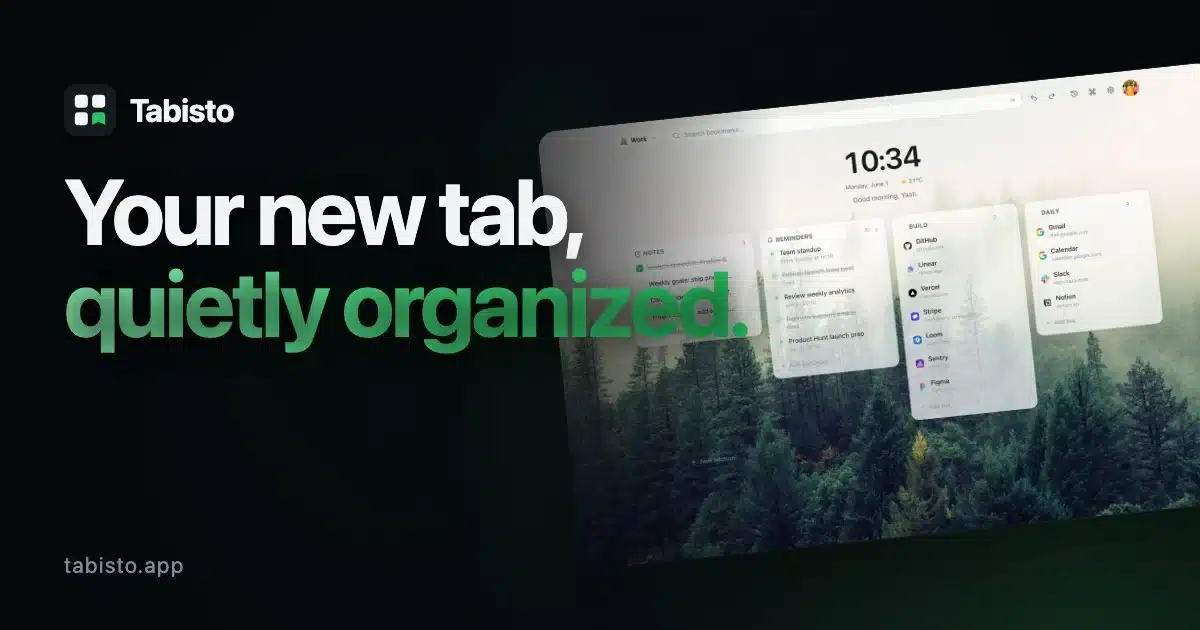
Tabisto is a bookmark manager for Chrome extension I built to replace Chrome’s default new tab page with a quiet visual workspace. I run a small agency that ships WordPress and WooCommerce plugins, and I open new tabs more often than I open my email. The default page got in my way every single day.
Most new tab extensions either go full mindfulness wallpaper or full tab manager. I wanted neither. I wanted a page that holds my bookmarks, my session for a project, and a note I scribbled at 3 AM, without making me think.
This post walks through why I started, what I chose to build, the stack I picked, the parts that were harder than expected, and where the project goes next.
Why Chrome’s Default New Tab Page Broke For Me
I open hundreds of tabs a day. My browser ends up holding work projects, half-read articles, client dashboards, and a personal to-do list, all in the same flat strip across the top.
Chrome’s default new tab page does not help. It shows a search box and a row of “most visited” sites I never clicked. The bookmark bar is fine for ten links and falls apart after that.
I tried the big new tab extensions for a few months each. Momentum gave me a calm photo and a quote, but it locked the links bar behind Plus. Toby was useful for tab groups but lived in its own panel, so I rarely opened it. Speed Dial 2 felt dated. Infinity New Tab loaded a wall of widgets and ate my first paint.
None of them solved the real problem. I wanted the new tab page itself to be the bookmark manager. Not a wallpaper. Not a side panel. The page.
So I started Tabisto.
The Constraint I Picked First: Local-First
Before I wrote a line of UI, I picked one rule. The dashboard must work offline, must load before Chrome paints, and must never need an account to start.
Two reasons.
- I open new tabs on planes, in hotels with broken Wi-Fi, and in airport lounges that auth-wall the network for the first 30 seconds. If the new tab page waits on a server, the experience is broken.
- I did not want users to “sign up to see your bookmarks.” That feels wrong for a tool you use 80 times a day.
So Tabisto stores everything in IndexedDB on your machine through a small Dexie wrapper. The dashboard reads from disk and renders. There is no network call on first paint. If you sign in later, an optional Supabase sync turns on. The entire free tier works without an account and without the cloud.
That single rule shaped every other choice.
What I Chose to Build
I wrote the feature list on one notepad page before any code. Six things, no more.
- Visual bookmarks in sections: Favicon cards inside named sections like “Daily,” “Clients,” or “Reading.” Favicons load from Chrome’s built-in cache, not a third-party service.
- Workspaces: Personal, Work, Research, anything you name. Each workspace has its own sections and its own switcher in one click.
- Saved sessions: Snapshot the current window of tabs under a name, restore the whole group later with one click.
- Command palette: Press Cmd+K or Ctrl+K. Type three letters. Open anything.
- Quick notes: A scratchpad on the dashboard itself. No file, no folder, no “where did I write that” moment.
- Reminders: Pick a date and time, or hit a chip for 15 minutes, 1 hour, tonight, or tomorrow. They fire as Chrome notifications, scheduled by the service worker even when the dashboard is closed.
That was the shape. Free covers 2 workspaces, 25 bookmarks, 1 saved session, and 3 reminders. The Tabisto pricing page keeps Pro at $3.99 a month or $35.88 a year. Pro removes the count caps and adds recurring reminders. Nothing else.
I rejected almost every other feature anyone suggested. A built-in RSS reader. A pomodoro timer. A stock ticker. Each one would have made the page louder.
The Stack and Why I Picked Each Piece
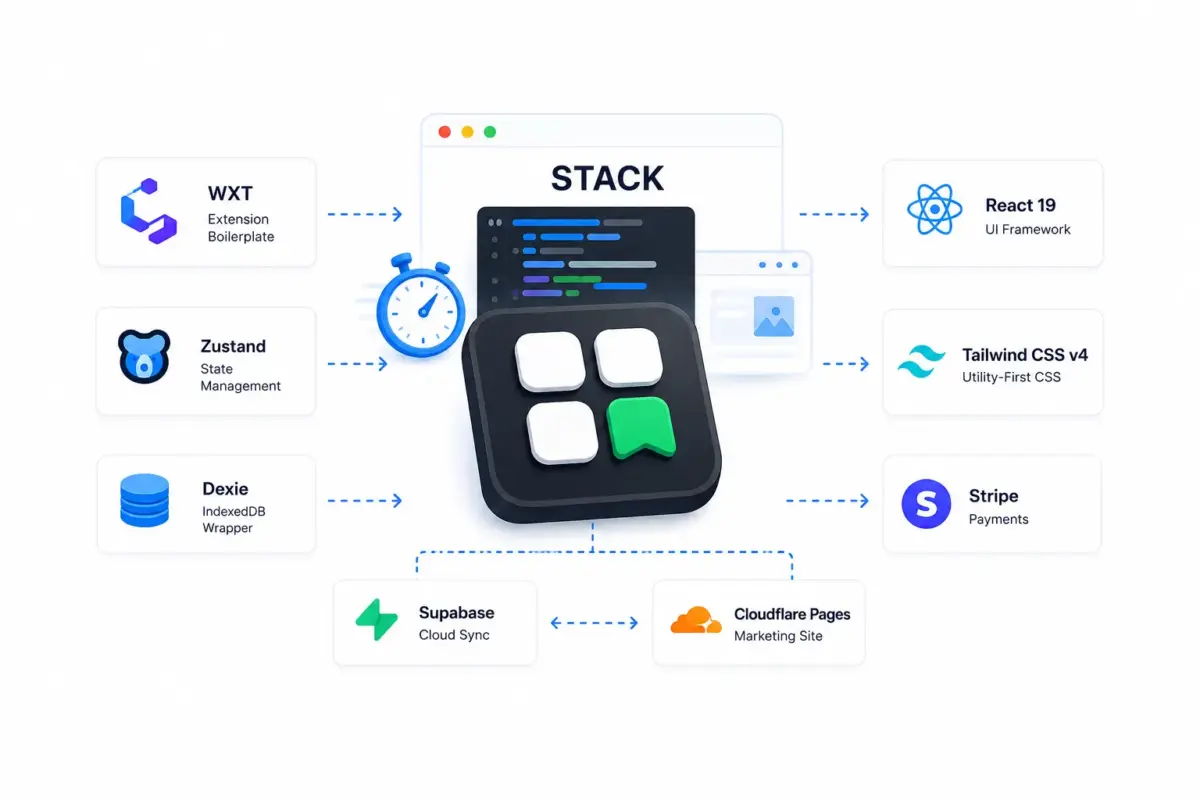
The hot-path question for any Chrome extension is “how fast does my new tab page paint?” The stack served that question first.
- WXT for the extension scaffold. It handles the Manifest V3 plumbing, file-system-based entry points, and dev-mode hot reload for the new tab override. I picked it over CRXJS because the dev loop is faster and Firefox builds work with one flag.
- React 19 for the UI. I wanted the new transitions API for view changes and the smaller hydration cost on cold boots.
- Tailwind v4 with the CSS-first config. The whole design system is variables and a few @utility blocks. I edit one CSS file when I want to retheme.
- Zustand for state. There are two stores: one persisted to IndexedDB through Dexie, and one for transient UI like modals and the command palette. Every mutation bumps a
dataUpdatedAttimestamp and queues a sync push. - Dexie for the IndexedDB wrapper. The schema consists of six tables. Loads in under 5 ms on warm cache.
- Supabase for optional cloud sync. The whole workspace state is one JSONB row per user. Row-level security blocks every cross-account read. Last-write-wins on the timestamp.
- Stripe for Pro. One product, two prices, two Edge Functions for checkout and the billing portal, plus one webhook for subscription state.
- Cloudflare Pages for the marketing site. Static prerender, Brotli on every text response, free unlimited bandwidth.
The marketing site is React 19 + Vite 6 with a tiny custom SPA router and a Node prerender step that writes one static HTML file per route. The client bundle is code-split into three buckets. A home chunk. A secondary chunk for legal and walkthrough pages. A separate chunk for the Speed Dial 2 alternative and Momentum alternative pages. The home page ships under 75 kB of client JS, gzipped.
The Parts That Were Harder Than Expected
Three pieces took longer than I planned.
- Cold-Boot Paint: Chrome opens a new tab and gives the extension milliseconds to render before the user starts typing. I spent more time on that single render than on any single feature. The dashboard hydrates from IndexedDB inside a
useSyncExternalStorehook, paints the layout shell first, then fills in favicons. No skeleton flicker. No layout shift. CLS sits at 0 and LCP lands near 800 ms on a cold profile. - Reminders Across Cold Service Workers. Manifest V3 spins down the service worker after 30 seconds of idle. Reminders that were due during that idle window need to fire when the worker wakes up next. I built a small scheduler that uses
chrome.alarmsfor the next-firing reminder, re-reads from Dexie when the worker boots, and reconciles state. A persistent race between the Zustand store and the worker’s read cost me two days of debugging. The fix was a 600 ms debounce on the worker side, not a sync barrier on the UI side. - Sync Without Data Loss: Two devices both write a workspace at the same second. The naive last-write-wins overwrites the other side. I added three pieces. A 1500 ms slack on the comparison. In-flight dedupe on the push path. A session cache for the Supabase token to avoid an MV3 deadlock with
getSession(). Sync runs free for any signed-in user, not as a Pro feature. I picked that line because if I lose your data, the price tag does not matter.
The honest trade-off: I do not run a CRDT layer. Two devices editing the same field within 1500 ms can still race for a single-user workspace product that has not bitten anyone yet. If it ever does, I will move to per-entity CRDTs.
Shipping It To The Chrome Web Store
The store review took 3 days the first time. The reviewer flagged the bookmarks permission as too broad for the import flow. I moved that permission to an optional runtime request and shipped a new build the next day. The follow-up review took six hours.
Two things I would tell anyone shipping a Manifest V3 extension this year.
First, pin your extension ID. I generated a key once with wxt prepare and copied the public key into wxt.config.ts as manifest.key. The ID stayed stable across every dev machine and the production build. OAuth redirect URIs depend on this ID. If you regenerate it, every redirect and every saved auth state breaks.
Second, read the Chrome Web Store policies on cross-purpose data twice. Mine were already clean: local-first, no analytics on the new tab, no third-party favicon fetches. The policy page is dense, though. The rejection notices are not.
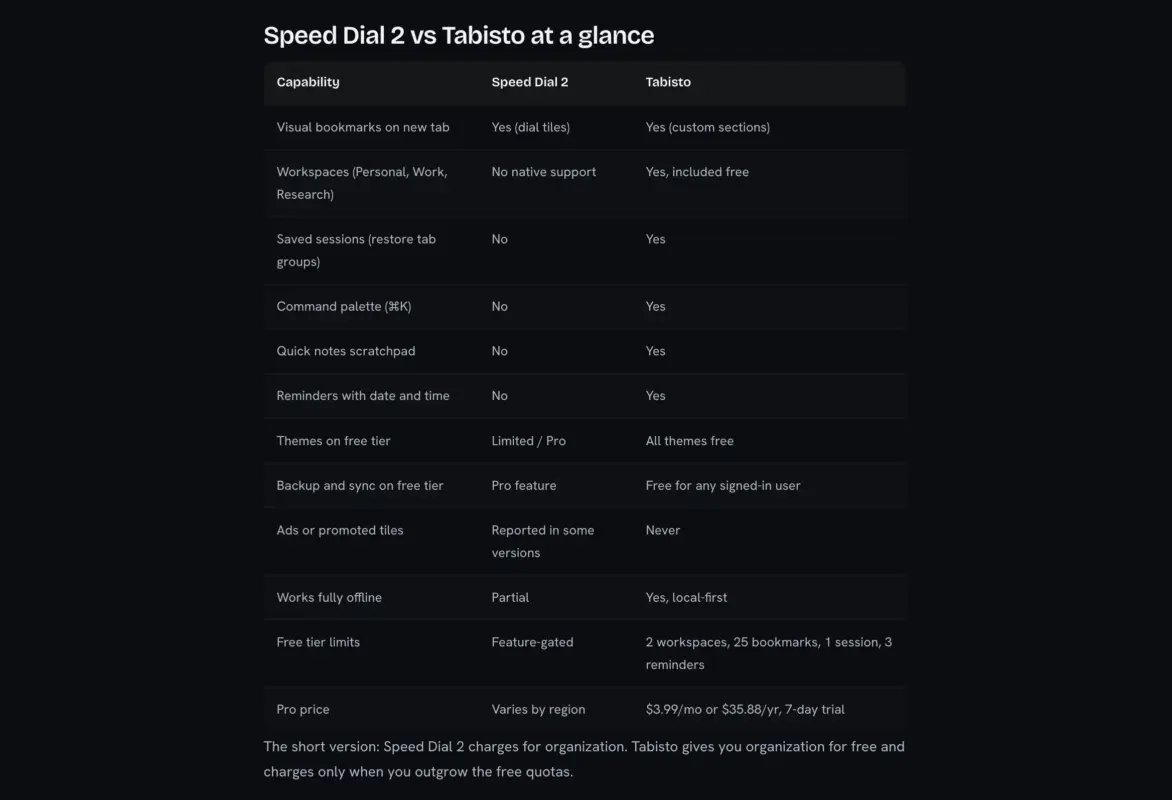
The marketing site lived at tabisto.app from day one. Every route prerenders to static HTML for SEO. The build writes a sitemap.xml and injects JSON-LD schema for the home page and the comparison pages. Google indexed every page within four days. The four comparison pages, including the Toby alternative and the Infinity New Tab alternative, each carry a feature table, an honest “where the competitor still wins” section, and a migration path. They were the SEO bet that turned out to be the best ROI.
What I Cut, And What I Would Not Put Back
Tabisto does not have a newsletter widget on the new tab page. It does not have an RSS feed. It does not have stock prices, a calendar feed, or a Pomodoro timer. It does not show ads, ever.
Every one of those was suggested. Everyone would have made the page busier. I keep the new tab page small on purpose, and Pro stays $3.99 a month because the product surface stays small.
The one feature I almost cut and then kept: the weather widget. I wired it through wttr.in (no API key, no signup, CORS-friendly). It sits in an off-by-default corner of the dashboard. Two beta testers asked about it during the soft launch. I left it in.
The Build Numbers, For Anyone Curious
Some real figures from the current build, not a pitch deck.
- Home page client JS, gzipped: ~13.83 kB.
- LCP on a desktop profile: ~0.6 seconds in the lab.
- Brotli home page payload: About 10 kB on the wire.
- Chrome extension
.zipfor the store: ~881 kB. - Cold-boot dashboard render: ~20 ms after Chrome paints.
- Free plan caps: 2 workspaces, 25 bookmarks, 1 session, 3 reminders.
- Pro plan price: $3.99 a month or $35.88 a year. 7-day free trial.
The extension does not ship a single byte of third-party tracking JS. Google Analytics on the marketing site is delayed until the first real user interaction (pointerdown, keydown, scroll, touchstart). That single change made the home page LCP target hit on mobile.
What Comes Next
I run Tabisto as the only person on the codebase. I read every email that hits the support address. I read every uninstall feedback row in Supabase. That direct loop is what makes the next features land in weeks, not quarters.
Three on the short list right now.
- A keyboard-only mode for the dashboard, so the command palette is the default and the mouse stays optional.
- A second workspace template for academic and research work, with section presets and a study timer.
- A Web App Manifest, so the dashboard works as a PWA on a Chromebook home screen.
Beyond that, the constraint stays. Keep the new tab page calm. If a feature does not earn its weight against that goal, it does not ship.
You can read more about why I started Tabisto on the about page. If you want to try it, the extension is on the Chrome Web Store, and the free plan covers most solo users for years.
Conclusion
Building Tabisto did not require a moonshot. It required one constraint (local-first) and a small list of features that earned their place. The stack is unglamorous: React, Tailwind, IndexedDB, Supabase, Stripe, Cloudflare Pages. The marketing site lives at tabisto.app, the extension lives on the Chrome Web Store, and the new tab page itself is the entire product.
If you build a Chrome extension this year, my one piece of advice: pick one constraint that you refuse to break. The rest of the design follows. You can also say hello if you want to swap notes on shipping browser extensions in 2026.
Frequently Asked Questions
Q1. What is Tabisto?
Tabisto is a free Chrome extension that replaces Chrome’s default new tab page with a calm visual bookmark manager. It holds bookmarks in custom sections, lets you switch between named workspaces, saves and restores tab sessions with one click, and includes quick notes and reminders.
Q2. How long did it take to build Tabisto?
The first usable version took about 5 days. The store-ready release with sync, the Pro plan, and the four comparison pages on the marketing site took another 15 days. I am the only person on the codebase, so the timeline reflects one builder, not a team.
Q3. What tech stack does Tabisto use?
The extension uses WXT for Manifest V3, React 19 with TypeScript for the UI, Tailwind v4 for styling, Dexie over IndexedDB for local storage, and Zustand for state. Optional cloud sync uses Supabase with row-level security. Pro billing runs on Stripe with two Supabase Edge Functions. The marketing site is React 19 + Vite 6 prerendered to static HTML on Cloudflare Pages.
Q4. Why is Tabisto local-first instead of cloud-first?
A new tab page that waits on a server is a broken new tab page. The dashboard loads instantly, works fully offline, and does not need an account to start. Sync is opt-in and free for any signed-in user. Pro is about removing count limits, not about gating sync.
Q5. Is Tabisto open source?
The extension is closed source today. I might open a portion of it later (the favicon cache logic and the IndexedDB schema would be useful to other builders), but the full codebase ties to the Pro billing path and the Supabase sync schema, and I am not ready to split those out.
Q6. How does Tabisto compare to Momentum or Toby?
The full breakdowns sit on the comparison pages I built for the marketing site. The short version: Momentum is mindfulness-focused, Toby is a tab manager that lives in its own panel, and Tabisto is a calm new tab dashboard that runs on the page itself. The right choice depends on what you want a new tab to do.