


How many SEO keywords should I use? Target one primary keyword per page and cover its close variants and related questions in the same content.
Google gives no keyword count and no density number in any of its guides. I checked its SEO Starter Guide, spam policies and AI features documentation in October 2026. I also pulled Search Console data for this page and tested the focus keyword limit in Rank Math 1.0.280 on WordPress 7.1.3.
This guide explains the rule, the numbers behind it and where each keyword goes. It also covers keyword density, the meta keywords tag and what AI search changes about keyword targeting.
How Many SEO Keywords Should I Use per Page?
How many SEO keywords should I use per page comes down to one primary keyword and a few close variants. The primary keyword sets the topic, and the variants are other ways people ask the same thing. If two keywords need different answers, they need different pages.
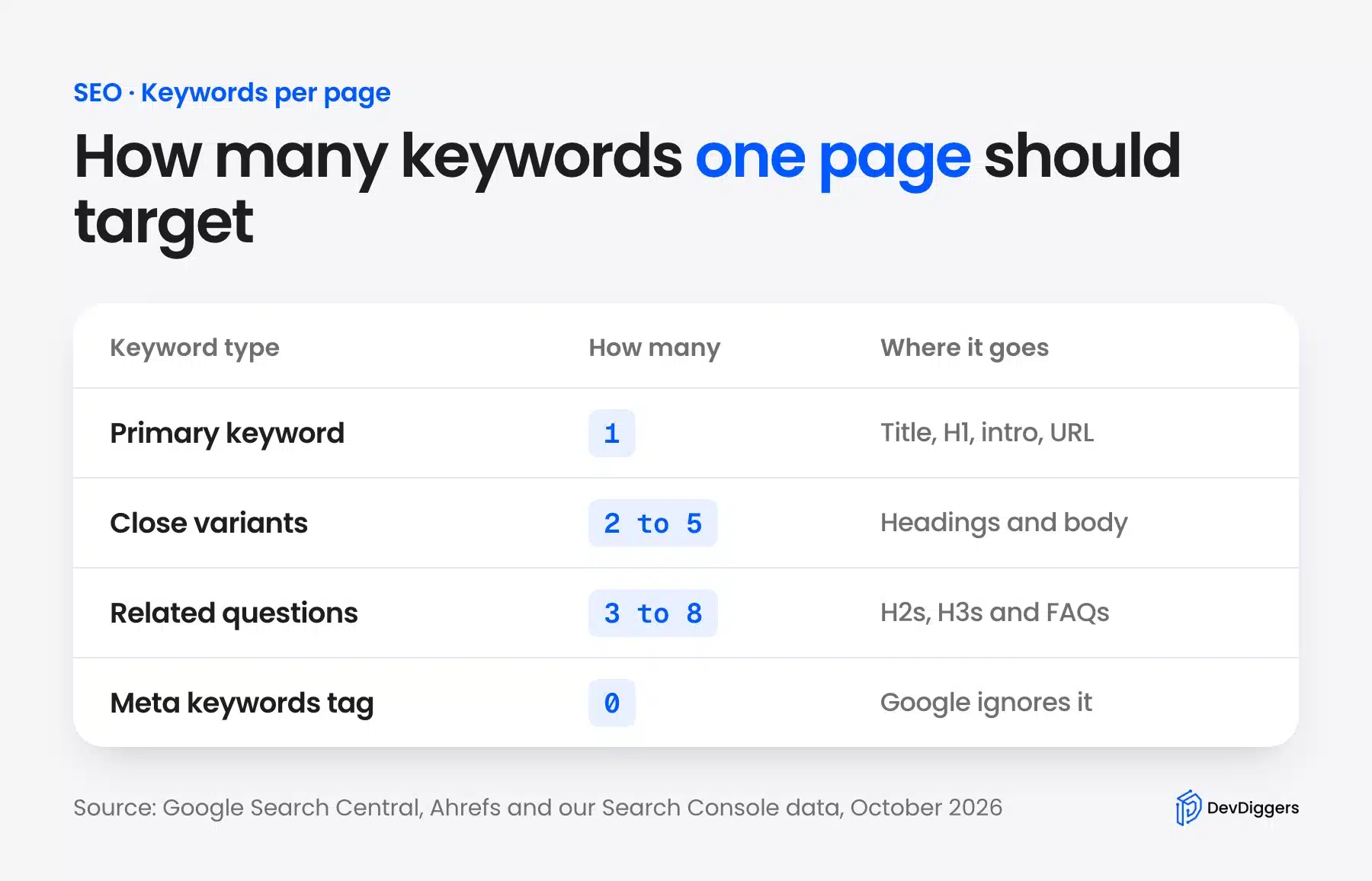
Here is a simple way to think about it:
- Primary keyword: One phrase that names the topic, such as “how many keywords for SEO”.
- Close variants: Two to five phrases with the same meaning, such as “how many SEO keywords” or “SEO how many keywords”.
- Related questions: Three to eight sub-questions a reader asks next, such as “what is keyword density”.
- Meta keywords tag: None. Google does not read it.
These are working ranges. Google itself publishes no such rule. A long guide naturally covers more related questions than a short product page.
Why One Page Ranks for Many Keywords
One page can rank for hundreds of searches because Google matches meaning instead of exact words. If your page fully answers a topic, it shows up for many phrasings of that topic. That is why you pick one primary keyword and let the variants follow. Do not build a page for each phrase.
The best known data comes from Ahrefs. Its study of 3 million searches found that the average page ranking first also ranks in the top 10 for nearly 1,000 other keywords. The median was around 400.
Our own Search Console data shows the same pattern on a small scale. Between May and September 2026, this very page appeared in Google for 56 different queries.
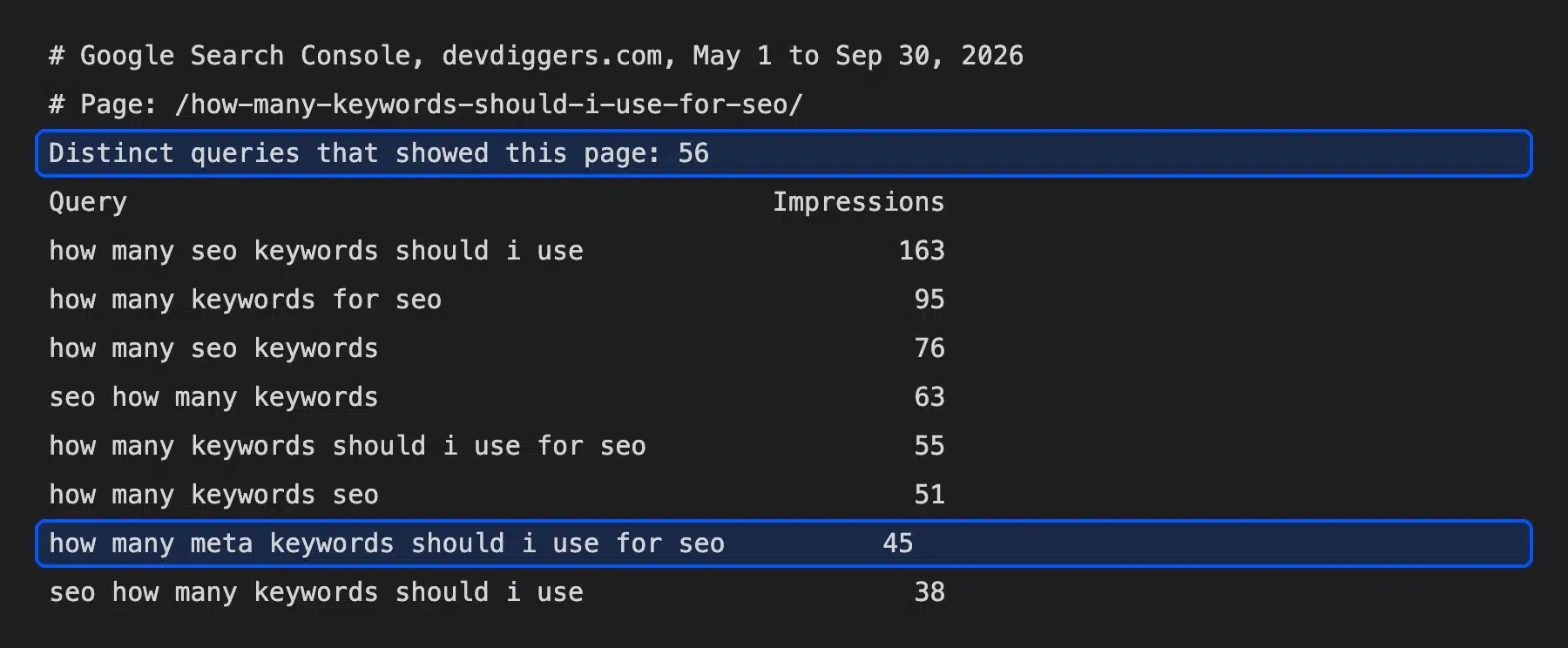
Most of those 56 queries are the same question in different words. “How many SEO keywords”, “SEO how many keywords” and “how many keywords SEO” all want one answer. They belong on one page.
The same report showed one query that needs its own section: “how many meta keywords should I use for SEO”, with 45 impressions. It is a related question with a different answer, which this guide covers below.
Primary vs Secondary Keywords: What Is the Difference?
A primary keyword is the main search a page answers, and secondary keywords are close variants or sub-questions of it. The primary keyword shapes the title and the H1. Secondary keywords shape the headings and the body and make the page cover the whole topic.
Take this page as an example. Its primary keyword is “how many SEO keywords should I use”, and its secondary keywords include “how many keywords for SEO” and “keyword density”.
A secondary keyword should never need a different answer. If it does, it is the primary keyword of another page, and it belongs in your keyword map as a new row.
A good page has more secondary keywords than you plan. Write the answer well, and the variants appear in the text without forcing them.
Search intent is the test. Search both phrases in Google, and if the top results are mostly the same pages, one page can serve both.
How to Find Your Keyword Variants in Search Console
Search Console shows the real searches that already bring up your page, which makes it the best source of variants. Open the Performance report, filter by your page and read the Queries tab. Add the variants that match your topic, and give unrelated queries their own pages.
Follow these steps:
- Open Search Console and pick your site.
- Click Search results under Performance.
- Click New > Page and paste the page URL.
- Open the Queries tab and sort by Impressions.
- Note the variants of your topic and the questions you do not answer yet.
That is how this guide found its meta keywords section. The query had 45 impressions, and the old version of the page never answered it.
Look for questions as well as variants. A query that starts with “how”, “why” or “can” often deserves its own H2 or FAQ, as long as it fits the page’s topic.
Check the report again a month after you update a page. New variants usually appear once Google has crawled the new sections.
How Many Keywords for SEO by Page Type
The count changes with the job of the page. A blog post can cover one primary keyword and many related questions, while a product page targets one product phrase and a few modifiers. A home page targets your brand and your main category instead of a long list of services.
| Page type | Primary keywords | Variants and questions |
|---|---|---|
| Blog post or guide | 1 | 5 to 15, as headings and FAQs |
| Product page | 1 | 2 to 4, such as size, color or “price” |
| Category page | 1 | 3 to 6 subcategory terms |
| Service page | 1 | 3 to 5, such as location or industry |
| Home page | 1 (brand plus category) | Your top 2 or 3 categories |
A blog post has the most room, because each H2 can answer a related question. A product page has the least, because adding unrelated keywords makes it less clear what you sell.
If a page tries to rank for two topics, split it. Two focused pages beat one page that half answers both.
How Many SEO Keywords Per Website?
There is no limit per website, because each page targets its own primary keyword. A site with 200 pages can target 200 primary keywords and thousands of variants. The real limit is how many topics you can cover well without two pages competing for the same search.
Two pages that chase the same keyword cause keyword cannibalization. Usually only one of them ranks, often the weaker one, and both do worse than one strong page would.
Keep a simple keyword map: one row per page, with its primary keyword and its variants. Before you write a new post, search the map for the topic.
If you track keywords in a tool, start with the primary keyword of each page. Tracking every variant adds noise without changing what you do next.
Track a small set first. The primary keyword of each important page is enough to see whether your work moves rankings, and Search Console covers the long tail for free.
Where to Place Keywords on a Page
Place the primary keyword where readers and search engines look first: the title tag, the H1, the first sentence and the URL. Then use it once in a subheading and an image’s alt text, and let variants carry the rest. Google’s starter guide asks you to think about the words readers use.
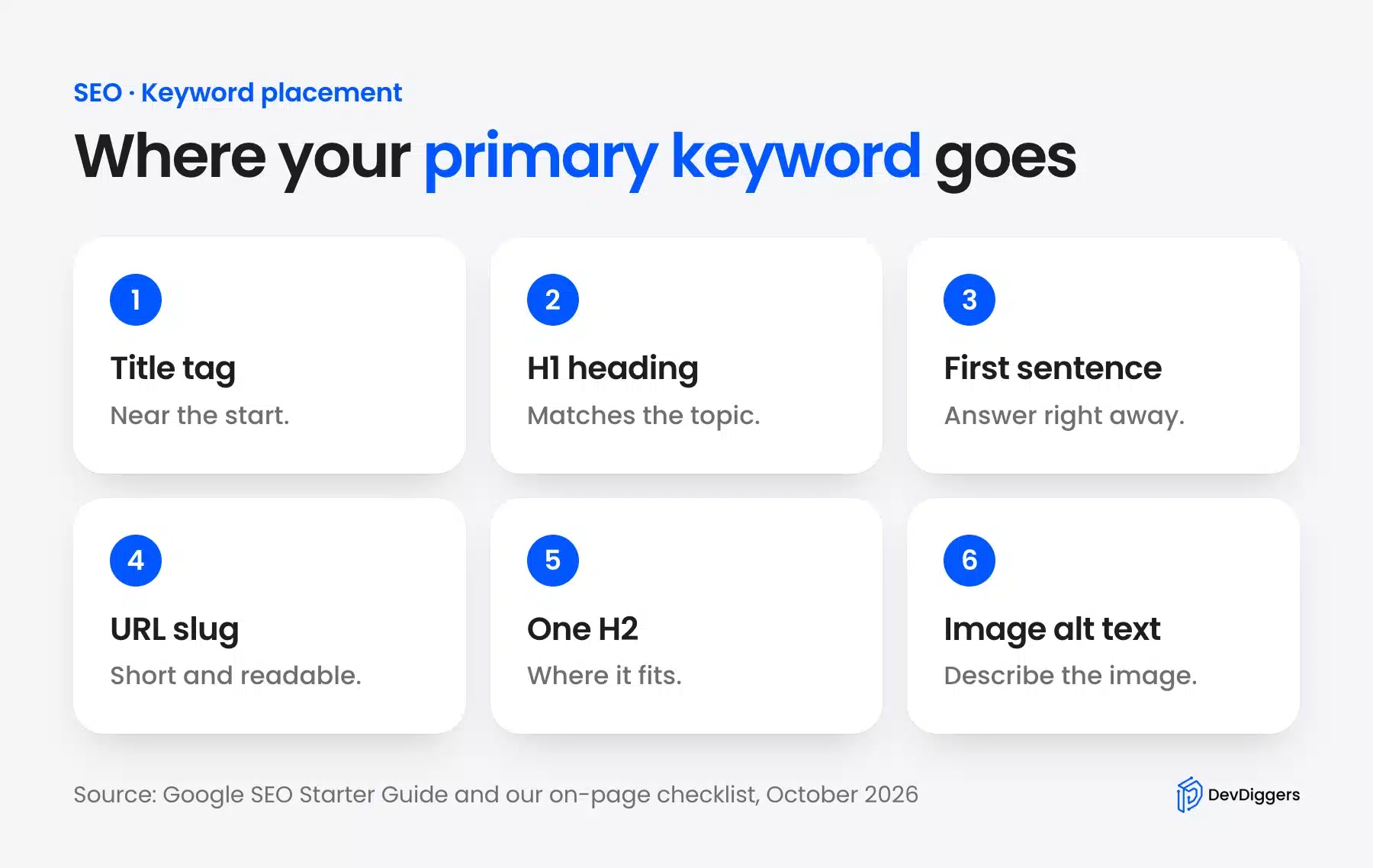
- Title tag: Put the keyword near the start so it survives when the title is cut off.
- H1 heading: Match the topic of the page and keep it close to the title.
- First sentence: Answer the search right away and use the keyword in that answer.
- URL slug: Keep it short (such as
/how-many-keywords-should-i-use-for-seo/). - One H2: Use the keyword or a close variant where it fits the section.
- Image alt text: Describe the image, and include the keyword only when it is true.
The Google SEO Starter Guide gives an example of this. Some people search for “charcuterie” and others for “cheese board.” A page should reflect the different words readers use.
Keyword Density: How Many Keywords per 1,000 Words?
There is no ideal keyword density, and Google does not use a percentage. Advice like “use your keyword 1 to 2 percent of the time” is a myth from older search engines. Use the keyword where it reads naturally, and use synonyms and variants everywhere else.
Google’s spam policies define keyword stuffing as filling a page with keywords in an attempt to manipulate rankings. They add that stuffed keywords often appear in a list or group, unnaturally or out of context.
The starter guide says the same thing in plainer words. Repeating the same words over and over, even in variations, tires readers and goes against the spam policies.
Here is what density looks like in practice. This guide is about 2,500 words long and uses its exact primary keyword about six times, which is well under half a percent. It still ranks for dozens of variants, because the rest of the text uses them naturally.
Counting tools in SEO plugins can still be useful as a warning light. If a plugin says your keyword appears 40 times in 800 words, read the page again and cut the repeats.
A quick test helps. Read the paragraph aloud. If the keyword sounds forced, replace it with a pronoun or a synonym.
How Many Meta Keywords Should I Use for SEO?
Use zero meta keywords. Google has ignored the meta keywords tag for years and says so in its SEO Starter Guide. Filling it in does not help rankings and shows competitors exactly which terms you target. Most SEO plugins no longer offer the field.
Google announced this in a 2009 Search Central post. It said Google had ignored the keywords meta tag for years and saw no need to change that policy.
The current SEO Starter Guide repeats the point. It says plainly that Google Search does not use the keywords meta tag.
The meta description is a different tag and still matters. Google may show it as the snippet under your title. Write one clear sentence per page that answers the search.
If your theme or an old plugin still prints a meta keywords tag, you can remove it. It does no harm, but it does nothing useful either.
How Many Focus Keywords in Rank Math and Yoast?
Rank Math’s free version accepts five focus keywords per post, and Yoast’s free version accepts one. These fields only feed the plugin’s content analysis, and Google never sees them. Put your primary keyword first, because both plugins score the page against the first keyword.
I checked Rank Math 1.0.280 on a test site running WordPress 7.1.3. After five focus keywords, the field stopped accepting new ones and showed an upgrade notice for the Pro version.
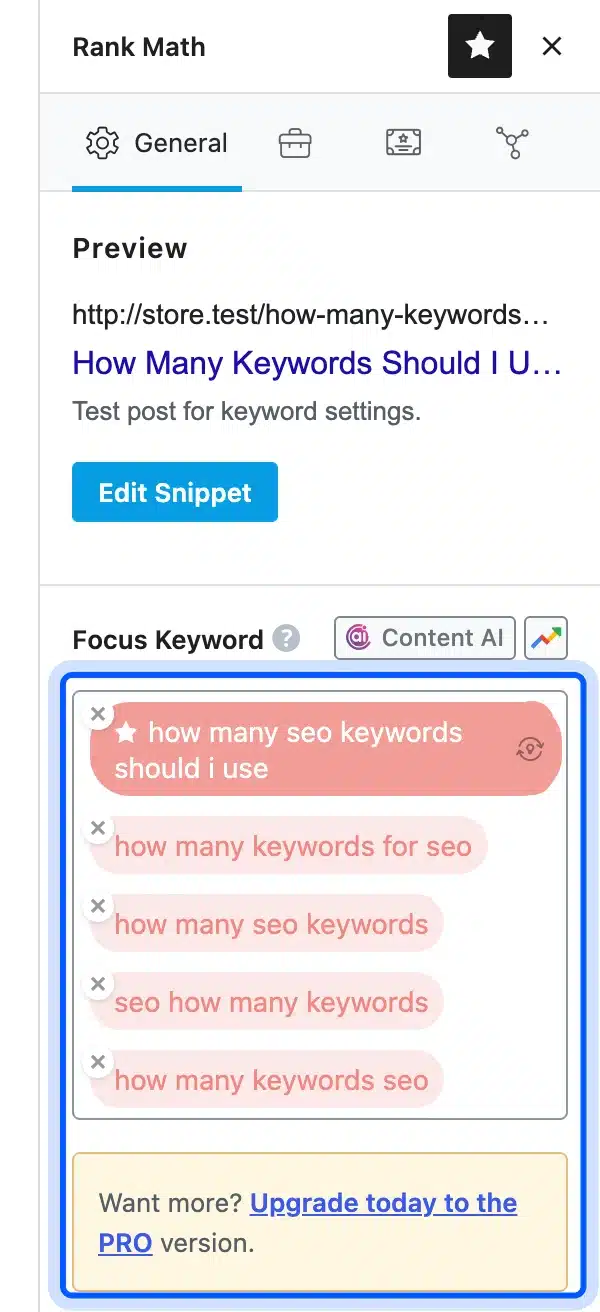
The limit sits in the plugin’s code as a filter named rank_math/focus_keyword/maxtags, set to 5. Rank Math’s focus keyword guide describes the same default of up to five per post.
Yoast works differently. The Yoast Premium features page says the free version allows a single focus keyphrase. Premium adds up to four related keyphrases for five in total.
More keyword fields do not mean you should target more topics. Use the extra slots for variants of the same topic.
Do AI Overviews Change How Many Keywords You Need?
AI search does not need more keywords, but it rewards pages that cover a topic fully. Google’s AI features guide says AI Overviews may run several related searches, called query fan-out, to build one answer. A page that answers the main question and its sub-questions has more chances to be cited.
Google’s AI features documentation describes query fan-out as issuing multiple related searches across subtopics. The same page says AI Overviews have no extra requirements and need no special optimizations.
So the practical change is coverage instead of counts. Answer the related questions under clear headings, start each section with a direct answer and keep facts sourced.
Clear structure helps here too. A heading that matches a sub-question, followed by a short direct answer, is easy to quote as one passage in a summary.
Freshness matters for facts that change. Limits and version numbers move over time. Date them and check them when you update the page.
That also explains why this guide has sections on density, meta keywords and plugin limits. Each one is a sub-question that people ask next.
Common Keyword Mistakes to Avoid
Most keyword mistakes come from targeting too many topics or repeating one phrase too often. Both make a page less clear to readers and to search engines. Pick one topic per page, write for the reader first and check that no other page on your site targets the same search.
- Too many topics: One page targeting “keyword density” and “backlinks” answers neither well.
- Keyword stuffing: Repeating the exact phrase in every paragraph reads badly and breaks Google’s spam policies.
- Ignoring intent: “How many keywords” wants a number, while “keyword research tools” wants a list of tools.
- Duplicate targets: Two posts on the same keyword compete with each other.
- Chasing density: Counting percentages wastes time that clearer writing would use better.
New pages also need to be found. Our guide on how to submit your website to Google Search covers sitemaps and URL inspection. News sites can also submit their site to Google News.
The same keyword rules apply to store pages. Our guide on how to write product descriptions using ChatGPT shows how to keep one product phrase per page while the text stays natural.
Conclusion
So how many SEO keywords should I use? One primary keyword per page, a few close variants and the related questions a reader asks next.
Google gives no count and no density figure. It rewards pages that answer a topic well and warns against stuffing.
Place the primary keyword in the title, H1, first sentence and URL and write naturally. Check your Search Console data later. You will likely see one page showing for dozens of searches.
Frequently Asked Questions (FAQs)
Q1. How many keywords should I use for SEO in a blog post?
Use one primary keyword and cover its variants and related questions in headings and FAQs. A long post can naturally rank for dozens or hundreds of searches, as our own Search Console data shows.
Q2. Can one page rank for multiple keywords?
Yes. Ahrefs found that the average first-ranked page also ranks in the top 10 for nearly 1,000 other keywords. Pages rank for meaning. Close variants come with the primary keyword.
Q3. What is the ideal keyword density?
There is none. Google uses no density percentage, and its spam policies warn against keyword stuffing. Use the keyword where it reads naturally and use variants elsewhere.
Q4. Does Google use the meta keywords tag?
No. Google said in 2009 that it ignores the keywords meta tag, and its current SEO Starter Guide says the same. Leave the tag empty or remove it.
Q5. How many focus keywords can I add in Rank Math?
Five in the free version, as my test on Rank Math 1.0.280 showed. The plugin scores the page against the first one. Put your primary keyword first.
Q6. Should I target the same keyword on two pages?
No. Two pages on one keyword compete with each other, and Google usually ranks only one. Merge them or give each page a different primary keyword.