
You can sell on WordPress without WooCommerce by using Easy Digital Downloads, a Stripe payment link, a PayPal button, WP Simple Pay or SureCart. Which one fits depends on what you sell and how much setup you want.
We set up Easy Digital Downloads on a WordPress 7.1.3 test site in October 2026 and ran a full test order. We also opened WP Simple Pay and SureCart as far as each goes before it asks for an account. Every fee comes from a vendor page.
This guide compares five options and walks through the Easy Digital Downloads setup. It also lists the fees and says when WooCommerce is still the better choice.
Do You Need WooCommerce to Sell on WordPress?
No. WordPress can take payments through other plugins, payment links or a pasted PayPal button, and WooCommerce is only one route. The right choice depends on what you sell, how many products you have, whether you ship anything and how much setup you want to maintain.
WooCommerce is a good fit for a full store, and its WordPress.org listing says you can sell physical and digital goods with variations. A small shop does not always need that much. A single ebook, a consulting call or a tip jar can run on far less.
One more point before you choose: every option here still needs a payment processor. Stripe and PayPal are the two main ones, and each charges card fees that the next sections list.
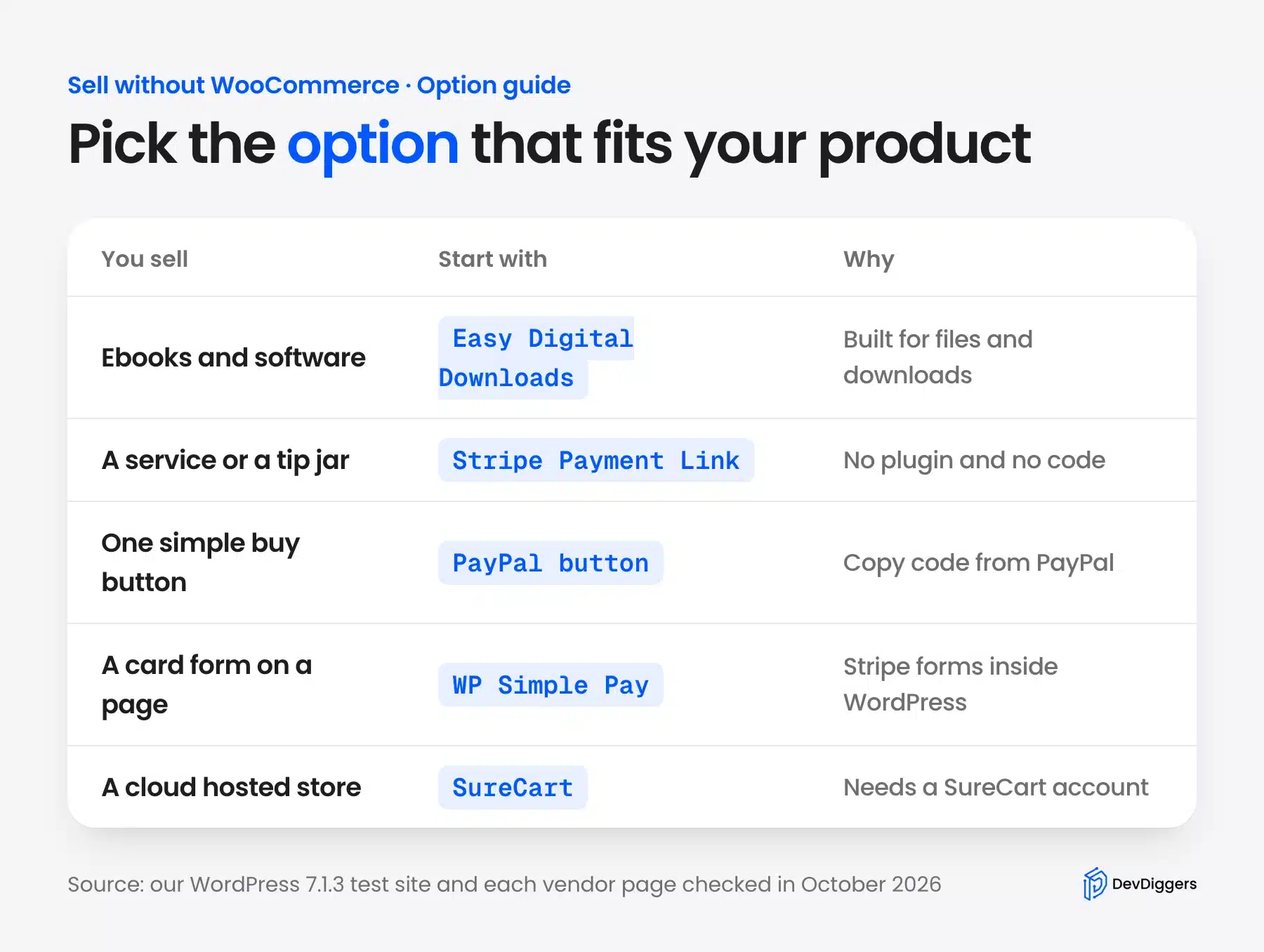
The infographic below sends each kind of product to the option we would try first. The sections after it explain each option and what it costs.
5 Ways to Sell on WordPress Without WooCommerce
You can sell on WordPress without WooCommerce in five ways. Easy Digital Downloads suits files, a Stripe payment link suits a service, and a PayPal button suits a simple buy button. WP Simple Pay adds a Stripe form to a page, and SureCart runs a cloud hosted store.
1. Easy Digital Downloads
Easy Digital Downloads is a WordPress eCommerce plugin built for digital products such as ebooks, software and music. Its WordPress.org listing says the free plugin includes Stripe and PayPal, a checkout form and protected file downloads.
Subscriptions, software licensing and content restriction are marked as paid extras on that page. EDD’s Stripe guide says the free version adds a 3% fee on Stripe payments. An Extended or higher pass removes the fee while the license stays active.
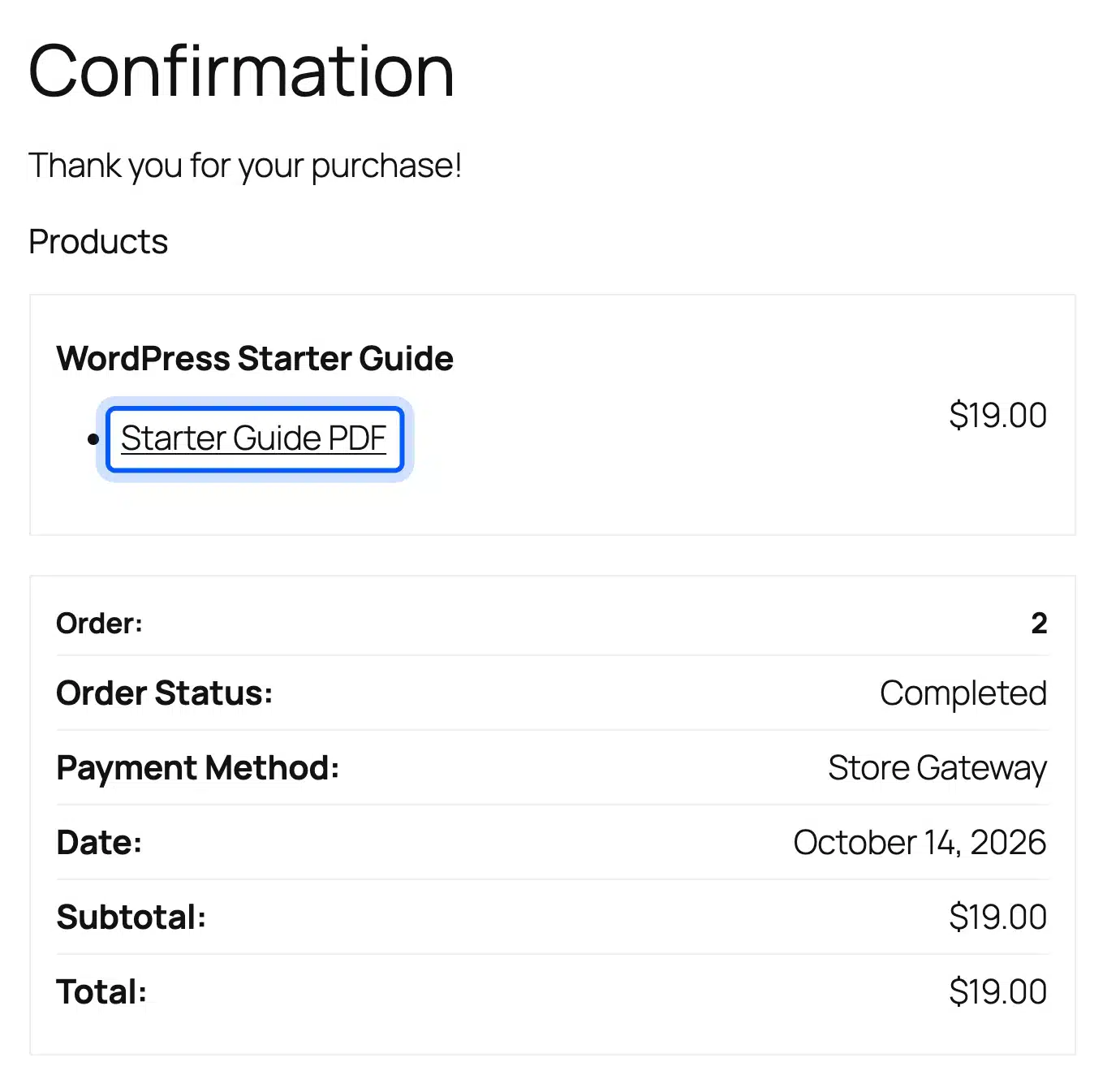
We installed version 3.7.2 and ran a test order from a download page through checkout to a confirmation page with a download link. Our guide on selling ebooks online covers the product side. The plugin is not built for shipping physical goods.
2. Stripe Payment Links
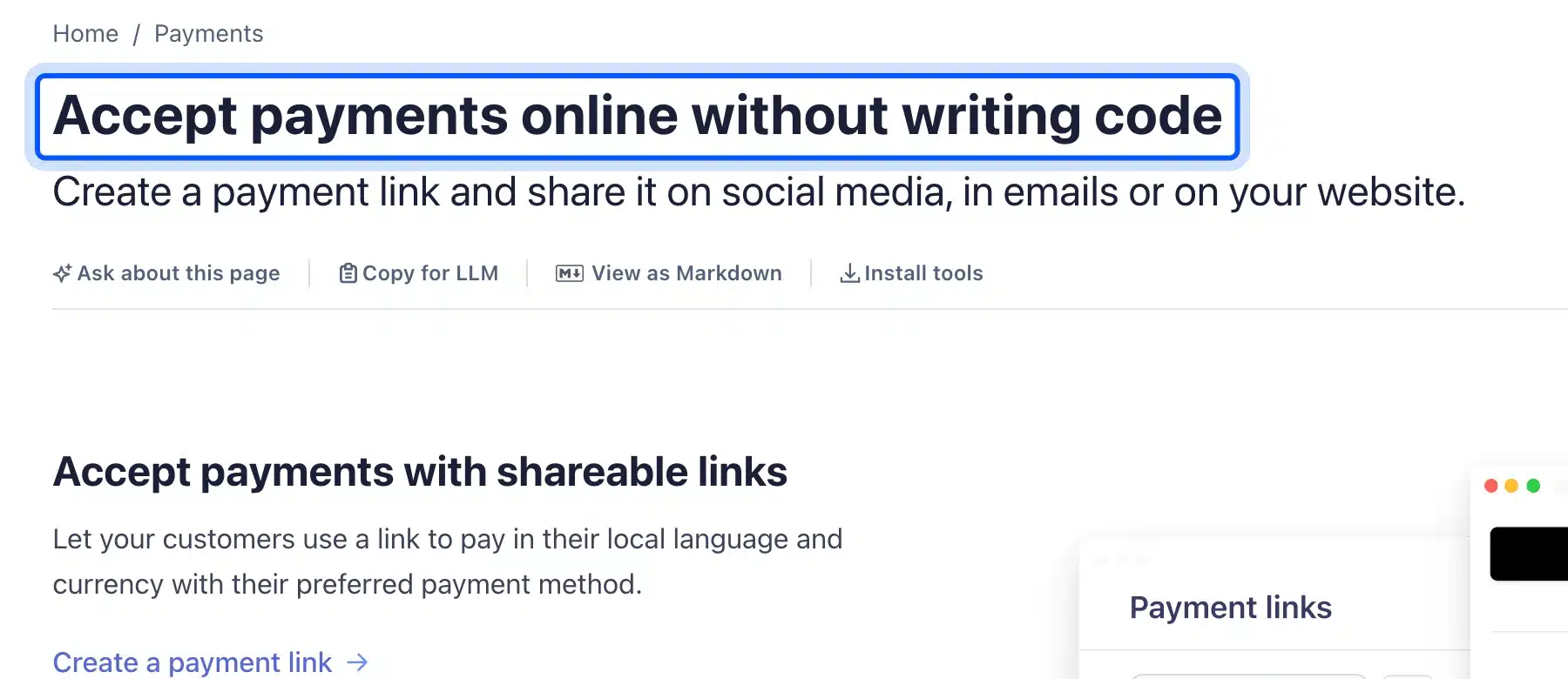
A Stripe payment link is a page hosted by Stripe that you share by link, QR code or a buy button on your site. Stripe’s documentation calls it payments without writing code, and it covers one-time sales, subscriptions and donations.
You need a Stripe account and no WordPress plugin. The checkout page is Stripe’s, and customization is limited to 20 preset fonts, three border radius options, a logo and colors. Customers can also edit quantities or choose what to pay on a link.
We did not create a Stripe account for this test and did not run a live link. This option fits a service, a one-off product or a tip jar.
3. PayPal Payment Links and Buttons
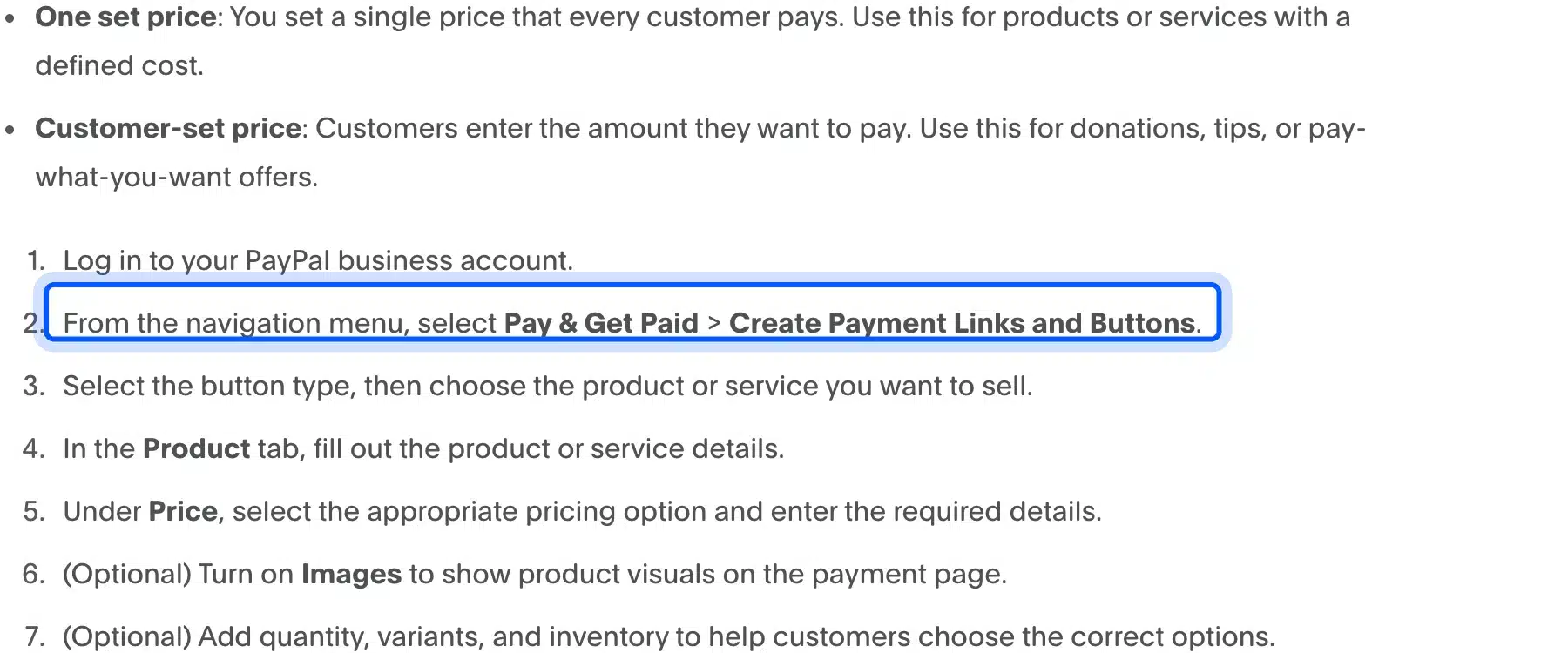
PayPal’s current tool for this is Payment Links and Buttons, and you need a PayPal business account to use it. The PayPal Developer guide says to choose Pay & Get Paid > Create Payment Links and Buttons, pick the button type and then the product.
PayPal gives you code to paste into a page, and a sandbox account is optional for testing. In the block editor you can paste that code into a Custom HTML block. PayPal lists US standard rates of 3.49% plus 49 cents for PayPal Checkout as of 1 October 2026.
We did not sign in to a PayPal account and did not test a button. It suits one product with no cart.
4. WP Simple Pay
WP Simple Pay is a Stripe payments plugin that puts payment forms on your pages without an eCommerce platform. Its WordPress.org listing says Lite connects to Stripe only, and it adds a 3% fee per transaction on top of Stripe’s fees.
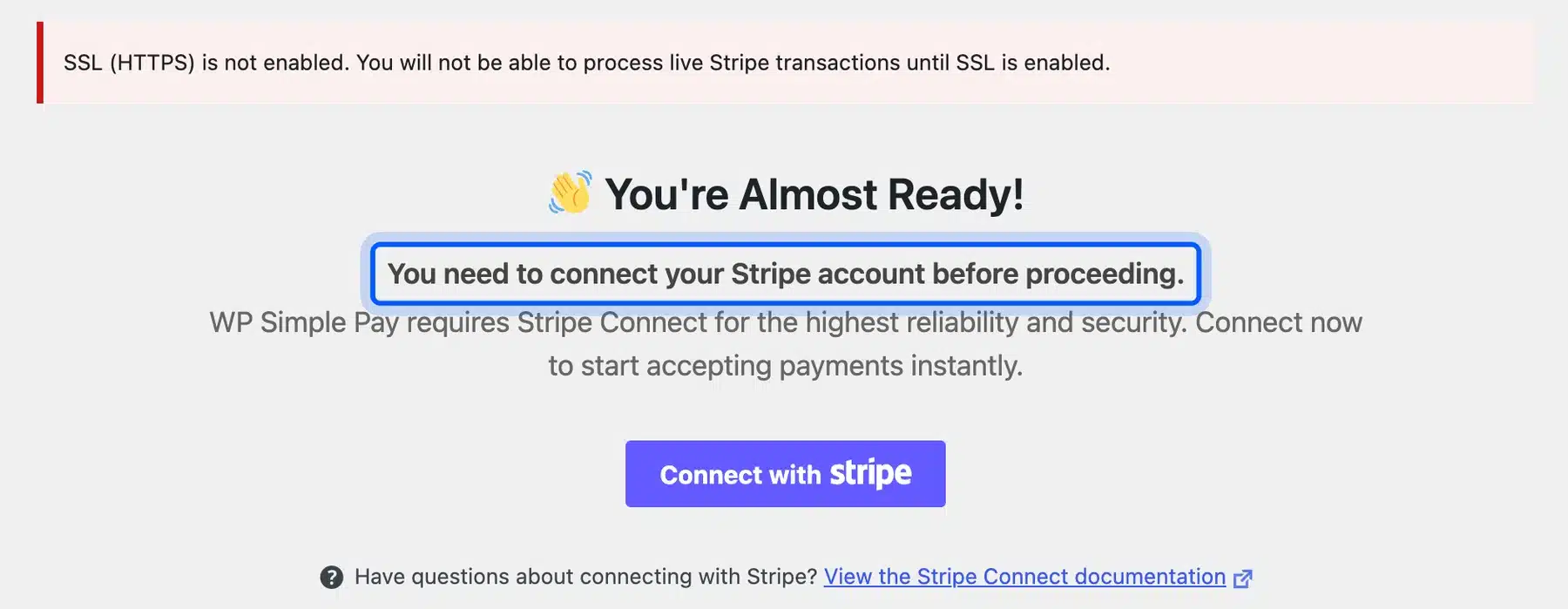
The listing says subscriptions are now free in Lite. The form builder, custom fields and tax rate management need Pro. On our test site the plugin stopped at a screen that says you must connect a Stripe account before you proceed.
It also showed a warning that live Stripe payments need HTTPS. We did not connect Stripe and did not build a form.
5. SureCart
SureCart is a WordPress plugin tied to a cloud platform that handles checkout, payments and subscriptions. The WordPress.org listing says you can sell digital downloads, subscriptions, physical products, services and donations.
It works with Stripe, PayPal, Mollie, Razorpay and Paystack. The free plan charges a 2.9% transaction fee on top of the processor’s fees, and paid plans have no SureCart fee. The plugin needs a SureCart account to work.
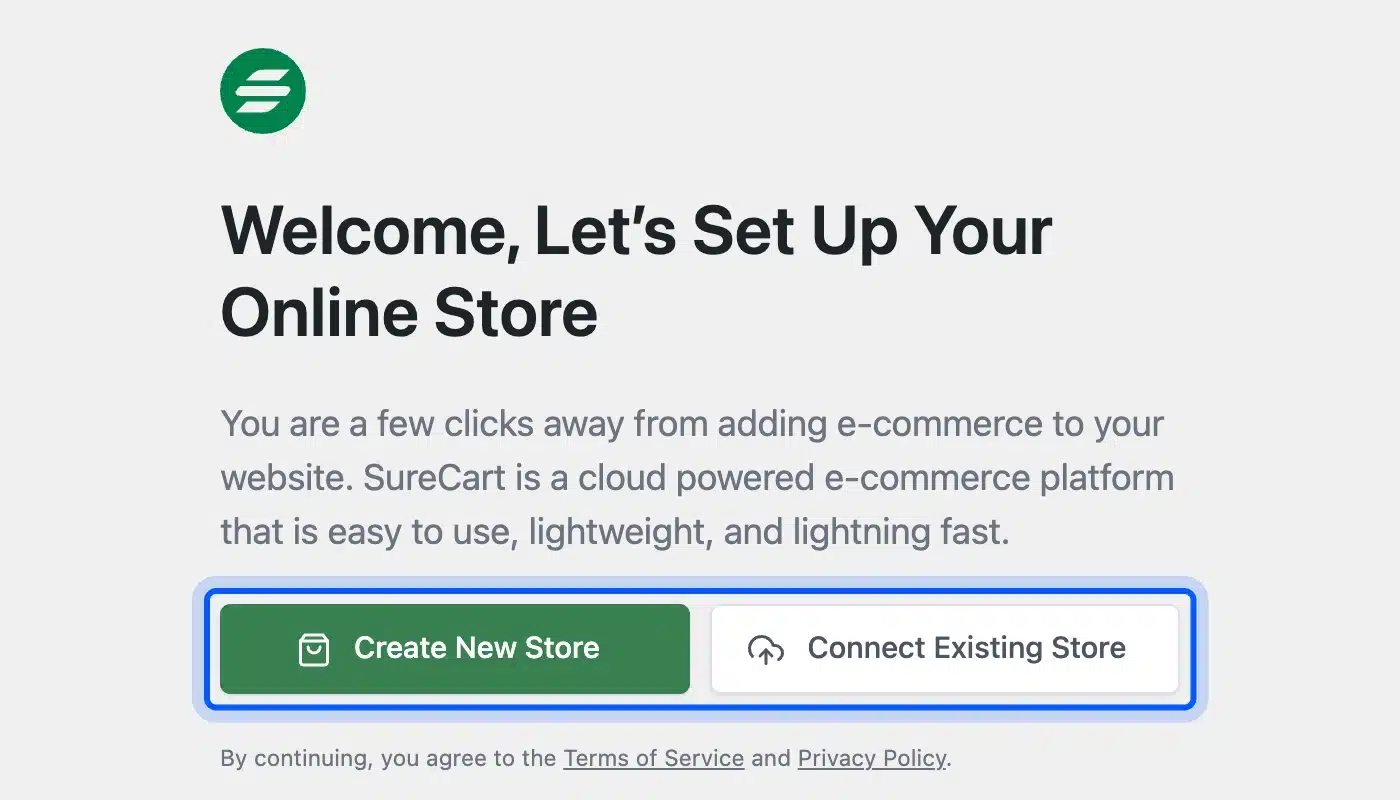
Our test site showed a welcome screen with Create New Store and Connect Existing Store. We did not create an account and did not test the checkout.
How to Set Up Easy Digital Downloads
To set up Easy Digital Downloads, install the plugin, turn on test mode and add a download with a price and a file. Then run a test order and check the order before you connect a real payment account. The six steps below follow the order we used on our test site.
Step 1: Install Easy Digital Downloads
Go to Plugins > Add Plugin, search for Easy Digital Downloads and install the plugin from the first result. WordPress.org lists it as tested up to WordPress 7.0.7, and our site ran 7.1.3. The test order worked without trouble.
The plugin creates its checkout and confirmation pages for you. It also adds a Downloads menu where products, orders and settings live.
Step 2: Turn On Test Mode and the Store Gateway
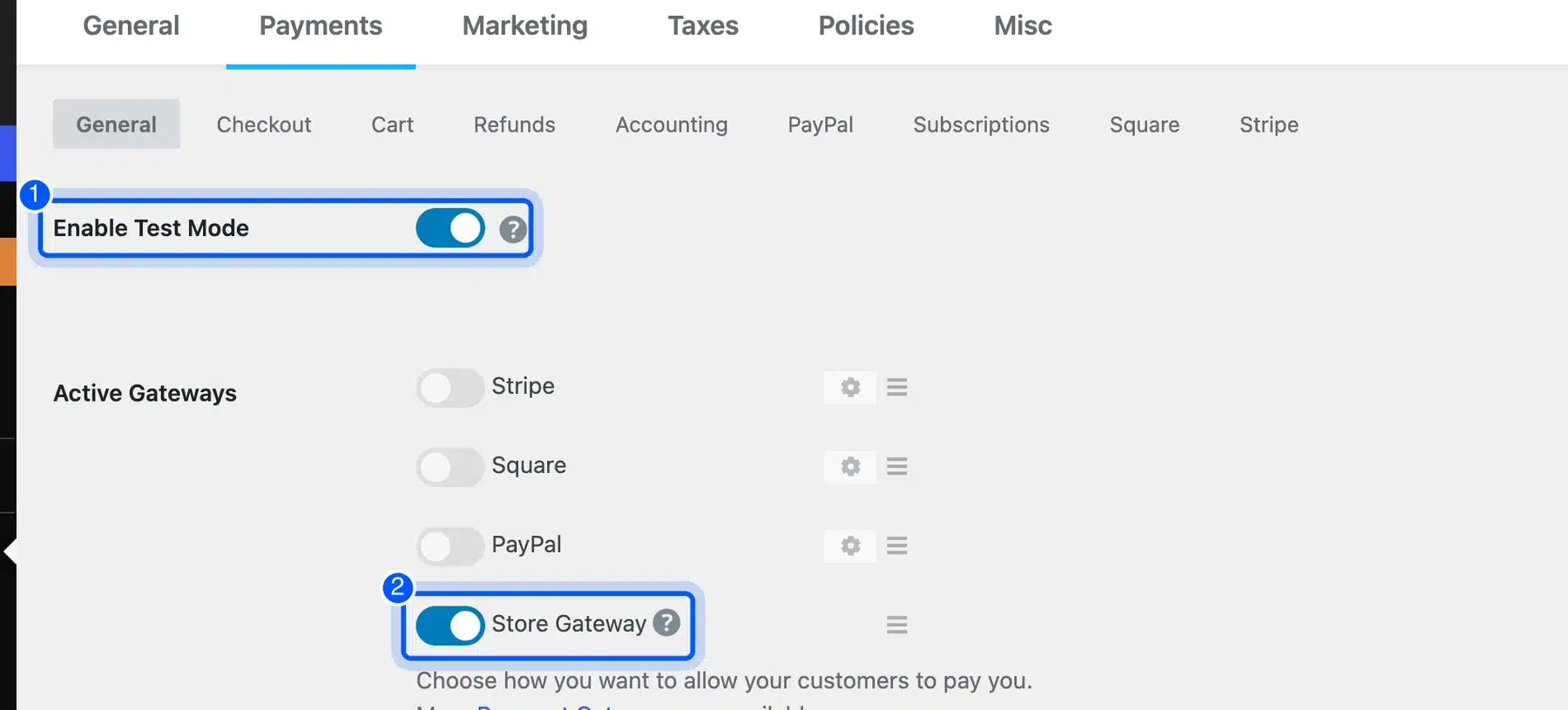
Open Downloads > Settings > Payments and switch on Enable Test Mode. Then switch on Store Gateway under Active Gateways.
The store gateway lets you place a fake order with no payment account. That lets you check the whole flow first.
EDD’s Stripe guide says Stripe test payments need test mode and a connected Stripe account. For real sales you would turn on Stripe or PayPal here instead.
Step 3: Add a Download and Set the Price
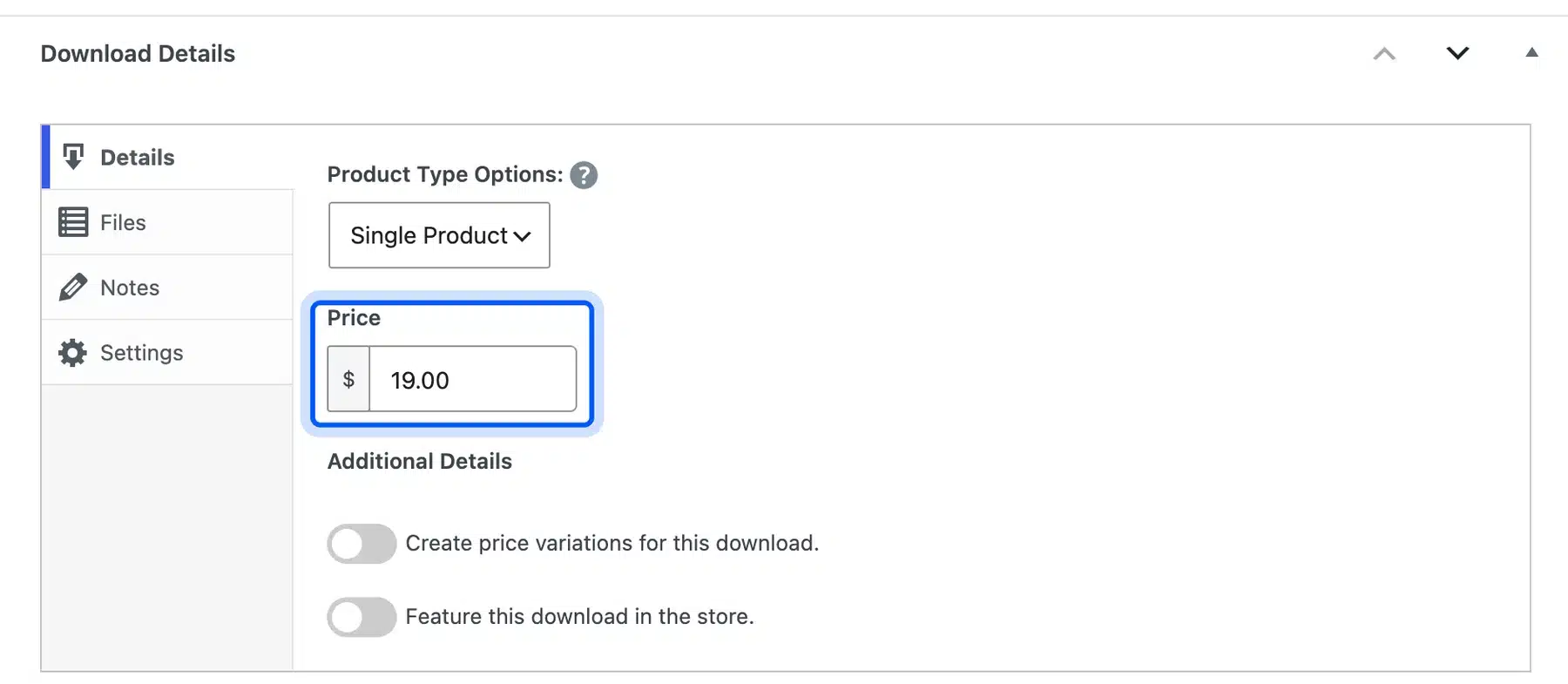
Go to Downloads > Add Download, type a title and a short description and open the Details tab in the Download Details box. Enter the price in the Price field. Our test product was a one-page PDF guide at $19.
Price variations and a featured flag sit just below. Leave them off for a first product.
Step 4: Attach the File Buyers Receive
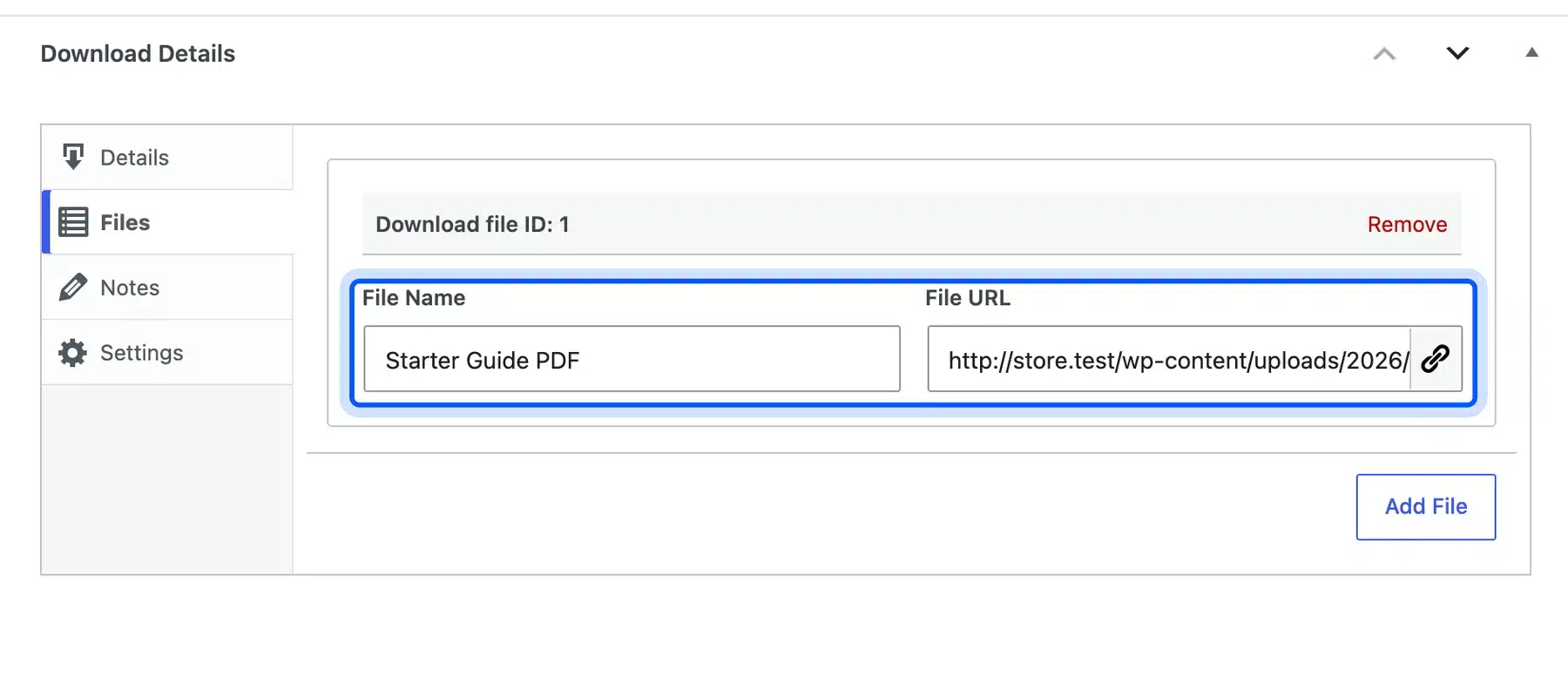
Open the Files tab in the same box. Type a file name and paste the file URL.
Our test file was a PDF from the Media Library. Buyers get this file after they pay.
The EDD listing says downloads are protected with unique links, expiration times and download limits.
Step 5: Run a Test Purchase
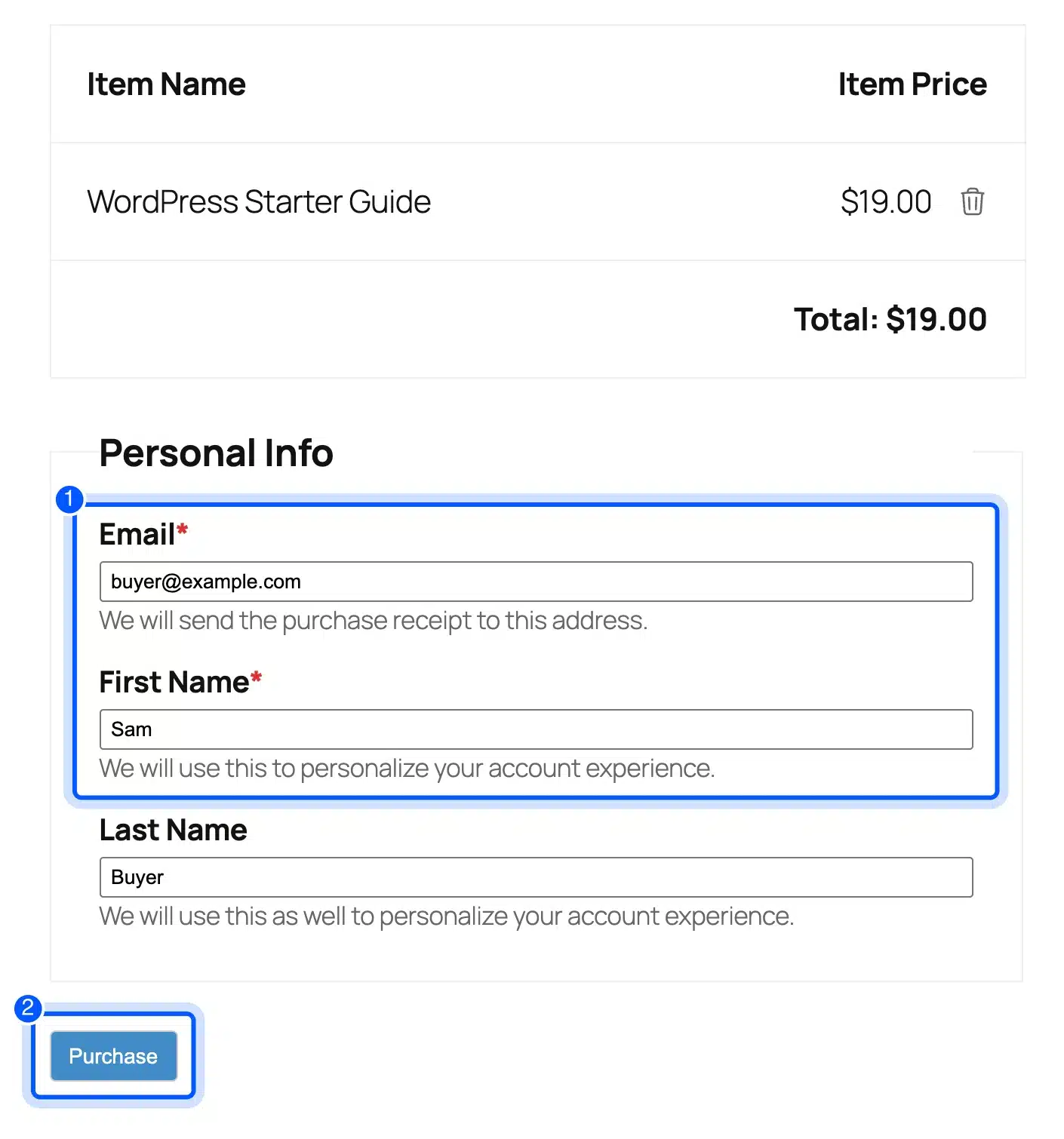
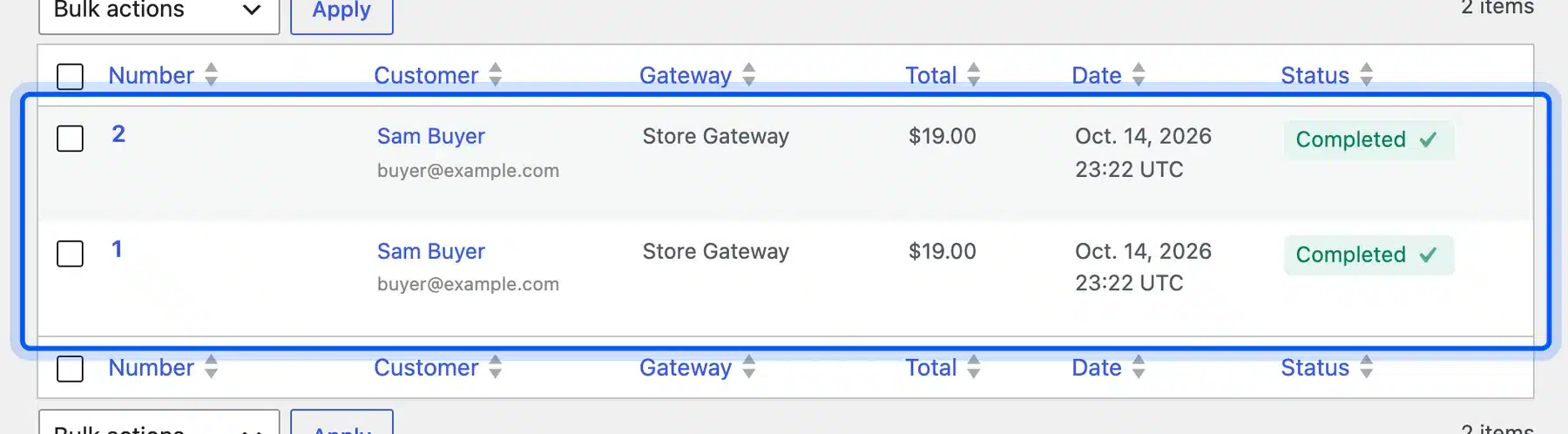
Open the download page, click the Purchase button and go to the checkout page. Enter an email address and a first name and click Purchase. EDD sent our test order to a confirmation page that listed the order, its status and the download link.
The order showed as Completed with Store Gateway as the payment method.
Step 6: Check the Order Before You Go Live
Open Downloads > Orders and confirm the test order is listed as Completed. Then turn test mode off, switch on Stripe or PayPal and run one small real purchase of your own.
We ran two test orders at $19 each, and both showed as Completed. We did not connect Stripe or PayPal and did not test a live payment.
When WooCommerce Is Still the Better Choice
WooCommerce is the better choice when you ship physical products, need tax and shipping tools or expect many variations. A lighter option works for a few digital products or one service. Past that point, you end up rebuilding what WooCommerce already includes.
The WooCommerce listing names built-in shipping tools and carrier connections. It also says subscriptions, bookings and memberships come through extensions. That is why a store with variations, shipping zones and subscriptions usually belongs on WooCommerce.
We build WooCommerce plugins; weigh our view with that in mind. Choose WooCommerce for a store that will grow. Choose a lighter option when you sell one thing.
Our post on WooCommerce alternatives and the one on WordPress as an eCommerce platform go further.
A lighter option can still be the right start. Many sites begin with one payment link and move to a store once the catalog grows.
The cost of moving later is mostly your time. You rebuild product pages and move customers by hand. Choose WooCommerce early if you already expect shipping or variations.
If you pick WooCommerce and need custom features, our WooCommerce development services cover that work.
What Each Option Costs
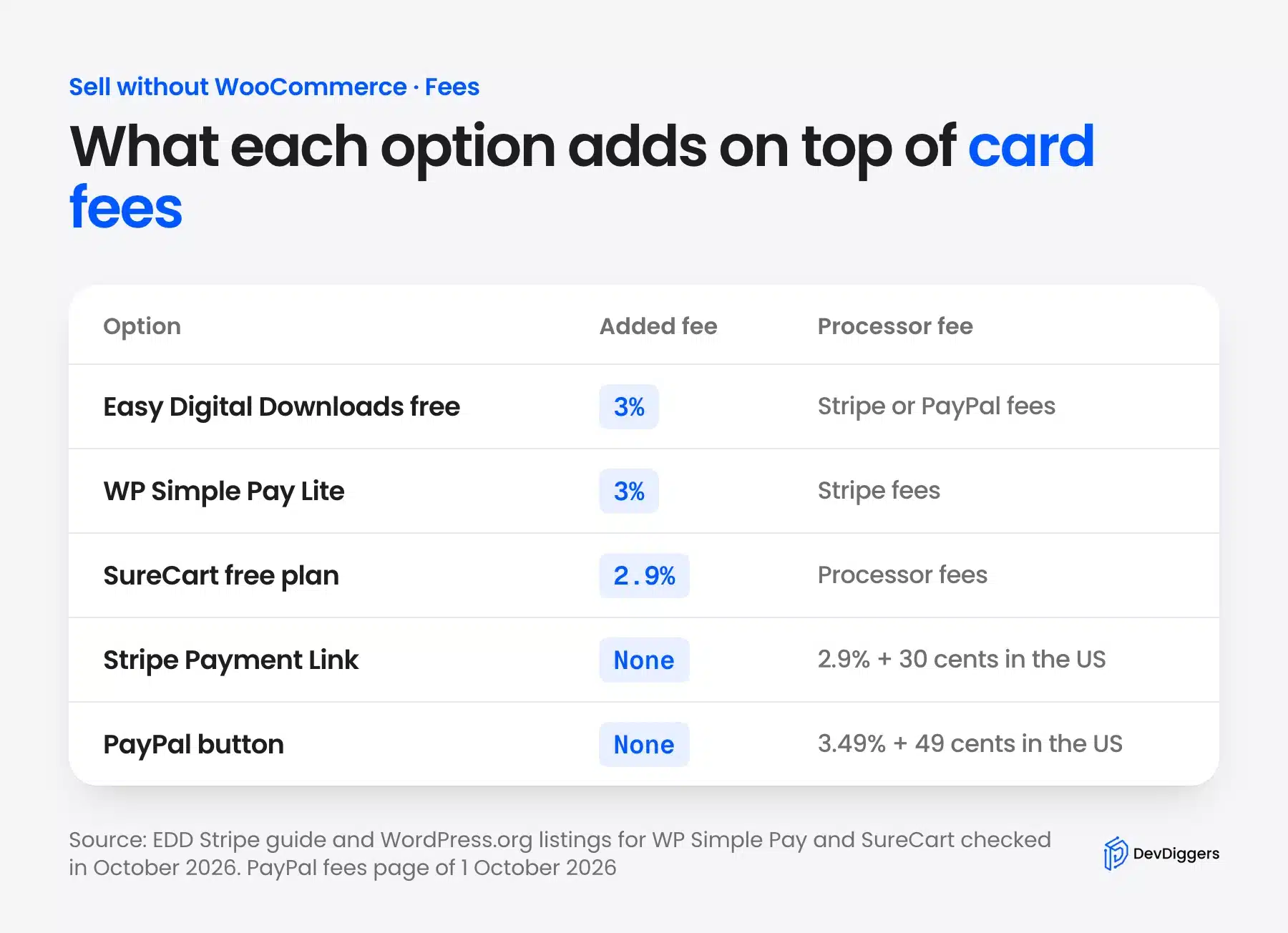
Every option charges card processing fees, and some add a fee of their own. Stripe lists 2.9% plus 30 cents for US domestic cards, and PayPal Checkout is 3.49% plus 49 cents. Easy Digital Downloads Lite, WP Simple Pay Lite and the SureCart free plan add a fee on top.
| Option | Added platform fee | Plan price notes |
|---|---|---|
| Easy Digital Downloads | 3% on Lite for Stripe payments | Personal plan from $99.50 a year instead of the normal $199 on the pricing page |
| Stripe Payment Link | None from Stripe | Stripe card fees apply |
| PayPal button | None | PayPal Checkout fees apply |
| WP Simple Pay | 3% on Lite plus Stripe fees | Pro removes the 3% fee |
| SureCart | 2.9% on the free plan | Paid plans have no SureCart fee |
The EDD pricing page lists the Personal plan at $99.50 a year for one site as an introductory price. We read these figures in October 2026, and prices change.
Here is a worked example with round numbers. Say you sell a $19 guide ten times. Stripe charges 2.9% of $19, which is 55 cents, plus 30 cents.
That is about 85 cents a sale. EDD Lite adds 3% of $19, which is 57 cents.
The total is about $1.42 a sale and $14.21 for ten sales, or 7.5% of revenue. The platform fee adds about two thirds on top of Stripe’s own fee. A paid pass or a payment link can pay for itself.
Can You Sell on WordPress Without Any Plugin?
Yes. A Stripe payment link or a PayPal button needs no WordPress plugin, because the payment page sits on Stripe or PayPal. You copy the link or code and paste it into a Button block or a Custom HTML block.
There is no cart, no order list inside WordPress and no file delivery. You manage orders in the Stripe or PayPal dashboard instead. That is fine for one product or a service, and it gets awkward past a handful of products.
Stripe’s documentation says a link can be reused with many customers or limited to a set number of purchases. A link works well for a service with one price. It works poorly for a catalog, because every product needs its own link and its own button.
Start with a link if you want to test demand. You can move to Easy Digital Downloads later when you have several products to manage.
Conclusion
You can sell on WordPress without WooCommerce, and the best route depends on the product. Use Easy Digital Downloads for files and a Stripe or PayPal link for a service or one product.
Pick WP Simple Pay or SureCart if you want a form or a cloud store.
Check the fees before you commit, because a 3% platform fee changes the math on small sales. If you ship physical goods, WooCommerce is still the safer base.
Frequently Asked Questions (FAQs)
Q1. How do I add a payment gateway without WooCommerce?
Use a plugin that has its own gateways, such as Easy Digital Downloads. Open Downloads > Settings > Payments and switch on Stripe or PayPal under Active Gateways. A payment link needs no gateway on your site at all.
Q2. Can I sell services on WordPress without WooCommerce?
Yes. A Stripe payment link works for a service and can be reused with many customers. You can also add a quantity or let customers choose what to pay.
Q3. Can I sell physical products without WooCommerce?
You can with SureCart, which lists physical products on its WordPress.org page. Easy Digital Downloads is built for digital goods. For shipping zones and many variations, WooCommerce is the stronger fit.
Q4. Do I need HTTPS to take payments?
For live payments through a plugin, yes. WP Simple Pay showed a warning on our test site that live Stripe transactions are not possible until SSL is enabled. A Stripe payment link opens on Stripe’s own page.
Q5. Can I use WooCommerce without WordPress?
No. The WooCommerce listing describes it as an eCommerce platform for WordPress. It runs inside a WordPress site.
Q6. Which option is the cheapest?
A Stripe payment link or a PayPal button adds no platform fee. You only pay card fees. Easy Digital Downloads Lite and WP Simple Pay Lite each add 3%, and the SureCart free plan adds 2.9%.