Have you ever purchased something on an online store only to be greeted with “Add 3 years of extended warranty for only $5” at checkout? Or even after you just bought the item, you get the option “Upgrade to Pro for an additional $20”?
It’s not just a coincidence; those are order bumps and upsells, and collectively they make eCommerce and SaaS businesses billions of dollars in extra revenue.
The issue, however, is that although those terms are somewhat similar, most business owners confuse them. Some introduce an order bump when it should have been an upsell, while others use neither and ultimately leave money on the table.
In today’s competitive environment, failing to recognize the distinction between Order Bump and Upsell can lead to slower growth, struggles in conversion rates, and lost profits.
The good news is that the two techniques are not difficult to understand. In this article, we will discuss what an order bump is, what an upsell is, and their key differences. We’ll also dive into exactly when you should use order bump vs upsell so you can raise your average order value (AOV) without alienating customers.
What is an Order Bump?
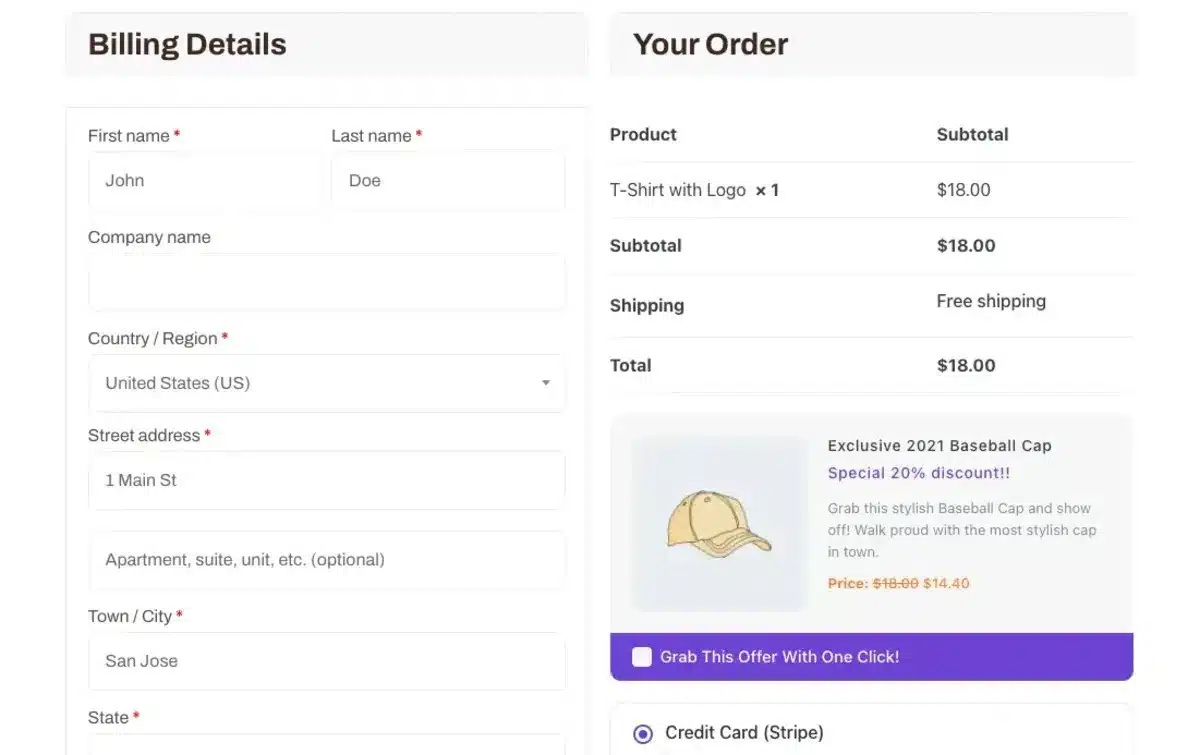
An order bump is a small upgrade offer placed right on the checkout page, just before a customer clicks on “Pay Now”. It is essentially a one-click add-on that allows buyers to upgrade or add to their purchase without having to redo their information or divert from the checkout process.
You can think of it as the closest online version possible of grabbing a candy bar impulse buy at the grocery store checkout. You didn’t plan on buying the candy bar, but it is convenient, affordable, and closely related to what you are already purchasing, so you toss it in your cart!
Examples of Order Bumps in Action
- eCommerce stores: “Would you like to buy gift wrapping for $3?” during checkout.
- Digital products: Purchase an eBook? Get “The Exclusive Workbook for just $5.
- Software/SaaS: Easy to offer priority support at checkout, “Would you like monthly priority support for $7/month?”
- Online courses: Buy a $99 course and then offer an order bump: “Get all the printable templates for just $9.”
Why Order Bumps Work So Well?
- Convenience → Customer remains in checkout process
- Low-risk/decision → Add-on generally is a small fraction of the main purchase price
- Impulse trigger → Simple checkbox, fast, and just about mindless.
- AOV Booster → The average order value will increase by 10-30% in spite of the bump being small and trivial.
In the larger paradigm of Order Bump vs Upsell, order bumps focus on small, frictionless wins. They don’t try to change the mind of the customer or change the product—they merely add to the purchase in a way that feels helpful and organic.
What is an Upsell?
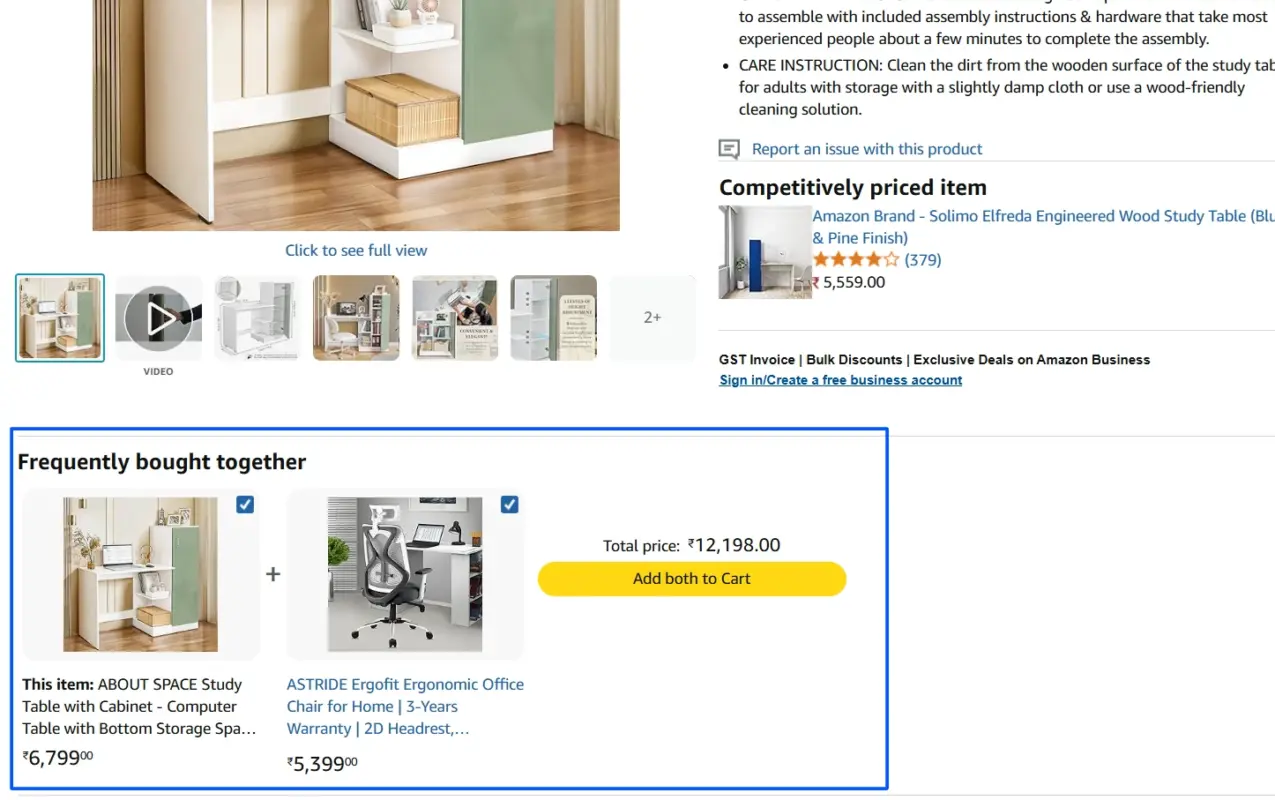
An upsell is an opportunity to entice your customers into buying a premium/amp version of the product they have already chosen to purchase. Rather than adding a small upsell, like an order bump, the goal of an upsell is to help the customer move into the highest tier or one that features more functionality, ultimately increasing both customer satisfaction and revenue.
You’ve likely experienced upsells many times. For example:
- Fast-food restaurants: “Would you like to make that a large combo for only $2 more?”
- Online courses: After you purchase a course for $99, you may be offered the VIP package that includes coaching calls for $199.
- Software tools: You are offered an upgrade after you purchased a basic subscription for $29/month by being prompted with “You can unlock unlimited access to our Pro Plan for $59/month.”
- Travel booking: When you select a flight, and see the options to upgrade to Business Class for $150 more.
Why Do Upsells Work?
- Value perception → Customers oftentimes see a case for a better long-term investment.
- Timing → Upsells are presented immediately after the buying decision, while the “yes” is still in play.
- Problem-solving → The upsell is usually solving a limitation or providing premium benefits.
- Revenue generation → Order bumps may give you an increase of 10 -30 % in AOV; a well-executed upsell can double or triple the value of the transaction!
Upselling vs Cross-selling (Tip)
Upselling and cross-selling are often confused. A cross-sell is offering a related product (e.g., “Customers who bought this laptop also buy a mouse”), whereas an upsell is selling the customer a better version of the product they wanted to buy (e.g., “iPhone 12 Pro Max instead of an iPhone 12”).
In terms of Order Bump vs Upsell, please consider upsells as the “big jump” relative to the low-friction bump. Both are critical, but upsells are always going to have a bigger impact on long-term revenue.
Order Bump vs Upsell: Differences
While you might consider order bumps and upsells to be fraternal twins because they both fundamentally exist to increase your revenue by getting your customers to spend more, they are actually quite different in terms of timing, psychology, purpose, and implementation.
Recognizing these differences will help you be effective with each item without overwhelming your customers.
1. Timing of the Offer
- Order Bump: The offer comes before payment and is typically found on the checkout page. The intention is to catch the impulse “Yes” just before the customer completes their order.
- Upsell: The offer comes after the customer has committed to purchase. An upsell offer often follows payment or is on the Confirmation Page.
You can think of an Order Bump as the last opportunity at checkout, and an Upsell as the next opportunity after they have made the purchase.
2. Type of Offer
- Order Bump: Typically, a small add-on at a low price that will complement the main purchase, with the customer feeling that it would be a no-brainer to include this additional purchase. Example: “Add lifetime updates for $7.”
- Upsell: As the definition describes, an upsell is the next opportunity to improve their purchase decision and provides a higher value offer or a premium version of the item that the customer has selected. Example: “Upgrade to Pro and unlock everything for a total of $50.”
3. Customer Psychology
- Order Bump: A typical impulse purchase. Customers typically do not think much before clicking to accept the offer since the pricing is so low and the offer is present on the order page.
- Upsell: Can be an eve of value justification. The consumer now must weigh the costs and benefits to them of the upsell. Because of this, you must use your copy to describe value, outcomes, and savings over the long run.
4. Effort Required from Customer
- Order Bump: Takes 1-click (i.e., checking a box), little effort, no distractions, extra steps.
- Upsell: Takes more attention from the customer, and the customer may have to spend more time reading the details, comparative features, etc. More likely than not, it will require some other page or pop-up.
5. Effectiveness on Revenue
- Order Bump: Creates incremental increases, and it is typical for a business to see an average of a 10-30% lift in average order value (AOV).
- Upsell: This can create big leaps of revenue potential. One upsell can double or triple the value of a singular sale.
6. Examples in Action
| Scenario | Order Bump | Upsell |
|---|---|---|
| eCommerce | “Add gift wrapping for $3.” | “Upgrade your purchase to the Deluxe Bundle for $49.” |
| SaaS/Software | “Add priority support for $9/month.” | “Upgrade to the Pro Plan with advanced features for $59/month.” |
| Online Courses | “Add a PDF workbook for $7.” | “Upgrade to VIP package with coaching for $299.” |
| Food & Beverage | “Add fries for $2.” | “Upgrade to a combo meal for $5 more.” |
7. Risk of Overuse
- Order Bump: It is quite safe to use lots of Order Bumps, as long as they are relevant and not expensive. Many bumps can start to feel cluttered on the checkout page.
- Upsell: Upsells must be used conservatively. Too many upsell suggestions, occasionally referred to as an “upsell funnel”, can confuse or overwhelm customers and can lead to cart abandonment.
Quick Way to Remember the Difference
- Order Bump – Kind of like a candy bar at the end of checkout, small, quick, and easy.
- Upsell – More like immediately being offered a VIP membership after you have already purchased your ticket, more valuable, much larger, and may require thinking.
Order Bump vs Upsell: Why are Both Important?
This is not an Order Bump vs Upsell conversation. The smartest businesses use both strategically. Order bumps produce those small, steady incremental improvements, while upsells provide significantly larger growth. Combining both can help maximize the lifetime value of each customer, without increasing ad spend or traffic.
Example:
- A course creator could add a template order bump for $9 at checkout, and then upsell a VIP coaching membership for $199 after purchase.
- A SaaS tool might offer a priority support order bump for $7 and then upsell users into a Pro Plan with advanced features.
When you put both together, you create the perfect flow so customers don’t mind—and your revenue graph will thank you.
Final Thoughts
So, when we talk about Order Bump vs Upsell, the main takeaway is not to choose one or the other. It’s figuring out how to leverage both strategically.
An order bump allows you to have easier wins by creating higher revenue opportunities by nudging a shopper to add something smaller at checkout to their cart. An upsell provides larger leaps of additional revenue by taking shoppers to another buying opportunity.
If you only use one or the other, they will certainly help increase your average order value (AOV). When used hand-in-hand, they are great ways to jam-pack profit out without spending more money on ads or traffic.
Picture offering the shoppers a $9.00 add-on at checkout (order bump) and then also showing a $99 upgrade option (upsell). You just proved the value of that undertaking, with just one customer, to increase their transaction value while they were buying something.
The best part is to try them both out, measure the results, and keep refining over time. Keep your order bumps relevant and inexpensive, and upsells that create a better customer buying experience. We want to do more than simply extract extra buying dollars. Create more value for their purchase while we organically make more revenue.
FAQs About Order Bump vs Upsell
Q1. What is the main difference between an order bump and an upsell?
An order bump is a small add-on at checkout, while an upsell is a higher-value upgrade offered after purchase.
Q2. Can I use both order bumps and upsells together?
Yes, using both is the best way to increase average order value without disrupting the customer journey.
Q3. Which converts better: order bumps or upsells?
Order bumps usually have higher conversion rates, while upsells generate more revenue per sale.
Q4. Do upsells ruin my conversions?
Yes, too many upsells confuse customers and increase the likelihood of cart abandonment.
Q5. Can upsells work for digital products?
Absolutely, digital products like courses, software, and eBooks often benefit most from upsells.