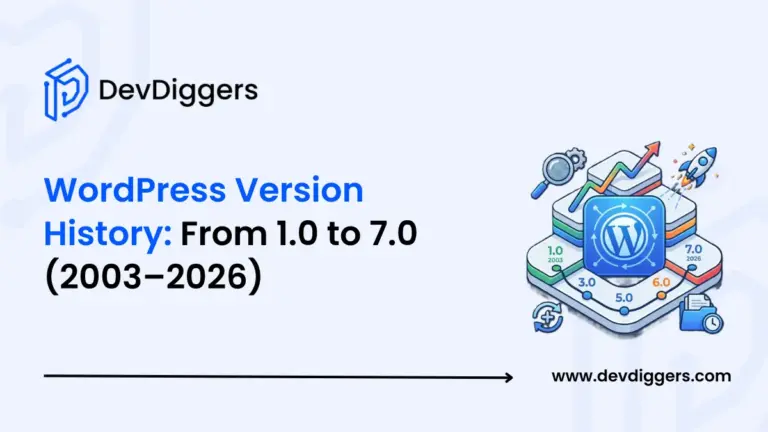
The WordPress version history runs from a small blogging tool launched in May 2003 all the way to WordPress 7.0, arriving on April 9, 2026. Having built 25+ WooCommerce plugins, we’ve watched this evolution up close, and each major release has changed what’s possible for store owners, developers, and everyday site builders alike.
Most people treat a WordPress update notification as an annoying red badge in their dashboard. Here’s why that’s the wrong way to think about it, and what the 23-year arc of WordPress releases actually tells you about where the platform is headed.
In this guide, you’ll get the complete WordPress release timeline organised by era, a plain-English explanation of how versioning works, and a practical checklist for updating safely, especially if you’re running a WooCommerce store.
Where WordPress Started: The Story Before Version 1.0
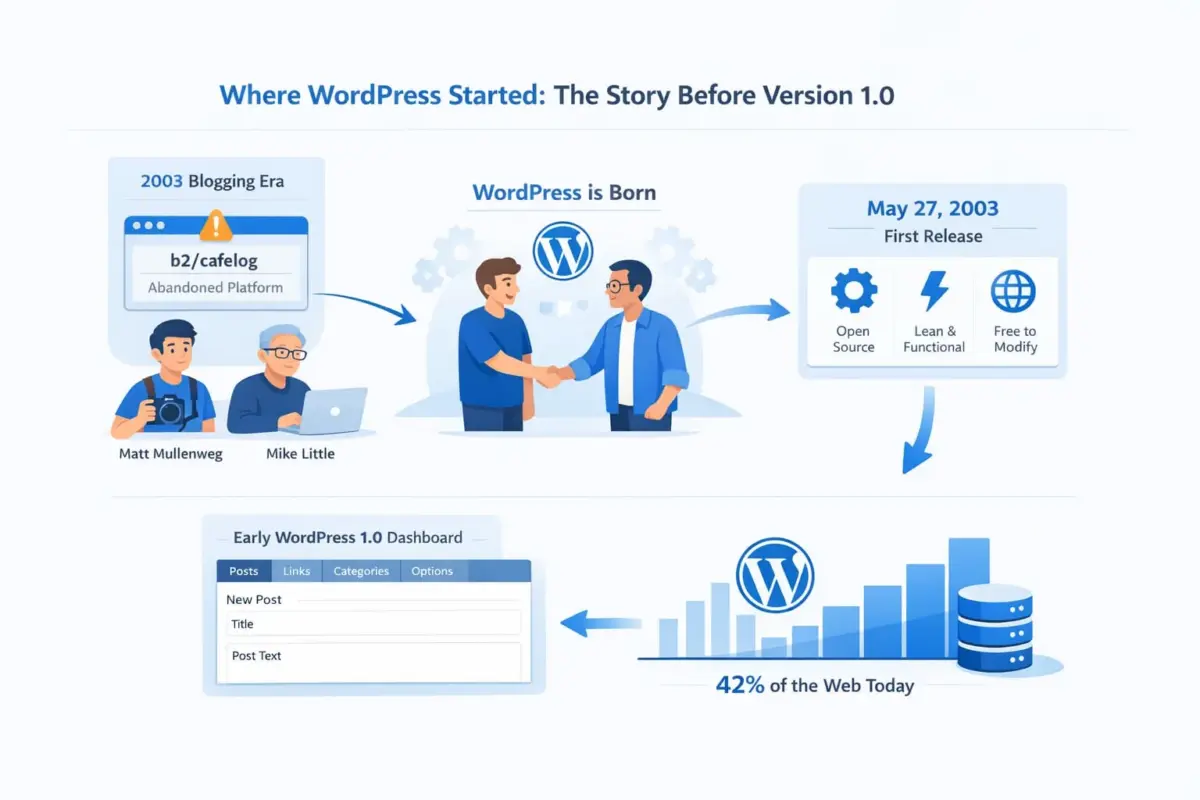
In early 2003, blogging was gaining momentum fast, but the best tool available, a platform called b2/cafelog, had effectively been abandoned by its developers. Matt Mullenweg, then a 19-year-old photography enthusiast and blogger, posted publicly that he intended to fork the codebase and improve it. Mike Little responded the same day. Together, they built what became WordPress.
The first public release came on May 27, 2003. It was lean, it was functional, and it was open-source from day one. That last detail mattered more than almost anything else.
It meant anyone could inspect the code, contribute improvements, and adapt it freely. That open foundation is the reason WordPress grew into what it is today, which is the CMS powering 42.2% of all websites on the internet.
If you want a deeper look at how WordPress compares to every other CMS option, our post on why WordPress beats other CMS options covers that ground thoroughly.
WordPress Version History by Era
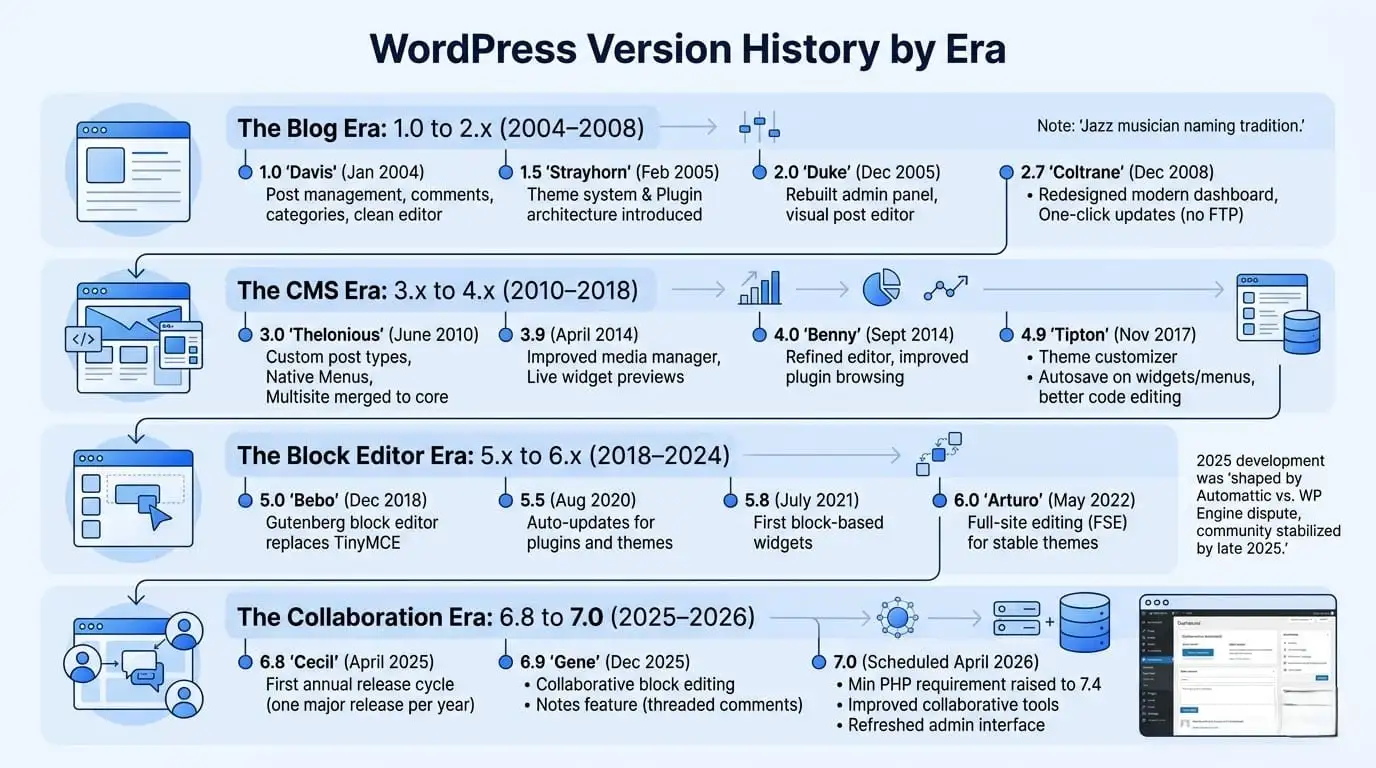
The best way to understand the WordPress release history isn’t to read a table of version numbers. It’s to see the platform in four distinct phases, each of which changed what WordPress fundamentally was.
The Blog Era: WordPress 1.0 to 2.x (2004–2008)
- WordPress 1.0, codenamed “Davis” after jazz musician Miles Davis, launched in January 2004. This was a proper blogging tool: post management, comments, categories, and a clean editor. Nothing more, nothing less.
- Version 1.5 (“Strayhorn,” February 2005) introduced the theme system. That was a turning point. Suddenly, anyone could change the entire visual design of a WordPress site without touching PHP. The plugin architecture followed in the same release, giving developers a way to extend functionality without modifying core files.
- By WordPress 2.0 (“Duke,” December 2005), the admin panel had been rebuilt. The visual post editor arrived. Rich text formatting no longer requires knowing HTML. For bloggers, this felt like a major leap.
- WordPress 2.2 (May 2007) brought widgets, and 2.7 (“Coltrane,” December 2008) delivered a completely redesigned dashboard that looked modern for its time. The one-click update system also landed in 2.7, which meant WordPress could update itself without FTP access. That single feature removed a huge barrier for non-technical users.
The jazz musician naming tradition, which gives every major WordPress release a name, started with 1.0 Davis and has continued ever since. You’ll see it running through every era.
The CMS Era: WordPress 3.x to 4.x (2010–2018)
- WordPress 3.0 (“Thelonious,” June 2010) is the version that changed everything about how people thought about the platform. Custom post types arrived, meaning WordPress could now store and display almost any type of structured content, not just blog posts. Menus became a native feature. And most significantly, WordPress MU, the multisite variant, was merged into core, allowing one installation to power hundreds of separate websites.
- WordPress 3.9 (April 2014) brought a dramatically improved media manager and live widget previews.
- WordPress 4.0 (“Benny,” September 2014) refined the editor and improved plugin browsing. None of the 4.x releases was as dramatic as 3.0, but they steadily improved speed, usability, and the plugin and theme ecosystems.
- By the time WordPress 4.9 (“Tipton,” November 2017) landed, the platform had a theme customizer, autosave on widgets and menus, and much better code editing in the Customizer. It was the last version before everything changed again.
The Block Editor Era: WordPress 5.x to 6.x (2018–2024)
- WordPress 5.0 (“Bebo,” December 2018) introduced the Gutenberg block editor, and it was controversial. The traditional TinyMCE editor had been the default for over a decade. Gutenberg replaced it with a drag-and-drop block system where every piece of content, headings, paragraphs, images, and buttons is its own block that you can move and configure individually. A lot of long-time WordPress users pushed back hard. The Classic Editor plugin, which restored the old editor, was downloaded over 5 million times within weeks. But looking back now, the block editor was the right call. It set the technical foundation for everything that came after.
- WordPress 5.5 (August 2020) added auto-updates for plugins and themes.
- WordPress 5.8 (July 2021) brought the first block-based widgets, extending the Gutenberg system beyond just posts and pages. And then the 6.x releases began to deliver on the original promise.
- WordPress 6.0 (“Arturo,” May 2022) introduced full-site editing for stable themes. FSE meant your entire site, header, footer, sidebar, and every template could be built and edited using blocks. WordPress 6.1 through 6.6 steadily matured the block editor, adding locked blocks, style variations, improved performance, and a faster admin experience.
- WordPress 6.7 (“Rollins,” November 2024) improved block theme support further and introduced better font management.
The Collaboration Era: WordPress 6.8 to 7.0 (2025–2026)
Here’s where things get interesting for anyone building on WordPress right now.
Note: The 2025 development period was also shaped by the public dispute between Automattic (the company behind WordPress.com) and WP Engine, one of the largest managed WordPress hosts. The conflict centred on trademark usage and financial contributions to the open-source project. It distracted contributors, led to some committer resignations, and affected the pace of development. The community largely stabilised by late 2025, but it’s an honest context for understanding why the 6.8 cycle felt more measured than previous years.
- WordPress 6.8 (“Cecil,” April 2025) was the first release under a new annual release schedule. The WordPress core team announced in late 2024 that they would move to one major release per year rather than the previous pattern of two or three releases annually. The reasoning: a longer development cycle allows for more thorough testing, better coordination with plugin developers, and fewer compatibility surprises.
- WordPress 6.9 (“Gene,” December 2025) landed with collaborative block editing at its core. Multiple users can now edit blocks within the same post simultaneously, a feature that agencies and editorial teams have been waiting for for years. The Notes feature also arrived, bringing threaded in-block commenting directly into the editor.
- WordPress 7.0 is scheduled for April 9, 2026. Based on the confirmed development track, it raises the minimum PHP requirement to PHP 7.4, improves the collaborative editing tools introduced in 6.9, and delivers a refreshed admin interface. For our full breakdown of what’s landing in the next major release, see our full breakdown of WordPress 7.0.
What “Major” vs “Minor” WordPress Versions Actually Mean
This trips up a lot of people. The WordPress version numbering system follows a three-number format: Major.Minor.Patch.
- A major version is the first two numbers, for example, 6.8 or 7.0. These are the named releases, the ones that introduce new features and potentially change how things work. They come once a year now, and they’re the updates that require a little more care before installing.
- A minor version (sometimes called a maintenance release) is the third number. WordPress 6.8.1 or 6.8.2 are minor versions of the 6.8 release. These fix bugs and address security vulnerabilities discovered after the major release. They don’t add new features. You should install minor version updates immediately because they often address known security issues.
- Security releases are a subset of minor versions released outside the normal schedule when a critical vulnerability is discovered. WordPress tries to push these automatically to all sites, but if your site has auto-updates disabled, you’ll need to apply them manually.
The practical takeaway: treat major version updates with care and a backup. Treat minor version updates and security updates as non-negotiable and install them quickly.
Why Running an Outdated WordPress Version Is a Real Problem
Let’s be direct about this. Running an outdated version of WordPress isn’t just a “best practice” issue. It’s a genuine security exposure.
WordPress publishes known vulnerabilities publicly after a patch is released. This means that once a fix is out, attackers can reverse-engineer exactly what the vulnerability was and target every site still running the old version. If you’re on WordPress 6.5 and the fix was released in 6.6, you’ve essentially handed attackers a roadmap to your site.
For WooCommerce store owners, the risks go beyond security. Major version updates sometimes change hooks, filters, and database structures that WooCommerce and other plugins depend on. Running an old WordPress version can also mean your plugins have stopped receiving their own updates because their developers have moved on to supporting the current core. That creates compounding compatibility debt that gets harder and harder to unwind.
Having built 25+ WooCommerce plugins, we’ve seen this scenario play out more than once: a store owner skips updates for 18 months, then tries to update everything at once, and the checkout breaks. The fix exists, but it requires untangling dependencies across three or four plugins simultaneously. Getting proper support in that situation often means bringing in professionals. Our WooCommerce development services handle exactly these kinds of compatibility and update recovery situations.
The performance angle matters too. Each WordPress major version brings measurable speed improvements. The 6.x cycle alone introduced autoloaded options cleanup, improved query performance, and better block rendering speed. A site on WordPress 5.x is leaving genuine load time improvements on the table. For a WooCommerce store, page speed directly affects conversion rate.
How to Update WordPress Safely (Especially for WooCommerce Stores)
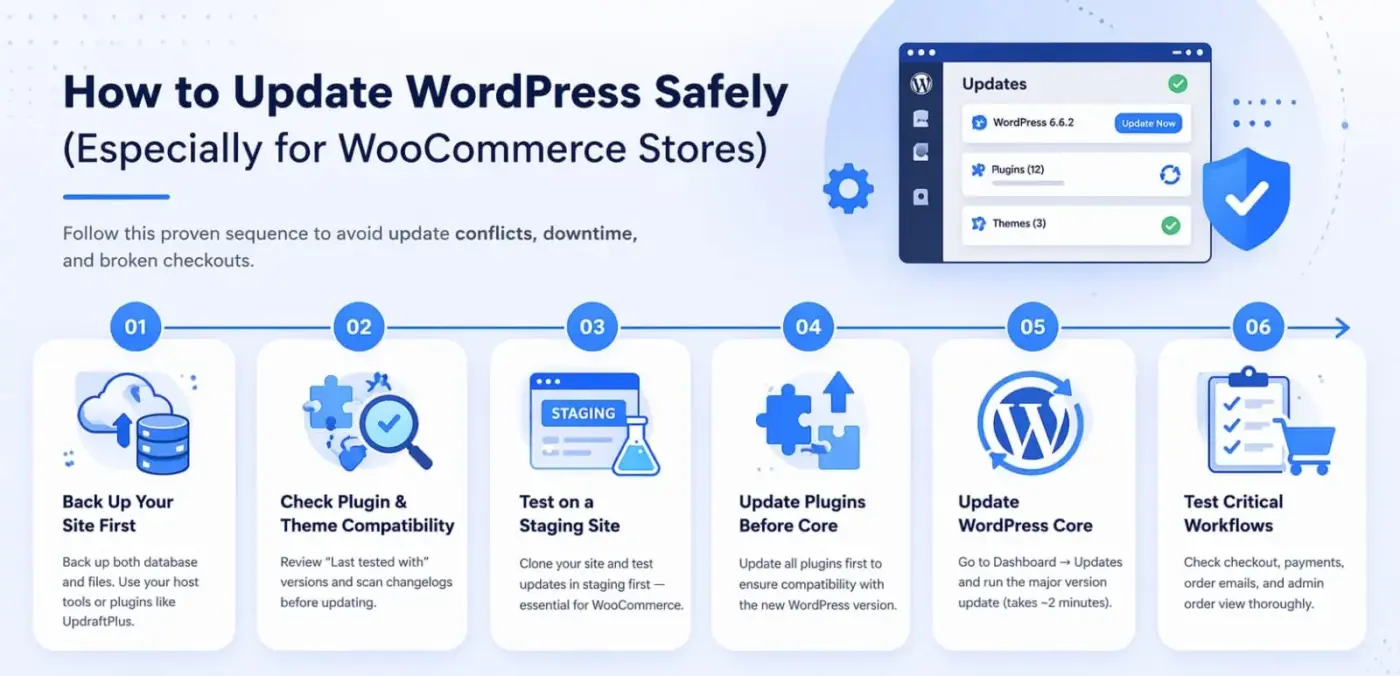
Most update problems aren’t caused by WordPress itself. They’re caused by plugins or themes that haven’t kept up with core changes. Follow this sequence, and you’ll avoid the majority of issues.
- Back up your site first: This one isn’t optional. Back up both your database and your files before touching anything. Most managed hosts have one-click backup tools. If yours doesn’t, plugins like UpdraftPlus handle this reliably.
- Check plugin and theme compatibility: Go to your installed plugins list. Check the “Last tested with” version shown for each plugin. If a plugin hasn’t been tested with the WordPress version you’re moving to, check the plugin’s changelog or the support forums before updating.
- Test on a staging site: Most managed WordPress hosts offer a staging environment at no extra cost. Clone your live site to staging, run the update there first, and test thoroughly. This is especially critical for WooCommerce stores where a broken checkout isn’t just inconvenient — it costs sales.
- Update plugins before updating WordPress core: This is illogical but important. Plugin developers release compatibility updates before or alongside new WordPress major versions. Getting your plugins current first means fewer surprises when core updates.
- Update WordPress core: Go to Dashboard, Updates, and run the major version update. The process typically takes under two minutes.
- Test your critical workflows: For a WooCommerce store, this means: add a product to cart, go through checkout, confirm the order email fires, check the admin order view, and test any payment gateways you use. Don’t just check the homepage and assume everything is fine.
If you’d rather hand this entire process to professionals who know WooCommerce inside out, our WordPress development services and WordPress speed optimisation services cover update management, staging, and performance work.
Conclusion
The WordPress version history is really a story about ambition. What started as a fork of an abandoned blogging tool in 2003 became the software running nearly half the web. Each era, from the early blog years through the CMS transition, the block editor overhaul, and the current collaboration phase, built on the one before it.
The practical lesson from 23 years of WordPress releases is straightforward: stay current. Minor and security updates should be applied immediately. Major updates deserve care and a proper staging test, particularly for WooCommerce stores where checkout integrity matters.
WordPress 7.0 lands April 9, 2026, and with a refreshed admin interface and raised PHP requirements, now is a good time to audit where your site sits in the WordPress version history and make a plan.
Have questions about upgrading or managing WordPress for your store? Drop them in the comments below.
Frequently Asked Questions
Q1. What is the current version of WordPress?
As of late March 2026, the current stable version of WordPress is 6.9 (“Gene”), released in December 2025. WordPress 7.0 is scheduled for April 9, 2026. You can always check your current installed version at the bottom of your WordPress dashboard.
Q2. How often does WordPress release new versions?
WordPress moved to an annual major release schedule in 2025. WordPress 6.8 (“Cecil”) was the first release under this new cycle in April 2025, followed by 6.9 in December 2025. Security and maintenance releases (minor versions like 6.8.1) are still issued throughout the year whenever needed.
Q3. What was the most significant update in WordPress history?
Most developers would point to WordPress 5.0 (December 2018) as the most consequential single release. It replaced the longstanding TinyMCE editor with the Gutenberg block editor, which changed how content is created and laid the foundation for full-site editing in the 6.x era.
Q4. Does updating WordPress break WooCommerce?
Not typically, but it can happen when plugin developers haven’t updated their code to match the new core version. The safest approach is to check WooCommerce’s compatibility notes before updating, test on a staging site first, and update WooCommerce itself before updating WordPress core.
Q5. What is the minimum PHP version required for WordPress 7.0?
WordPress 7.0 raises the minimum PHP requirement to PHP 7.4. If your hosting environment runs PHP 7.3 or lower, you’ll need to upgrade PHP before updating WordPress. Most reputable hosts allow you to change your PHP version from the hosting control panel.