The WordPress version history runs from version 0.70 on May 27, 2003 to WordPress 7.1 “Mary Lou,” released on August 19, 2026. The current version is 7.1.2, a security release from September 22, 2026, and 7.2 is planned for December 10, 2026.
Every date below comes from WordPress.org’s own version records. The security status of each release comes from the same API your dashboard uses to decide whether to warn you. That data shows something most version histories leave out: 909 of the 934 WordPress versions ever released are now marked insecure.
You get the full table of all major WordPress releases first, then the story of how each era changed the platform. After that come the versions still safe to run and how the numbering works. The last sections show how to check your version and update without breaking a store.
What Is the Current WordPress Version?
The current WordPress version is 7.1.2, released on September 22, 2026. It is a security release on top of WordPress 7.1 “Mary Lou,” which shipped on August 19, 2026. WordPress.org’s update API marks 7.1.2 as the only “latest” version out of every release it tracks. For what changed in the 7.0 release itself, see our WordPress 7.0 changelog and requirements.
The WordPress 7.1.2 release post describes it as “a fix for a critical severity security vulnerability.” It came five days after 7.1.1. The 7.1.1 release notes list “17 bug fixes on Core, 19 bug fixes for the Block Editor, and 11 security fixes.”
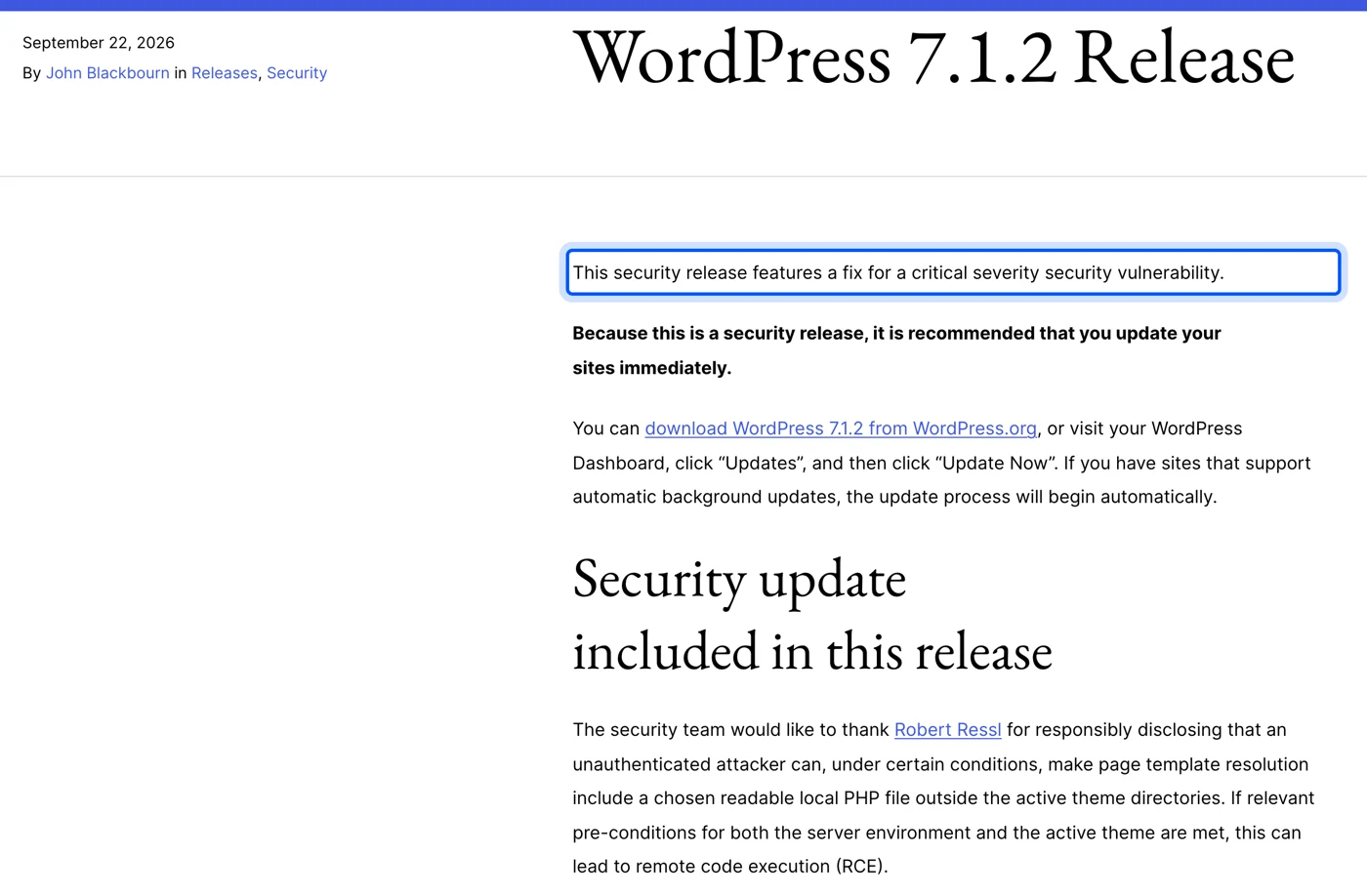
The flaw fixed in 7.1.2 involved how WordPress resolves page templates. The same post explains that, under certain conditions, an unauthenticated attacker could make WordPress load a readable PHP file from outside the theme folders. That can lead to remote code execution, which is why the release post says to update immediately.
Note: Two September releases in five days is a good reminder to check. Our own local copy of this site was still on 7.1.1 while writing this, a week behind the live site on 7.1.2.
So if someone asks for the latest WordPress version, the answer changes more often than the major number suggests. Four releases landed between July and September 2026 on the 7.0 branch alone, from 7.0.1 to 7.0.4, before 7.1 took over.
The next major version is 7.2, planned for December 10, 2026, according to the WordPress Versions page. Planned dates can move, so treat it as a target rather than a promise.
Every Major WordPress Version and Release Date
WordPress has shipped 54 named major versions since 1.0 in January 2004, each honoring a jazz musician. Before them came the unnamed 0.70 release in May 2003. This table lists every one with its release date, from WordPress.org’s official version records.
The newest version is at the top:
| Version | Name | Released |
|---|---|---|
| 7.1 | Mary Lou | August 19, 2026 |
| 7.0 | Armstrong | May 20, 2026 |
| 6.9 | Gene | December 2, 2025 |
| 6.8 | Cecil | April 15, 2025 |
| 6.7 | Rollins | November 12, 2024 |
| 6.6 | Dorsey | July 16, 2024 |
| 6.5 | Regina | April 2, 2024 |
| 6.4 | Shirley | November 7, 2023 |
| 6.3 | Lionel | August 8, 2023 |
| 6.2 | Dolphy | March 29, 2023 |
| 6.1 | Misha | November 1, 2022 |
| 6.0 | Arturo | May 24, 2022 |
| 5.9 | Josephine | January 25, 2022 |
| 5.8 | Tatum | July 20, 2021 |
| 5.7 | Esperanza | March 9, 2021 |
| 5.6 | Simone | December 8, 2020 |
| 5.5 | Eckstine | August 11, 2020 |
| 5.4 | Adderley | March 31, 2020 |
| 5.3 | Kirk | November 12, 2019 |
| 5.2 | Jaco | May 7, 2019 |
| 5.1 | Betty | February 21, 2019 |
| 5.0 | Bebo | December 6, 2018 |
| 4.9 | Tipton | November 15, 2017 |
| 4.8 | Evans | June 8, 2017 |
| 4.7 | Vaughan | December 6, 2016 |
| 4.6 | Pepper | August 16, 2016 |
| 4.5 | Coleman | April 12, 2016 |
| 4.4 | Clifford | December 8, 2015 |
| 4.3 | Billie | August 18, 2015 |
| 4.2 | Powell | April 23, 2015 |
| 4.1 | Dinah | December 17, 2014 |
| 4.0 | Benny | September 4, 2014 |
| 3.9 | Smith | April 16, 2014 |
| 3.8 | Parker | December 12, 2013 |
| 3.7 | Basie | October 24, 2013 |
| 3.6 | Oscar | August 1, 2013 |
| 3.5 | Elvin | December 11, 2012 |
| 3.4 | Green | June 13, 2012 |
| 3.3 | Sonny | December 12, 2011 |
| 3.2 | Gershwin | July 4, 2011 |
| 3.1 | Reinhardt | February 23, 2011 |
| 3.0 | Thelonious | June 17, 2010 |
| 2.9 | Carmen | December 18, 2009 |
| 2.8 | Baker | June 10, 2009 |
| 2.7 | Coltrane | December 10, 2008 |
| 2.6 | Tyner | July 15, 2008 |
| 2.5 | Brecker | March 29, 2008 |
| 2.3 | Dexter | September 24, 2007 |
| 2.2 | Getz | May 16, 2007 |
| 2.1 | Ella | January 22, 2007 |
| 2.0 | Duke | December 26, 2005 |
| 1.5 | Strayhorn | February 17, 2005 |
| 1.2 | Mingus | May 22, 2004 |
| 1.0 | Davis | January 3, 2004 |
| 0.70 | None | May 27, 2003 |
Two versions are missing from the numbering on purpose. There was never a 2.4, which was folded into 2.5, and 1.0 followed the 0.7x releases directly. WordPress.org’s versions documentation notes that “all major releases are named in honor of jazz musicians” the core developers admire.
The spacing tells its own story. Between 2014 and 2020, WordPress usually shipped three major versions a year. Recent years ran slower: two in 2025 (6.8 and 6.9), then 7.0 and 7.1 in 2026 with 7.2 planned for December.
WordPress Version History by Era
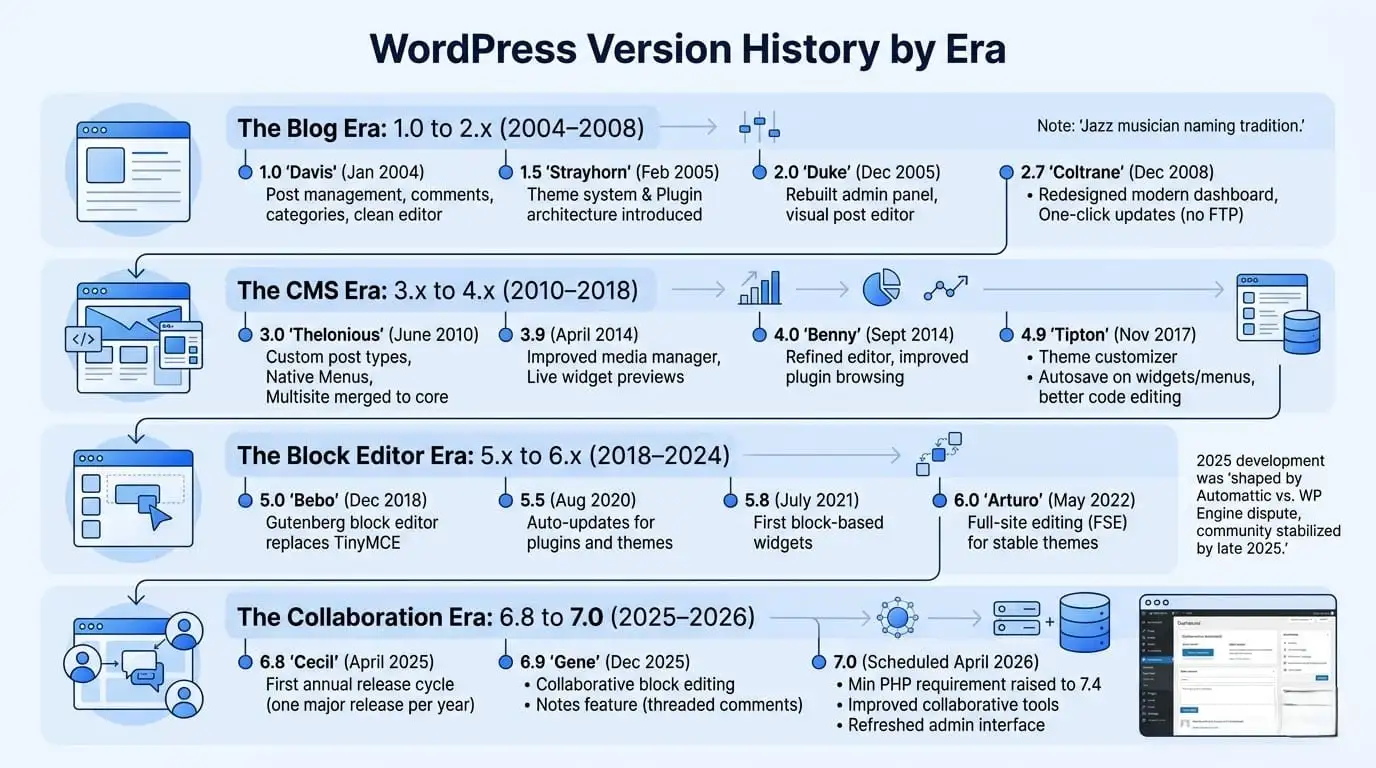
WordPress versions group into four eras, each defined by one big change in what the software was for. The blog era built the basics, the CMS era turned it into a site builder, and the block editor era replaced how content is written. The current era adds site-wide design tools, AI connections and editor collaboration.
That path took WordPress to 40.2% of all websites, according to W3Techs usage statistics for September 2026. Each era below added one reason for that growth.
Where It Started: The b2 Fork in 2003
WordPress began as a fork of an abandoned blogging tool. WordPress.org’s origins and version history page explains that Matt Mullenweg and Mike Little built on b2/cafelog after its developer stopped working on it. The first release, 0.70, came out on May 27, 2003.
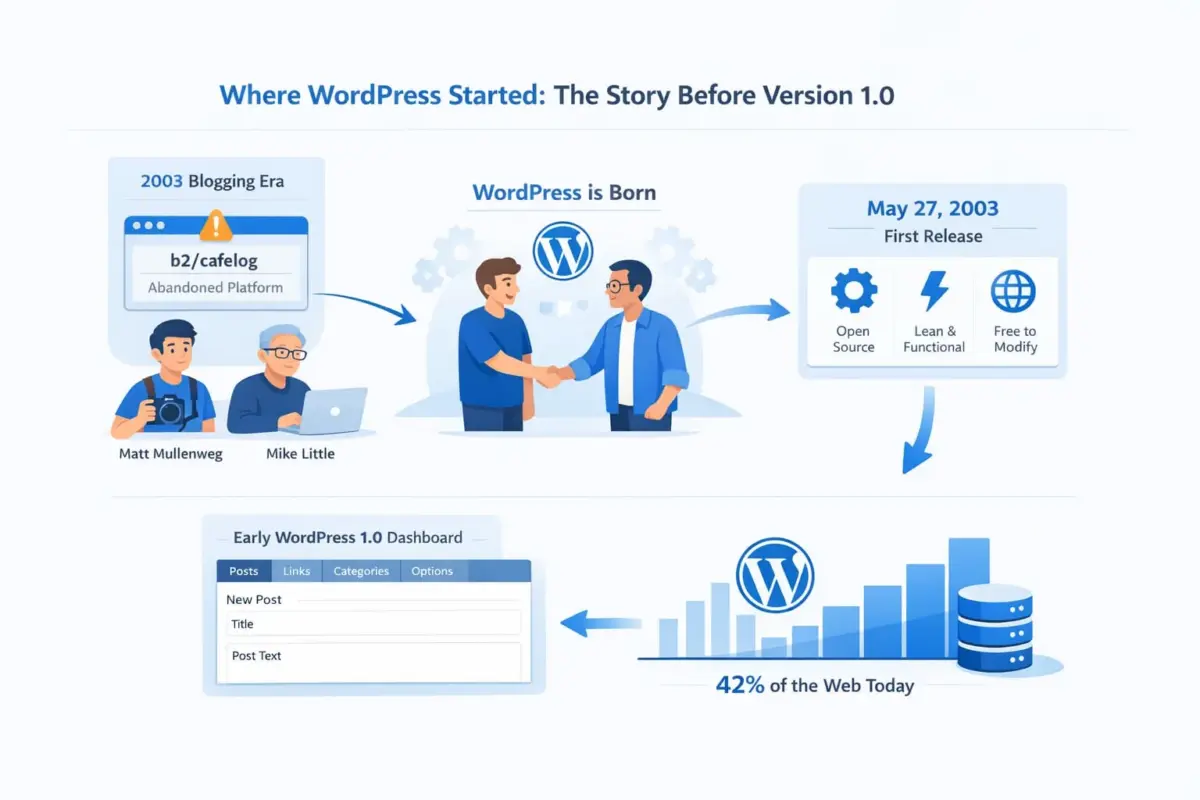
Because b2 was licensed under the GPL, anyone was free to copy and improve it. WordPress kept that license, and it is still the reason any developer can read, change and extend the code.
The Blog Era: 1.0 to 2.9 (2004 to 2009)
WordPress 1.0 “Davis” shipped on January 3, 2004, and 1.2 “Mingus” followed that May. Version 1.5 “Strayhorn” in February 2005 added the theme system, so a site’s whole design could change without editing PHP. Version 2.0 “Duke” in December 2005 rebuilt the admin area.
The rest of the 2.x line filled in what a blog needed. By 2.7 “Coltrane” in December 2008, WordPress had a redesigned dashboard and could update itself from inside the admin. That one feature took FTP out of routine updates.
The CMS Era: 3.0 to 4.9 (2010 to 2017)
WordPress 3.0 “Thelonious” on June 17, 2010 changed what WordPress could be. Custom post types let it store any kind of content beyond posts, and navigation menus became part of core. The separate multisite version was merged in, so one install could run many sites.
The 4.x releases were steadier. They improved media, the Customizer and the plugin screens across ten releases, ending with 4.9 “Tipton” in November 2017.
The Block Editor Era: 5.0 to 6.7 (2018 to 2024)
WordPress 5.0 “Bebo” on December 6, 2018 replaced the classic editor with the block editor. Every heading, paragraph and image became its own block. It was the most disruptive change in WordPress history, and it set up everything that followed.
The 5.x and 6.x releases pushed blocks across the whole site. WordPress 5.5 in August 2020 added automatic updates for plugins and themes. WordPress 5.9 “Josephine” in January 2022 brought full site editing to block themes, and 6.0 through 6.7 kept refining it.
The Current Era: 6.8 to 7.1 (2025 to 2026)
WordPress 6.8 “Cecil” shipped on April 15, 2025, and 6.9 “Gene” on December 2, 2025. Then 2026 brought the first 7.x releases, and both added more than a typical point release.
The WordPress 7.0 announcement describes “a new AI Client in Core” that lets WordPress talk to generative AI models. It also brought a new admin color scheme, a Command Palette on Ctrl+K, and blocks built with PHP alone. It shipped on May 20, 2026.
That AI Client gives plugins one shared way to reach AI models instead of each one bundling its own. Tools such as the WordPress chatbot plugins many stores run are the kind of feature it was built for.
WordPress 7.1 “Mary Lou” followed on August 19, 2026. Its release post lists responsive styling for blocks, a new media editor, and new Tabs and Playlist blocks. Image compression and resizing also moved into the browser, which the post says reduces server load.
Which WordPress Versions Are Still Safe to Run?
Only one WordPress version is fully current, 7.1.2, but the newest release on each branch from 4.7 onward is still patched. WordPress.org marks those 24 releases “outdated” rather than insecure. Every other version, 909 of the 934 it tracks, is marked insecure.
We pulled those numbers from WordPress.org’s public stable-check API on September 23, 2026. It is the list WordPress uses to decide whether your dashboard shows a security warning.
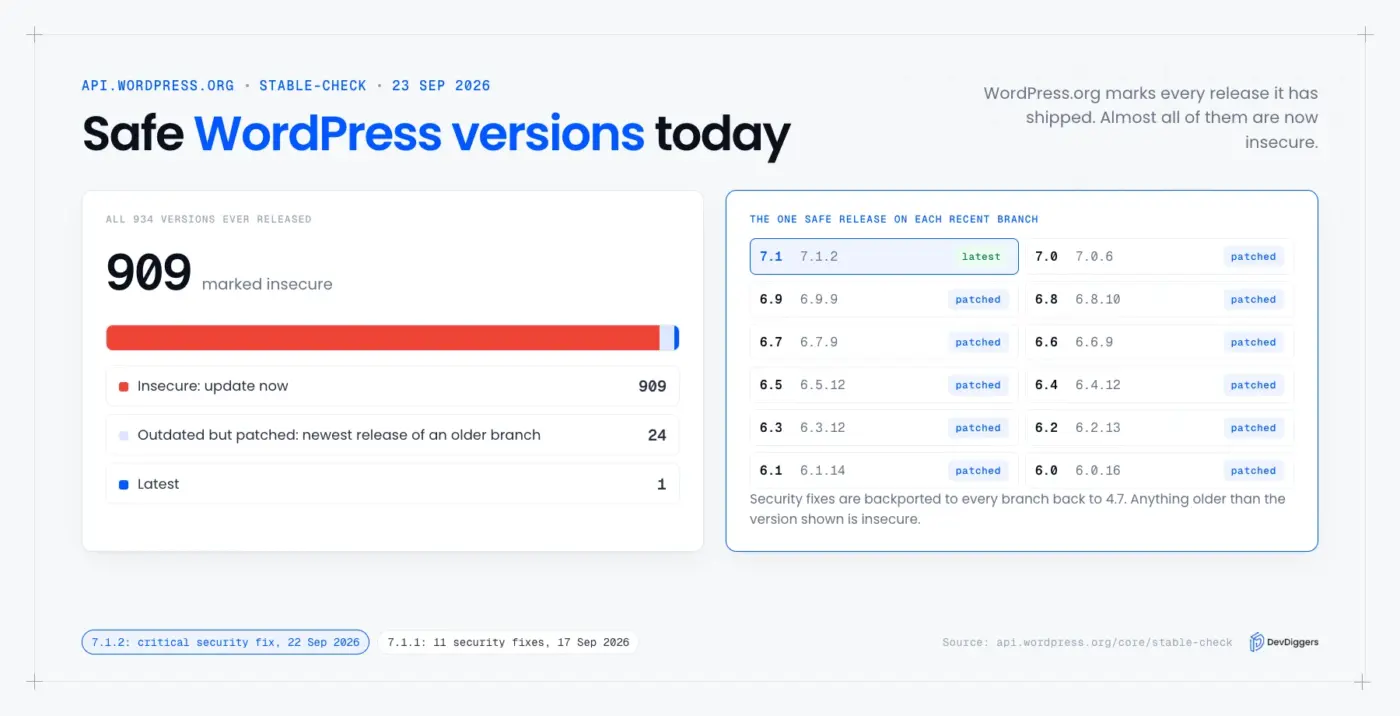
The patched releases exist because the security team backports fixes. The 7.1.1 release notes say the fixes went to every branch still covered, which is currently back to 4.7. So a site on 6.4 is safe on 6.4.12, but not on 6.4.11 or anything earlier.
Here is the patched release for each recent branch, as the API listed it:
| Branch | Safe release | Status |
|---|---|---|
| 7.1 | 7.1.2 | Latest |
| 7.0 | 7.0.6 | Outdated, patched |
| 6.9 | 6.9.9 | Outdated, patched |
| 6.8 | 6.8.10 | Outdated, patched |
| 6.7 | 6.7.9 | Outdated, patched |
| 6.6 | 6.6.9 | Outdated, patched |
| 6.5 | 6.5.12 | Outdated, patched |
Patched does not mean current. An old branch gets security fixes only, so it misses bug fixes, new features and the compatibility work that plugins expect. Plugin authors test new releases against recent WordPress versions, so an old branch slowly loses plugin support even while it stays patched.
The PHP requirement also moved. The update API lists PHP 7.4 as the minimum for 7.1.2, while the 6.9 branch still accepts PHP 7.2.24. So WordPress 7.0 raised the floor, and a host stuck on PHP 7.2 or 7.3 cannot run the 7.x line.
Even PHP 7.4 is old. The PHP project’s end of life list shows PHP 7.4 stopped getting security fixes on 28 November 2022. Being able to run WordPress on it does not make it a good idea, so move to a supported PHP version when you update.
What Major and Minor WordPress Versions Mean
A major WordPress version is the first two numbers, such as 7.0 or 7.1, and it brings new features and a jazz musician’s name. A minor version adds a third number, such as 7.1.2, and only fixes bugs or security problems. So 7.0 and 7.1 are separate majors.
That last point confuses many site owners. WordPress does not follow strict semantic versioning, so going from 6.9 to 7.0 is the same size of change as going from 6.8 to 6.9. The first digit rolls over after .9, and a big number change does not mean a bigger release.
Minor releases are the ones to install straight away. They arrive whenever a fix is ready, as 7.1.1 and 7.1.2 did five days apart, and most sites receive them through automatic background updates. The 7.1.2 post notes that sites supporting background updates will “begin automatically.”
Major releases deserve a little more care. They change editor behavior and add features that plugins may need to catch up with. Test them on a staging copy first if your site takes payments.
How to Check Your WordPress Version
You can check your WordPress version in the dashboard under Dashboard > Updates, or at the bottom right of most admin screens. From outside the site, the page source or the RSS feed often shows it too. If you have file access, wp-includes/version.php holds the exact number.
These are the four ways, from easiest to most technical:
- Dashboard: Open Dashboard > Updates. It shows your version and whether a newer one exists.
- Page source: Search the source for
generator. Many sites print a tag with the WordPress version in it. - RSS feed: Open
/feed/and look for the generator line, which ends with?v=and the version. - Files or WP-CLI: Read
$wp_versioninwp-includes/version.php, or runwp core version.
We tested the page source and feed checks on real sites. The results are in our guide on how to know if a website is made with WordPress. In that test, one large news site was still showing 6.9.9, a patched release on an older branch.
Knowing the number is only half the answer. Compare it with the safe release for its branch in the table above, since 6.9.8 and 6.9.9 look alike but only one is patched.
Worth checking: A version you can read from outside, anyone else can read too. Hiding the generator tag does not make an old version safe, so keep WordPress updated first and treat hiding it as a small extra.
How to Update WordPress Safely
To update WordPress safely, take a full backup, update plugins and themes, then update core, and test the pages that earn money. On a store, run the update on a staging copy first. Most update problems come from a plugin that has not caught up with the new release.
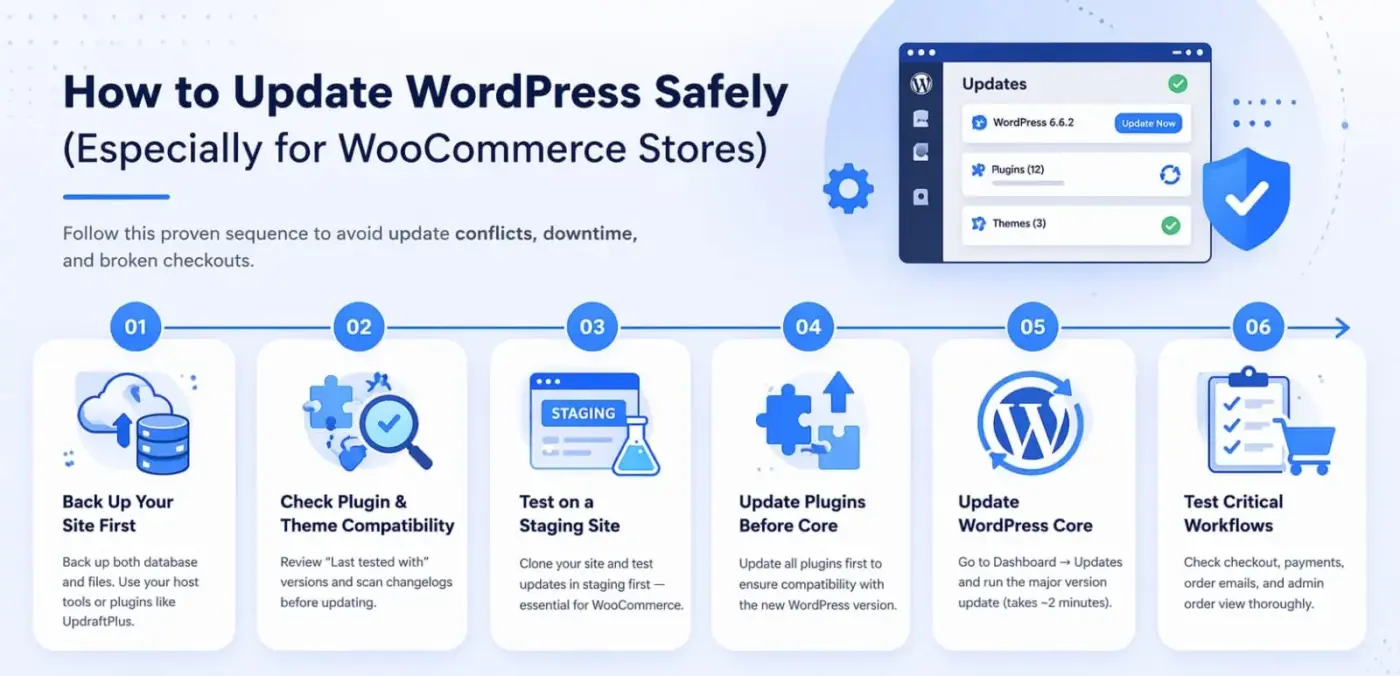
Follow these steps in order:
- Back up files and the database: Use your host’s backup tool or a backup plugin, and confirm the backup finished before you continue.
- Check plugin compatibility: Open each plugin’s page and compare its “Tested up to” version with the WordPress version you are moving to.
- Update on staging first: Copy the live site to a staging site, run every update there, and test it.
- Update plugins and themes before core: Plugin authors often ship their compatibility fixes before a major WordPress release.
- Update WordPress core: Go to Dashboard > Updates and click Update to version 7.1.2, or run
wp core update. - Test the money pages: Add a product to the cart, complete a test checkout, and confirm the order email arrives.
Stores need that last step most. A broken checkout does not show on the home page, so a quick look at the front page will not catch it.
This routine is the core of a WordPress care plan, which bundles updates, backups and testing into one monthly job. If you would rather not run this every month, our WordPress maintenance services cover updates, staging tests and backups.
Conclusion
The WordPress version history covers 55 major releases from 0.70 in May 2003 to 7.1 “Mary Lou” in August 2026. The current version is 7.1.2, a critical security release from September 22, 2026, with 7.2 planned for December.
The most useful number in that history is the security one. WordPress.org marks 909 of 934 versions insecure, and only the newest release on each branch from 4.7 up is still patched. Check your version today, and if it is not the safe release for its branch, update after a backup.
Frequently Asked Questions (FAQs)
Q1. How old is WordPress?
WordPress is 23 years old. Its first release, version 0.70, came out on May 27, 2003, and WordPress 1.0 followed on January 3, 2004. So the software has been in continuous development for more than two decades.
Q2. How often is WordPress updated?
Major versions arrive two or three times a year. 2025 had two, and 2026 has 7.0 and 7.1 with 7.2 planned for December. Minor security releases come whenever needed, such as 7.1.1 and 7.1.2 five days apart in September 2026.
Q3. What was the most important WordPress release?
Most developers point to WordPress 5.0 “Bebo” from December 6, 2018, which replaced the classic editor with the block editor. WordPress 3.0 “Thelonious” from June 17, 2010 is the other strong choice, because custom post types turned WordPress into a full CMS.
Q4. Is it safe to stay on an older WordPress version?
Only if you run the newest patched release on that branch, such as 6.9.9 on the 6.9 line. Anything older is marked insecure by WordPress.org. Even a patched old branch misses bug fixes and slowly loses plugin support.
Q5. What PHP version does WordPress 7.1 need?
The WordPress.org update API lists PHP 7.4 as the minimum for WordPress 7.1.2. WordPress 6.9 still accepts PHP 7.2.24, so moving to 7.x may need a PHP upgrade first. Most hosts let you change the PHP version in the control panel.
Q6. Where can I read the WordPress changelog for each version?
Each version in the official WordPress Versions page links to its changelog and release post. The releases archive on WordPress.org News lists every announcement, newest first. If you are researching which files changed, our guide to index.php in WordPress shows how the core loading files work.