A WordPress care plan is a monthly service that keeps a live WordPress site updated, backed up, secure and fast. It also includes a set number of developer hours, so small fixes and edits happen without a new quote each time.
On our own site, 10 of the 13 free plugins we run shipped an update in the 30 days to September 23, 2026. WordPress itself shipped two security releases in the same week. Every one of those changes needs a backup and a test before it goes live.
This guide covers what a care plan includes and what it costs in 2026, and how it differs from hosting or doing the work yourself. After that you get a simple way to work out your own hours, how to pick a plan, and what changes for a WooCommerce store.
What Is a WordPress Care Plan?
A WordPress care plan is a fixed monthly service in which a developer or agency looks after a live WordPress site. The work covers core, plugin and theme updates, backups, security checks, uptime monitoring and speed. Most plans also include a few developer hours for small changes.
The name varies by provider. Some call it a WordPress maintenance plan, some call it WordPress support, and some sell WordPress care packages. The work is the same, and the real difference between offers is the developer hours and the response time.
A WordPress website care plan and a store care plan follow the same pattern too. The store version adds checkout and payment tests, which the WooCommerce section below covers in full.
A care plan is not a hosting plan, even though some hosts sell both together. Hosting keeps the server running. A care plan keeps the software on that server safe to run, which is a separate job and usually a separate person.
Here is the short version of who does what on a typical site:
| Job | Hosting company | Care plan | You, without a plan |
|---|---|---|---|
| Server uptime and hardware | Yes | Watches it | No |
| WordPress, plugin and theme updates | Rarely tested | Yes, tested first | Yes |
| Backups you can restore | Sometimes, on the same server | Yes, off-site | Yes |
| Fixing a plugin conflict | No | Yes, inside the hours | Yes |
| Small content edits | No | Yes, inside the hours | Yes |
Why a WordPress Site Needs Ongoing Care
A WordPress site needs ongoing care because the software on it changes most weeks, as our own numbers below show. Plugins, themes and WordPress core all ship updates, and many of those updates fix security holes. A site left alone for a few months falls behind, and the gap is exactly what attackers look for.
We measured this on our own site. On September 23, 2026, we checked the 13 free plugins devdiggers.com runs against the WordPress.org plugin directory. Ten had shipped an update in the previous 30 days, four in the previous 7 days, and three the day before.
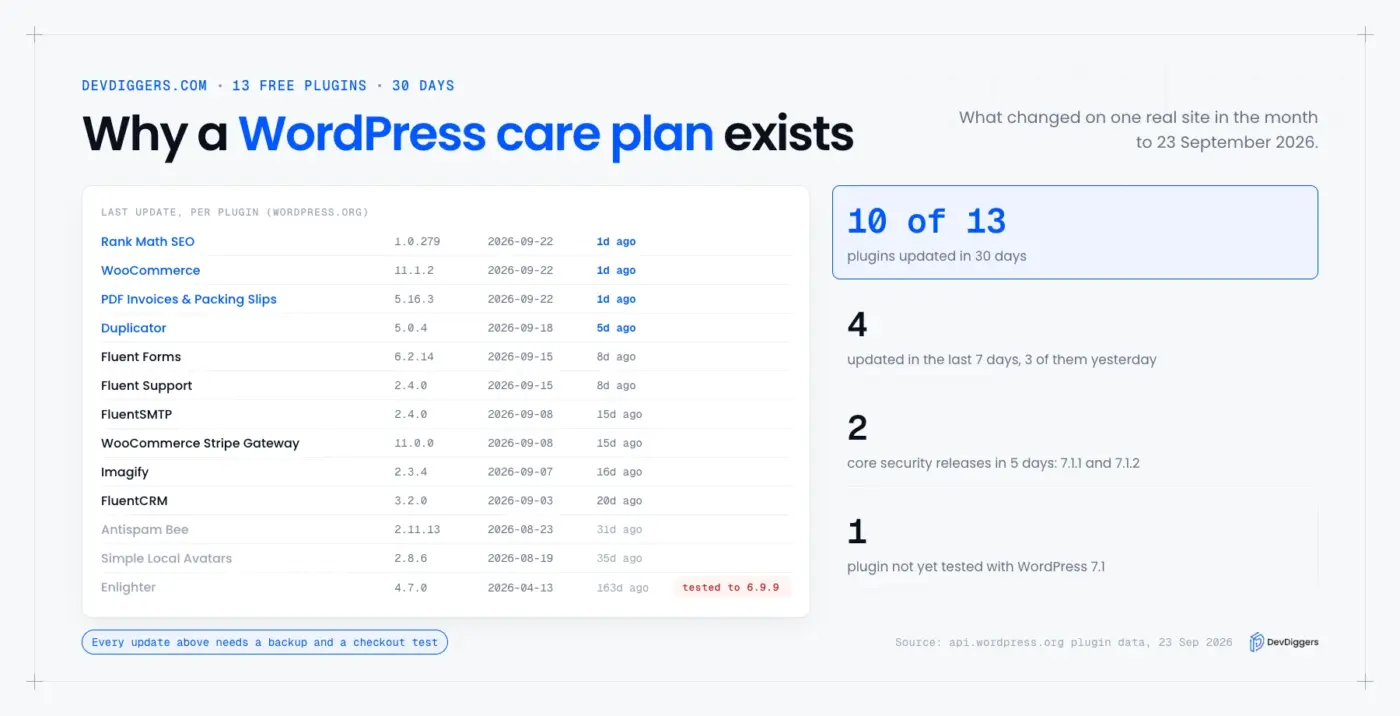
Those three were WooCommerce 11.1.2, Rank Math and a PDF invoices plugin, all on September 22. The same week, WordPress shipped 7.1.1 and then 7.1.2, which the WordPress 7.1.2 release post calls a fix for “a critical severity security vulnerability.” Counting the two core releases, a store owner doing this alone would have had six separate updates to test in seven days.
The data also caught a quieter problem. One plugin on our list, a code highlighter, was last tested only up to WordPress 6.9.9.
It may work fine on 7.1, but nobody has said so. Spotting that before an update, rather than after a broken page, is half of what a care plan is for.
How Fast Unpatched Sites Get Attacked
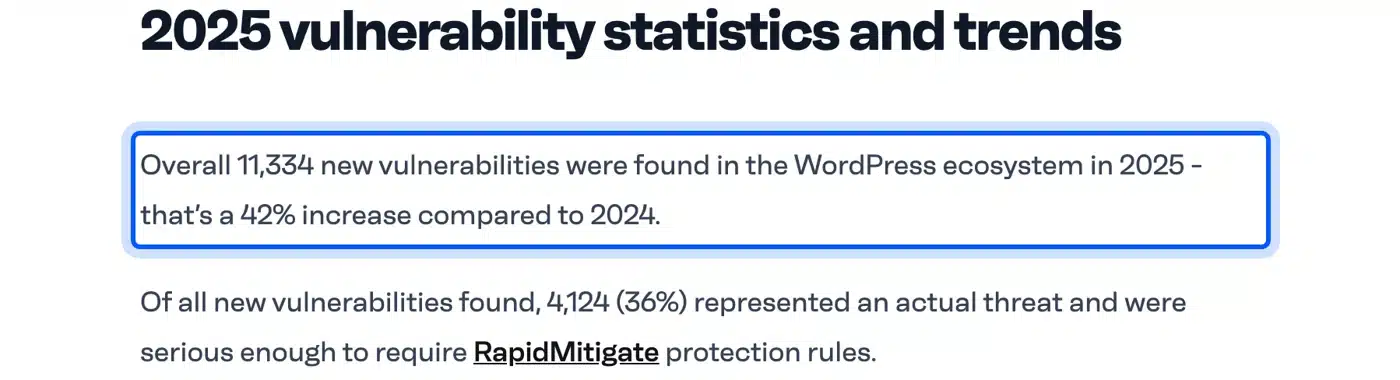
The risk is not theoretical. Patchstack’s State of WordPress Security in 2026 report counted 11,334 new vulnerabilities in 2025, a 42% rise on 2024. It found 91% of them in plugins and 9% in themes, and put the weighted median time to first exploit at 5 hours.
Five hours is the part that matters for a care plan. A monthly check is too slow for a critical plugin fix. The plan you choose should apply security updates within a day, even if feature updates wait for the monthly round.
Note: Every plugin you add grows that update list. A form builder or a chat widget from our roundup of WordPress chatbot plugins each brings its own release cycle and security history.
What a WordPress Care Plan Includes
A WordPress care plan usually includes eight jobs: updates, backups, security monitoring, uptime checks, speed checks, support hours, a monthly report and malware cleanup. The quality of each one varies a lot between providers. So read what each job means in practice before you tick it off the list.

These are the eight, with what good looks like for each:
- Tested updates: Every update goes to a staging copy first, the key pages get checked, and only then does it go live.
- Off-site backups: Daily copies of files and the database, stored away from your host, with a restore test at least every quarter.
- Security monitoring: Regular scans against known plugin flaws, login protection, and alerts when a core file changes.
- Uptime checks: A check every few minutes on the home page, the shop and the checkout, since checkout can fail while the home page still loads.
- Speed checks: A monthly look at Core Web Vitals, including Interaction to Next Paint, with fixes before slow pages start to cost rankings.
- Support hours: Developer time each month for edits, small features or a plugin conflict, ideally with unused hours rolling over.
- A monthly report: A short summary of what was updated, what was blocked and what to fix next.
- Malware cleanup: Removal and a cause report if the site is hacked, included rather than billed as an emergency.
The file check in item 3 is simpler than it sounds. WordPress core files, such as the root index.php, are the same on every site at the same version.
So any change to one is a warning sign. Our guide to index.php in WordPress shows how WP-CLI compares every core file against the official copies in one command.
Two items get skipped most often in cheaper plans: staging tests and restore tests. An update applied straight to the live site looks fine on a report. So does a backup nobody has restored, right up to the day it is needed.
WordPress Care Plan Pricing in 2026
WordPress care plans cost from about $50 to over $500 a month in 2026, based on published prices we reviewed in September. The price rises with developer hours, response speed and the money the site handles. A small brochure site sits at the bottom of that range and a busy WooCommerce store near the top.
The price usually tracks four things. They are the number of plugins, how often content changes, whether the site takes payments, and how fast you need an answer. Hours are the biggest single driver, because an hour of developer time costs the provider the most.
Here are our own published tiers from the WordPress maintenance services page, as an example of how the tiers break down:
| Plan | Best for | What it adds | Price per month |
|---|---|---|---|
| Essential care | Brochure sites and small blogs | Staging updates, daily off-site backups, weekly security scans, uptime checks, 1 developer hour | $79 to $129 |
| Growth care | Busy sites and small stores | Everything in Essential, plus monthly speed tuning, form and checkout tests, 3 developer hours | $179 to $299 |
| Store care | WooCommerce stores | Order and payment gateway checks, database cleanups, same-day response on anything blocking a sale, 6 developer hours | $349 to $599 |
| One-off rescue | A site that is down or hacked today | A fix first, and no plan needed | From $149 |
Plans that hide their price until a sales call are not always worse, but they make comparing hard. Ask any provider for the developer hours, the response time and whether malware cleanup is included, then compare those three numbers side by side.
Care Plan vs Managed Hosting vs Doing It Yourself
A care plan, managed hosting and doing it yourself cover different parts of the same job. Managed hosting runs the server and often applies updates automatically, but rarely tests them on your site. A care plan tests and fixes, while doing it yourself costs hours instead of a fee.
The gap between managed hosting and a care plan is testing. A host that auto-updates plugins does not know that your checkout depends on a certain gateway setting. It applies the update and moves on, while a care plan provider clicks through the checkout afterwards.
Doing it yourself works well for some sites. A personal blog with five plugins and no payments can often be maintained in under an hour a month. The math changes once the site earns money, because one broken checkout day can cost more than a year of a basic plan.
Some hosts now bundle a care plan with hosting. That can work well, but check that the bundle includes staging tests and developer hours. Automatic updates with a new name are not a care plan.
Managed hosting and a care plan also fail in different ways. A host outage takes the whole site down and the host fixes it. A bad plugin update leaves the site up but broken, and only someone checking your pages will notice.
A useful rule of thumb: if you would notice a broken site within an hour and could fix it yourself, you can skip the plan. If you would find out from a customer, you need one.
The DIY Math: What Maintenance Costs You in Hours
The honest way to judge a care plan is to price your own time. Count the updates your site gets each month and the minutes each one takes to back up, apply and test. Then add the time you lose when one goes wrong.
Here is a worked example with round numbers for an imaginary store. Say your store runs 15 plugins and 10 of them update in a month, which is what we saw on our own site. You batch them into two rounds, and each round takes 30 minutes for a backup, 15 minutes to update and 30 minutes to test checkout.
That is 75 minutes per round, so two rounds come to 2.5 hours a month. Add one core security release and one plugin conflict at 1.5 hours, and the month comes to 4 hours.
At $50 an hour for your own time, that is $200 a month, before you count the risk of a missed fix. Compare that with the plan prices above, and a mid-tier plan roughly breaks even with doing it yourself. The difference is who carries the risk when an update breaks something at night.
Log four things while you measure: the date, the update, the minutes spent, and anything that broke. After a month you will know your real update load and how often an update causes trouble. Those two numbers make the plan decision for you.
Tip: Track your real maintenance time for one month before you decide. The number you measure is worth more than any estimate, including this one.
How to Choose the Right WordPress Care Plan
To choose the right WordPress care plan, match the developer hours and response time to how much money your site handles. Then check that updates are tested on staging and that someone restores a backup to prove it works. Those two habits separate a plan that protects a site from one that only sends invoices.
Ask every provider these questions before you sign:
- Staging: Do you test every update on a staging copy before it goes live?
- Restore tests: When did you last restore a client backup, and how long did it take?
- Security speed: How fast do you apply a critical security update, in hours?
- Hours: How many developer hours are included, and do unused hours roll over?
- Malware: Is cleanup included, or billed as an emergency?
- Exit: If I leave, do I keep my backups and logins?
Watch for a few red flags too. A plan that only promises “updates” without testing is automatic updates with an invoice attached.
A report full of green ticks with no detail tells you nothing. And a long contract with no trial month suggests the provider expects you to want to leave.
Response time needs a clear definition before you compare plans. Some providers mean the time to a first reply, others mean the time to a fix. For a store, ask how long it takes to start working on a checkout that stopped taking payments.
Worth checking: Ask for a sample monthly report. It shows in two minutes whether the provider explains their work in plain words or hides it behind charts.
WooCommerce Care Plans: What Changes for a Store
A WooCommerce care plan adds the checks that keep a store selling: checkout tests, payment gateway checks and order email checks after every update. A store can stay online while checkout quietly breaks. So the plan has to test the money path, since a home page that loads proves very little.
Payment plugins update often, and each update touches the part of the site that takes money. On our own site, the WooCommerce Stripe gateway shipped version 11.0.0 on September 8, 2026, and WooCommerce itself shipped 11.1.2 two weeks later. Both need a test order after they go live.
Stores with subscriptions need one more check. Renewal payments run in the background, so a broken renewal shows up days later as missing revenue rather than an error on screen. A store care plan should confirm that scheduled renewals still process after each update.
Stores also collect more personal data than most sites, from addresses to order history. That raises the cost of a breach, so the security side of a store plan deserves the closest look.
WooCommerce care plans should also include regular database cleanups. Old orders, expired sessions and leftover plugin tables slow the admin down over time, and a cleanup every few months keeps order screens fast.
Store care also costs more, and for good reason. A same-day response matters when a broken checkout loses sales by the hour, and that speed is what the higher tiers pay for.
A good store plan also tests emails. Order confirmations and password resets run through your mail plugin, which updated on our own site on September 8, 2026. So a test order should also confirm the email arrives.
For the full picture of WordPress releases and how often core changes, our WordPress version history lists every version and which ones are still safe. Our WordPress security checklist covers the hardening steps a care plan should already be doing.
Conclusion
A WordPress care plan is a monthly service that keeps your site updated, backed up, secure and fast, with developer hours for small fixes. Our own site saw 10 of 13 plugins update in one month and two core security releases in a week. That pace is why the work needs someone doing it on a schedule.
Pick a plan by developer hours, security response time and whether updates are tested on staging. For a store, add checkout and payment tests after every update. If your own measured hours cost more than a plan, the plan is the cheaper option.
Frequently Asked Questions (FAQs)
Q1. Do I need a care plan for a small blog?
Not always. A blog with a handful of plugins and no payments can be kept up with an hour a month of your own time. Leave automatic minor core updates switched on, keep backups off the server, and check the site after each round of plugin updates.
Q2. What is not included in a WordPress care plan?
Most plans exclude new features, redesigns, content writing and large development work beyond the included hours. Hosting is usually separate too. Ask for the exclusions list in writing, since this is where surprise invoices come from.
Q3. How often should WordPress be updated?
Apply security updates within a day of release, since Patchstack’s 2026 report put the weighted median time to first exploit at 5 hours. Feature updates can wait for a weekly or monthly round, once they have been tested on staging.
Q4. What is a WordPress care plan audit?
It is the first-month review a good provider runs before taking over a site. It lists every plugin, its version and whether it is still maintained. It also sets up staging and off-site backups, and clears any updates the last team left pending.
Q5. Is a WordPress care plan worth it for a WooCommerce store?
Usually, yes. A store runs payment and shipping plugins that update often and touch the checkout directly. One broken checkout day can cost more than months of a store care plan, and the plan’s tests are what catch it.
Q6. Can a care plan fix a hacked WordPress site?
A good one can, and it should include the cleanup rather than bill it as an emergency. Ask whether the plan also closes the hole that let the attacker in and explains how it happened in writing.