Skip to content

Bulk Redirect Checker for 301 Chains and Loops

This free redirect checker traces up to 500 URLs in one run. See every hop and status code, test old-to-new migration mappings and export the results as CSV.

0 / 500

Migration check: put the expected URL after a comma.

  • No sign-up or email
  • Evidence behind every result
  • Rules from the official docs
Bulk redirect checker report with totals for clean URLs and chains and a table of hops for each URL
How it works

How to check redirects in bulk

  1. Paste up to 500 URLs

    One URL per line. For a migration check, add the expected new URL after a comma on the same line.

  2. Check as a browser or Googlebot

    Pick the user agent and run the check. Long lists run in batches of 25 with a progress bar.

  3. Filter and export the report

    Click a total to show only those rows and export the CSV. When problems show up, Claude can write the .htaccess, Nginx or Redirection plugin rules.

What it checks

What the redirect checker flags

Each URL is followed one hop at a time for up to 10 hops. That is the same limit Google's crawlers use.

Redirect chains

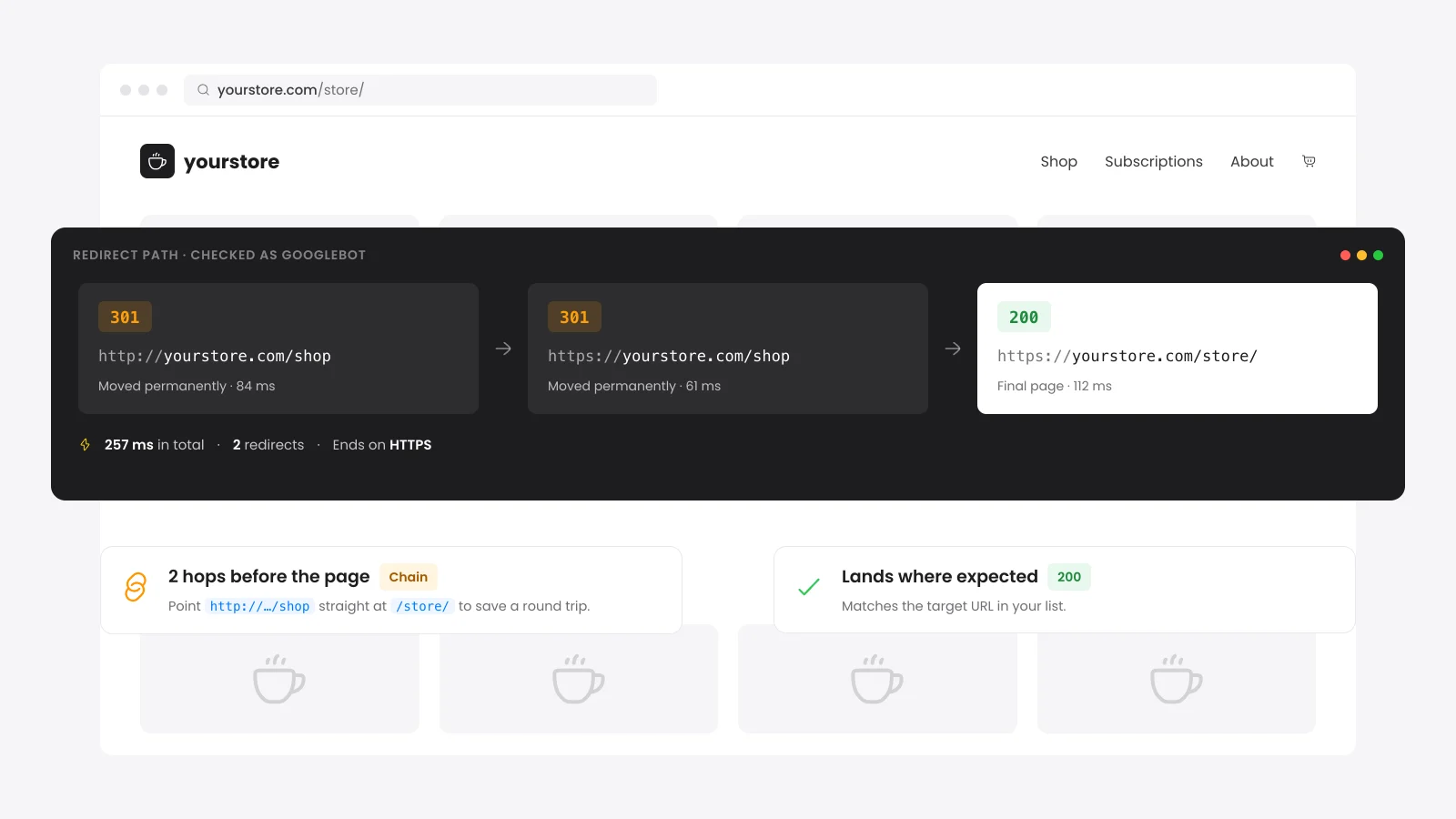
We flag any URL that takes two or more redirects to land. Each extra hop is another round trip for shoppers and crawlers.

Redirect loops

We flag a URL that leads back to an address already in its chain. Browsers show a too many redirects error and the page never loads.

Temporary redirects

The 302, 303 and 307 codes tell Google the move may not last. Google treats them as only a weak signal to rank the new URL.

Wrong destinations

Add the expected URL after a comma. Any redirect that lands somewhere else is flagged.

Dead ends and HTTPS drops

We flag chains that end on an error such as 404 or 500. URLs that never answer and HTTPS pages that fall back to HTTP get flagged too.

Meta refresh redirects

We read HTML meta refresh tags on pages that load with a normal 200 code. Google reads a delayed refresh as a temporary redirect.

What does a redirect checker do?

A redirect checker requests a URL and follows each redirect until it reaches a page that answers on its own. It lists every hop with its HTTP status code and the URL it points to. A bulk redirect checker runs the same trace for a whole list of URLs at once.

Browsers hide the hops. A shopper sees the final page and never learns it took a 301, a 302 and another 301 to get there.

This checker also reads the page that answers. It catches HTML meta refresh tags that header-only checkers miss. A JavaScript redirect is not run and shows as a 200 on the first URL.

301 vs 302 redirect: which one should you use?

Use a 301 when a page has moved for good and a 302 when the move is short term. Google treats 301 and 308 as a strong signal that the new URL should rank. It treats 302, 303 and 307 as a weak signal and may keep the old URL.

CodeMeaningWhen to use it
301Moved permanentlyPages that moved for good. The default for migrations.
308Permanent and keeps the request methodGoogle treats it like a 301. Useful for forms and APIs.
302Found (temporary)Short moves such as a seasonal page or maintenance.
303See otherSends the browser to a result page after a form post. Google treats it like a 302.
307Temporary and keeps the request methodGoogle treats it like a 302.

Google reads an instant meta refresh as permanent and a delayed one as temporary. It sees a JavaScript redirect only when the page renders. A server redirect is the safest choice.

How many redirects in a chain is too many?

One hop is the target for every redirect. Google's crawlers follow up to 10 hops, and Google's site move guide recommends no more than 3. Each extra hop adds a full round trip for the shopper and one more request for Googlebot.

The checker flags any URL with two or more redirects as a chain. Past 10 hops it stops and marks the row as an error.

How to fix redirect chains in WordPress

A redirect chain on a WordPress site often comes from rules that different plugins and hosts added at different times. A common one sends HTTP to HTTPS and then www to non-www in two separate hops. One combined rule in the server config removes that extra hop for every URL.

  • Server rules first: HTTPS and www redirects belong in .htaccess on Apache and LiteSpeed, or in the server block on Nginx. They run before WordPress loads.
  • Page redirects in a plugin: The Redirection plugin or the Rank Math Redirections module handle single pages with no code. Our guide shows how to redirect a page or URL in WordPress.
  • Point rules at the final URL: When a page moves twice, edit the first redirect to go straight to the newest address.
  • Check the CDN too: A redirect rule in Cloudflare or at your host runs before your server. It can stack with the same rule in .htaccess.
  • Update internal links: Menus and links in your own content should point at the final URL. Shoppers then never touch a redirect.

Does WordPress redirect a changed URL on its own?

WordPress redirects a changed URL on its own for posts and WooCommerce products only. When you change the slug of either, it saves the old slug and sends a 301 to the new address. Pages, product categories and tags get no such redirect, and their old URLs usually return a 404.

WordPress keeps every old slug of a post. A product renamed twice still sends both old URLs to the newest one in a single hop.

Pages and categories need a redirect from you. Paste their old addresses here after any rename to see which ones still land.

How do you check redirects after a site migration?

Export every old URL before the move, map each one to its new address and test the full list after launch. Paste the old URL, a comma and the expected new URL on each line here. The checker flags every row that lands anywhere else.

Include pages, posts, products, categories and any image or PDF that earns links. The match ignores letter case and a trailing slash.

Google advises keeping migration redirects for at least a year. Watch the Pages report in Search Console for Not found rows over the following weeks.
Sources

More free tools

More free tools for WordPress sites

FAQ

Redirect checker questions

Plain answers on redirect codes, chains and migrations.

Ask us a question

Yes. You can check up to 500 URLs per run with no account and no email. Each visitor gets 120 checks an hour, and a full 500-URL run in batches of 25 uses 21 of them.

Our server fetches each URL and keeps the result for 6 hours. That cache lets the summary and the AI fix list read the same run. There is no account and nothing is tied to your name.

Some servers, CDNs and security plugins answer search engine user agents differently from browsers. The Googlebot option sends Google's user agent from our server. A site that verifies Googlebot by IP address will treat it like a normal visitor.

A redirect loop. Two rules keep sending the browser back and forth, often an HTTPS setting in WordPress against a rule at the host or CDN. The checker shows which URLs bounce, and our guide to fixing ERR_TOO_MANY_REDIRECTS walks through the fixes.

No. It follows HTTP redirects and HTML meta refresh tags but does not run scripts.

A page that redirects with JavaScript shows as a 200 on the first URL. Open those pages in a browser to see where they land.

Google advises keeping them for at least one year. Links from other sites and old bookmarks keep sending visitors for much longer than that. Keeping the rules for good costs almost nothing.

Yes. Copy the old URL and expected URL columns from your sheet and paste them in.

A tab, comma or semicolon between the two all work. A URL without http or https is checked as https.

Planning a site move? Keep every redirect clean

We map your old URLs, write the redirect rules and run the full list through a redirect checker after launch. Shoppers and Google land on the right page from day one.

Support within hours A real person replies
14-day money back Fair terms
Always compatible Latest WP and Woo
Custom builds Made for your store

Why store owners pick us

What comes with every plugin you buy.

  • 26 premium WooCommerce plugins
  • 500+ five-star reviews
  • Served in 158+ countries
  • Elite Author on Envato
  • HPOS and latest Woo ready
  • Support that replies in hours
Pedro Lima, DevDiggers customer Kareem Al Samman, DevDiggers customer Valentina Dancheva, DevDiggers customer Diego Lopes, DevDiggers customer 5 star rating from 500+ reviews

Trusted worldwide

Store owners in 158+ countries run on DevDiggers.

Alan, DevDiggers customer Shiyanthan M, DevDiggers customer Pawel Pytasz, DevDiggers customer Marius, DevDiggers customer

Proven on Envato

Elite Author with $125,000+ in sales.