
What is a WordPress plugin readme.txt?
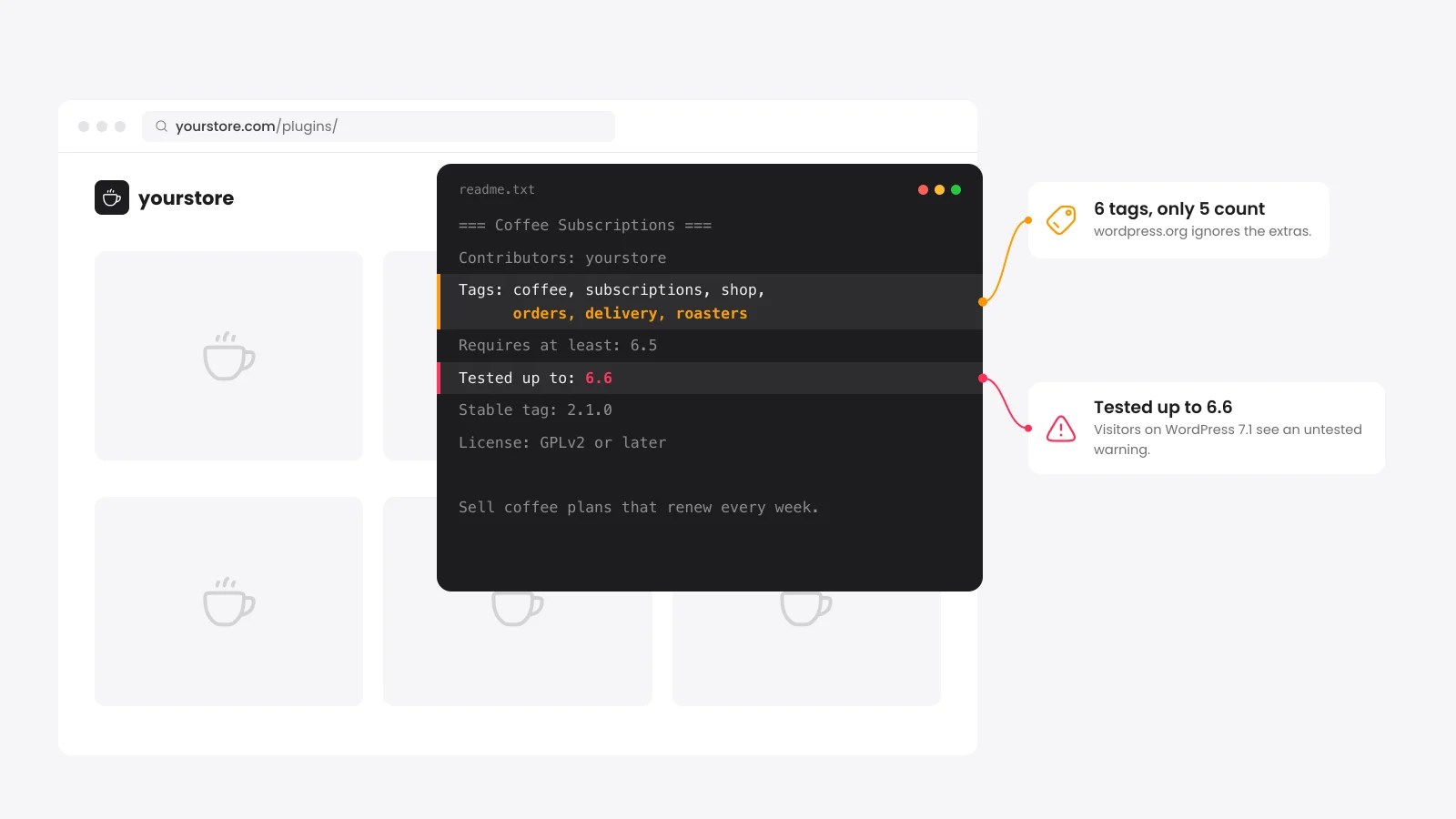
The readme.txt file in a plugin's main folder is the source of its wordpress.org page. The directory reads the plugin name, headers, short description and sections from it. Those sections become the Description, Installation, FAQ and Changelog tabs people see before they install.
The file uses a custom flavor of Markdown with its own header block. Small mistakes give no error message. A misspelled header is ignored and a sixth tag disappears.
The handbook also warns that a readme larger than 10 KB may cause errors. Keep the description plain and move old changelog entries out once the file grows.
Which readme.txt headers does wordpress.org read?
The headers sit under the plugin name as one "Name: value" pair per line. The directory reads Contributors, Donate link, Tags, Requires at least, Tested up to, Requires PHP, Stable tag, License and License URI. Any other name is ignored, including a typo such as "Tested up too".
| Header | Example | What it controls |
|---|---|---|
| Contributors | yourname, teammate | The wordpress.org accounts shown as authors. |
| Tags | woocommerce, checkout | Up to 5 browse tags. |
| Requires at least | 6.6 | The oldest WordPress version shown on the plugin page. |
| Tested up to | 7.1 | The newest WordPress major version you tested. |
| Requires PHP | 7.4 | The oldest PHP version shown on the plugin page. |
| Stable tag | 1.4.2 | The SVN tag folder people download. |
| License | GPLv2 or later | Must be GPLv2 or later compatible. |
Since WordPress 5.8, a site reads Requires at least and Requires PHP from your main plugin file header. The readme values only feed the directory page. Keep both files on the same numbers.
The Plugin Check plugin warns when the two disagree. Run it on your plugin before each release.
Why does my readme change not show on the plugin page?
The plugin page is built from the readme.txt inside the tag folder that your Stable tag names. With Stable tag 1.4.2, the directory reads tags/1.4.2/readme.txt and ignores trunk. Edit the readme in that tag folder and in trunk to see the change.
The handbook discourages "Stable tag: trunk" and no longer allows it for new plugins. With trunk, every commit goes straight to every site that updates and there is no tag to roll back to.
When you enter a slug, the validator above follows the same path. It reads trunk first and then the readme in the tag your Stable tag names. If that tag folder is missing, the report says so.
How long can a WordPress plugin readme be?
The short description can run to 150 characters and most sections to 2,500 words, with 5,000 words for FAQ and Changelog. Past these limits, the directory trims the text without rejecting the file. You only notice when the page ends mid-sentence.
- Short description: 150 characters with no markup. It shows under your plugin name in search results.
- Description, Installation and custom sections: 2,500 words each.
- FAQ and Changelog: 5,000 words each.
- Tag count: Only the first 5 tags count. The tags "plugin" and "wordpress" never count.
- Upgrade Notice: The official sample readme asks for 300 characters or fewer per version.
These are the limits in the directory parser as of October 2026. If your Changelog nears 5,000 words, move older releases into a changelog.txt file and link to it from the readme.
How do I update Tested up to without a new release?
Change the Tested up to line in the readme.txt of your current tag folder and in trunk and commit both. The plugin page picks up the new value with no version bump. Use the major version only, such as 7.1, because the directory adds minor releases for you.
The current release is WordPress 7.1.3 as of October 2026. The directory ignores a value newer than the next major version, and the validator flags it as an error. A value behind the current major version makes the plugin installer label it "Untested with your version of WordPress".
Official readme.txt validator or this one: which should you use?
Use both. The wordpress.org readme validator runs the real directory parser on a URL or a pasted file. This readme.txt validator follows the same rules and adds a plugin slug lookup, a score, fix steps under each row and a page preview.
There is one thing only the official tool can do. It checks that each name in Contributors is a real wordpress.org account. Ours checks the format of each name and cannot see the account list.
Our preview draws headings, lists, links and bold text. Tables and video embeds are not drawn. Check those on the official tool or a test listing.
How do I get a plugin ready for wordpress.org review?
Pass the readme checks above and run Plugin Check on the plugin code. Pick a name that follows guideline 17 and a slug you can live with. The review team approves the slug once, and the Plugin Developer FAQ says it cannot be changed later.
Guideline 17 does not allow a slug that starts with someone else's trademark. "Acme Wallet for WooCommerce" is fine for most authors. "WooCommerce Wallet" is not.
If you are building your first extension, our guide to WooCommerce plugin development covers the plugin file header and folder layout.


 from 500+ reviews


