
What does a WordPress vulnerability scanner check?
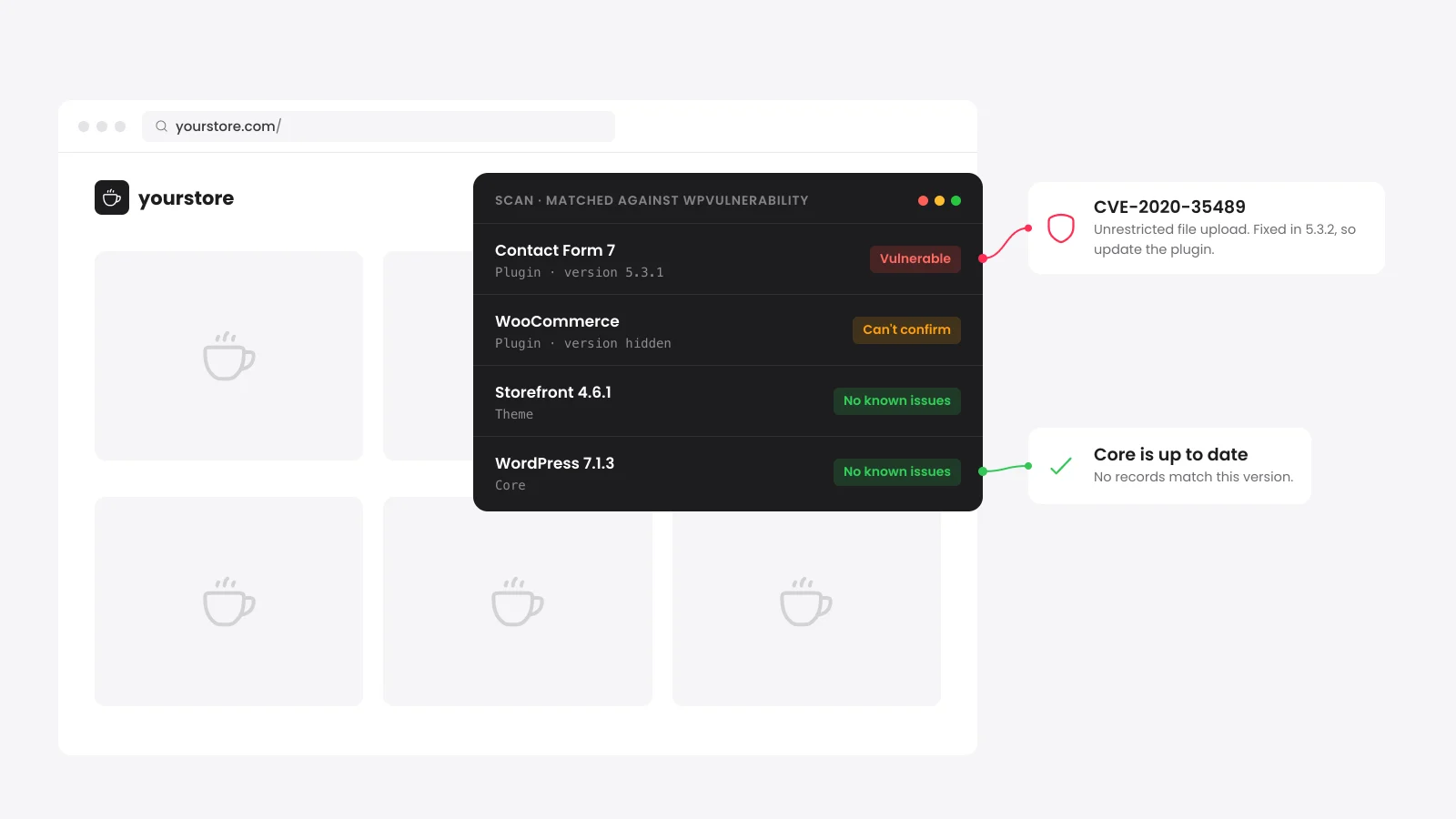
A WordPress vulnerability scanner finds the software a site runs and checks each version against a list of known security holes. This one reads the WordPress core version, the active theme and every plugin it can see. Each match comes with its severity and the version that fixes it.
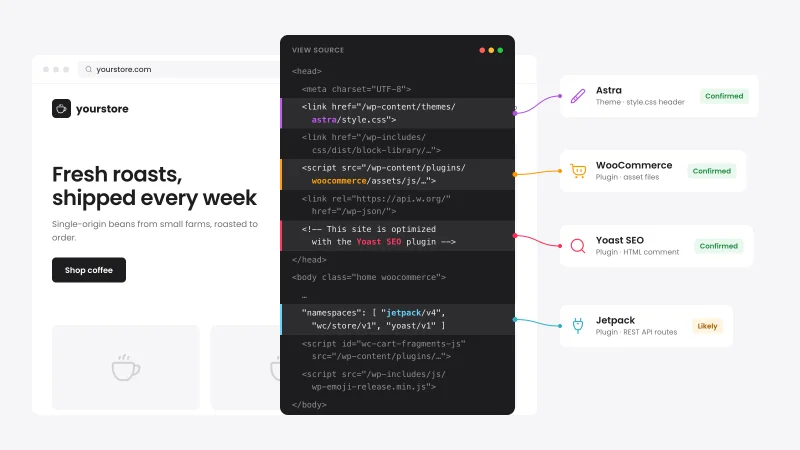
It works from the outside. It reads the public homepage, the theme's style.css and the REST API index, the same files any visitor can load.
It does not log in or send attack traffic. It also does not test passwords or scan files for malware.
Where does the vulnerability data come from?
The scanner reads the free WPVulnerability database at wpvulnerability.net. As of October 2026, its records link to CVE entries, the EU vulnerability database and advisories from Wordfence, WPScan and Patchstack. One lookup covers the main WordPress security feeds for core, themes and plugins at once.
Records are cached on our server for 12 hours per plugin, theme or core release. A flaw published this morning can take up to half a day to show here.
Why does the scanner say it can't confirm a version?
A plugin shows Can't confirm when it has known flaws in some versions but the site does not show which version it runs. Without a version there is no proof either way. We flag the plugin for a manual check and never call it vulnerable on a guess.
Versions come from the ?ver= number on each plugin's CSS and JavaScript files. Three things hide that number on WordPress and WooCommerce sites.
- Core's version on plugin files: Many plugins load assets with the WordPress version in ?ver=. When the number equals the core version we treat it as unknown.
- Combined or minified files: Cache plugins merge CSS and JavaScript into one bundle. That strips the plugin folders and their version numbers.
- Build hashes: Some plugins use a timestamp or file hash in place of a release number. Only real release numbers count.
To settle a Can't confirm row, open Plugins > Installed Plugins in wp-admin and read the version. Compare it with the fixed versions linked in the report.
What do CVSS severity scores mean?
CVSS is a score from 0 to 10 that rates how easy a flaw is to exploit and how much harm it can do. The severity bands come from the CVSS v3.1 specification published by FIRST. The scanner sorts matches by severity with the worst first.
| Score | Severity | What to do |
|---|---|---|
| 9.0 to 10 | Critical | Update today. |
| 7.0 to 8.9 | High | Update within days. |
| 4.0 to 6.9 | Medium | Update in your next maintenance window. |
| 0.1 to 3.9 | Low | Update with your regular updates. |
Read the score with the record. A flaw that needs an admin login is less urgent on a site with one admin than one any visitor can trigger.
The security score at the top starts at 100. Each vulnerable component costs 30 points for a critical flaw, 25 for high, 15 for medium and 8 for low. Each hidden version costs 2 more points, up to 10.
How do I fix a vulnerable WordPress plugin or theme?
Update the plugin or theme to the fixed version shown in the report, or to any newer release. The report shows that version on each row whose record names one. Rows with no fixed version need a replacement plugin instead.
- Back up first: Take a full backup of files and database before any update.
- Update core: Go to Dashboard > Updates and install the latest WordPress release.
- Update plugins and themes: Use Plugins > Installed Plugins and Appearance > Themes. Premium plugins update from the vendor's license screen.
- Test on staging: A WooCommerce store should test big updates on a copy of the site and place a test order.
- Turn on auto-updates: Since WordPress 5.5, you can switch on automatic updates for each plugin and theme.
- Replace what is abandoned: A plugin closed on wordpress.org or a flaw with no fix needs a maintained replacement.
Is an outside scan enough for a WooCommerce store?
An outside scan is a fast first check that needs no access to the site. It cannot see plugins that load nothing on public pages or confirm hidden versions. A store that takes payments needs an inside scan and a malware check on top of it.
| Check | What it sees | What it misses |
|---|---|---|
| Outside scan (this tool) | Core, theme and front-end plugins on the homepage | Admin-only plugins and hidden versions |
| Scan from inside wp-admin | Every installed plugin with its exact version | Malware that is already on the server |
| Malware scan of files | Injected code, backdoors and changed core files | Flaws that nobody has used yet |
Our WooCommerce security checklist covers the store-side settings a scanner cannot see. If the site already shows signs of a break-in, start with how to tell if WordPress is hacked.


 from 500+ reviews


