
What is a good meta description length?
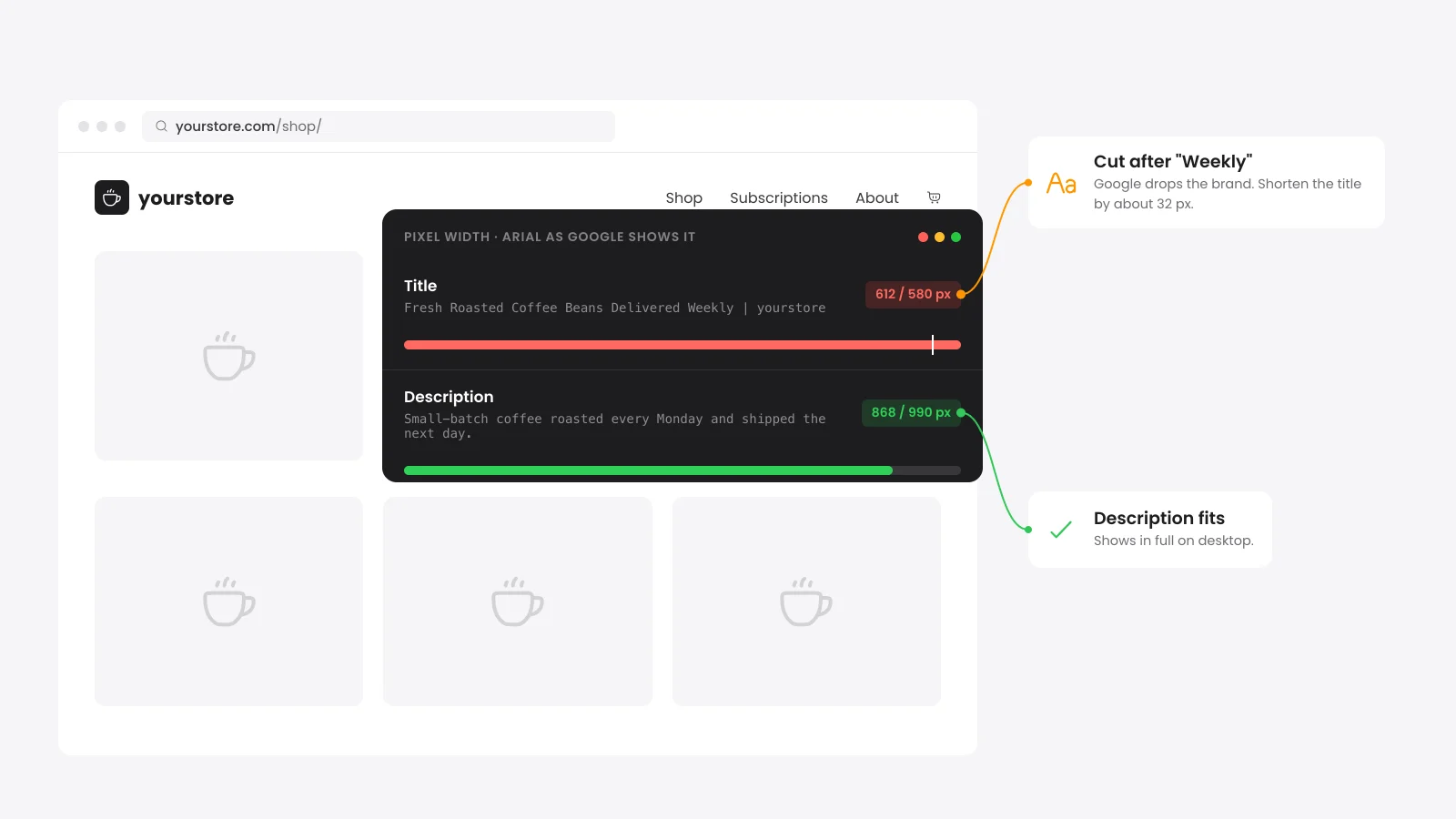
A good meta description is about 120 to 155 characters and fits inside about 990 pixels on desktop. Google sets no length limit and trims each snippet to the screen width. On a phone that leaves about 680 pixels for your main point.
Wide letters and capitals fill the space sooner. A 150-character description in plain lowercase may fit when one full of capital W and M letters does not.
Write one or two sentences that say what the visitor gets. Google suggests details such as price or author over a string of keywords.
How long should a title tag be?
Keep a title tag under about 580 pixels (roughly 50 to 60 characters). Google says it sets no limit on title length and trims title links to fit the device width. Put the topic first so a cut removes only your brand name.
MDN gives the same advice in characters. It says search engines show about the first 55 to 60 characters and the important words should come early.
Why does a meta description checker measure pixels?
A meta description checker measures pixels because Google cuts snippets by their width on screen. In Arial at 20px, an i is 4 pixels wide and a W is 19. Two titles with the same character count can land on different sides of the cut.
Google publishes no pixel numbers. Other checkers use their own estimates and some use 920 pixels for desktop descriptions. Ours uses 580 for titles, 990 for desktop descriptions and 680 for phones.
| Letter | Width at 20px | What it means |
|---|---|---|
| W | 19 px | Wide capitals use up the limit fast. |
| m | 17 px | Some lowercase letters are wide too. |
| a | 11 px | Most lowercase letters sit near this width. |
| i | 4 px | Narrow letters let more text fit. |
Why does Google rewrite titles and descriptions?
Google rewrites a title when it thinks the tag does a poor job of describing the page. It builds most snippets from page text and uses your meta description when that describes the page better. A clear and unique tag gives Google less reason to replace it.
- Half-empty titles: The title holds only the site name or a single word.
- Boilerplate titles: Many pages share one title with a single detail changed.
- Site name twice: You typed the brand into the title and the SEO plugin adds it again.
- Out of date or wrong: The title names last year or a product the page no longer sells.
- Keyword lists: A description that strings keywords together tells the reader nothing about the page.
How to fix titles and meta descriptions in WordPress
A custom title and meta description in WordPress need an SEO plugin such as Rank Math, Yoast or All in One SEO. Each one adds title and description fields under the editor. Set one template for each content type and hand-write the snippets for your most important pages.
A live URL check reads the page head and catches problems a typed-text check cannot see, such as two title tags. These four fixes cover the WordPress side.
- Two sets of tags: Two SEO plugins or a theme that prints its own title give Google two choices. Keep one plugin and follow our guide to fix duplicate title tags in WordPress.
- Brand first: A template like "Store Name | %title%" puts the topic at the end where phones cut it. Move the brand to the end in the plugin's title settings.
- WooCommerce products: Hand-write descriptions for your best sellers with price or delivery details. Let the template cover the rest of the catalog.
- Social previews: Turn on Open Graph output in your SEO plugin. Facebook, LinkedIn and Slack then show your own title and description.
Does the meta description affect rankings?
Google said in September 2009 that it uses the description tag for snippets and not for ranking. A good description still wins clicks, since it is often the text people read under your title. Treat it as ad copy for the page.
Google also says each page should have its own description. Large stores can build them from product data as long as they read like a person wrote them.
For the full list of tags worth adding, see our guide on how to add meta tags in WordPress.


 from 500+ reviews


