
What does a WordPress speed test measure?
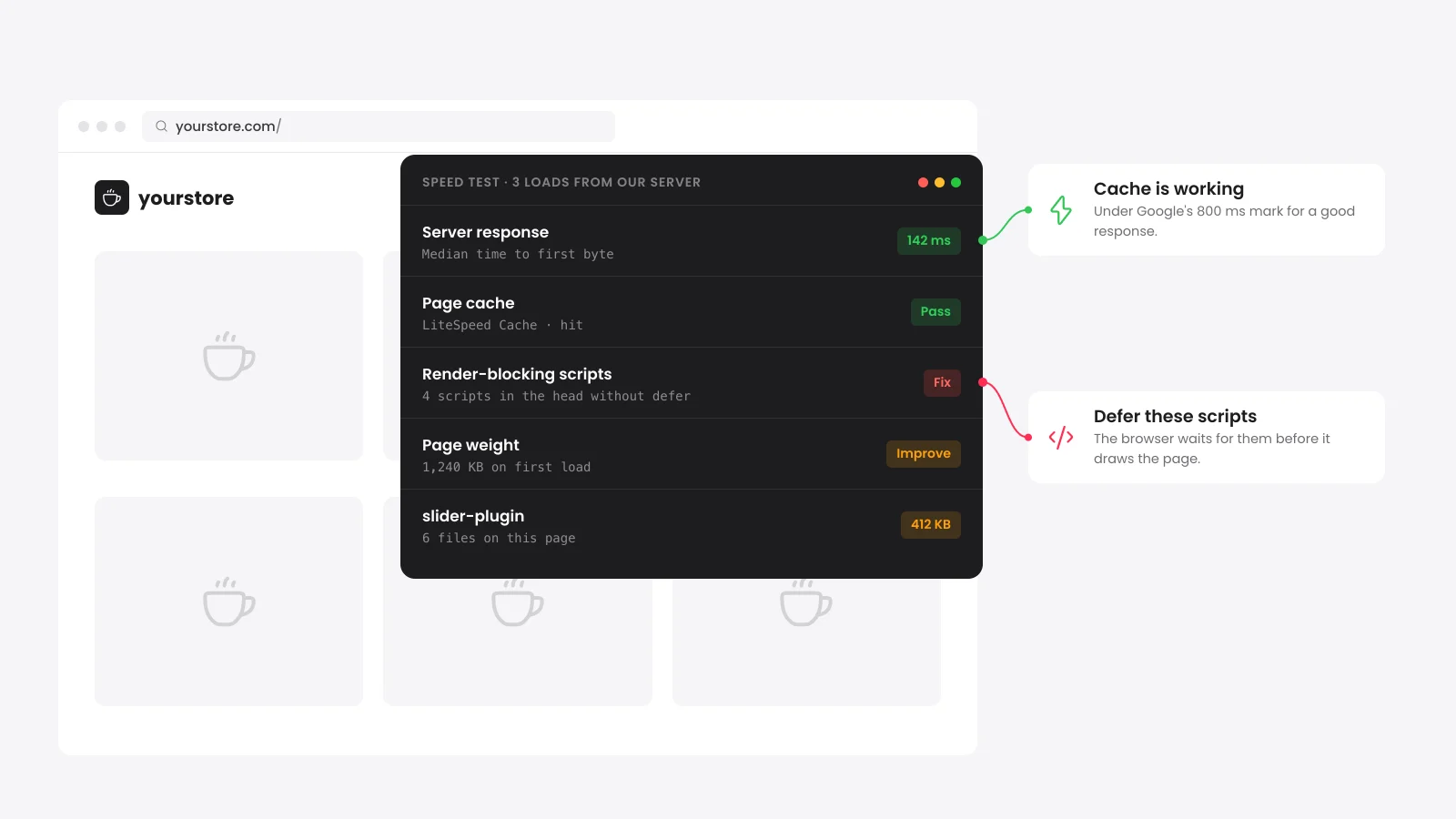
A WordPress speed test loads your page and times how long the server takes to answer. It then adds up what the browser must download before the page appears. This one also reads the page code for common WordPress causes of a slow site: no page cache, blocking scripts and heavy plugins.
The test runs from our server as a logged-out visitor. It loads the HTML and fetches up to 60 of the files the page asks for. It does not run JavaScript or paint the page in a browser.
That means it cannot report Core Web Vitals such as Largest Contentful Paint. Use Google PageSpeed Insights for those, and use this report to find the cause behind a poor score.
What is a good server response time for WordPress?
Google's web.dev guide calls a time to first byte of 0.8 seconds or less good and anything over 1.8 seconds poor. WordPress sets a stricter bar. Since version 6.1, its Site Health screen treats 600 milliseconds or less as a good response time.
| Time to first byte | Rating in this test | What it usually means on WordPress |
|---|---|---|
| 0.8 s or less | Pass | A page cache answered or the server is quick. |
| 0.8 to 1.8 s | Improve | No page cache, or the cache missed on this load. |
| Over 1.8 s | Fix | Slow plugins, heavy database queries or a crowded server. |
Google does not count TTFB as one of the Core Web Vitals. It still matters because every other metric waits for it.
The number moves between loads with server load and cache misses. That is why the test loads the page three times and reports the middle result.
How do I check if my WordPress page cache is working?
Load the page as a logged-out visitor and read the response headers. A cached page carries a header such as cf-cache-status or x-litespeed-cache with the value HIT. The test above does this for you and names the cache it finds.
Cache plugins skip the page cache for logged-in users by default. A check in the browser where you are logged in to wp-admin will look uncached.
| Header | Set by | A cached page shows |
|---|---|---|
| cf-cache-status | Cloudflare | HIT |
| x-litespeed-cache | LiteSpeed Cache | hit |
| x-cache | Fastly and many hosts | HIT |
| x-proxy-cache | Nginx proxy caches | HIT |
| x-cache-enabled | Hosts that report their cache | true |
WP Rocket and WP Super Cache can mark a cached page with an HTML comment in place of a header. The test reads those comments too.
WooCommerce asks you to keep the cart, checkout and my account pages out of the cache. A "no page cache" result on those pages is correct. Test a product or category page to judge your cache.
WordPress runs a similar check under Tools > Site Health. It looks for these headers and warns when the page cache is missing or the response is slow.
How to speed up a WordPress site
Work from the server outward because server and cache fixes speed up every page at once. Image and script fixes help one template at a time, such as your product pages. Run the test after each change to see which fix moved the number.
- Turn on a page cache: LiteSpeed Cache, WP Rocket, FlyingPress or your host's cache serve a ready page without running PHP.
- Add a CDN: Cloudflare has a free plan that serves your files from a location near each visitor.
- Defer JavaScript: Scripts in the head stop the page from drawing until they finish.
- Unload unused plugin files: A contact form plugin does not need its CSS on every product page.
- Resize and convert images: Serve WebP or AVIF at the size the image shows on screen.
- Upgrade PHP: WordPress recommends PHP 8.3 or newer as of October 2026. Most hosts let you switch it in the hosting panel.
For a longer walk through each cause, read our guide on why a WordPress site is slow.
Do plugins slow down WordPress?
Plugins slow WordPress down when they run slow code on each request or load files on pages that do not need them. The plugin count matters less than what each one does. One heavy plugin can cost more than several small ones put together.
The test groups every CSS and JavaScript file by the plugin folder it comes from. It lists the ten heaviest with their file count and size in KB.
Start with the heaviest plugin you do not need on that page. On a store, look at slider and form plugins that load on product pages. Our WooCommerce speed guide covers the store-specific fixes.
Does page speed affect Google rankings?
Google says good Core Web Vitals line up with what its core ranking systems reward. Those metrics come from real Chrome visitors at the 75th percentile, split by phone and desktop. A lab test like this one finds causes but does not decide rankings.
The good thresholds are Largest Contentful Paint within 2.5 seconds and Interaction to Next Paint within 200 milliseconds. Cumulative Layout Shift should be 0.1 or less.
Check the Core Web Vitals report in Google Search Console for your real numbers. A slow server response holds back Largest Contentful Paint. Fixing the rows in this test can move that report too.


 from 500+ reviews


