WordPress 7.0 shipped on May 20, 2026, under the name Armstrong, after a delay from its planned April 9 date. It brought an AI Client, a Connectors screen, a refreshed admin and Visual Revisions. It did not include real-time collaboration.
We checked the release against real files. We downloaded the 7.0 and 6.9.9 packages from WordPress.org, compared them and read the requirements straight from version.php. Where the official notes and the files disagree with older articles, this guide follows the files.
Below you get the changelog, the requirements, what WooCommerce stores need to know and whether to update now. WordPress 7.1 has since replaced 7.0 as the current version, so the last sections cover that too.
What Is WordPress 7.0 and When Was It Released?
WordPress 7.0 is a major release, named Armstrong, and it was released on May 20, 2026. WordPress.org announced it as WordPress 7.0 “Armstrong”. It raised the minimum PHP version to 7.4 and added an AI Client to core, which older releases do not have.
The release slipped from its original April 9 target. The 7.0 release schedule shows Beta 1 on February 19 and Release Candidate 1 on March 19. Later candidates ended with RC 5 on May 19.
| Milestone | Date |
|---|---|
| Beta 1 | February 19, 2026 |
| Release Candidate 1 | March 19, 2026 |
| Release Candidate 3 | May 8, 2026 |
| Release Candidate 4 | May 14, 2026 |
| Release Candidate 5 | May 19, 2026 |
| Release | May 20, 2026 |
Why WordPress 7.0 was delayed
The delay came from real-time collaboration.
On May 8, the core team removed the feature from 7.0. The post says the team was not confident the approach was solid enough for core. It listed concerns about race conditions, server load and memory.
That is why RC 3 on May 8 worked like a new beta. Older articles that promise real-time editing in 7.0, including an earlier version of this one, are out of date.
WordPress 7 Changelog: What Shipped in 7.0
The WordPress 7.0 changelog is led by an AI Client, a Connectors screen, a refreshed admin, Visual Revisions and new blocks. The official announcement also lists block-level custom CSS and hide-by-device controls. Below is what each change does and where you see it.
| Change | What it does | Where you see it |
|---|---|---|
| AI Client | Gives plugins a core API for calling AI providers | Behind the scenes |
| Connectors screen | Stores provider credentials once for all plugins | Settings, then Connectors |
| Admin refresh | New look and color scheme for the dashboard | Every admin screen |
| Visual Revisions | Scrub through past versions of a post | The editor’s revisions panel |
| New blocks | Breadcrumbs, Icons and a Heading update, plus a Gallery lightbox | The block inserter |
| Responsive controls | Hide or show a block by device | Block settings |
The AI Client and the Connectors screen
The AI Client is a core API that plugins use to call AI providers. The Connectors screen is where you store the credentials those plugins use. Both are new in 7.0, and nothing connects until you install a provider.
We saw them in the files and on screen. The 7.0 package adds wp-includes/ai-client.php, connectors.php and a php-ai-client folder of 215 files. The Connectors screen in a 7.0 test site lists Anthropic, Google and OpenAI, each with an Install button.
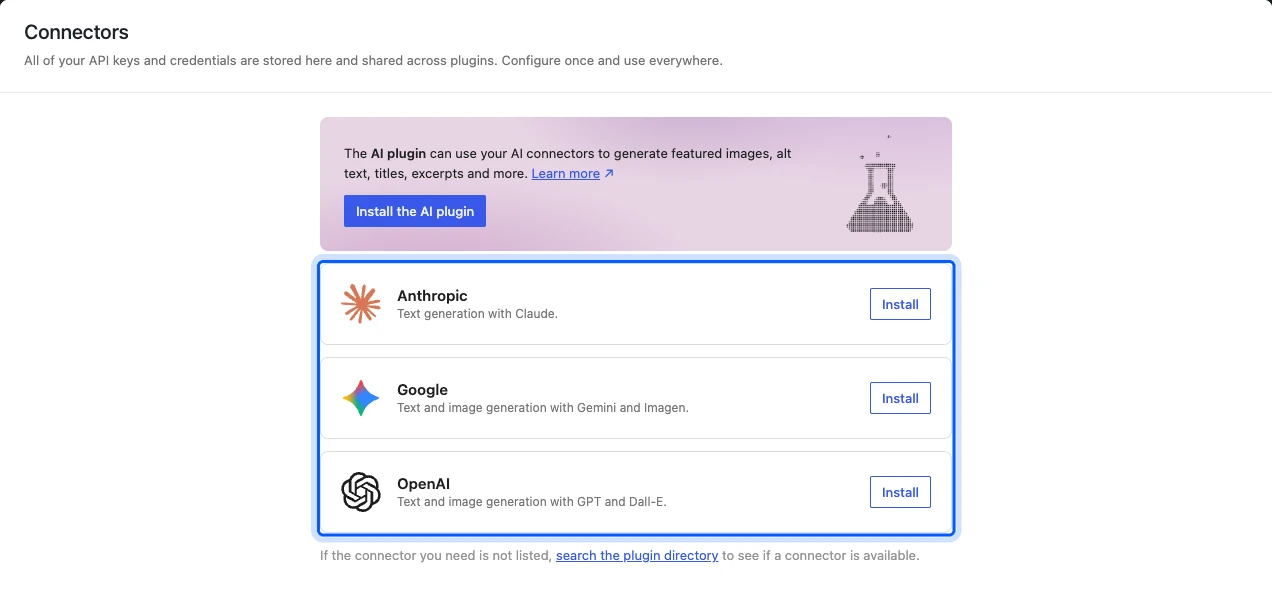
The screen says API keys and credentials are stored once and shared across plugins. Treat those keys like passwords. If you run a chatbot, our roundup of the best WordPress chatbot plugins lists options to compare before you connect a provider.
The Abilities API is older than 7.0
Many guides list the Abilities API as a 7.0 feature, but it is not one. We found wp-includes/abilities-api.php and its registry classes in the 6.9.9 package as well.
WordPress 7.0 builds on the Abilities API and did not introduce it. Any article that dates the API to 7.0 is a release behind.
Admin refresh and Visual Revisions
The 7.0 dashboard has a new color scheme and a modernized look. Visual Revisions add a scrubber interface that lets you step through earlier versions of a post.
The visual change is easy to test on a staging site. Open a long post, click the revisions control and drag the scrubber. If your team relies on custom admin CSS, check it there first.
New blocks and editor changes
The release notes name a Gallery lightbox, a Heading update, Breadcrumbs and Icons. The files agree on the block count.
The 6.9.9 package has 106 block folders and the 7.0 package has 109. The three new folders are breadcrumbs, icon and navigation-overlay-close.
| Package | Block folders | New since the last version |
|---|---|---|
| WordPress 6.9.9 | 106 | Not applicable |
| WordPress 7.0 | 109 | breadcrumbs, icon, navigation-overlay-close |
| WordPress 7.1.2 | 115 | playlist, playlist-track, tab-list, tab-panel, tab-panels, tabs |
Note: Block folders count files and do not list features. A change to an existing block, such as the Heading or Gallery updates, does not add a folder.
What Happened to Real-Time Collaboration?
Real-time collaboration did not ship in 7.0, and it is not in 7.1 either. The core team is now testing a server-aware design that sends every edit through WordPress. As of its September 18, 2026 post, the team calls the work early and not ready for core.
The September update says collaborators would no longer exchange updates with each other directly. They would send updates to WordPress instead. The team lists three candidate sync engines and keeps the work in an exploratory plugin.
For editing with a team today, WordPress 7.1 added richer Notes with mentions and inline feedback. That is asynchronous review, which is different from two people typing in one post at once.
What WordPress 7.0 Changes for Developers
For developers, WordPress 7.0 adds a core AI Client, a Connectors registry, server-side block creation and block-level custom CSS. The official announcement lists all four. The Field Guide collects the developer notes, so read it before you update a custom plugin or theme.
The official announcement says you can create blocks and patterns on the server using only PHP. It also lists an extensible Site Editor and block-level custom CSS. These change how you build, but none of them breaks existing blocks.
The 7.0 package also adds new PHP files at the top of wp-includes. We found ai-client.php, connectors.php, class-wp-connector-registry.php, class-wp-icons-registry.php and view-transitions.php. If a plugin of yours loads a file with one of those names, check for a clash on staging.
The 7.0 Field Guide links every developer note for the release. Search it for hooks your plugin uses before you update a client site.
WordPress 6 vs 7: What Changed Between 6.9.9 and 7.1.2
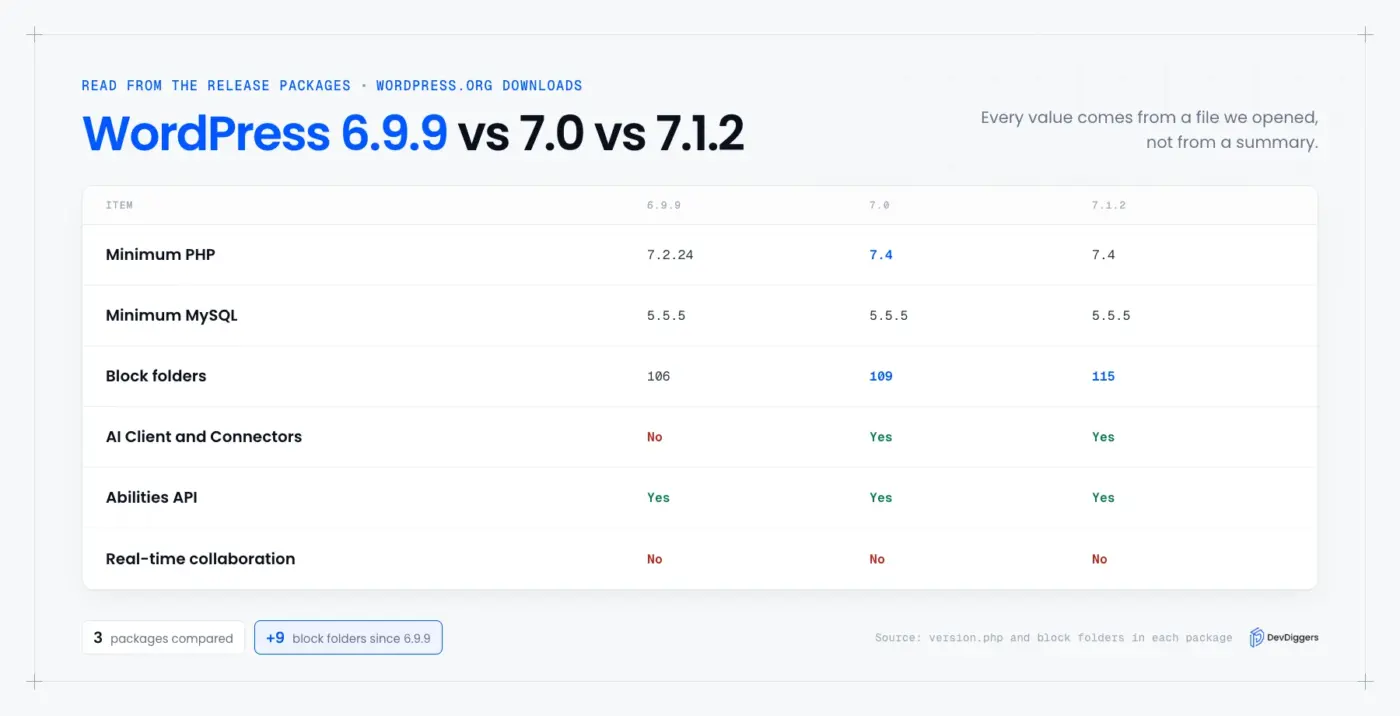
Between 6.9.9 and 7.1.2, WordPress raised its PHP minimum from 7.2.24 to 7.4 and added an AI Client, a Connectors screen and nine block folders. The Abilities API was already in 6.9.9. The MySQL minimum stayed at 5.5.5 throughout every release.
| Item | WordPress 6.9.9 | WordPress 7.0 | WordPress 7.1.2 |
|---|---|---|---|
| Minimum PHP | 7.2.24 | 7.4 | 7.4 |
| Minimum MySQL | 5.5.5 | 5.5.5 | 5.5.5 |
| Abilities API | Yes | Yes | Yes |
| AI Client and Connectors | No | Yes | Yes |
| Block folders | 106 | 109 | 115 |
| Real-time collaboration | No | No | No |
We built this table from the release packages themselves. Each value comes from a file we opened, so it does not depend on anyone’s summary of the release.
WordPress 7.0 System Requirements
WordPress 7.0 needs PHP 7.4 or higher and MySQL 5.5.5 or higher. Version 6.9.9 accepted PHP 7.2.24, so 7.0 raised the floor for every site. Two PHP extensions are required, json and hash, and the same minimums apply to WordPress 7.1.2.
We read these numbers from wp-includes/version.php in each package and from the WordPress.org version-check API.
| Version | Minimum PHP | Minimum MySQL | Required PHP extensions |
|---|---|---|---|
| 6.9.9 | 7.2.24 | 5.5.5 | json, hash |
| 7.0 | 7.4 | 5.5.5 | json, hash |
| 7.1.2 | 7.4 | 5.5.5 | json, hash |
If your host still runs PHP 7.2 or 7.3, you cannot take 7.0 or later. Ask for a PHP upgrade first. Our guide on whether PHP is still relevant helps you decide which version to move to.
The size of the change is easy to measure in the WordPress.org release archive packages. The wp-includes folder holds 2,610 files in 6.9.9 and 3,283 in 7.0. Of the 673 added files, 215 sit in the new php-ai-client folder.
WordPress 7.0 for WooCommerce Stores
WooCommerce 11.1.2 requires WordPress 7.0 or higher, according to the plugin header on our test site. It is tested up to WordPress 7.1 and needs PHP 7.4. If your store still runs WordPress 6.9, it cannot take this version of WooCommerce.
Check three things before you update a store: your PHP version, your theme and your payment or shipping plugins. Test checkout on a staging copy, and place one real test order after the update.
A short checklist keeps the test honest:
- Cart and checkout: Add a product, apply a coupon and pay with each active gateway in test mode.
- Emails: Confirm the new-order and customer emails still send.
- Custom code: Search your child theme and custom plugins for any function the Field Guide flags.
- Backups: Take a fresh database backup right before you update production.
Our WooCommerce plugins page lists everything we build. Read each plugin’s changelog for the WordPress and WooCommerce versions it supports.
How to Check Which WordPress Version You Run
You can check your WordPress version in three places: the Updates screen, the command line or the version.php file. The Updates screen shows it at the top as Current version. The other two work when you cannot log in, so keep both in mind.
- Dashboard: Go to Dashboard, then Updates. The heading reads Current version, followed by the number.
- WP-CLI: Run
wp core versionon the server. On our test copy of this site it printed7.1.2, and the--extraflag also printed database revision 61833. - File: Open
wp-includes/version.phpand read the$wp_versionline. This is the source of truth, and it is the file we used for every number in this guide.
The database revision is worth a glance. It is 61833 in both the 7.0 package and 7.1.2, so moving between them needs no database schema step. That is one reason the update from 7.0 to 7.1 is usually quick.
Tip: Do not trust a version number printed in a page’s source. Many sites hide it, including ours, and a stale cache can show an old one.
Should You Update to WordPress 7.0 or 7.1 Now?
Update to the newest stable version, which is WordPress 7.1.2 as of September 29, 2026, once your host runs PHP 7.4 or higher. The WordPress.org update check also offers 7.0.6 and 6.9.9 as maintenance releases for older branches. Sites on those branches stay supported while you plan the jump.
We asked the version-check API which versions it offers. It returned 7.1.2 as the current release, 7.0.6 for the 7.0 branch and 6.9.9 for the 6.9 branch.
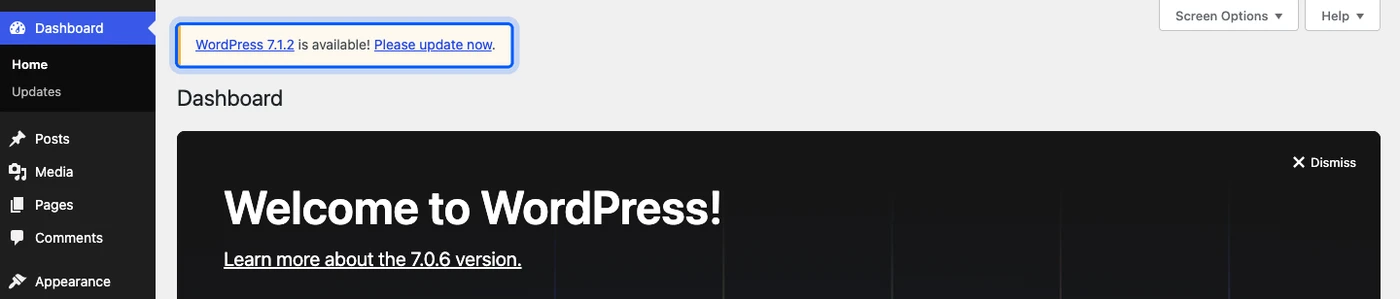
A test site running 7.0.6 shows the offer on its Updates screen. The dashboard also prints a notice that WordPress 7.1.2 is available.

How to update safely
Follow the same order every time. It takes about 30 minutes and it prevents most bad updates.
- Back up: Save the database and the files, and confirm you can restore them.
- Check PHP: Confirm the host runs PHP 7.4 or higher.
- Update on staging: Run the update on a copy of the site first.
- Test key paths: Log in, edit a post, check the front page and place a test order.
- Update production: Run the update, then clear your page cache.
If you would rather not manage this yourself, a WordPress care plan usually covers backups, updates and testing. Our WordPress version history lists every release if you need to see where your version sits.
What Is New After 7.0: WordPress 7.1
WordPress 7.1, named Mary Lou, was released on August 19, 2026. The 7.1 announcement lists responsive styling controls, a new media editor, richer Notes and new Playlist and Tabs blocks. It also lists image processing in the browser and support for AVIF, HEIC and HDR formats.
The block files match. The 7.1.2 package adds playlist, playlist-track, tab-list, tab-panel, tab-panels and tabs folders, six in total. Every WordPress 7.0 site can take 7.1 with no change to the PHP or MySQL minimums.
Conclusion
WordPress 7.0 shipped on May 20, 2026 with an AI Client, Connectors, an admin redesign and Visual Revisions. Real-time collaboration was cut, and PHP 7.4 became the minimum.
The version to run today is 7.1.2. Update after a backup and a staging test, and check your PHP version first. For a WooCommerce store, remember that WooCommerce 11.1.2 already requires WordPress 7.0.
WordPress still loads every request through index.php. Our guide to what index.php does in WordPress explains that file if you edit a root folder by hand.
Frequently Asked Questions (FAQs)
Q1. What is the latest version of WordPress?
As of September 29, 2026, the WordPress.org version-check API returns WordPress 7.1.2 as the current release. It also offers 7.0.6 and 6.9.9 for older branches. WordPress 7.1 was released on August 19, 2026.
Q2. When was the WordPress 7 release date?
WordPress 7.0 was released on May 20, 2026. The original target was April 9. The date moved after the core team removed real-time collaboration on May 8, as the Make WordPress Core post explains.
Q3. What is new in WordPress 7.0?
The headline changes are the AI Client, the Connectors screen, a refreshed admin, Visual Revisions and new blocks. The official announcement lists the full set.
Q4. Does WordPress 7 have real-time collaboration?
No. Real-time collaboration was removed before the 7.0 release, and WordPress 7.1 did not add it. The core team is testing a server-aware design in an exploratory plugin.
Q5. What PHP version does WordPress 7 require?
WordPress 7.0 requires PHP 7.4 or higher, and MySQL 5.5.5 or higher. WordPress 6.9.9 accepted PHP 7.2.24. We read both numbers from version.php in the release packages.
Q6. How do I migrate to WordPress 7 safely?
Back up the site, confirm PHP 7.4 or higher and update a staging copy first. Then test login, editing and checkout before you update production. Clear the page cache afterwards.
Q7. Should I upgrade to WordPress 7 or wait?
Upgrade to the current stable release once your host meets the PHP minimum and your plugins are compatible. WooCommerce 11.1.2 already requires WordPress 7.0 or higher, so a store on 6.9 will miss later WooCommerce updates.