

The best WooCommerce shipping plugin for most stores is Flexible Shipping, because its free version prices orders by cart weight and total. Weight Based Shipping is the simpler pick for per pound pricing, and carrier plugins cover live rates and labels.
We tested eight options on our WooCommerce 11.2 test store running WordPress 7.1 in October 2026. Each free plugin ran alone, with one real rule, against the same guest carts of ceramic mugs weighing 1, 2.5 and 4 pounds. Paid tools and carrier accounts we could not connect were judged from their own docs and listings.
Below you will find a quick comparison table, our test method and what WooCommerce does with no plugin at all. Then come the eight plugins, a cost breakdown, a buying checklist and the surprises our test carts turned up.
Quick Comparison of the Best WooCommerce Shipping Plugins
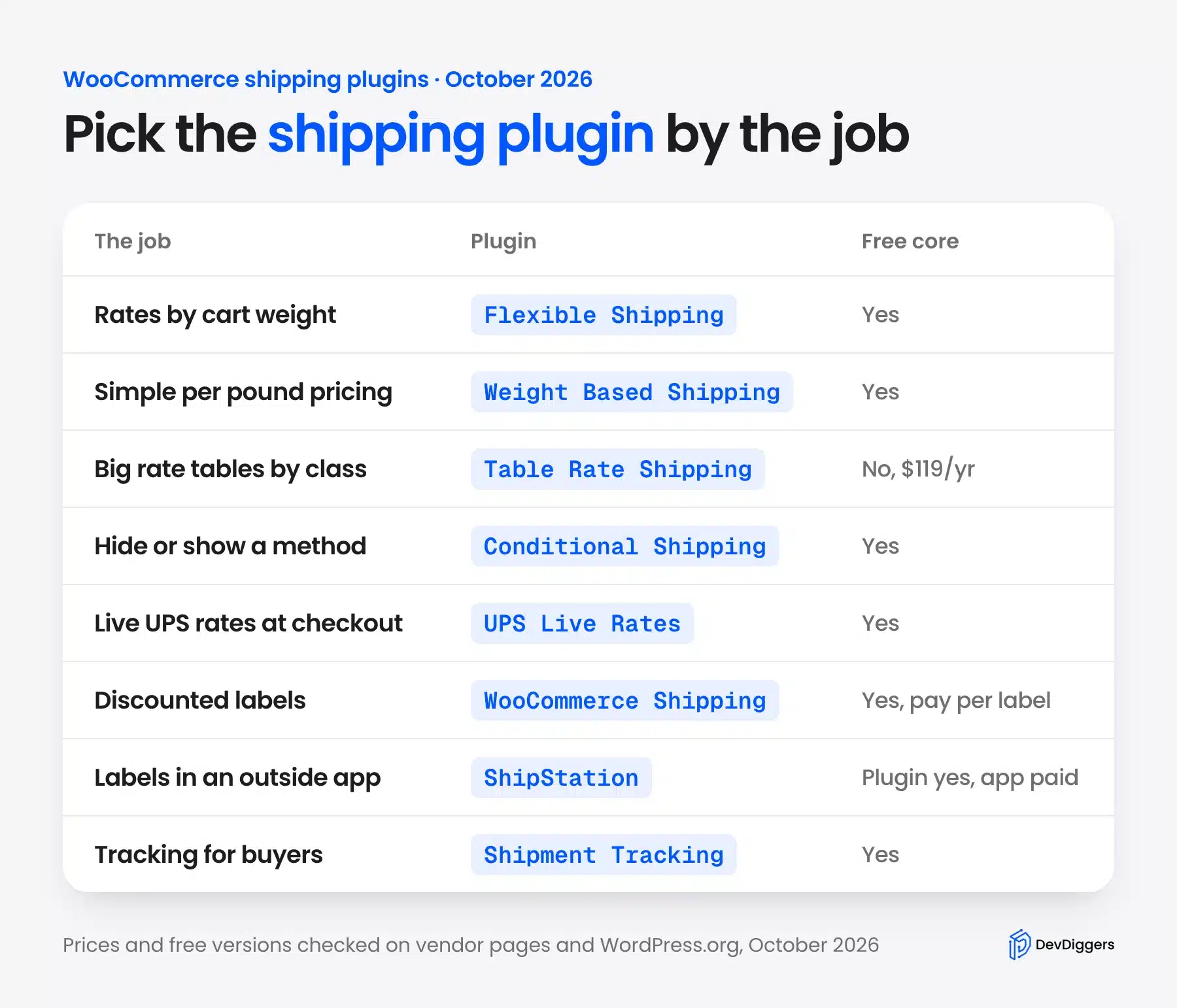
The best WooCommerce shipping plugins split into four jobs: rate rules, live carrier rates, label printing and tracking. Most stores need one rate rules plugin and maybe one label or tracking tool. The table shows each plugin’s job, its free version and the paid price we found on 10 October 2026.
| Plugin | Main job | Free version | Paid price (October 2026) | Our test |
|---|---|---|---|---|
| Flexible Shipping | Weight and cart total rules | Yes | PRO from $99 a year | 5 lb cart charged $12.00 |
| Weight Based Shipping | Weight brackets and per pound rates | Yes | Pro $29 for one site | 7.5 lb cart charged $6.00 |
| Conditional Shipping | Hide or show methods | Yes | Pro from $59 | Freight only above 5 lb |
| WooCommerce Shipping | Discounted labels | Yes, pay per label | None | Needs a WordPress.com connection |
| Table Rate Shipping | Big rate tables by class | No | $119 a year | Docs only |
| UPS Live Rates | Live UPS rates at checkout | Yes | PRO $79 a year | Needs UPS API keys |
| ShipStation for WooCommerce | Orders and labels in ShipStation | Plugin free | ShipStation from $14.99 a month | Needs a ShipStation account |
| Advanced Shipment Tracking | Tracking numbers for buyers | Yes | PRO $129 a year | Tracking showed in My Account |
If you only read one row, read the job column. Two plugins with the same job fight over the same checkout, while plugins with different jobs work side by side.
How We Tested Each Shipping Plugin for WooCommerce
We tested every free shipping plugin for WooCommerce on the same store with WooCommerce 11.2, WordPress 7.1 and the Twenty Twenty-Five theme. Each plugin ran alone with one rule we set up ourselves. Then four guest carts went through the block cart and checkout with a California address.
The products were twelve ceramic mugs priced from $21 to $32. Most weigh 1 pound, one weighs 2.5 pounds and one weighs 4 pounds. That gave us four carts: 1 lb for $21, 5 lb for $53, 7.5 lb for $84 and 8.5 lb for $114.
We read the shipping line in the cart for every cart, and opened the checkout where a plugin hides methods. Prices and plan details came from each vendor’s own page or the WordPress.org listing on 10 October 2026.
Note: We did not connect UPS, ShipStation or WordPress.com accounts. Live carrier rates and label purchases were therefore not tested, and every claim about them comes from the vendor’s documentation or settings screen.
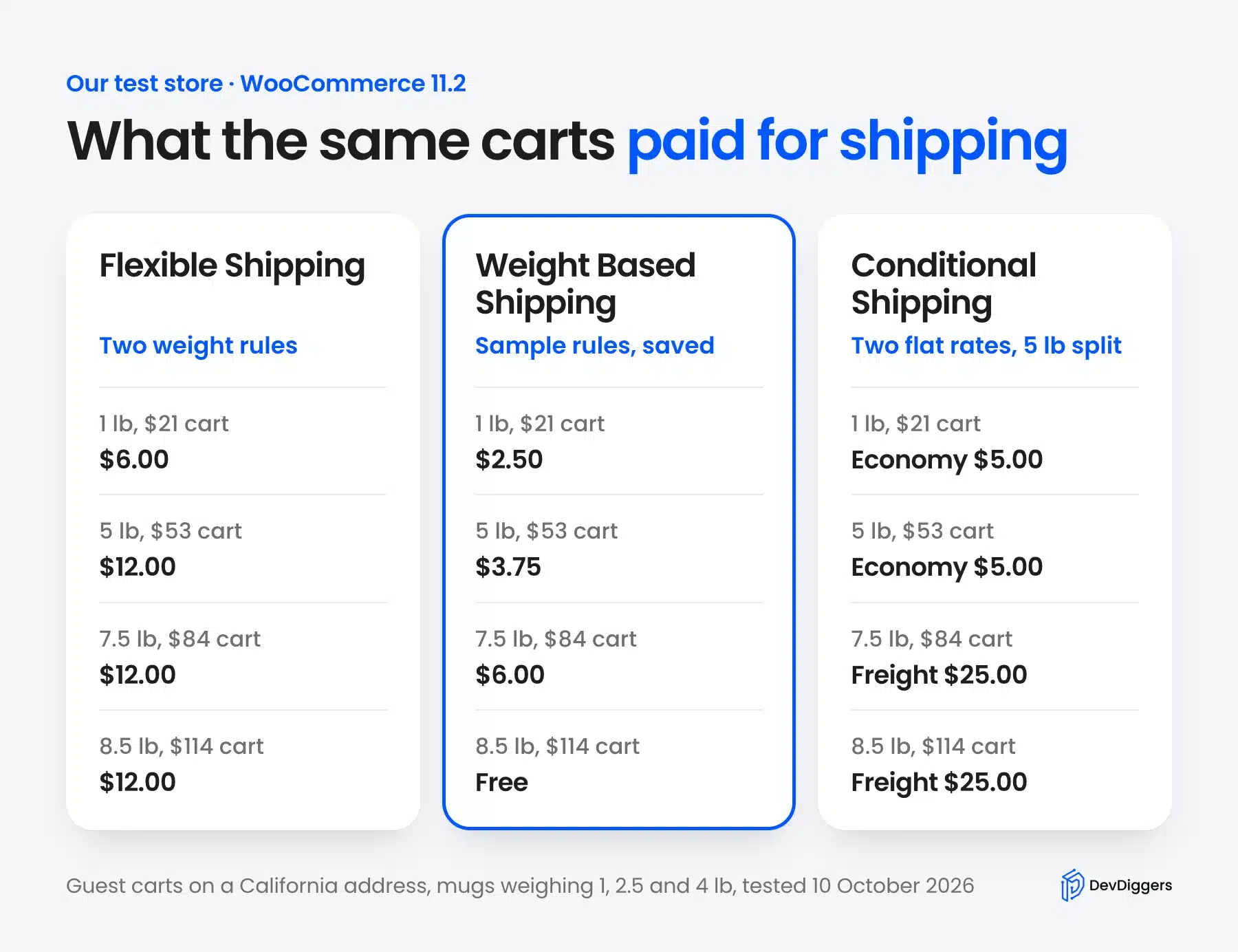
The three rate plugins landed far apart on the same carts. The 7.5 lb cart cost $12.00 with Flexible Shipping, $6.00 with Weight Based Shipping and $25.00 with our freight rule. Your own numbers will differ, but the gap shows how much the rule design matters.
What WooCommerce Shipping Does Without a Plugin
WooCommerce ships with three shipping methods and no plugin at all: flat rate, free shipping and local pickup. You add them inside shipping zones, which match a customer’s address to a set of methods. Flat rate can charge per order or per class, but it cannot price by cart weight.
That covers more stores than people expect. A shop that charges $5 everywhere, or free shipping over $50, needs nothing else. Our guide to setting up WooCommerce shipping zones walks through zones, flat rate and free shipping step by step.
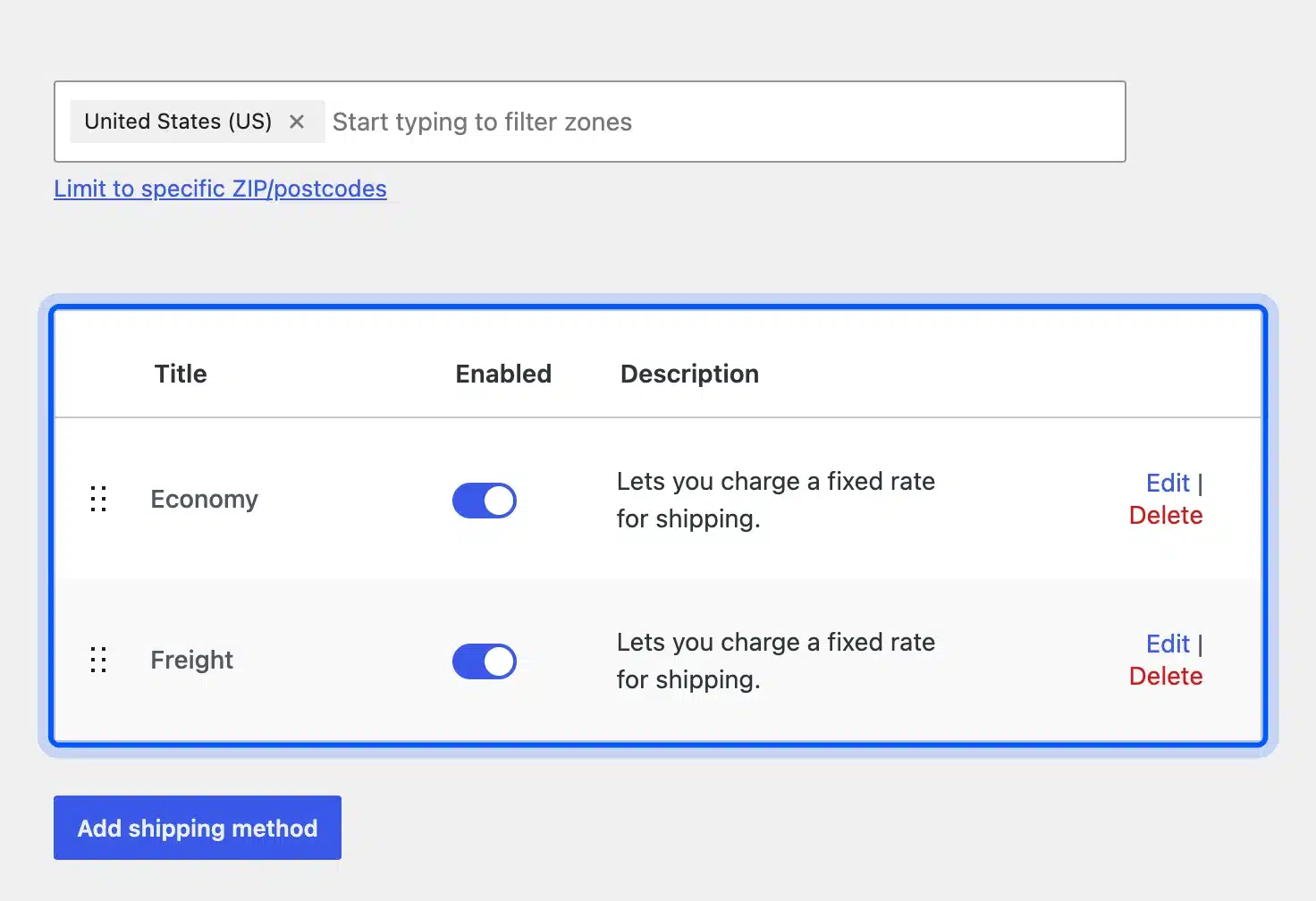
The limit shows up the moment weight matters. Our zone above has two flat rates, Economy at $5 and Freight at $25, and core WooCommerce shows both to every shopper. It has no way to say “Freight only above 5 pounds” without a plugin.
Core free shipping is better than many store owners think. It can require a minimum order amount, a coupon, or both, and it can check the minimum before or after discounts.
For a lot of stores that is the only free shipping rule they will ever need. So try the built-in method first, and reach for a plugin only when it stops fitting.
Core also cannot fetch a live price from UPS or USPS, print a label, or add a tracking number. Those gaps are exactly where the plugins below come in.
The 8 Best WooCommerce Shipping Plugins
These eight WooCommerce shipping plugins cover rate rules, live carrier rates, labels and tracking. The free rate plugins come first because we could test them end to end on our store. Carrier, label and tracking tools follow, each with what we could confirm and what needs an outside account.
1. Flexible Shipping
Flexible Shipping by Octolize is a free table rate shipping plugin that prices orders by cart weight or cart total. It runs on 100,000+ stores according to its WordPress.org listing, and version 6.13.1 was current in October 2026. Shipping classes, quantity and product conditions sit in the paid PRO version.
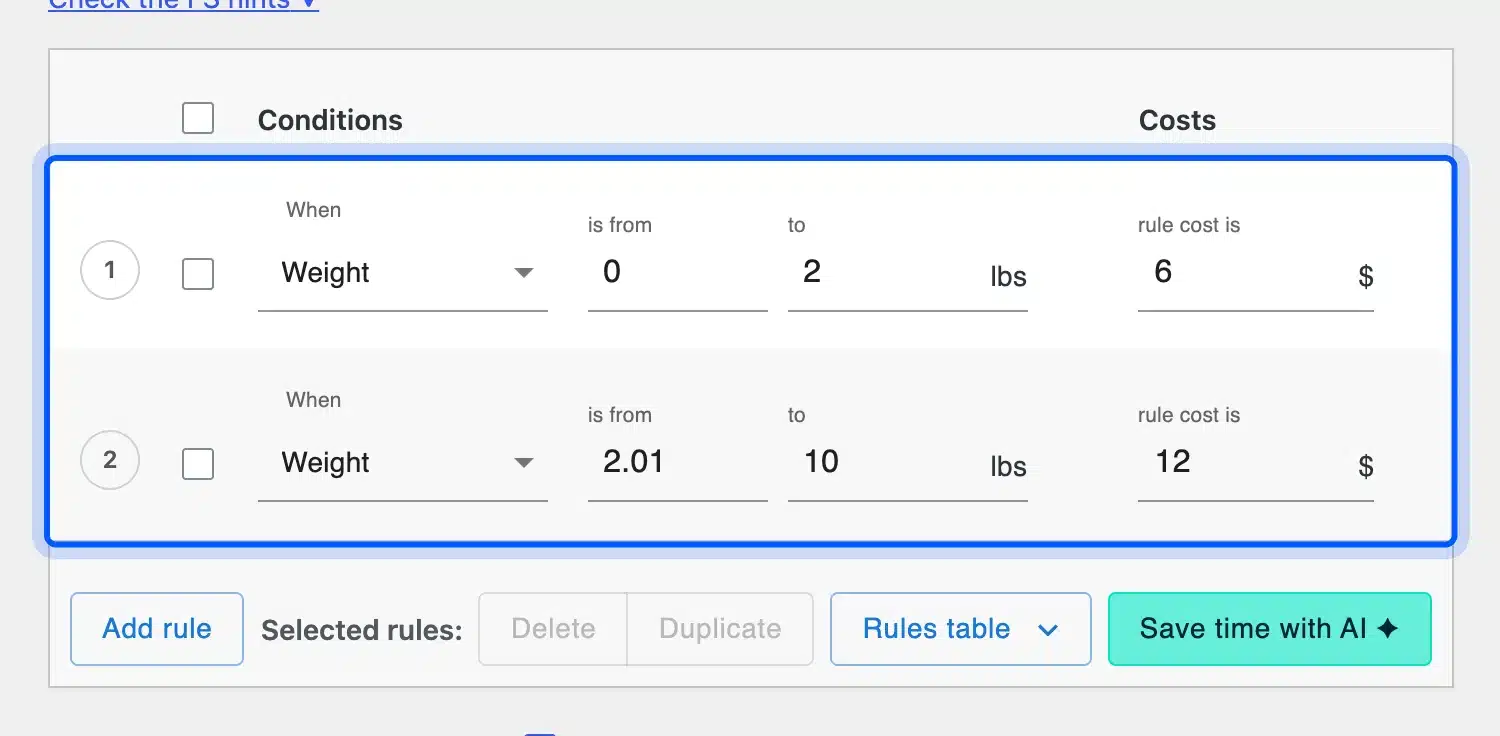
We added it to our United States zone and wrote two rules. Up to 2 lb costs $6, and 2.01 to 10 lb costs $12. The rules table shows paid conditions in the same dropdown, marked as PRO features.
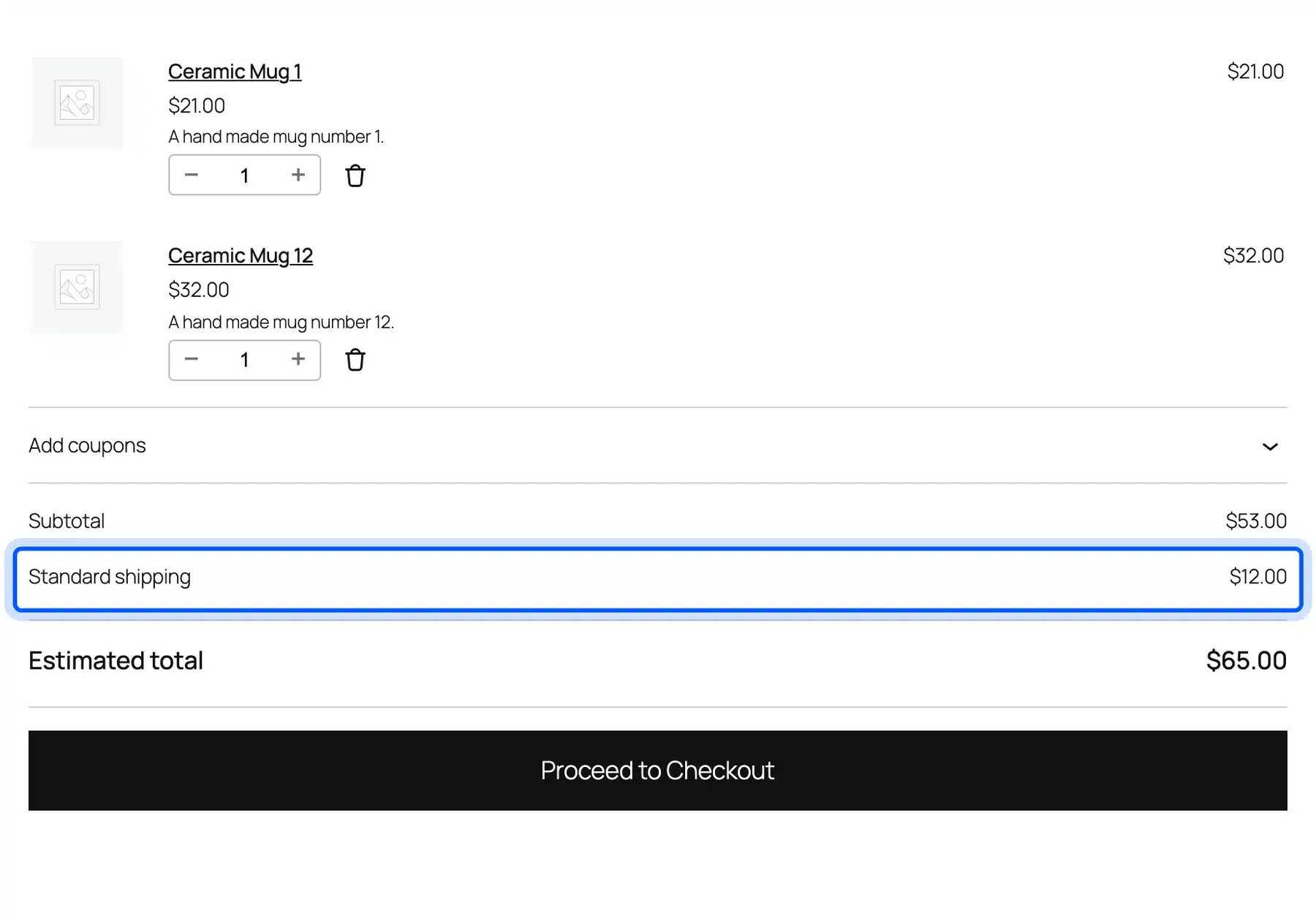
The block cart picked up both rules correctly. One mug showed $6.00, and the 5 lb cart with the 4 lb mug added showed $12.00 under our “Standard shipping” title.
The free version also has a free shipping threshold by minimum order value. Free shipping by coupon, and coupon plus amount, show as PRO options on the same screen. The same listing confirms that shipping class rules need PRO.
- Key features: Unlimited weight and cart total rules with minimum and maximum values and a free shipping threshold. It also has a logged in only option and a debug mode.
- Pricing: Free core. PRO costs $99 a year for one site, $158.40 for two sites and $396 for ten, checked on 10 October 2026.
- Best for: Stores that want table rate shipping by weight or order total without paying for it.
2. Weight Based Shipping for WooCommerce
Weight Based Shipping is a free plugin that turns your price list into a table of weight rules. It runs on 50,000+ stores according to its WordPress.org listing, and version 6.19.0 was current in October 2026. Rules that match at the same time add up, which suits handling fees on top of a weight rate.
When we added the method to our zone, it opened with four sample rules already filled in. Free shipping over $100, $2.50 up to 2 lb, $3.75 from 2 to 5 lb, and $3.75 plus $0.75 per pound above 5 lb.
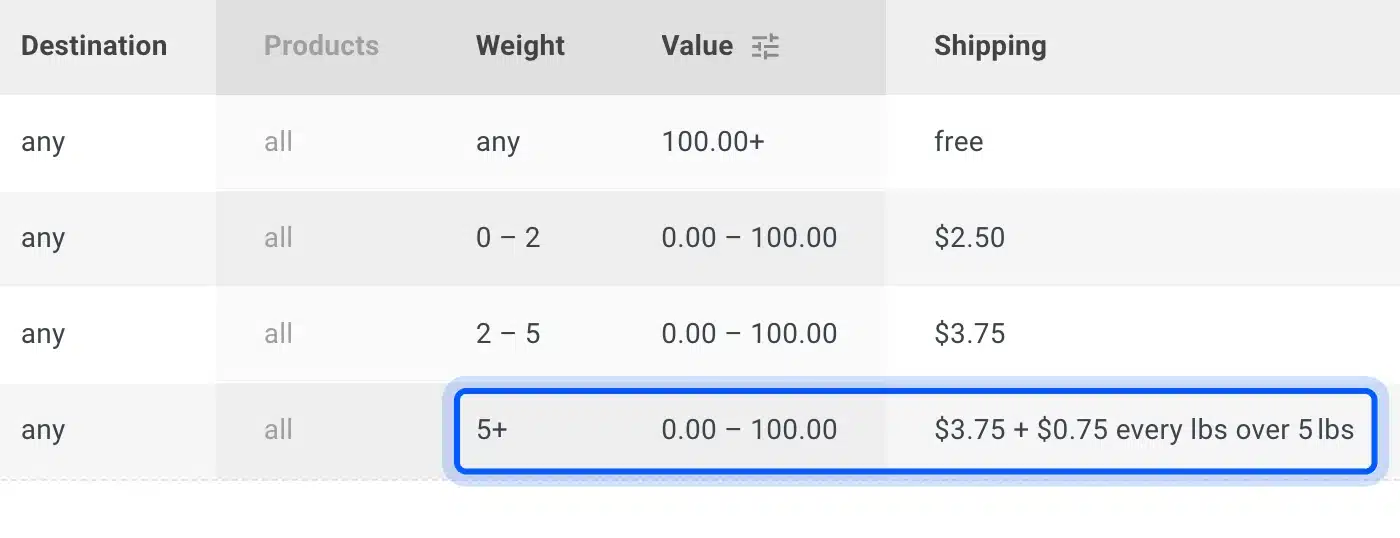
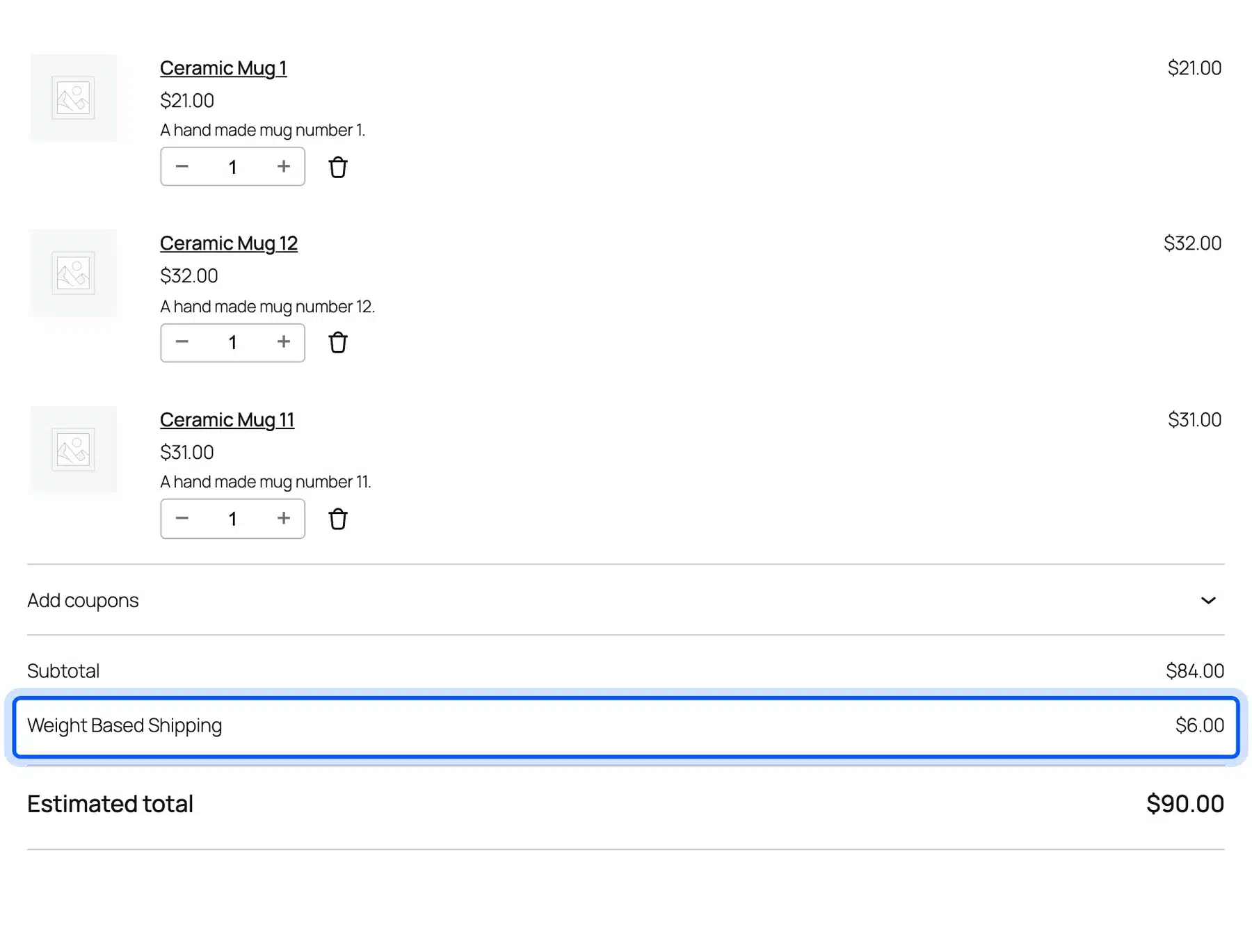
We saved those sample rules and ran our carts. The results were $2.50, $3.75, $6.00 and free for the $114 cart. The $6.00 needs a closer look, because the 7.5 lb cart is only 2.5 pounds over the limit.
The math only works if the partial pound rounds up. Three extra pounds at $0.75 is $2.25, and $3.75 plus $2.25 is $6.00. So a half pound over the line costs a full step.
Its WordPress.org listing says the paid edition adds rule mods called Stop, Drop, Deny and Require. Those control which rule wins and when a method is hidden.
- Key features: Weight brackets, a price per pound or kilogram, free shipping over an amount, rates by order total and rates by country in one table.
- Pricing: Free core. The paid license is $29 for one production site with a year of updates, checked on 10 October 2026.
- Best for: Stores that think in pounds and want one readable table of weight based prices.
3. Conditional Shipping for WooCommerce
Conditional Shipping for WooCommerce is a free plugin that hides or shows your existing shipping methods based on rules. It does not create rates of its own. It runs on 10,000+ stores according to its WordPress.org listing, and works with flat rate, free shipping and pickup methods.
We kept the two core flat rates, Economy at $5 and Freight at $25. Then we made two rulesets: disable Economy when total weight is greater than 5 lb, and disable Freight at 5 lb or less.
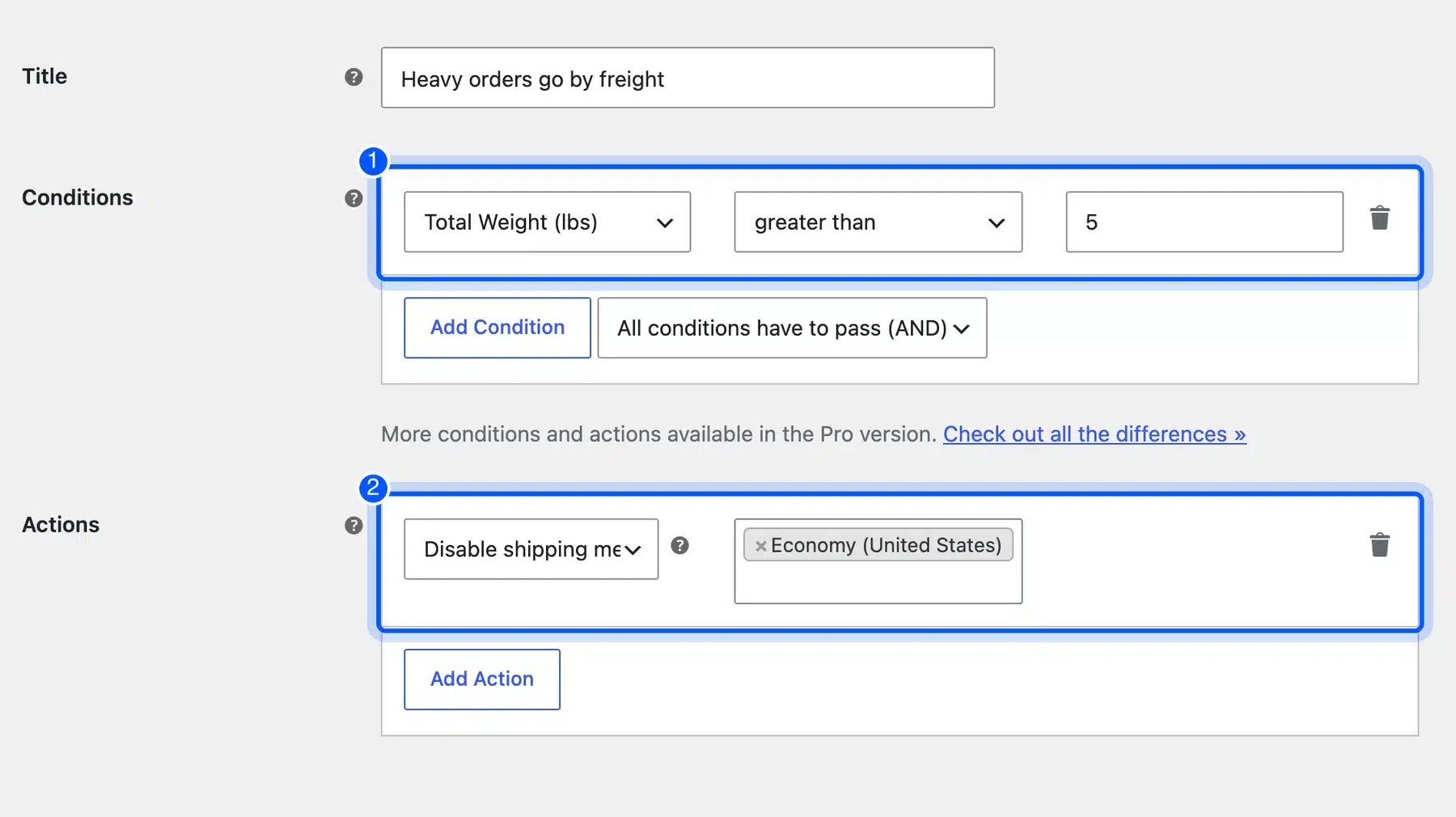
The checkout followed the rules exactly. Carts of 1 lb and 5 lb only saw Economy at $5.00.
The 7.5 lb and 8.5 lb carts only saw Freight at $25.00. There was no cheaper option left to pick by mistake.
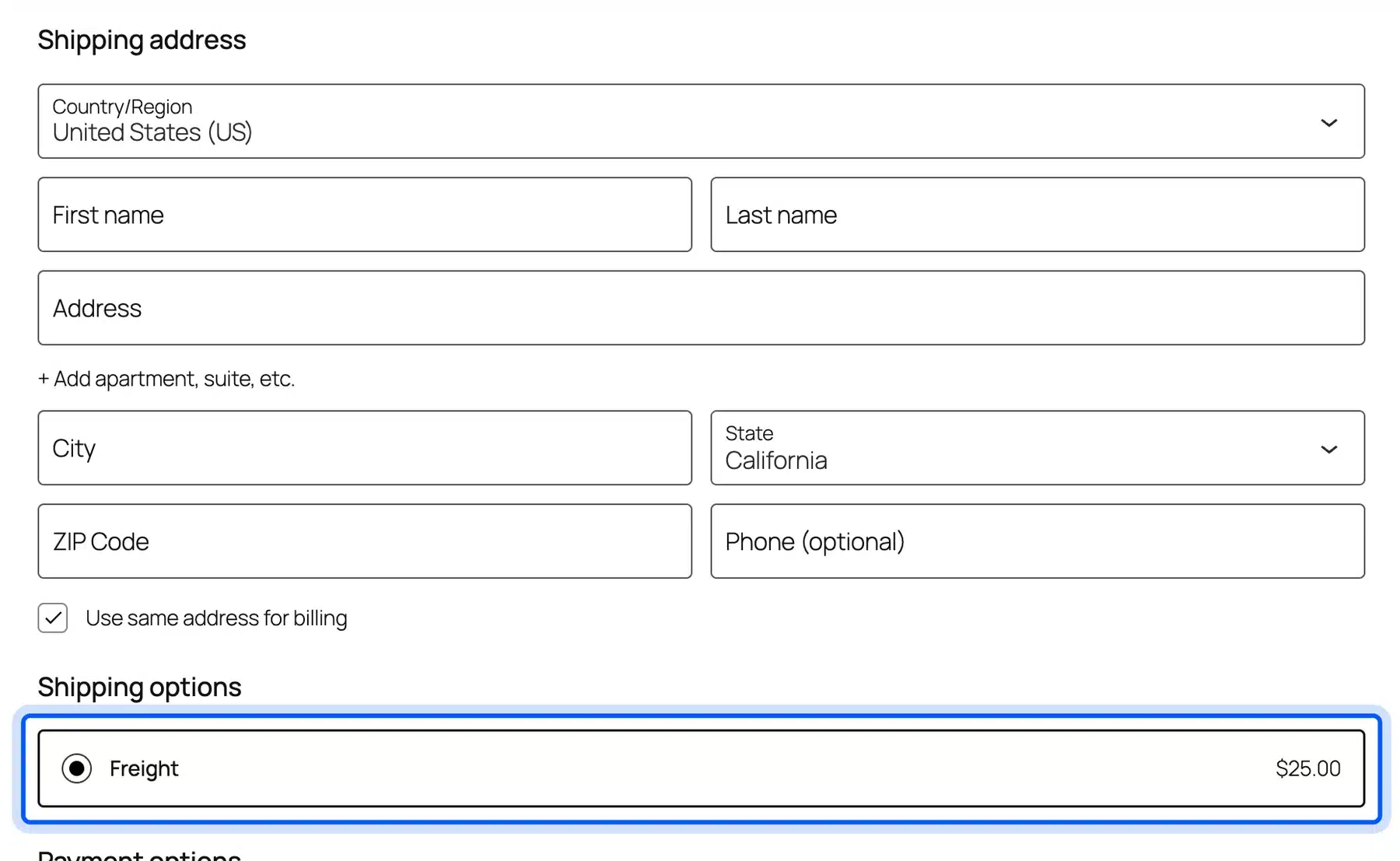
The free conditions are subtotal, products, total weight and total height, length, width and volume. Its listing puts shipping class, category, coupon and user role conditions in Pro.
- Key features: Disable, enable or allow methods by condition, AND or OR logic between conditions, support for live carrier rates and a debug mode for admins.
- Pricing: Free core. Pro costs $59 for one site or $89 for three sites, with a year of updates, checked on 10 October 2026.
- Best for: Stores that already have the right rates and only need to control who sees which one.
4. WooCommerce Shipping
WooCommerce Shipping is the free, official extension from Woo for buying and printing discounted shipping labels. It covers USPS, UPS and DHL Express from the order screen. It runs on 70,000+ stores according to its WordPress.org listing, and version 2.4.2 was current in October 2026.
The first thing it asked on our store was to connect to WordPress.com. Nothing else works until that link exists, so we stopped at this screen and did not buy a label.
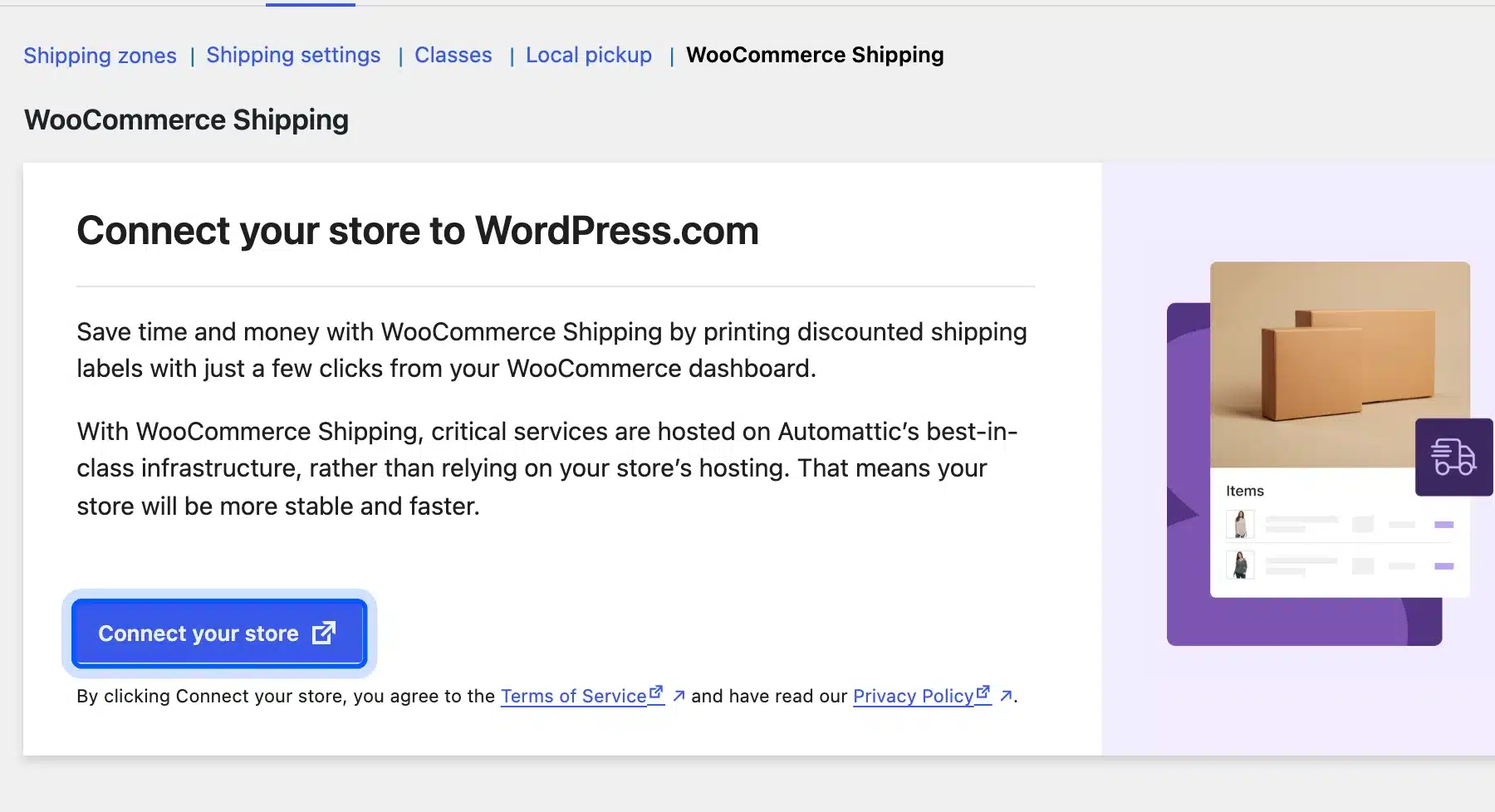
The WooCommerce Shipping product page says the extension is not for showing live carrier rates at checkout. It is a fulfillment tool, so you still need rate rules or a carrier plugin for the cart.
It is also built for stores that ship from the United States. The plugin readme lists only US and US territory store locations and US dollars, though you can still ship abroad.
- Key features: Discounted USPS, UPS and DHL Express labels, live label rate comparison and split shipments. Tracking numbers go into completed order emails, and addresses are checked at checkout.
- Pricing: Free to install. You pay only for the labels you buy, with no monthly fee, checked on 10 October 2026.
- Best for: US stores that print their own labels and want to skip a separate shipping app.
5. Table Rate Shipping
Table Rate Shipping is Woo’s own paid extension for complex rate tables, priced at $119 a year in October 2026. It builds rates from weight, item count, items per shipping class or price. Version 3.7.4 was tested with WooCommerce 11.2 and needs WooCommerce 10.9 or newer.
We did not buy it for this test, so the screenshot comes from its official documentation. The Condition column is the heart of the plugin, and it decides what product data feeds each row.
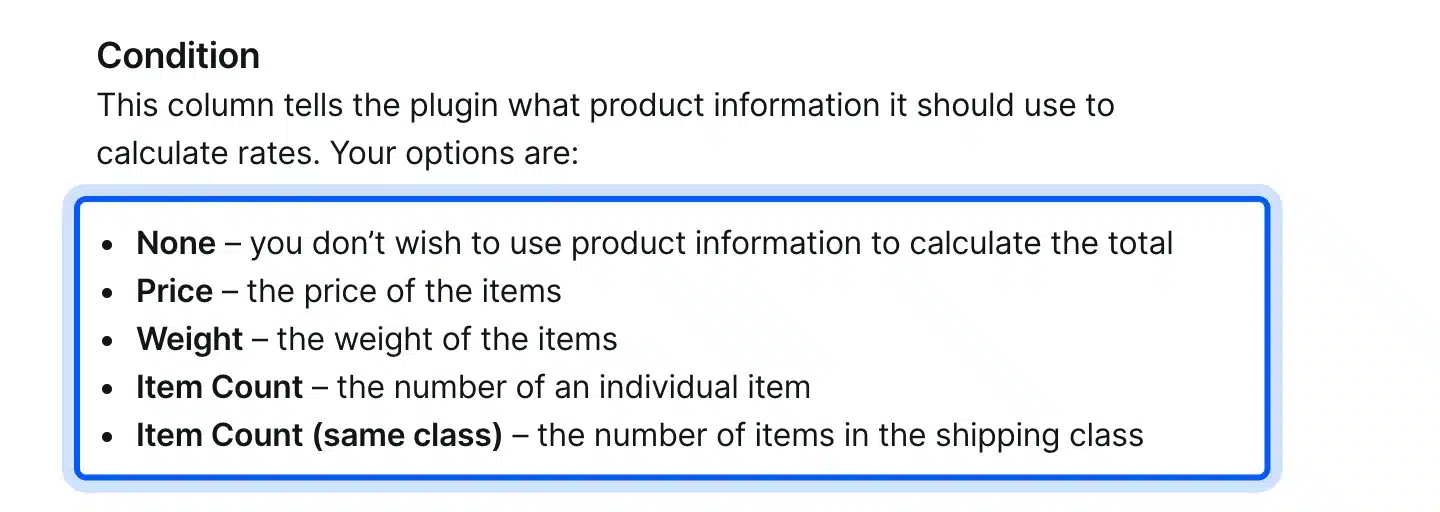
The Table Rate Shipping documentation explains four calculation types. Per order checks the whole cart, and per item checks each item on its own. Per line charges once for a line of the same item, and per class totals each shipping class.
That per class mode is the reason to pay. Flexible Shipping and Weight Based Shipping both keep shipping class rules in their paid tiers too. So the real choice is which paid tool fits your rate sheet.
- Key features: Many rates per zone with rows by weight, item count, class count or price. It also has four calculation types, class priorities and an abort option.
- Pricing: No free version. $119 for one year or $190.40 for two years, checked on 10 October 2026.
- Best for: Stores with carrier style rate sheets that mix shipping classes in one cart.
6. Shipping Live Rates for UPS by Octolize
Shipping Live Rates and Access Points for UPS is a free Octolize plugin that shows live UPS rates at checkout. Prices come straight from the UPS API using your own UPS account. It runs on 7,000+ stores according to its WordPress.org listing, and version 3.9.0 was current in October 2026.
Its settings ask for three things before any rate can appear: a Client ID, a Client Secret and your UPS Account Number. You get those by creating an application in the UPS developer portal.
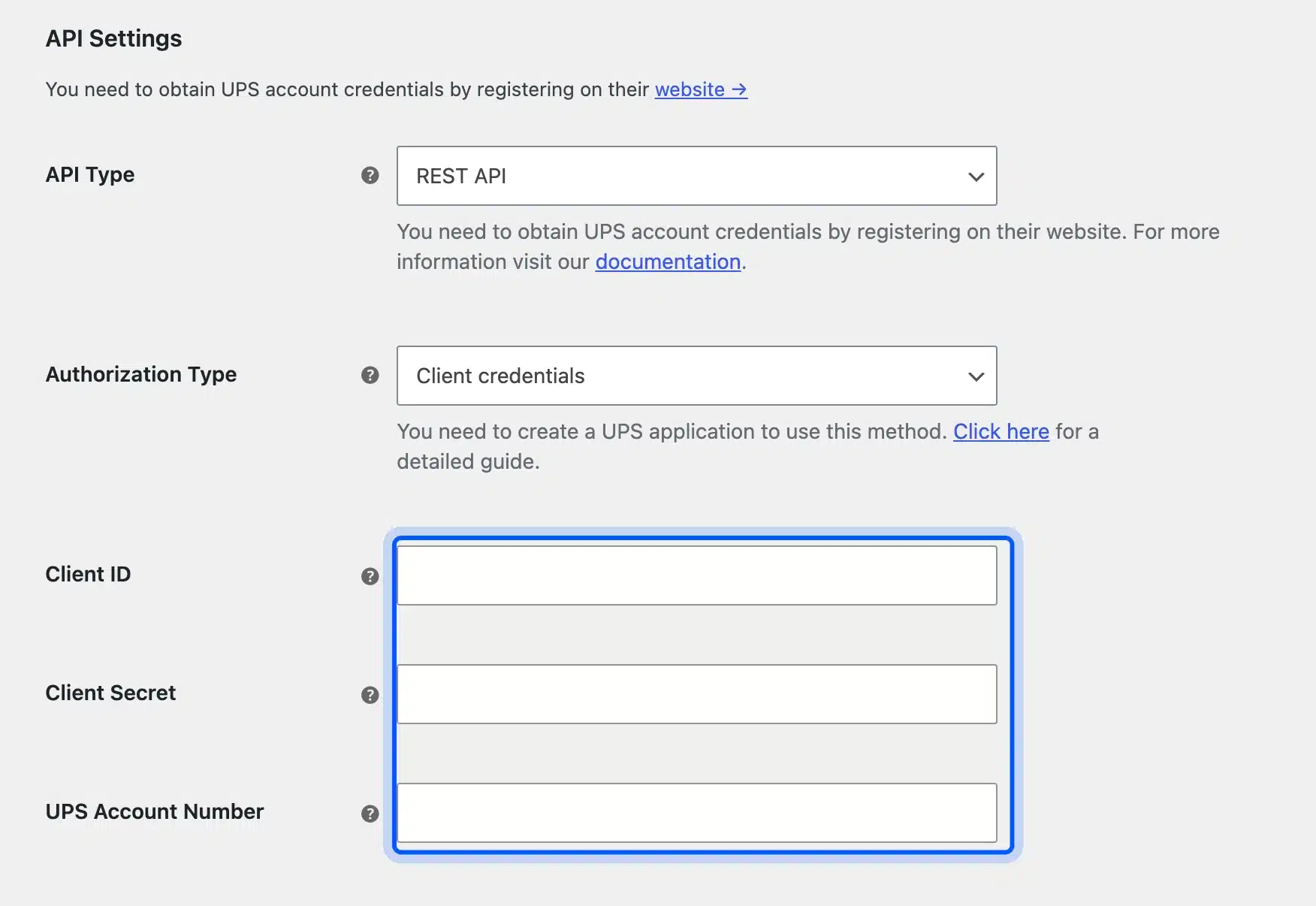
We did not have UPS credentials, so no live rate was quoted on our store. With the key fields empty, the connection status field showed a failure message, which at least tells you the plugin is checking.
That listing also notes it works with Flexible Shipping, so you can mix live rates with weight rules. Octolize sells label printing as a separate UPS Labels add-on.
- Key features: Live UPS rates from the REST API, UPS Access Point selection, a choice of UPS services, a custom origin and a debug mode.
- Pricing: Free core. PRO costs $79 a year for one site and adds box packing, handling fees and delivery dates, checked on 10 October 2026.
- Best for: Stores that already ship with UPS and want shoppers to pay the real carrier rate.
7. ShipStation for WooCommerce
ShipStation for WooCommerce is the free official connector that sends your orders into a ShipStation account. All label buying, batch printing and rate shopping then happens inside ShipStation. It runs on 40,000+ stores according to its WordPress.org listing, and version 5.3.9 was current in October 2026.
Version 5.3.9 also has a Checkout Rates section. Once you connect the store from the Checkout Rates tab in ShipStation, it can add ShipStation live rates as a shipping option at checkout.
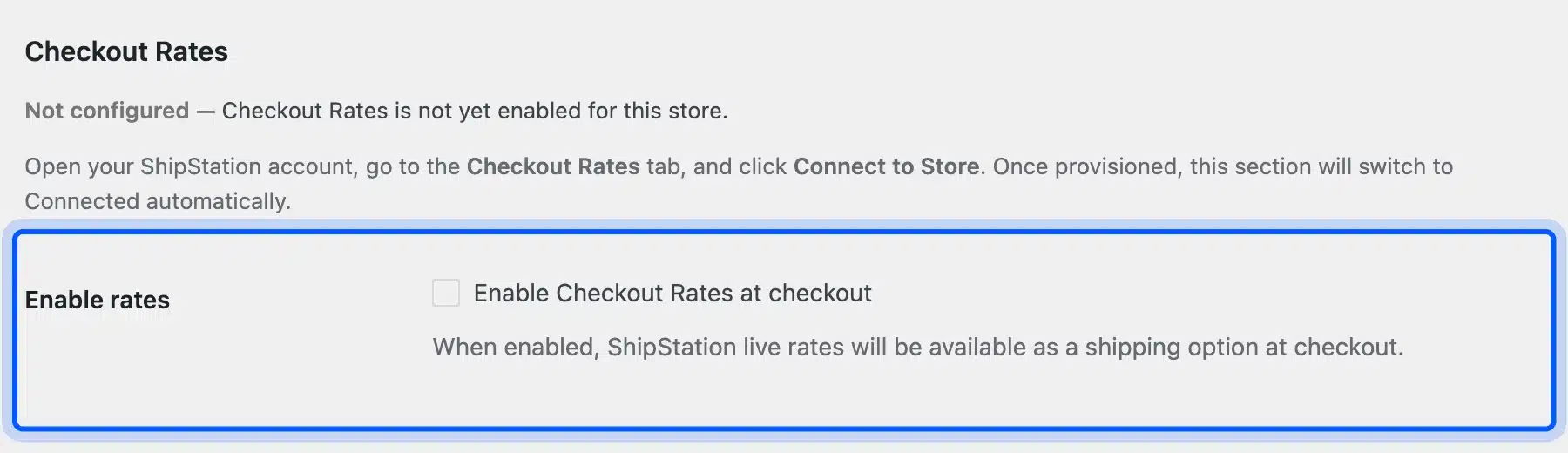
Without a ShipStation account, the plugin only showed “Not connected yet” on our store. It did let us choose which order statuses export to ShipStation, which matters if you hold orders on-hold before packing.
ShipStation’s pricing page starts the Starter plan at $14.99 a month for 50 shipments and offers a 30-day free trial. Costs climb with volume, so check your monthly shipment count first.
- Key features: Automatic order import, batch labels across many carriers, automation rules, return labels and an optional checkout rates feature.
- Pricing: The plugin is free. ShipStation plans start at $14.99 a month for 50 shipments, checked on 10 October 2026.
- Best for: Stores selling on several channels that want all orders and labels in one place.
8. Advanced Shipment Tracking for WooCommerce
Advanced Shipment Tracking, or AST, is a free zorem plugin that adds tracking numbers to orders and shows them to buyers. Tracking appears in the order email and on the My Account order page. It runs on 70,000+ stores according to its WordPress.org listing, with version 4.0.4 current in October 2026.
We added a USPS test tracking number to an order and marked it shipped. The customer’s order page then showed a Tracking Information card with the carrier, the number, the ship date and a Track Your Order button.
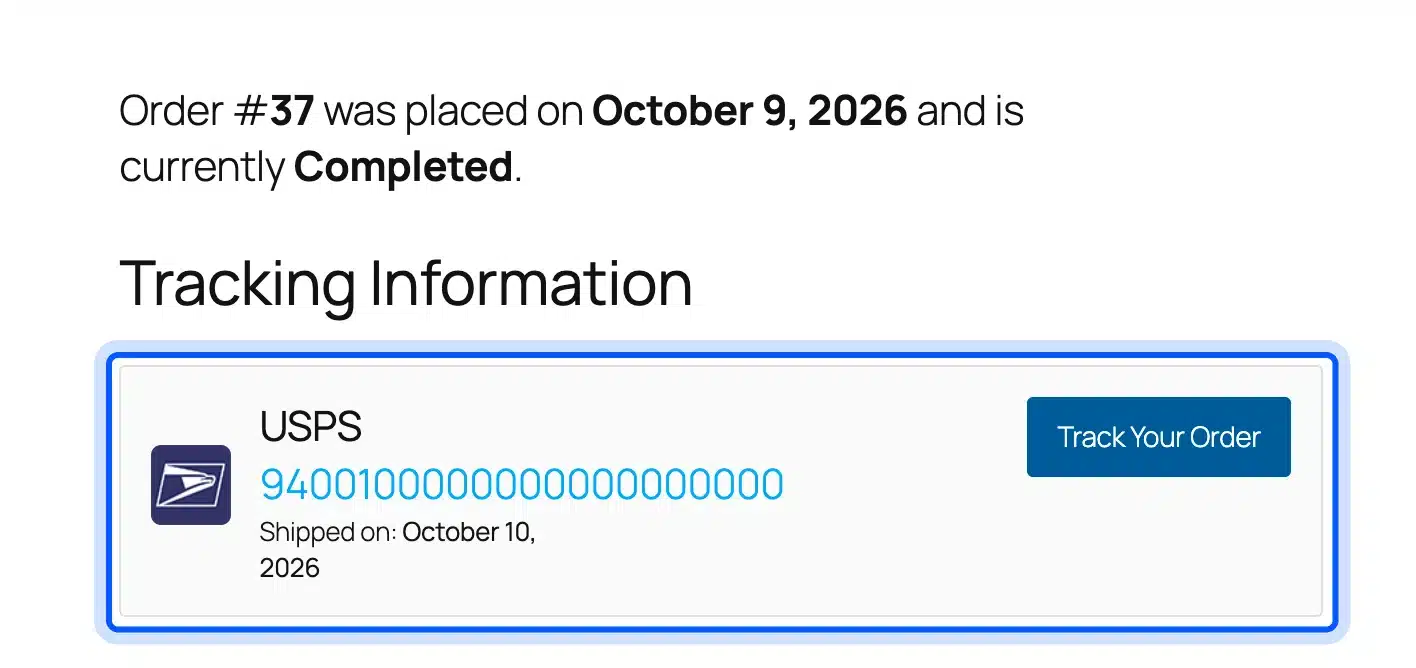
One side effect surprised us. Marking the order shipped moved it straight to Completed, so plan your status flow before you switch it on. The AST listing offers a Shipped status to use in place of Completed.
If you want buyers to see progress before the parcel leaves, our WooCommerce Order Progress Bar shows each order stage as a visual bar. Its yearly licenses run from $29 to $179 on the DevDiggers store, checked on 10 October 2026.
- Key features: Manual tracking per order, bulk CSV import, a REST API for label tools, 1,010+ preset carriers, Shipped and Partially Shipped statuses and a tracking widget.
- Pricing: Free core. AST PRO costs $129 a year for one site, checked on 10 October 2026.
- Best for: Any store that ships physical goods and gets “where is my order” emails.
Table Rate vs Weight Based vs Live Carrier Rates
Table rate shipping, weight based pricing and live carrier rates are three ways to set what a shopper pays. Table rates read a grid you write, weight based pricing applies a per pound formula, and live rates ask the carrier at checkout. Most small stores do well with the first two.
| Approach | Where the price comes from | Good at | Weak at |
|---|---|---|---|
| Table rate shipping | Rows you write by weight, items, class or total | Matching a carrier price list closely | Long tables get hard to maintain |
| Weight based pricing | A base price plus a cost per pound | One clear formula that scales | Rounds partial pounds up, as our test showed |
| Live carrier rates | The UPS, USPS or FedEx API at checkout | The exact postage for each order | Needs an account, API keys and package sizes |
Live rates sound like the honest choice, but they move every time a carrier changes prices. A flat or weight table lets you round prices to numbers shoppers trust, like $6 or $12.
A good middle road is a weight table set slightly above your average label cost. You then check the gap each month and adjust the rows.
Here is how two of the approaches priced our 7.5 lb cart. The Flexible Shipping table put it in the 2.01 to 10 lb row, so the shopper paid $12.00.
The Weight Based Shipping formula charged $3.75 plus three pounds at $0.75, which came to $6.00. A live UPS rate would depend on box size and distance, which our store could not quote without UPS keys.
You can also mix them. The UPS Live Rates listing says its live rates can combine with Flexible Shipping costs based on price and weight. That is one way to add a handling fee on top of the carrier price.
Free vs Paid WooCommerce Shipping Plugins: What Each Costs
Free WooCommerce shipping plugins cover weight rates, cart total rates, method hiding, UPS rates and tracking. Paid tiers mostly add shipping class rules, product rules and packing. In October 2026 the paid tiers we checked ran from $29 one time to $129 a year per site.
Here is what one site costs for a year with each paid option:
- Weight Based Shipping Pro: $29 for one production site with one year of updates.
- Conditional Shipping Pro: $59 for one site with one year of updates.
- UPS Live Rates PRO: $79 a year, plus the UPS Labels add-on if you print labels.
- Flexible Shipping PRO: $99 a year for one site.
- Table Rate Shipping: $119 a year, and it has no free version to start on.
- AST PRO: $129 a year for one site.
- ShipStation: From $14.99 a month, which is $179.88 over a year on the smallest Starter tier.
So the cheapest full setup is often free. A store with one weight table and a tracking plugin pays nothing until it needs class rules.
What you give up by staying free is mostly class and product logic. A store selling mugs and chairs needs the chair to cost more to ship in the same cart.
That is where every free rate tier we tested stopped, from Flexible Shipping to Weight Based Shipping and Conditional Shipping. Each one keeps shipping class conditions in its paid version.
Also watch how each vendor counts. Flexible Shipping PRO falls to $39.60 per site on the ten site plan, while ShipStation charges by monthly shipments and ignores sites.
Tip: Count shipping classes before you buy. If every product ships the same way, the free tiers of Flexible Shipping or Weight Based Shipping are enough.
How to Choose a WooCommerce Shipping Plugin
Choosing a WooCommerce shipping plugin starts with how your carrier charges you. Match the plugin to that price model, then check your checkout type and the accounts you already have. These six questions settle it for most stores, in this order:
- Your carrier price model: Weight brackets point to Weight Based Shipping, mixed weight and total rules point to Flexible Shipping.
- Shipping classes in one cart: If bulky and small items share carts, budget for a paid tier with class rules.
- Live rates or fixed rates: Pick a carrier plugin only if you hold that carrier’s API keys and real package sizes.
- Who prints labels: US stores can use WooCommerce Shipping, multichannel stores often prefer ShipStation.
- Methods to hide: Freight for heavy orders or pickup for local orders is a job for Conditional Shipping.
- Tracking for buyers: Add a tracking plugin last, once orders start leaving the building.
Also look at the cart itself. Our test used the block cart and checkout, and all three free rate plugins we ran displayed their prices there. If you have customized the cart template, our guide on editing the WooCommerce cart page shows where the shipping line sits.
Some rate sheets do not fit any plugin. Zone surcharges by postcode, rates per vendor, or rules tied to your ERP need custom code. Our WooCommerce development services team builds custom shipping methods like that for WooCommerce stores.
What Surprised Us in Testing
Testing WooCommerce shipping plugins on a real store showed six behaviors that the plugin listings barely mention. Most of them are small settings traps that cost nothing to fix early. One of them can quietly undercharge or overcharge every order, so check these before you go live:
- Sample rules go live on save: Weight Based Shipping opened with four sample rules, and saving the screen made them real prices.
- Partial pounds round up: Our 7.5 lb cart was 2.5 pounds over the limit and paid for three extra pounds.
- Free shipping coupons cost extra: Flexible Shipping free offers a minimum order amount, while coupon based free shipping is marked PRO.
- Shipped means Completed: Marking an AST order shipped moved it to Completed on our store.
- Labels need an account first: WooCommerce Shipping did nothing until a WordPress.com connection existed.
- Old flat rates stay visible: With Flexible Shipping and our two flat rates in one zone, the 5 lb checkout offered $12, $5 and $25.
That last one is the costly mistake. Disable old flat rates when you move to a rules plugin, then run a test cart for your lightest and heaviest orders.
Shipping questions also turn into support tickets after checkout. If customers keep asking where parcels are, see our ways to auto send tracking emails in WooCommerce. For more tools, we also compared the best WooCommerce order tracking plugins.
Conclusion
The right WooCommerce shipping plugin depends on the job you need done. For rate rules, start with the free Flexible Shipping or Weight Based Shipping and test your lightest and heaviest carts. Add Conditional Shipping when you need to hide a method.
Carrier plugins, WooCommerce Shipping and ShipStation only make sense once you have the accounts they connect to. Tracking comes last, once orders ship. Whatever you pick, turn off old flat rates and check the cart before customers do.
Frequently Asked Questions (FAQs)
Q1. Is WooCommerce Shipping free?
Yes, the WooCommerce Shipping extension is free to install. You pay only for the labels you buy, with no monthly fee, according to the WooCommerce Shipping product page. It needs a WordPress.com connection before it works.
Q2. Does WooCommerce have built-in table rate shipping?
No, core WooCommerce has flat rate, free shipping and local pickup only. Flat rate can charge per shipping class, but it cannot price by weight. For weight or table rates, add a plugin such as Flexible Shipping or Table Rate Shipping.
Q3. How do I show live carrier rates at checkout?
Install a carrier plugin such as UPS Live Rates, then enter your own API keys from the carrier. Products also need weights and sizes, or the quote will be wrong. WooCommerce Shipping prints labels but does not show checkout rates.
Q4. Can I use two shipping plugins at the same time?
Yes, when they do different jobs, like a rate plugin with a tracking plugin. A rate plugin next to old flat rates shows the shopper every price, as our test showed. Keep one rate method per zone unless you want customers to choose.
Q5. How do I offer free shipping over a set amount?
Core WooCommerce has a Free shipping method with a minimum order amount, which you add inside a shipping zone. Flexible Shipping free and Weight Based Shipping free both offer a threshold too. In our test, Weight Based Shipping made the $114 cart free.
Q6. Which WooCommerce plugin prints shipping labels?
WooCommerce Shipping prints USPS, UPS and DHL Express labels from the order screen for US stores. ShipStation prints labels inside its own app after importing your orders. Octolize sells a separate UPS Labels add-on for its UPS plugin.
Q7. Do shipping plugins work with the WooCommerce block checkout?
The three free rate plugins we tested all showed their prices in the block cart and checkout on WooCommerce 11.2. AST lists block checkout support on its WordPress.org page too. Always run one test order after updating WooCommerce, since checkout changes often.