A WordPress CRM is a plugin that keeps customer contacts, orders and email history inside your own WordPress site. Choose one by where the data lives, whether it syncs WooCommerce orders, and how it sends email.
In October 2026 we installed five free CRM plugins on a test store running WordPress 7.1.3 and WooCommerce 11.2. They were FluentCRM, Jetpack CRM, Groundhogg, WP ERP and HubSpot. We added three test customers with orders and counted what each plugin put in the database.
This guide starts with what a WordPress CRM is and a comparison table. Then come five steps to choose one and a short review of each plugin. The limits section covers what sales pages skip, from email sending to database load.
What Is a WordPress CRM?
A WordPress CRM is customer relationship management software that runs as a plugin inside WordPress. It stores contact records, tags, notes and purchase history in your own database. Most also send newsletters and automated emails, so one plugin can replace a separate CRM and email tool.
There are two ways to run one. A built-in CRM like FluentCRM or Jetpack CRM keeps everything in WordPress, and you pay a yearly license per site. An external CRM like HubSpot keeps the data on the vendor’s servers, and a WordPress plugin connects your forms and pages to it.
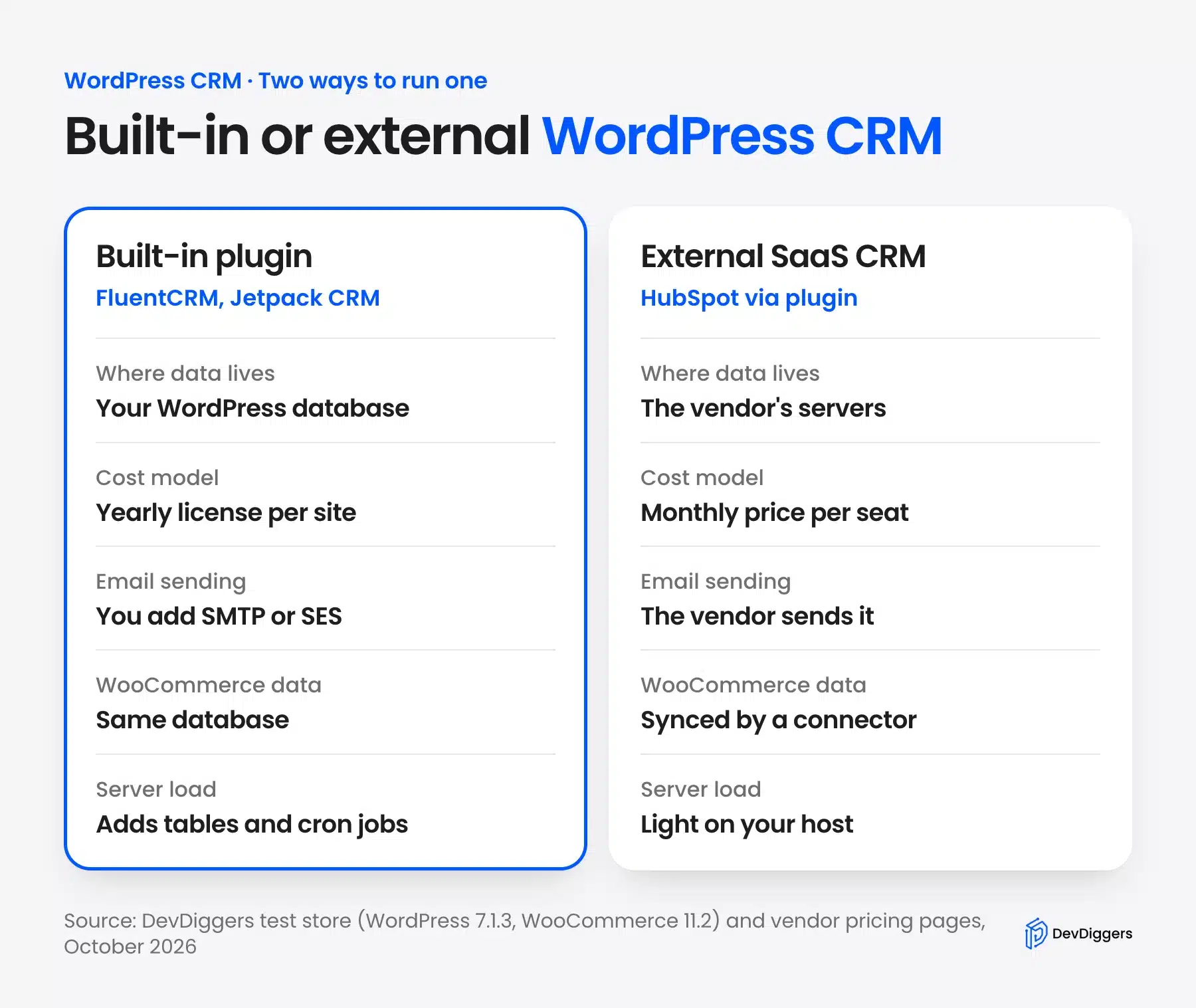
The built-in kind suits a WooCommerce store, because the customer and the order already sit in the same database. The external kind suits a sales team with several people who need one shared pipeline outside the website.
Neither is free of trade-offs. A built-in CRM puts more load on your hosting and needs an email sending service. An external one bills per seat and moves your customer data to another company.
WooCommerce itself is not a CRM, even though it knows your customers. Its Customers screen lists each buyer with orders and total spend. It has no tags, notes, lead stages or email campaigns, which is the gap a CRM plugin fills.
WordPress CRM Plugins Compared
The table compares the five WordPress CRM plugins we installed by data location, WooCommerce support on the free plan and starting paid price. Prices come from each vendor’s pricing page in October 2026. Table counts are what we measured on our test store right after activation.
| Plugin | Data lives in | WooCommerce on free plan | Tables added | Paid from (October 2026) |
|---|---|---|---|---|
| FluentCRM 3.2.5 | Your database | Purchase history, no order triggers | 17 | $129 a year, 1 site |
| Jetpack CRM 6.8.5 | Your database | WooSync module, off by default | 30 | $11 a month, billed yearly |
| Groundhogg 4.9.2 | Your database | No, Pro plan only | 34 | $20 a month, billed yearly |
| WP ERP 1.17.10 | Your database | No, Growth plan only | 85 | $228 a year |
| HubSpot 11.3.75 | HubSpot’s servers | Needs a HubSpot account | 0 | $15 a month per seat |
Two numbers stand out. WP ERP added 85 tables because it ships HR and accounting modules too, and HubSpot added none because nothing is stored on your site.
Read the WooCommerce column first if you run a store. It decides whether order history and purchase-based emails come free, or need a paid plan on day one.
Here is how the table translates into a shortlist:
- Store that mostly sends email: FluentCRM, with Pro once you need order-based automations.
- Store that also quotes and invoices: Jetpack CRM, the only one with free order sync.
- Marketer with a big list: Groundhogg, whose prices stay flat as contacts grow.
- Business that wants HR too: WP ERP, if you accept its size.
- Team selling outside the website: HubSpot, as an external CRM connected by plugin.
How to Choose a WordPress CRM
To choose a WordPress CRM, work through five checks in order. Decide where contact records should live, then confirm WooCommerce order sync and how contacts get in. Last, check which automations are free and plan how the CRM will send email.
Each step below shows the screen where we checked it on our test store.
Step 1: Decide Where Your Contact Records Live
Start with the data, because it is the hardest thing to move later. A built-in CRM writes your contact records into new database tables on your host. An external CRM keeps them with the vendor, and your site only sends form entries and page visits.
We counted the tables each plugin created with a SHOW TABLES query after activation. The spread was wide, from 0 for HubSpot to 85 for WP ERP.
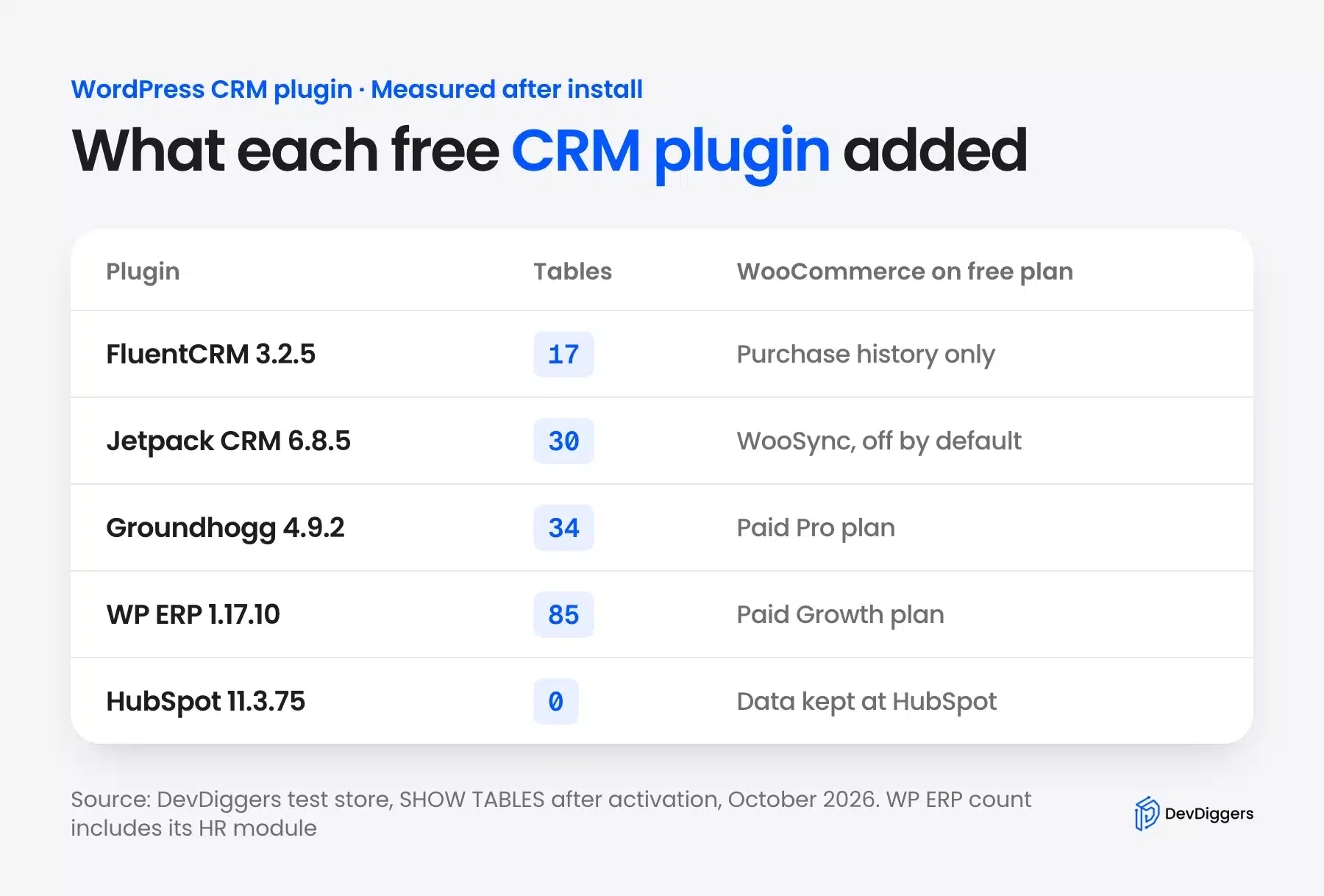
More tables is not bad by itself. It does mean bigger backups, more to migrate and more to remove if you switch. If you run a small shared hosting plan, lean toward the lighter plugins or an external CRM.
Data location also decides your privacy paperwork. A built-in CRM keeps customer data with your existing host. An external CRM adds a new data processor, which belongs in your privacy policy.
Step 2: Check WooCommerce Order Sync
For a store, a CRM is only as useful as its WooCommerce order history. Check whether the free plan imports past orders, links them to contacts and keeps syncing new ones. Several plugins sell this as a paid add-on.
Jetpack CRM was the only plugin that synced orders on the free plan. Its WooCommerce Sync is a core module that ships switched off. Once we turned it on under Core Modules, the sync hub imported all three test orders on its own.
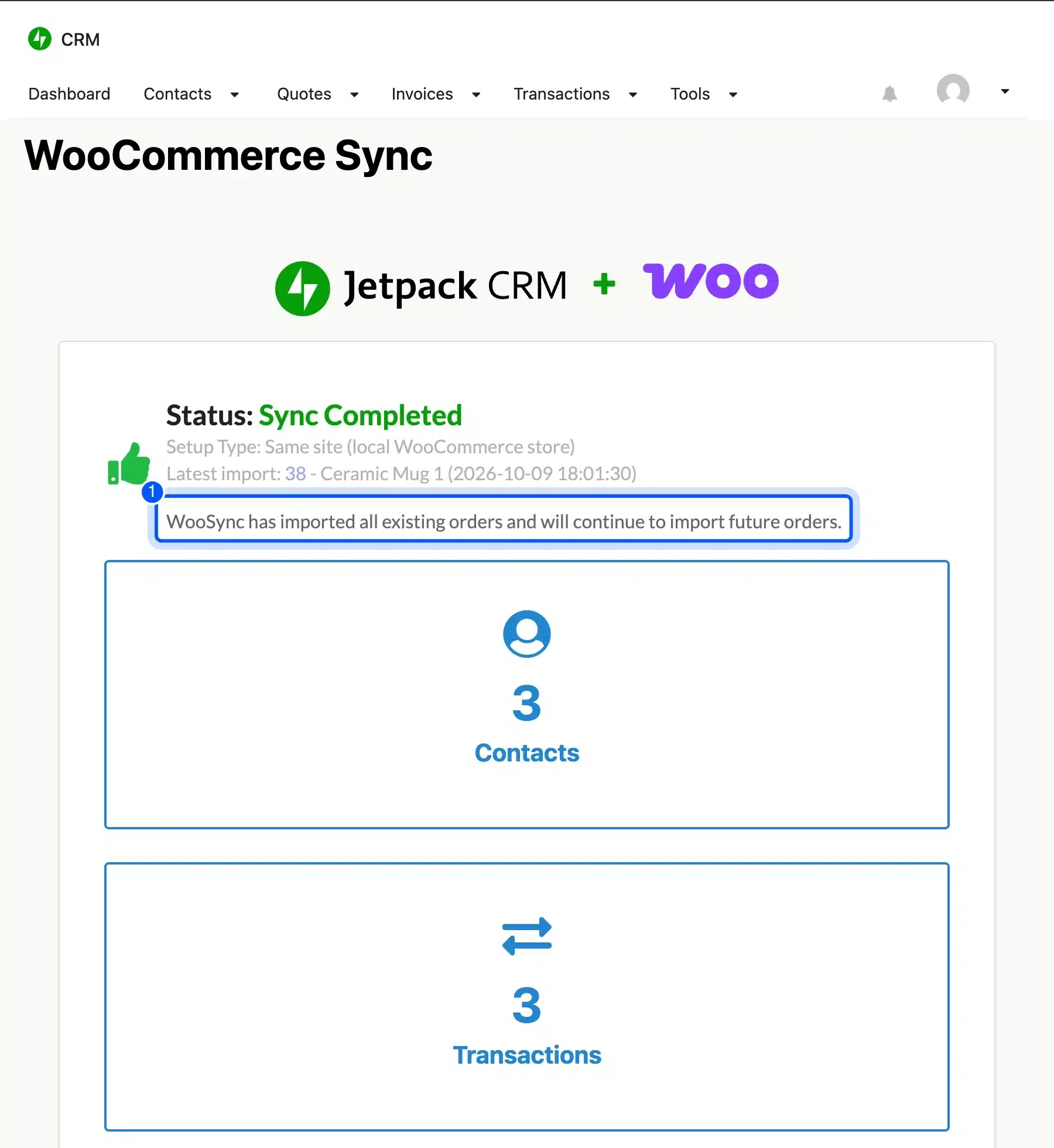
The total matched our orders exactly: $21, $44 and $69 make $134. FluentCRM showed the same orders on each contact’s profile, while Groundhogg and WP ERP list WooCommerce sync in their paid plans.
We also checked that the sync keeps going. After we placed a fourth order for $48, the next run of Jetpack CRM’s sync job added it as a fourth transaction. New orders arrive on WordPress cron, so a site with little traffic may see them a few minutes late.
Step 3: Check How Contacts Get Into the CRM
Contacts reach a CRM through imports, forms and sign-ups, so check all three before you commit. A CSV import covers your old list once. Forms and WordPress user sync keep new customers flowing in without manual work.
FluentCRM’s free import offered three sources: a CSV file, WordPress users or another provider. We picked WordPress users with the Customer role, and the review screen found our three test customers.
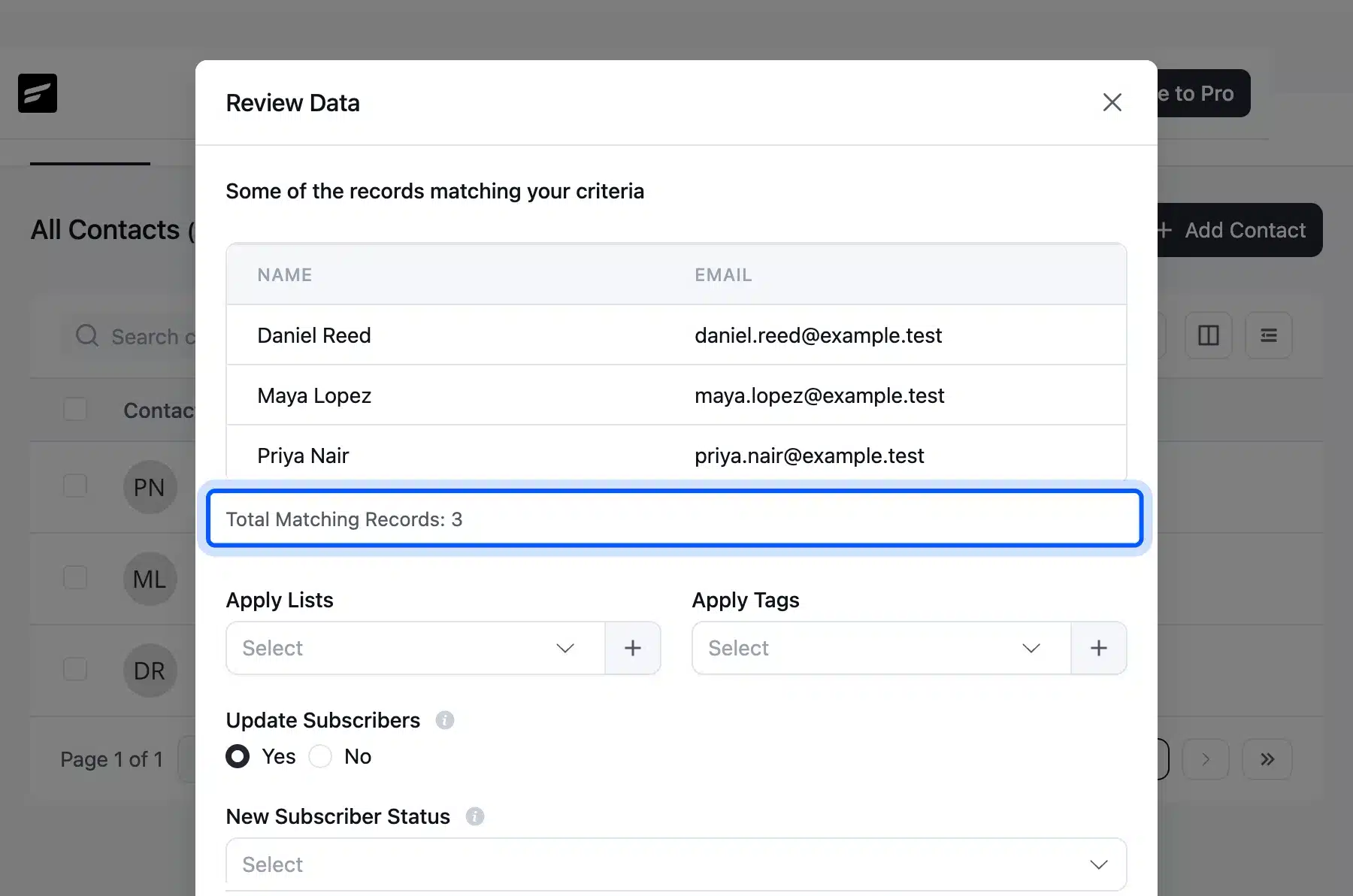
Two details on that screen matter. “Do Not Trigger Automations” was ticked by default, which stops a welcome sequence from firing at old customers. And the imported contacts arrived as Subscribed unless you pick another status, which has GDPR consequences covered in the limits section below.
For forms, FluentCRM asked us to install Fluent Forms, Jetpack CRM includes a simple form module, and HubSpot builds forms inside your HubSpot account. If you already run a form plugin, check whether your entries reach the CRM, as in our guide on checking form submissions in WordPress.
Step 4: Check Which Automations Are Free
Automations are where free plans differ most. Open the automation builder on a test site and count the triggers you can use without paying. The trigger list shows the real free plan faster than any pricing table.
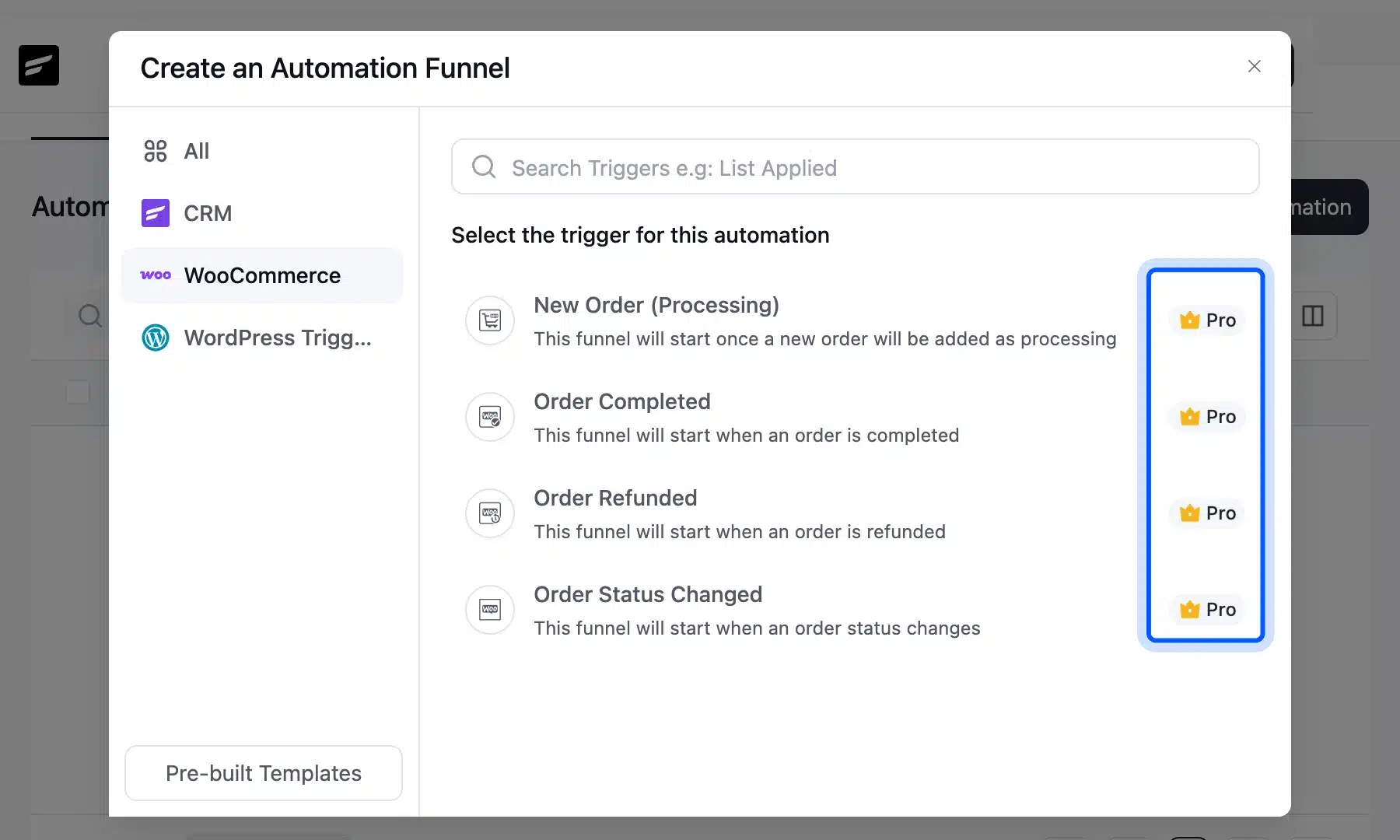
In FluentCRM 3.2.5, the new automation dialog listed 13 triggers and marked 12 of them Pro. Only “New User Sign Up” was free. All four WooCommerce triggers, from New Order to Order Status Changed, carried the Pro badge.
Groundhogg’s flow templates showed the same pattern. Some were free, such as Double Opt-in, while others carried a lock icon and an upgrade link. So budget for the paid tier if order-based emails are the reason you want a CRM.
Step 5: Plan How the CRM Will Send Email
A built-in WordPress CRM sends email from your own site, so it needs a proper sending service. WordPress sends every email through wp_mail(), which works like PHP’s mail function. Bulk newsletters sent that way often land in spam.
FluentCRM’s Email Service settings page says so directly. It offers to install FluentSMTP, a free companion plugin, and lists connections such as Amazon SES, Mailgun and SendGrid.
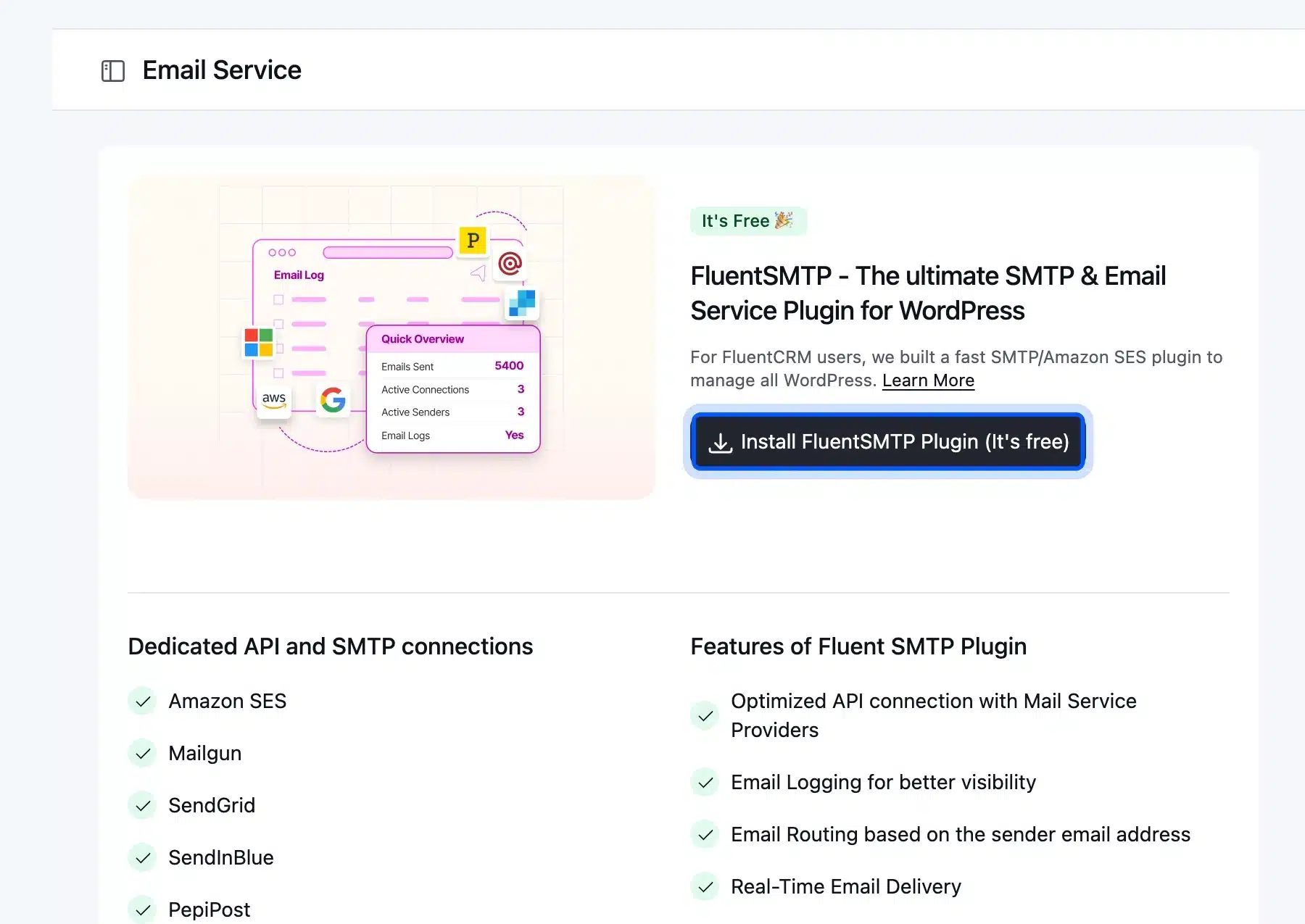
Plan this before your first campaign. Pick an email service, verify your sending domain with it, and send a test to a Gmail and an Outlook inbox. An external CRM like HubSpot handles sending for you, which is one of the main reasons teams pick one.
Email sync is a separate question from sending. Built-in plugins log the emails they send to each contact, but they do not read replies from your inbox. If your team works from Gmail or Outlook, an external CRM with inbox sync may save more time than any plugin.
The 5 Free WordPress CRM Plugins We Tested
These five plugins cover the main ways to run a WordPress CRM. Each review lists what our test found, the key features, the price checked on the vendor’s page in October 2026 and the store it suits. All five are free on WordPress.org, with paid plans for the advanced parts.
1. FluentCRM
FluentCRM is an email marketing and CRM plugin that stores everything in your WordPress database. The FluentCRM listing shows 80,000+ active installs, version 3.2.5. DevDiggers uses FluentCRM for its own customer emails.
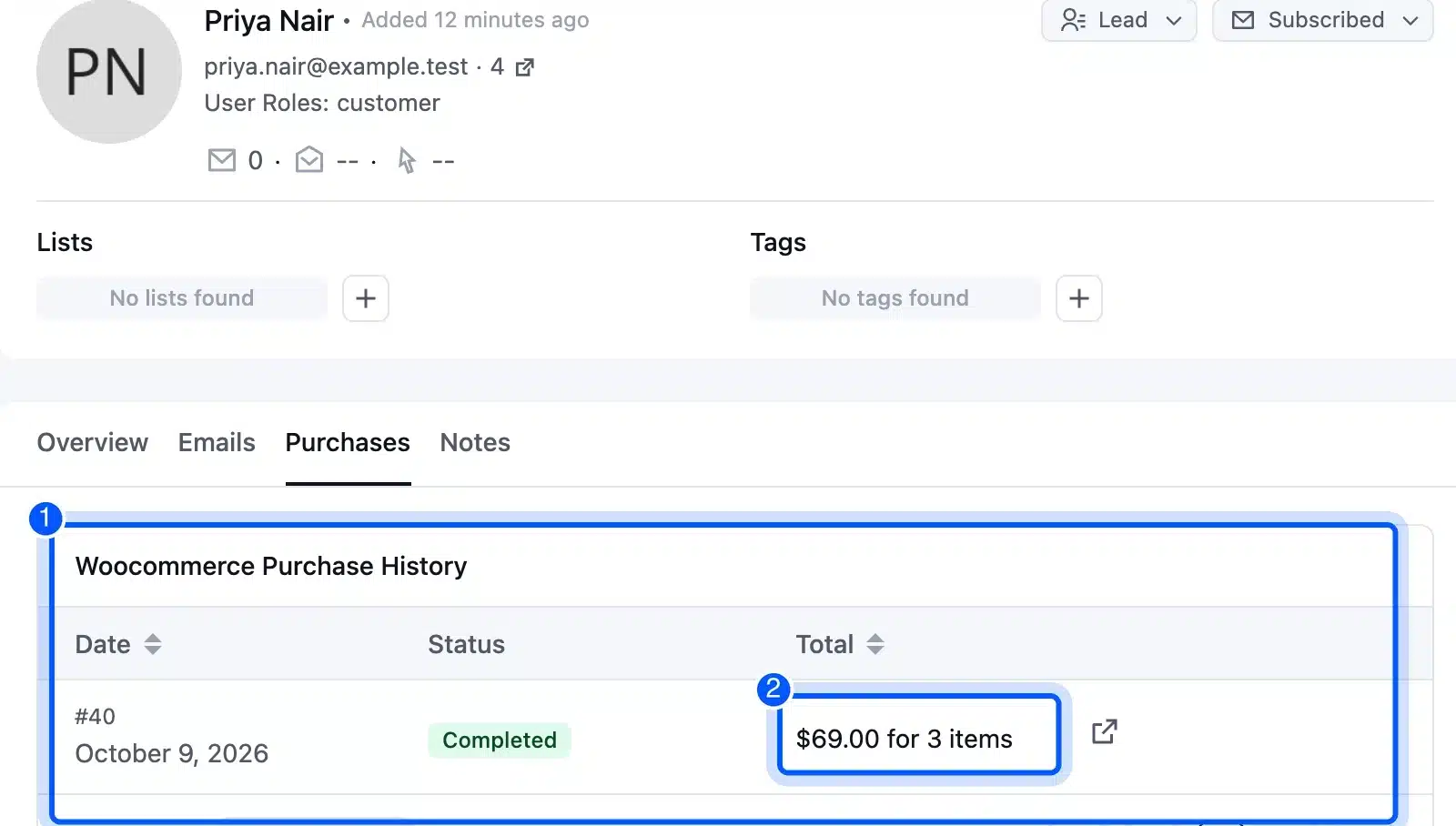
On our test store, each imported contact showed a Purchases tab with WooCommerce purchase history. Priya Nair’s profile listed order #40, Completed, $69.00 for 3 items, on the free plan.
The settings menu goes further than most free CRMs. It includes Double Opt-in Settings, Abandoned Cart Settings, AI Configuration and Compliance Settings, though several features behind them need Pro.
- Key features: Contacts with lists and tags, email campaigns and sequences, a visual automation builder, and WooCommerce purchase history on each contact.
- Pricing: Free on WordPress.org. Pro is $129 a year for one site on the FluentCRM pricing page, shown at $103 with a 20% saving, October 2026.
- Best for: WooCommerce stores that want email marketing and a CRM in one plugin, priced by site and not by list size.
2. Jetpack CRM
Jetpack CRM, formerly Zero BS CRM, is a CRM from Automattic with contacts, quotes, invoices and transactions. Its free WooCommerce Sync was the most complete store sync in our test. The Jetpack CRM listing shows 30,000+ active installs.
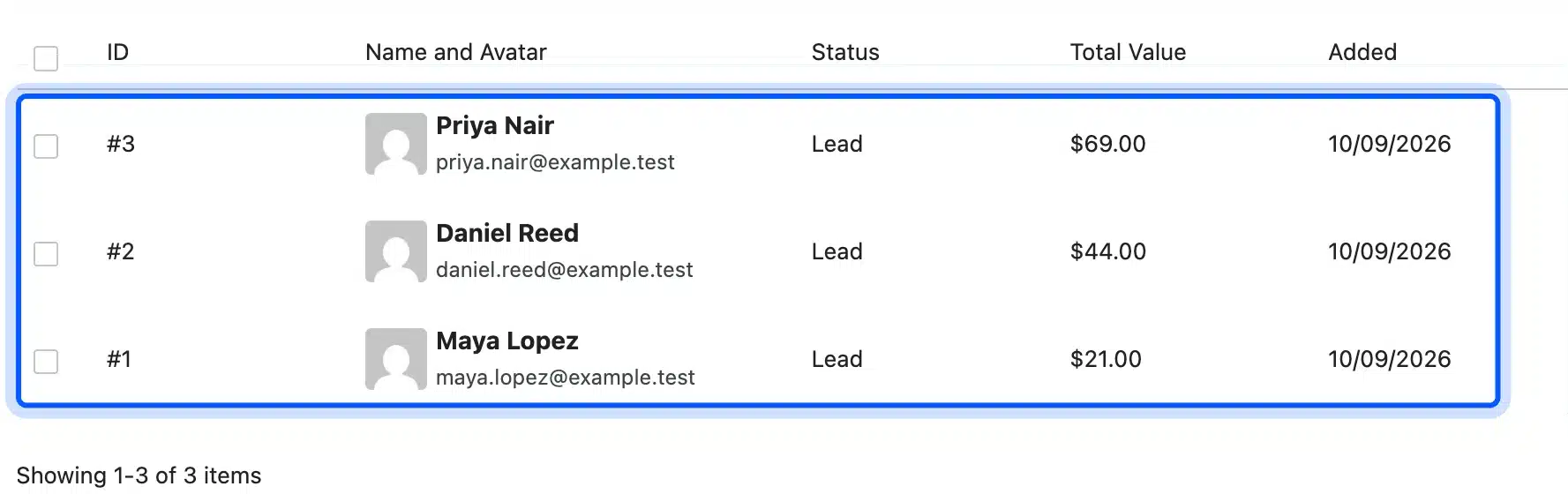
After the sync, the contacts list showed each customer as a Lead with their total value: $69, $44 and $21. Quotes and invoices stayed at $0 because we never created any. That per-customer total is the input you need for calculating customer lifetime value in eCommerce.
The module list shows how Jetpack CRM grows. API, Client Portal, MailPoet Sync and GiveWP Connector are separate modules you switch on, and the API module was off by default.
- Key features: Contacts, companies in B2B mode, quotes, invoices, transactions, tasks, simple forms and WooCommerce Sync.
- Pricing: Free core plugin. Paid bundles start at $11 a month billed yearly for the Freelancer plan, on Jetpack CRM’s pricing page, October 2026.
- Best for: Small businesses that sell online and also send quotes and invoices to clients.
3. Groundhogg
Groundhogg is a marketing automation CRM with flows, broadcasts and contact records stored on your site. It was the only plugin that added contacts without being asked. The Groundhogg listing shows 2,000+ active installs.
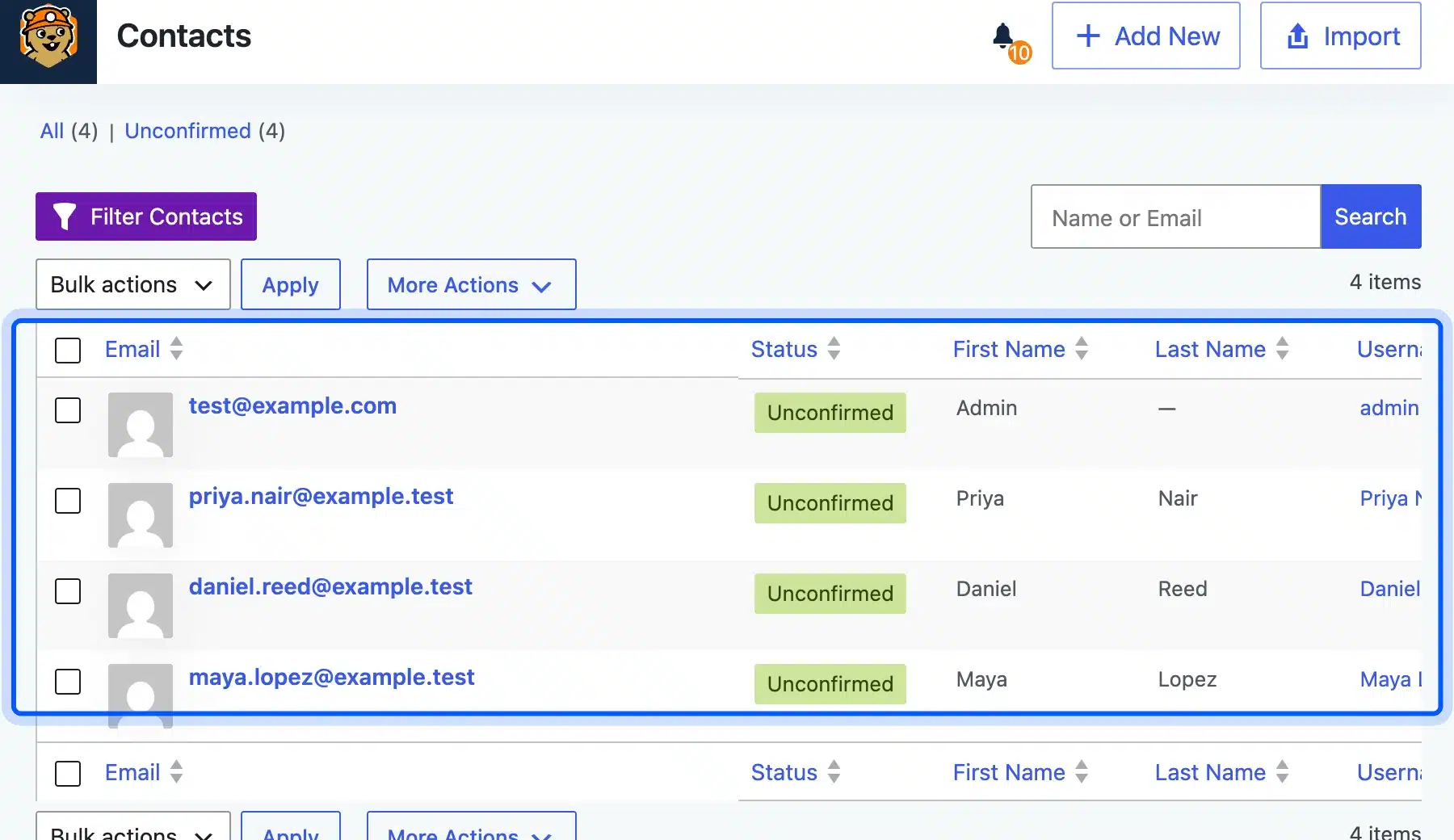
All four WordPress users, including our three WooCommerce customers, appeared as Unconfirmed contacts right after activation. That suits double opt-in, because nobody gets marketing email until they confirm.
Its setup wizard opens with your business name and address. The screen explains that anti-spam laws require both in the footer of every marketing email, a detail the other plugins left to you.
- Key features: Contact records, tags, a flow builder with templates, broadcasts, reporting and a guided setup.
- Pricing: Basic is $20 a month billed yearly. Ecommerce and SMTP integrations sit in Pro at $50 a month on the Groundhogg pricing page, October 2026.
- Best for: Marketers who want flat pricing that never grows with contact count.
4. WP ERP
WP ERP is a business suite with HR, CRM and accounting modules, and the CRM is one part of it. That explains its size: 85 tables on our store. The WP ERP listing shows 5,000+ active installs.
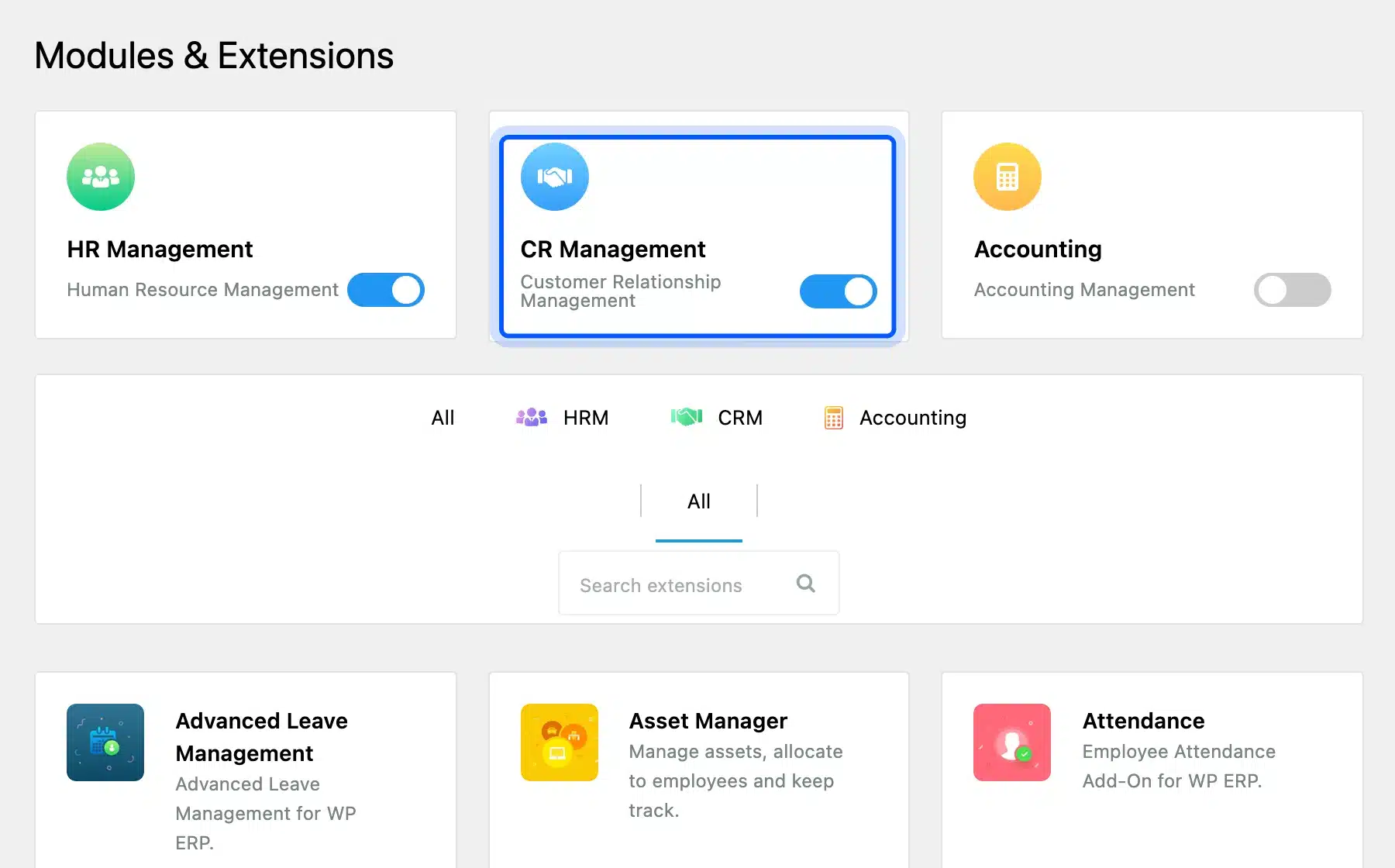
The CRM module was off after activation, while HR Management was on. We switched CR Management on under WP ERP, then Modules, and the CRM menu appeared with an empty contact list and an Import Users button.
Its CRM dashboard sorts contacts into four life stages: Customer, Lead, Opportunity and Subscriber. The Modules screen also lists paid add-ons such as Deals, so sales pipelines cost extra.
- Key features: Contacts and companies, activities, schedules, contact groups and segments, plus separate HR and accounting modules.
- Pricing: Starter is $228 a year. WooCommerce integration, workflow automation and deals pipeline sit in Growth at $468 a year on the WP ERP pricing page, October 2026.
- Best for: Companies that also want HR and accounting inside WordPress.
5. HubSpot
HubSpot’s WordPress plugin connects your site to HubSpot’s cloud CRM, so contacts never sit in your database. The HubSpot plugin listing shows 200,000+ active installs, the most of the five. It is the external route covered in Step 1.
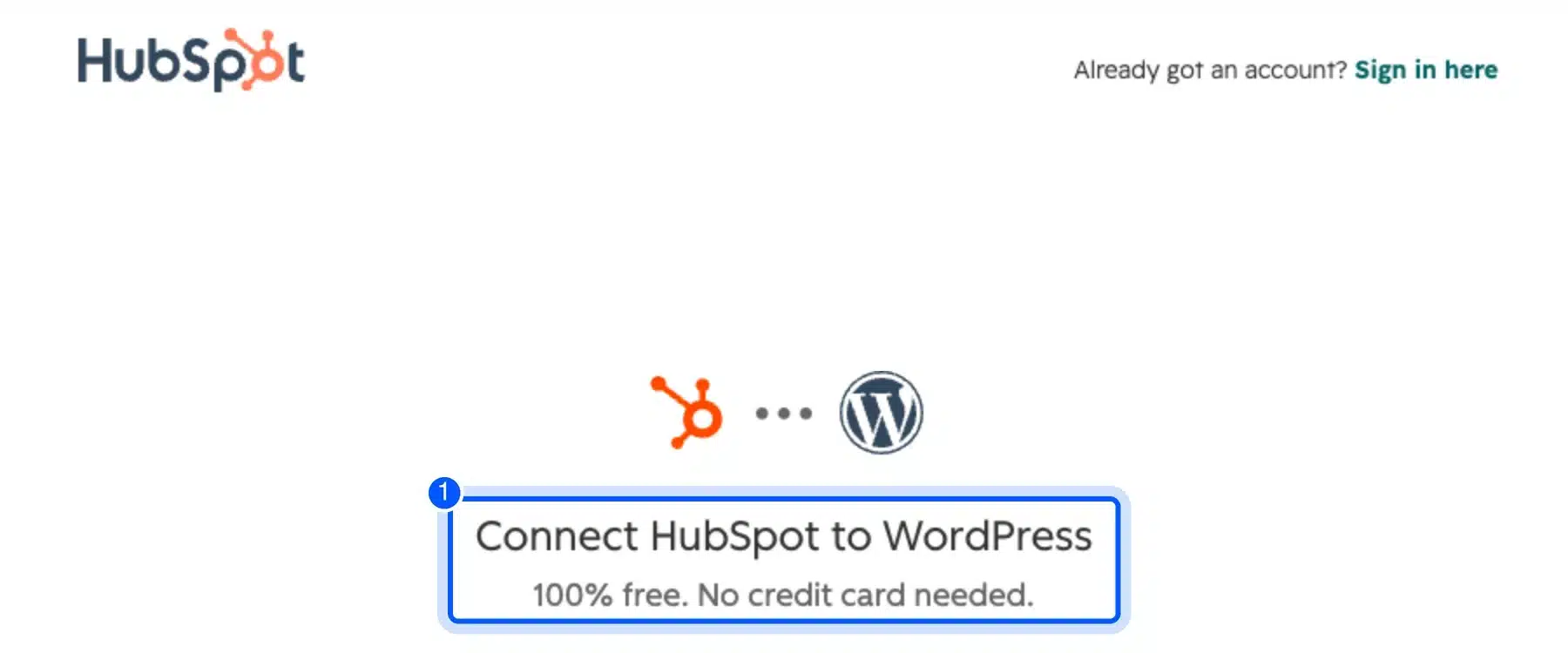
The plugin page opened a HubSpot sign-up form and did nothing else until connected. Its notice says that by continuing, WordPress shares your name, email, company name and domain with HubSpot. We did not connect an account.
The form offered sign-in with Google, Microsoft, Apple or ChatGPT, or an email address. It also filled in the site’s admin email on its own, so check which address you connect.
- Key features: Contact management, deal pipelines, forms, popups, live chat and email tools, all run in HubSpot.
- Pricing: Free tools for up to 2 users. Starter is from $15 a month per seat on HubSpot’s CRM page, October 2026.
- Best for: Teams that sell beyond the website and need one CRM for several people.
The Honest Limits of a WordPress CRM
A WordPress CRM saves money, but it moves work onto your site. You become responsible for email delivery, database size, backups and consent records. Plan for those four before you import a customer list, because each one gets harder to fix after the first campaign.
These are the limits our test turned up:
- Email delivery: Every built-in CRM needs SMTP or an email API, and FluentCRM’s own settings page pushes you to add one.
- Database load: The four built-in plugins added 166 tables between them, and they registered 18 WordPress cron hooks, including a FluentCRM task that runs every minute.
- Plugin overlap: Jetpack CRM, Groundhogg and WP ERP added 15 new user roles together, from “Jetpack CRM Mail Manager” to “CRM Agent”.
- Admin notices: With all five active, every admin screen carried notices from the other plugins asking for setup or tracking consent.
- Consent status: FluentCRM imported our customers as Subscribed unless we picked a status, while Groundhogg marked them Unconfirmed.
- Storage before data: With four contacts, the CRM tables already used 6.5 MB, from 1.17 MB for FluentCRM to 2.44 MB for WP ERP.
Most of that is empty tables and indexes, so it grows slowly at first. Every email sent and every contact event adds rows, though, and a busy list can make the database the largest part of your backup.
Lead scoring is another gap. None of the free plugins we tested scored leads on its own, and HubSpot lists standard contact scoring in its Professional plan. If scoring matters, check it in the paid tier before you choose.
Important: A completed WooCommerce order is not consent to marketing email under GDPR. Import past customers as unconfirmed or transactional only, and send a double opt-in email first. Our guide to making a WooCommerce site GDPR compliant covers the consent records you need.
Run one CRM only. Each plugin we added built its own contact list from the same customers.
So three plugins meant three copies of every record to keep in sync. Pick one after testing, then delete the others with their data.
If the free plans do not fit, a custom CRM integration with WordPress is often cheaper than stacking paid add-ons. Our custom WooCommerce development team builds those connections between WooCommerce and an outside CRM.
Conclusion
The right WordPress CRM depends on where you want contact records to live. For most WooCommerce stores, a built-in plugin like FluentCRM or Jetpack CRM keeps WooCommerce order history next to each customer. Jetpack CRM also syncs orders for free.
Budget for two things the free plans leave out: order-based automations and email sending. If email is the main job, compare these with the email marketing plugins for WooCommerce before you pay, and test on a staging copy first.
Frequently Asked Questions (FAQs)
Q1. What is the best CRM for WordPress?
For a WooCommerce store, FluentCRM is the best CRM for WordPress when email marketing matters most, and Jetpack CRM when quotes and invoices matter. HubSpot is the better fit for a sales team that works outside the website.
Q2. How do you create a CRM in WordPress?
Install a CRM plugin such as FluentCRM or Jetpack CRM from WordPress.org and activate it. Then import your existing customers, connect your forms, and set up an SMTP plugin so its emails reach inboxes.
Q3. Is FluentCRM free?
Yes, the core FluentCRM plugin is free on WordPress.org with contacts, campaigns and basic automations. In our October 2026 test, all four WooCommerce automation triggers needed FluentCRM Pro, which starts at $129 a year.
Q4. Does WooCommerce have a built-in CRM?
Not a full one. WooCommerce has a Customers screen under WooCommerce with order counts and spend per customer. Tags, email campaigns and lead scoring need a CRM plugin or an external CRM such as HubSpot, whose Professional plan adds standard contact scoring.
Q5. Does a CRM plugin slow down WordPress?
It can on small hosting plans. The plugins we tested added between 17 and 85 database tables, plus scheduled tasks and admin pages. A CRM rarely touches front-end page speed, but large email sends from the site can strain shared hosting.
Q6. Can I connect an external CRM to WordPress?
Yes. Most cloud CRMs offer a WordPress plugin or a form integration that sends new leads to the CRM, like HubSpot’s plugin in our test. The contact data then lives with the CRM vendor, and email sync and sending run on their servers.