
The best WooCommerce subscription plugin for most growing stores is Woo Subscriptions, because it covers switching, proration and 25+ payment gateways. Milo Subscriptions is the strongest free pick, since its free core already includes plan switching with proration. YITH WooCommerce Subscription suits a simple monthly box sold through PayPal.
We installed five free subscription plugins from WordPress.org on a test store in October 2026, running WooCommerce 11.2.0 and WordPress 7.1.3. With each one we built the same $20 a month “Coffee Club” product, then checked the cart, the checkout and the subscription record. The paid Woo Subscriptions was judged from its official listing and documentation.
Below you get a comparison table, then each plugin with its real settings screen and what our test showed. After that come the parts most roundups skip: subscription switching, proration math, renewal orders, and which payment gateways can renew on their own.
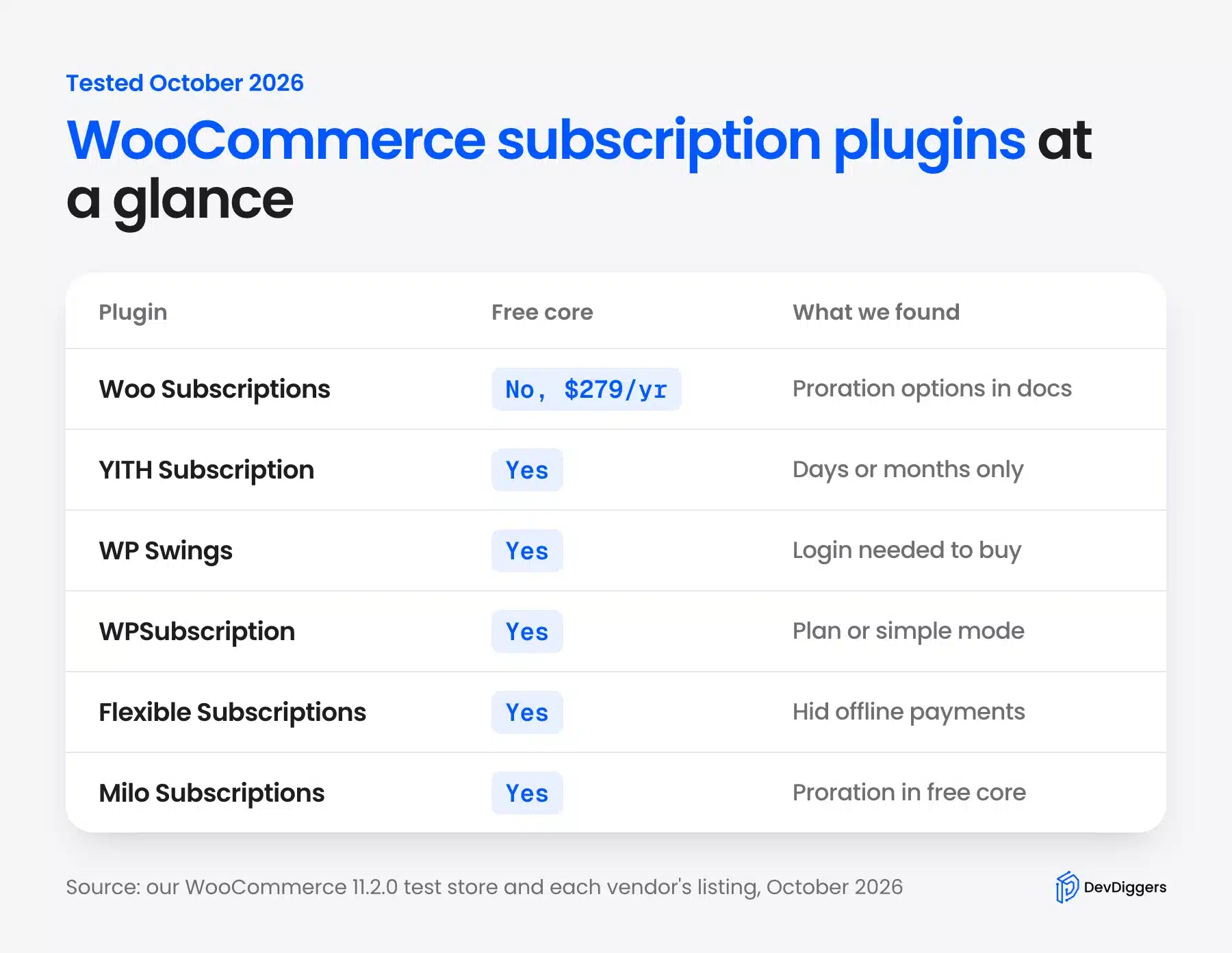
WooCommerce Subscription Plugins Compared
Six WooCommerce subscriptions plugins are worth a look in 2026, led by the paid Woo Subscriptions. The other five, from YITH, WP Swings, WPSubscription, WP Desk and Milo, have a free core on WordPress.org. They differ most on billing periods, plan switching and which payment methods can renew automatically.
| Plugin | Free core | Paid tier (October 2026) | Billing periods in free core | Switching with proration | Active installs |
|---|---|---|---|---|---|
| Woo Subscriptions | No | $279 a year | Weekly to yearly | Yes | 100K+ |
| YITH WooCommerce Subscription | Yes | Premium version | Days or months | Premium only | 6,000+ |
| Subscriptions for WooCommerce (WP Swings) | Yes | Pro version | Day, week, month, year | Not in free core | 10,000+ |
| WPSubscription | Yes | From $149 a year | Daily, weekly, monthly, yearly | Listed under Pro | 1,000+ |
| Flexible Subscriptions | Yes | Paid add-ons | Day, week, month, year | Not in free core | 1,000+ |
| Milo Subscriptions | Yes | Add-ons, bundle $149 a year | Day, week, month, year, lifetime | Yes, free | 200+ |
Install counts come from each plugin’s WordPress.org listing and the Woo Marketplace page on 9 October 2026. The switching column comes from each plugin’s own readme, and we also searched the free code for proration.
That search was blunt but useful. The word “prorate” appeared in 76 files of Milo’s free plugin, 4 in WP Swings, 3 in YITH, and none in WPSubscription or Flexible Subscriptions.
How We Tested Each Plugin
We tested each subscription plugin for WooCommerce on a clean WordPress 7.1.3 test store with WooCommerce 11.2.0, PHP 8.3 and the default Twenty Twenty-Five theme. Only bank transfer, check and cash on delivery were enabled. That showed how each plugin treats payment methods that cannot charge a card again.
For each plugin we activated it alone and created the same product: Coffee Club, $20 every month. Then we added it to the cart as a guest, opened the block checkout, and noted what the shopper saw. With YITH we went further and placed a real test order, then marked it paid to watch the subscription turn active.
Testing one plugin at a time matters. Two subscription plugins on one store fight over the same cart and product data. That is a mess you do not want on a live site.
Note: We did not connect Stripe, PayPal or any live account. Automatic card renewals were therefore not tested, and every claim about them comes from the vendor’s own documentation.
Here is what each free plugin showed a guest shopper with the same $20 a month product:
| Plugin (version) | Cart showed | Checkout as a guest |
|---|---|---|
| YITH WooCommerce Subscription 4.22.0 | $20.00 / month, plus a recurring total | Offline methods shown, order accepted |
| WP Swings Subscriptions for WooCommerce 2.1.0 | $0.00 today, a $5 sign-up fee and the trial | “You must be logged in to checkout” |
| WPSubscription 2.4.0 | Every Month, next billing on November 9, 2026 | Offline methods shown |
| Flexible Subscriptions 1.8.6 | Total due today, first renewal November 9, 2026 | No payment methods available |
| Milo Subscriptions 1.8.36 | Recurring total (every month) | No payment methods available |
Two patterns stand out. Every plugin worked with the block cart and checkout, which was not a given a couple of years ago. And the five split almost evenly on whether an offline payment method may start a subscription at all.
The Best WooCommerce Subscription Plugins
These are the six options in the order we would shortlist them for a typical store. The paid Woo Subscriptions comes first because it sets the standard the free plugins are measured against. The five free plugins follow, each with what it does well and where our test hit a limit.
1. Woo Subscriptions
Woo Subscriptions is the official subscription extension from the WooCommerce team, sold on the Woo Marketplace for $279 a year as of October 2026. It handles weekly, monthly and yearly billing, upgrades and downgrades with proration, and automatic renewals through more than 25 payment gateways.
The listing showed version 9.3.0, 100K+ active installs and an average rating of 3.9 from 142 reviews. Several recent reviews praise support and complain about price, which matches what store owners tend to say about it.
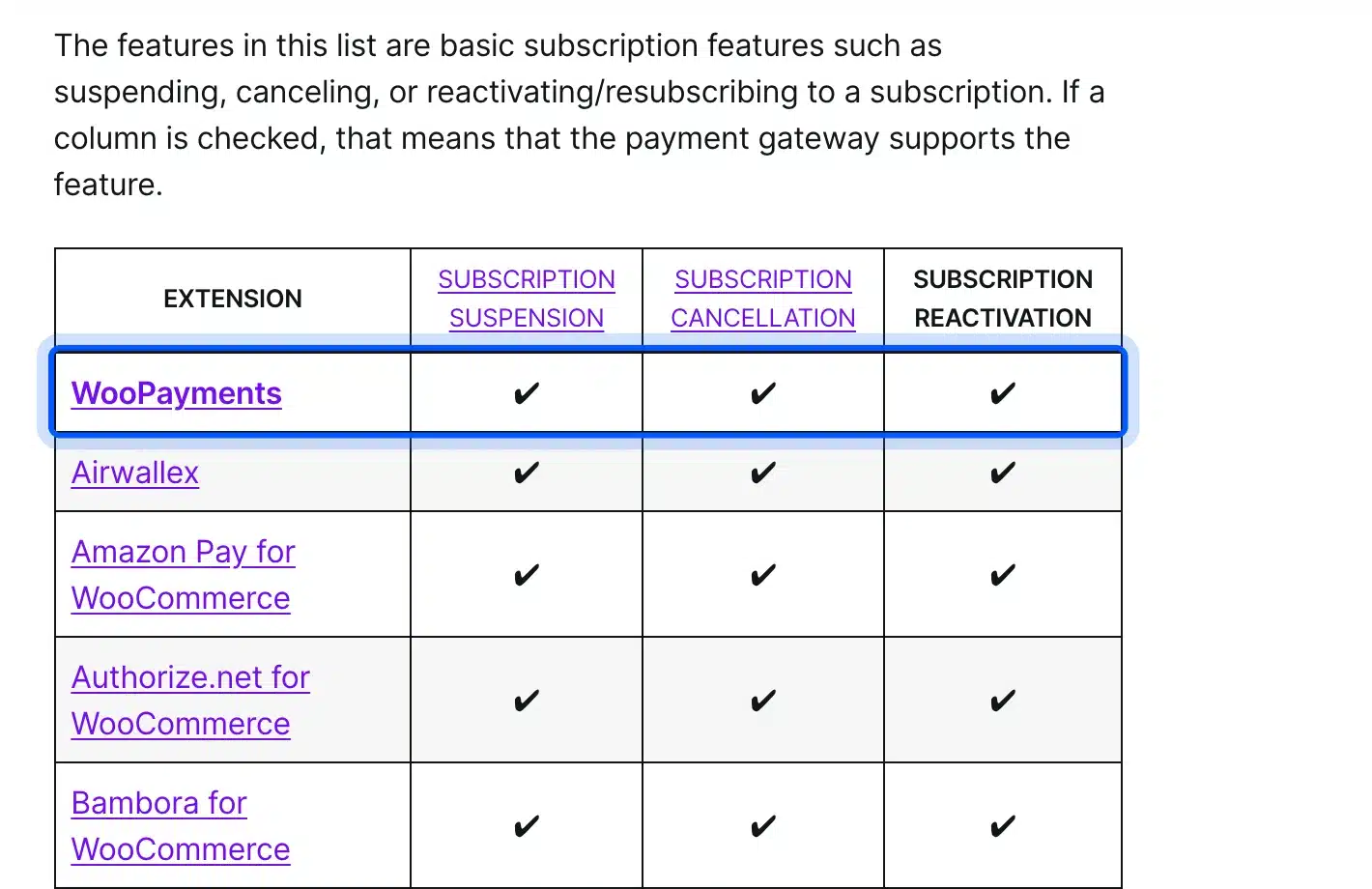
Its payment gateways guide lists which gateways support automatic renewals and which features each supports, such as suspension and cancellation. Manual renewals work through any WooCommerce gateway, with emailed invoices.
The listing also says it works with the Cart and Checkout blocks and with High-Performance Order Storage. It was tested with WooCommerce 11.1 and needs at least WooCommerce 11.0, so it keeps up with core releases.
Two features matter more than they sound. Multiple subscriptions bought together are grouped by billing schedule, so they renew as one order and one payment with fewer gateway fees. Billing date alignment can renew everyone on the same day, which helps a box that ships once a month.
- Key features: Switching with proration, failed payment retry, synchronized renewal dates, gifting, subscription coupons and a health check that flags broken renewals.
- Pricing: No free version. $279 a year for one site, or $446.40 for two years, checked on 9 October 2026, with a 30-day money-back guarantee.
- Best for: Stores that depend on recurring revenue and want the widest gateway support and official help.
2. YITH WooCommerce Subscription
YITH WooCommerce Subscription is a free plugin with a premium upgrade, used on 6,000+ stores according to WordPress.org. Its free version turns a simple product into a subscription with a tick box. It charges renewals automatically only through PayPal, and keeps upgrades and pauses for the premium version.
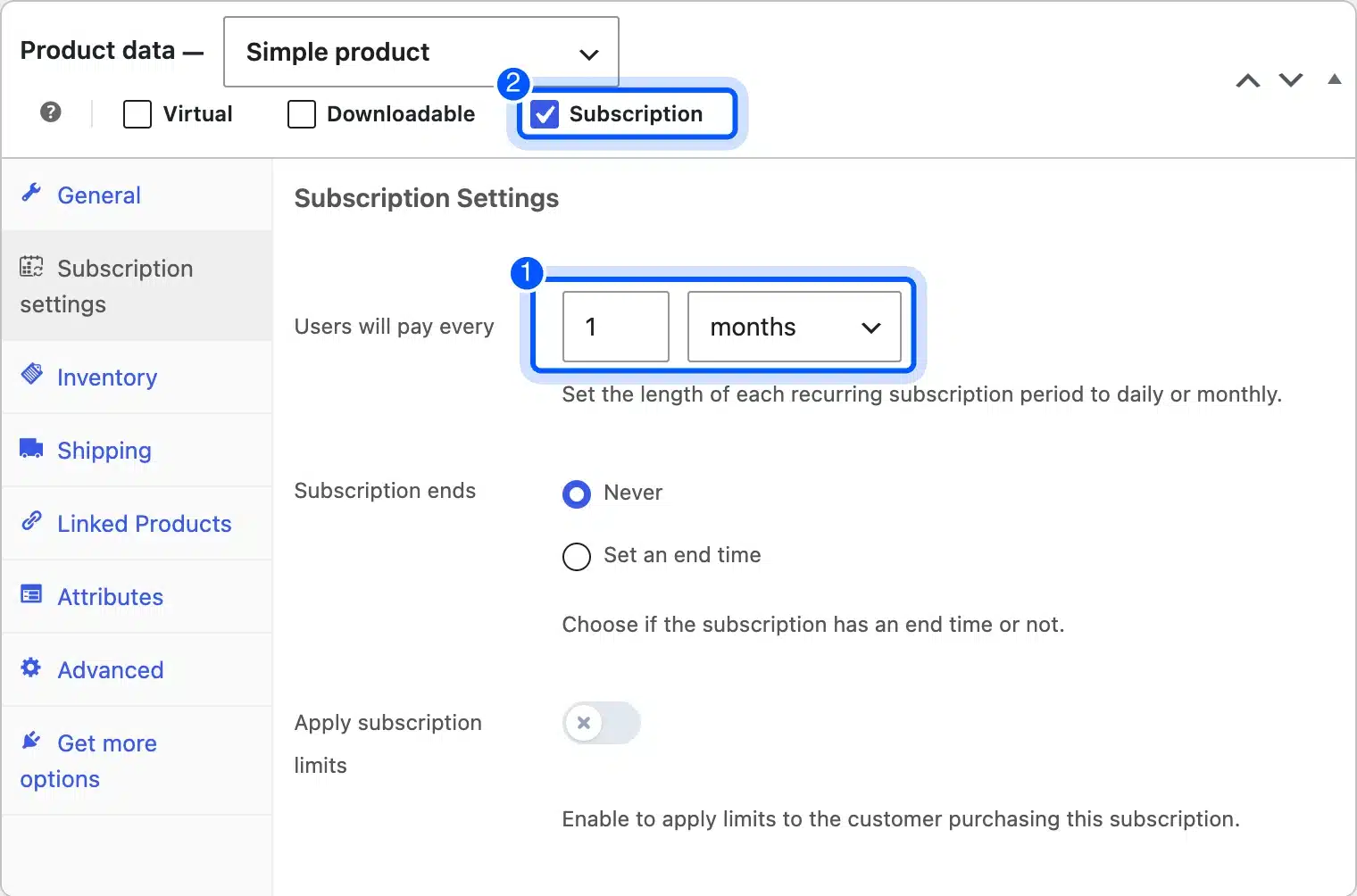
Version 4.22.0 added a Subscription tick box next to Virtual and Downloadable, plus a Subscription settings tab. The free version offered only two billing units, days or months, so a weekly or yearly plan was not possible.
On the product page the price read “$20.00 / month” with a Subscribe button, and the block cart added a “Recurring totals” line. The YITH WooCommerce Subscription listing on WordPress.org confirms that free renewals are charged automatically only with PayPal.
We placed a real test order with bank transfer. The plugin created a subscription record in pending status. Marking the order paid turned it active with a payment due date of November 9, 2026.
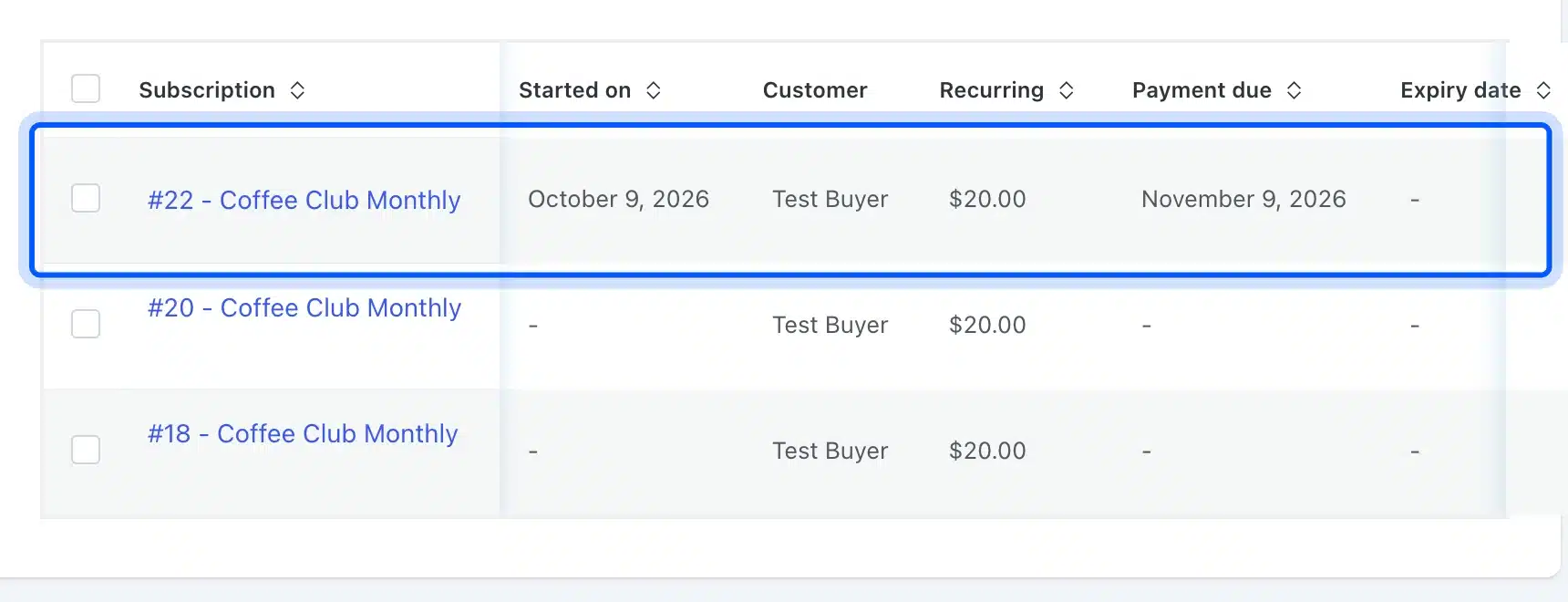
One finding needs care. Our order went through as a guest, and the subscription record had no user attached. That buyer could not manage it from a My Account page.
So turn off guest checkout for subscription products, or make account creation required at checkout. YITH did not force it on our store.
- Key features: Subscription tick box on simple products, a recurring total in the block cart, a Subscribe button, and PayPal Payments support for automatic charges.
- Pricing: Free core. The premium price was not shown on the vendor page when we checked in October 2026.
- Best for: A small store selling one monthly plan through PayPal.
3. Subscriptions for WooCommerce by WP Swings
Subscriptions for WooCommerce by WP Swings is a free plugin with 10,000+ active installs, the most of the free options here. It supports daily to yearly billing, free trials and sign-up fees in its free core. Variable subscription products and manual subscriptions are Pro features.
The plugin does nothing until you tick “enable the subscription” in its four step setup wizard. We nearly missed it, so check that box first.

After that, products gained a Subscription tick box and a Subscription Settings tab. We set $20 a month with a 7 day free trial and a $5 sign-up fee.
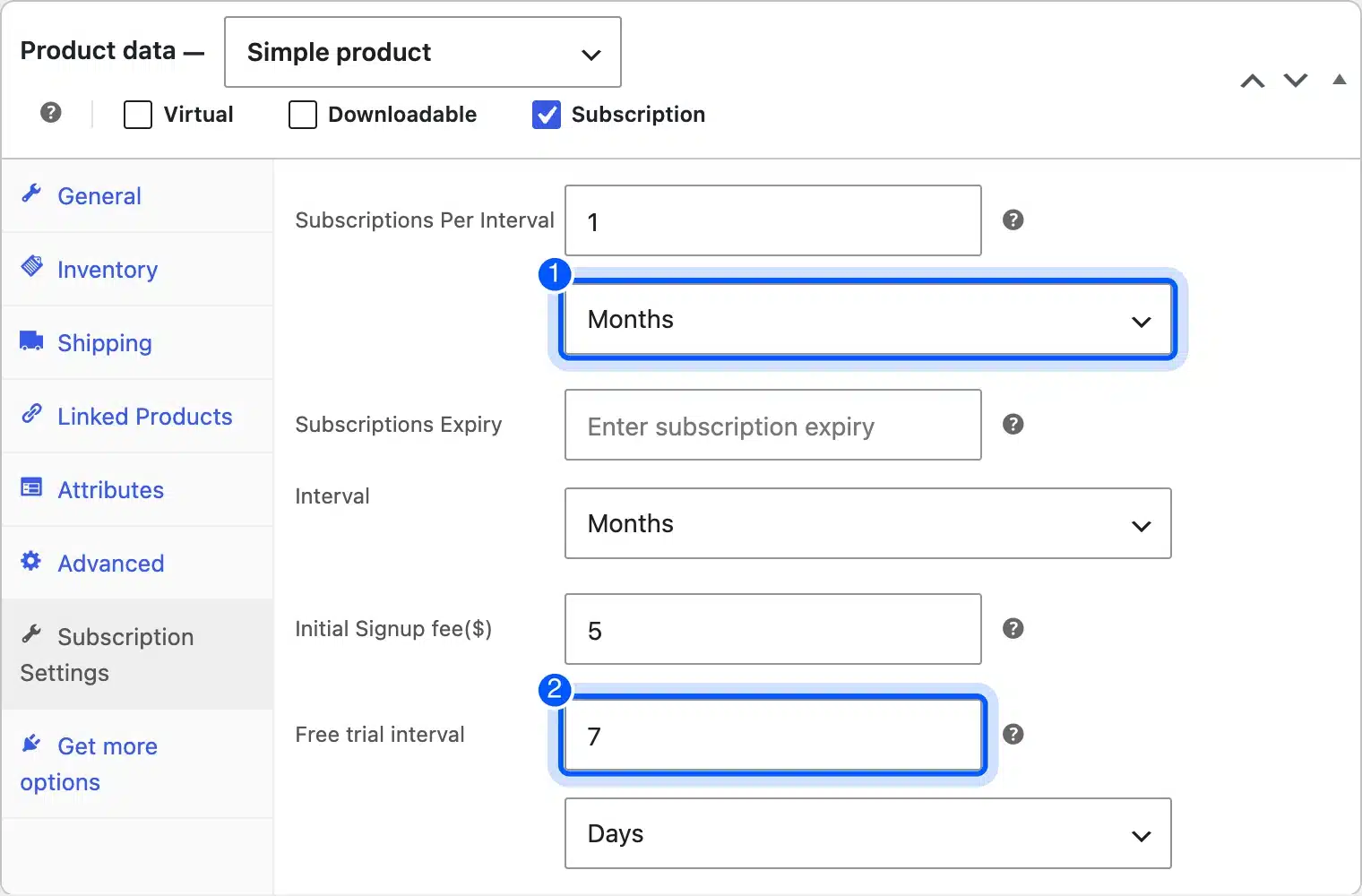
The cart showed a crossed-out $20.00, a $0.00 price and a $5.00 sign-up fee as the total due. That is correct for a trial, but it may confuse shoppers. At checkout, a guest saw only “You must be logged in to checkout”, so buyers need an account first.
The WP Swings plugin listing says it includes its own WPS PayPal gateway, and notes that this gateway works only with US-based PayPal merchant accounts. Its admin also promoted a new membership feature built into the same plugin.
- Key features: Free trials, sign-up fees, renewal order emails, a built-in WPS PayPal gateway for US accounts, and Stripe support.
- Pricing: Free core. The Pro price was not shown in what we could load from the vendor page in October 2026.
- Best for: Stores that need trials and sign-up fees on simple products without paying yet.
4. WPSubscription
WPSubscription, listed on WordPress.org as “Subscriptions for WooCommerce with Stripe Recurring Payments”, is a free plugin with 1,000+ installs. Its listing says Stripe and PayPal recurring payments are included free. It sells subscriptions through reusable plans or a simple per-product mode.
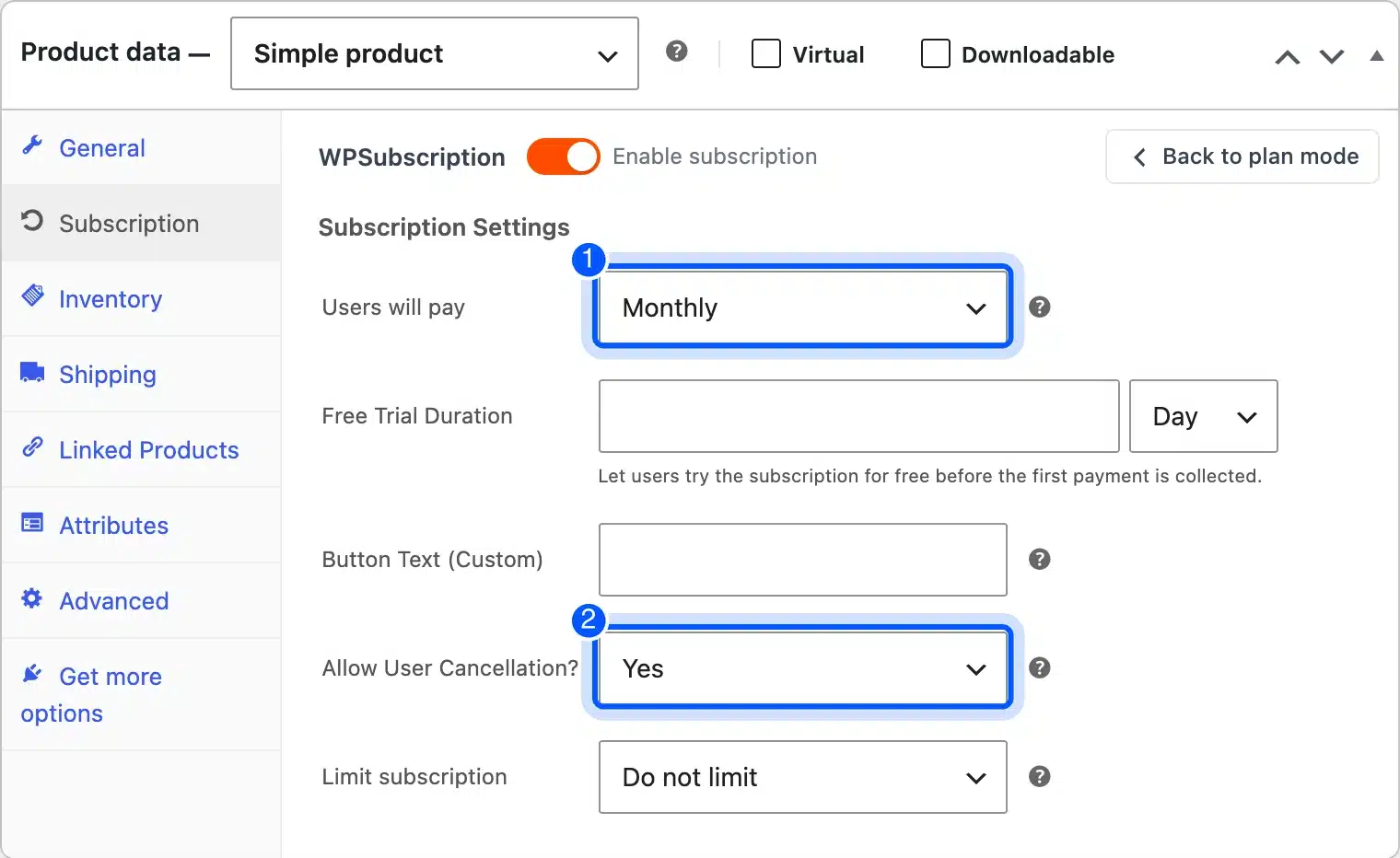
The product tab opened in plan mode and said the product was not connected to any plan yet. A “Switch to simple mode” link showed the familiar fields: billing period, free trial, button text, user cancellation and a purchase limit.
The cart was the clearest of the five. It showed “Every Month”, a recurring total, “Next billing on: November 9, 2026” and a note that the customer can cancel anytime. Offline payment methods stayed available at checkout.
The admin side is larger than most free plugins. WPSubscription added menu pages for Plans, Delivery, Subscriptions, Reports, Health, Integrations and a Cancellation Flow. Its WordPress.org listing puts variable products and some renewal tools in the Pro version.
- Key features: Plans shared across products, free trials, user cancellation control, purchase limits, and built-in Stripe and PayPal renewals.
- Pricing: Free core. Paid plans started at $149 a year for 5 sites on 9 October 2026, with lifetime options.
- Best for: Stores that want several products on the same plans and Stripe renewals in the free version.
5. Flexible Subscriptions
Flexible Subscriptions by WP Desk is a free plugin with 1,000+ installs that adds two real product types: Subscription and Variable subscription. That makes it one of the few free options with variable subscriptions in the core. Paid add-ons cover payment retry, recurring shipping and emails.
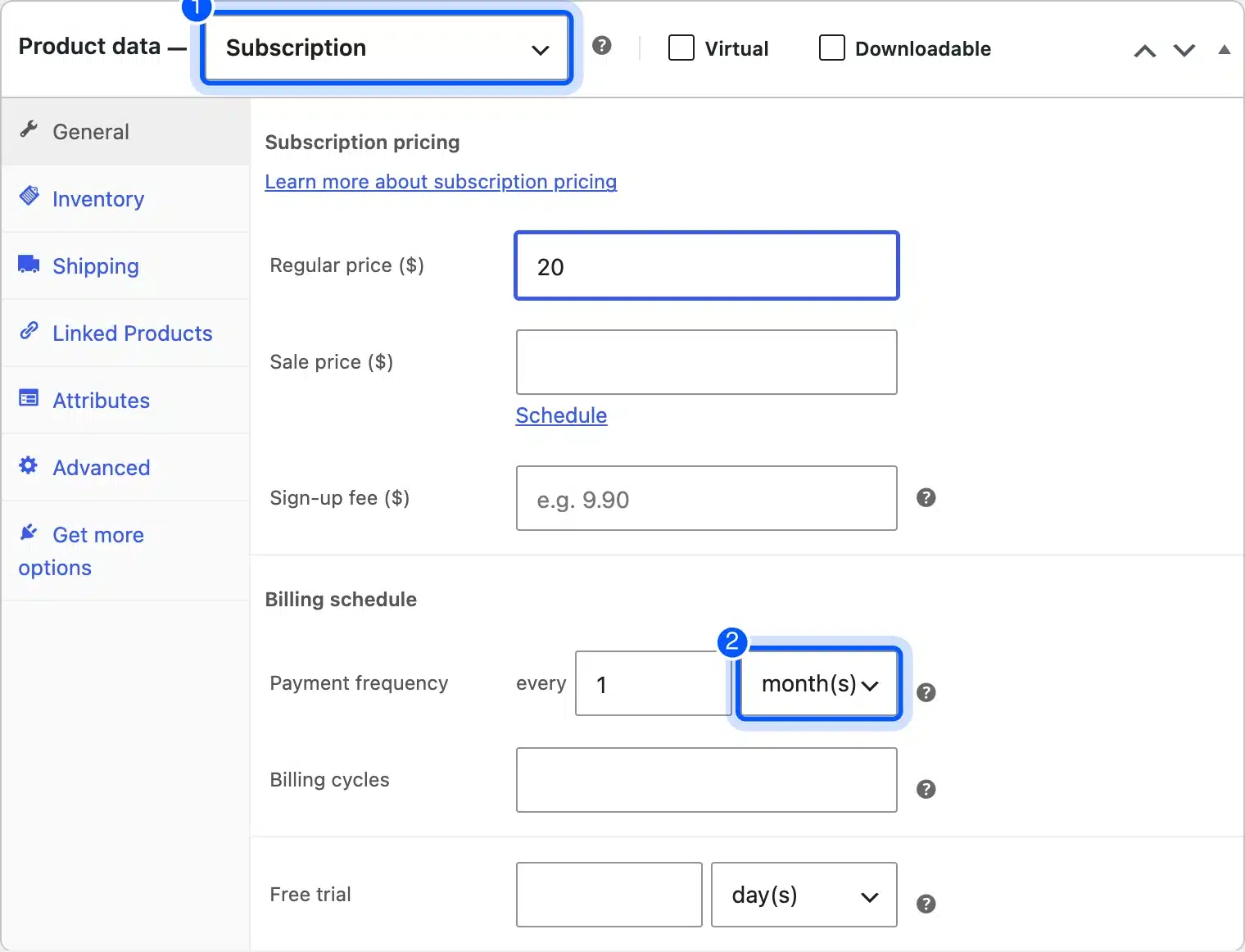
Choosing the Subscription product type opened its own pricing block with sign-up fee, payment frequency, billing cycles and a free trial. We set $20 every month.
The cart was clear, with “Total due today”, “Recurring total (every month)” and “First renewal: November 9, 2026”. The checkout, though, showed “There are no payment methods available”, because the plugin filters out gateways it cannot renew automatically.
That is a safe default, yet it surprises anyone testing with bank transfer. Connect Stripe or PayPal before you launch, or the store cannot take a single subscription order.
On the front end, the product read “$20.00 every month” with a Sign up now button. The Flexible Subscriptions listing also lists mandatory user registration for subscription purchases, which avoids the guest problem we saw with YITH.
- Key features: Simple and variable subscription types, sign-up fees, trials, billing cycle limits, one-time shipping and mandatory account creation.
- Pricing: Free core with paid add-ons, checked October 2026.
- Best for: Stores that need variable subscriptions, such as sizes or flavors, without paying for a license.
6. Milo Subscriptions
Milo Subscriptions is the newest plugin here, with 200+ installs, and its free core includes plan switching with prorated charges and credits. It uses the same subscription product types and price fields as Woo Subscriptions. Payments run through its free Milo Payments plugin, which connects Stripe, PayPal, Mollie and Square.
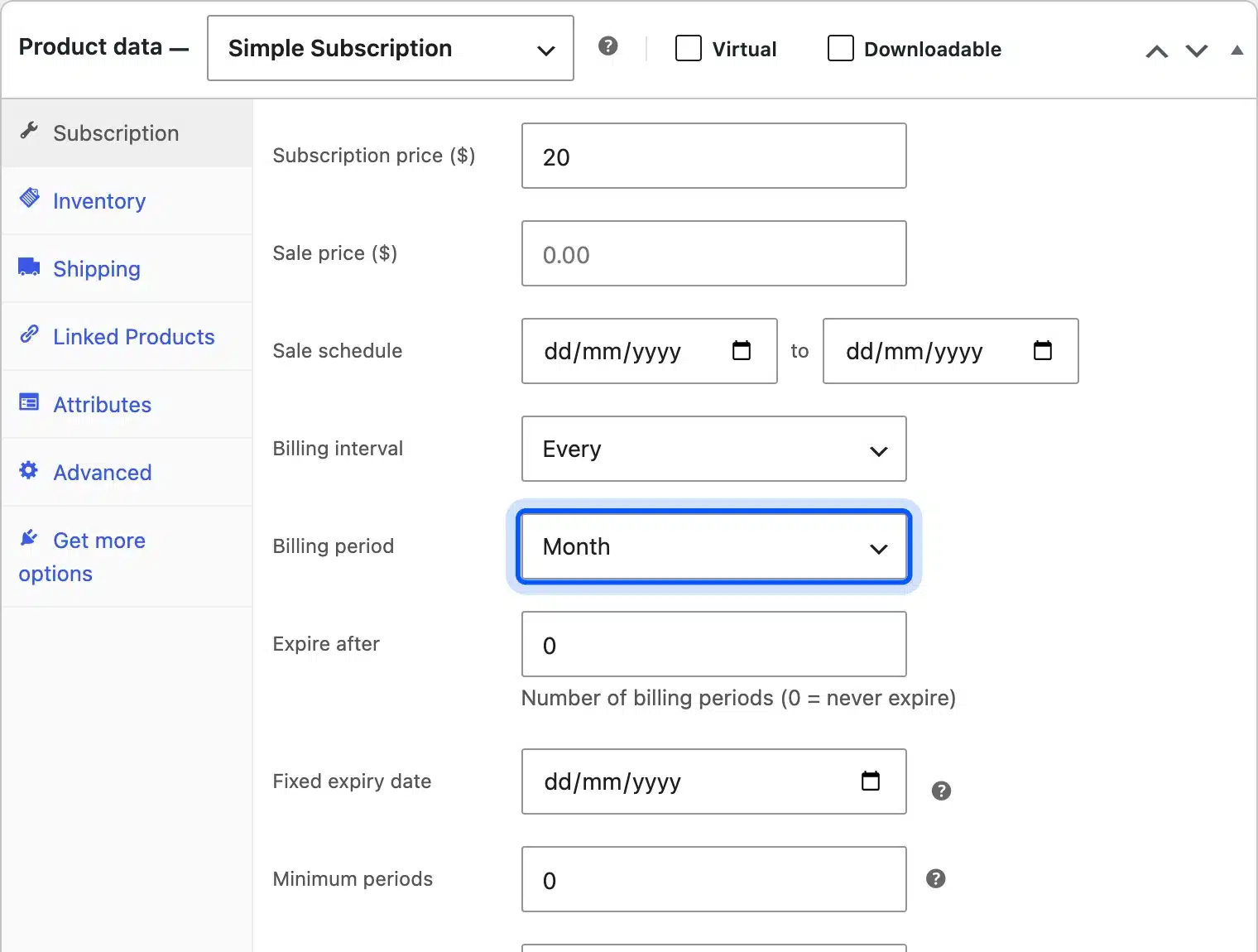
Activation sent us to a five step setup wizard. Its product types were Subscription and Variable subscription, with billing every 1st to 6th day, week, month or year, plus a lifetime option.
Like Flexible Subscriptions, Milo showed no payment methods at checkout with only offline gateways enabled. That happened even though its “Accept manual renewals” setting appeared switched on.
The wizard covered store settings, customer controls, payments, a first product and an import step, and said it takes about two minutes. The import step is the interesting one: the Milo Subscriptions listing describes migration tools for moving from another subscription plugin.
The low install count is the trade-off. A newer plugin has had less time in real stores, so test renewals on a staging copy before you trust it with paying customers.
- Key features: Free switching with proration, a customer portal for pause and cancel, and a subscription health check. It also has a REST API and import tools for moving from another plugin.
- Pricing: Free core. Add-ons from $19 a year, or the All Add-ons Bundle at $149 a year, checked on 9 October 2026.
- Best for: Stores that want upgrades and downgrades without buying Woo Subscriptions.
Subscription Switching and Proration Explained
Subscription switching lets a customer move to another plan, such as monthly to yearly or a small box to a large one, without canceling. Proration decides what that switch costs today. The fair version credits the unused part of the old plan and charges the new plan only for the days left.
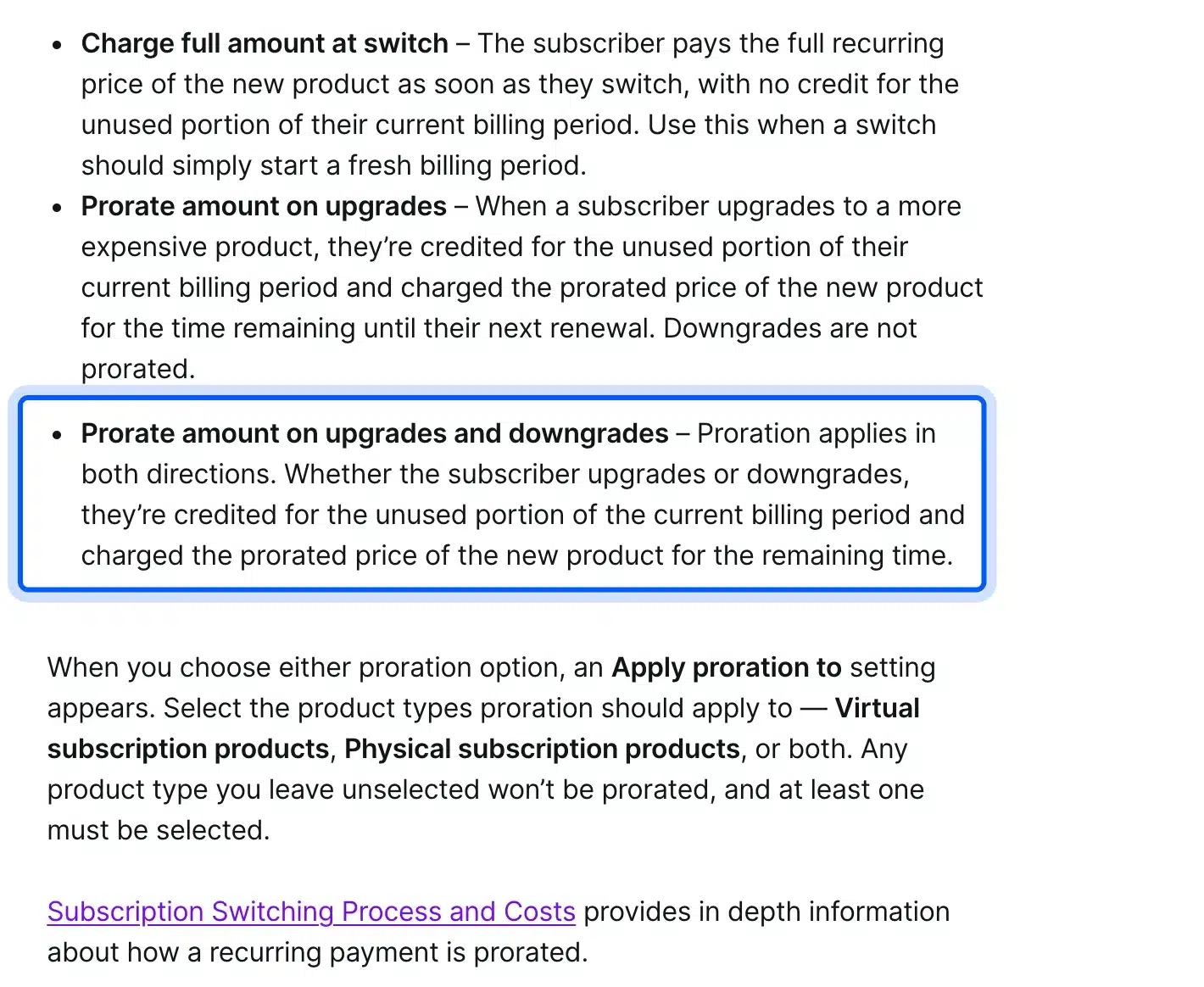
Woo Subscriptions documents this in detail. Its switching guide offers three choices: charge the full amount at switch, prorate upgrades only, or prorate both upgrades and downgrades.
The same guide says proration is based on the number of payments. The calendar time between the old start date and the switch does not count. That detail matters when a renewal was ever charged off schedule.
Here is a worked example with round numbers. Say a customer pays $20 a month and switches to a $35 plan on day 15 of a 30 day period:
- The unused half of the old plan is worth $10, which is 15 of 30 days at $20.
- The new plan for the remaining 15 days costs $17.50, which is half of $35.
- The customer pays the difference today, $17.50 minus $10, so $7.50.
- From the next renewal on, the customer pays the full $35.
With “charge full amount at switch” the same customer would pay $35 today with no credit. That is simpler to run, but it punishes upgrades, which is the move you want customers to make.
Among the free plugins, only Milo puts switching in its free core. Its settings include a “Subscription switching” toggle that lets customers upgrade, downgrade or switch plans from their account.
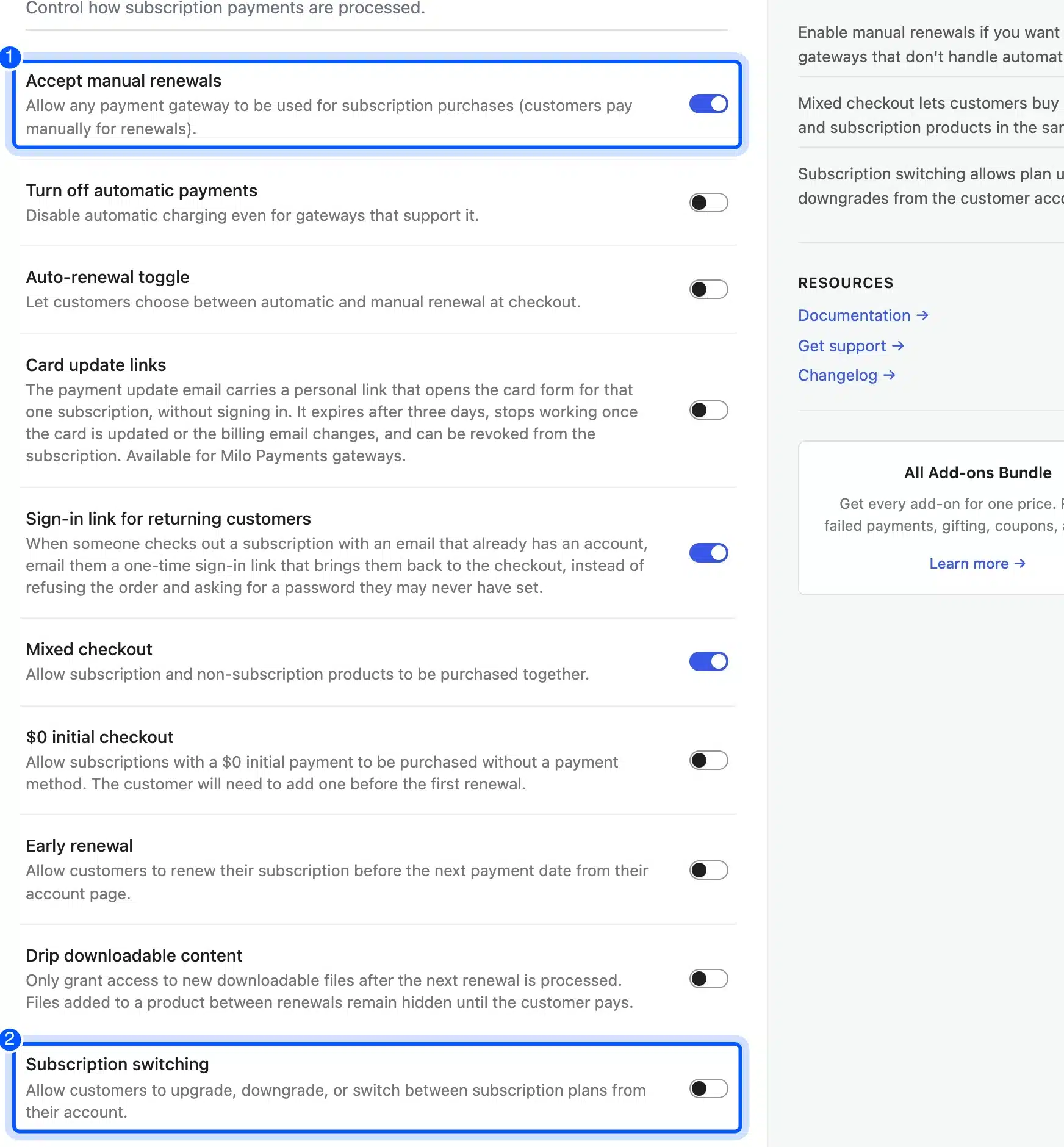
YITH lists upgrades and downgrades as a premium feature for variable products only. WPSubscription lists them in its Pro feature list. So if switching is a must and the budget is zero, Milo is the one to test.
Renewal Orders and Recurring Billing
A renewal order is the new WooCommerce order a subscription plugin creates each billing period, such as every month. Recurring billing means charging that order without the customer doing anything. That only works with a payment gateway that can store a card token and charge it again.
Offline methods like bank transfer cannot do that. Plugins handle the gap in two ways. Some allow them as manual renewals, where the customer gets an invoice and pays by hand, and others hide them from subscription checkouts.
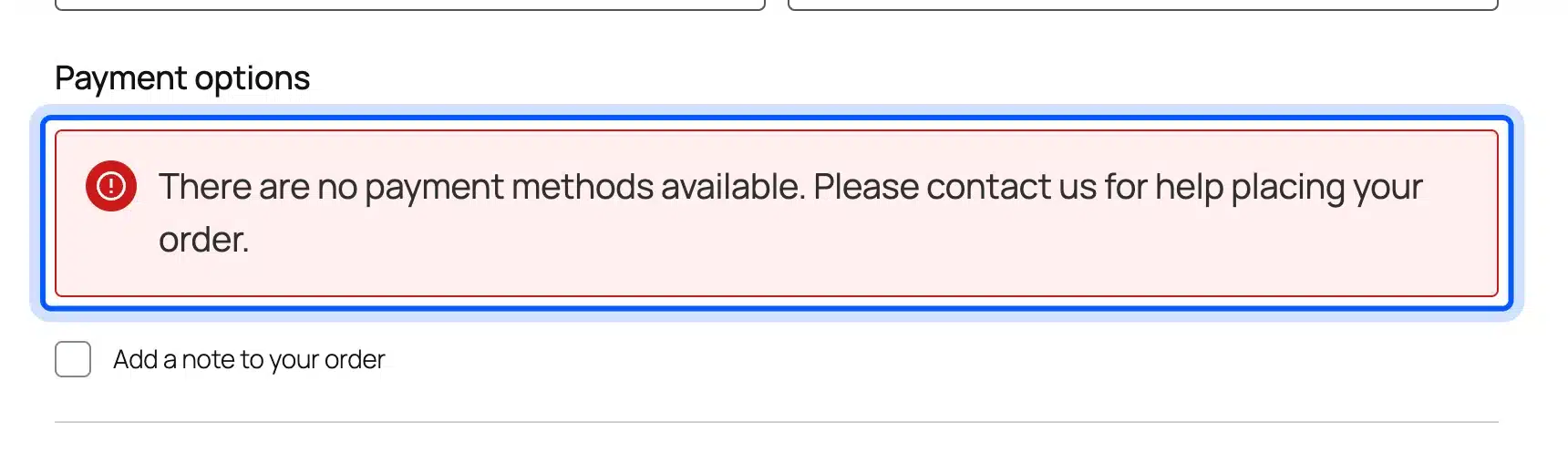
Our test showed both behaviors. YITH, WP Swings and WPSubscription kept bank transfer, check and cash on delivery at checkout. Flexible Subscriptions and Milo showed no payment methods at all until a renewal-capable gateway was connected.
Automatic renewals also depend on the gateway plugin as much as the subscription plugin. Woo Subscriptions names WooPayments, Stripe, PayPal Payments and PayPal Braintree among its automatic payment gateways. Its listing adds that the subscriptions live on your site rather than inside the gateway.
Plan for failed renewals before launch. Cards expire, and a subscription store without retries loses paying customers quietly. Woo Subscriptions includes a failed payment retry system, while Milo and Flexible sell retries as add-ons.
Renewal emails are the other half. A customer who pays by hand needs an invoice for each renewal order, and a customer on automatic billing should get a receipt. Check which emails each plugin sends in its free version, because Flexible Subscriptions sells its transactional emails as an add-on.
Variable Subscriptions and Multiple Plans
A variable subscription is one product with several plan options, such as monthly, quarterly and yearly, or small, medium and large. It keeps one product page and lets the shopper choose. It is also the usual setup for switching, since the customer moves between variations of the same product.
Free support is uneven. Flexible Subscriptions and Milo include a Variable subscription product type in their free cores. WP Swings keeps variable subscriptions for Pro, and YITH ties plan changes to variable products in its premium version.
A simple example shows why it matters. Say you sell coffee at $20 a month or $200 a year.
As a variable subscription, both options sit on one page with one review count. A monthly customer can later switch to yearly without losing their history.
That switch only works when the plugin supports it, which brings you back to the switching section above. On a free plugin without switching, the customer has to cancel the monthly plan and buy the yearly one, and you lose the clean history.
DevDiggers sells its own plugins this way. The licenses we checked, such as the PWA and Wallet plugins, are variable-subscription products with yearly tiers in our store’s public product data.
Multiple plans are a separate idea. WPSubscription and Woo Subscriptions both offer storewide plans that you create once and attach to many products. That saves time when you sell dozens of boxes on the same schedule.
Free vs Paid WooCommerce Subscription Plugins
A free WooCommerce subscription plugin is enough when you sell one or two plans and renew through a gateway it supports. A paid plugin earns its fee when you need switching, retries, many gateways or official support. The real cost is the license plus every add-on the free route needs.
Here is a worked comparison with the prices we saw on 9 October 2026. Woo Subscriptions costs $279 a year with retries and switching included. Milo is free, and its All Add-ons Bundle costs $149 a year, while its Failed Payment Retry add-on alone costs $19 a year.
So a store that only needs Milo’s free core plus retries pays $19 a year, against $279 for Woo Subscriptions. That gap is $260 a year, which is about 13 months of one $20 subscriber.
The free route has hidden costs too. You do more testing yourself, support comes from forums, and a plugin with 200 installs has less history behind it. For a store with hundreds of subscribers, one broken renewal run costs more than the license.
Our rule of thumb is simple. Under about 50 subscribers, start free and keep the setup small. Above that, the price of a dependable renewal system is small next to the revenue riding on it.
How to Set Up a Subscription Product in WooCommerce
Setting up a subscription product in WooCommerce takes about 10 minutes once a subscription plugin and a renewal-capable gateway are active. You create a normal product, mark it as a subscription, set the price and billing period, then run one test order. The exact field names change between plugins.
These are the steps we followed for every plugin in this test:
- Install and activate one subscription plugin, and finish its setup wizard if it shows one.
- Connect a payment gateway that the plugin lists for automatic renewals, using test mode first.
- Go to Products, then Add New, and enter the product name and description.
- Mark it as a subscription with the tick box or the Subscription product type, depending on the plugin.
- Set the recurring price, the billing period, and any trial or sign-up fee.
- Publish the product and check that the product page shows the price with its period.
- Buy it with a test account, then confirm the subscription record and its next payment date.
Step 7 is the one people skip. It is also where we found the guest-checkout gap and the missing payment methods, so never launch without it.
After the test order, log in as that customer and open My Account. Check that the subscription appears with its next payment date, and that cancel or pause works if you offer it.
Then cancel the test subscription from the admin side and confirm no renewal order is scheduled for it. A leftover test renewal that charges a real card later is an awkward support email to write.
How to Choose a Subscription Plugin for WooCommerce
Choose a subscription plugin for WooCommerce by the payment gateway you will renew through, then by the features your plans need. A store with Stripe and one monthly box can start free. A store with tiered plans, upgrades and many gateways should budget for Woo Subscriptions or a free plugin with switching.
Ask these questions in this order:
- Payment gateway: Which gateway will charge renewals, and does the plugin list it for automatic payments?
- Plan changes: Will customers upgrade, downgrade or pause, and does the free core allow it?
- Product types: Do you need variable subscriptions for sizes, flavors or billing terms?
- Account rules: Does checkout force an account, so every subscriber can manage the plan later?
- Failed payments: Is there a retry system, built in or as an add-on?
- Migration: Could you move later, for example with Milo’s import tools or shared product fields?
Subscriptions are not the only way to get repeat revenue. Some stores do better with installments or deposits, and our guide to WooCommerce buy now pay later plugins covers that model. Pre-orders are another option for planned launches, as our list of the best WooCommerce pre-order plugins shows.
Before you pick, work out what one subscriber is worth to you. Our guide on how to calculate customer lifetime value in eCommerce shows the math, and it tells you how much a $279 license can return.
Sometimes none of these fit, for example with a custom renewal rule or a gateway no plugin supports. Our WooCommerce development services team builds that logic on top of an existing plugin. You can also browse our WooCommerce extensions for add-ons that sit next to a subscription setup.
Conclusion
The best WooCommerce subscription plugin depends on two things: the gateway that will renew your orders, and whether customers need to switch plans. Woo Subscriptions covers both for $279 a year and stays the safe choice for a serious subscription business.
On a zero budget, Milo is the free plugin with switching and proration, Flexible Subscriptions gives you variable subscriptions, and WPSubscription bundles Stripe renewals. YITH and WP Swings handle simple monthly plans well.
Whatever you install, connect a renewal-capable gateway, force account creation, and run one full test order before you open the store.
Frequently Asked Questions (FAQs)
Q1. Is there a free WooCommerce subscription plugin?
Yes. YITH WooCommerce Subscription, Subscriptions for WooCommerce by WP Swings, WPSubscription, Flexible Subscriptions and Milo Subscriptions all have free versions on WordPress.org. Their free versions differ on billing periods, variable products and plan switching.
Q2. Does WooCommerce have subscriptions built in?
No. WooCommerce core sells one-time products, so recurring billing needs a plugin such as Woo Subscriptions or one of the free options. A payment gateway that can charge saved cards is the other half of the setup.
Q3. How much does Woo Subscriptions cost?
Woo Subscriptions costs $279 a year for one site, or $446.40 for a two-year plan, as of October 2026. It includes updates, support and a 30-day money-back guarantee.
Q4. Which payment gateways support recurring payments in WooCommerce?
WooPayments, Stripe, PayPal Payments and PayPal Braintree support automatic renewals with Woo Subscriptions. Free plugins vary, so check each plugin’s listing for the gateways it can charge again automatically.
Q5. Can customers pause or cancel a WooCommerce subscription?
Yes, when the plugin allows it. Woo Subscriptions and Milo let customers suspend or cancel from My Account, and WPSubscription has a per-product setting for user cancellation.
Q6. Can I switch from one subscription plugin to another later?
Yes, but plan it. Milo includes import tools and uses the same product fields as Woo Subscriptions. Other plugins store subscriptions in their own format, so a move may need a migration tool or custom work.
Q7. Do I need an account for customers to buy a subscription?
You should require one. In our test, YITH accepted a guest order and created a subscription with no user attached. WP Swings asked guests to log in, and Flexible Subscriptions lists mandatory registration.