WordPress gives you more control over your site, along with deeper SEO options and access to a large plugin library. That’s why many people choose it over closed CMS platforms.
That’s not a marketing claim; it’s why 43.4% of all websites on the internet run on it, according to W3Techs data from 2025. Most platforms will get you online. Very few will let you stay in control as you grow. The ones that can’t are the ones businesses quietly migrate away from, usually after spending more than they planned.
In this post, you’ll learn seven real reasons people choose WordPress over other options. It explains why ownership matters more than most guides suggest. It also looks at where WordPress still has gaps and how WooCommerce affects decisions when you’re building a store.
What “Better” Actually Means When Comparing CMS Platforms
A content management system (CMS) lets you build, edit, and publish a website without writing everything from scratch. The real question isn’t which CMS looks best in a feature list. It’s which one gives you more control, lower long-term cost, and the flexibility to move when you need to?
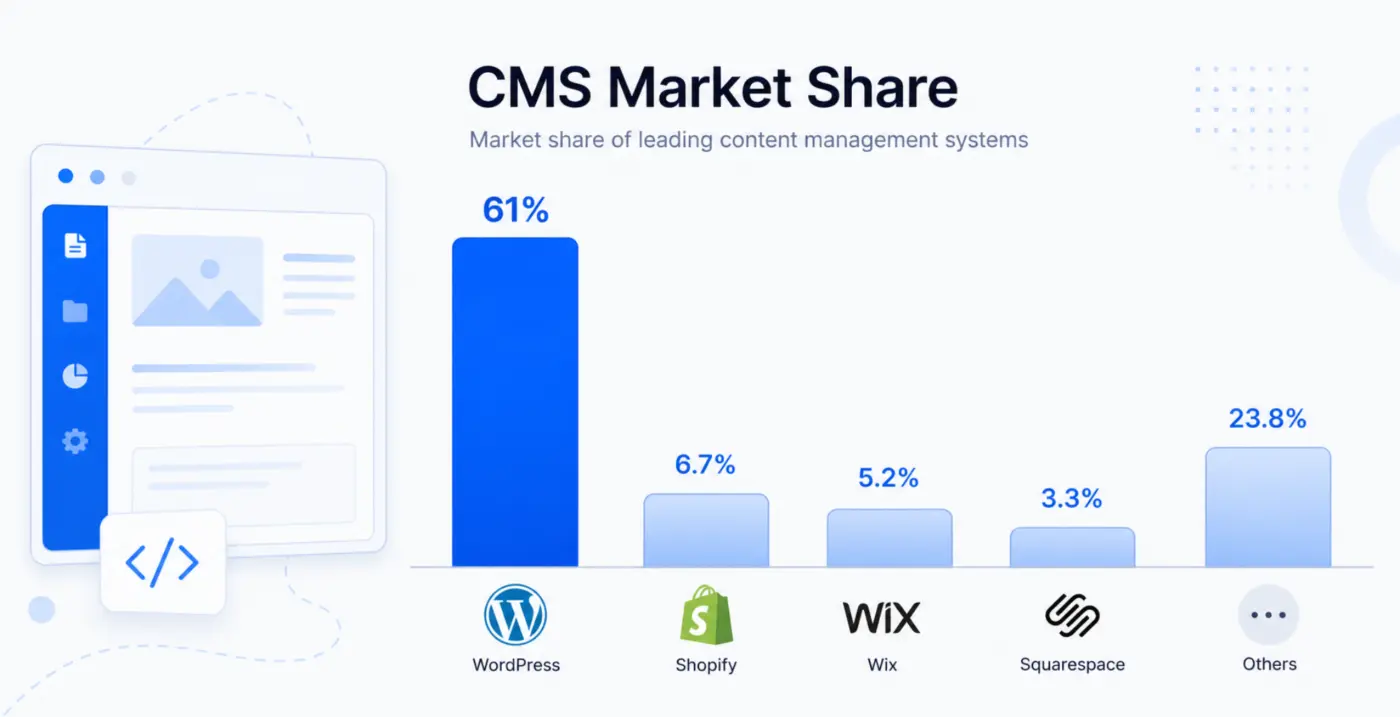
As of 2025, WordPress powers about 43.4% of all websites and roughly 61% of the CMS market, according to W3Techs. Its nearest CMS competitor, Shopify, is at 6.7%. That gap comes from how widely WordPress is used.
Worth Knowing: WordPress’s share of the CMS market peaked at 65.2% in early 2022 and has eased to around 61% since. SaaS platforms like Wix and Squarespace have picked up some ground. This is real, and it’s worth saying out loud. It doesn’t change the case for WordPress, but it does mean the “just use WordPress, it’s everywhere” argument needs substance behind it. That substance is what this post covers.
7 Reasons Why WordPress Is Better Than Other CMS Platforms
Here are seven reasons that matter in practice, not just on comparison lists.
- You own everything: Your files, your database, your hosting relationship. If you walk away from your host, you take the whole site with you.
- 65,000+ plugins extend your site without touching a line of code. No other open-source CMS comes close to this library.
- WordPress lets you control key SEO settings like robots.txt, .htaccess, schema markup, canonical tags, and URL structure.
- You can use it for anything from a simple blog to a multi-vendor marketplace on the same platform.
- The core software is free, and over time, it often ends up cheaper than subscription platforms.
- The community and developer pool is the largest in the world. Finding help, finding talent, and finding solutions is faster on WordPress than anywhere else.
- It also scales with your site. You can start small and grow into a high-traffic store without switching platforms.
These aren’t abstract. The sections below break down the ones that matter most in practice.
The Ownership Difference Nobody Talks About Enough
This is the point most comparison articles bury in a footnote. It deserves its own section.
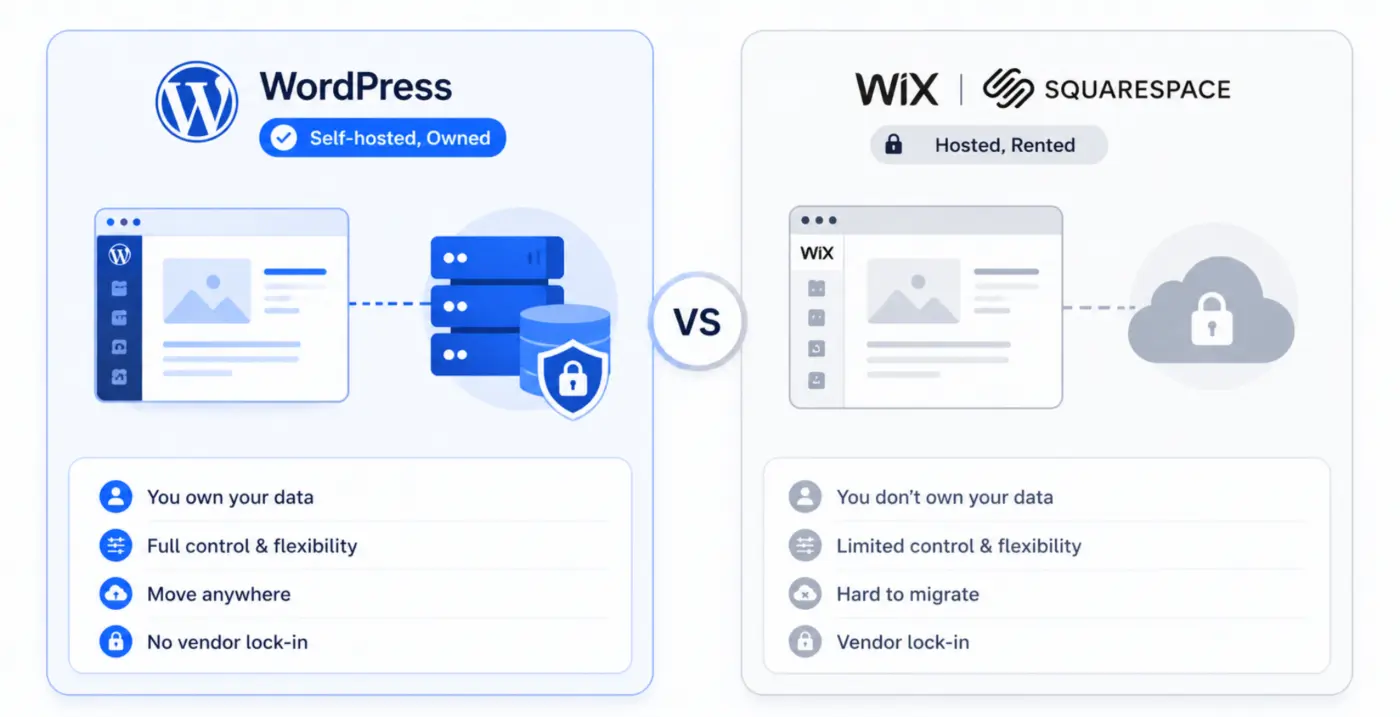
When you build on Wix or Squarespace, you’re renting. The platform owns the infrastructure. They set the terms, they control the features, and they decide what you can and can’t do. Stop paying, and your site disappears. The content might be exportable, but the layouts, design, and structure rarely are.
WordPress is different. It’s an open-source CMS. You install it on a hosting you control. Your files live on your server. Your database is yours. If your host raises prices or goes under, you move the site in an afternoon. No permission needed.
That distinction sounds administrative until you actually need it.
We see this often in support and client conversations. Many businesses start on Wix or Squarespace, run into limits, and then move to WordPress. Moving later isn’t cheap. Developer time, SEO recovery, URL redirects, and rebuilding content all add up. In many cases, it ultimately costs more than starting with WordPress. People sometimes call this the “graduation path.” Businesses switch when they need more flexibility. Starting on WordPress avoids that extra step.
Starting on WordPress skips that cost entirely.
That said, ownership comes with responsibility. You manage your updates, your backups, and your security. A neglected WordPress site is a vulnerable WordPress site. According to WordPress security data, about 92% of breaches come from outdated plugins. That’s not a reason to avoid WordPress; it’s a reminder to keep it properly maintained.
Platform lock-in is a risk that’s easy to ignore until it isn’t. If you’re building for the long term, owning your site is usually worth the extra effort to manage it.
SEO Control That Other Platforms Can’t Match
Every platform will tell you it’s SEO-friendly. What they don’t all tell you is how much of that friendliness is on their terms, not yours.
On Wix, your robots.txt is managed by Wix. On Squarespace, your URL structure flexibility is limited by what Squarespace allows. On WordPress, you control all of it.
Specifically, WordPress gives you direct access to:
- robots.txt: Tell search engines exactly what to crawl and what to skip.
- .htaccess: Manage redirects, set up caching rules, and control access at the server level.
- Schema markup: Adds structured data for articles, products, FAQs, reviews, and more using plugins like Rank Math or Yoast SEO.
- Canonical tags: Handle duplicate content on your own terms.
- URL structure: Set your own permalink patterns, not the platform’s defaults.
This level of control is particularly important when building a content-heavy site or an ecommerce store. One third-party scan looked at 21,327 Squarespace homepages. The average SEO score came out to 40.5 out of 100, and 66.4% were missing alt text. That doesn’t make Squarespace bad. It shows how closed platforms rely on default settings, and those don’t always fit your site.
The DevDiggers WooCommerce SEO guide covers the technical SEO setup in detail if you’re running a store.
On the AI side, WordPress uses a clean content structure and supports schema through plugins. That makes it easier for search engines and AI systems to extract answers from your pages. AI-generated results tend to favor short, self-contained paragraphs that answer questions directly. WordPress makes that style of content easier to manage.
One thing worth saying: WordPress’s SEO flexibility is a tool, not a guarantee. The control is there. Using it correctly still takes thought and, often, professional setup.
The Plugin Ecosystem No Other CMS Comes Close To
As of early 2025, WordPress has over 65,000 free plugins in its directory, based on official 2025 data.
More useful than the number is what the plugin ecosystem actually covers. You can add:
- Full ecommerce functionality via WooCommerce
- Booking and appointment systems
- Membership and course platforms
- CRM integrations
- Analytics and heatmaps
- Form builders, pop-up tools, and lead capture
- Security scanning, firewall protection, and login hardening
- Page builders that give non-developers full layout control
For every business need, a WordPress solution almost certainly exists.
But here’s the honest part: More plugins are not always better. A WordPress site with 40 active plugins will be slower and harder to maintain than one with 10 well-chosen ones. Plugin conflicts come up often; we see them regularly across DevDiggers stores. The plugin ecosystem’s strength is its depth. Its risk is the temptation to overload a site because you can.
WordPress customization options are unmatched. The discipline is knowing which ones you actually need.
WordPress for eCommerce: Why WooCommerce Changes the Calculation
If you’re building an online store, the CMS question and the ecommerce platform question are the same question on WordPress. WooCommerce is a free plugin built directly on top of WordPress. Once installed, you get a complete ecommerce store inside the CMS you already control.
Based on Store Leads data from March 2025, WooCommerce-powered stores make up about a third of online shops globally. For most store owners, that comes down to control over product data, SEO, content, and checkout.
Compare that to Shopify. Shopify is excellent for getting a store live quickly. It’s hosted, it’s polished, and it handles payment processing cleanly. Shopify charges a monthly platform fee, no matter how much you earn. Shopify adds transaction fees if you use a payment processor outside Shopify Payments. WooCommerce has neither of those constraints. You pay for hosting and your gateway, that’s it.
The trade-off is real: Shopify is genuinely easier to set up in a day. WooCommerce takes more configuration. If you need a store running today with no developer budget, Shopify is a reasonable short-term choice.
If your store depends on blog traffic, SEO, and email capture, WooCommerce on WordPress is easier to work with. Shopify’s content tools are more limited. Shopify’s content tools are more limited in those areas. Our guide on how to set up WooCommerce on WordPress covers the full setup process if you’re starting fresh. If you’re weighing your options, the WooCommerce alternatives post covers the field honestly.
At DevDiggers, we build plugins specifically for WooCommerce stores, from loyalty and rewards to POS systems and wallets. The reason we build on WooCommerce is the same reason store owners choose it: full control, no platform tax, and a plugin layer that lets you add exactly what your store needs without rebuilding anything from scratch.
If your store needs extended WooCommerce features, take a look at our WooCommerce extensions. They’re built for stores that need more than what WooCommerce provides by default.
Where WordPress Is Not the Best Choice
Most “why WordPress wins” articles won’t say this. They should.
- If you need a site online today with no budget and no developer support, Wix or Squarespace is faster. You can have a presentable site in a few hours. WordPress requires hosting setup, installation, and at least some configuration before it’s usable. The learning curve is real, even if it’s not steep.
- If you’re running a pure eCommerce operation with no content strategy, Shopify is often simpler to manage. Its hosting, security, and updates are handled for you. If you don’t plan to blog, produce guides, or build organic traffic, the SEO flexibility of WordPress matters less.
- If you have no one to manage updates and maintenance, a self-hosted WordPress site can become a security liability. Closed platforms handle this for you by default. That has genuine value for some users.
For anyone building for the long term, with content, traffic, scale, and ownership in mind, WordPress is still the right answer. But it’s not the right answer for everyone on day one. Knowing that distinction is more useful than a list of twenty reasons telling you it’s always the best choice.
Conclusion
WordPress is better than other CMS platforms because it gives you something no closed platform can: full control over your site, your data, and your future.
The 65,000-plugin library, the SEO depth, the WooCommerce eCommerce layer, and the ownership model all compound over time in a way that subscription platforms don’t. The honest trade-off is that control requires responsibility: updates, security, and the right setup from the start.
That’s where having a team with WordPress development expertise matters. If you’re building or scaling a WordPress or WooCommerce site, our WordPress development services are worth a look.
Frequently Asked Questions
Q1. Is WordPress really free?
The core WordPress software is free to download and use. You pay for hosting (which starts from a few dollars a month), a domain name, and any premium themes or plugins you choose. The total cost is usually lower than Wix or Squarespace subscription plans over three years, especially for growing sites.
Q2. How does WordPress compare to Shopify for an online store?
WordPress with WooCommerce gives you more control over content, SEO, and checkout customization. Shopify is easier to set up and handles hosting and security automatically. Shopify charges monthly platform fees and, in some cases, transaction fees. WooCommerce does not. The right choice depends on whether your store is content-driven (WordPress wins) or you need the fastest possible setup (Shopify is simpler).
Q3. Can I move my site from Wix or Squarespace to WordPress later?
You can, but it’s not straightforward. Basic content — posts, pages, images — can often be exported. Your design, layout structure, and URL architecture usually cannot. You will likely need to rebuild significant parts of the site. This migration cost is one of the main reasons developers recommend starting on WordPress rather than planning to switch later.
Q4. Does WordPress work for large, high-traffic websites?
Yes. WordPress handles enterprise-scale sites when set up correctly. NASA, Time Magazine, and the New York Times all use WordPress. The key is pairing it with appropriate hosting (a managed WordPress host or VPS), a caching layer, and a CDN. A shared hosting plan with no optimization is a different conversation entirely.
Q5. Is WordPress harder to keep secure than other CMS platforms?
WordPress sites are frequently targeted, mainly because they’re so common. But most breaches come from outdated plugins and themes, not from WordPress core itself. Keeping plugins updated, using two-factor authentication, running a security plugin like Wordfence, and choosing a quality host covers the majority of attack vectors. Closed platforms like Wix handle this automatically — which is a genuine convenience trade-off worth knowing about.
Q6. Can a non-developer manage a WordPress site?
Yes, and most WordPress site owners are not developers. The block editor (Gutenberg) lets you build and edit pages visually. Page builders like Elementor go further. Day-to-day tasks, adding posts, updating pages, and managing products in WooCommerce, require no code. Where technical help is useful is in the initial setup, plugin selection, and ongoing performance optimization.