
Have you ensured your WooCommerce Store meets the standards set by the General Data Protection Regulation (GDPR), or are you risking customer trust and incurring costly fines by not being compliant?
With many WooCommerce stores collecting user names, email addresses, IP addresses, and payment information, GDPR compliance applies to them. However, many WooCommerce store owners believe that they would automatically be in compliance and delay seeking compliance because of the complexity of GDPR.
This is a costly practice, as the absence of consent checkboxes, the lack of a properly defined Privacy Policy, and/or improper utilisation of tracking cookies can lead to a breakdown of trust for the store and potential monetary penalties from regulatory authorities.
Because of this, it is no longer an option but a necessity to understand how to make a website GDPR compliant on WooCommerce based on the provisions of GDPR. GDPR is about more than just avoiding penalties; it is about being transparent, giving users control over their data, and establishing a framework for long-term trust.
In this guide, you will find a detailed and structured approach to becoming compliant with GDPR within your WooCommerce store through proven processes and best practices with the use of examples and evidence-based methods. So you can create a safe and legally compliant store in confidence.
What is GDPR Compliant on WooCommerce?
To be GDPR compliant with WooCommerce means that your online store is following the General Data Protection Regulation when it collects, processes, stores, and shares user data. This essentially means your website must respect user privacy and provide customers with total control of their personal information.
Your WooCommerce site collects any of the following for which GDPR applies:
- Names and email addresses
- Billing and shipping details
- IP addresses
- Payment information
- Cookies and tracking data
And yes, even contact forms, product reviews, analytics tools, and marketing plugins also count.
What GDPR Compliance Looks Like in Practice?
If a WooCommerce site complies with the GDPR, it will:
- Inform its customers clearly of what information is collected and the purpose for which it will be used.
- Obtains explicit consent before collecting personal data.
- Provide users with the ability to review, change, or delete any personal data.
- Securely keep personal data and limit access to it.
- Only use plugins or services that are compliant with the GDPR.
WooCommerce provides a number of built-in features that support compliance with the GDPR, including integration of privacy policies, the ability to export data, and the ability to delete data. However, you will need to configure these features yourself; they do not work automatically.
Does GDPR Apply If You’re Not in the EU?
The GDPR will apply to you if:
- You sell to customers in the EU.
- EU users can access your website.
- You are tracking users from the EU using cookies or analytics tools.
According to the official European Commission GDPR guidelines, business location does not matter—user location does.
Why WooCommerce Store Owners Must Take GDPR Seriously?
There are many reasons that store owners should take GDPR compliance seriously beyond the potential legal ramifications. Non-compliance can lead to:
- High fines
- Loss of customer loyalty
- Account suspension by payment processors
- Damage to a store’s reputation
To stay competitive and grow, store owners need to know how to make a website GDPR compliant on WooCommerce.
How to Make a Website GDPR Compliant on WooCommerce: 6 Steps
If you want to understand how to make a website GDPR compliant on WooCommerce, you need to consider how your eCommerce store processes and stores its user data.
You cannot rely solely on one plugin or page to be in compliance; it requires a mix of clearly defined Policies, appropriate Settings, and full knowledge and consent from your customers.
Read through the six steps below to ensure your store is compliant with the most important requirements of the GDPR on WooCommerce. The six steps for WooCommerce store owners to be compliant with the GDPR are:
Step 1: Setting Up Your WooCommerce Terms and Conditions
Your Terms and Conditions page creates the expectations that you have with your Customers and is a key factor in complying with the Transparency mandate of the GDPR.
What This Step Achieves?
- The Terms and Conditions page provides the information to your Customers who will be using your website.
- Explains transactional rules and legal boundaries
- Supports compliance during checkout
What to Include in Your Terms and Conditions?
- User account creation requirements and eligibility
- Payment, refunds, and cancellations policies
- Customer care, technical support, and acceptable Use
- Reference to any governing laws regarding user data
How to Set It Up in WooCommerce
- Create a separate “Terms and Conditions” page in WordPress.
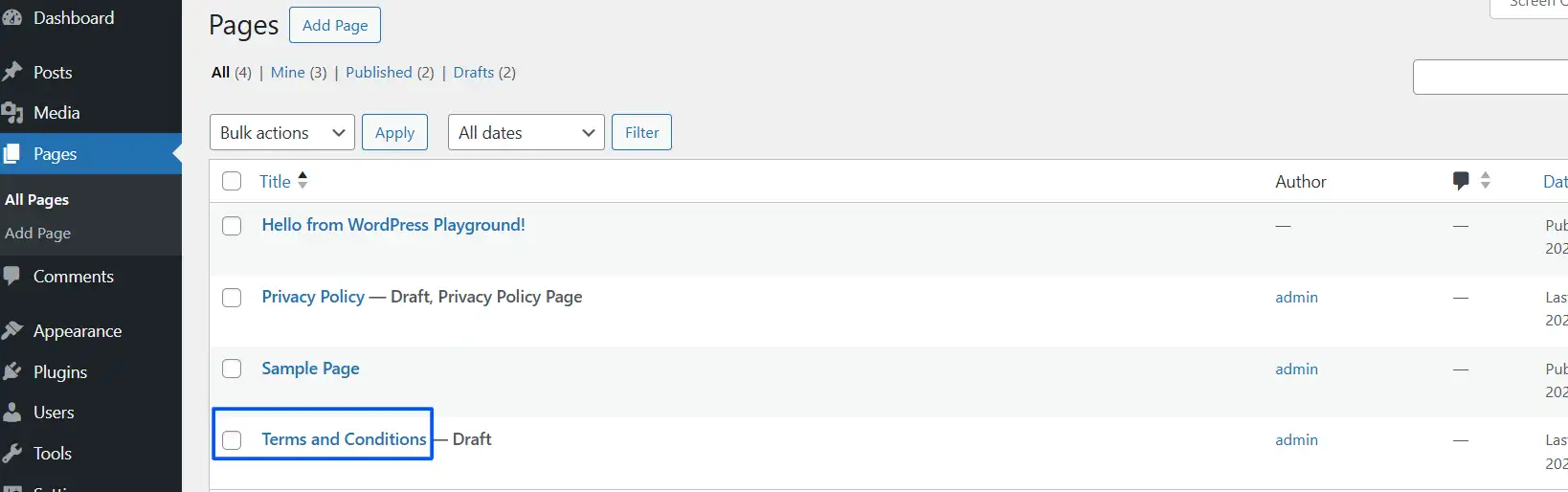
- Create clear and simple definitions of the terms, and avoid using technical language.
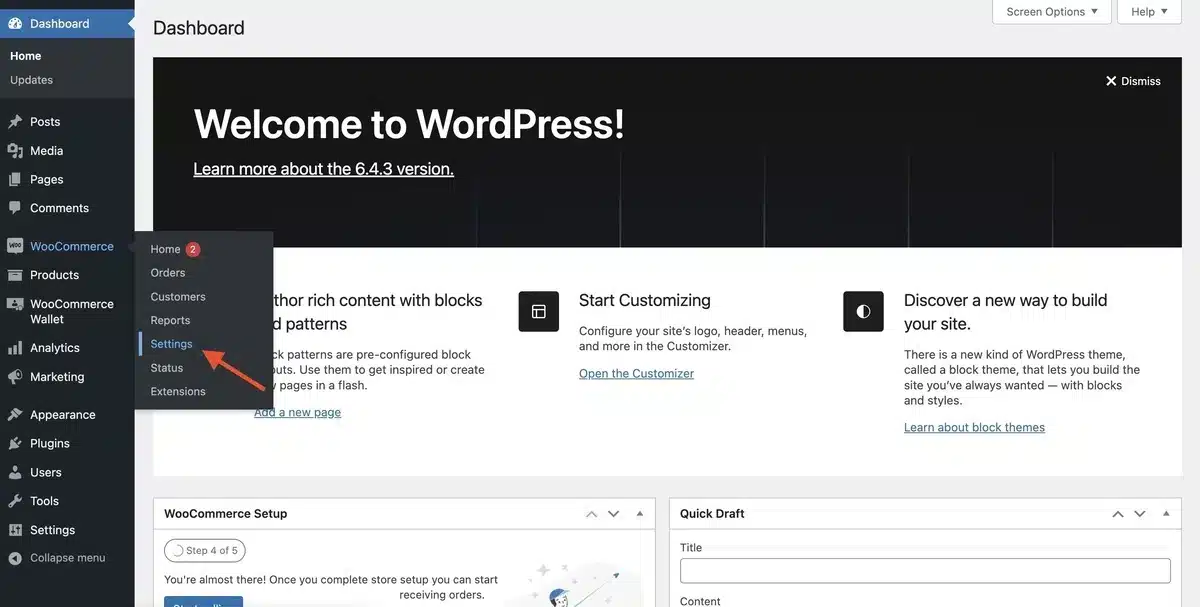
- Go to WooCommerce → Settings.
- Then click on Advanced and select the page for Terms and Conditions.
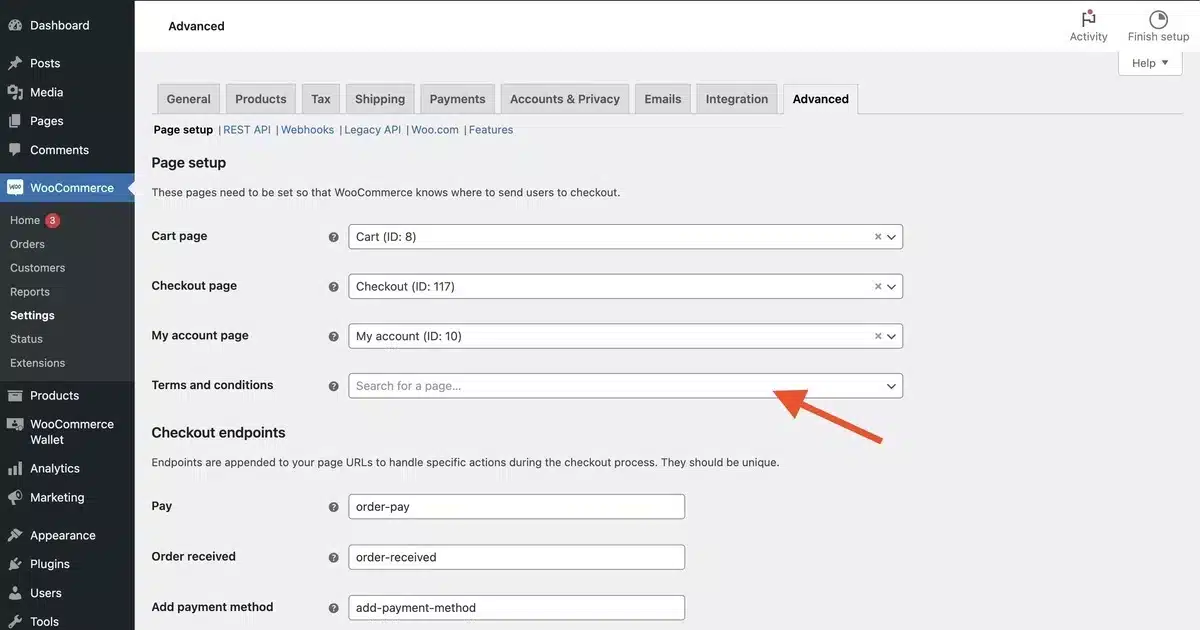
WooCommerce will require customers to accept the Terms and Conditions of your website at checkout, which reinforces both legal and GDPR compliance.
Step 2: Create Your GDPR Compliant Privacy Policy
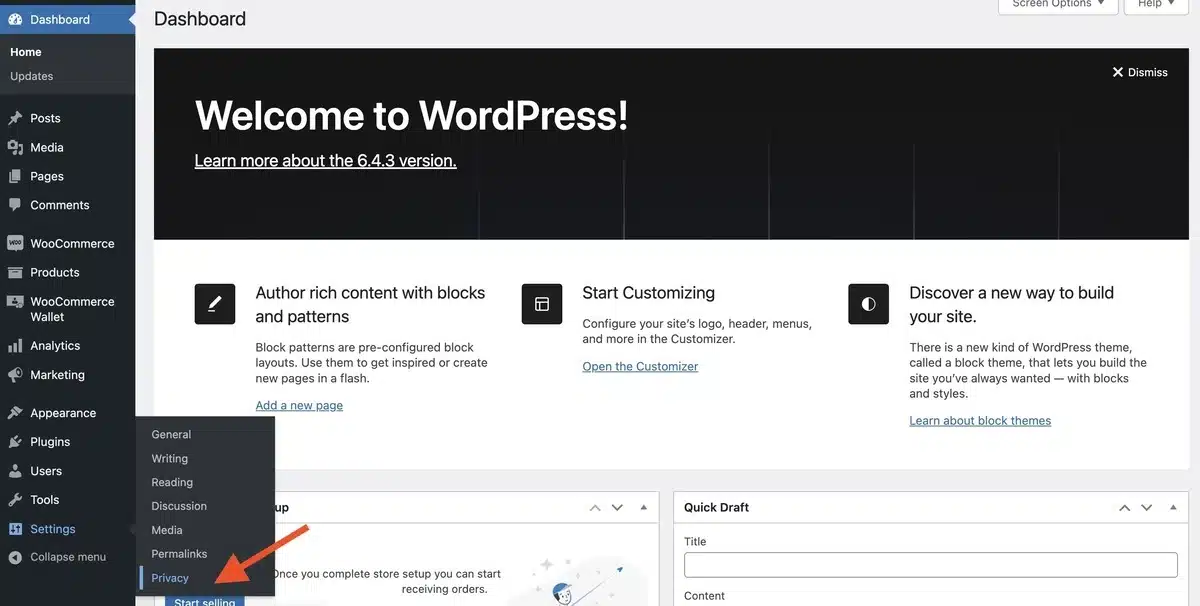
Your WooCommerce privacy policy outlines precisely how you collect and use your WooCommerce customers’ personal data (with respect to the EU’s GDPR). Under GDPR, this page is mandatory.
Data You Must Disclose
- What personal data are you collecting (names, emails, IP addresses, etc.)?
- What will the data be used for?
- How long will you keep the data?
- Will it be shared with any third parties?
- What rights do users have (access to their data, deletion of data, the ability to correct the data)?
Best Practice for WooCommerce
WordPress provides a free GDPR-compliant privacy policy template, which you should customize to add the following items:
Display your Privacy Policy link in:
- Footer
- Checkout page
- Registration forms
Once you have created your privacy policy, this is an essential step when learning how to make a website GDPR compliant on WooCommerce properly.
Step 3: Enable Explicit User Consent for Accounts and Checkout
WooCommerce accounts contain sensitive personal information (such as a customer’s payment information and shipping address). Therefore, you must obtain explicit consent from customers before storing their data in a WooCommerce account.
What Does GDPR Require?
- Customers must give informed, explicit consent to the storage of their data.
- Consent must be provided as distinct from any other actions taken by the user.
- You must keep a record of customers’ consent.
How to Enable Consent in WooCommerce
- Go to WooCommerce → Settings → Accounts & Privacy

- Enable customer account creation

- Make sure the text box in the privacy policy section is filled.
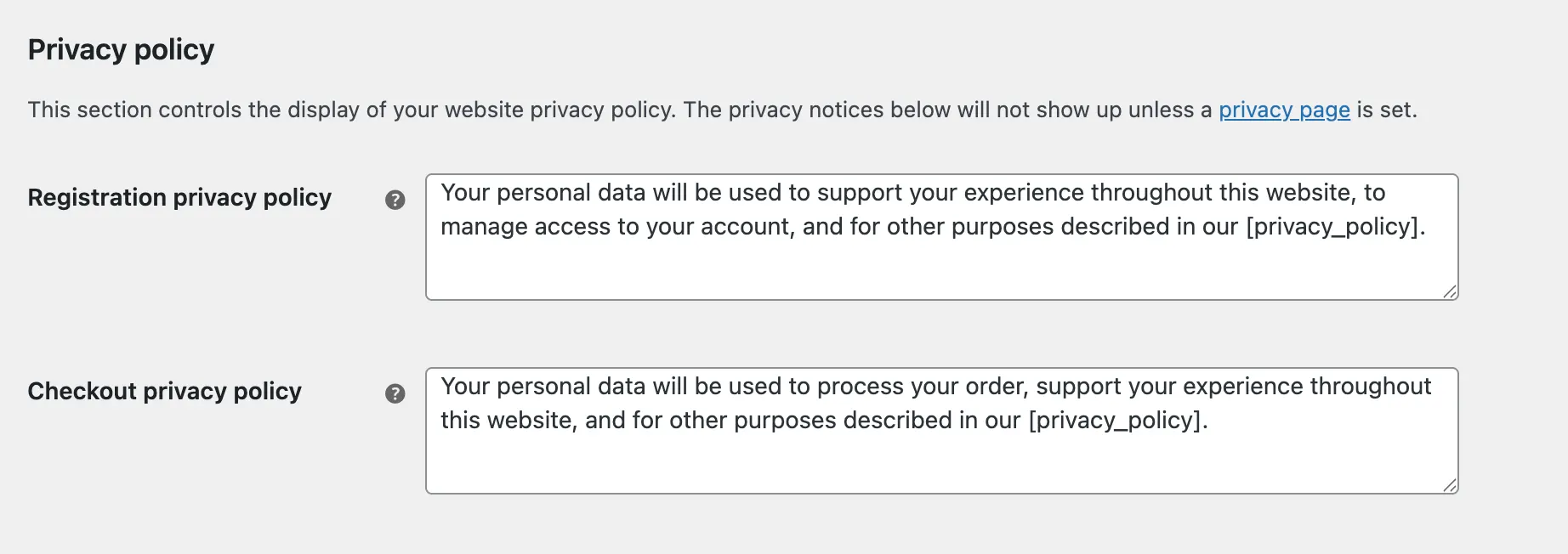
Provide an option for customers to delete their accounts or request that their data be deleted.
Step 4: Make Product Reviews GDPR Compliant
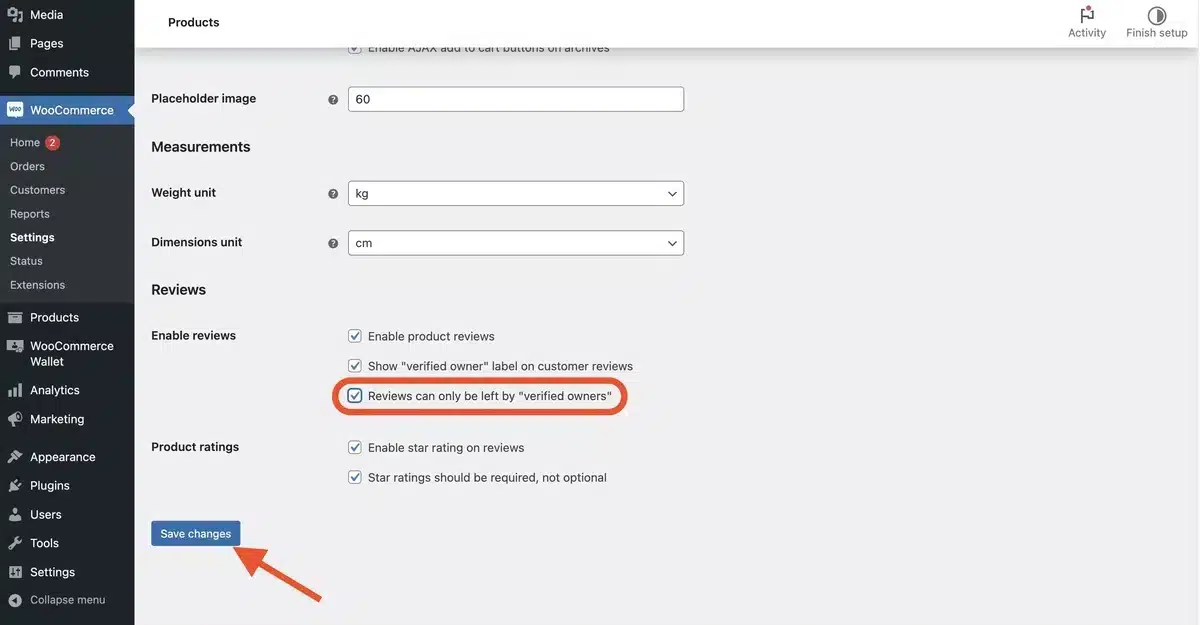
Data collected through reviews contains Personally Identifiable Information (PII) and must comply with the GDPR.
Common Review Data Collected
- Name or username
- Email address
- IP address
How to Comply
- Add a consent checkbox to every review form.
- Clearly express how the data will be stored and used.
- Provide an easy way for users to request the removal of their review data.
The use of plugins dedicated to data privacy will make it easier to ensure the data collected via reviews complies with the GDPR.
Step 5: Audit and Replace Non-Compliant Plugins
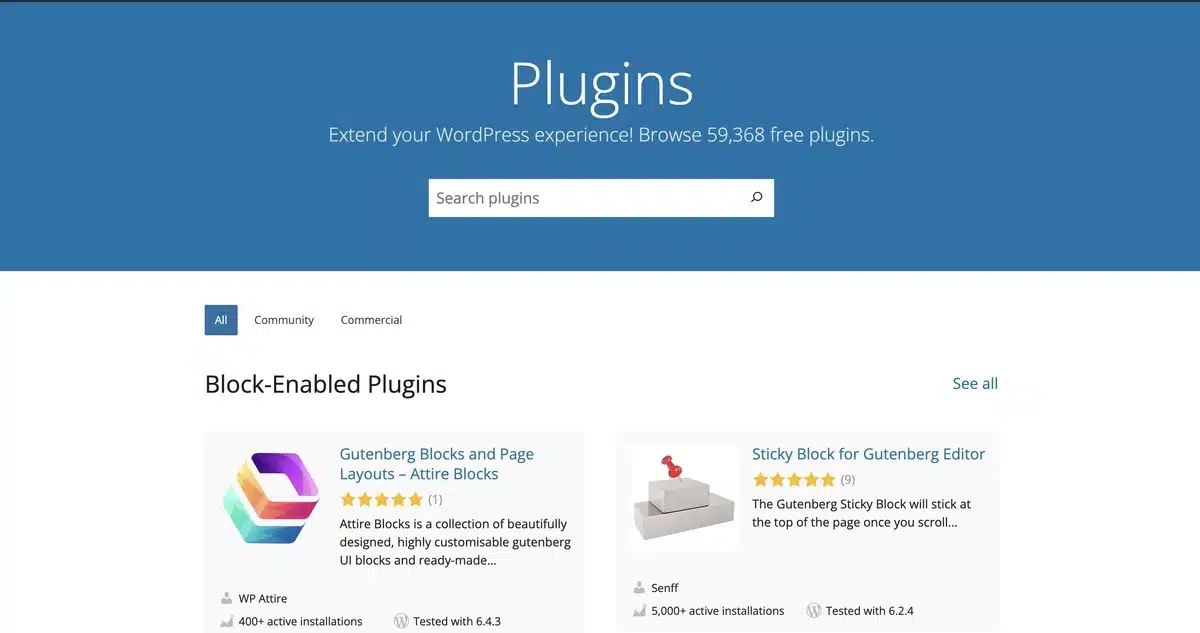
Plugins are a common method for collecting data without adequate transparency and, therefore, represent one of the highest risks for compliance.
Plugins That Commonly Collect Data
- Contact forms
- Analytics tools
- Live chat software
- Email marketing integrations
How to Perform a Plugin Audit
- Confirm the existence of documentation regarding GDPR.
- Confirm availability of user consent options.
- Confirm the location(s) where data will be stored.
Remove or replace the plugin that lacks transparency or GDPR support.
Step 6: Implement GDPR-Compliant Cookie Consent
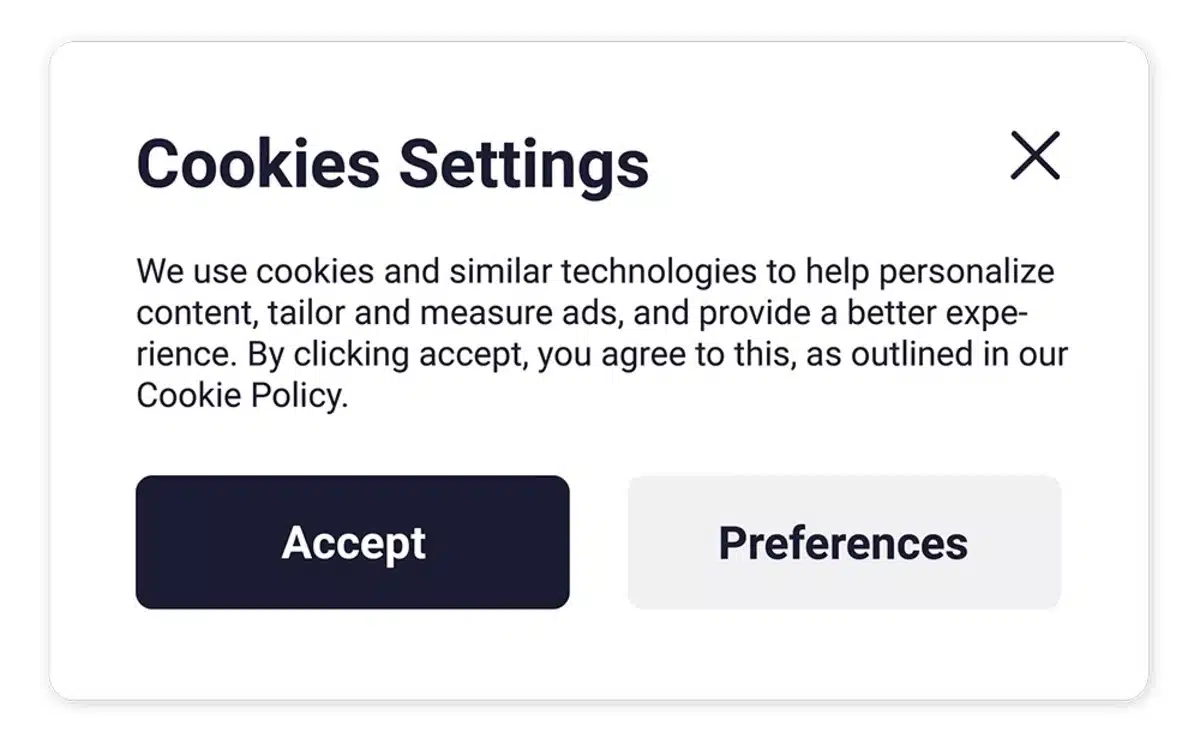
Cookies are currently one of the most heavily regulated components of GDPR compliance.
What GDPR Requires for Cookies?
- Do not set any cookies until consent has been obtained (except essential cookies)
- Clearly explain how cookies will be used
- Provide a way for the user to simply opt out of cookie use at any time
Best Implementation Approach
Use a cookie consent tool that:
- Blocks scripts until consent is given
- Allows for granular cookie selection (e.g., only allowing certain cookie types)
- Stores evidence of consent
Avoid using any pre-checked boxes or using implied consent because both are violations of the GDPR.
Benefits of Making a Website GDPR-Compliant
Making a WooCommerce store follow GDPR rules gives more than just legal safety. Learning how to make a website GDPR compliant on WooCommerce can bring some great business perks and build long-term trust.
- Improves customer trust and reputation: Customers feel comfortable sharing their info when your store explains how it collects, stores, and keeps their data safe.
- Lowers risks of fines and legal trouble: Sticking to GDPR rules protects your business from fines, legal issues, or notices that could harm your business.
- Boosts checkout success: Showing clear consent options and simple privacy details helps customers feel confident, reduces cart abandonment, and makes checkout easier.
- Builds a stronger brand image and shows professionalism: Customers and partners view a GDPR-compliant WooCommerce store as responsible, honest, and trustworthy over time.
- Leads to better customer data quality: When users give clear consent, businesses collect cleaner and more precise information. This helps with making better decisions, running email campaigns, and analyzing data more.
- Boosts SEO and enhances user experience in the long run: Design focused on privacy increases trust, improves how users engage, and creates a smoother experience. All of this supports better SEO performance.
- Get your store ready for upcoming privacy laws: Following GDPR now gives your site a solid base to handle new data protection rules later without huge changes.
Final Thoughts
When learning how to make a website GDPR compliant on WooCommerce, the goal is not just about making sure there are no errors in your documentation, but instead creating a store that is transparent and trustworthy to customers who purchase products from you.
By implementing clear policies, obtaining explicit consent from customers, using secure data storage methods, and utilising compliant plugins, you provide protection to your users as well as your business.
To summarise, implementing the GDPR compliance on WooCommerce comes down to a few essentials:
- Transparency on what data you collect and why that data is being collected
- Explicitly request that users provide consent and do not add pre-checked consent check boxes to your registration form.
- Let users have control of their data, which includes being able to delete their account
- Audit plugins and cookies to eliminate any ‘stealth’ data collection
The positive thing about WooCommerce & WordPress is that they already have Many of the things you need to be GDPR Compliant. Once you have your store configured properly and adopt a privacy-first mindset, becoming GDPR Compliant becomes relatively easy and can be advantageous.
If you haven’t recently reviewed your store to verify its compliance with GDPR, now’s the perfect time to begin implementing these steps to ensure your store becomes GDPR compliant and establish customer confidence in your WooCommerce business moving forward.
Frequently Asked Questions (FAQs)
Q1. What does it mean to be compliant with GDPR for my WooCommerce store?
Being compliant with GDPR means that your store respects the privacy rights of individuals by notifying them that you will collect their data, obtaining the customer’s consent, and protecting their personal data.
Q2. Do I need to set up WooCommerce to be compliant with GDPR right away?
No, WooCommerce provides basic tools for your store’s privacy practices, but you must set up certain features on your own (like consent checkboxes and cookie notifications) to make your store fully compliant with GDPR.
Q3. If my business is not located in the European Union, do I need to comply with GDPR?
Yes, you will need to comply with GDPR if you process data about an EU citizen or sell goods or services to EU citizens, regardless of where your business is physically located.
Q4. How do I collect the customer’s consent for my WooCommerce store?
Enable consent checkboxes for the WooCommerce store settings, and create clear language regarding how you will use the customer’s personal data.
Q5. Can customers have their personal data removed from my WooCommerce store?
Yes, customers can request to export their personal data or have their data removed (according to the “right to be forgotten” provision in GDPR) through the WooCommerce store.