To find the IP address of a WordPress site, open your hosting control panel and look for Server Information or Site Details. If you cannot log in, run ping or a DNS lookup on the domain. Either way, you get the number in under a minute.
Most guides skip one catch. We ran these lookups on a live site behind Cloudflare, and the number that came back belonged to Cloudflare. The same word, IP address, also covers your outgoing IP and every visitor’s IP.
This guide gives four ways to find the server IP and shows how to tell when the answer is wrong. It also explains where WordPress stores visitor IPs. A tested PHP function reads a visitor IP without trusting a fake header.
How to Find the IP Address of a WordPress Site
There are four reliable ways to find the IP address of a WordPress site. You can read it in your hosting panel, run a terminal command, use an online DNS lookup tool or trace the host through WHOIS. Start with the panel, because it shows the address your host assigned.
Each method answers a slightly different question, so the sections below say what you get from each one.
1. Check your hosting control panel
Log in to your host and open the site’s overview. Look for Server Information, Site Details, Account Overview or a similar label. The IP address usually appears as Shared IP or Dedicated IP.
This is the only method that shows the address your host assigned to your account. Every other method shows what the internet sees, which can be a proxy instead. If your panel lists two addresses, the second one is often the outgoing IP, covered further down.
2. Run ping, nslookup or dig
Open Terminal on Mac or Linux, or Command Prompt on Windows, and query the domain. We ran all three against wordpress.org and each returned the same address, 66.6.42.252.
ping -c 1 wordpress.org
nslookup wordpress.org
dig +short A wordpress.org
On Windows, use ping -n 1 wordpress.org. The dig +short command prints only the address, which makes it the easiest to copy. Add AAAA in place of A to get the IPv6 address if the site has one.
Note: These commands show where DNS points today. If the site sits behind a proxy or CDN, they show the proxy instead of your server.
3. Use an online DNS lookup tool
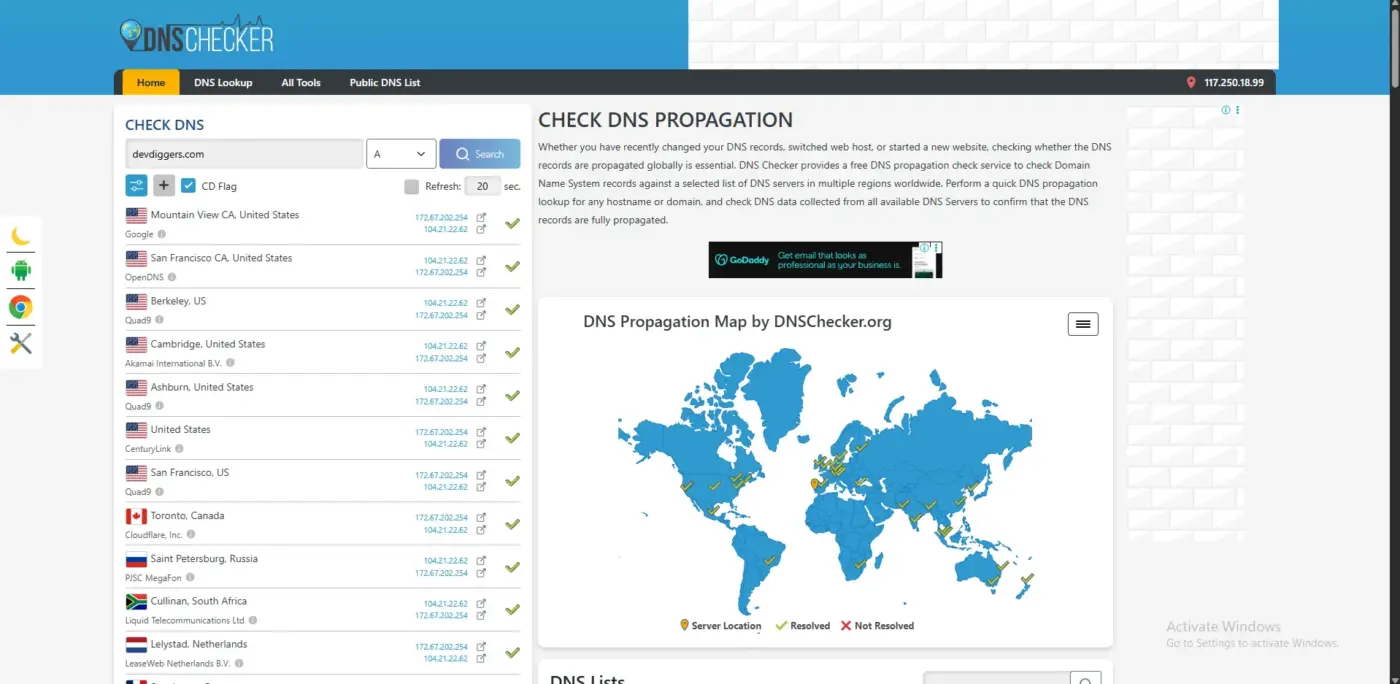
A browser-based tool such as DNS Checker asks resolvers in many countries for the same record. Type the domain, choose the A record type and read the list of results.
This helps most after a host move. If some locations show the old IP and others show the new one, DNS is still propagating. No setting on your site will speed that up.
4. Trace the host with WHOIS
An IP address alone does not tell you who runs the server. A WHOIS lookup on the address names the network owner. We ran whois on the address for wordpress.org and the network name came back as AUTOMATTIC.
Use this when you need to know where a site is hosted, for example before you file a support ticket or a DMCA notice. The network name is the host or the proxy in front of it. That difference is exactly the catch in the next section.
Why the IP Address You Find May Not Be Your Server
If your site uses Cloudflare or a similar proxy, every lookup returns the proxy’s IP address instead of your host’s. That is by design, because the proxy sits between visitors and your server. The real server IP is only visible inside your hosting account.
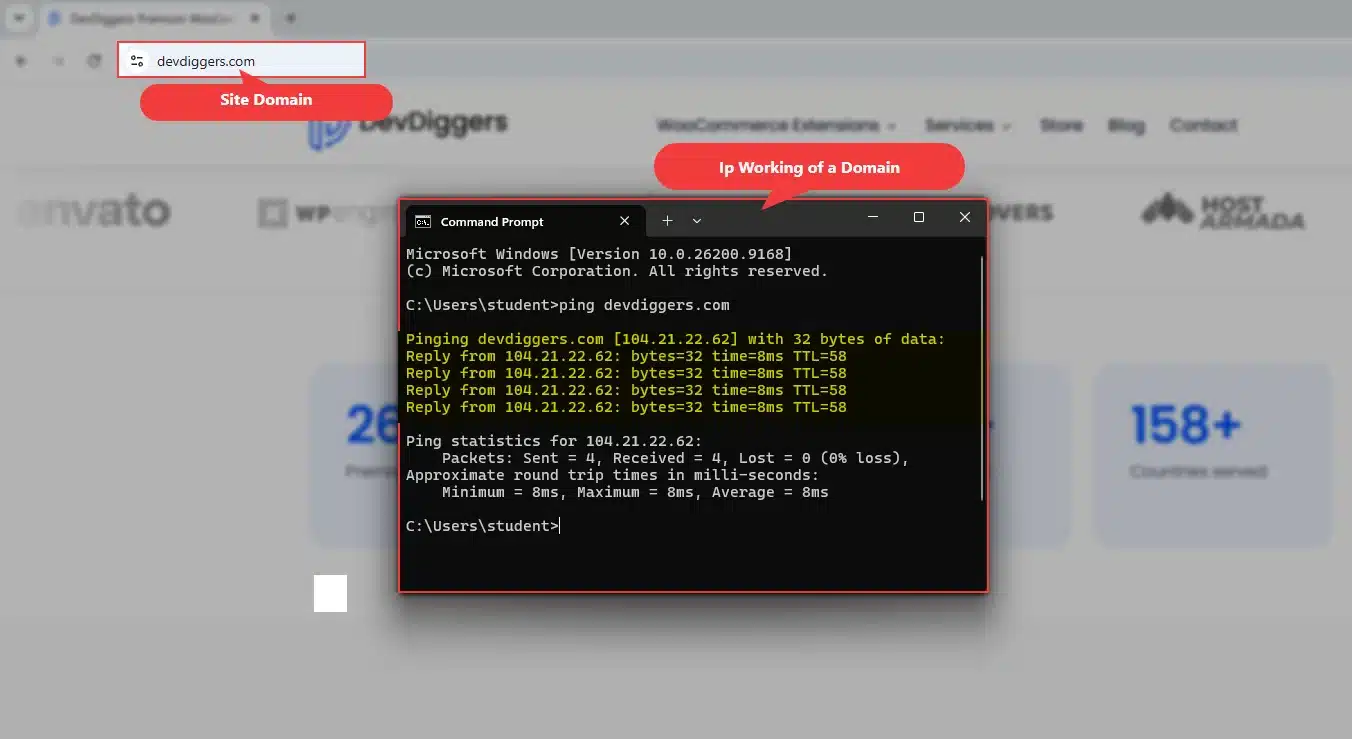
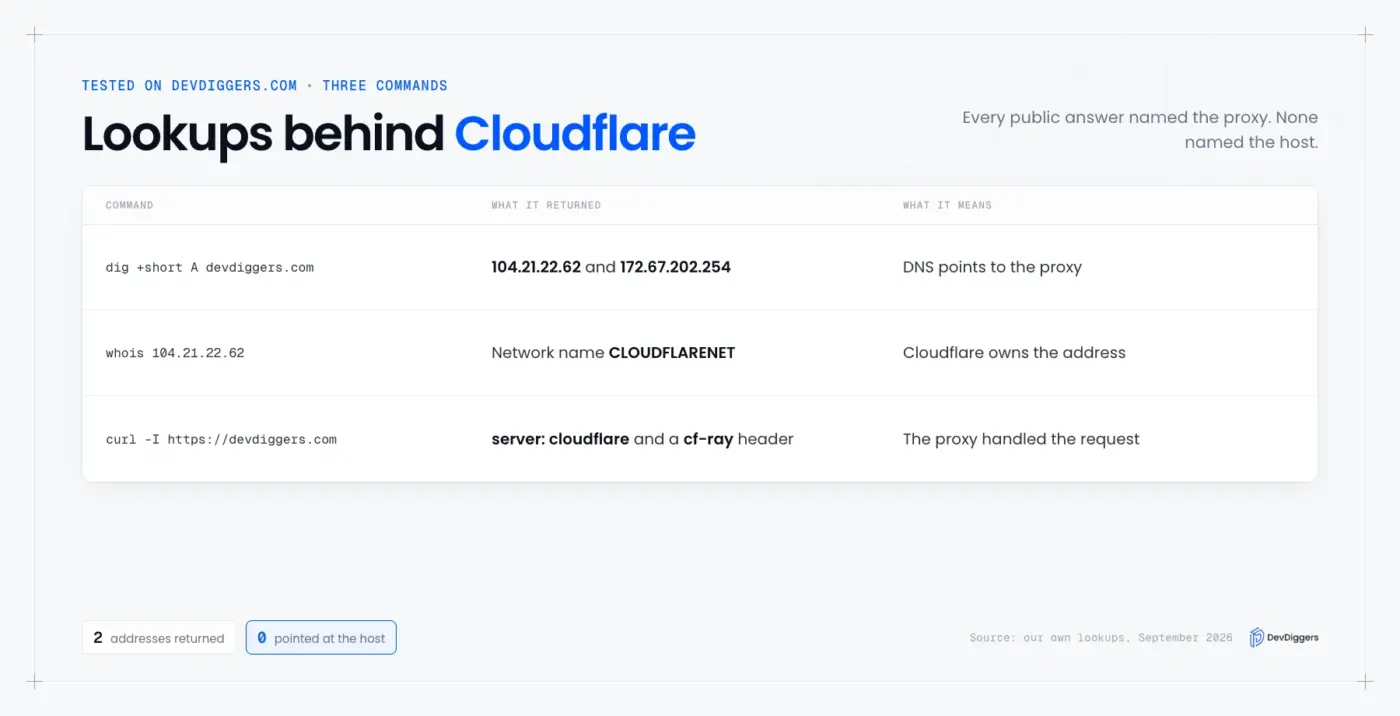
We checked this on devdiggers.com. dig +short A devdiggers.com returned two addresses, 104.21.22.62 and 172.67.202.254. Running whois on the first one gave the network name CLOUDFLARENET.
The response headers said the same thing. A curl -I request returned server: cloudflare and a cf-ray header, which Cloudflare adds to every request it handles. Any site that shows those two headers is behind Cloudflare, and its public IP is not the origin.
| What you run | What devdiggers.com returned | What it means |
|---|---|---|
dig +short A devdiggers.com | Two Cloudflare addresses | DNS points to the proxy |
whois on the first address | Network name CLOUDFLARENET | The network owner is Cloudflare |
curl -I https://devdiggers.com | server: cloudflare and a cf-ray header | The proxy handled the request |
Tip: Never publish or paste your real origin IP in a public forum post. It lets anyone send traffic around your proxy and its firewall rules.
The Three IP Addresses People Mean
When someone asks for “the IP address” of your WordPress site, they mean one of three numbers. The server IP is where your site lives. The outgoing IP is what other servers see when your site calls them, and the visitor IP belongs to each person loading a page.
| IP type | What it is | Where to find it | Common use |
|---|---|---|---|
| Server IP | Where your domain points | Hosting panel, dig, DNS tools | A records, migrations |
| Outgoing IP | What other servers see when your site calls them | Hosting panel, or curl https://api.ipify.org run on the server | Allowlists at payment gateways and APIs |
| Visitor IP | The address of a person loading a page | Server logs, comments screen, PHP | Blocking spam, rate limits, logs |
Before you search for how to find my WordPress IP address, decide which of the three you need. Mixing them up is the classic support-ticket mistake. You give a payment provider your server IP for an allowlist, and the calls still fail because they come from the outgoing IP.
On shared hosting, your server IP is often shared with many other sites. That is normal. You only need a dedicated IP when a service demands one address that belongs to you alone.
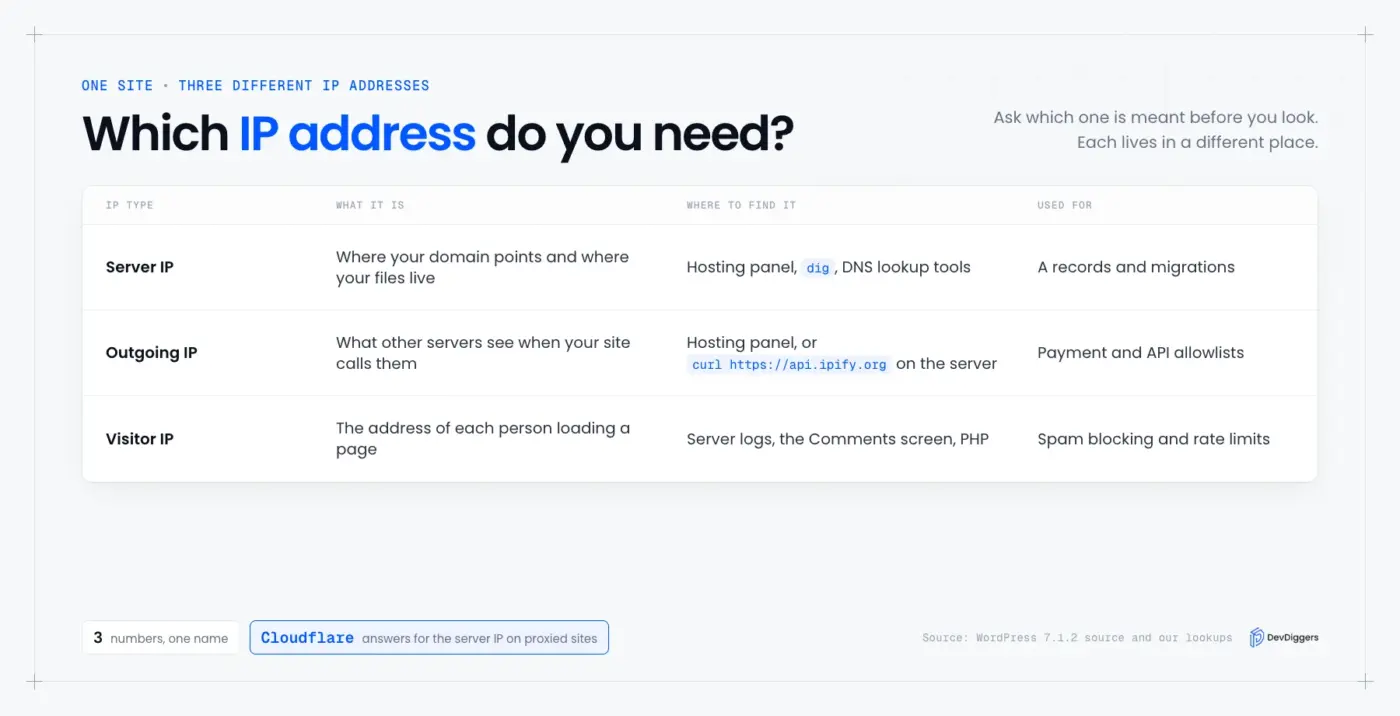
To find the outgoing IP yourself, run curl https://api.ipify.org in a terminal on the server. Ask your host first if you do not have SSH access, because many hosts publish the outgoing address in their docs.
Where WordPress Stores Visitor IP Addresses
WordPress stores an IP address in three places by default: in each comment, in each login session and, when WooCommerce is active, on each order. It does not log every page view. To record all visitors, you need server logs or a plugin.
We checked the WordPress 7.1.2 source on our test site. The comments table has a comment_author_IP column, and the get_comment_author_IP() function retrieves the IP address of the current comment’s author. In the admin, that address shows under each commenter’s name on the Comments screen.
Login sessions also record an address. In class-wp-session-tokens.php, WordPress writes $_SERVER['REMOTE_ADDR'] into the session data when a user logs in. WooCommerce saves a customer IP address on each order in its order data store.
That last fact matters for a store. The IP saved on an order is whatever the server saw. Behind a proxy, that can be the proxy’s IP unless you fix it, as the next section shows.
For all-visitor logging, use your host’s access logs or a security plugin. A security or activity-log plugin can record them too.
If you also run a chatbot, read our guide to the best WordPress chatbot plugins before you decide what visitor data to keep.
How to Get a Visitor IP Address in WordPress with PHP
WordPress has no core function that returns the current visitor’s IP. You read $_SERVER['REMOTE_ADDR'], which is the address that connected to your server. Behind a proxy, that address is the proxy, so you read a forwarded header, and only when the connection comes from a proxy you trust.
Cloudflare documents this. The original visitor IP appears in the CF-Connecting-IP header, and Cloudflare advises accepting traffic only from its own IP addresses. Otherwise, it warns, the header could be spoofed.
We tested two versions of the function on a local PHP server. The naive version trusts any header. The safe version reads headers only when REMOTE_ADDR is in a trusted list.
function devdiggers_visitor_ip( array $trusted ) {
	$ip = $_SERVER['REMOTE_ADDR'] ?? '';
	if ( in_array( $ip, $trusted, true ) ) {
		if ( ! empty( $_SERVER['HTTP_CF_CONNECTING_IP'] ) ) {
			$ip = $_SERVER['HTTP_CF_CONNECTING_IP'];
		} elseif ( ! empty( $_SERVER['HTTP_X_FORWARDED_FOR'] ) ) {
			$ip = trim( explode( ',', $_SERVER['HTTP_X_FORWARDED_FOR'] )[0] );
		}
	}
	return filter_var( $ip, FILTER_VALIDATE_IP ) ? $ip : '';
}
Here is what each version returned. The connecting address was 127.0.0.1 every time, and the safe version trusted 127.0.0.1 only in the last row.
| Test request | Naive version | Safe version |
|---|---|---|
| No headers | 127.0.0.1 | 127.0.0.1 |
Fake X-Forwarded-For: 1.2.3.4 sent straight to the server | 1.2.3.4 | 127.0.0.1 |
Junk value not-an-ip in the header | not-an-ip | 127.0.0.1 |
CF-Connecting-IP sent by a trusted proxy | 198.51.100.7 | 198.51.100.7 |
The naive version returned a fake address, and in one case a string that is not an address at all. A bot could use that to dodge a rate limit or fill your logs with garbage.
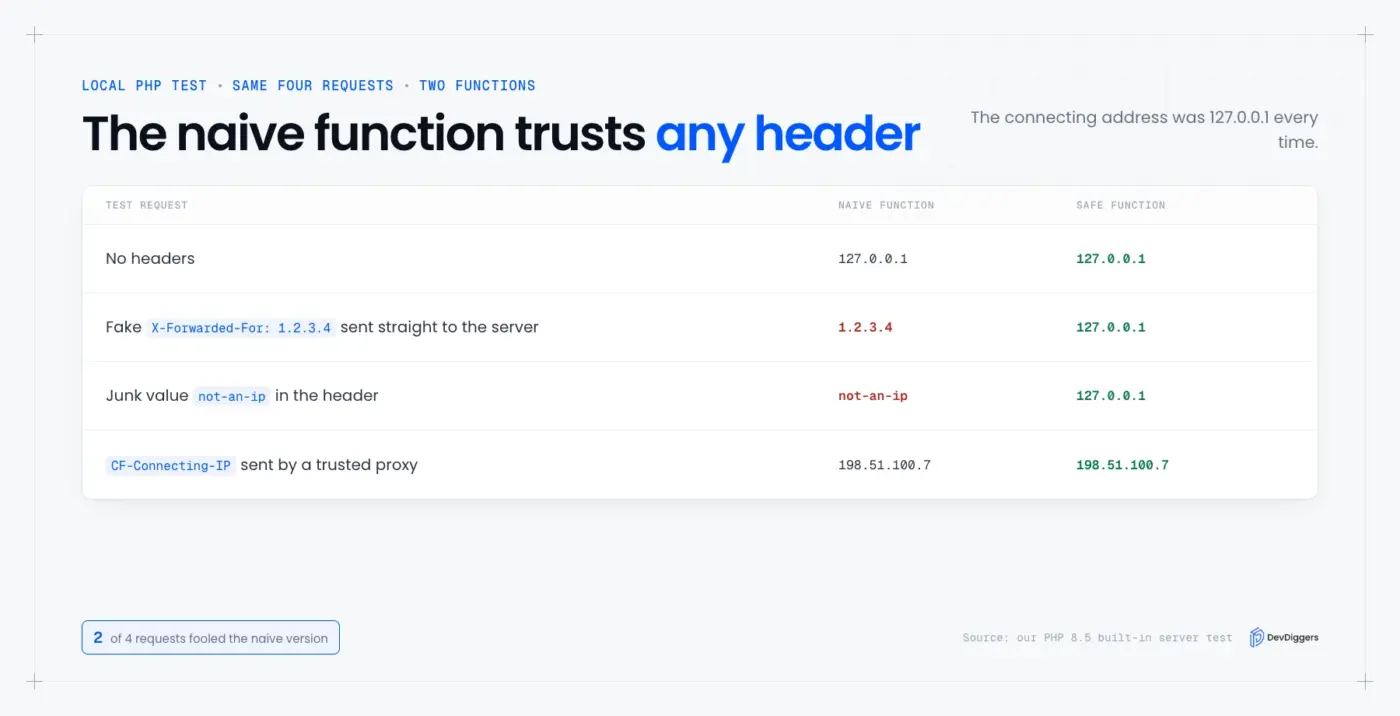
MDN gives the rule in one sentence. Any security use of X-Forwarded-For, such as rate limiting or access control, must only use addresses added by a trusted proxy. Pass the proxy addresses you trust into $trusted, and your host or Cloudflare publishes the list.
Warning: Always run filter_var() before you store or compare an IP. It is the difference between a clean log and a log full of header junk.
How to Find the Server IP From Inside WordPress
You can read the server IP from PHP with gethostbyname(), which resolves your domain the same way dig does. The SERVER_ADDR variable is a second option, but it is not always set. Use gethostbyname() first, and treat the result as what DNS says.
We tested both. gethostbyname('wordpress.org') returned 66.6.42.252, the same address dig returned. On PHP’s built-in server, $_SERVER['SERVER_ADDR'] did not exist and PHP raised an undefined array key warning.
Here is a safe way to print the address on a WordPress site, for example from a temporary admin-only snippet:
$host = wp_parse_url( home_url(), PHP_URL_HOST );
echo esc_html( gethostbyname( $host ) );
The PHP manual describes SERVER_ADDR as the address of the server running the script. Web servers fill it in, and some setups leave it empty or show an internal address. Delete the snippet when you are done, because a public page that prints the address exposes it.
How to Open a WordPress Site by Its IP Address
You cannot reliably open a WordPress site by typing its IP into a browser. Most servers host many sites and pick the right one from the domain name. To test a new host before DNS changes, tell your computer which IP a domain should use.
We tested this with curl --resolve. Running curl -sI --resolve wordpress.org:443:66.6.42.252 https://wordpress.org returned HTTP/2 200, so the request reached the server at that address with the correct domain.
For a browser, add a line to your hosts file that pairs the new server IP with your domain. Remove it when the test is done. Otherwise you will keep seeing the old address after DNS changes and wonder why the site never updates.
A --resolve test also checks the SSL certificate for that domain. If the certificate fails, the new host has not issued one yet, and you should fix that before you switch DNS.
Static, Dynamic, Shared and Dedicated IPs
A static IP does not change unless your host changes it, while a dynamic IP can change without warning. A shared IP serves several sites and a dedicated IP serves only yours. Most WordPress hosts give a shared IP that rarely changes, which is fine for nearly every site.
| Term | Meaning | When it matters |
|---|---|---|
| Static IP | Stays the same | Hardcoded firewall rules and allowlists |
| Dynamic IP | Can change | Usually changes after a server migration |
| Shared IP | Used by other sites too | Fine for most sites |
| Dedicated IP | Belongs to your site alone | Some integrations and compliance rules |
If you hardcoded an IP anywhere, such as a firewall rule or a payment gateway allowlist, list it in a note. After any host move, update every place on that list.
A change of host means a new server IP, so the A record for your domain must change too. Lower the record’s TTL a day before the move, and DNS will pick up the new address faster.
IP Addresses and Privacy
An IP address can count as personal data when it points to a real person. The GDPR lists internet protocol addresses as online identifiers in its recitals. That is why a visitor log needs a privacy policy entry, a stated purpose and a retention limit.
If your store serves customers in the EU or the UK, treat every stored IP that way. Our guide to making a WooCommerce store GDPR compliant covers the wider checklist.
Keep IP logs only as long as you need them. Delete or shorten old entries. Store the validated value and never the raw header.
Three habits keep a log defensible:
- Purpose: Write down why you keep the IP, such as fraud checks or spam blocking.
- Retention: Set a fixed number of days and delete older rows on a schedule.
- Access: Limit who can read the log, since it links a person to their activity.
Troubleshooting: When the IP Address Looks Wrong
When the IP address you find looks wrong, check for a proxy first, then DNS records, then plugins. These three causes explain almost every mismatch. Each one takes about a minute to test, and the list below shows how to test it.
- Proxy or CDN: A Cloudflare address means the proxy is answering. Your real server IP is in your hosting panel.
- DNS propagation: After a host move, an online DNS tool shows old and new addresses in different regions. Wait for the record’s TTL to expire.
- Wrong A record: A typo in the A record sends the domain to the wrong server. Compare it with the IP your host gave you.
- Plugin conflicts: Security and caching plugins sometimes rewrite the client IP. Deactivate them one at a time and recheck.
A wrong A record can also surface as SSL errors in WordPress, because the certificate belongs to the server the domain used to point at. If a strange IP shows up in your logs after an intrusion, blocking it is not enough. Our WordPress security services cover cleaning up an infected site.
Conclusion
To find the IP address of a WordPress site, start with the hosting panel and confirm it with dig. Then check whether a proxy answers instead of your server, because that is the mistake our tests turned up most. Your WordPress IP address is rarely one single number.
Keep server IP, outgoing IP and visitor IP apart in your head. Use the safe PHP function whenever a proxy sits in front of your site, and never trust a forwarded header from an unknown sender.
If you want someone to watch DNS and host changes for you, a WordPress care plan is one option. Our guide to what index.php does in WordPress explains the file where every request ends up.
Frequently Asked Questions (FAQs)
Q1. Where is the IP address on a WordPress website?
It is in your hosting control panel, usually under Server Information or Site Details. If you cannot log in, run dig +short A yourdomain.com or use an online DNS lookup tool. Behind Cloudflare, those return Cloudflare’s address instead.
Q2. How to find WordPress IP address details when Cloudflare is in front of the site?
Log in to your hosting account and read it in the panel, because public lookups show Cloudflare. Your host’s support can also confirm it. Keep the origin IP private, since it lets people bypass the proxy.
Q3. Does WordPress track IP addresses?
Yes, in three places. Comments store comment_author_IP, login sessions store the connecting address, and WooCommerce saves a customer IP on each order. WordPress does not log every page view without a plugin or server logs.
Q4. How to find IP address of WordPress site owners cannot log in to?
Run dig +short A example.com from any terminal, or use an online DNS lookup tool. Both work without a login. Remember that a proxy answers with its own address, and use WHOIS to see whose it is.
Q5. Can I change my WordPress site’s IP address?
You change it by moving to a new server or asking your host for a different IP. Then update your domain’s A record to the new address. Allow time for DNS to propagate before you shut the old server down.
Q6. How do I get a visitor’s IP address in WordPress?
Read $_SERVER['REMOTE_ADDR'] on a plain host. Behind a proxy, read the forwarded header only when the connection comes from a proxy you trust, then validate it with filter_var(). Our tested function above does exactly that.
Q7. Why does my WordPress site show a different IP than my host gave me?
A proxy or CDN in front of the site answers instead of your server. Cloudflare, Sucuri and most managed hosts do this. Your host’s panel still shows the assigned server IP.
Q8. Is it safe to show my site’s IP address publicly?
A proxied site’s public IP is not a secret because it belongs to the proxy. Your origin IP is different. Keep it private, and restrict the server to accept traffic from your proxy only.