B2B eCommerce is the online sale of goods or services from one business to another, through a store, portal or ordering system. Think of a supplier selling cases of stock to retailers, or a manufacturer taking reorders from distributors without a phone call.
It is far bigger than most people guess. The US Census Bureau found that e-commerce made up 67.8% of all manufacturing shipments in 2019, against 10.7% of retail sales. We tested the WooCommerce side on our WordPress 7.1 test store with WooCommerce 11.2 and on our plugin demo stores in October 2026.
This guide explains what B2B eCommerce is, how it differs from B2C and which models exist. Then it walks through a WooCommerce B2B setup step by step, with wholesale roles, tiered pricing, hidden prices and net terms. It ends with the gaps that still need an extension and the mistakes that cost B2B stores orders.
What Is B2B Ecommerce?
B2B eCommerce means one business buys from another business online instead of through a sales rep, a fax or an emailed spreadsheet. The buyer logs in to a company account, sees its own prices and reorders in bulk. The seller gets the order, the payment terms and the customer data in one system.
The numbers behind it come from official government surveys. In its 2019 E-Stats report, the US Census Bureau put e-commerce shipments of US manufacturers at $3,887.6 billion. Merchant wholesalers sold $2,873.1 billion through e-commerce, which was 33.3% of their total sales.
Retail e-commerce in the same report was $578.5 billion. So the business-to-business side was several times larger than the online retail most people picture. The Census definition counts orders placed over EDI and other electronic networks too. Not every dollar went through a web store.
That gap is the opportunity. A lot of that volume still moves through older systems, and smaller suppliers can win buyers who want a simple self-service store.
B2B vs B2C Ecommerce: What Changes in Your Store
The main difference between B2B vs B2C eCommerce is who buys and how the price is set. A B2C store sells to one person at one public price, paid by card in minutes. A B2B store sells to a company account at a negotiated or tiered price, often paid by invoice weeks later.
Those differences decide which features your store needs. The table below shows the ones that matter when you plan a WooCommerce build:
| Area | B2C store | B2B store |
|---|---|---|
| Buyer | One person | A company that often has several users |
| Price | One public price | Price by customer role, quantity tier or quote |
| Order size | A few units | Cases, cartons and pallets |
| Payment | Card at checkout | Invoice, bank transfer, net 30 or net 60 terms |
| Catalog access | Open to everyone | Prices often hidden until the buyer logs in |
| Repeat orders | Occasional | Frequent and often the same items |
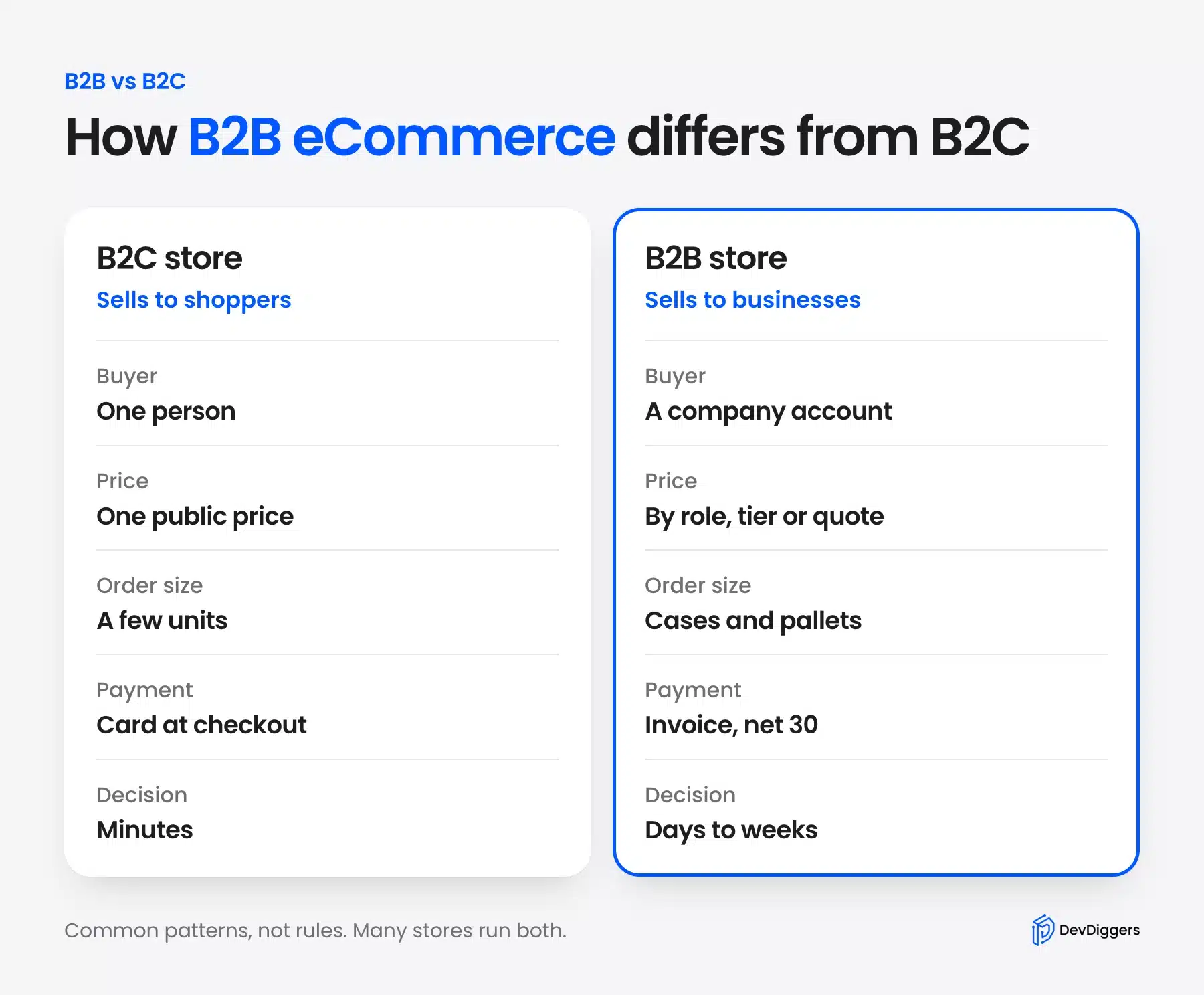
A store can run both models at once. Many WooCommerce shops sell retail to the public and wholesale to approved trade accounts from the same catalog. The setup later in this guide does exactly that.
Note: The buying cycle is longer in B2B. A trade buyer may compare quotes, check stock and wait for a manager to approve the order. Your store has to make reordering faster than calling you.
Types of B2B Ecommerce Models
B2B eCommerce comes in a few common models, and most stores fit one of them. The model you pick decides who your buyer is, how prices are set and which features you build first. These examples show the shape of each one, framed as typical cases rather than named companies.
- Wholesale: A brand sells its own products in bulk to retailers, such as a coffee roaster selling 5 kg bags to cafes at trade prices.
- Manufacturer direct: A maker sells parts or finished goods to other businesses, often with minimum order quantities and price breaks per carton.
- Distributor: A middle business buys from many makers and resells to shops, contractors or clinics, usually with a very large catalog.
- B2B2C: A business sells through a partner to the end consumer, such as a supplier that ships direct to the customers of its retail partners.
- Marketplace: Many sellers list products for business buyers on one platform, and the platform owner takes a fee per sale.
Wholesale is the most common starting point for a WooCommerce store. It reuses a catalog you already have and adds trade pricing on top of it.
The manufacturer and distributor models lean harder on catalog size and repeat ordering. A distributor with thousands of SKUs needs fast search and quick reorder far more than a pretty product page.
What a B2B Ecommerce Platform Needs
A B2B eCommerce platform needs company accounts, customer-specific prices and payment by invoice on top of a normal online store. Without those three, a trade buyer still has to email you for a price. The other features make bulk ordering faster for buyers who order the same items every month.
Use this list when you compare platforms or plan your own build:
- Customer accounts and roles: Each buyer type gets its own login and its own set of prices and rules.
- Quantity tiers: Unit prices drop as the order quantity climbs, and the buyer can see every break before ordering.
- Hidden or gated prices: Guests see a login prompt in place of your trade prices.
- Payment terms: Buyers can pay by bank transfer or invoice and settle later.
- Tax exemption: Resellers with a valid certificate check out without sales tax.
- Quotes and minimums: Large or custom orders go through a quote request, and small orders below a minimum are blocked.
- Fast reordering: Order history, quick order forms and saved lists cut a repeat order to a minute.
How to Choose a B2B Ecommerce Platform
Start from your catalog and your buyers. Then check which items above each platform covers without custom work. Hosted platforms such as Shopify bundle B2B features into their higher plans. WooCommerce is open source. You add only the pieces you need through extensions.
That trade off matters for a smaller supplier. If you already run a store on WordPress, our guide on whether WordPress is good for eCommerce covers the limits worth checking first.
How to Set Up WooCommerce B2B
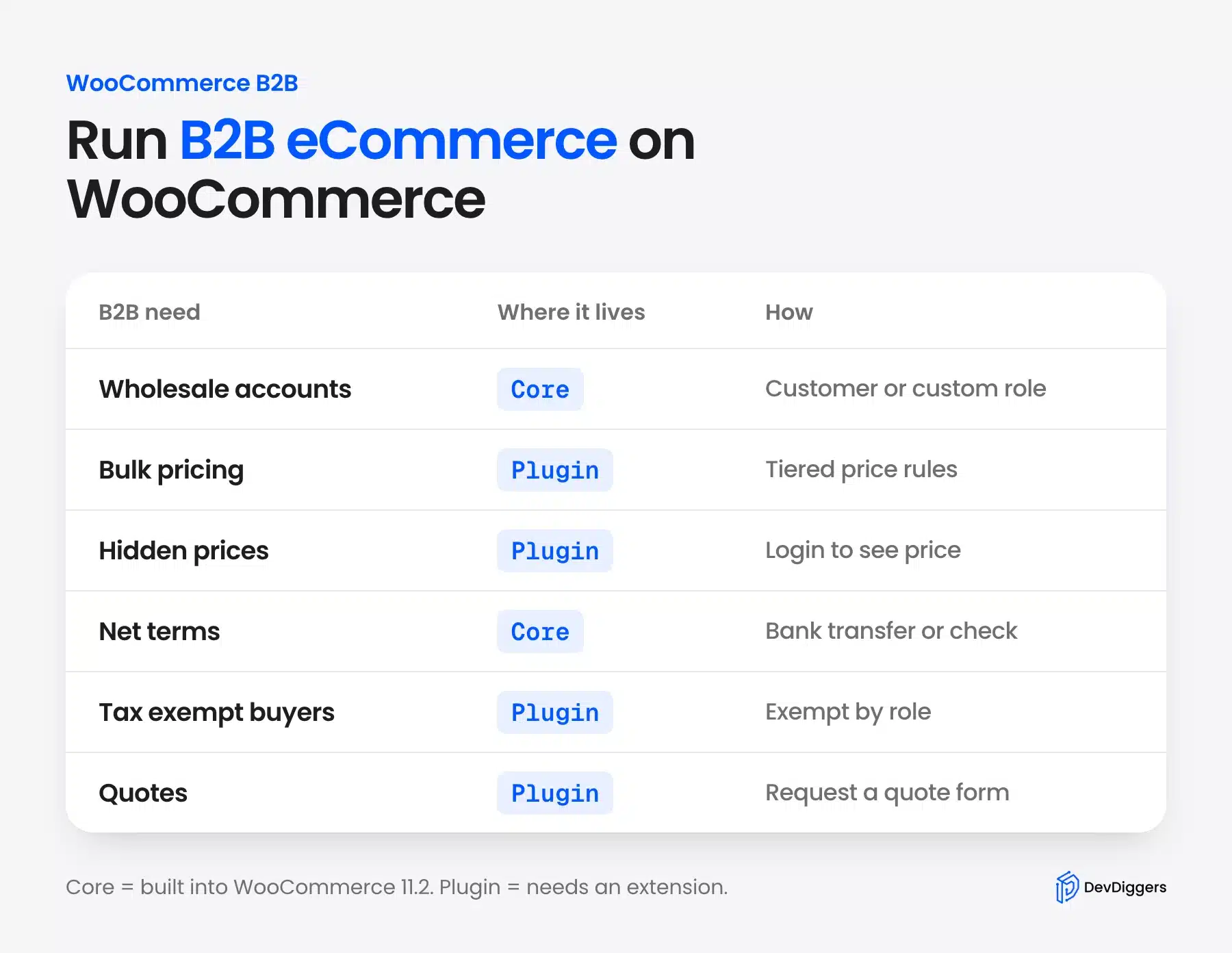
You can set up WooCommerce B2B in five steps: create a wholesale role and give trade buyers tiered prices. Then hide prices from guests, offer net terms through offline payments and limit what the public sees. Each step below shows the real screen from our test stores.
Plan about an hour for a small catalog once the plugins are installed. Most of that time goes into deciding your tier breaks, because the settings themselves are quick.
Step 1: Create a Wholesale Customer Role
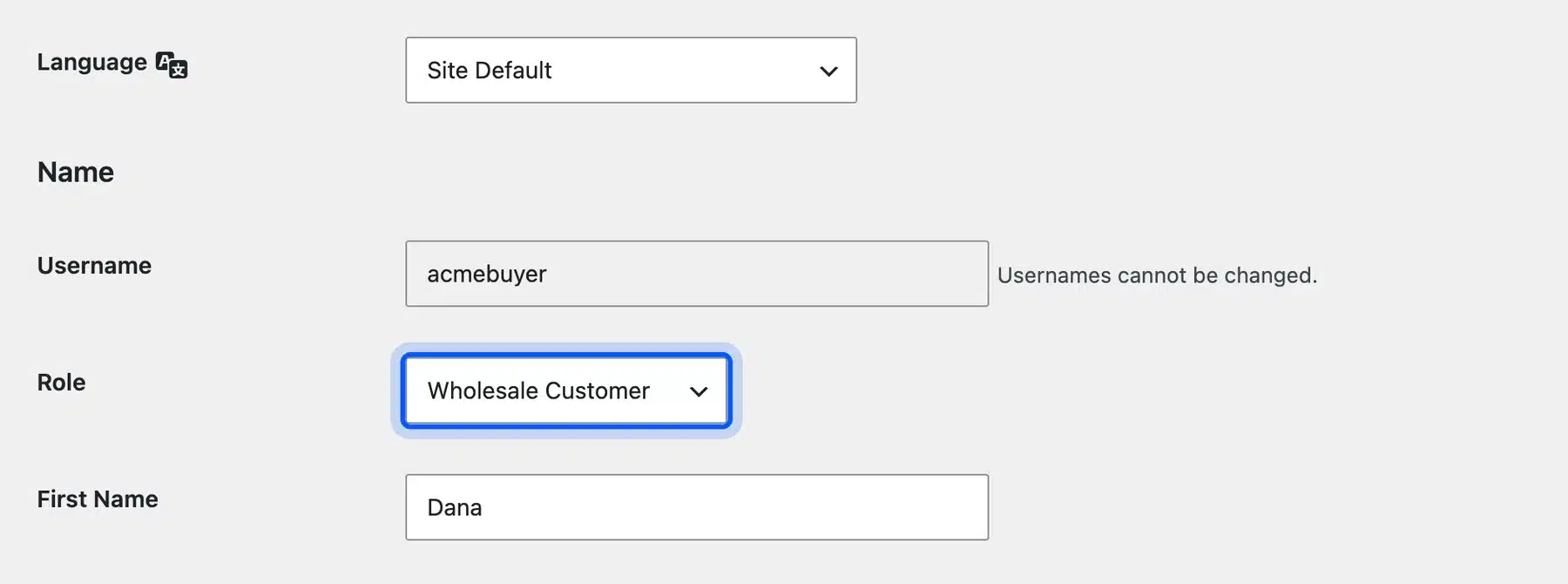
WordPress uses roles to decide what each user can do, and WooCommerce adds a Customer role for shoppers. The WordPress roles documentation lists the built in ones. A separate wholesale role lets every pricing rule target trade buyers only.
WordPress has no screen for adding a role. We created one with WP-CLI. The --clone flag copies every capability from the Customer role. That way wholesale buyers can still log in, order and see their account:
wp role create wholesale_customer "Wholesale Customer" --clone=customer
The WP-CLI role create command is documented on developer.wordpress.org. After that, open any user under Users, pick Wholesale Customer in the Role dropdown and save. We did this for a test buyer account on our store.
Step 2: Set Tiered and Bulk Pricing
Tiered pricing is what turns a retail product into a wholesale offer. The buyer pays less per unit as the quantity grows, and the product page shows every break. Our WooCommerce Tiered Pricing plugin builds those breaks as rules.
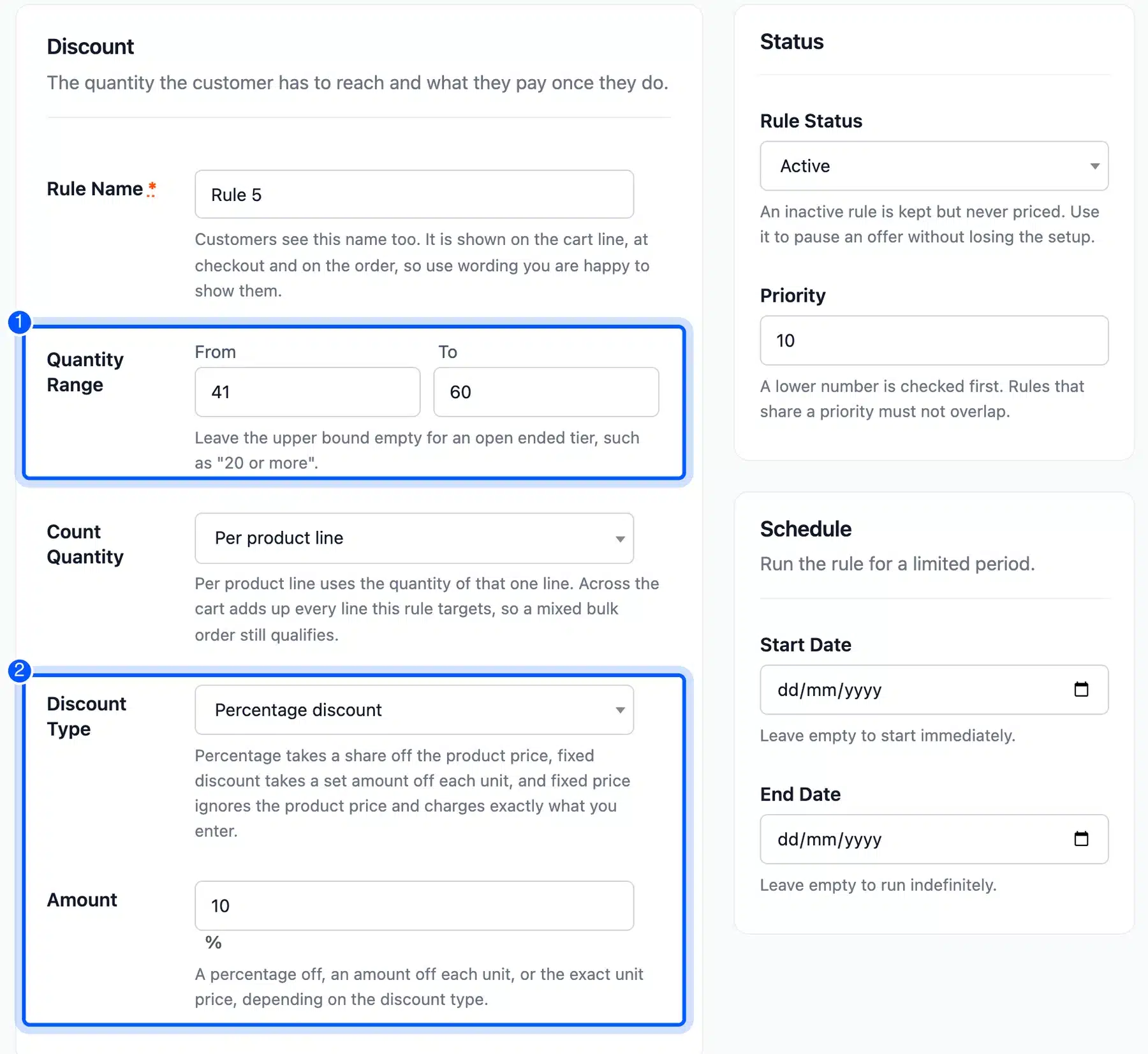
In the Edit Rule screen you set a Quantity Range with From and To fields, a Count Quantity mode and a Discount Type. The discount can be a percentage, a fixed amount off each unit or a fixed unit price. Leave the upper bound empty for an open tier such as “60 or more”.
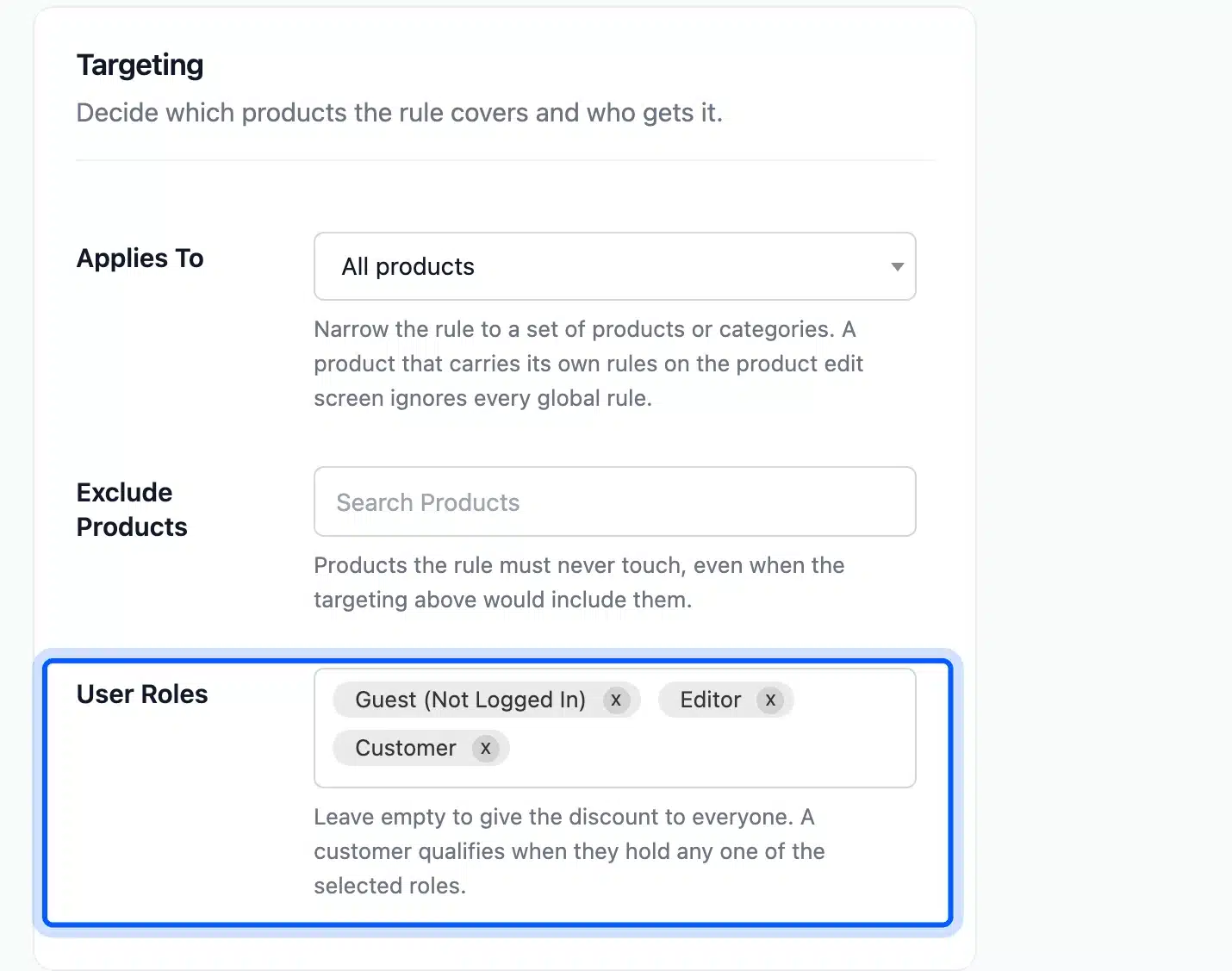
The same rule has a User Roles field in its Targeting section. The screen says to leave it empty to give the discount to everyone. A customer qualifies when they hold any one of the selected roles.
Pick Wholesale Customer there, and retail shoppers stay on the normal price.
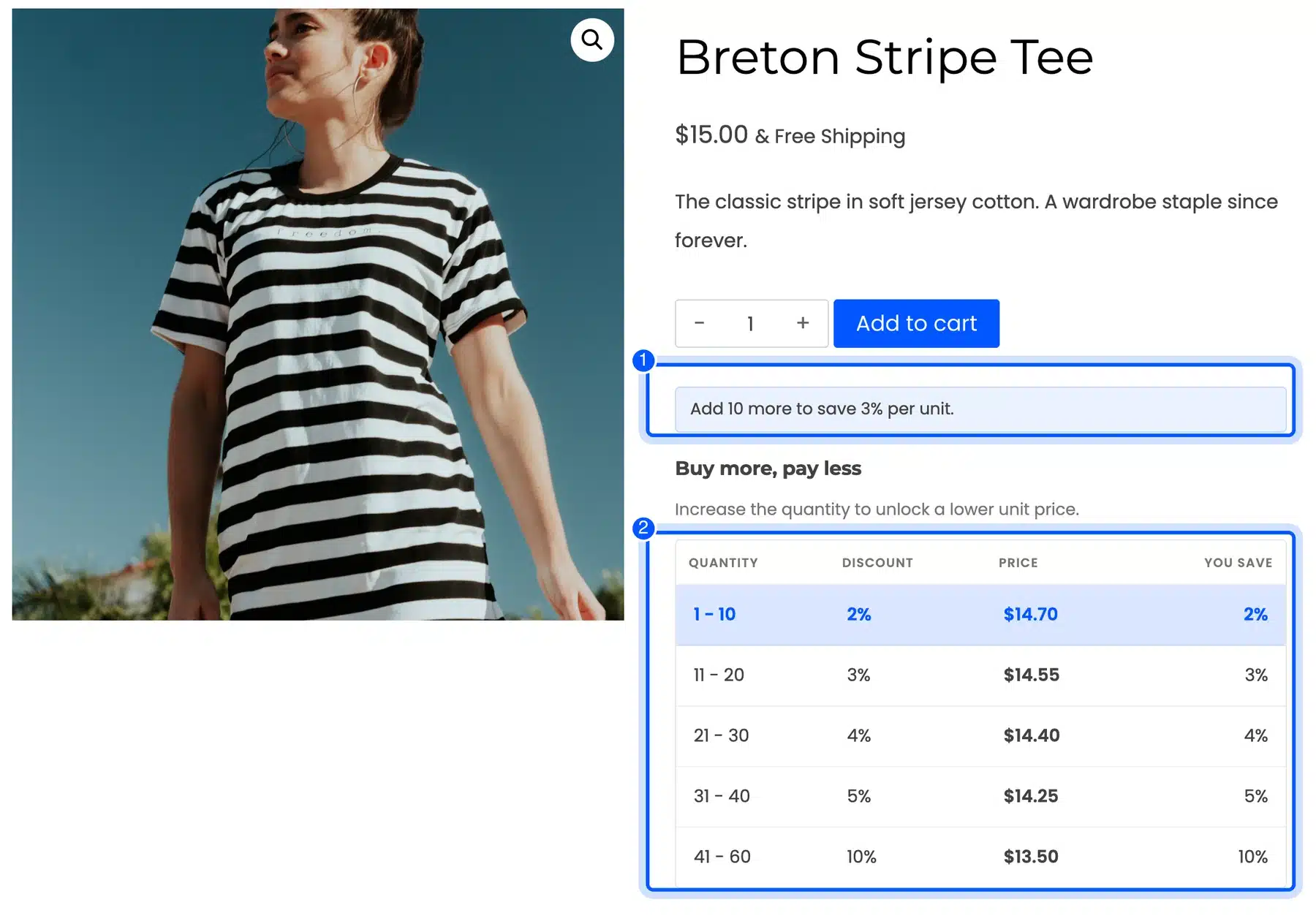
On our demo store a $15.00 tee carried five rules. They ran from 2% off at 1 to 10 units up to 10% off at 41 to 60 units. The table showed $14.70 at the first tier and $13.50 at the last, which matches $15.00 less 2% and less 10%.
A hint under the quantity box read “Add 10 more to save 3% per unit.”
The plugin is sold as a yearly license from $49 to $299 as of October 2026. If you want to compare it with other options first, our roundup of the best WooCommerce tiered pricing plugins covers the field.
Step 3: Hide Prices From Guests
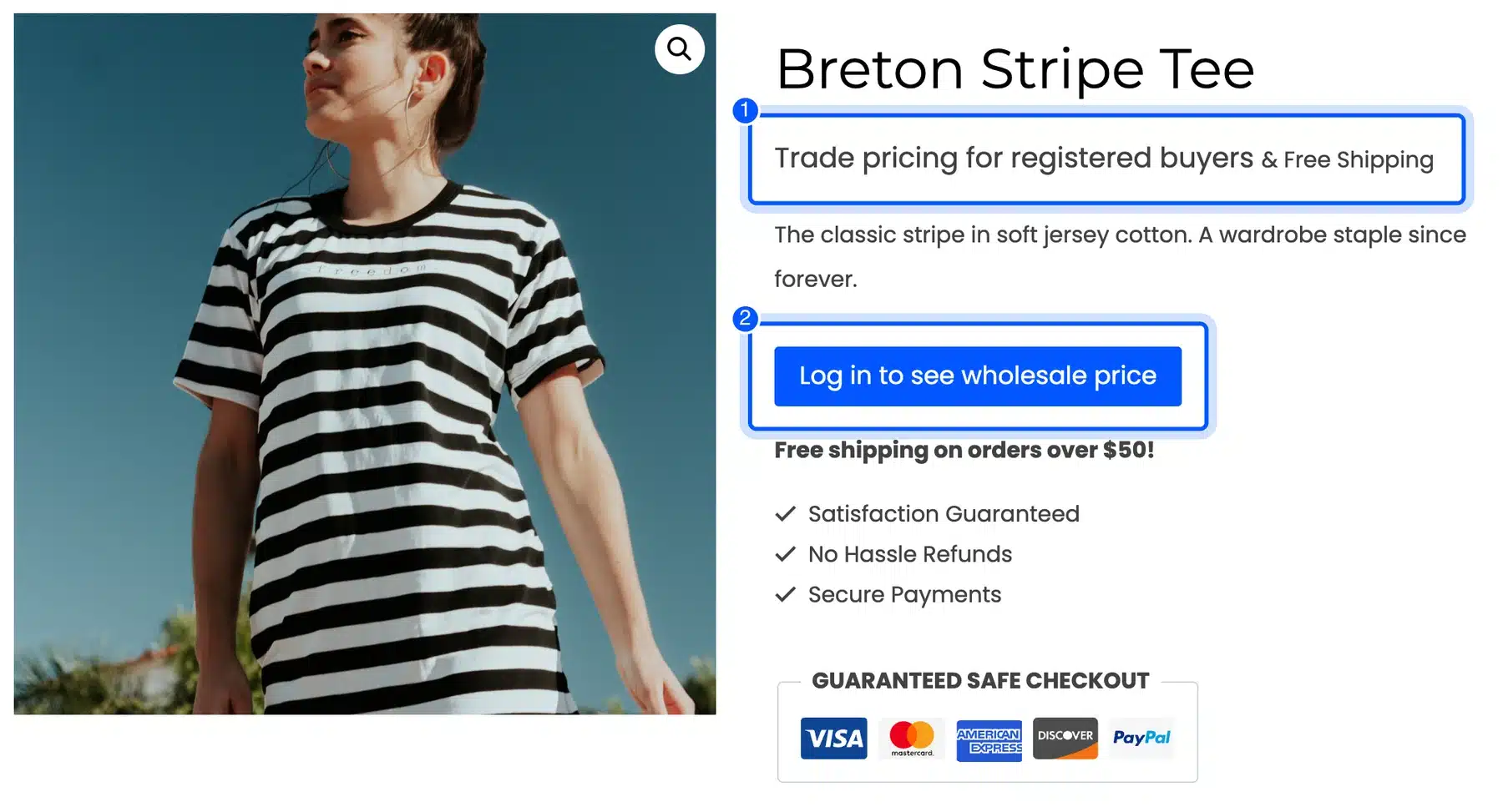
Most wholesale catalogs keep trade prices away from the public and from competitors. The usual fix is a login wall on the price only. Guests can still browse products and register. Our WooCommerce Hide Price For Guest plugin does exactly that.
Its General tab has one switch to turn hiding on and two text fields. Hidden Price Title is the text that appears in place of the product price, and Add to Cart Button Title replaces the button text. We set them to “Trade pricing for registered buyers” and “Log in to see wholesale price”.
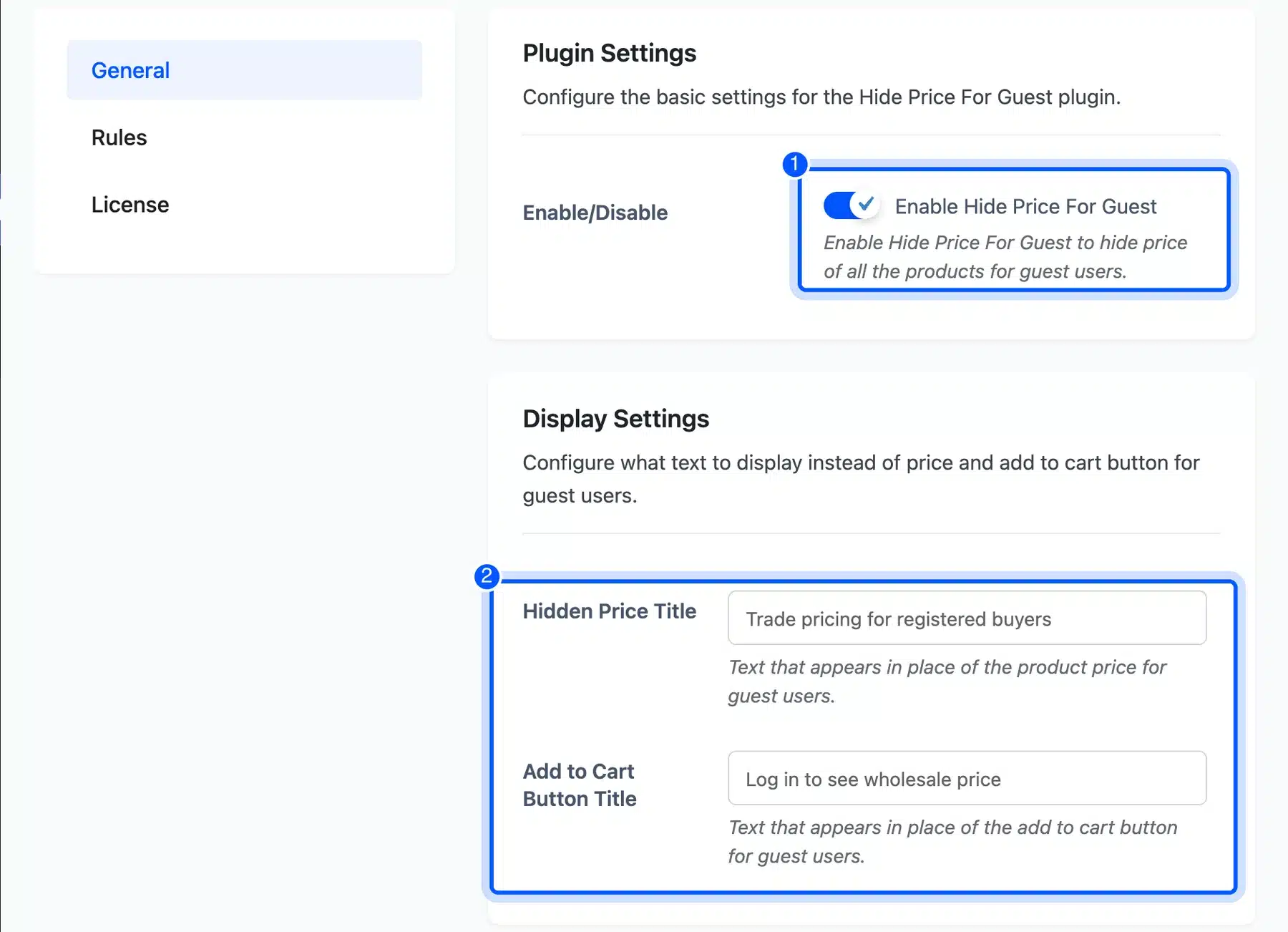
A logged out visitor then saw both texts on the product page with no price and no way to add the item to the cart. The button linked to the account page with a redirect back to the same product. A buyer then lands where they started after logging in.
Step 4: Offer Net Terms With Offline Payments
Net terms let a trusted buyer order now and pay within an agreed window, such as 30 days. WooCommerce has no net terms gateway in core. Its offline methods still cover the basic case, because the order is placed first and you collect the money later.
In WooCommerce 11.2 they sit under WooCommerce > Settings > Payments > Take offline payments. The list shows Direct bank transfer, Check payments and Cash on delivery, each with its own Enable button. The WooCommerce guide to direct bank transfer says these orders are set to On hold until you confirm the money arrived.
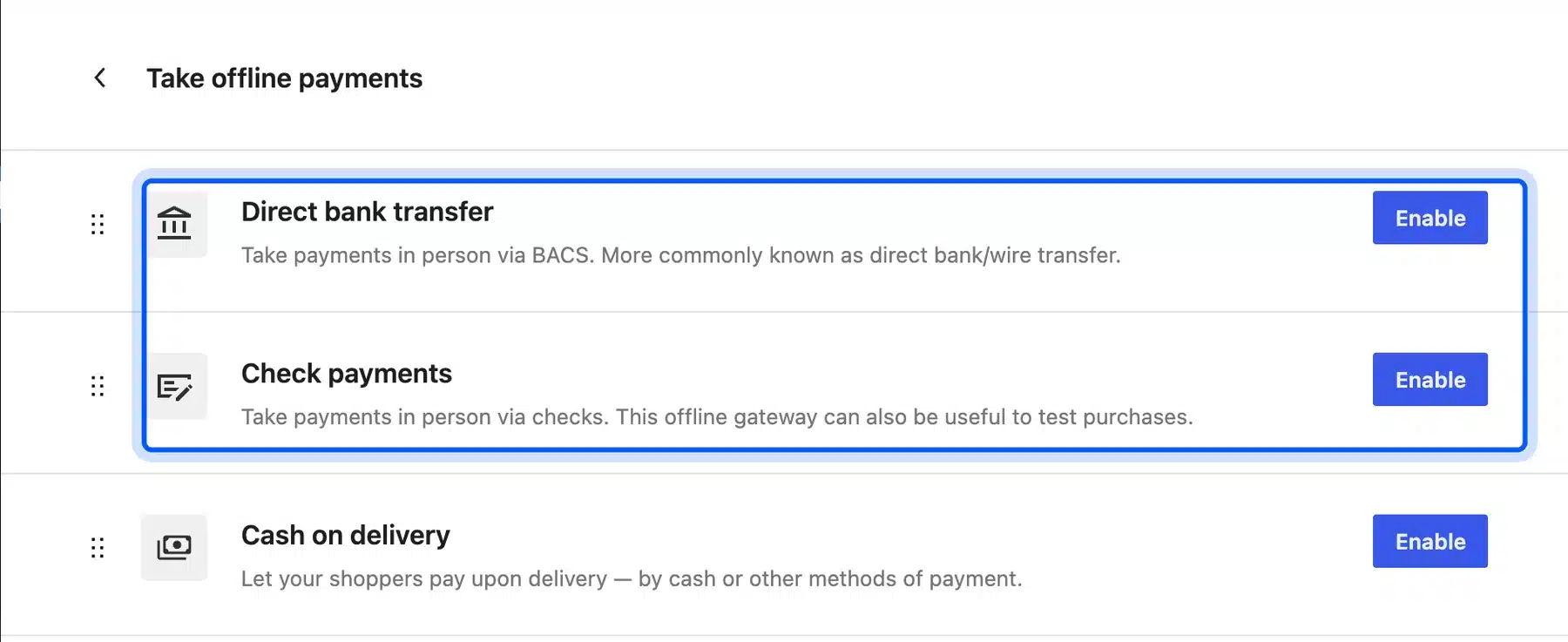
Put your terms in the payment instructions field, for example “Payment due within 30 days of the invoice date”. On hold is a safe default for wholesale, since you check the account before you ship.
Worth checking: Offline methods show to every customer by default, retail shoppers included. Limiting bank transfer to the Wholesale Customer role needs a payment rules plugin or a few lines of code.
Step 5: Hide Prices on Trade Only Products
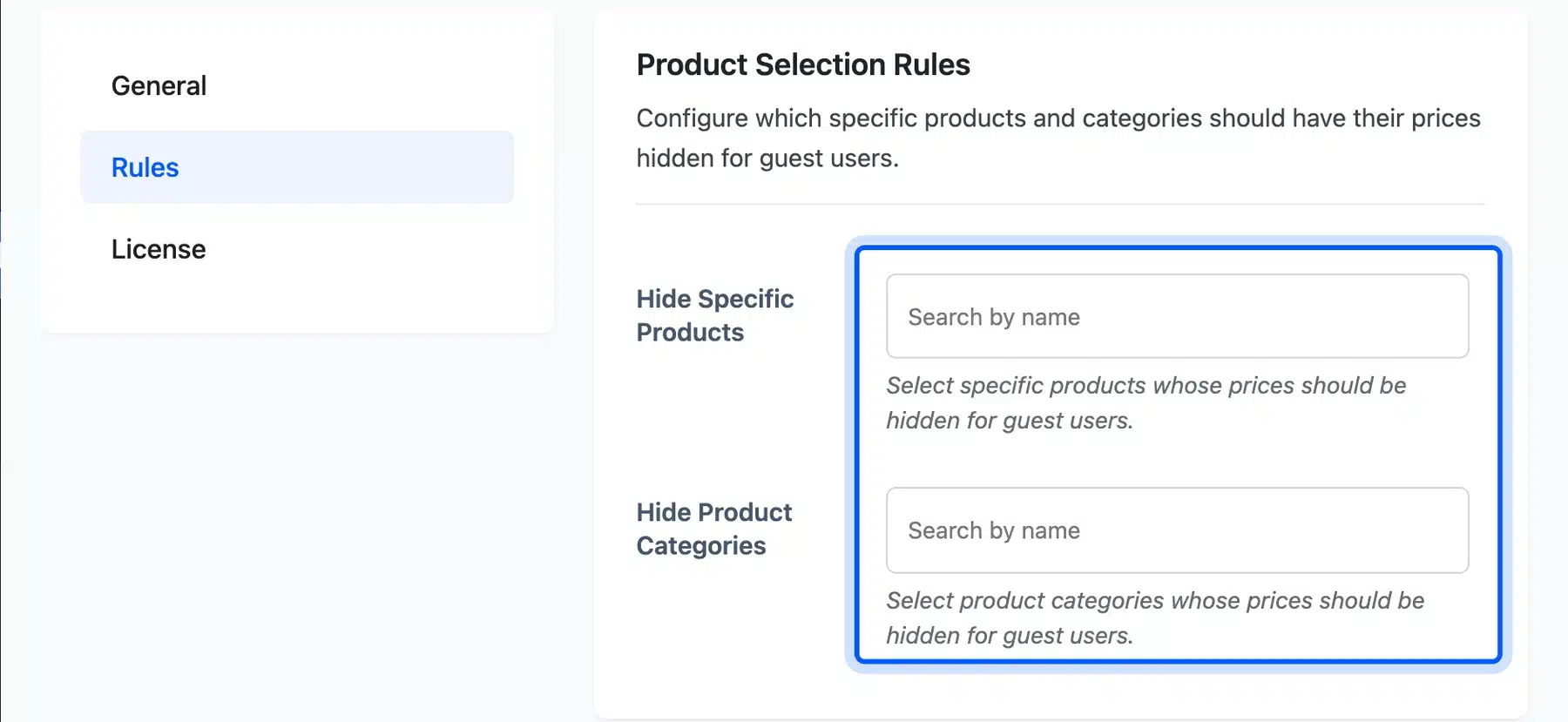
Some stores keep retail products public and lock only the trade range. The Rules tab in Hide Price For Guest handles that with Hide Specific Products and Hide Product Categories fields. Each one searches by name. You pick a Wholesale category once and every product in it follows.
The same tab can also match a minimum stock or price, product creation dates, product types, virtual or downloadable items and sale status. We left everything else visible to guests, which keeps the retail side of the store working as before.
These five steps take a store from retail only to a working wholesale channel. If you need company accounts, approval flows or an ERP sync on top, our custom WooCommerce development services can build the parts no plugin covers.
What WooCommerce Wholesale Still Needs: Tax, Quotes and Minimums
The steps above leave out three things a WooCommerce wholesale store still needs: tax exemption for resellers, quotes for large orders and minimum order rules. WooCommerce core does not handle any of them per customer. Each one needs an extension or custom code, and planning for them early avoids a rebuild.
- Tax exemption: WooCommerce tax classes are set per product, and the default list includes Standard, Reduced rate and Zero rate. The WooCommerce tax guide covers those classes, but none of them exempts one customer. Exempting a reseller by role needs a plugin.
- Quote requests: A buyer asking for 2,000 units wants a price you set by hand. A request a quote plugin replaces the cart button with a form and turns the approved quote into an order.
- Minimum order rules: Wholesale prices only pay off above a certain order size. A minimum quantity or order value rule stops a trade buyer from checking out three units at the bulk price.
If your tax totals already look wrong before you add any of this, fix that first with our guide on WooCommerce tax not working. Layering an exemption plugin over broken tax settings makes both harder to debug.
Common B2B Ecommerce Mistakes
The most common B2B eCommerce mistakes come from treating trade buyers like retail shoppers. A trade buyer wants their own price, a fast reorder and clear terms. Missing any one of those pushes them back to email and phone orders, which is the work the store was meant to remove.
- One price for everyone: Showing retail prices to trade buyers forces them to ask for a quote on every order.
- Public trade prices: A visible wholesale price list undercuts your retail partners and hands your margins to competitors.
- Hidden tier breaks: A discount the buyer cannot see does not change how many units they order.
- Card only checkout: Many business buyers pay by invoice, and a card wall loses them at the last step.
- Overlapping rules: Two tier rules on the same quantity range leave the final price to chance. Check them before launch.
The rules mistake is easy to make and easy to miss. The Tiered Pricing rule screen shows a Priority field and notes that rules sharing a priority must not overlap. That is a sensible guard, but test a cart at each tier break before real buyers find the gap.
Conclusion
B2B eCommerce is selling to other businesses online, and it already moves far more money than online retail. A trade buyer needs a company account, their own prices and payment terms. Everything else in the store follows from those three.
WooCommerce can run B2B eCommerce without a separate platform. A wholesale role and tiered pricing cover the price side, and hidden prices keep trade rates private.
Offline payments cover simple net terms. Tax exemption, quotes and minimum orders still need an extension. Plan for them before launch.
Start with the role and one tier rule on your best selling product. Then watch how trade buyers order before you add the rest.
Frequently Asked Questions (FAQs)
Q1. What are examples of B2B eCommerce?
Common examples are a brand selling bulk stock to retailers, a manufacturer selling parts to other makers and a distributor reselling to shops or clinics. Online marketplaces for business buyers count too. In each case the buyer is a company ordering for its own use or for resale.
Q2. Can WooCommerce handle B2B?
Yes. WooCommerce runs B2B stores with a custom user role, tiered pricing, hidden prices and offline payments for net terms. Tax exemption, quote requests and minimum order rules need an extension, because core WooCommerce does not set them per customer.
Q3. Can one store sell to both businesses and consumers?
Yes, and it is the most common setup on WooCommerce. Retail shoppers see public prices, while logged in trade buyers with a wholesale role get their own tiers. Keep the two separate with role targeted rules so a retail shopper never sees trade pricing.
Q4. How do I show wholesale prices only to approved buyers?
Give approved buyers a wholesale role and then limit your tiered price rules to that role. Hide prices from guests with a login prompt. The public then sees a message in place of the price. Approve each trade account by hand before you change its role.
Q5. What does net 30 mean in B2B?
Net 30 means the buyer pays the full invoice within 30 days of the invoice date. Net 60 gives 60 days. On WooCommerce, you can offer it through direct bank transfer or check payments, which place the order on hold until you confirm the payment.
Q6. How much does it cost to add B2B features to WooCommerce?
WooCommerce itself is free. The cost is the extensions you add. As of October 2026, WooCommerce Tiered Pricing is a yearly license from $49 to $299. Hide Price For Guest runs from $39 to $299 a year.
Q7. Is B2B eCommerce growing?
The share of business sales made online has climbed for years in US Census data. Merchant wholesaler e-commerce reached 33.3% of total sales in 2019, up from 32.4% in 2018, according to the Census Bureau’s E-Stats report.