
To monetize WooCommerce, you sell something through it: physical goods, downloads, yearly licenses, affiliate products or paid programs such as points and store credit. WooCommerce itself is free. Every dollar comes from what you put in the store and how you raise the size of each order.
I checked every setting in this guide in October 2026 on a test store running WordPress 7.1.3 and WooCommerce 11.2. Every screenshot below comes from that store. Plugin prices come from the live DevDiggers Store API, and payment fees from the WooPayments fee schedule.
You get a short answer to how WooCommerce makes money first. Then come eight ways to make money with WooCommerce, each with the screen where you set it up. After that come payments, the honest answer on fast money, running costs and the mistakes that cost stores sales.
How Does WooCommerce Make Money?
WooCommerce makes money from paid add-ons, because the plugin itself costs nothing. The core is free and open source, while Woo earns from Marketplace extensions and themes, and from payment fees through WooPayments. A store owner can run a full shop on the free plugin and pay only for hosting.
Here is where the money goes, based on Woo’s own pages:
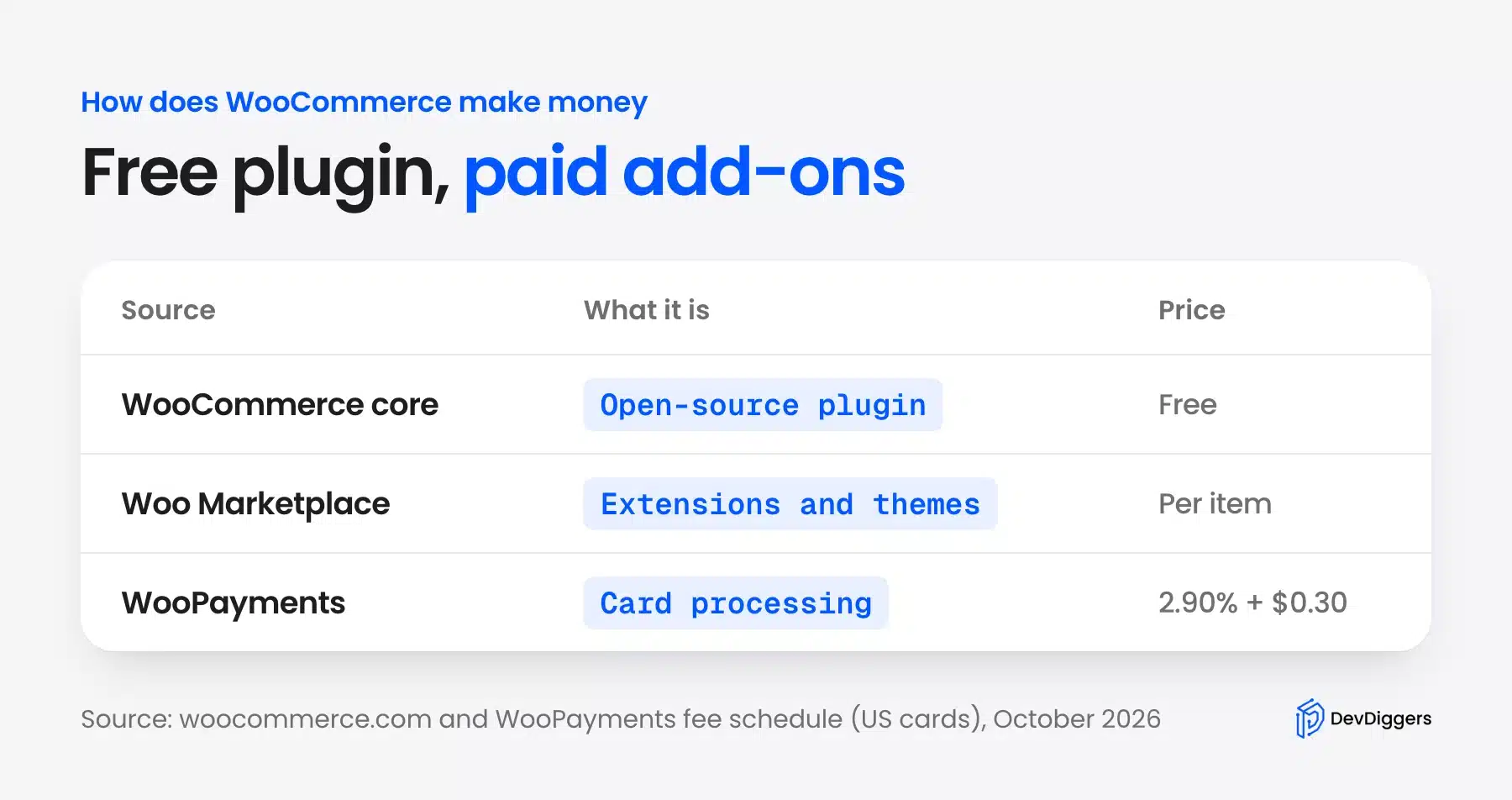
The WooCommerce homepage describes it as an open-source eCommerce platform. You download it from WordPress.org at no cost and keep full control of the store and its data.
The Woo Marketplace sells extensions built by Woo and by outside developers. Its monetization rules for Marketplace plugins explain how sellers bill through Woo.
WooPayments is the third source. For a US store, the WooPayments fee schedule lists 2.90% plus $0.30 per card payment, with 1.50% added for international cards, as of October 2026.
Hosting partners and paid support plans add to that picture, but neither is required. A store built on free plugins and a basic host still runs every feature in the next section that core covers.
So the question for a store owner is different. WooCommerce makes its money when you add features, and you make yours by choosing which features pay for themselves.
Ways to Monetize WooCommerce
There are eight main ways to monetize WooCommerce, and they split into two groups of four. Four decide what you sell: physical products, downloads, subscriptions and affiliate items. The other four raise each order: upsells, coupons, shipping rules and paid programs such as points. A checkout add-on offer is one example, covered in our order bump walkthrough.
Most stores combine three or four of them. Here is the full set before the detail:
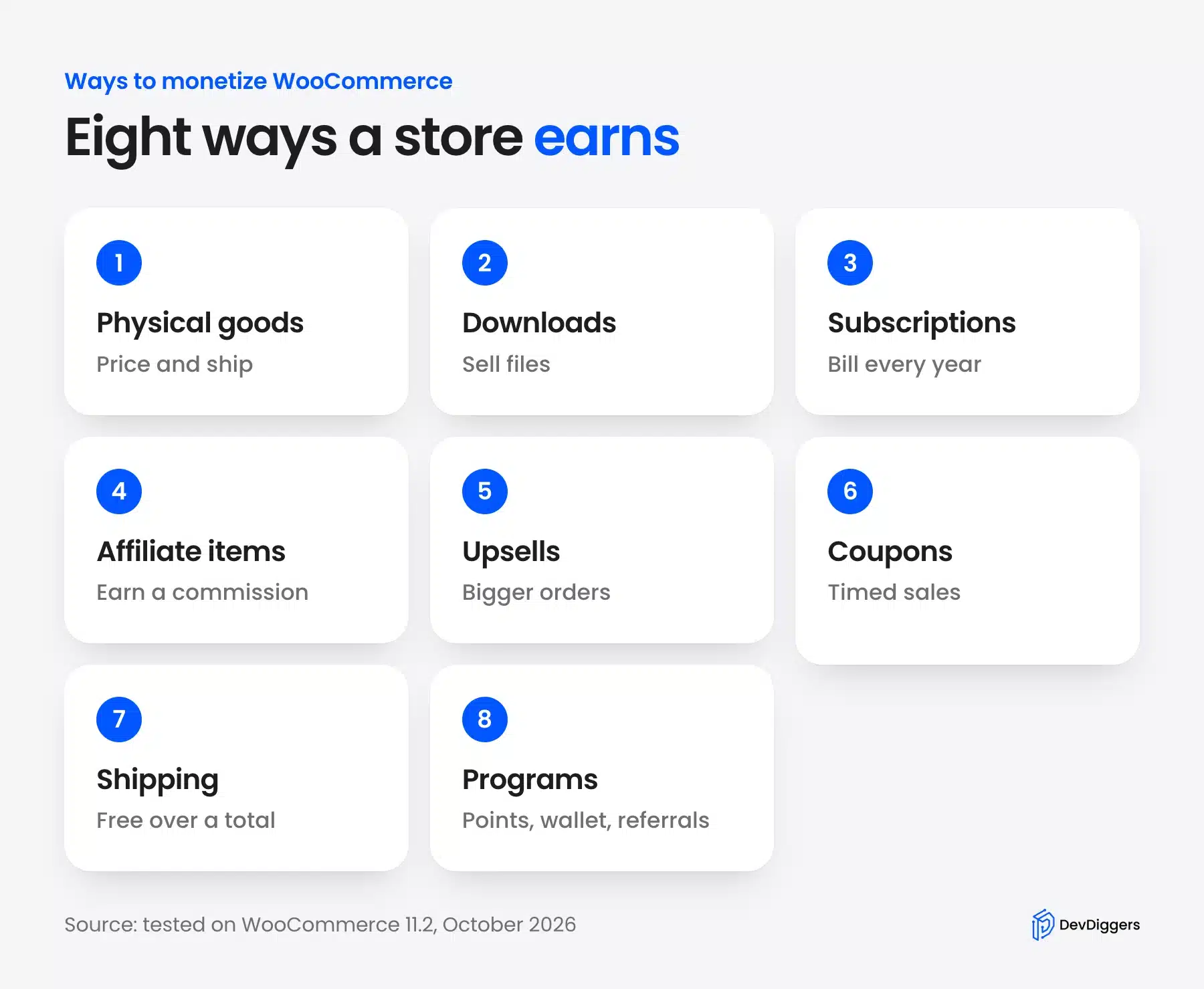
Each method below shows the exact WooCommerce screen where it is set up. Free WooCommerce covers six of them out of the box, and the other two need an extension.
Sell Physical Products
Physical products are the default in WooCommerce: you set a price, add stock and ship the order. Open Products > Add New and fill in the Regular price on the General tab of the Product data box.
Here is that tab on our test store, with the two price fields boxed:
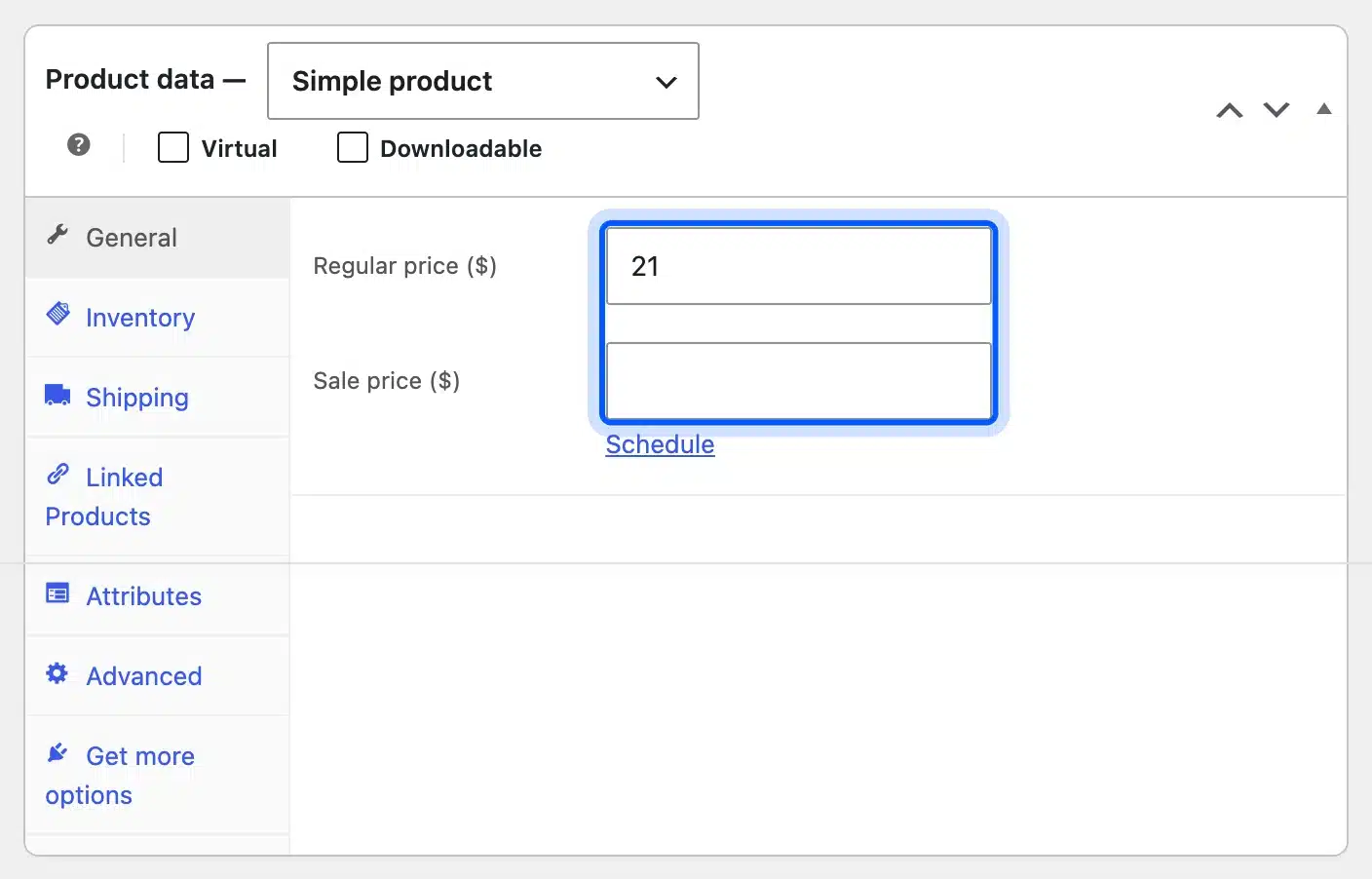
The Sale price field below it, with its Schedule link, runs a discount for set dates. That one field covers most seasonal promotions without any extension.
Margin is the number that matters here. Price each product after shipping, packaging and payment fees, or a busy store can still lose money on every order.
Woo’s product management guide covers the other product types. Simple products suit single items, while variable products handle sizes and colors.
Sell Digital Downloads
Digital products cost nothing to ship. Almost all the price is margin. In the Product data box, tick both Virtual and Downloadable. Then add the file under Downloadable files.
I ticked both boxes on a test product. The Shipping tab disappeared, and the download fields appeared:
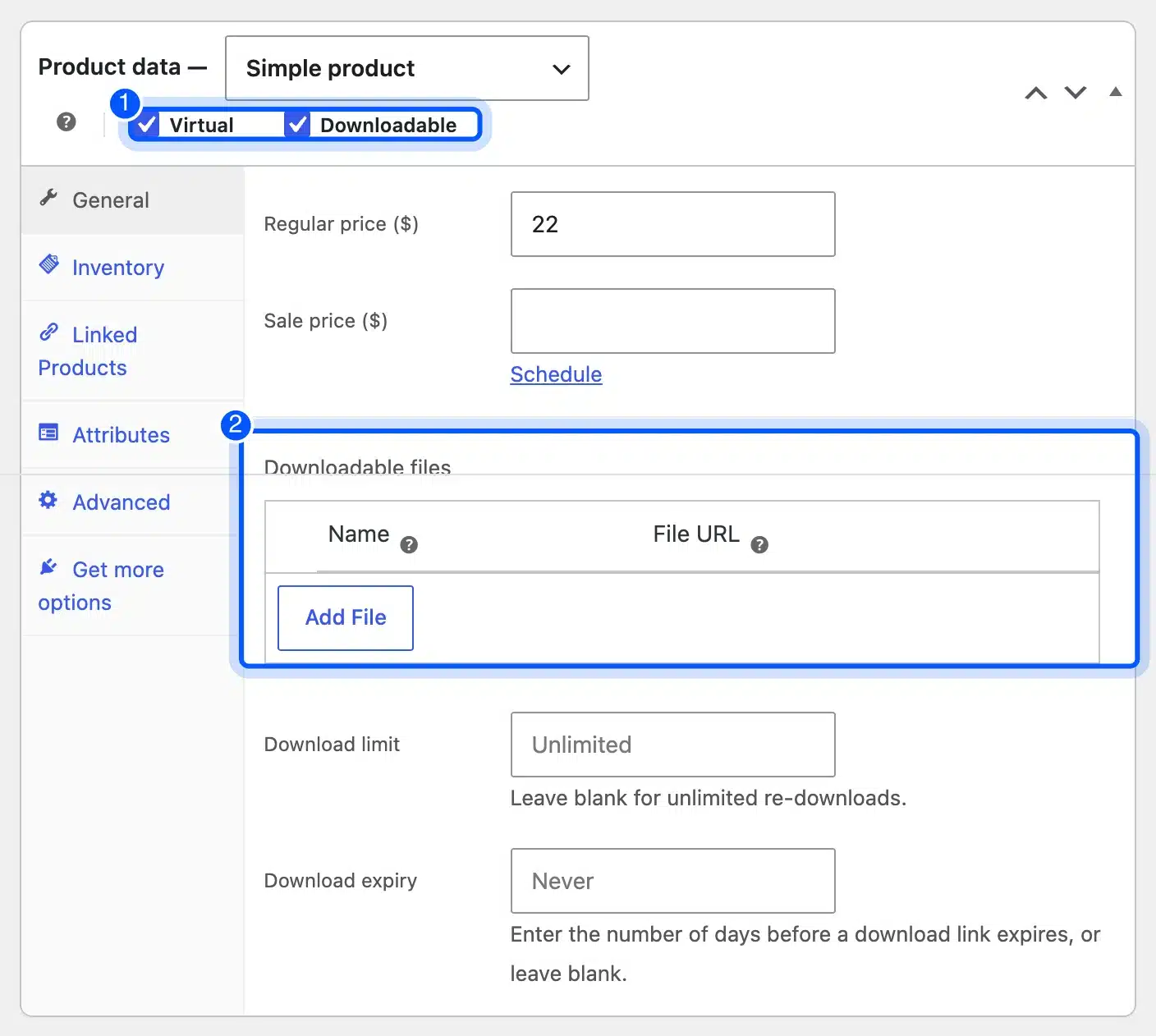
Download limit and Download expiry control how often and how long a buyer can fetch the file. Both default to unlimited and never.
Woo’s guide to digital and downloadable products explains the file delivery methods. Pick one that hides the real file URL. That way links cannot be shared freely.
Price downloads by the value to the buyer, because the cost to you is close to zero. A template that saves a designer three hours is worth far more than the file size suggests.
Music works the same way, and you can sell music online with WooCommerce as MP3 or WAV downloads.
Ebooks, templates, presets, courses and software all fit this model. The work goes into making the product once. Then the store sells it on repeat.
Sell Subscriptions and Yearly Licenses
Subscriptions turn one sale into repeat income, billed every month or year. WooCommerce core has no subscription product type. You add one with an extension such as WooCommerce Subscriptions.
This is how DevDiggers sells its own plugins. The Store API shows our Wallet plugin as a variable subscription with yearly tiers:
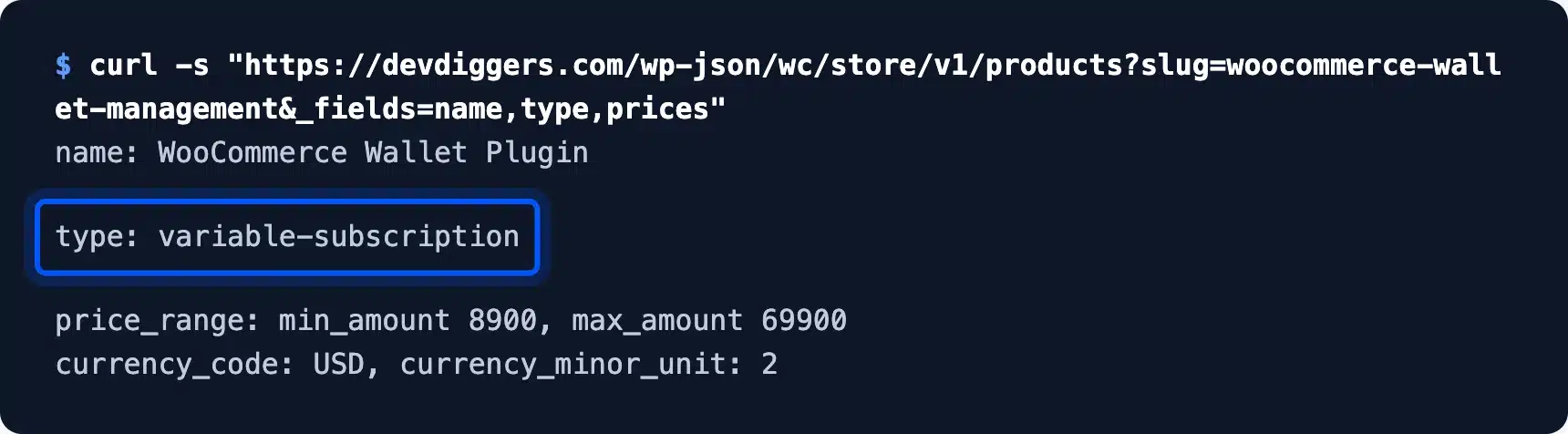
The price range runs from 8900 to 69900 in cents. The yearly tiers go from $89 to $699. Each tier adds more site licenses. One product then serves a single shop and an agency.
Offer the yearly plan as the default. Buyers who pay once a year cancel less often than monthly ones, and you collect the money up front.
Subscriptions suit products people use over time: software, memberships, boxes of goods and support plans. They need a clear renewal reminder and an easy way to cancel, or refund requests follow.
Earn Commissions With Affiliate Products
An affiliate product sits in your store but sells on another site. Choose External/Affiliate product in the Product data dropdown. Then paste the Product URL and the Button text.
Here is that product type on our test store:
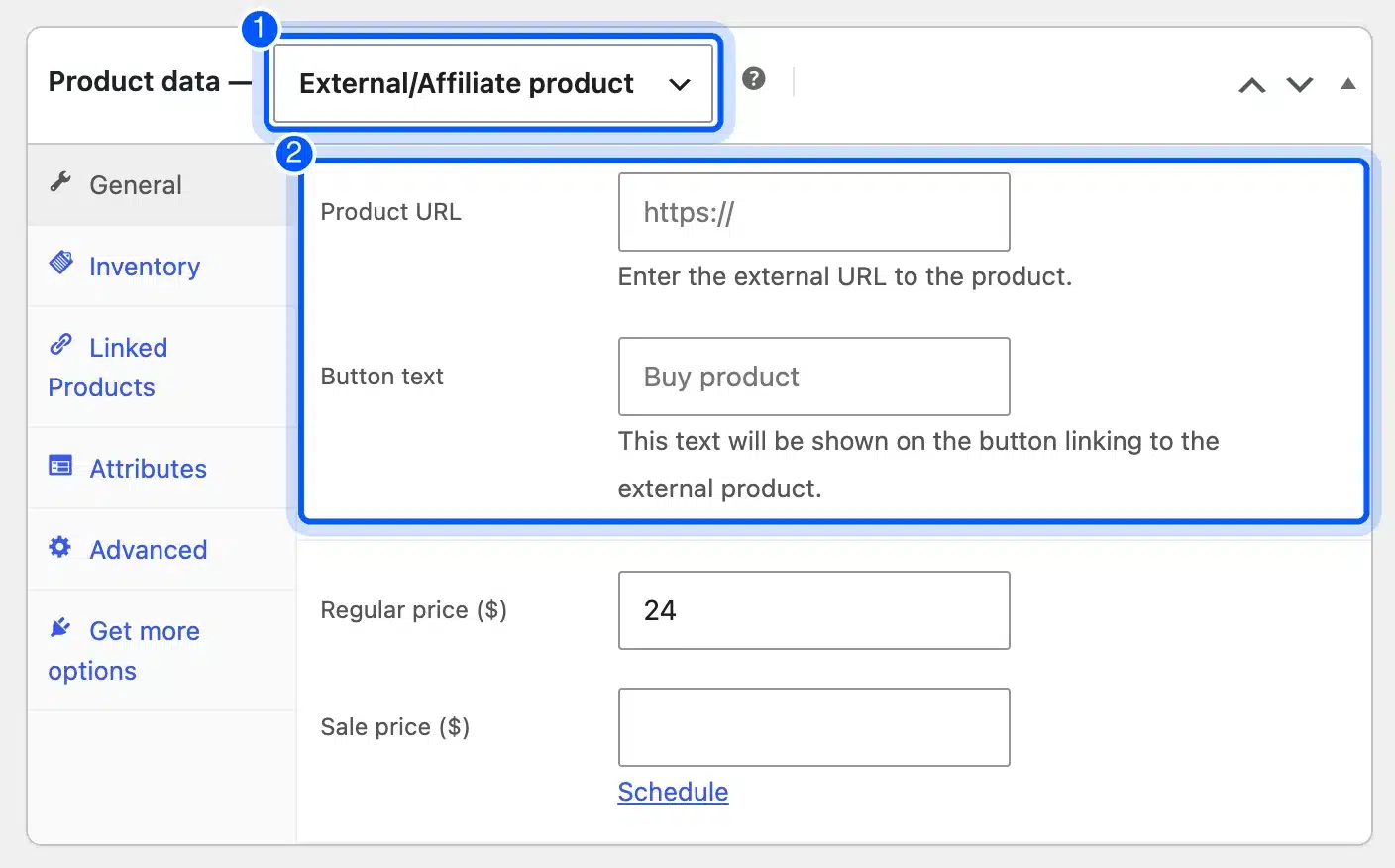
The buyer clicks the button and lands on the seller’s page, where your affiliate link tracks the sale. You earn a commission without stock, shipping or support.
The trade-off is control. Commission rates change, cookies expire and the buyer leaves your site. Treat affiliate products as an extra stream rather than the core of the store.
Label these links as affiliate links on the page. Google asks for a sponsored or nofollow attribute on paid links, and buyers trust stores that say so.
Raise Order Value With Upsells and Cross-Sells
Upsells and cross-sells raise how much each order is worth. Open the Linked Products tab in Product data and pick products in the Upsells and Cross-sells fields.
Both fields search your catalog as you type:
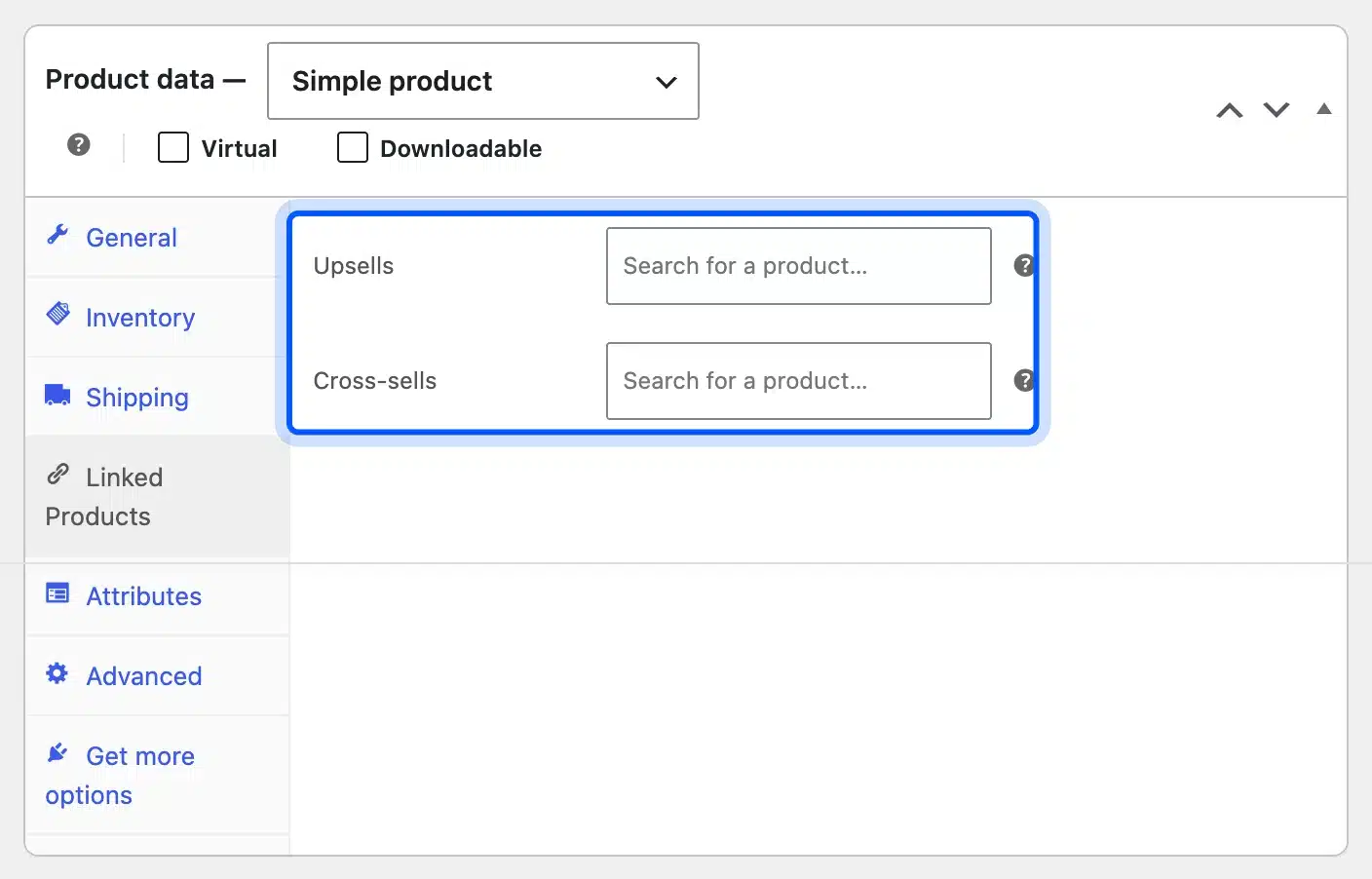
Upsells show on the product page as a better or bigger option. Cross-sells show in the cart as add-ons, such as a case with a phone.
Woo’s guide to upsells, cross-sells and related products explains where each one appears. Note that the newer block-based cart shows cross-sells through its own block.
Start with your best sellers. A product that already gets traffic is the cheapest place to test whether an upsell lifts the order total.
Pick two or three linked products per item at most. A long list of suggestions slows the buyer down and rarely adds more sales.
A checkout add-on works differently from an upsell, and order bump versus upsell shows where each offer appears in WooCommerce.
Run Coupons and Timed Sales
Coupons bring back past buyers and push new ones to order now. Go to Marketing > Coupons > Add coupon and set the Discount type and the Coupon amount.
These are the first two fields on the coupon screen:
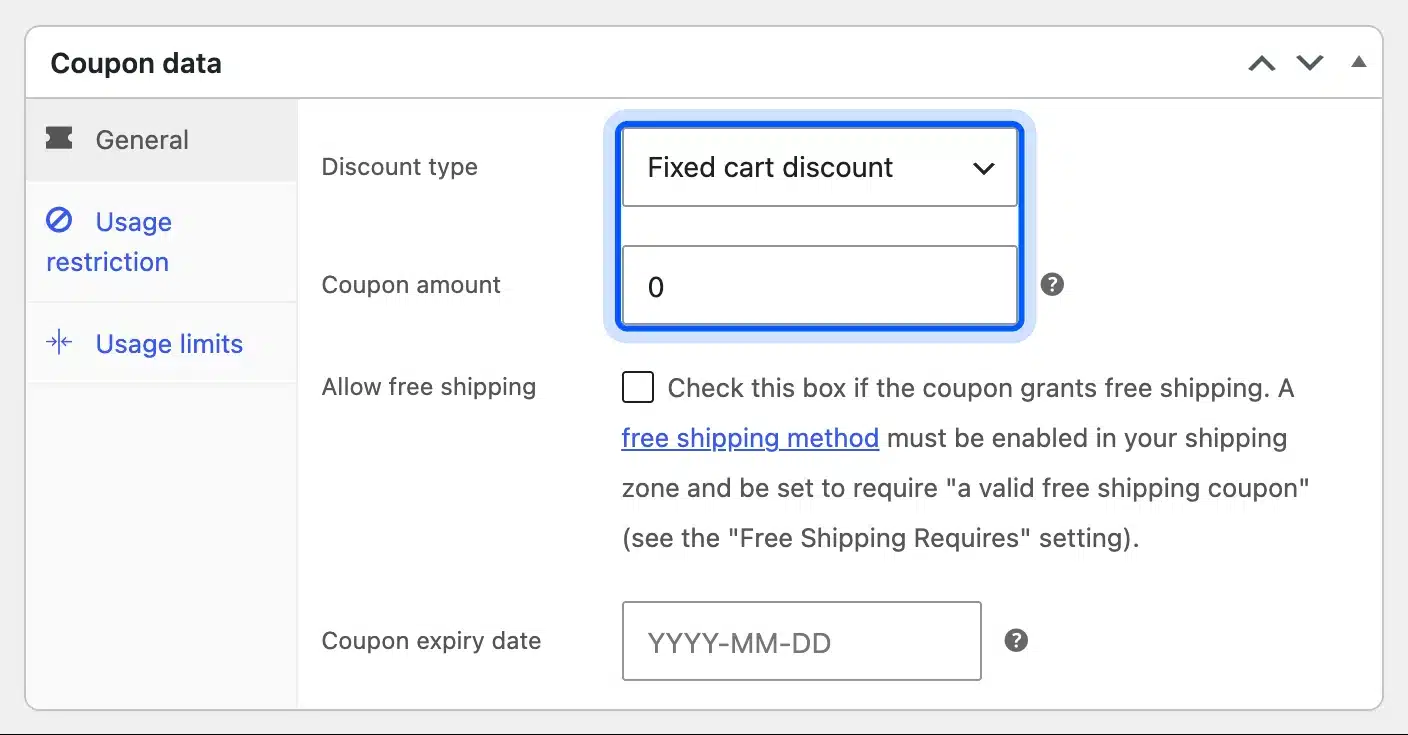
Discount type offers a percentage discount, a fixed cart discount or a fixed product discount. The Usage restriction tab adds a minimum spend. The coupon then only works on bigger orders.
Woo’s coupon management guide lists every restriction and limit. Usage limits stop one code from being shared on deal sites.
A coupon with a minimum spend often pays for itself. A $10 discount on orders over $75 lifts small orders to the threshold while protecting the margin on each one.
Turn Shipping Into a Sales Tool
Shipping rules can raise order value as well as cover costs. Go to WooCommerce, Settings, Shipping, open a zone, and add Flat rate, Free shipping and Local pickup methods.
I created a United States zone on the test store with all three methods:
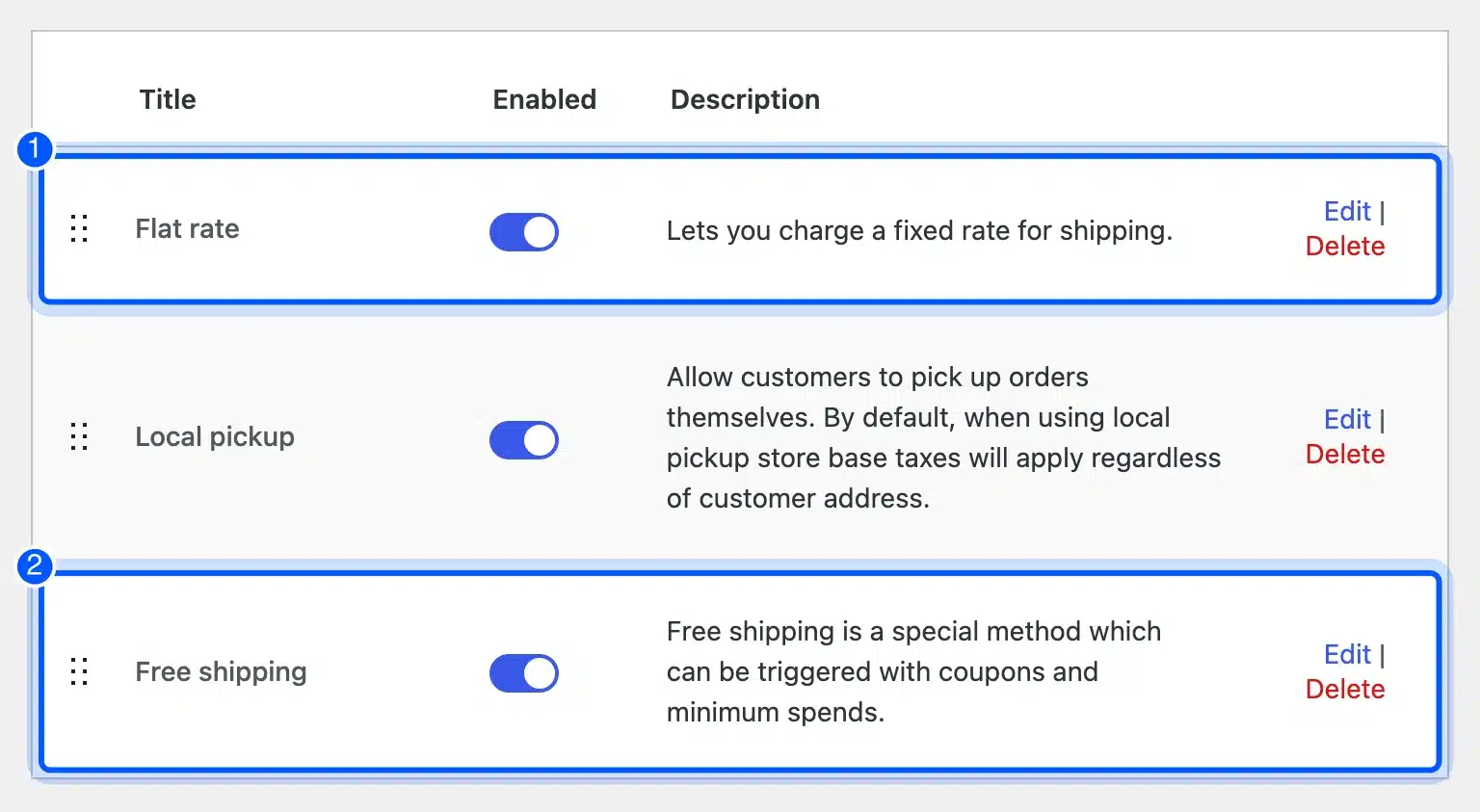
Free shipping can require a minimum order amount. Set it a little above your average order, and many buyers add one more item to reach it.
Flat rate covers the cost on smaller orders, and local pickup saves the buyer a fee for nearby customers. Woo’s guide to setting up shipping zones covers rates by region and class.
Local pickup also brings people to your shop or warehouse. For a store with a counter, that visit is another chance to sell.
Check the numbers each quarter. If carrier prices rise and your rates do not, shipping slowly eats the margin on every order.
Add Loyalty, Wallet, Referral and Pre-Order Programs
Paid programs keep customers buying and bring in new ones. WooCommerce core has none of them. They come from extensions. The common ones are points, store credit, referrals, pre-orders and back in stock alerts. Our review of WooCommerce pre-order plugins covers the pre-order side.
DevDiggers builds plugins for each of these. Here are their starting yearly prices, read from our Store API in October 2026:
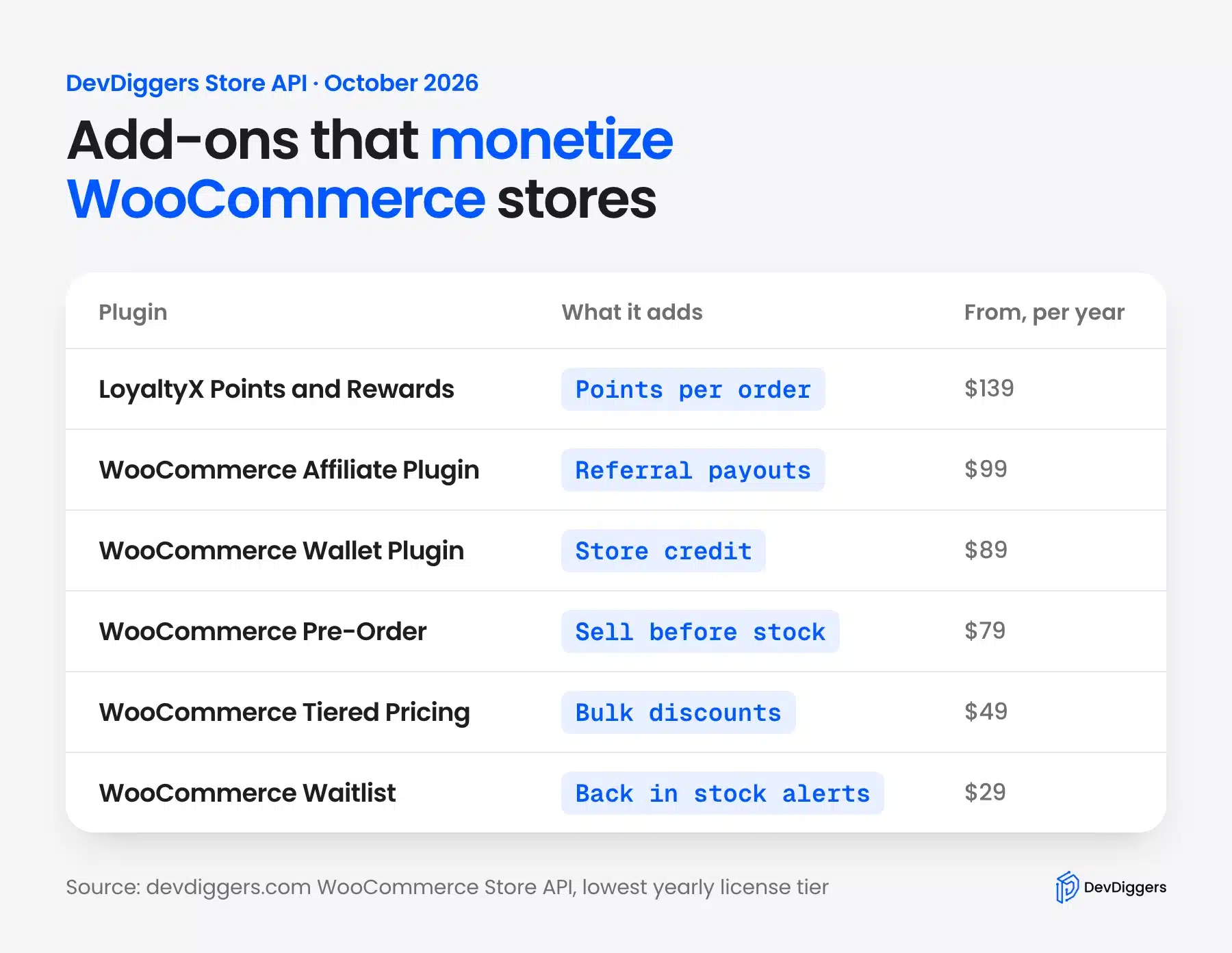
- Points and rewards: The WooCommerce points and rewards plugin gives points per order that buyers spend later. It starts at $139 a year.
- Store credit: The WooCommerce Wallet Plugin holds refunds and top-ups as credit, which keeps the money inside your store. It starts at $89 a year.
- Referrals: The WooCommerce Affiliate Plugin pays people who send you buyers. It starts at $99 a year.
- Pre-orders and waitlists: WooCommerce Pre-Order sells stock before it arrives, from $79 a year. WooCommerce Waitlist emails buyers when an item is back, from $29 a year.
Our guide on setting up a loyalty program in WooCommerce walks through the first steps. Add one program at a time and measure it before adding the next.
How to Get Paid: Set Up Payments in WooCommerce
To get paid, open WooCommerce > Settings > Payments and connect at least one payment provider. WooCommerce 11.2 lists WooPayments and PayPal Payments first, with offline methods below them. Test one full order before you share the store with anyone.
Here is the Payments tab on our fresh test store, with the two main providers boxed:
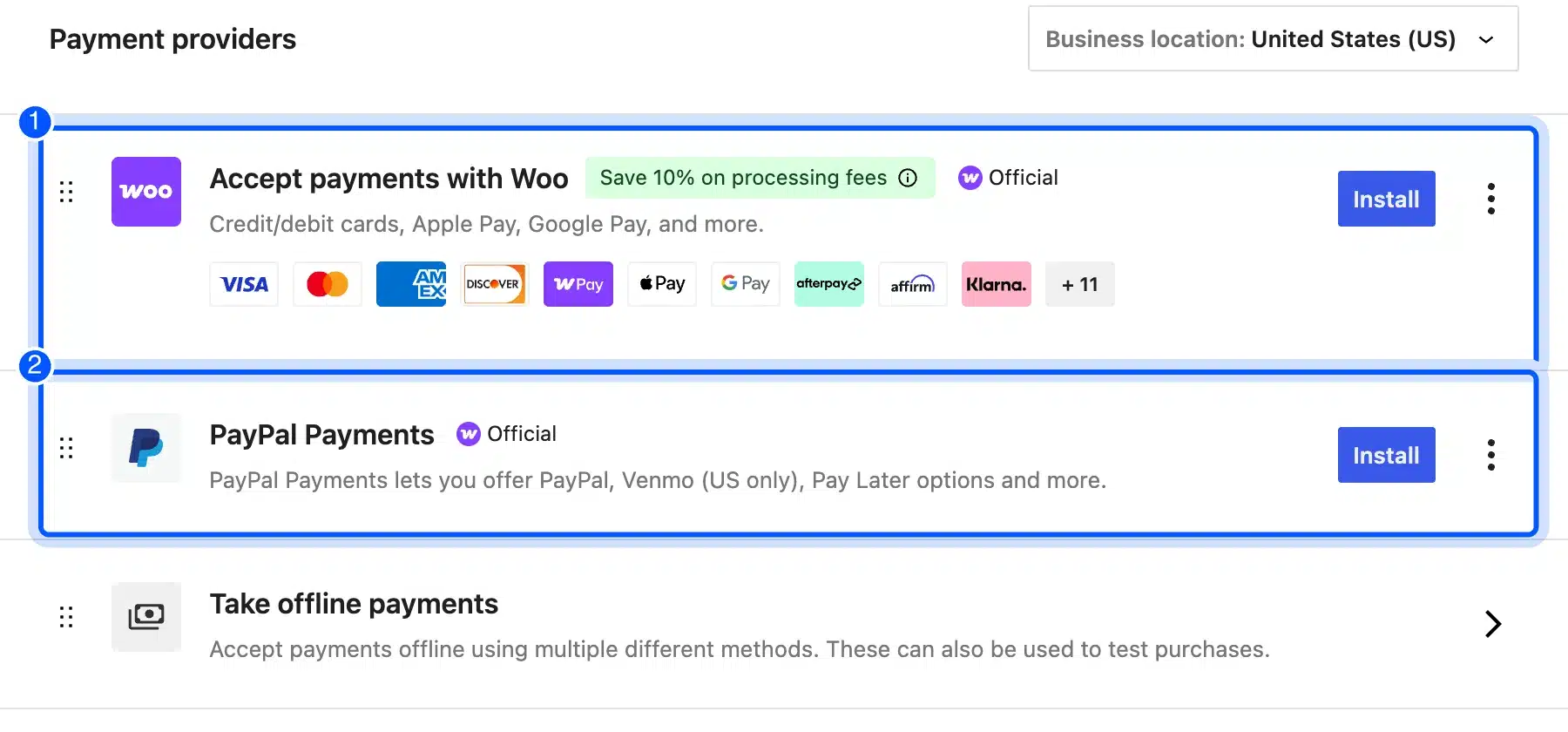
Each provider needs its own account and charges its own fees. For WooPayments in the US, cards cost 2.90% plus $0.30 per payment, and each dispute costs $15, as of October 2026.
Offline methods, such as bank transfer and cash on delivery, cost nothing per order. They suit local stores and wholesale buyers, but they add manual work to every sale.
Show the payment logos near the Add to cart button and on the checkout page. Buyers look for a method they already use before they type card details.
Turn on at least one wallet option, such as Apple Pay or Google Pay, if your provider supports it. The Woo provider row on our test store listed both, which saves mobile buyers from typing a card number.
Run a test purchase with a real card for the cheapest product. Then refund it. That one order checks the payment, the stock change and the customer email together.
Can You Make Money With WooCommerce Fast?
You can take a first sale within days, but you cannot make steady money with WooCommerce fast. A first order needs one product, one shipping zone and one tested payment method. Steady income needs traffic, repeat buyers and good margins, and those take months to build.
Search results for “WooCommerce make money fast” promise quick money. Here is the honest shortest path to a first sale:
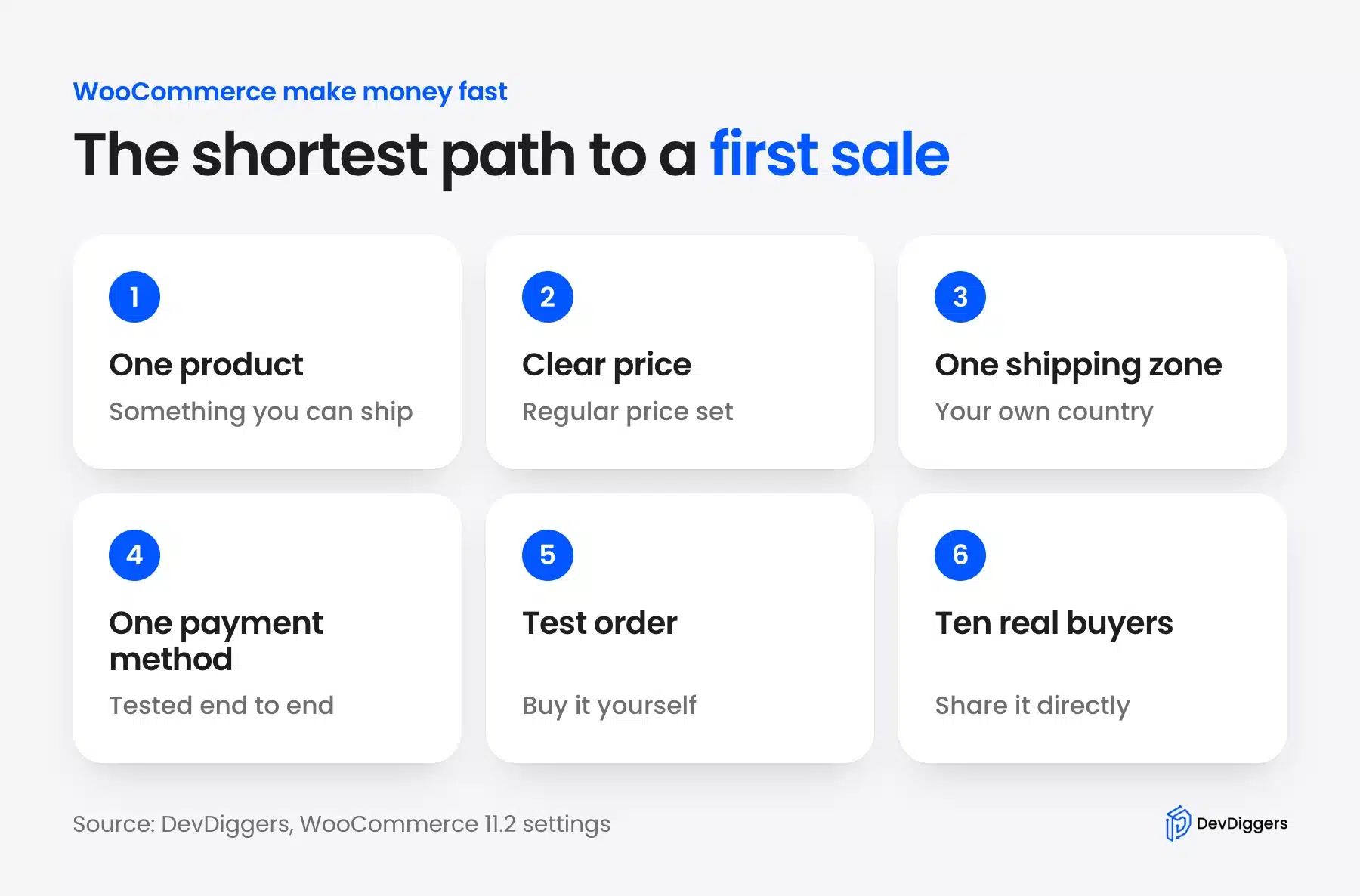
- Add one product: Pick something you can deliver this week, physical or digital.
- Set a clear price: Fill in the Regular price, and leave the sale price empty for now.
- Add one shipping zone: Cover your own country first, or skip shipping for a download.
- Connect one payment method: Use the Payments tab and test it end to end.
- Place a test order: Buy the product yourself and then refund it.
- Reach ten real buyers: Share the product with people who already know you, by email or message.
Traffic is the slow part. Search engines take months to rank a new store, which is why our WooCommerce SEO guide starts with product pages and categories.
Email is the fastest owned channel. Our list of email marketing plugins for WooCommerce covers tools to collect addresses from the first order on.
What It Costs to Run a WooCommerce Store
A WooCommerce store costs hosting, a domain and payment fees at minimum because the plugin itself is free. Extensions, a premium theme and paid support come on top. Most of the cost is yearly. Plan it against your margin before the first order.
These are the usual cost lines:
- Hosting: The biggest fixed cost. A store needs more memory and a better cache than a blog.
- Domain and SSL: A yearly domain fee. Most hosts include the SSL certificate.
- Payment fees: A share of every sale, such as 2.90% plus $0.30 per US card payment on WooPayments.
- Extensions: Yearly licenses for features core lacks, such as subscriptions or loyalty points.
- Your time: Product photos, support emails and order handling.
Payment fees deserve the most attention, because they grow with sales. On a $40 order, 2.90% plus $0.30 comes to $1.46, which is 3.65% of the order.
Extensions should earn back their price. A $49 yearly plugin that adds one $50 order a month pays for itself many times over, while one nobody uses is pure cost.
Review the list once a year. Cancel any license you no longer use, and check whether a single plugin now covers what two used to.
eCommerce Monetization Mistakes to Avoid
The most common eCommerce monetization mistakes are pricing without counting fees, adding too many extensions at once, and chasing traffic before the store converts. Each one costs money quietly. A short monthly check of margins and plugin use catches most of them.
- Pricing before costs: A price that ignores shipping and payment fees can lose money on every order. Work out the margin first.
- Too many add-ons: Ten extensions slow the store and blur which one works. Add one and measure it. Then decide.
- Traffic before trust: Ads to a store with no reviews, no returns page and no contact details waste money.
- Hidden costs at checkout: Shipping that appears only at the last step makes buyers leave. Show it on the product page.
- No repeat plan: A store that never emails past buyers pays to win every sale again.
- No returns policy: Buyers hesitate when they cannot see how returns work. A clear policy page often lifts sales more than a discount does.
Most of these show up in the numbers within a month. Compare orders, average order value and refunds each month, and the weak spot usually stands out.
If you want help building any of these features, our WooCommerce development services cover custom stores and extensions. For a broader view, our guide on how to make money with WordPress covers models beyond a shop.
Conclusion
To monetize WooCommerce, pick what you sell first. Then add the features that raise each order. Physical goods, downloads, subscriptions and affiliate products decide your income. Upsells, coupons and shipping rules lift it.
The plugin is free. Your real costs are hosting, payment fees and the extensions you choose. Check that each extension earns back its yearly price.
Start small. One product, one shipping zone and one tested payment method get you a first sale, and repeat buyers turn it into a business.
Frequently Asked Questions (FAQs)
Q1. Is WooCommerce free to use?
Yes, the core plugin is free and open source. You pay for hosting, a domain, payment fees and any paid extensions or themes you add.
Q2. Can WooCommerce sell subscriptions without a plugin?
No. WooCommerce 11.2 has simple, grouped, external and variable products, but no subscription type. You need an extension such as WooCommerce Subscriptions for repeat billing.
Q3. How much does WooPayments charge per sale?
For a US store, WooPayments charges 2.90% plus $0.30 per card payment, plus 1.50% for international cards, as of October 2026. Check the fee schedule for your country, because rates differ.
Q4. Can I sell digital and physical products in one store?
Yes. Tick Virtual and Downloadable on the digital items only. WooCommerce then skips shipping for those products while charging it on the physical ones in the same cart.
Q5. What is the easiest way to raise average order value?
Free shipping above a set order total is the simplest, because it needs only a shipping method with a minimum amount. Upsells and cross-sells on your best sellers come next.
Q6. Do I need a business license to sell with WooCommerce?
That depends on your country and what you sell. WooCommerce has no rule of its own. Check local rules for business registration and sales tax before you take your first payment.
Q7. Can affiliate products in WooCommerce make real money?
They can add income, but the seller sets the commission and can change it. Use them alongside your own products, and never as the whole store.