WooCommerce has no hard limit on how many products you can add, but that answer only gets you halfway there. The real question is how many products your setup can handle before performance starts to suffer.
Most guides stop at “unlimited products” and call it done. That’s not the whole story. The actual limit isn’t set by WooCommerce. It’s set by your database row count, your hosting tier, and whether you’re selling variable products.
This guide covers what drives WooCommerce performance at scale. You’ll see where slowdowns happen in the real world and what to fix before your customers start noticing.
Does WooCommerce Have a Product Limit?
WooCommerce has no hard-coded product limit. There is no setting, no cap, no number baked into the code that stops you from adding more products. WooCommerce has confirmed stores that list over 100,000 products and handle thousands of transactions per minute. So if someone tells you WooCommerce tops out at a specific number, that’s not accurate.
That said, “no limit” does not mean “no consequences.” WooCommerce stores products as custom post types inside WordPress’s database. Every product you add creates rows across multiple tables, particularly wp_posts and wp_postmeta. The more rows, the heavier the queries. The heavier the queries, the slower the responses.
The product count itself is not the metric to watch. The metric that matters is what’s happening inside your database.
Worth knowing before you go further: just getting started? Our guide on how to set up WooCommerce on WordPress covers the basics before scale becomes a concern.
What Actually Limits WooCommerce Performance
Four things control how many products WooCommerce can handle well. The product count is downstream of all of them.
- Your hosting tier: Shared hosting splits server resources across dozens of sites. Large catalogs put real pressure on shared servers. You get slow queries, tight memory limits, and frequent timeouts. Managed WooCommerce hosting from Kinsta or WP Engine gives you dedicated resources and server-level caching instead.
- Your database row count: This is separate from your product count, and it’s the one most store owners underestimate. A single product does not create a single database row. It creates dozens. More on this in the next section.
- Your plugin stack: Plugins that run unindexed database queries on every page load compound the problem at scale. On a store with 50,000 products, one poorly written plugin filter can add seconds to every admin search.
- Your product type: Simple products and variable products create completely different database loads. According to Akamai research, a 100ms delay in page load time can reduce conversions by up to 7%. Variable products often add far more than 100ms to page load when the catalog grows.
The Real Problem: Your Database, Not Your Product Count
This is the part most articles skip. And it’s where most scaling problems actually live.
WooCommerce stores product data across two core WordPress tables: wp_posts and wp_postmeta. The wp_posts table holds the product itself, title, content, and status. The wp_postmeta table stores everything else: price, sale price, stock status, SKU, weight, dimensions, shipping class, tax status, and every product attribute. Each of these is stored as its own row.
A single WooCommerce simple product can generate 30 to 100 rows in wp_postmeta. A variable product with 20 variations can generate 500 or more rows. According to a detailed performance analysis by Turbopress, a store with just 2,000 products can easily have 200,000 or more rows in wp_postmeta. That table was originally designed for blog post metadata. It was never built for this kind of load.
When WooCommerce displays a shop page with 24 products, it runs multiple queries wp_postmeta for every single product on screen. Price, sale price, stock status, thumbnail, and rating count are each a separate lookup. As the table grows, those lookups slow down.
Two features directly address this:
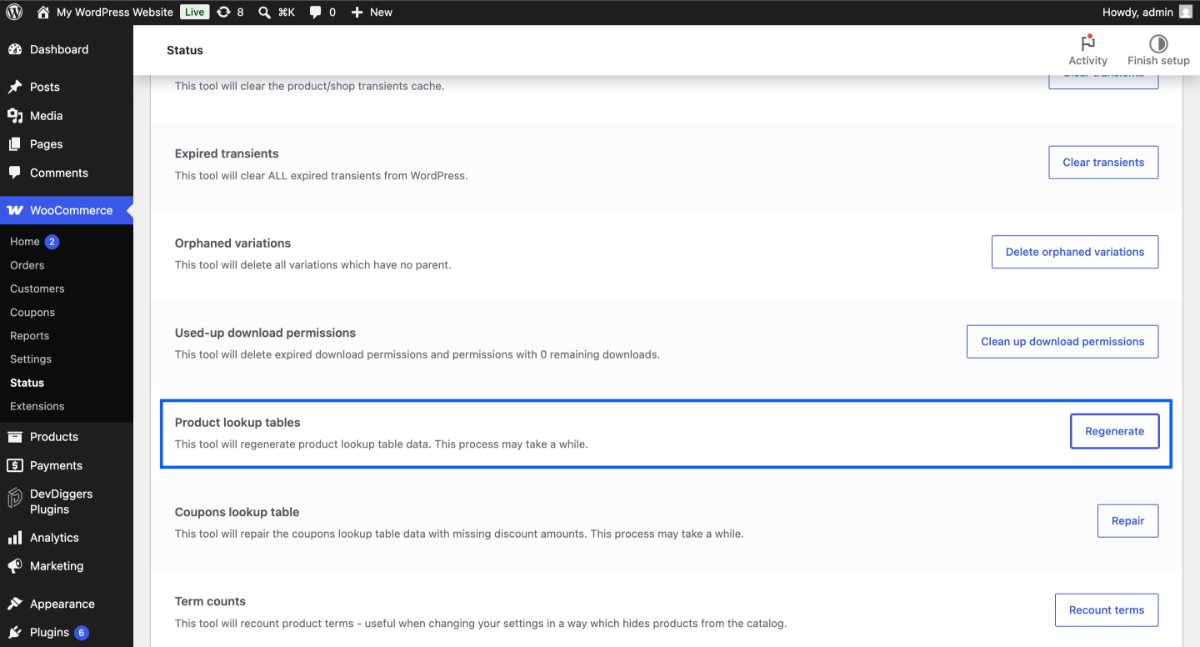
Product lookup tables came in with WooCommerce 3.6. They store frequently searched data, price ranges, stock, and ratings in dedicated tables built for filtering and sorting. Instead of a slow wp_postmeta query every time a customer filters by price, WooCommerce hits a properly indexed column. The speed difference is significant. Rebuild these tables anytime under WooCommerce > Status > Tools > “Regenerate product lookup tables.” On migrated stores, this step is often skipped, and it’s an easy win.
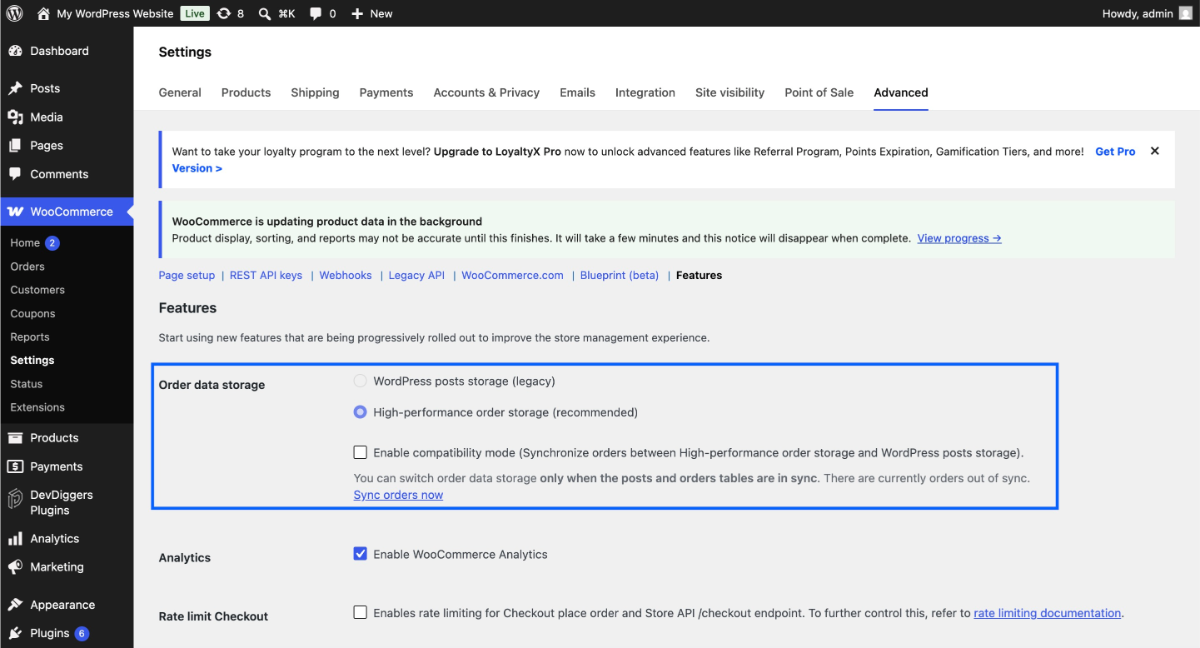
HPOS (High-Performance Order Storage) arrived in WooCommerce 6.9 and became the default from version 8.2 onward. It moves order data out of wp_postmeta into four dedicated tables. The WooCommerce developer blog reports around a 5x improvement in order creation speed. It also cuts order filtering time from 0.6 seconds to under 0.02 seconds on large stores. Running an existing store? Go to WooCommerce > Settings > Advanced > Features and confirm HPOS is active.
One more detail worth knowing: wp_postmeta has no index on meta_value by default. Every product search that filters by price, SKU, or stock status runs a full table scan. On a store with 500,000 or more rows in that table, a single search can take two seconds or longer. Adding a combined index (meta_key, meta_value(191)) can cut that to under 20ms.
This is not a change to make on a live store without testing on staging first, on very large tables; it ALTER TABLE locks the table while the index builds. But for stores hitting search slowdowns, it is one of the highest-impact fixes available.
Fellowship Agency’s database analysis found a WooCommerce store where wp_postmeta had grown to 6.5 million rows. Checkout queries were taking 30 seconds or more under load. The product count wasn’t the problem. The metadata density was.
How Many Products Can WooCommerce Handle at Each Scale?
Here is a practical breakdown based on real-world performance patterns. These are not guarantees; they depend on your product type, plugin stack, and server configuration. But they give you a usable reference point.
| Product Count | Expected Performance | Minimum Hosting Requirement |
|---|---|---|
| Under 1,000 | Smooth, no optimization needed | Shared or basic managed |
| 1,000 to 10,000 | Good with standard caching | Managed WooCommerce (Kinsta, WP Engine, SiteGround) |
| 10,000 to 50,000 | Needs database tuning and object caching | VPS or cloud hosting |
| 50,000 to 100,000 | Requires a full optimization stack | Dedicated server or cloud (AWS, GCP) |
| 100,000+ | Custom infrastructure required | Enterprise hosting or headless architecture |
A few notes. First, these numbers assume simple products. Variable products compress these ranges significantly. A store with 10,000 variable products may hit the performance characteristics of a 50,000 simple-product store.
Second, the admin dashboard usually degrades before the storefront does. Managing 10,000 or more products? Slow product searches and slow bulk edits will hit you long before customers notice anything. Admin queries rarely have the caching that protects customer-facing pages, so the backend feels the strain first. If your WooCommerce admin is slow, it is usually a database signal, not a theme problem.
Third, WooCommerce.com has cited stores with over 100,000 products. Some handle thousands of transactions per minute. That’s achievable. But those stores are not running on default configurations.
The Hidden Multiplier: Variable Products
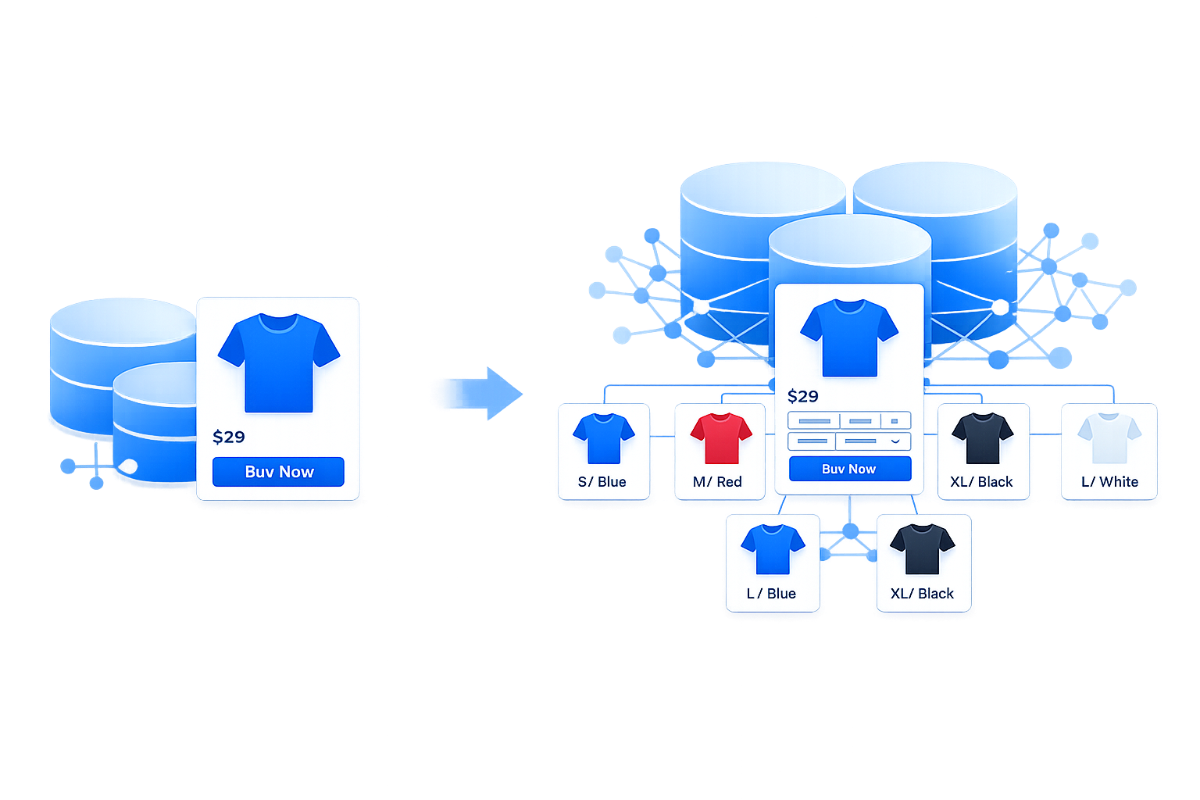
Here is something most scaling guides do not mention. Two stores can both say they have 5,000 products and be in completely different situations.
Store A has 5,000 simple products. Each one creates roughly 40 to 60 rows in wp_postmeta. Total: around 200,000 to 300,000 rows.
Store B has 5,000 variable products, each with 30 variations. Each variation is a separate post with wp_posts plus 20 to 30 metadata rows. Total: 150,000 additional posts and potentially 4 to 5 million rows in wp_postmeta. Same product count. Completely different database reality.
A t-shirt with 5 colors and 5 sizes creates 25 variations. A product with 3 attributes and 10 options each can produce up to 1,000 variations. That’s 20,000 to 30,000 database rows for a single product.
There is a core WooCommerce architecture issue worth understanding here. Even with AJAX variation loading on, WooCommerce still processes all variation data at the PHP level on every product page load. It needs this to render the attribute dropdowns and validate selections. A WordPress.org support thread showed a product with 186 variations loading in 5 seconds. A product with just 6 variations loaded in 0.8 seconds on identical hosting. The WooCommerce team confirmed that the core has no persistent caching layer for variation attributes.
This is something we see often in stores that come to us with performance complaints. The product count looks manageable at 3,000 products. But the wp_postmeta table has over 800,000 rows because each product carries 40 to 50 variation attributes. The fix is rarely more server power. It’s usually restructuring how variations are set up.
The Practical Fix: For product options that do not affect price or stock (gift wrap, engraving text, personalisation notes), use a product add-ons plugin instead of creating variations. Add-ons don’t create additional posts in the database; they’re handled at cart time. This keeps variation counts lower and wp_postmeta manageable.
How to Keep Performance Stable as Your Catalog Grows
These are the actions that move the needle. Not all of them apply at every scale, but they’re ordered by impact.
- Enable HPOS if you haven’t already: Enable HPOS if you haven’t yet. Go to WooCommerce > Settings > Advanced > Features and turn on “High-performance order storage.” For new installs on WooCommerce 8.2 or later, it’s on by default. For older stores, it is worth enabling — the performance gain on order-related queries is documented and meaningful.
- Regenerate product lookup tables: Go to WooCommerce > Status > Tools. Look for “Product Lookup Tables” and run the regeneration. Stores migrated from older WooCommerce versions often skip this step. It can cut category page query times significantly.
- Set up object caching with Redis or Memcached: Standard page caching speeds up front-end pages. Object caching goes further; it stores database query results in memory, so WooCommerce doesn’t re-run the same queries on every request. For large catalogs, Redis can cut wp_postmeta lookup times significantly on repeat queries.
- Use a CDN for product images: Product images load on every shop page, category page, and search result. A CDN like Cloudflare serves those images from servers close to your customers. This cuts load time without touching your database. This is also covered in our WooCommerce SEO guide as part of a broader performance strategy.
- Clean your database regularly: Unused postmeta rows from deleted products stay in wp_postmeta and slow down every query. Plugins like WP-Optimize or Advanced Database Cleaner remove this waste automatically. Also, check your WooCommerce security checklist. Some security steps, like limiting stored session data, give you a direct performance boost at scale.
For stores above 50,000 products, standard WooCommerce optimization starts to hit its limit. At this scale, a search solution like Algolia or Elasticsearch becomes necessary. Default WooCommerce search queries wp_postmeta directly. At 50,000+ products, that’s too slow for real-time filtering. Algolia indexes your catalog externally and returns results in milliseconds, no matter how large your catalog gets.
Approaching or exceeding 100,000 products and want to stay on WordPress? A headless WooCommerce setup separates the frontend from the WordPress rendering layer. Product pages get pre-rendered. Variation data loads on demand via the WooCommerce REST API. This cuts database pressure on page load significantly. It’s custom work, but for large catalogs, it removes the limit.
Hit a wall with your current setup? Our WooCommerce development services include performance checks and custom optimization for stores at scale.
Conclusion
WooCommerce can handle far more products than most store owners expect. But the product count isn’t the number to watch. The real indicators are your wp_postmeta row count, your variable product count, and whether your hosting and caching can handle your catalog’s database load.
Enable HPOS, regenerate your product lookup tables, and check your variation structure. Do this before assuming you need a platform change. Most performance problems in the 5,000 to 50,000 product range are fixable within WooCommerce. A catalog that size brings crawl budget and category page problems too, which is what our WooCommerce SEO services deal with.
For stores pushing above 100,000 products, custom architecture becomes part of the conversation. If you’re at that point and want a second opinion, we’re here to help.
Frequently Asked Questions (FAQs)
Q1. Does WooCommerce slow down with more products?
Yes, but not because of the product count directly. Performance drops when your database tables, mainly wp_postmeta, outgrow what your hosting can query quickly. A well-optimized store on managed hosting can handle 50,000 products without any noticeable slowdown. A poorly optimized store can struggle with 5,000. The configuration matters more than the count.
Q2. What is the difference between simple and variable products for performance?
A simple product creates roughly 30 to 100 database rows in wp_postmeta. A variable product with 30 variations can create 500 or more database rows. Each variation also gets its own post in wp_posts. A store with 1,000 variable products can carry a heavier database load than a store with 10,000 simple products. If your store depends heavily on variable products, your effective product capacity is lower than the raw numbers suggest.
Q3. Can WooCommerce handle 100,000 products?
Yes, but not on a standard setup. WooCommerce has no hard product limit, and WooCommerce.com has documented stores operating at this scale. To support that scale, you’ll need managed or cloud hosting with strong RAM, object caching, and a dedicated database server. Make sure HPOS is on and that your product lookup tables are regenerated. Search at this scale also needs an external solution like Algolia. It is achievable; it just requires real infrastructure investment.
Q4. Is Shopify better than WooCommerce for large product catalogs?
It depends on what you are optimizing for. Shopify Plus manages the infrastructure for you. That removes the performance tuning work, but it also removes your control over the stack. WooCommerce gives you full flexibility. You can build the exact architecture you need, including headless setups and custom database solutions. For stores that need deep customization at scale, WooCommerce on proper infrastructure usually comes out ahead. For stores that want managed simplicity, Shopify Plus is worth evaluating. Our breakdown of WooCommerce alternatives covers the comparison in more detail.
Q5. What is HPOS in WooCommerce, and does it help with scaling?
HPOS stands for High-Performance Order Storage. It moves order data out of wp_posts and wp_postmeta into four dedicated custom tables built for ecommerce queries. The WooCommerce developer team documented around a 5x improvement in order creation speed. Order filtering queries dropped from roughly 0.6 seconds to under 0.02 seconds on large stores. It has been enabled by default for new WooCommerce installs since version 8.2 (October 2023). Existing stores should check WooCommerce > Settings > Advanced > Features to confirm it is active.