Digital dropshipping is an eCommerce business model where you sell digital products you didn’t create, without holding any inventory or managing shipping. Someone buys from your store. They get an instant download. You keep the margin. No warehouse. No courier. No stock runs out.
That sounds simple enough. But most guides skip the parts that matter: how licensing actually works, what margins look like in practice, and why WooCommerce is one of the best platforms to run this model on.
This post covers all of it: what digital dropshipping is, how it differs from traditional dropshipping, what you can sell, how to protect yourself legally, and how to get a store running on WooCommerce.
What Is Digital Dropshipping?
Digital dropshipping is an eCommerce business model where you list and sell digital products created by someone else, then deliver them automatically to buyers without ever touching a file manually.
Here’s the 40-word version for anyone who wants the plain definition:
Digital dropshipping is the practice of selling digital products like ebooks, templates, courses, software, and stock photos that you license or source from a creator, then deliver instantly to customers through your online store. You handle marketing. The file handles itself.
Unlike physical dropshipping, nothing gets shipped. The customer pays, the download link hits their inbox, and the transaction is complete. You never need a supplier relationship in the traditional sense, and you never need to worry about a product going out of stock.
How Does Digital Dropshipping Work?
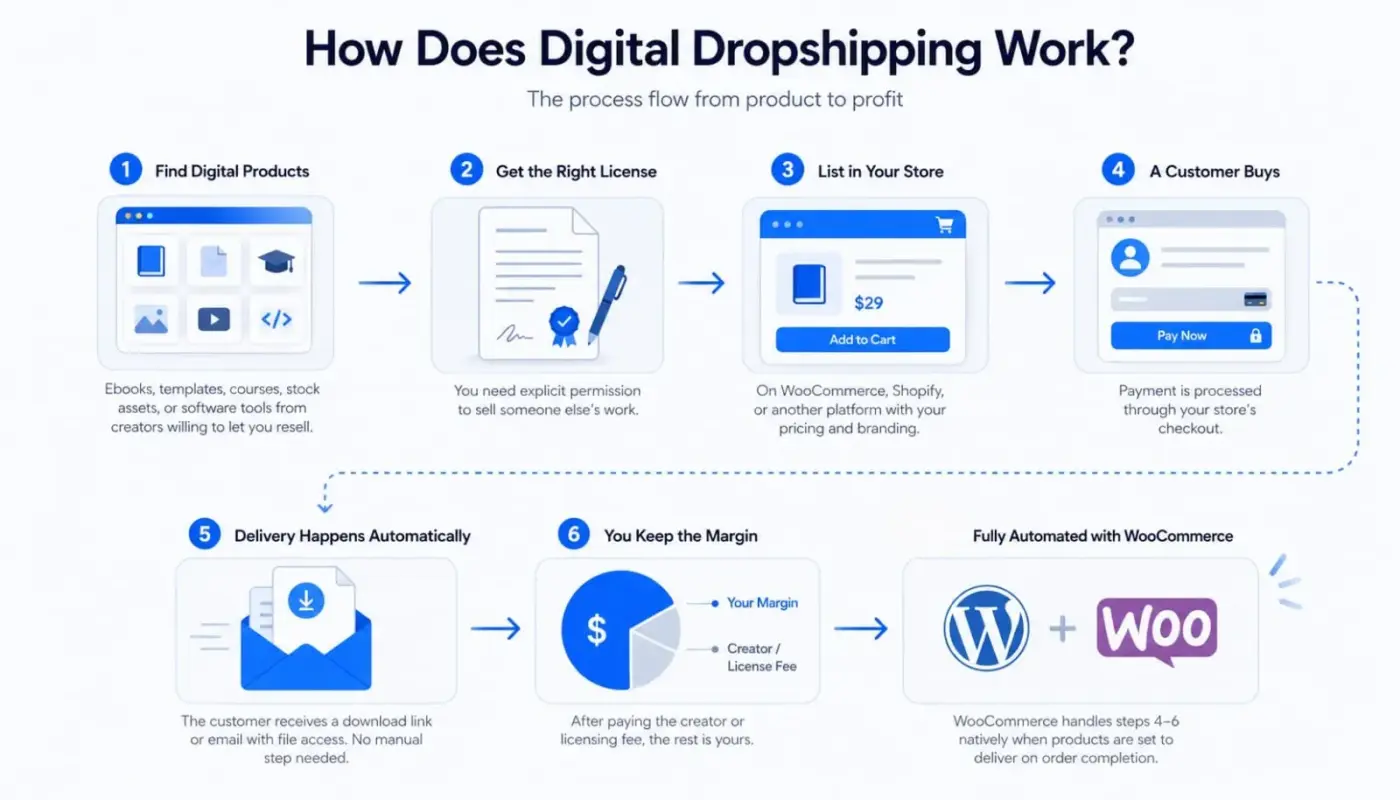
The process is straightforward once you understand the moving parts:
- Find digital products: Ebooks, templates, courses, stock assets, or software tools from creators willing to let you resell them.
- Get the right license: More on this below, but you need explicit permission to sell someone else’s work.
- List in your store: On WooCommerce, Shopify, or another platform, list products in your store with your pricing and branding.
- A customer buys: Payment is processed through your store’s checkout.
- Delivery happens automatically: The customer receives a download link or email with file access. No manual step needed.
- You keep the margin: After paying the creator or licensing fee, the rest is yours.
WooCommerce handles steps four through six natively. When you mark a product as downloadable and set it to deliver on order completion, the whole flow runs without you touching anything. That’s what makes this model appealing to store owners already on WordPress.
Digital Dropshipping vs. Traditional Dropshipping
Both models let you sell without holding stock. That’s where the similarities mostly end.
| Feature | Digital Dropshipping | Traditional Dropshipping |
|---|---|---|
| Product type | Intangible files (ebooks, templates, software) | Physical goods (clothing, electronics, homeware) |
| Delivery | Instant download or email | 3 to 30 days depending on supplier location |
| Gross profit margins | 40 to 80%+ | 3 to 30 days, depending on supplier location |
| Inventory risk | Zero: files don’t run out | Real risk of stockouts and overselling |
| Shipping costs | None | Major ongoing expense |
| Return complexity | Harder: customers can’t “return” a file | Easier with a supplier return process |
| Product range | Narrower categories | Much broader |
| Supplier dependency | Low after initial licensing | High: you rely on supplier quality and speed |
| Piracy risk | Real | None |
| Platform setup | WooCommerce downloadable products, EDD, Gumroad | WooCommerce or Shopify with dropship integrations |
The margin gap is significant. Traditional dropshipping margins sit around 15 to 25% net after advertising, according to analysis of 1,200+ stores by TrueProfit. Digital products can run at 40 to 80% margins because there’s no per-unit production cost after the license is secured.
Worth knowing: Digital dropshipping also avoids one of the biggest pain points in physical dropshipping. In a 2025 survey of over 3,100 store owners, 64% cited shipping delays as their biggest challenge, and 52% flagged thin margins as a major obstacle, per SellersCommerce data. Neither of those problems exists with digital products.
That doesn’t make it automatically better. The narrower product range, piracy risk, and refund complexity are genuine trade-offs. More on those below.
What Products Can You Sell with Digital Dropshipping?
The product range is narrower than physical dropshipping, but the categories that work tend to have consistent demand and healthy margins.
- Ebooks and guides are one of the most accessible starting points. The global ebook market is projected to generate $15.1 billion in revenue in 2026, and the licensing options are wide. PLR ebook libraries, author partnerships, and content licensing platforms all give you legal routes to sell without writing a word.
- Online courses and educational content are the biggest opportunity by volume. The global e-learning market is expected to reach $457.6 billion by 2026. Selling access to recorded courses through your WooCommerce store, using a virtual product type, puts you in this space without needing to build a course yourself.
- Templates are where many digital dropshippers find the best balance of demand and margin. Canva templates, Notion dashboards, resume kits, and social media content packs. These are created once and sold thousands of times. Customers want them now, use them quickly, and rarely request refunds.
- Stock photos and graphics suit niches where content creators are your buyers. Licensing collections from photographers or design asset libraries gives you a ready catalog.
- Software licenses carry some of the highest margins in this space, sometimes up to 75% gross, but sourcing legitimate reseller agreements with software developers takes more upfront work than other categories.
- Audio files and presets serve content creators, podcasters, and video editors. Lightroom presets, royalty-free music packs, and sound effect libraries are consistently searched for.
- Printable art and worksheets are a growing category. Customers download and print at home. Zero delivery friction. High perceived value relative to file size.
Here’s the honest note most guides skip: The most profitable digital dropshippers in 2026 are not selling broadly. They pick one niche, such as productivity templates for small business owners, and build a small catalog of genuinely useful products. Depth in one niche outperforms breadth across five.
The Part Nobody Tells You: Licensing and Legality
This is the section most digital dropshipping guides write in one sentence. That sentence is usually something like “make sure you have permission.” That’s not enough.
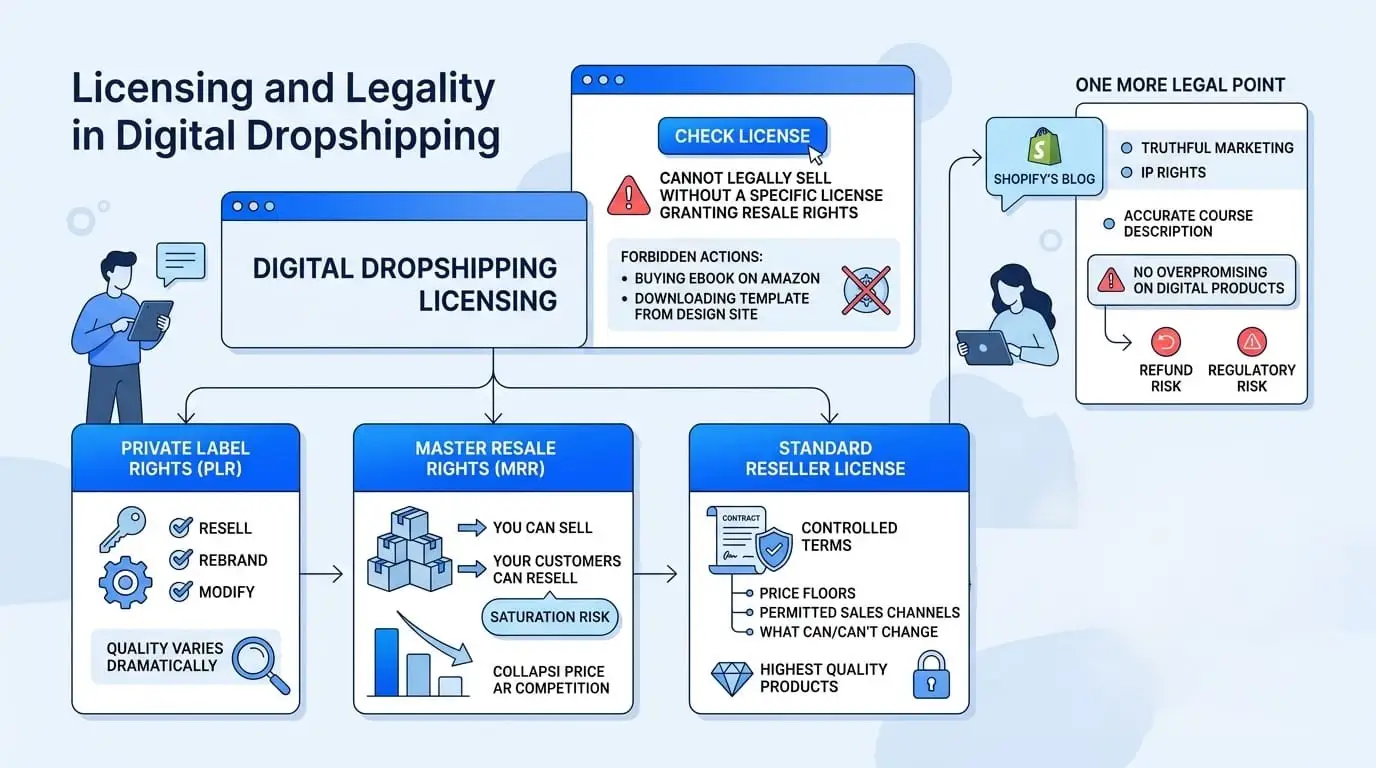
You cannot legally sell someone else’s digital product without a specific license granting you resale rights. Buying an ebook on Amazon does not give you the right to sell it. Downloading a template from a design site does not mean you can list it in your store. Selling a file without the right license is copyright infringement, even if you’re using a legitimate dropshipping model.
There are three license types you’ll encounter:
- Private Label Rights (PLR): The broadest license. With PLR, you can resell the product, often rebrand it, and sometimes modify it. PLR product libraries are widely available for ebooks, courses, and templates. Quality varies dramatically, so evaluate products before listing them.
- Master Resale Rights (MRR): You can sell the product, and your customers can also resell it. This creates saturation risk. If everyone who buys your product can also sell it, price competition tends to collapse quickly.
- Standard Reseller License: The most controlled type. The original creator sets specific terms: price floors, permitted sales channels, and what you can and can’t change. These are often the best-quality products because creators are protecting their work carefully.
This is something we see often in support conversations around digital eCommerce stores: a store owner assumes that because they bought a product legitimately, they can resell it. They can’t. Always check the license before listing.
One more legal point: Shopify’s blog on digital dropshipping correctly notes that intellectual property rights and truthful marketing determine legality. If you’re selling a course, your marketing has to accurately describe what’s in it. Overpromising on digital products creates both refund risk and regulatory risk.
Why Digital Dropshipping Attracts Entrepreneurs (And Where It Falls Short)
The benefits are real. So are the limitations. Here’s both, without the sales pitch.
What Works Well
No inventory and no shipping costs mean your overhead is mostly a domain, hosting, and whatever platform or tools you use. The global dropshipping market hit $290.7 billion in 2025 and is projected to reach $1.84 trillion by 2035. The digital segment captures the highest-margin slice of that growth.
Instant delivery removes one of the biggest friction points in eCommerce. No “where is my order?” emails. No lost packages. No customs delays. Customers get what they paid for in seconds.
The model is genuinely scalable. Adding a new product to a WooCommerce digital store takes minutes. There’s no minimum order quantity, no supplier negotiation, and no warehouse cost.
You can also run this business from anywhere. All you need is a store, a payment processor, and your licensing agreements in place.
Where It Falls Short
Niche saturation is real. Popular template and ebook categories are crowded. If you list the same PLR ebook pack that 200 other stores are selling, you’re competing purely on price. The only stores doing well in competitive categories are the ones that either add genuine value like curating, rebranding, improving the product, or go narrow into an underserved niche.
Piracy is a genuine cost. Digital files can be shared, which means some percentage of buyers will share your product without buying again. Using WooCommerce’s Force Downloads setting reduces this risk by serving files via PHP rather than exposing the raw URL, but it doesn’t eliminate it.
Refund policy is harder than it sounds. Once a customer has downloaded a file, there’s no way to “take it back.” You’ll need a clear policy on whether you offer refunds for digital products, and you’ll need to be consistent about enforcing it. Chargebacks happen.
Finally, passive income is the goal, but it’s not the starting point. Building a store, sourcing licensed products, writing product pages, and driving traffic all take real time upfront. The “passive” part comes after that groundwork is in place.
How to Start Digital Dropshipping on WooCommerce
WooCommerce is a strong choice for digital dropshipping because it handles downloadable products natively, charges no per-transaction fees beyond your payment gateway, and gives you full control over how files are delivered and protected.
Most guides on digital dropshipping recommend Shopify or Gumroad. But if you’re already on WordPress, or if you want to sell digital products alongside physical ones in the same store, WooCommerce makes more sense. The setup is less than an hour if you know where to look.
Setting Up Downloadable Products in WooCommerce
- Go to Products → Add New Product in your WordPress dashboard.

- Give the product a name and description.

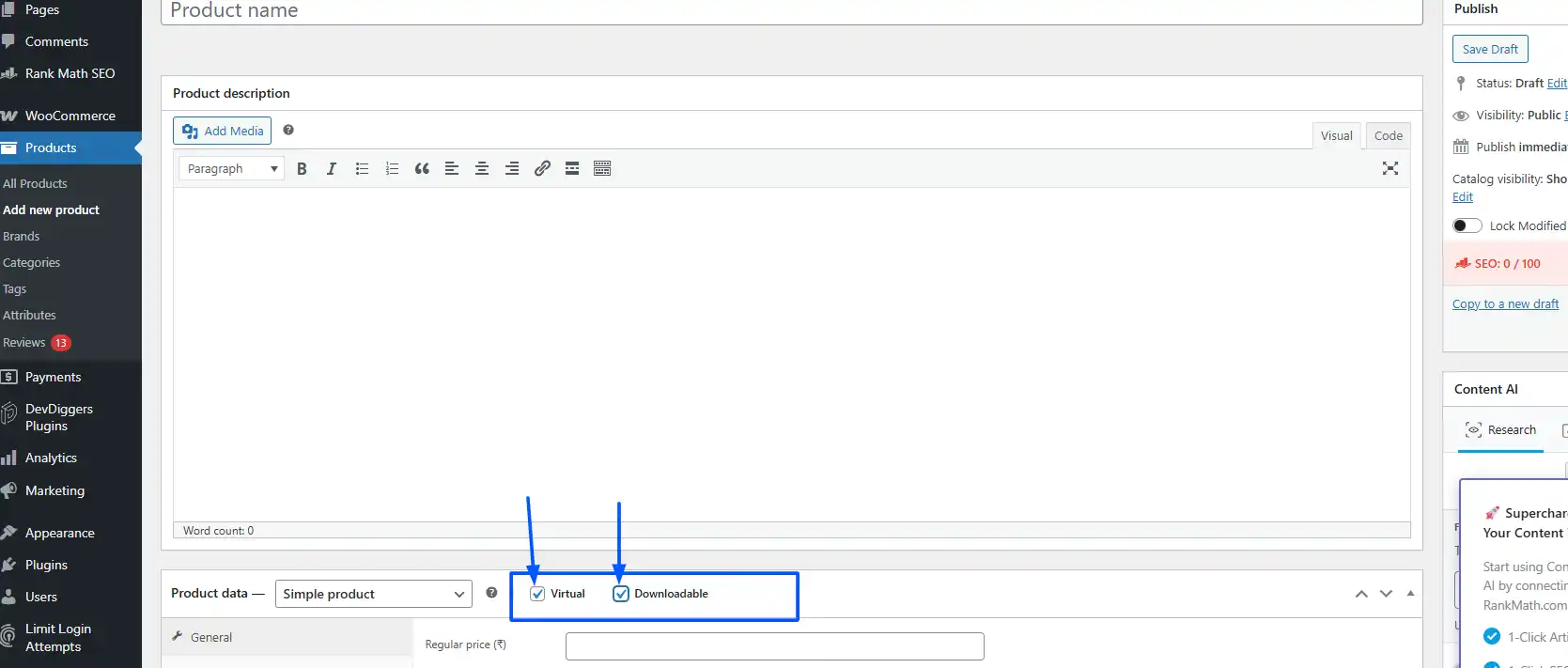
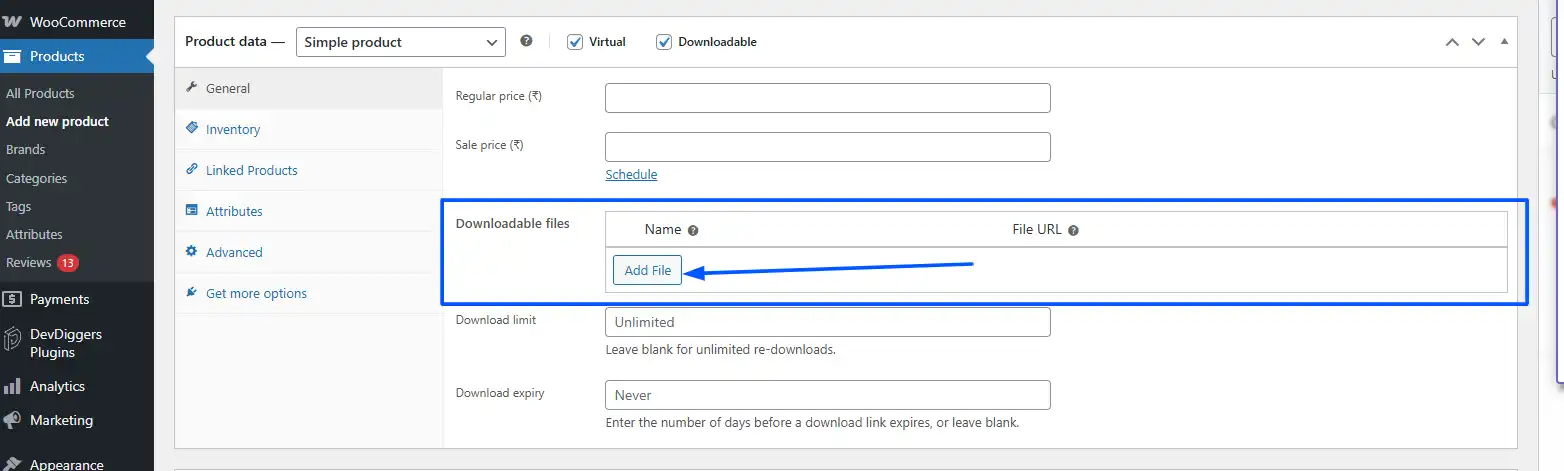
- In the Product Data section, check both Virtual and Downloadable. This removes shipping fields from checkout (customers don’t need to enter a shipping address) and enables the file upload section.
- Under the General tab, set your price. Under the Downloadable Files section, click on Add File.
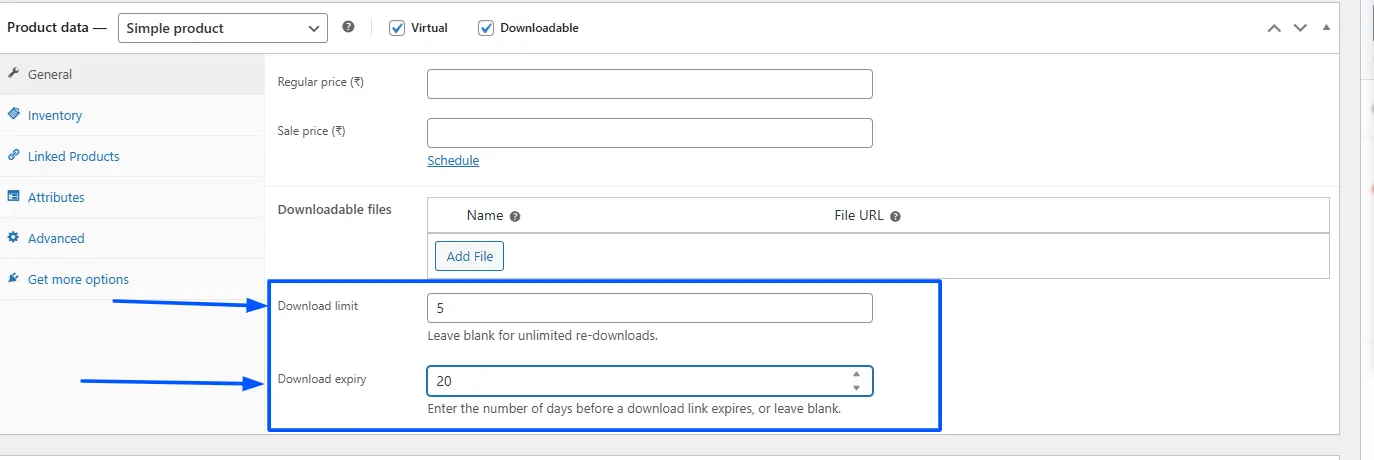
- Set Download Limit if you want to restrict how many times the file can be accessed per order. Set Download Expiry to limit access to a specific number of days after purchase. Both are optional, but useful for protecting content.
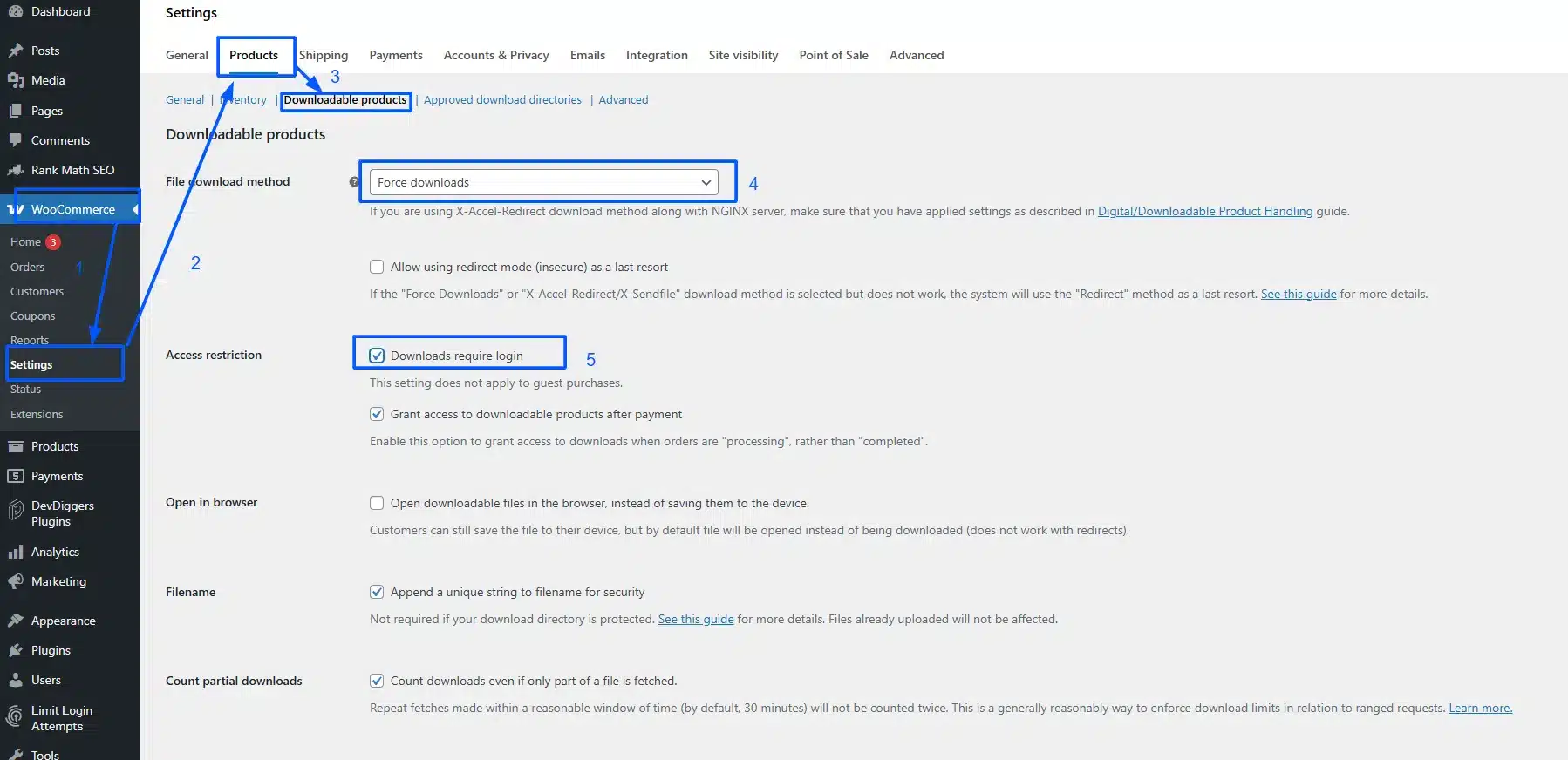
- Then go to WooCommerce → Settings → Products → Downloadable Products and set the File Download Method to Force Downloads. This is the setting most new stores miss. Without it, WooCommerce may serve files via a redirect, which can expose the raw file URL. Force Downloads serves the file through PHP, keeping the actual URL hidden from the browser. Also, check Downloads require login under Access Restrictions if you want only registered users to access files.
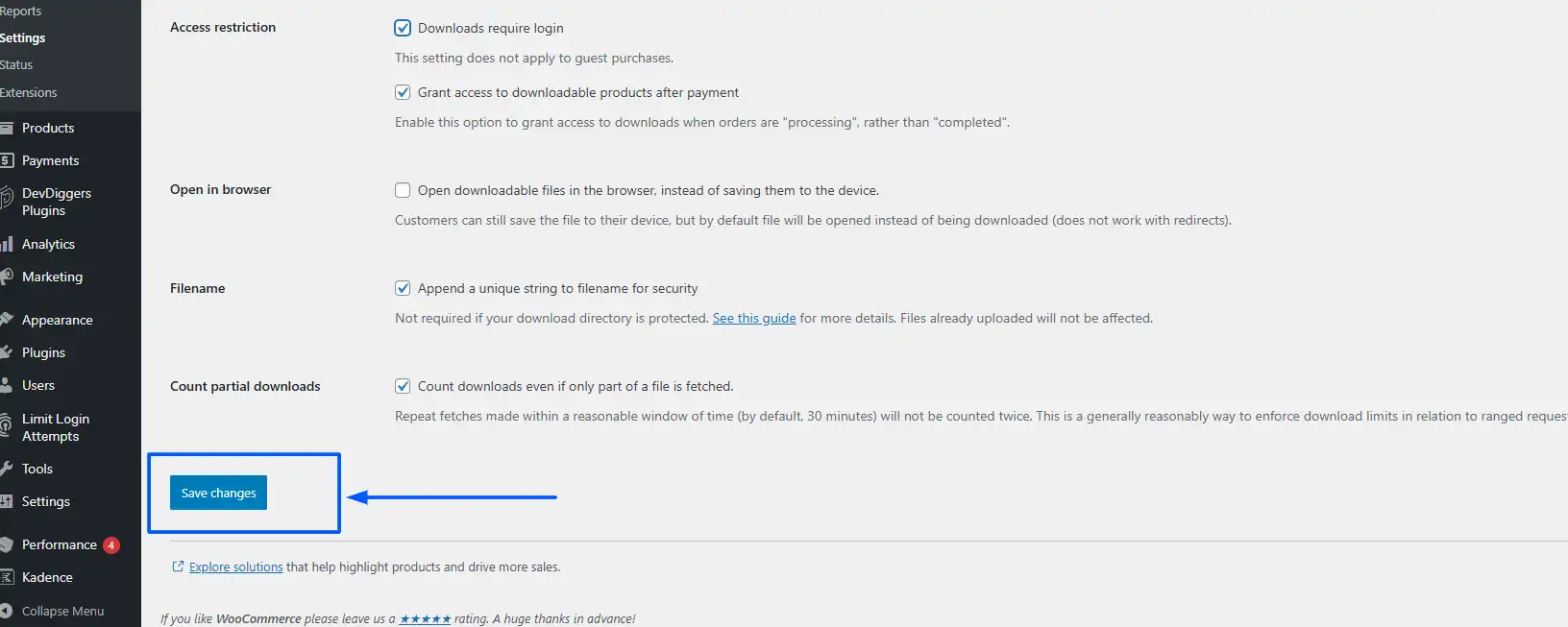
- Click on Save Changes to save your settings.
Delivering Digital Products Automatically
Once the above is set up, WooCommerce handles delivery on its own. When an order moves to “processing” or “completed” (depending on your settings), the customer receives an email with their unique download link. The link is tied to their order and expires according to the rules you set.
For larger catalogs or more complex delivery rules like multiple file versions, license keys per purchase, subscription-based access, Easy Digital Downloads is a WordPress plugin built specifically for this. It’s worth considering if digital products become a significant part of your store’s revenue.
If you’re just getting started with WooCommerce, our guide on how to set up WooCommerce on WordPress walks through the full store setup before you get to product configuration.
You can also combine digital and physical products in the same WooCommerce store. A customer can buy a physical product and a digital download in a single cart. WooCommerce handles both product types without any conflict. This is worth knowing if you’re an existing store owner looking to add a passive income stream alongside your current catalog, and it’s one of the reasons WooCommerce has an edge over standalone digital product platforms.
Is Digital Dropshipping Worth It?
For most eCommerce beginners, yes, with realistic expectations. The low startup cost, instant delivery, and margin advantage over physical dropshipping make it a legitimate model. The global digital goods market is on track to exceed $416 billion by 2030, which means demand isn’t shrinking.
But it’s not a shortcut. The people making consistent money from digital dropshipping share a few traits: they chose a specific niche with real buyer demand, they sourced products with proper licensing, and they invested time in building a store and driving traffic before expecting returns.
If you’re already running a WooCommerce store and want to add a low-maintenance revenue stream, digital products are a natural fit. You don’t need a second platform, a second store, or a second checkout flow. You add downloadable product listings alongside what you already sell.
If you’re starting from scratch, start narrow. One niche. Five to ten well-licensed products. A clear refund policy. And a real source of traffic, whether that’s SEO, email, or social. Without traffic, no model works.
For more on building an income stream based on WooCommerce, our post on how to make money with WordPress covers several models that work alongside digital dropshipping.
Conclusion
Digital dropshipping is a practical eCommerce business model for anyone who wants to sell online without managing inventory or shipping. The core idea is simple: you license or source digital products, list them in your store, and deliver them automatically when someone buys. WooCommerce handles that delivery flow natively, making it a good fit for store owners already on WordPress.
The key things to get right are licensing (know which rights you actually have before listing anything), niche selection (go specific rather than broad), and file protection (use Force Downloads in WooCommerce). Get those three right, and the model runs largely on its own.
FAQ
Q1. What is the difference between digital dropshipping and affiliate marketing?
In affiliate marketing, you send buyers to someone else’s store and earn a commission. In digital dropshipping, buyers check out on your store, and you control the transaction, pricing, and customer relationship. Affiliate marketing requires no store setup; digital dropshipping requires one but gives you more control over revenue.
Q2. Do I need a business license to start digital dropshipping?
That depends on your country and local regulations. Most places require you to register a business if you’re earning income. You also need to collect and remit applicable taxes on digital goods. This is separate from the product license you need from creators. Consult a local accountant or legal advisor for specifics.
Q3. What happens if a customer shares the digital file with others?
You can’t fully prevent this, but you can reduce it. WooCommerce’s Force Downloads setting hides the raw file URL. Setting download limits per order reduces sharing for multiple devices. Watermarking PDFs with a buyer’s email or order ID adds a disincentive for public sharing. None of these is perfect, but together they raise the cost of piracy enough to protect most of your revenue.
Q4. Is digital dropshipping the same as selling your own digital products?
No. When you sell your own digital products, you created them and own the rights. With digital dropshipping, you sell products someone else created under a license that grants you resale rights. The store setup is similar, but the source of the product and your rights over it are different. Most digital dropshippers start by sourcing licensed products and eventually create their own if a niche proves out.
Q5. Which types of digital products have the highest profit margins?
Software licenses tend to have the highest gross margins, sometimes 75% or more. Templates (Canva, Notion, website) and online courses also perform well because they have high perceived value relative to their file size. Ebooks in competitive niches tend to have lower margins because PLR content is widely available and price competition is higher.