You can reward customers for writing reviews in WooCommerce by setting up a points-based earning rule that automatically credits loyalty points the moment a customer submits a product review.
Having built LoyaltyX across dozens of store configurations, we’ve seen this single change produce a measurable jump in review volume within the first two weeks of going live. Most guides focus entirely on the “why” and gloss over the setup. This one won’t.
By the end, you’ll know exactly how to configure review rewards in WooCommerce, what reward types to use for your store, how to get customers to actually write reviews, and how to keep your program compliant and trustworthy.
Why Product Reviews Are Worth Rewarding
Before touching any settings, it helps to understand what you’re actually investing in.
Research from the Spiegel Research Centre found that purchase likelihood is 270% higher for products with five or more reviews compared to products with none. That’s not a marginal improvement. That’s the difference between a product that sells and one that sits.
The challenge is that most customers who have a positive experience don’t naturally go back to leave a review. They move on with their day. The ones who do write reviews without prompting are often motivated by frustration, not satisfaction. That’s why, without any incentive, most WooCommerce stores end up with an unrepresentative review set weighted toward negative feedback.
A small reward changes that dynamic completely.
Reviews also feed your WooCommerce SEO in a way that paid content can’t replicate. User-generated review text adds fresh, keyword-rich content to your product pages. Google reads it, indexes it, and treats it as a trust signal. More reviews mean longer page dwell times, too, as shoppers scroll through feedback before deciding.
If you’re looking at the best WooCommerce points and rewards plugins to handle this, LoyaltyX covers the review earning rule natively, alongside purchases, referrals, signups, and birthdays. You don’t need a separate plugin for each action.
What Types of Rewards Work Best for WooCommerce Reviews
Not every reward type suits every store. Here’s how to think through the options.
- Usually, the product that is going to cost you the least is a point system. You can reward customers with points for writing a product review. Your customers will accumulate points anytime they interact with you or purchase at your store. Points have the added benefit of not limiting your customers to a single way of redeeming their points. Some common options for your customers include discounts on future purchases, free shipping, and/or free products.
- Discount coupons provide an instant reward for a customer’s review, but do not create a repeat customer. Therefore, customers may leave a review and, as an example, receive a discount coupon two or more times, which ultimately may not encourage them to write reviews in the future.
- Free shipping is an enticing incentive to customers who experience high eco-friendly shipping costs. Knowing that a review will provide free shipping on their next order will, in turn, create an expectation in their minds for both the customer’s loyalty and purchasing behaviour to continue.
- Setting up free products will take some additional time, but it can be very effective for stores that sell consumable products or have a specific “entry product” that can be used to introduce customers into their assortment of products. LoyaltyX allows you to create redeemable rules to set up free product rewards in WooCommerce. This way, you can define exactly which product will be the free reward and at what threshold.
Most stores should consider using points as their initial loyalty program due to how inexpensive they are to use compared to other item types, they will encourage buyers to come back again, and they allow consumers to use their own judgment on how to spend them.
Stores with high average order values or a catalogue of physical products may find free shipping or free products more appealing in terms of returning customers.
How to Reward Customers for Writing Reviews in WooCommerce
Most reviews lack detail but do provide all the steps needed to set up LoyaltyX – Points and Rewards for WooCommerce. This step-by-step setup describes everything you should see on your LoyaltyX dashboard, including an overview of the names of every field you will encounter.
Step 1: Install and Activate LoyaltyX
To install LoyaltyX:
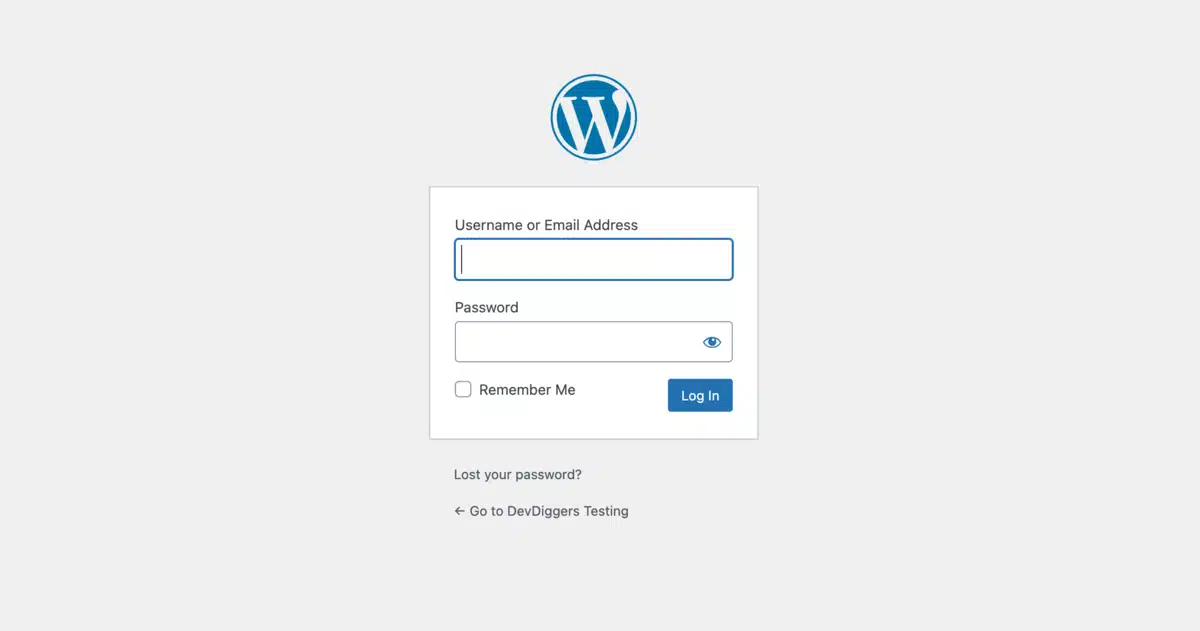
- Log in to your WordPress Dashboard
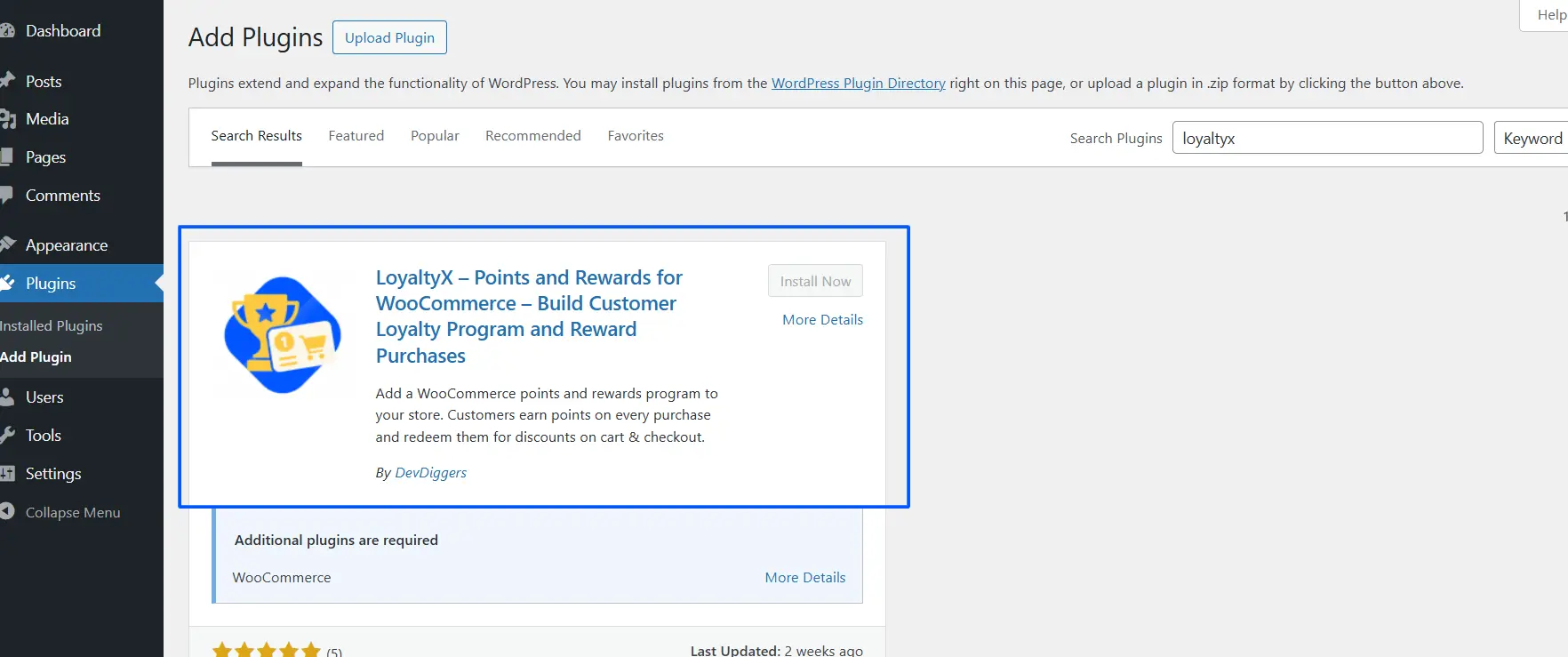
- Navigate to Plugins > Add Plugin

- Search LoyaltyX through the WordPress Plugin Directory or upload from the file you downloaded, either to try it out before purchasing or because you have purchased a pro version from the LoyaltyX website. Once you have found or uploaded your plugin successfully, click Activate, and your WordPress Sidebar will now contain a new menu item called LoyaltyX.
You can also download and install the free version from WordPress.org to work through before signing up for a paid plan.
Step 2: Create Review Earning Rules
- Under the LoyaltyX menu on your sidebar, click Points Earning Rules
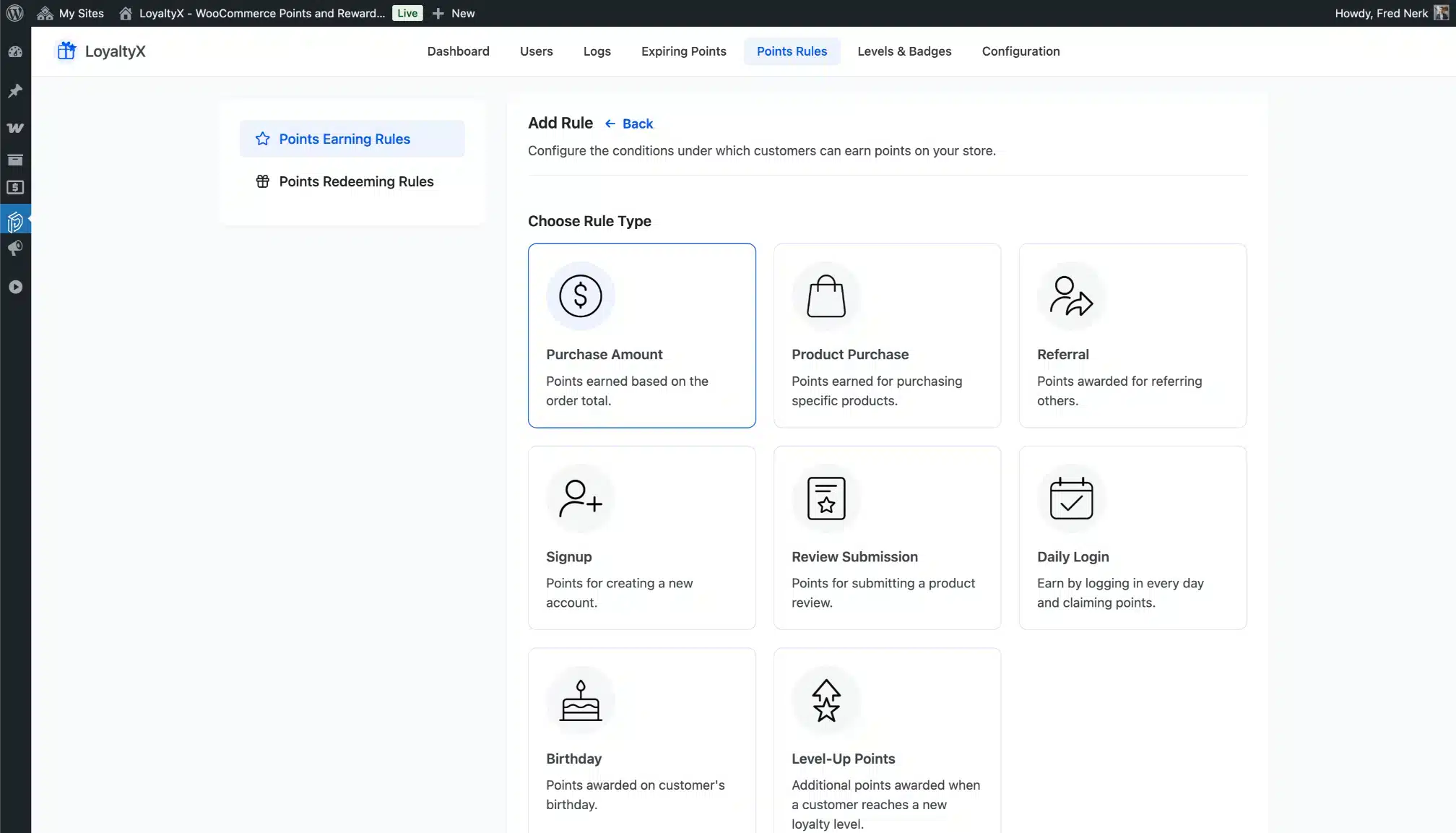
- Then click Add New
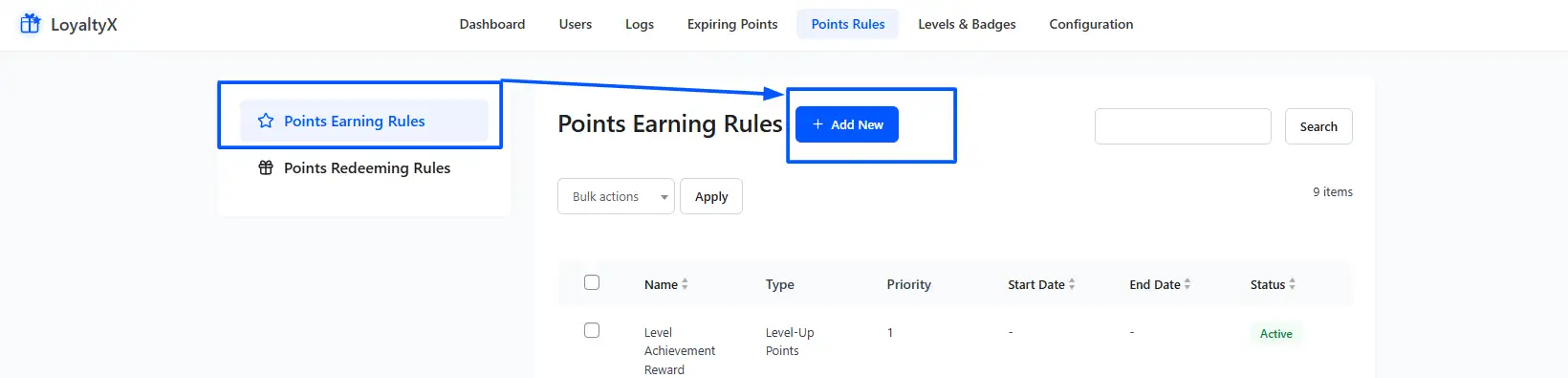
- You will be presented with a list of different types of rules that you can create. Select Review Submission.
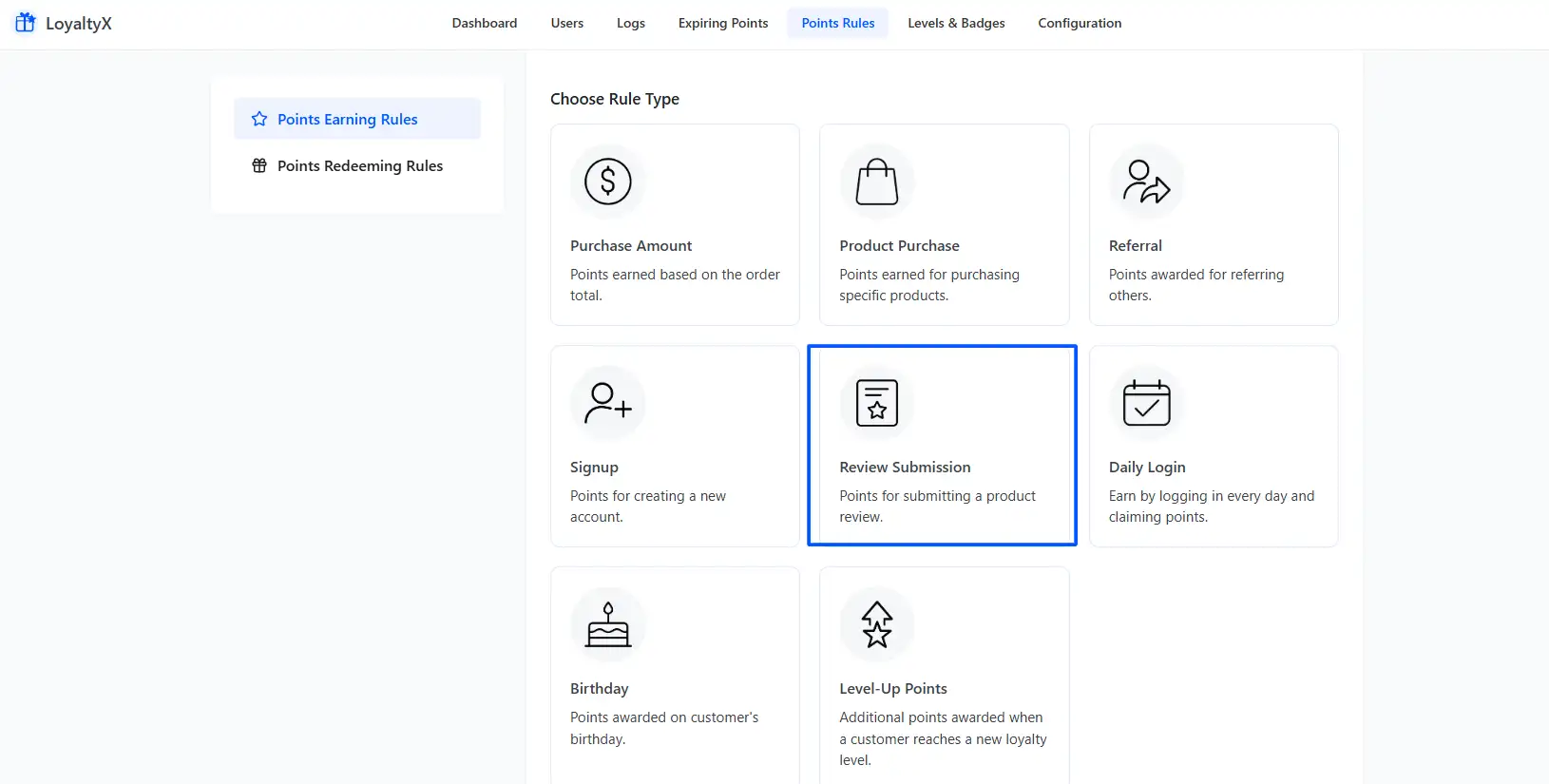
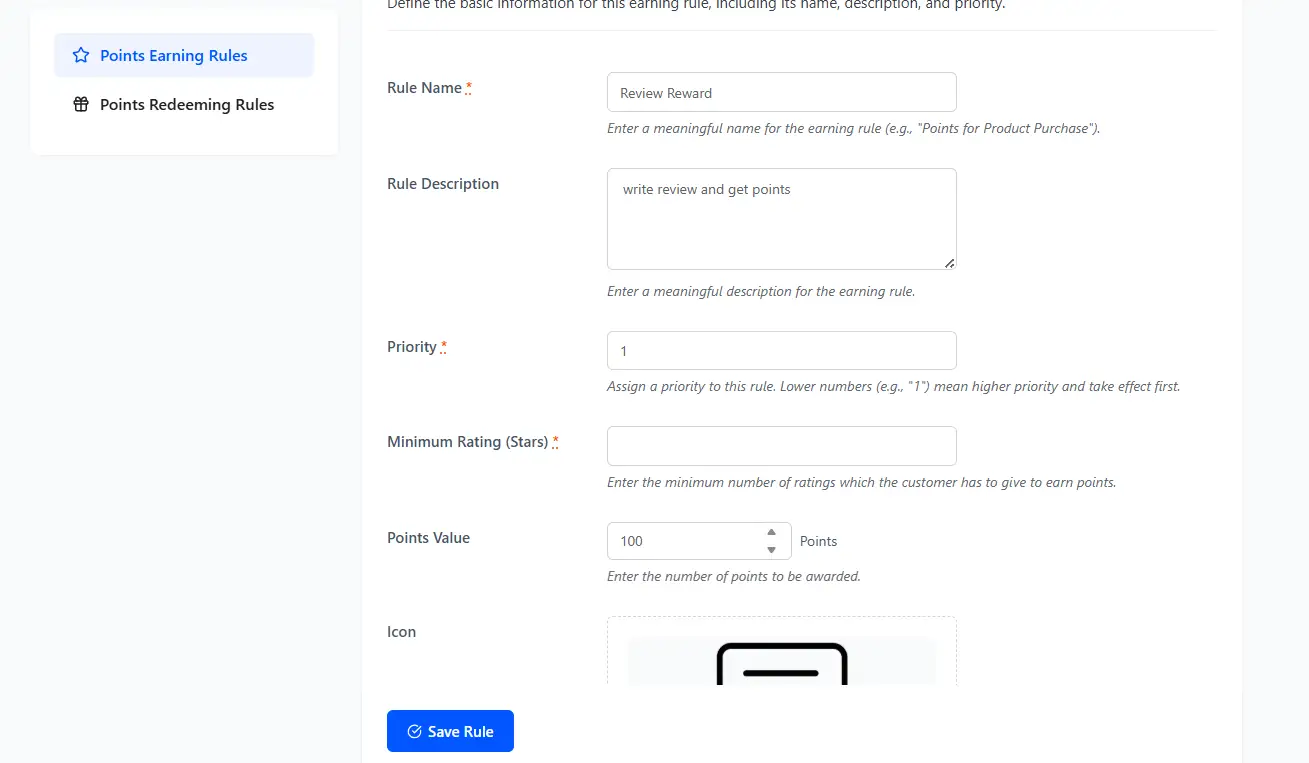
Once you select ‘Review Submission’, you will be taken to the Rule Setup screen. Give your rule a name(something like ‘Review Reward’ is fine). Next, set the Points to Award field. Average Store Point to Award when using LoyaltyX points will generally be between 50 and 200 points, depending on what the usual purchase earning rate is at your store.
In other words, you will want Review Points to seem like they were worth something, but without being too great as compared with what a customer will earn on an average order from your store.
Step 3: Configure the Reward Type and Point Value
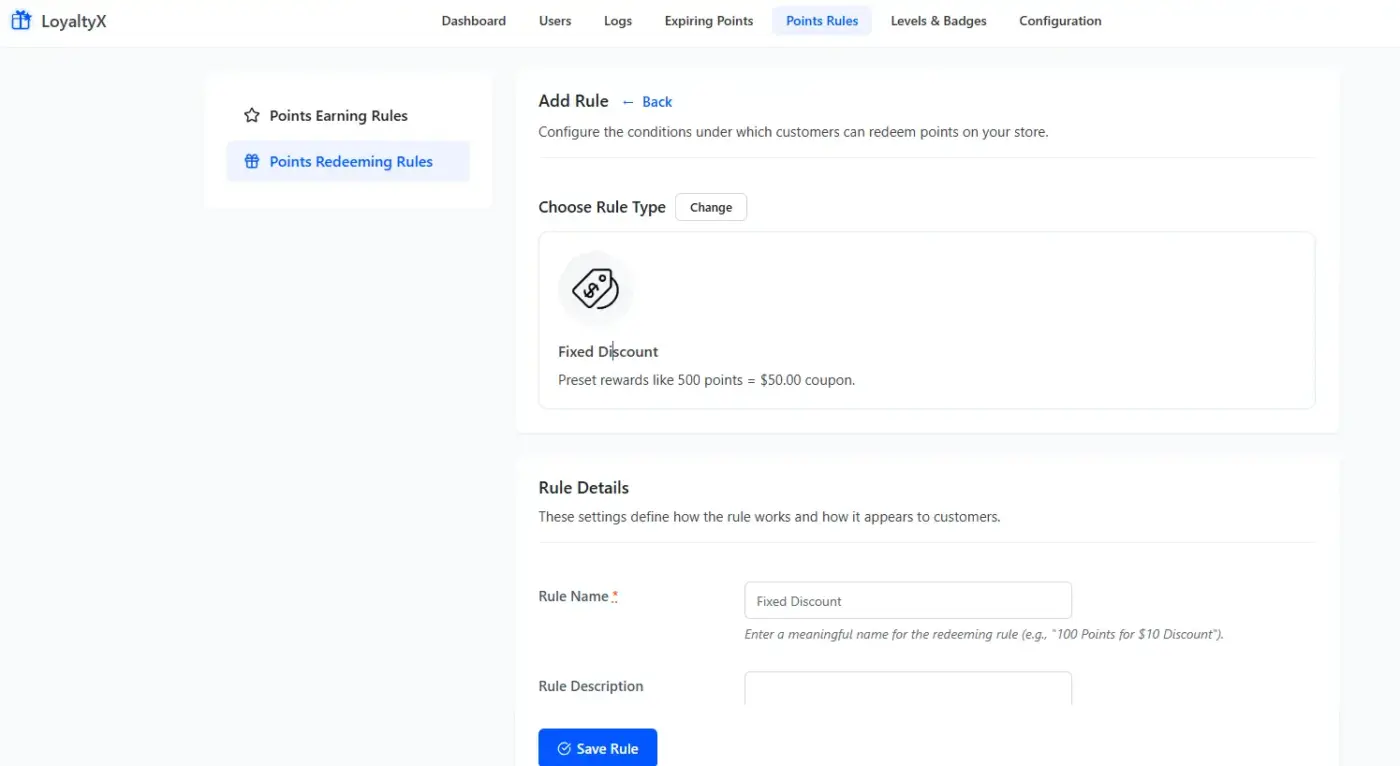
Now that you have saved your earning rule, you need to go to Points Redeeming Rules to see how your customers will be able to spend the points that they have earned. LoyaltyX gives you seven options for redeeming points: Fixed Discount, Percentage Discount, Free Shipping, Free Product, Buy X Get Y, Product Bundle and Auto Coupon Generation.
If you have already created your store’s redemption rules, you won’t need to change anything once your customer starts earning points through review earning rules, because they all add to the same points balance. That’s what a loyalty programme is about; every time your customer does something positive, it builds toward receiving the same reward.
If you have not created any redemption rules yet, a simple approach would be to create a fixed discount rule, such as “500 points = $5 off.” You will go to Points Redeeming Rules > Add Rule > Fixed Discount, and enter your point threshold. You will then be able to save your changes.
Step 4: What the Customer Sees After Submitting a Review
Your competitors will usually leave this information out of their content, so it can be very useful for setting customer expectations.
Once submitted, approved product reviews will automatically get customer points added to their LoyaltyX accounts, along with an email detailing a social media notification with the total number earned and total amount available. Customers also have access to their My Account page, which contains a LoyaltyX dashboard. Within that dashboard, they see their point balance, reward history, current loyalty, and all rewards available for redemption.
The point balance will be visible to the customer on their cart and checkout pages the next time they shop. Customers may redeem their points by selecting the desired reward from a reward selector pop-up, and the system automatically applies the coupon as soon as they select their reward. There is no manual administration required on your behalf for the entire review submission process through the redemption process.
How to Get More Customers to Actually Write Reviews
Setting up the earning rule is only half the job. Customers won’t find it by accident.
- Timing your post-purchase email correctly: It makes a bigger difference than any wording tweak. Most stores send review requests too early, before the customer has actually received and used the product. For physical goods, wait 7 to 14 days after the estimated delivery date. For digital products, 3 to 5 days post-purchase is usually enough time for the customer to engage with what they bought.
- Include the reward in the subject line: Not vaguely, and not buried at the bottom. Something like “Earn 100 loyalty points for reviewing your recent order” tells the customer exactly what’s in it for them before they even open the email. Subject lines that reference a specific reward consistently outperform generic “How was your order?” messages.
- Show Product Page/Display Opportunity to Earn A Review: LoyaltyX can show something like ‘Write a Review & Earn 100 Points’ on the product page just below the ‘Review’ section (this could also work as a pre-sale indicator). Reviews being rewarded as a customer looks at the product often lead them to feel that other actual customers have written a review about the product sold by that store, which adds some credibility prior to the sale.
- Ensure that Customers Can Access the Review Form: WooCommerce defaults to enabling product reviews, but some merchants mistakenly disable this feature (by going to WooCommerce > Settings > Products > Reviews). Examine the settings and verify that you allow Reviews by Logged-in Customers! LoyaltyX will award Points to the Recipient of the Review if the user performs the Review while logged in as a Registered User of the Merchant; therefore, include a reminder in your emails for Customers to log in when they write a Review.
Compliance and Authenticity: Keeping Your Review Programme Honest
This section gets skipped by almost every guide on this topic. That’s a problem, because doing this wrong can genuinely damage your store’s credibility.
When you offer rewards for reviews, you’re offering them for the act of reviewing, not for the content of the review. That distinction matters both ethically and practically. Customers who feel pressured to write positive reviews often write hollow, generic feedback that other shoppers can see through. Fake-sounding five-star reviews hurt conversions more than you’d expect.
A few practical rules to keep your programme trustworthy:
- Reward honest reviews, not just positive ones: Your earning rule configuration doesn’t need to discriminate by star rating. Let customers write three-star reviews, flag problems, and still earn their points. Stores that do this end up with a richer, more credible review set. Shoppers trust stores more when they see a realistic spread of ratings.
- The 4.0 to 4.7 star range is your sweet spot: The same Spiegel Research Centre research that found reviews dramatically increase purchase likelihood also found that products with a perfect 5.0 score actually convert less well than those rated between 4.0 and 4.7. A perfect score triggers scepticism. A realistic spread with a high average looks earned.
- Consider adding a note to your review request email: Something short like “We reward all honest reviews, regardless of star rating” reassures the customer that you’re not fishing for praise. It also tends to produce more thoughtful, detailed feedback, which is far more useful for your product development than a string of “great product!” one-liners.
Most WooCommerce store owners never think about this. Getting it right from the start means you build a review asset that keeps generating trust for years, not a collection of incentivised noise.
Connecting Reviews To A Loyalty Program
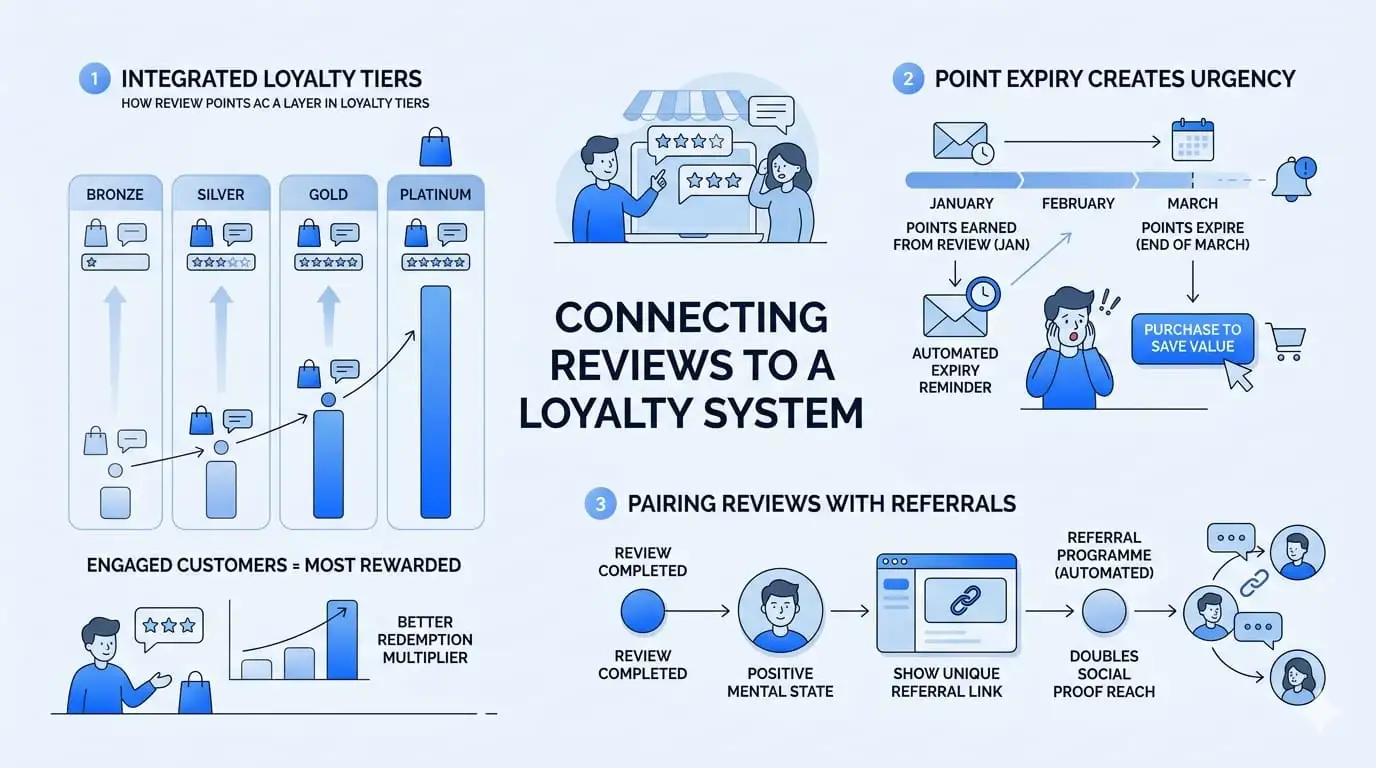
Rewarding customers for their reviews in isolation is one way to build loyalty; however, connecting reviews into a full loyalty system creates true stickiness with your customers.
- Review points act as a layer within the loyalty tiers you create: For example, LoyaltyX has a gamified system with a level (Bronze, Silver, Gold, Platinum) for each customer based on the amount of points the customer has accumulated. A customer who shops frequently and submits reviews will accumulate points at a faster pace than a customer who does not; therefore, a customer who shops frequently and submits reviews will level up much more quickly than a customer who shops less and/or submits fewer reviews. The higher-level tiers will also have better redemption multipliers, so that means that your most engaged customers, or those who buy and review your products, will also be your most rewarded.
- Setting an expiry on points creates urgency: LoyaltyX allows you to set an expiry on points, which means that as points get closer to expiring, the LoyaltyX plugin will automatically send a reminder email to your customer. A customer who receives a reminder that their points are about to expire often feels as if they need to purchase so that they do not lose the value of the points they have earned. The same concept applies to points earned from submitting a review; therefore, if a customer receives an email reminding them that points earned from writing a review in January are about to expire at the end of March, the customer is very likely to visit your store to spend those points before they are lost.
- Pairing reviews with referrals doubles your social proof reach: LoyaltyX includes an automated referral programme alongside the review-earning rule. A customer who has just written a review and earned points is in a positive mental state about your brand. That’s the ideal moment to show them their unique referral link in the dashboard. Some stores see their best referral activity come from customers who have just completed the review flow, because the act of writing a positive review primes them to recommend.
Conclusion
Rewarding customers for writing reviews in WooCommerce is one of the highest-return actions you can take for long-term store growth. Reviews drive conversions, feed SEO, and give you real product feedback. The LoyaltyX earning rule makes the setup genuinely simple, and when it’s connected to your broader loyalty programme, including tiers, point expiry, and referrals, the effect compounds over time.
The key takeaways: use points over fixed coupons where possible, time your review request email correctly, and reward honest reviews rather than chasing five-star ratings. Done well, your review programme becomes a self-reinforcing trust signal that keeps working long after you’ve moved on to other priorities.
If you haven’t set up review rewards on your store yet, our LoyaltyX – WooCommerce Points and Rewards plugin has a free version you can install and test in under ten minutes. Start there, see the customer experience yourself, and upgrade when you’re ready.
Frequently Asked Questions
Q1. Can WooCommerce give you rewards for leaving a product review without needing to use a rewards plugin?
Unfortunately, no. WooCommerce has a native rating system that allows your customers to rate your products in addition to leaving textual reviews. However, WooCommerce does not have any means of giving points, discounts, or any other reward for submitting a rating or textual review. To implement this functionality, you would need to use a points and rewards plugin like LoyaltyX. Using LoyaltyX is very easy to set up and requires no custom coding.
Q2. Will LoyaltyX give a customer review points multiple times if they leave multiple reviews for the same product?
LoyaltyX will only award review points once for the same product based on the customer’s first submission, regardless of whether or not the customer has previously reviewed that specific product. Therefore, the customer cannot manipulate the review process by deleting and resubmitting their review on the same product. The primary purpose of this policy is to prevent review manipulation and ensure fairness in the LoyaltyX customer rewards program.
Q3. Should I inform customers that there is a reward for leaving a review?
Yes. Transparency regarding your review incentive will build trust with your customer. Customers appreciate knowing “you will earn 100 points for a review” versus discovering their reward after writing a review. Additionally, it reduces the possibility that your review scores will be inflated via hidden review incentives.
Q4. What happens to a customer’s review points when they return a product?
Your store configuration will determine how customer review points are affected once an order has been refunded. By default, LoyaltyX has the option of deducting all points associated with an order from a customer’s account upon refund. Review points are earned by a customer for submitting their honest opinion and not for the purchase of an item. It is advisable to have a clearly defined policy related to this in your T&C’s and to communicate that policy to a customer to avoid confusion.
Q5. What amount of points should I give for a review?
There is no right or wrong amount that you can reward your customers with for submitting a review. One general rule of thumb is that the review rewards should match the value of a small purchase in your store. If a $10, which would be equal to 100 points, were earned by a customer would result in a review reward of between 50 and 100 points. If the total amount of points granted to a customer for submitting their review is too low, the incentive for writing the review may be lost, and if too many points are given, it may feel like you are trying to buy someone’s positive opinion rather than encouraging them to provide feedback.