
You can reward customers for writing reviews in WooCommerce with a points rule that pays every approved product review the same amount. The FTC rule on consumer reviews allows this, as long as the reward never depends on a positive rating.
We tested every step in this guide in October 2026 on a WordPress 7.1.3 store running WooCommerce 11.2 and LoyaltyX Pro 1.1.2. A test customer left a three star review and saw 50 points land in My Account after approval. We also checked what happens with one star, no stars, guest reviews and repeat reviews.
The first section covers what the FTC and Google allow, with the rule text quoted. Then come the six setup steps with screenshots, our test results and how to disclose the reward. The last sections cover a coupon option, how many points to give and when to ask.
Is It Legal to Reward Customers for Reviews?
Yes, rewarding product reviews is legal in the US when every reviewer gets the same reward whatever they write. The FTC rule on consumer reviews bans incentives tied to positive or negative sentiment. It took effect on October 21, 2024, and it applies to reviews on your own WooCommerce store.
The rule is 16 CFR Part 465, and section 465.4 is the part that matters for review rewards. The rule text on eCFR bans incentives “conditioned expressly or by implication on” reviews “expressing a particular sentiment.” A points rule that pays only for four or five stars is exactly that kind of incentive.
The FTC’s own Consumer Reviews and Testimonials Rule Q&A says incentives are fine “as long as there isn’t an express or implied requirement” about sentiment. The same page warns that “failing to disclose incentives could be a violation of the FTC Act.” So the reward has to be neutral, and shoppers have to be told about it.
The stakes are real for a small store. When the FTC announced the rule, it said the rule lets the agency “seek civil penalties against knowing violators” (FTC press release, August 14, 2024).
This guide is not legal advice. Check with a lawyer if your program works differently.
What the FTC Rule Bans
The table below sums up how common review reward setups sit against the rule and the FTC’s answers in its Q&A. Two setups are banned outright by section 465.4. Two more are not named in the rule but can still break the wider FTC Act.
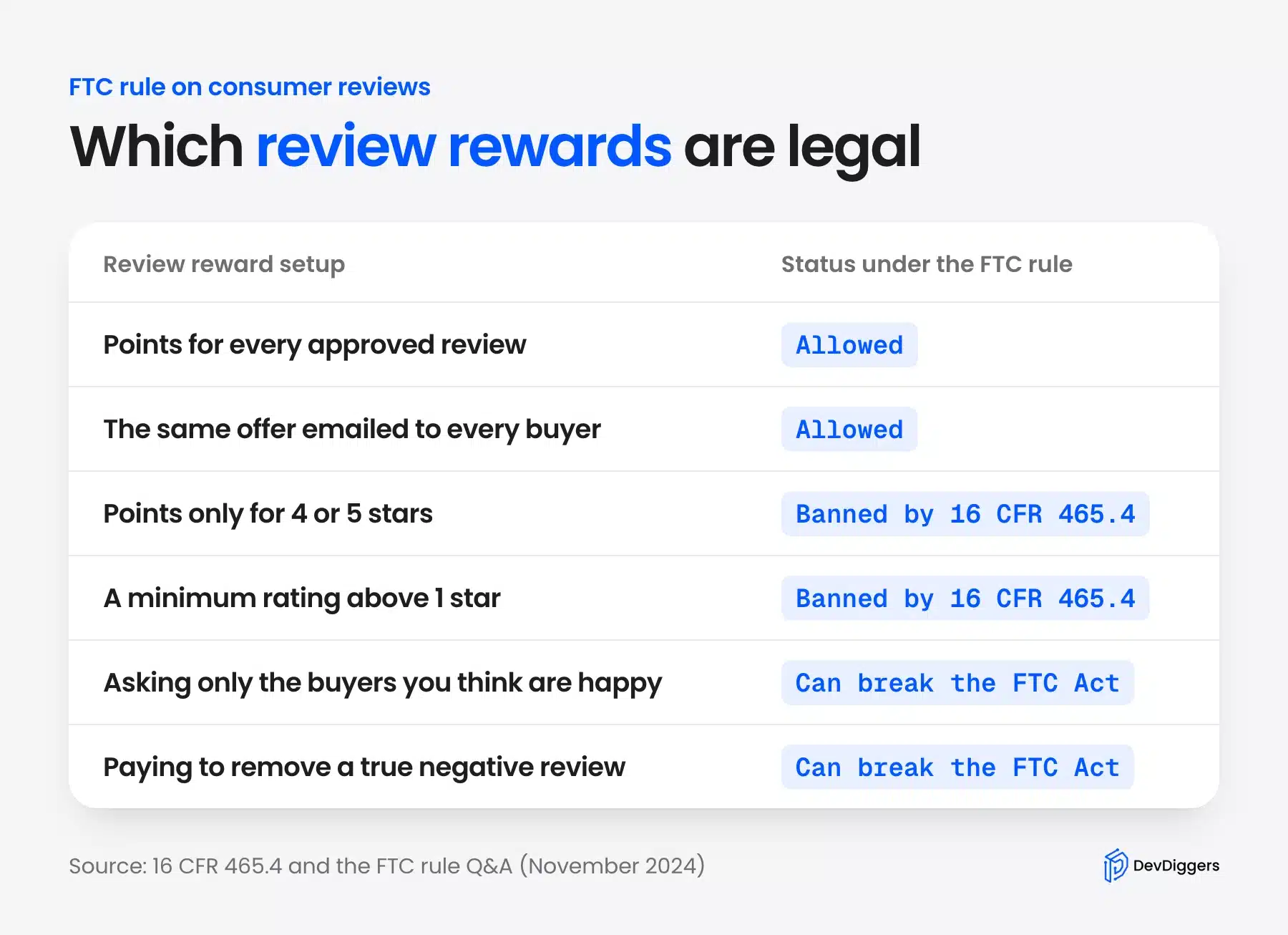
The quiet trap is the star filter. A store owner who rewards only four and five star reviews may think of it as a thank you for happy buyers. Under the rule it is a payment for positive sentiment, and that is the exact thing 465.4 bans.
Asking only the buyers you think are happy is the other trap. The FTC Q&A says the rule has no specific ban on it, but the practice “could violate the FTC Act.” Ask every buyer and the question goes away.
What Google Allows for Incentivized Reviews
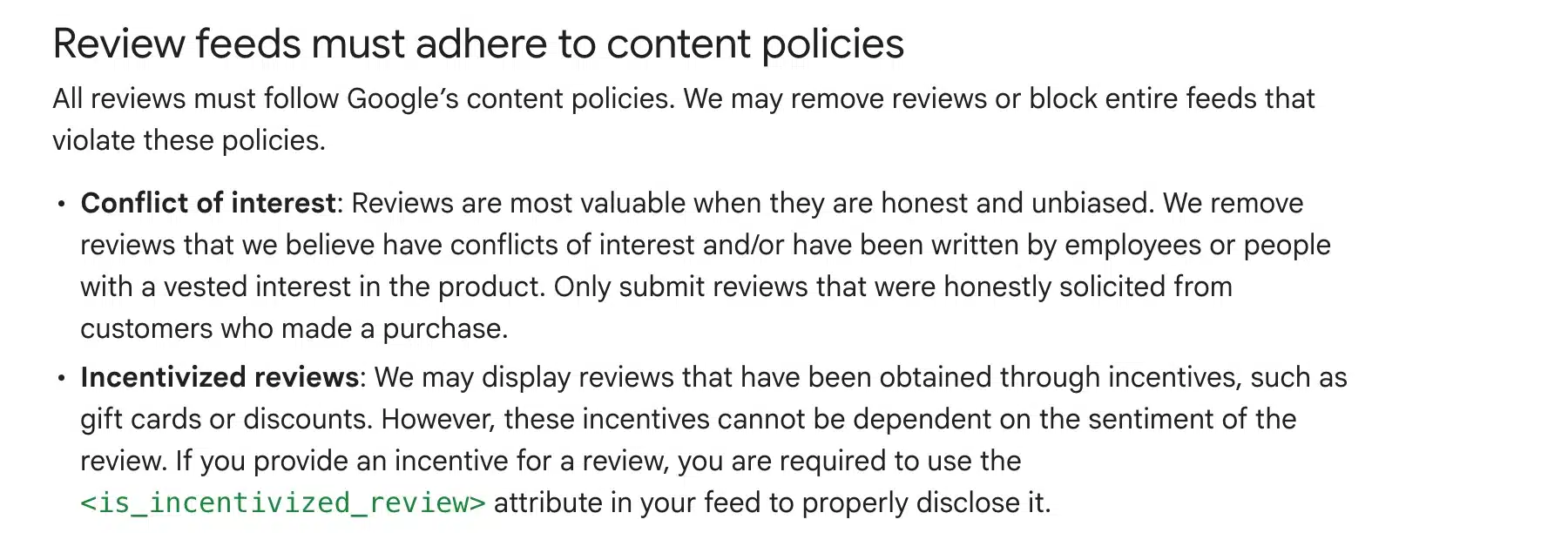
Google’s Product Ratings policies accept incentivized reviews in a product review feed, but “these incentives cannot be dependent on the sentiment of the review.” The same section asks you to flag them with the is_incentivized_review attribute. Store ratings follow a stricter rule than product ratings.
Google’s Merchant Review policies cover reviews of the store itself. They say merchants may not offer customers “financial incentives to write reviews of any kind.” So reward reviews of a product on your product page, and never reward a review of the store experience that you send to Google.
If you send product ratings to Google, our guide to a Google Shopping feed for WooCommerce covers the feed side. Mark every rewarded review in that feed before it goes out.
How to Reward Customers for Writing Reviews in WooCommerce
To reward customers for writing reviews in WooCommerce, allow reviews from verified owners only and create a points rule that pays every approved review. We build the LoyaltyX points and rewards plugin, and it is the method we show first. We tested every screen below on our WooCommerce 11.2 store.
Every WooCommerce reward for review needs two parts: a WooCommerce setting that limits who can review and a plugin that pays the reward. WooCommerce has no reward feature of its own. The six steps below cover both parts on a fresh store.
One limit to know up front: review points are a Pro feature, and LoyaltyX Pro starts at $139 a year as of October 2026. If you only want a one-off coupon per review, the coupon option further down costs nothing. Our roundup of WooCommerce points and rewards plugins compares other points tools too.
Step 1: Allow Reviews Only From Verified Owners
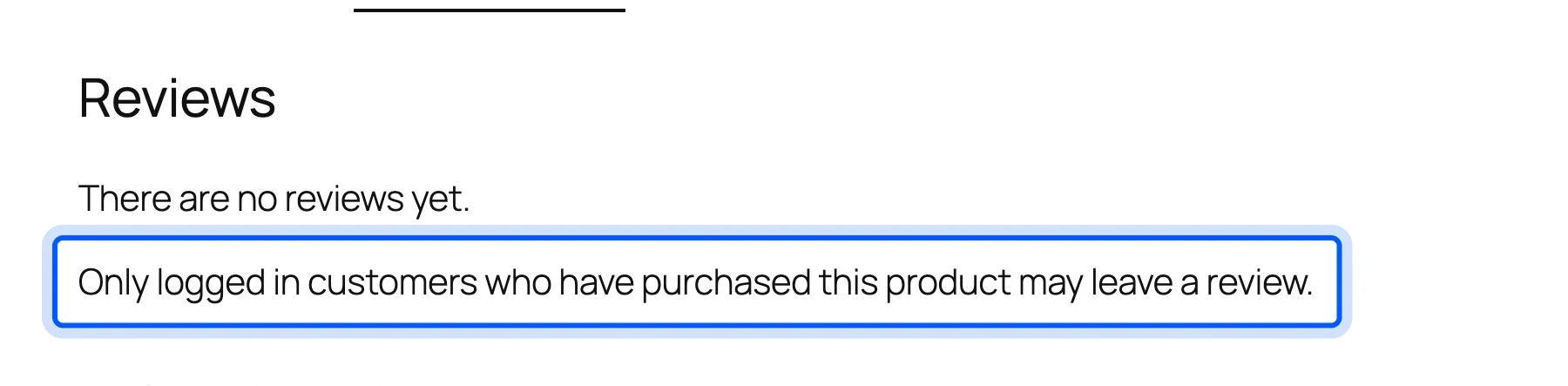
Go to WooCommerce > Settings > Products and scroll to the Reviews section. Tick “Reviews can only be left by verified owners”, which WooCommerce’s product reviews guide says “limits reviews to customers who purchased the product.” Tick the “Star ratings should be required” option in the Product ratings group as well.
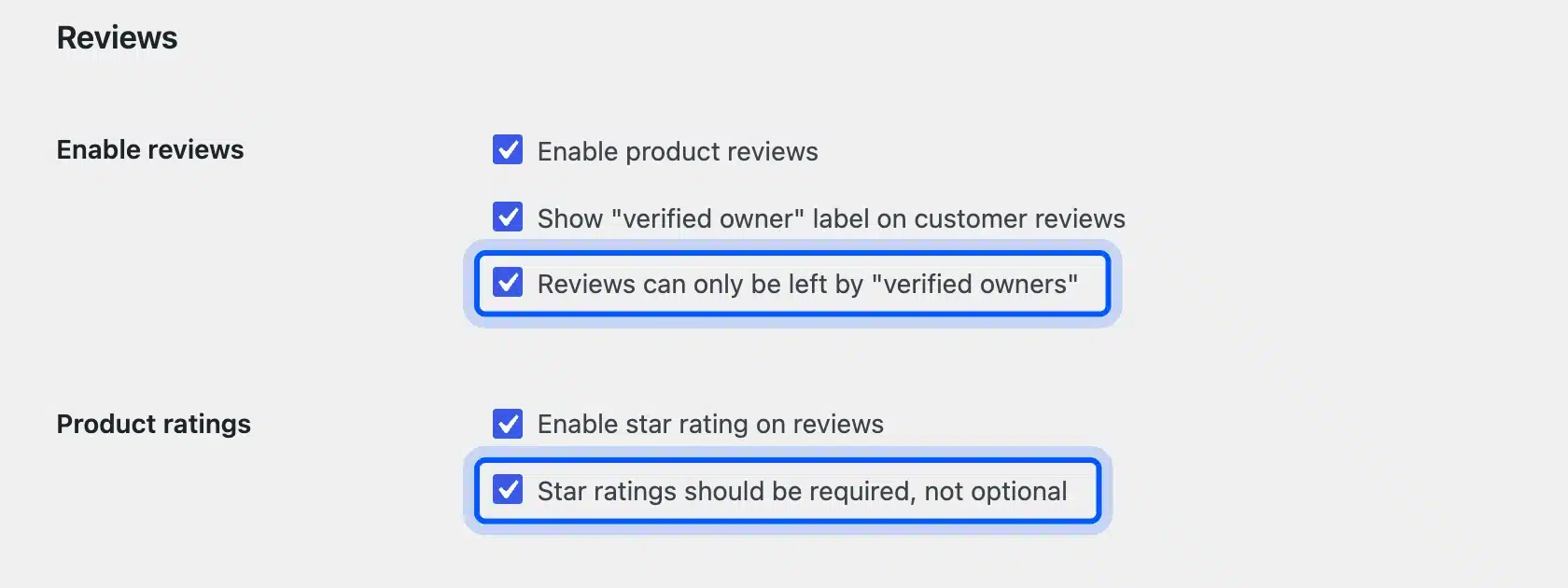
Both boxes protect the reward. The first stops people who never bought the product from farming points. The second matters because LoyaltyX pays nothing for a review without a star rating, which we confirmed in our test.
We logged in as a customer who had not bought the mug. The Reviews tab showed a notice and no form at all.
Step 2: Install LoyaltyX and Choose Review Submission
Install the free LoyaltyX plugin from WordPress.org first and then upload the Pro ZIP from Plugins > Add Plugin > Upload Plugin. The Pro build needs the free core active. Its setup wizard asks for a license key and sets your earning and redeeming rates.
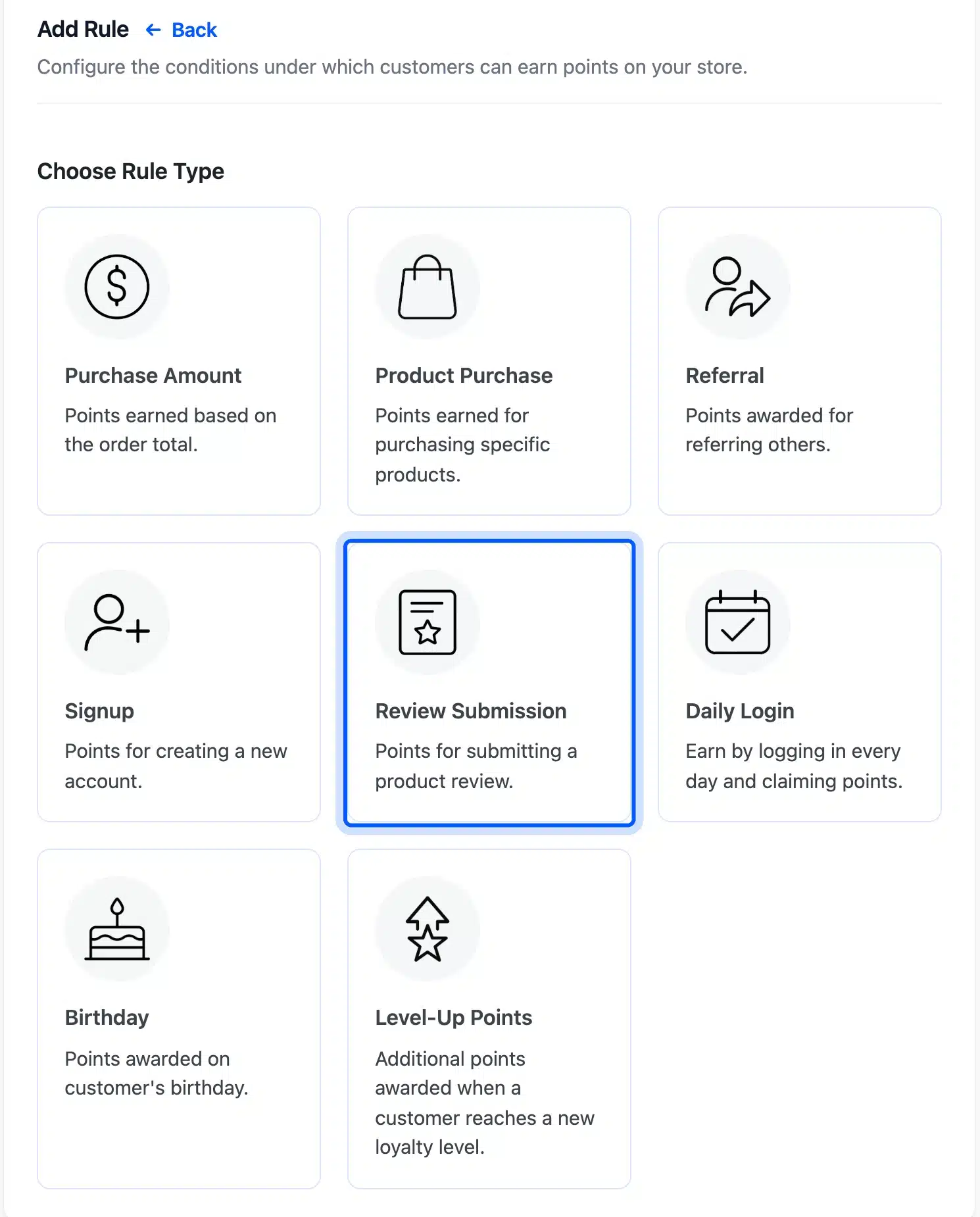
Then open LoyaltyX > Points Rules > Points Earning Rules and click Add New. The rule picker shows eight rule types. Pick Review Submission, the card labelled “Points for submitting a product review.”
For our test we set the store to earn 1 point per $1 spent. We set the redeem rate at 100 points for a $5 discount. Pick your own rates in the wizard, since they decide what a review point is worth.
Step 3: Set the Minimum Rating to 1 and the Points
Name the rule something clear, such as “Points for any product review”, and set Minimum Rating (Stars) to 1. Enter the reward in Points Value. We used 50 points and wrote “whatever the star rating” in the description so the rule explains itself to the next admin.
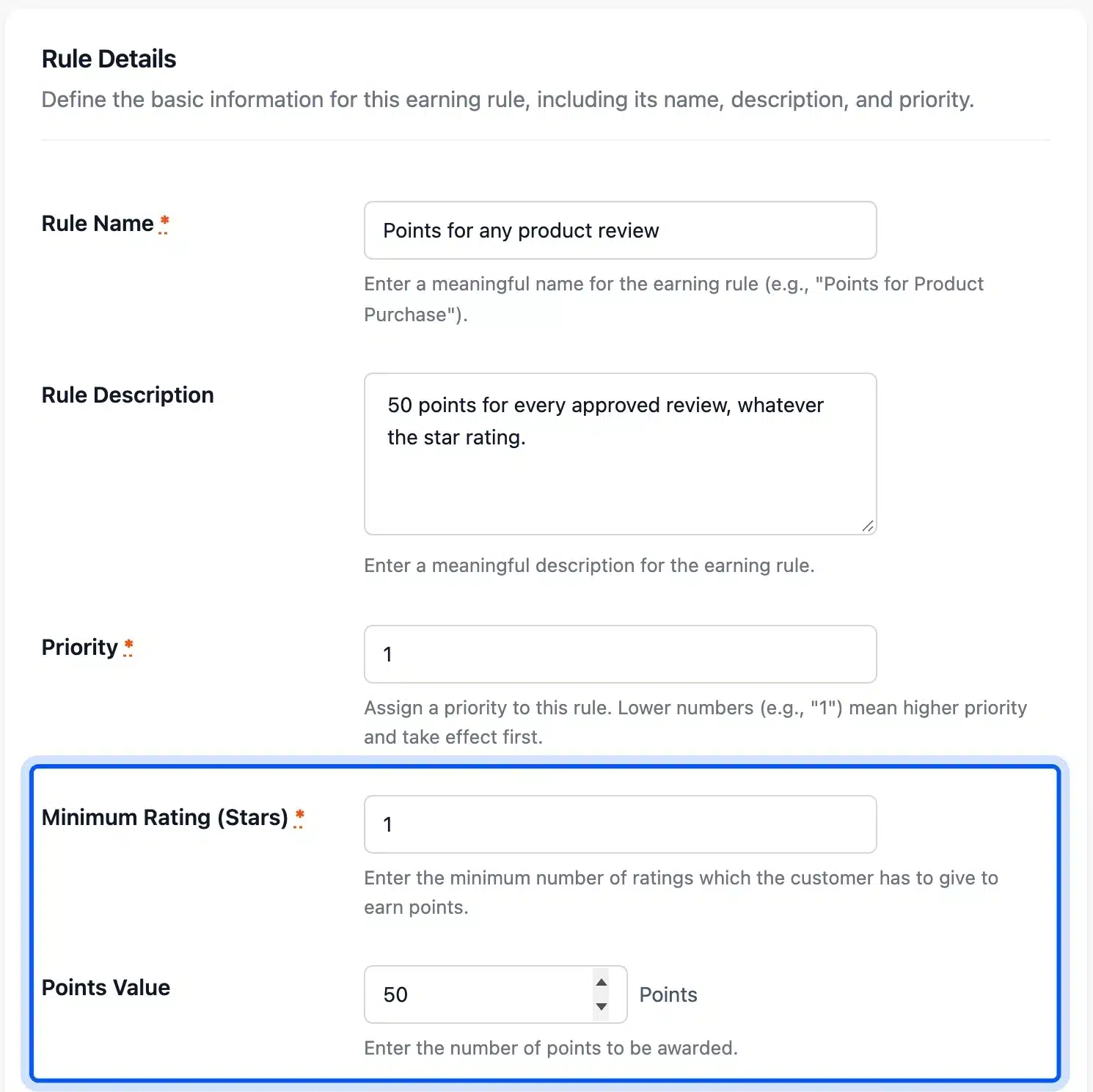
The Minimum Rating (Stars) field is required and accepts any value from 1 to 5. We tested a value of 4, and a two star review earned 0 points while a four star review earned 50. That setting pays only for positive reviews, which is what 16 CFR 465.4 bans.
Keep the field at 1, the lowest value it allows. Leaving it blank is not an option, because the rule will not save without it.
Leave Show to Customer on Show and Status on Active. The Conditions panel can limit the rule to set days, user roles or loyalty levels. Leave it on All Users so every verified buyer earns the same.
Step 4: Check That the Rule Is Active
Click Save Rule. LoyaltyX sends you back to Points Earning Rules, where the new rule sits in the list with its type, priority and status. Check that the status badge reads Active before you test anything.
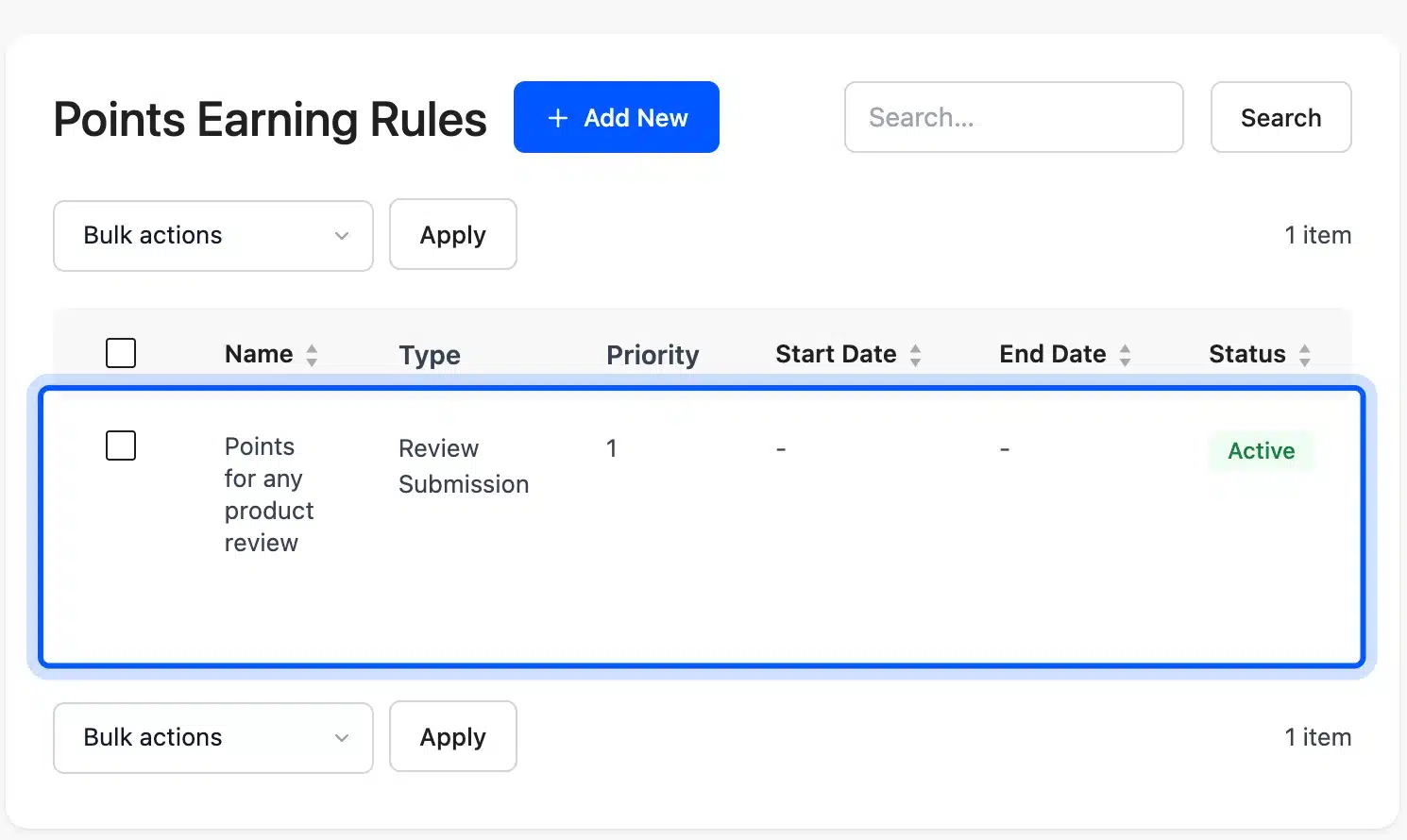
LoyaltyX checks rules in priority order and stops at the first active review rule it finds. So keep one review rule only. A second rule with a lower priority number would replace this one for every review.
Step 5: Leave a Test Review as a Customer
Log in as a test customer who has a completed order for the product. Open the product page and the Reviews tab, pick a star rating and write a short review. We picked three stars and wrote an honest complaint about a chipped rim, because a neutral review is the real test of a fair rule.
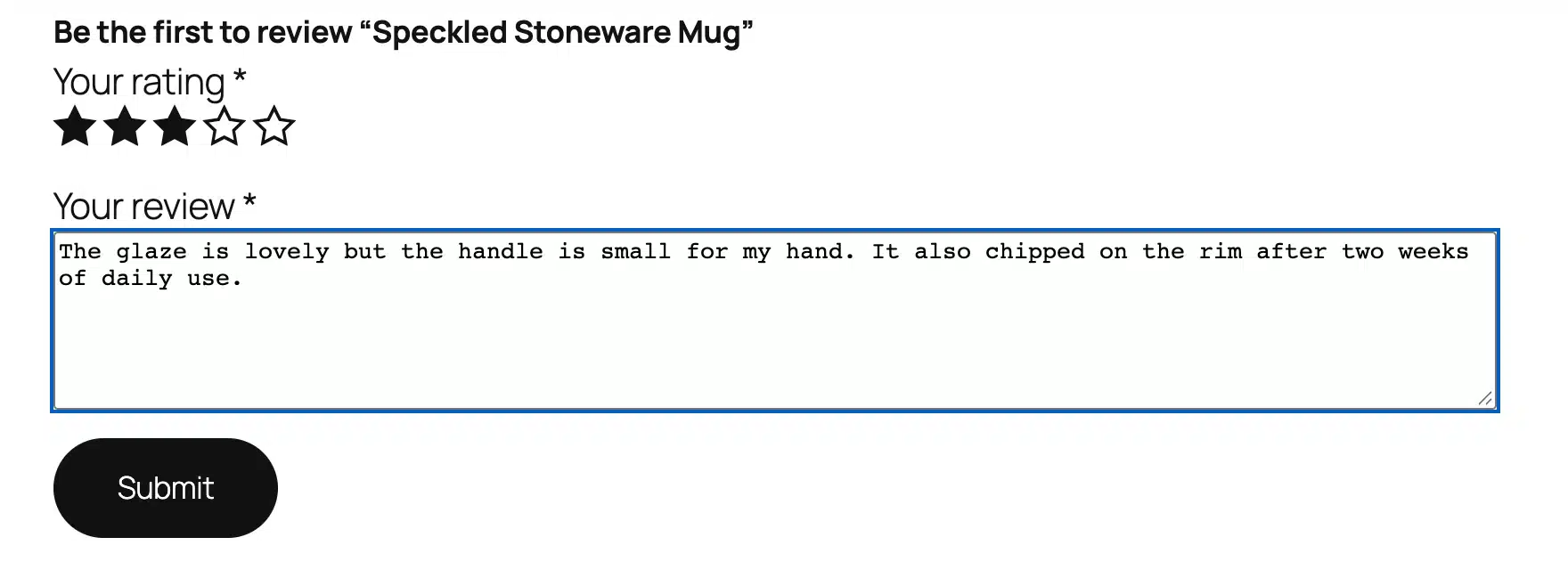
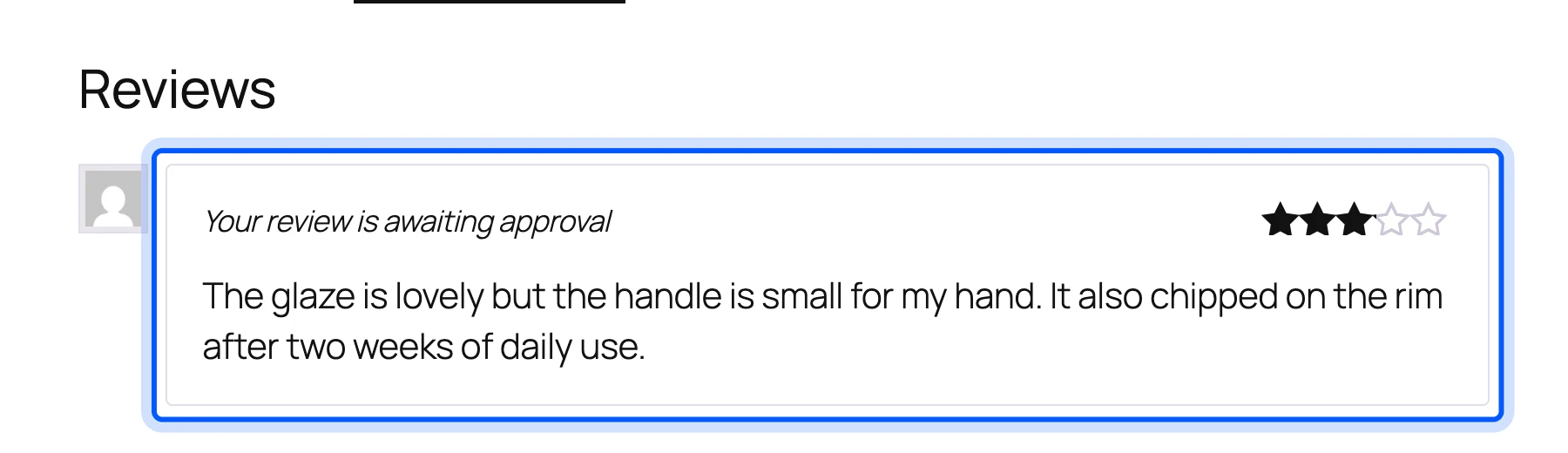
After you click Submit, the review shows “Your review is awaiting approval” if your Discussion settings hold comments for moderation. Points do not land yet. LoyaltyX pays when the review status changes to approved.
Step 6: Approve the Review and Check the Points
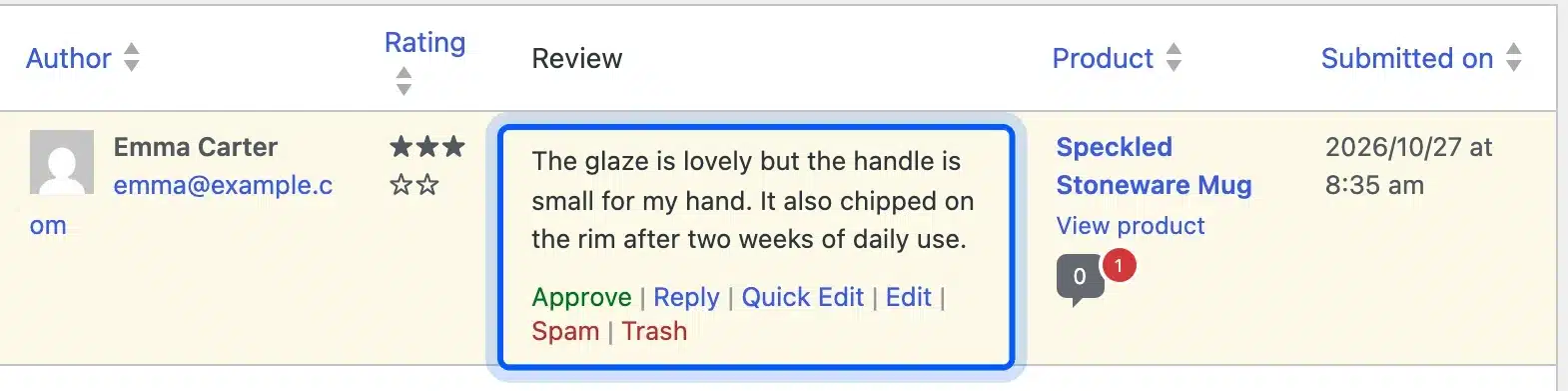
Go to Products > Reviews, find the pending review and click Approve under its text. Approval is your chance to remove spam and reviews that break your posted rules. Never use it to hold back honest negative reviews.
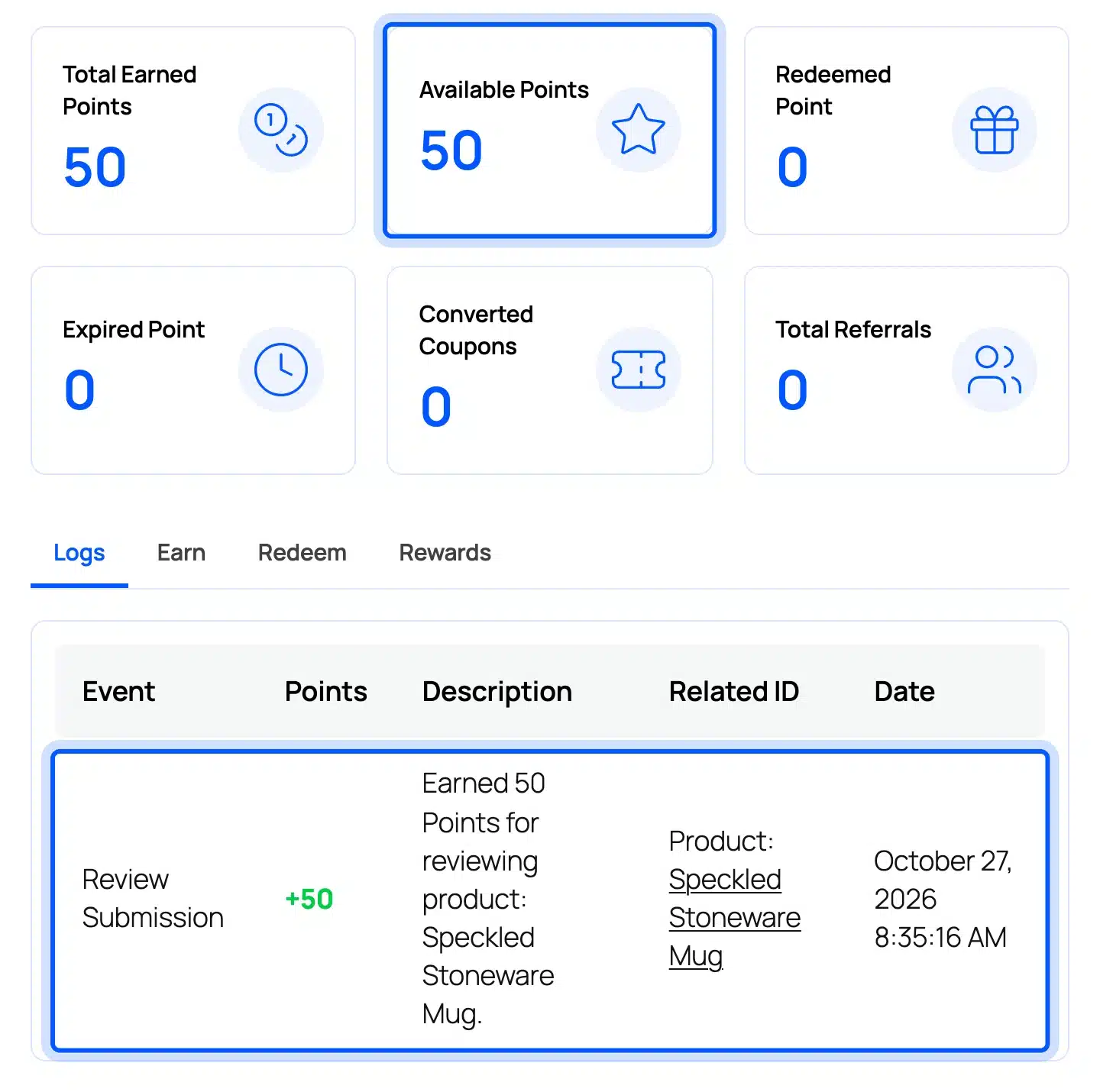
Then log in as the customer and open My Account > Points and Rewards. In our test the balance showed 50 Available Points. The log read “Earned 50 Points for reviewing product: Speckled Stoneware Mug” under the event Review Submission.
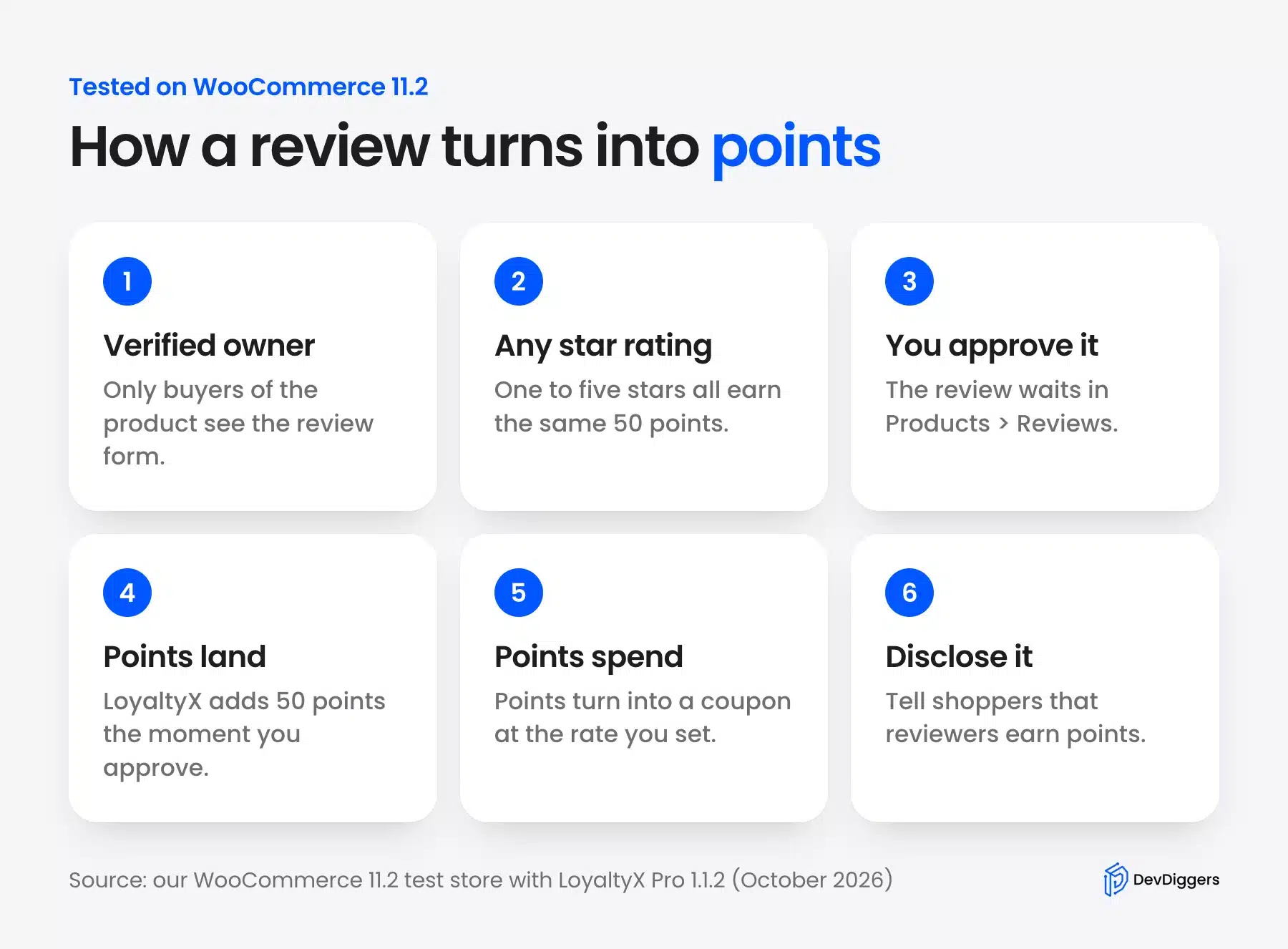
The whole flow takes one setting, one rule and one approval click per review. The infographic below sums up the path a review takes from the form to a spendable balance.
What Our Test Showed About Review Points
Our test showed that LoyaltyX pays the same 50 points for one star and five star reviews when the minimum is 1. Reviews without a star rating and reviews from guests earned nothing. A customer could earn points again with a second review on the same product.
We ran seven cases on the same test store and read the points log after each one. The table lists what we did and what landed in the customer’s balance.
| Test case | Points earned |
|---|---|
| Three star review from a verified buyer | 50 |
| One star review with the minimum at 1 | 50 |
| Second review on the same product | 50 |
| Same review set to pending and approved again | 0 extra |
| Review with no star rating | 0 |
| Review from a guest without an account | 0 |
| Two star review with the minimum at 4 | 0 |
The second review result is worth planning for. WooCommerce shows “Add a review” again after a customer’s first review, and LoyaltyX paid for each one. If you want one reward per product, hold reviews for moderation and approve only the first per customer.
Deleting a review does not take its points back, and neither does a refund on the order. LoyaltyX revokes only order points on refunds. Remove points from a spam review by hand with a manual adjustment from the LoyaltyX Users screen.
A fair rule will also bring in some lower ratings, and that is fine. The Spiegel Research Center found that purchase likelihood usually peaks for ratings between 4.0 and 4.7 stars. It then drops as the average nears 5.0.
How to Disclose Rewarded Reviews
Disclose the reward in the request that asks for the review and on the product page where reviews show. The FTC Q&A says failing to disclose incentives could break the FTC Act. One short plain sentence in each place does the job for most stores.
Use wording that makes the neutral rule obvious to both the reviewer and the next shopper. These lines worked well on our test store:
- Review request email: Write “Every approved review earns 50 points for any star rating.”
- Near the reviews: Add a note above the Reviews tab such as “Some reviewers earned loyalty points for any honest review.”
- Earn tab in My Account: Keep Show to Customer on Show so the review rule appears in the customer’s Earn list.
- Google feeds: Set
is_incentivized_reviewto true for every rewarded review you send to Google.
Avoid phrases like “leave us a great review” next to the reward. A word like “great” implies the review must be positive, and the FTC Q&A says an implied requirement counts the same as a written one.
Alternative: Send a Coupon for Each Review
A coupon for each review gives the customer an instant discount code instead of a points balance. It suits stores that do not run a loyalty program. Customer Reviews for WooCommerce, with more than 80,000 active installs, sends review coupons for free.
We installed Customer Reviews for WooCommerce 5.126.0 on the same store. Its Review for Discount tab can send coupons for on-site reviews and has an Incentivized Review Badge. The default badge label reads “Reviewer received an unconditional discount coupon on future purchases.”
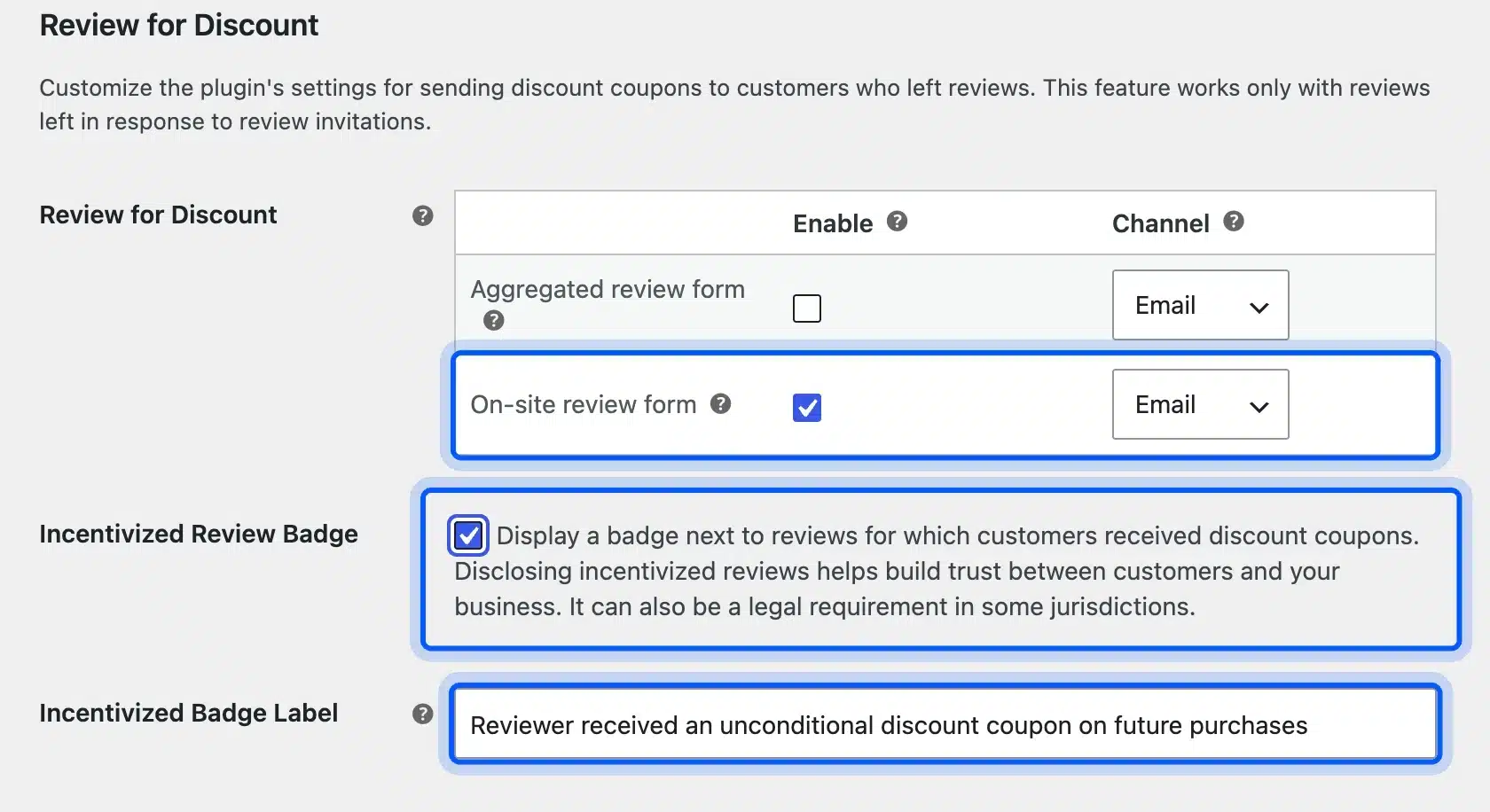
Two limits showed on that screen. The tab says the feature “works only with reviews left in response to review invitations.” That ties it to the plugin’s own reminder emails.
Its discount tiers depend on how many photos a reviewer uploads, and the star rating plays no part. We did not send live coupon emails from the test store and checked the settings only.
A newer option is Baehakis Honest Review Rewards. Its listing promises one reward per product, order and customer, “regardless of star rating.”
Version 1.0.0 shipped in June 2026 with very few installs. Test it on a staging copy first.
| Points per review | Coupon per review | |
|---|---|---|
| What the customer gets | A balance that grows with orders | One discount code |
| Brings them back | Yes, the balance needs spending | Once, if they use the code |
| Setup | One earning rule | Coupon template and emails |
| Fits | Stores with a loyalty program | Stores that want a quick start |
If you go the coupon route, our guide to WooCommerce coupon codes covers expiry dates and usage limits. Set a short expiry so old review coupons do not pile up.
How Many Points Should a Review Earn?
A fair review reward is smaller than what a typical order earns in points. At our test rates of 1 point per $1 and 100 points for $5, a 50 point review equals the points from a $50 order. That is $2.50 of credit per review.
If your average order is under $50, drop the review reward to 25 points. Work out the cash value before you pick a number.
Say 20 reviews come in this month at 50 points each. That is 1,000 points, or $50 of discounts at our redeem rate, spread across customers who come back to spend it.
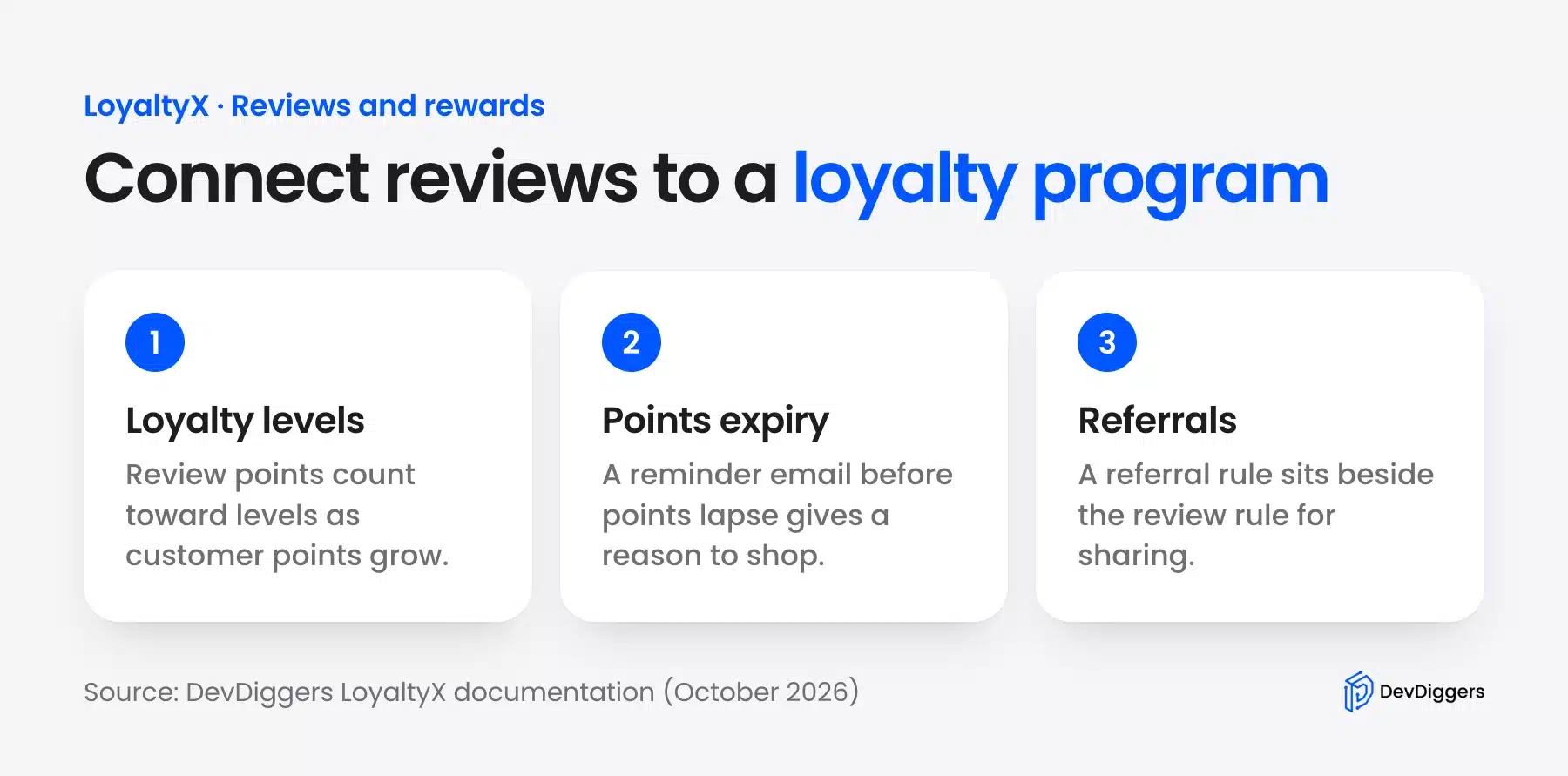
Review points work best when they feed the same balance as purchases and referrals. Our guide to a loyalty program in WooCommerce covers levels, expiry and referral rules.
When to Ask Customers for a Review
Ask after the customer has used the product, and ask every buyer with the same message. The FTC Q&A says “generalized solicitations to purchasers to post reviews about their experiences” do not break the rule. That holds even when all of them are offered the same incentive.
For physical goods, a request 7 to 14 days after delivery gives the buyer time to use the item. For downloads and digital products, a few days after purchase is usually enough. Send it once, with the reward named in the first line.
Give customers a way to stop these emails. Our guide to an unsubscribe link in WooCommerce emails shows the setup. A buyer who never wanted the email is not going to write a fair review.
Conclusion
The legal way to reward customers for writing reviews in WooCommerce is simple once the rules are clear. Pay every approved review from a verified owner the same amount. Keep any star filter at 1, and say plainly that reviewers earn a reward.
In our tests that setup paid 50 points for one star and five star reviews alike. It also paid nothing for guest and unrated reviews. Watch for repeat reviews on one product and remove points by hand when you delete a spam review.
LoyaltyX handles the review rule in its Pro version, and its free version on WordPress.org lets you try purchase points first. A coupon plugin is the lighter option if you do not run a loyalty program.
Frequently Asked Questions (FAQs)
Q1. Can WooCommerce reward product reviews without a plugin?
No. WooCommerce collects reviews and star ratings but has no setting that pays points or coupons for them. You need a points plugin such as LoyaltyX or a review plugin that sends coupons.
Q2. Can I give a reward only for 5-star reviews?
No. The FTC rule on consumer reviews bans incentives conditioned on a review’s sentiment, and a star filter is that kind of condition. Reward one star and five star reviews the same.
Q3. Can a customer earn review points twice on the same product?
Yes, in our LoyaltyX test a second approved review on the same product earned 50 more points. Approving the same review again did not pay twice. Hold reviews for moderation if you want one reward per product.
Q4. Do guest reviews earn points?
No. LoyaltyX pays only when the review belongs to a logged-in customer account, and a guest review earned 0 points in our test. Turning on verified owners already limits reviews to buyers.
Q5. What happens to review points if the order is refunded?
They stay in the balance. In LoyaltyX Pro 1.1.2, refunds revoke only the points earned on that order. Take review points back by hand if a refund or deleted review calls for it.
Q6. What is a WooCommerce social reward?
A social reward pays customers for sharing a product on social networks, which is a different action from writing a review. Our guide to social share discount plugins covers that kind of reward.
Q7. Can I reward reviews of my store on Google?
No. Google’s Merchant Review policies say merchants may not offer “financial incentives to write reviews of any kind” for store reviews. Rewarded product reviews are allowed in a product feed when they are marked as incentivized.