Do you want to grow your sales without relying on large discounts? You’re not alone. Many WooCommerce Store owners want to show appreciation to their customers, yet they struggle with how to set up WooCommerce free gifts without disrupting their checkout flow.
The key reason you are struggling to set up WooCommerce free gifts is that most gift configurations require complex rules, custom programming, or multiple plugins.
As a result of the restrictions placed by gift systems on Store Owners, either they will take longer than expected to implement them, or they will implement simple promotions that don’t add value to the Store & increase conversion rates. While all of this is going on, other Stores are using simple loyalty-based gift systems to increase average order value and improve customer retention.
The great news about how to set up WooCommerce free gifts is that with a LoyaltyX plugin, you can have a fully functioning points system established in less than five minutes.
This guide provides each step to help you learn how to create rules for earning points, define gift rewards, add conditions to gift promotions in a shopping cart, and test them out, all of which can be done quickly and accurately.
What Are WooCommerce Free Gifts?
WooCommerce Free Gifts are promotional items provided to customers in your store when they meet defined criteria.
Instead of providing price reductions, you reward customers with an additional item.
Examples:
- When you spend $75, you receive a free mug.
- You purchase Product A and get a free accessory.
- Earn 500 loyalty points and receive a free product.
Gift rules can be generated by:
- Minimum cart total.
- Purchase specific items only.
- Earn loyalty points for all purchases.
- Offers for a limited time.
The majority of store owners choose to implement a reward system based on points when using a WooCommerce Free Gift program, as it provides an incentive for more frequent purchasing and increases customer loyalty.
In the following sections of this blog, you will learn how to set up WooCommerce free gifts in 5 minutes using the LoyaltyX Pro plugin.
How to Set Up WooCommerce Free Gifts Using LoyaltyX Pro
Tip: Use this exact setup process if you want to quickly get started with setting up WooCommerce free gifts and learn the procedure exactly without any additional coding skills.
Setting up a complete WooCommerce free gift system from points of loyalty that will work from your dashboard.
The easiest way to do this is by using the LoyaltyX – WooCommerce Points and Rewards plugin.
We’ll follow the steps outlined below.
Step 1: Plugin Setup and Activation
Download and install the plugin from your WordPress dashboard.
- Go to your WordPress Dashboard.
- Click on Plugins → Add Plugin.
- Upload the file (LoyaltyX Pro’s .zip file).
- Select Install Now.
- Select Activate to activate.
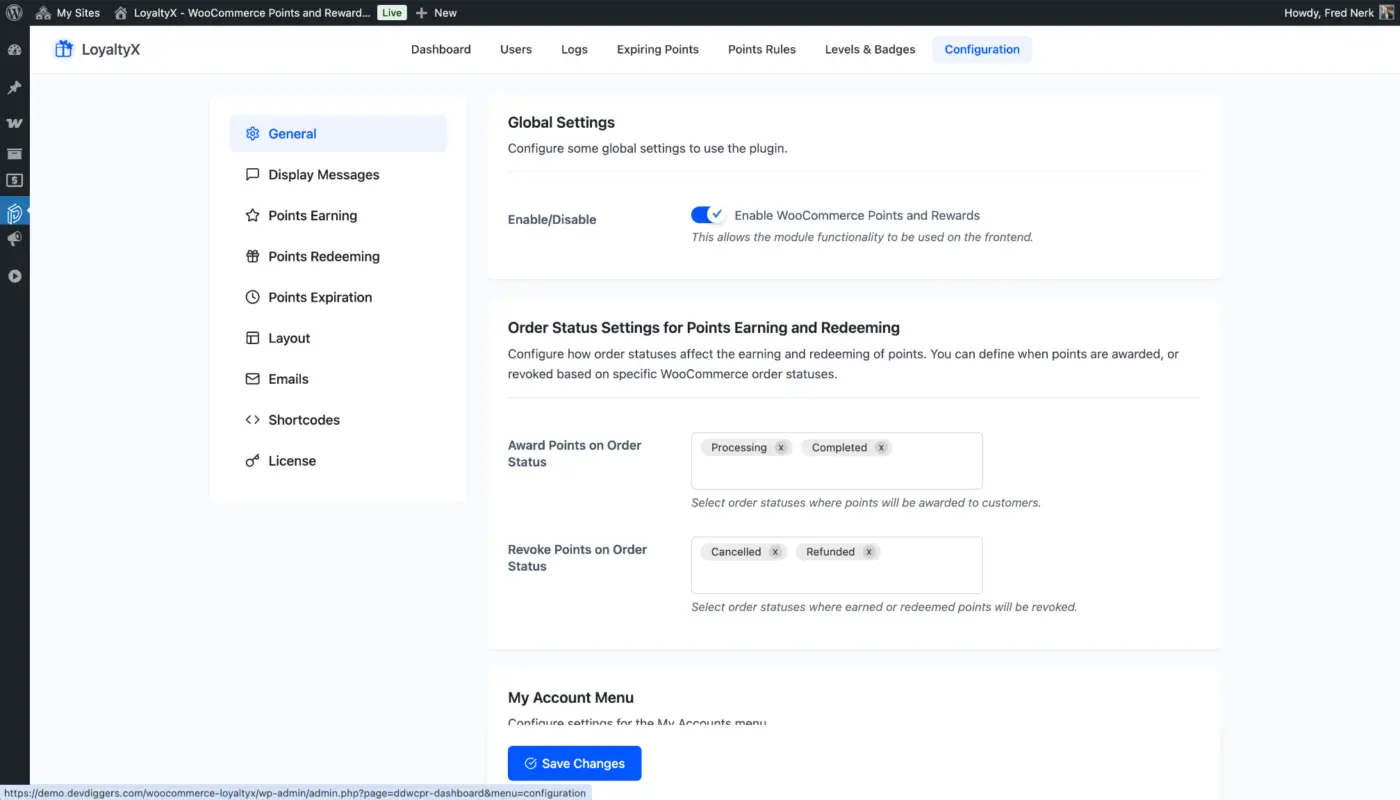
After you have activated the LoyaltyX Pro Plugin, you can:
- Go to Devdiggers Plugins → LoyaltyX and configure your general settings.
- Set the default points value(example: 1 point for every $1 spent)
This is all that you have to do, no coding is needed.
Estimated time to follow this step: 1 minute
Step 2: Create Earning Rules for Points to Redeem Gifts
Before your customers can redeem their free gifts, they need to earn points; therefore, as part of setting up your points reward program, you will need to set up rules for how and when customers will earn points.
Go to:
- Devdiggers Plugins → LoyaltyX.
- Points Rules → Points Earning Rules → Add New.
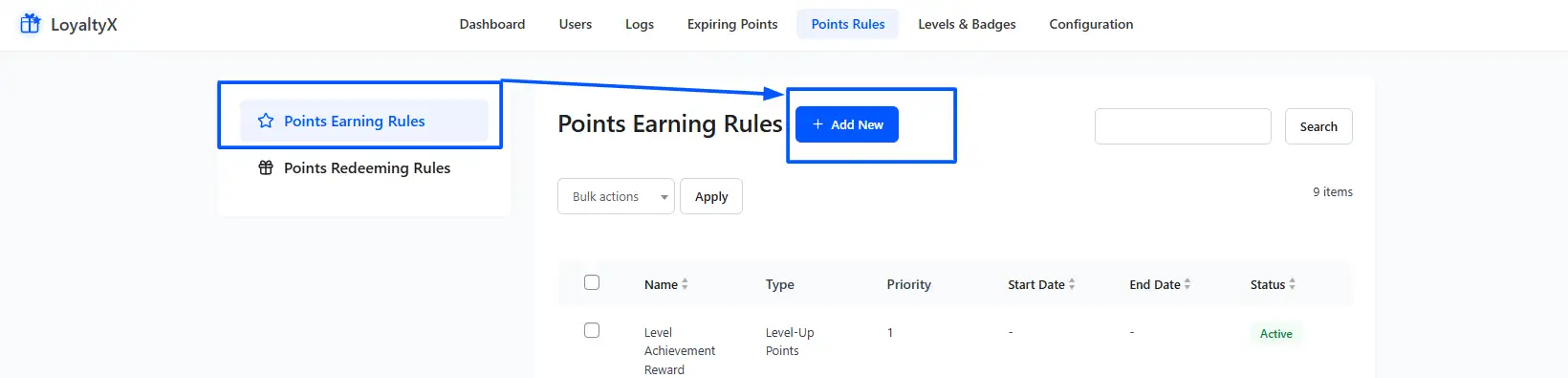
Creating a simple rule to earn points can be accomplished by creating a point-earning rule like the following example:
- Rule Name = Purchase Points (you can name it whatever makes sense to you)
- Condition = Earn 1 Point for Every $1 you spend
- Reward = 1 Point for $1 Spent.
Once you have created your own basic earning points Rule, you can also create additional Earning Point Rules like:
- Signup Bonus Points Rule
- First Purchase Bonus Points Rule
- Category-Based Double Points Rules
- Seasonal Promotions & Campaigns
This is the foundation of your WooCommerce Rewards System.
Be sure to save your rules.
Estimated time to follow this step: 1 minute
Step 3: Establish a Free Gift Reward through Product Redemption
We are now to establish the actual free gift.
Go to:
- Devdiggers Plugins → LoyaltyX → Points Rules → Points Redeeming Rules.
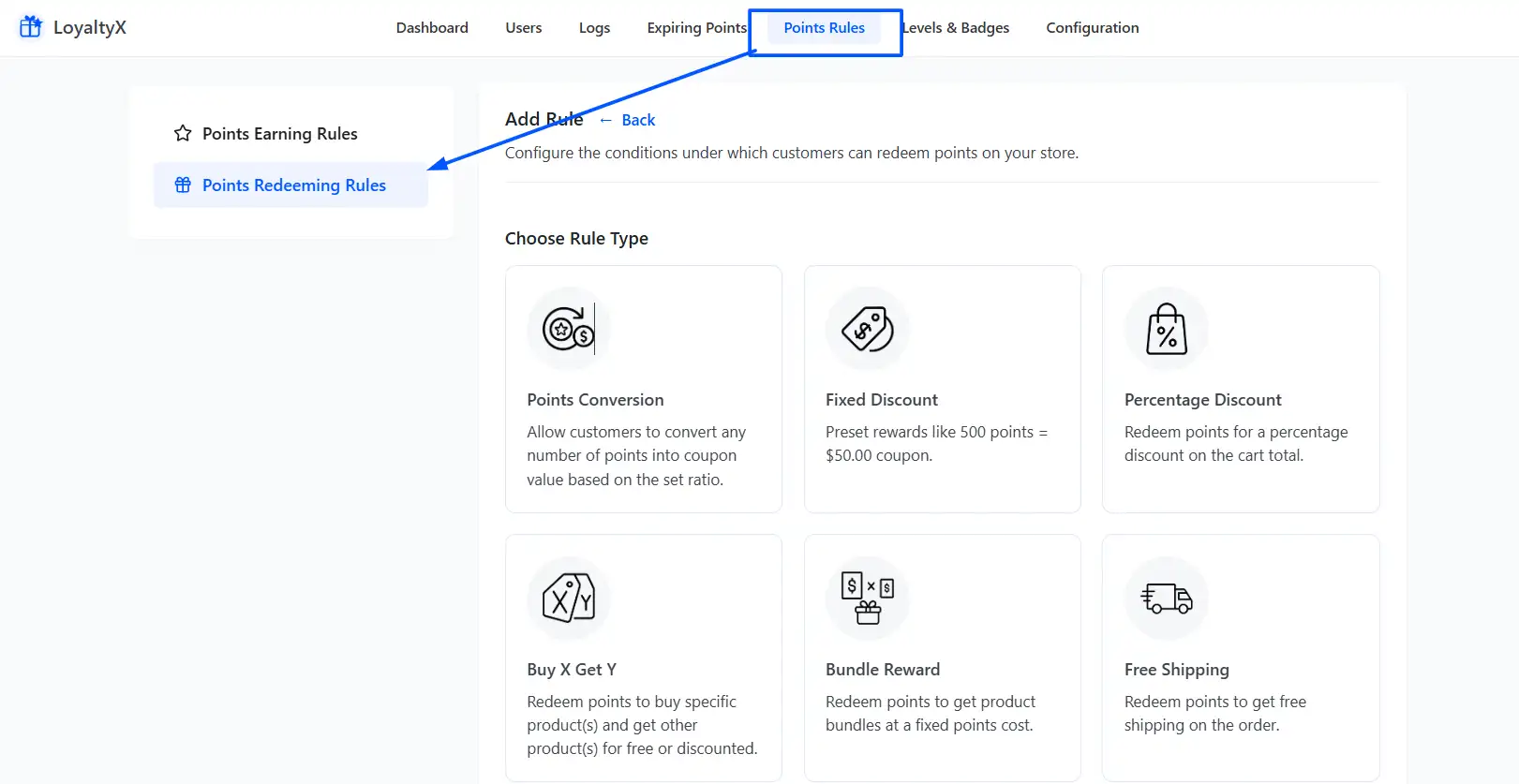
- Then, click on the Add New button and click on Free Product reward type.
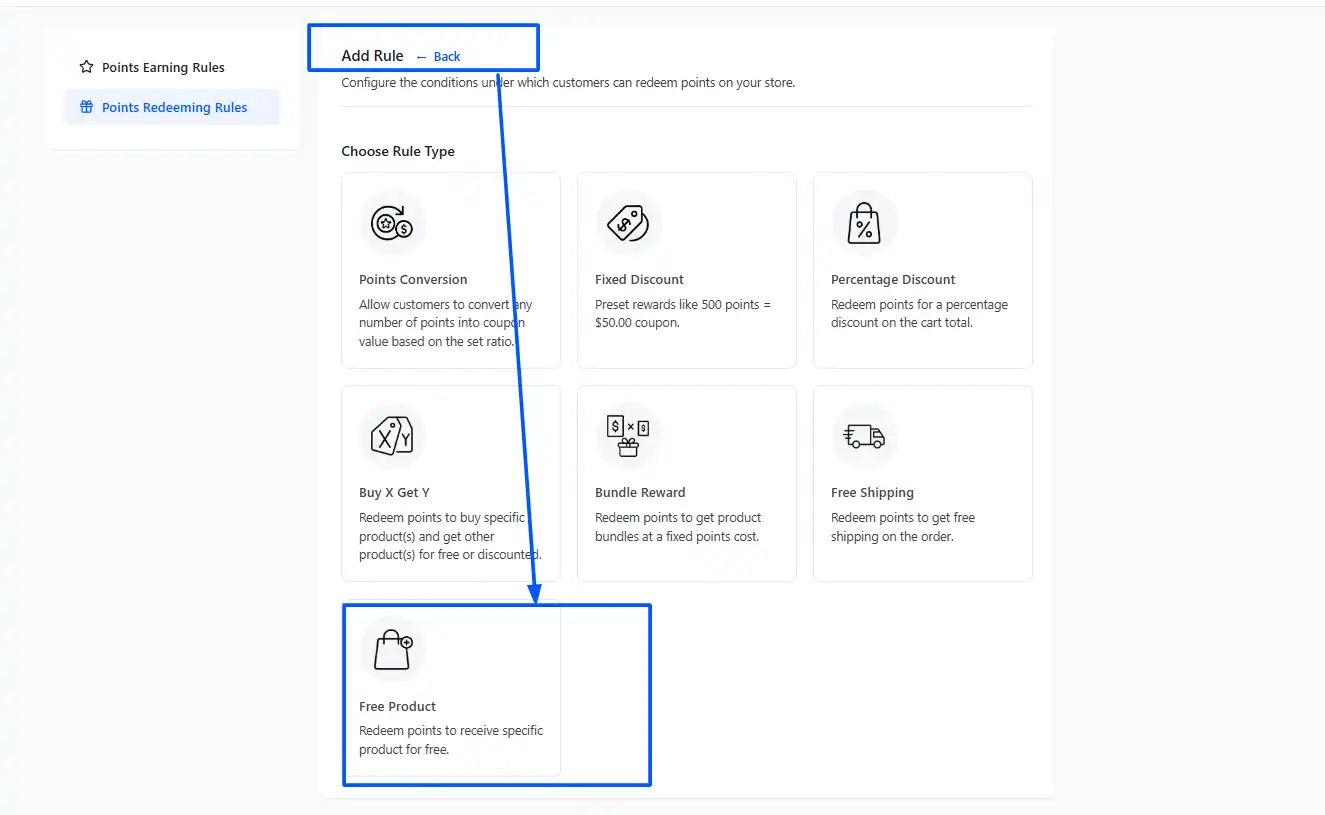
The next question to answer is, your reward must be set to the following:
- Reward Type = “Free Product”.
- Select the Product you would like to provide.
- Set the Quantity or Amount of Points that is required to redeem. (Ex: 500 Points).
Example Setup:
- Reward Name: Free Product
- Reward Quantity/Amount of points required: 500 Points
- Product: Cap
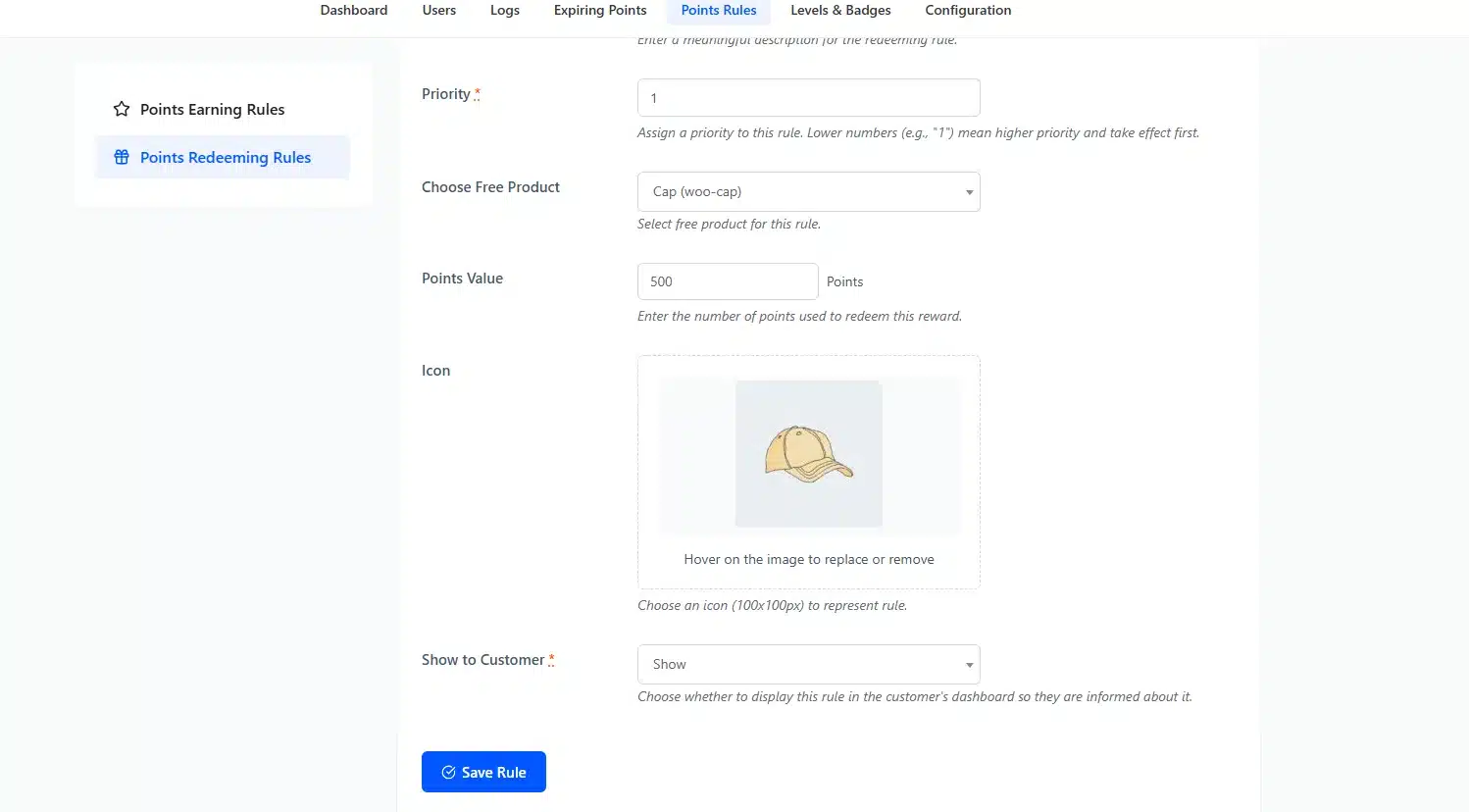
After saving the Reward, your customers will now be able to redeem it for that product after collecting sufficient points.
Setting up your Free Gifts in WooCommerce correctly is the most important step to take.
Estimated time to follow this step: 1 minute
Step 4: Set Cart and Point Conditions
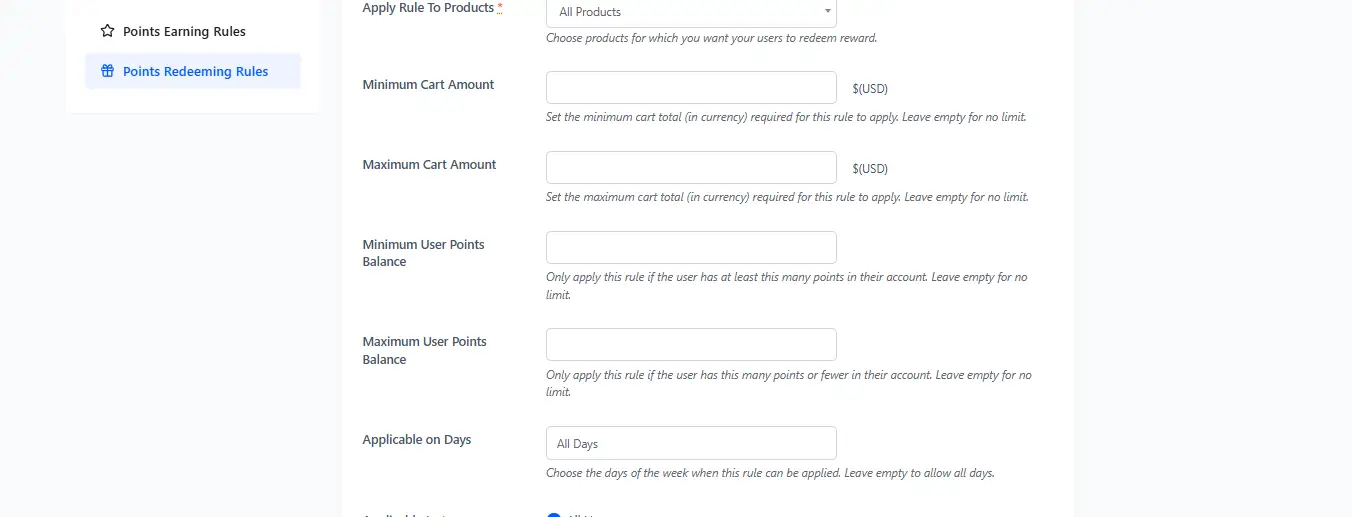
In order to protect your profit margins, set up cart and point conditions.
While still in the Reward Settings, configure the following:
- Minimum Cart Total (e.g., $75)
- Minimum points required (500)
- Limit per customer (1 redemption)
- Restrictions based on category (Optional)
Example: Spend $75 and redeem 500 points to get the Free Mug!
These conditions will drive up your Average Order Value and allow for your promotions to remain profitable.
Estimated time to follow this step: 30 seconds
Step 5: Allow Free Gifts to Show on Your Shopping Cart and Check Out Pages
In order for your customers to take action, you must show them that Free Gifts are available.
Next, follow the instructions below to display your rewards.
- Go to Devdiggers Plugins, then LoyaltyX.
- Then go to Configuration and then Display Messages.
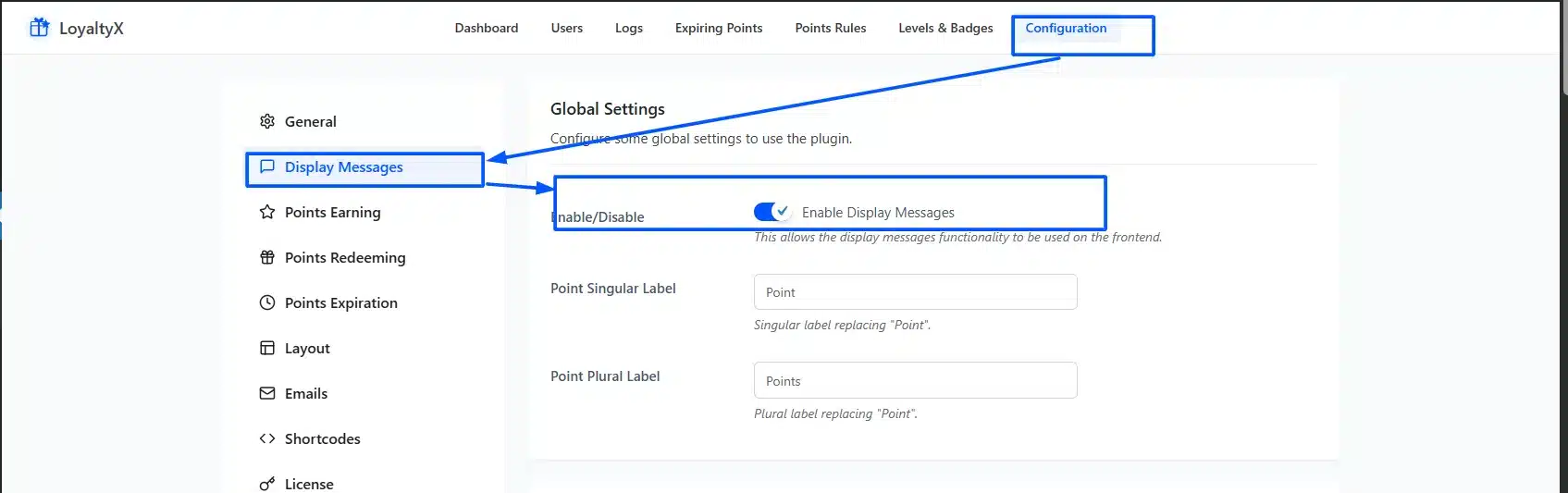
After that, messages will appear on the following pages, and you can customize those messages as well:
- Product Page
- Shop Page
- Cart Page
- Checkout Page
- View Order Page
Example Points Progress Message: “You’re 120 Points away from a Free Gift!”
Just by displaying this message, you provide a sense of urgency and the push for your customers to add more products.
Estimated time to follow this step: 1 minute
Step 6: Finalized Testing of The Workflow
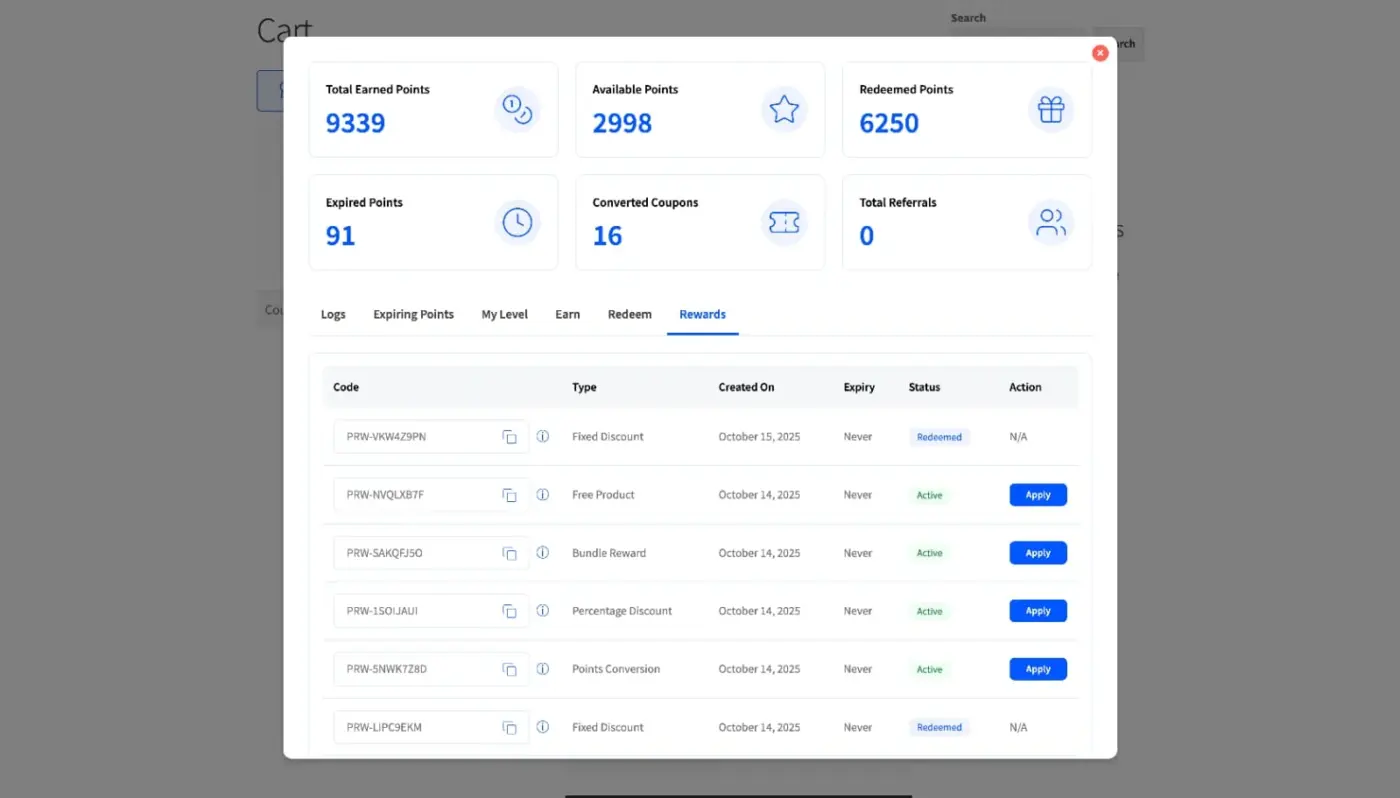
Before going live, test everything.
Complete this checklist before going live with the new process:
- Create Test User Account
- Complete Test Order
- Ensure Points are Added to Customer’s Account
- Add Items to Shopping Cart
- Redeem a Free Gift With Point Deduction
- Complete Checkout
If everything works smoothly, you’re done.
Congratulations! You learned how to set up WooCommerce free gifts in less than 5 minutes.
Advanced Optimization Tips to Maximize Results
After learning how to set up WooCommerce free gifts, you can now make the system work more effectively for both new customers and drive additional revenue through free gifts.
Here are a few quick and easy changes you can start making immediately.
1. Implement Tiered Rewards System
If you give away only one item for free, you have a flat program. By adding different tiers, you can encourage repeat purchases and longer engagement with your customer base.
For example:
- 501 Points = Free Mug
- 1000 Points = Free T-Shirt
- 2000 Points = Premium Product.
By having multiple levels of gifts, you increase the chance that customers will return and purchase again.
The more points that they accumulate, the more ownership they will feel.
2. Use Smart Cart System Thresholds
Don’t set your cart terms randomly.
For example, if your average cart value is $60, make the minimum amount for dual rewards (ex. receiving a free gift), $75, or $80.
This gets customers who were going to buy something added a couple more items to their cart.
That small increase can make a big difference in your revenue.
3. Use Message for Progress Updates
Ensure that you use the message boards to show all customers what their current progress is towards receiving a free gift.
Examples:
- “You have 150 more points until a free gift.”
- “Add $12 to your cart for free gift.”
These types of messages are often a subtle form of motivation to do something, but are effective because there is no direct pressure on customers to act.
4. Use Email Campaigns to Promote Free Gifts
Use your email campaigns to notify customers about:
- Their current points balance
- Available rewards
- Promote limited-time gifts
This encourages customers to return to your site. You are not just offering a discount through a promotion. You are going to be creating a sense of fulfillment and helping them feel better about themselves through your product offerings.
5. Implement Limited-Time Free Gift Promotions
Research proves that scarcity can help increase your sales.
Here are some examples:
- A weekend-only bonus gift
- A holiday exclusive bonus reward
- Double points for 48 hours
Time-related urgency is often a consideration when people make decisions about buying.
6. Track Performance
Once you launch your WooCommerce Free Gift Program, measure:
- Average Order Value (AOV)
- Repeat Purchase Rate
- Redemption Rate
- Revenue Impact
If your redemption is excessively high and damaging your margin, increase the required points to redeem.
If your redemption is very low and you want to see more redemptions, decrease the number of points necessary to redeem.
Optimizing these processes is ongoing; it’s never just a one-time effort.
Final Thoughts
If you want to increase your conversion rates without having to offer continual discounts, now you know how to set up WooCommerce free gifts correctly.
Instead of discounting the price of an item, you will be providing something of value to the customer.
You will do this using a method called a reward system. The LoyaltyX Pro points program is one such example. You will be able to…
- Effectively increase your average order value.
- Create an incentive for repeat buying from the same seller.
- Create customer loyalty over the long term.
- Have the ability to start running promotions in as little as several minutes.
And, one of the best parts about using LoyaltyX Pro is that you do not need to worry about any custom development or complex rules. It’s literally as easy as installing the plugin, establishing your earning rules, creating your free gift rules, setting conditions, and testing.
Start simple. Track what works. Adjust point thresholds when needed. Over time, your rewards program can become a major source of growth for your business.
If you’re serious about learning how to set up WooCommerce free gifts in a fast, scalable, and profitable way, LoyaltyX Pro will allow you to effectively create WooCommerce Free Gifts quickly, easily, and profitably.
So, now it’s your turn to implement, test, and discover for yourself how an inexpensive giveaway can lead to a big result!
FAQs: How to Set Up WooCommerce Free Gifts
Q1. Is it possible to configure WooCommerce free gift items without writing code?
Yes, you can configure WooCommerce free gift items via the LoyaltyX Pro plugin, which is completely coded by default and has a full user interface that is fully managed through the WordPress administration area.
Q2. What is the timeframe for setting up WooCommerce free gifts?
By following proper procedures, you can have everything set up and fully operational in less than five minutes.
Q3. Can I set requirements, such as a minimum amount required for a free gift?
Yes, you can set criteria like a minimum cart total prior to providing someone with a free gift.
Q4. Are customers allowed to redeem free gifts using points?
Yes, you may establish a rewards program based on points, whereby customers earn points that can then be used to trade in for free merchandise.
Q5. Is offering free gifts via WooCommerce likely to increase my sales volume?
Yes, free gift offers tend to increase your average sale amounts and provide additional repeat customer purchases when properly structured.