What is WooCommerce Waitlist?
WooCommerce Waitlist is a back in stock notifier plugin for WooCommerce. It adds a join waiting list button to out of stock products and collects customer email addresses. The notification sends automatically when stock status returns to in stock.
What an out of stock page normally costs you
A shopper who reaches an out of stock product has done everything right. They found your store, found the product, and decided to buy. Then the page tells them no, and they leave with no record that they were ever there.
A waiting list captures that intent. The customer is not browsing any more, they have chosen. Back in stock emails go to people who have already made the decision, which is why they convert far better than a general newsletter.
How it works for customers
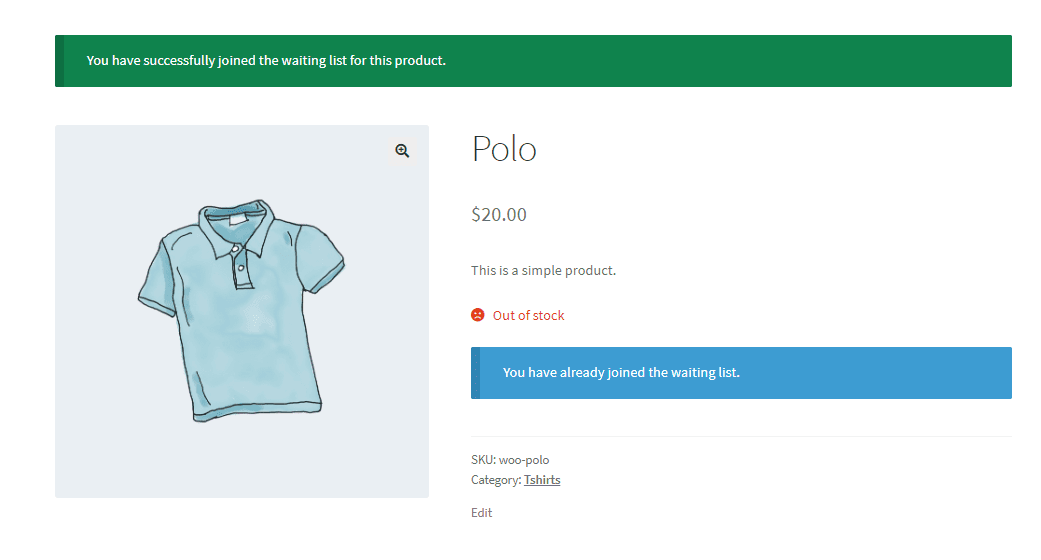
- Registered customers see the join button on the out of stock product page and join with a click. A confirmation message then shows they are on the list.
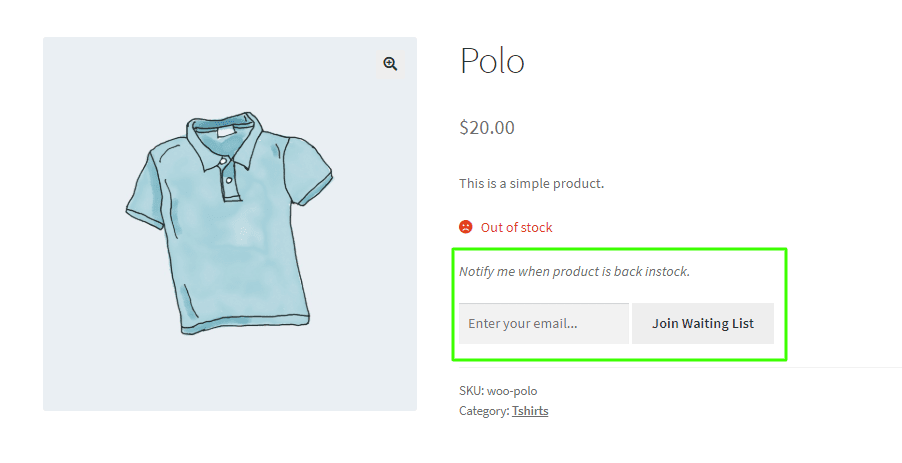
- Guests see the same button with an email field, and join by entering an address.
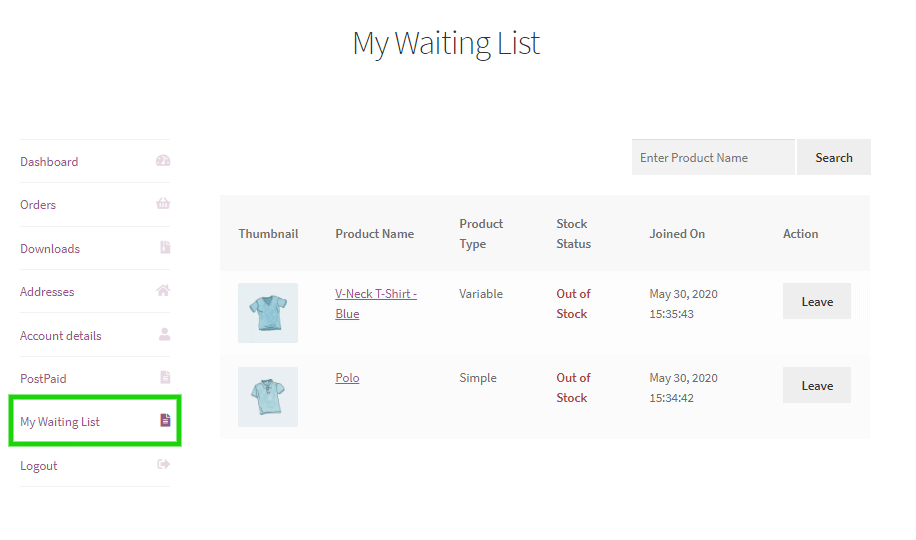
- Registered customers get a My Waiting List menu on the My Account page. It lists every product they are waiting for, its stock status, and an option to leave.
Managing lists as a store owner
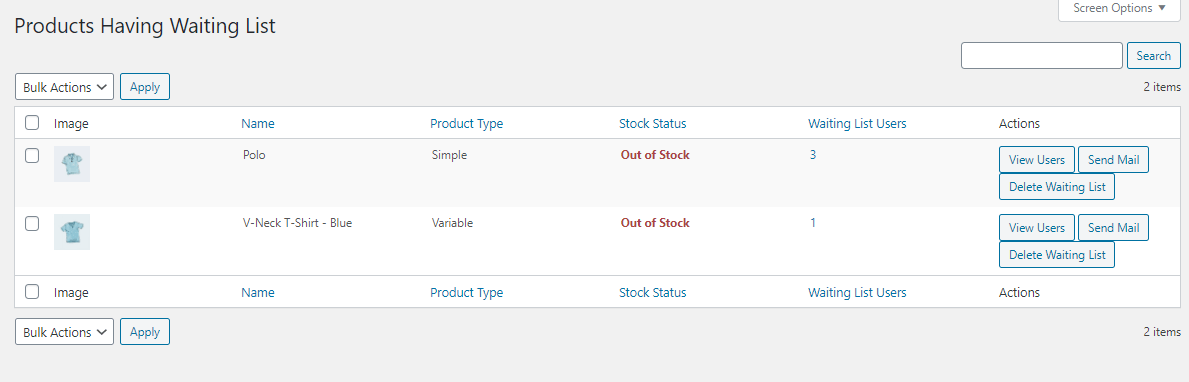
The products screen lists every product with people waiting. From the actions column you can view the users on a list, send them mail, or delete the list entirely.
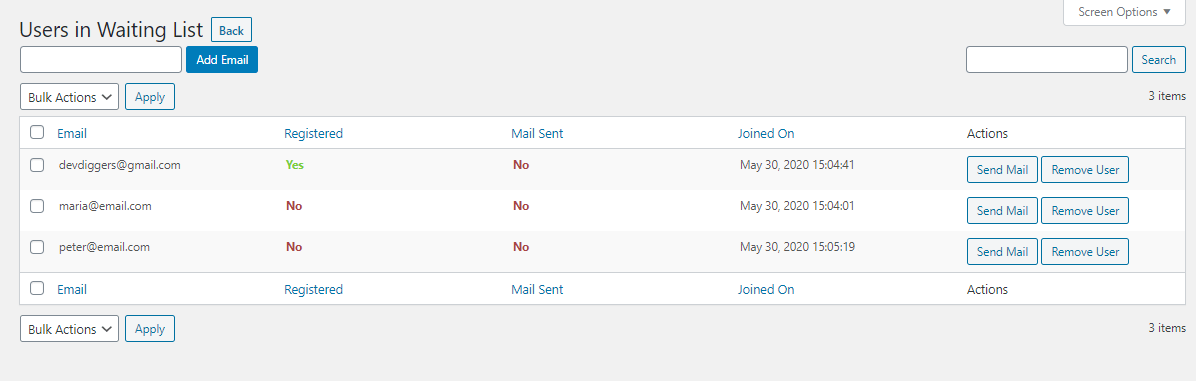
The users screen shows everyone waiting, whether their email is linked to a store account, and lets you add addresses by hand. You can email or remove individuals, or use bulk actions to handle a whole list at once.
Notification settings
- Turn automatic back in stock emails on or off. With them on, the email sends as soon as stock status changes to in stock.
- Send emails manually instead, which is useful for warning a list before a restock goes live.
- Set the join button text shown on out of stock products.
- Exclude products that should never accept waiting list signups.
- Place the join form anywhere with a shortcode.
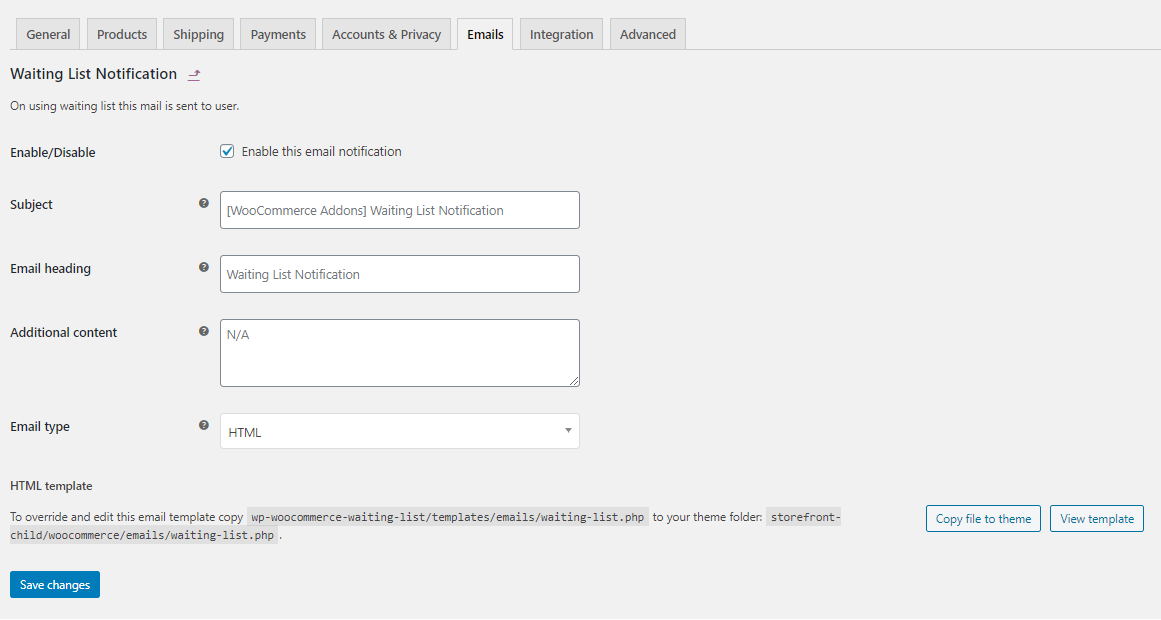
- Customise the notification email through the WooCommerce email template system.
Who this plugin is for
Stores with genuine stock limits: fashion in sized runs, limited editions, handmade goods, supplements, and anything on a long supply lead time. It also suits stores planning restocks, because the waiting list numbers show which products deserve the reorder budget.
Setting up the WooCommerce waitlist
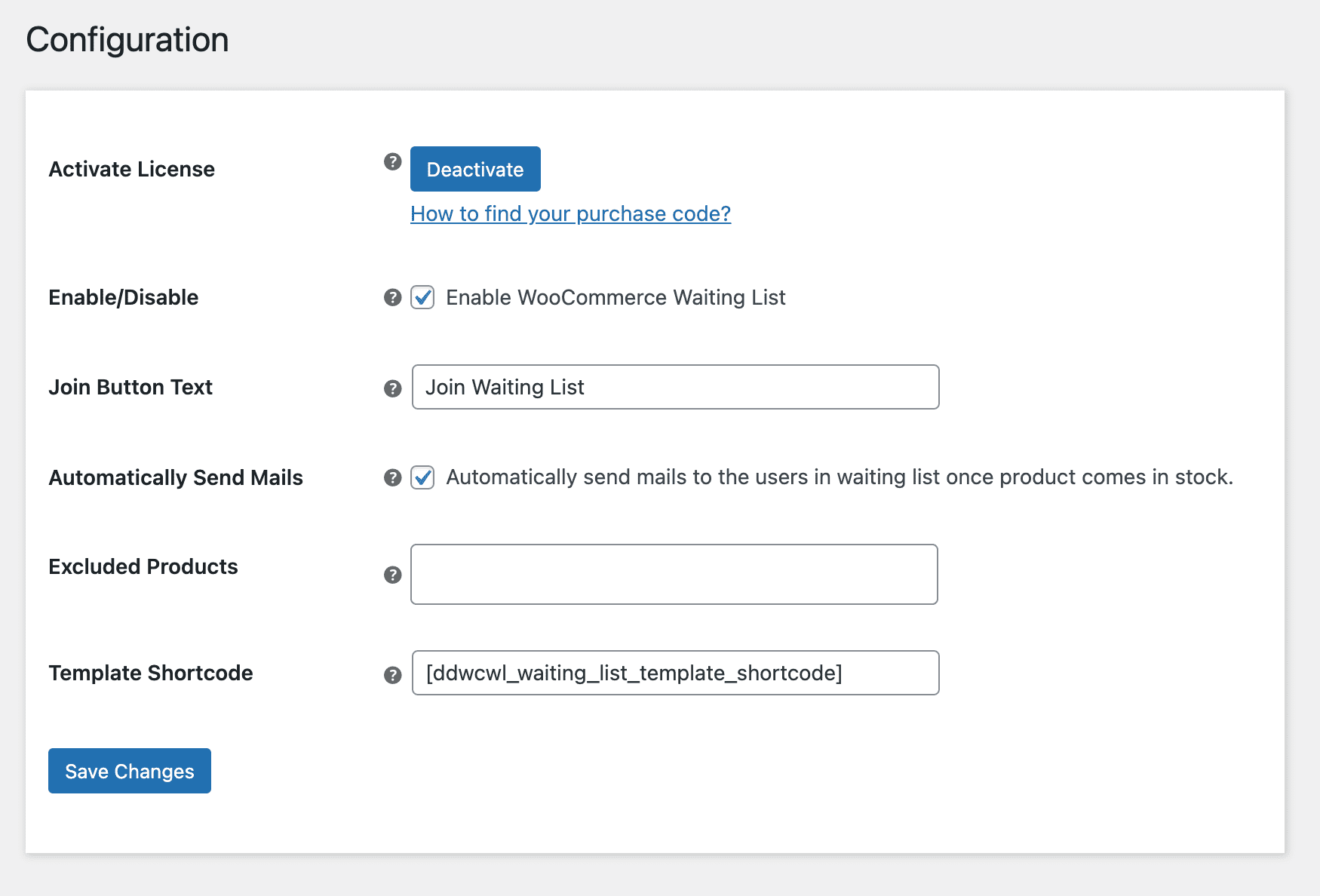
Configuration
Activate license
Enter your purchase code and email to activate the license before use.
Enable the waiting list
Turn the waitlist on or off for customers.
Join button text
Set the wording customers see on out of stock products. This is the button doing the work, so make it say what happens next.
Send back in stock emails automatically
Email the whole waiting list the moment a product’s stock status changes to in stock. Turn this off to send by hand, which lets you warn a list before a restock goes live.
Excluded products
Choose products that never accept waiting list signups.
Template shortcode
Place the join waiting list form anywhere with this shortcode.
Products: which items have demand waiting
Every product with people waiting, and how many. From the actions column you can View Users, Send Mail, or delete a list.
Treat these numbers as a reorder queue. A product with forty people waiting deserves the restock budget ahead of one with two.
Users on the waiting list
Everyone waiting, with whether their email matches an existing store account. Add addresses by hand, email or remove individuals, or use bulk actions to handle a whole list at once.
WooCommerce email template
The back in stock notification uses the WooCommerce email template system, so it carries your store branding.
Joining the waiting list: registered customers
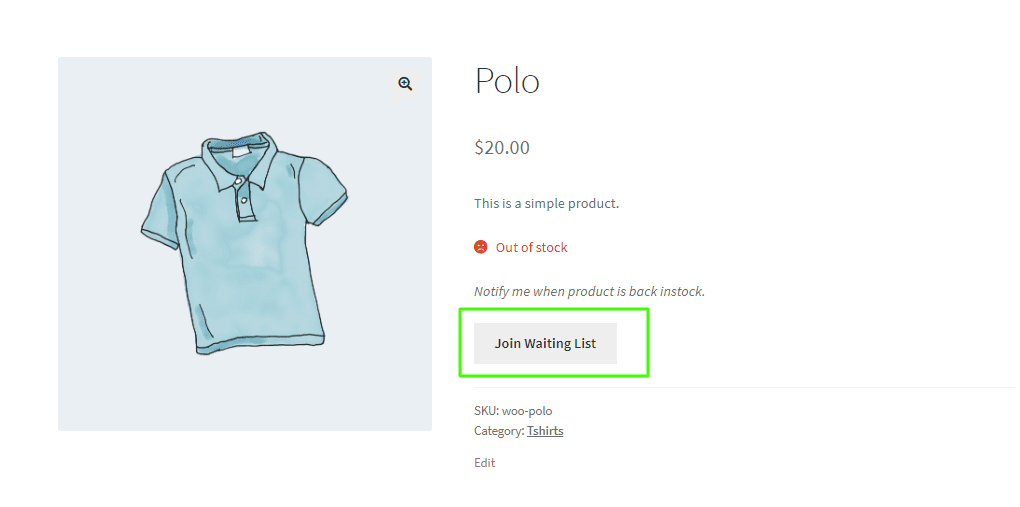
On an out of stock product, registered customers join with a single click and are notified as soon as it returns.
They then see a confirmation on the product page showing they are already on the list.
My Account page
The My Waiting List menu lists every product a customer is waiting for and its current stock status. They can leave any list from here.
Joining the waiting list: guests
Customers without an account see the same button with an email field. Entering an address puts them on the list, so a visitor who would otherwise have left with no trace becomes a contactable lead.
Back in stock email
When the product returns to stock, everyone on its list receives this email.
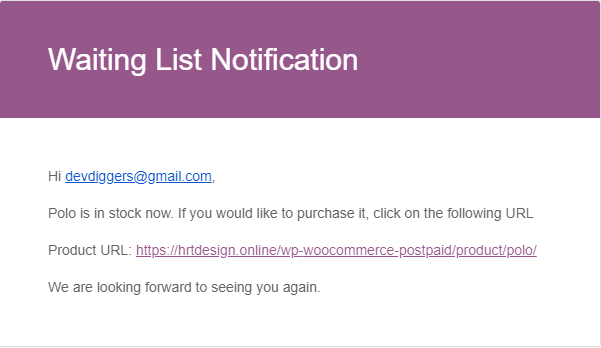
These convert far better than a general newsletter. The recipient already chose the product. You are telling them it is available, not persuading them to want it.
Frequently Asked Questions (FAQs)
Q1. Can guests join the waiting list without an account?
Yes. Guests join by entering an email address on the product page. Registered customers join with a single click.
Q2. Are back in stock emails sent automatically?
Yes, when automatic sending is enabled. The email goes out as soon as the product’s stock status changes to in stock. You can turn this off and send manually instead.
Q3. Can I see how many people are waiting for a product?
Yes. The products screen lists every product with a waiting list, and View Users shows exactly who is on each one.
Q4. Can I add someone to a waiting list myself?
Yes. Add an email address manually from the users screen. The plugin also shows whether that address belongs to an existing store account.
Q5. Can customers see and leave their own waiting lists?
Yes. Registered customers get a My Waiting List menu on the My Account page. It shows each product, its stock status, and an option to leave the list.
Q6. Can I stop the waiting list appearing on some products?
Yes. Add them to the excluded products list.
Q7. Can I change the join button text?
Yes. Set your own wording for the join waiting list button shown on out of stock products.
Q8. Can I email a whole waiting list at once?
Yes. Use Send Mail from the products screen, or bulk actions on the users screen.

devseg –
Incredibly Fast and Efficient Support
The support is unbelievably fast and straight to the point. We received replies in under 3 minutes every time. Faster than we could even respond back. Really impressive experience!
matty81 –
Lightning-Fast Support and Skilled Team
Super fast technical support. Got help within 5 minutes! The team is highly skilled and efficient. Truly impressive service, easily a 10/10 experience. Fantastic!
ronbir2020 –
Perfect Plugin with Great Support
Perfectly coded plugin with excellent support. Everything works smoothly, truly a 5-star experience!
rossdav –
Excellent Plugin and Responsive Support
I faced a few issues initially, but the support was excellent. The team was very responsive and helpful in resolving everything quickly.
iberinternet –
Great WooCommerce Waitlist Plugin
Great waitlist for WooCommerce plugin that works well, and the customer support is quick and helpful. Very satisfied!