
Technical SEO vs content SEO comes down to two questions: can Google reach and read a page, and is the page worth ranking? Technical SEO answers the first through servers, code and markup. Content SEO answers the second through words, headings and proof.
AI answers add a third angle that we cover in GEO vs SEO.
I ran every check in this guide in October 2026 on live devdiggers.com pages, with curl, Lighthouse 13.4.1 and our own Search Console data. One result surprised me. A post on our own site scored 66 for SEO in Lighthouse because a single noindex tag hid it from search.
You get a clear definition of each side, a side-by-side table of differences and the exact checks for both. A simple rule for which side to fix first closes the guide. The Dutch search “technische SEO vs content SEO” asks the same question and gets the same answer.
What Is Technical SEO?
Technical SEO is the work that lets search engines find, crawl, render and index a page. It covers status codes, robots rules, sitemaps, canonical tags, page speed, HTTPS and structured data. If any of these fail, the best article on the web can stay invisible in search.
Google’s own overview of how Search works describes three stages: crawling, indexing and serving results. Technical SEO lives in the first two stages, before any ranking happens.
Most of it is set once and checked often. A WordPress site with a good host and an SEO plugin gets many basics right by default, such as the sitemap and the canonical tag.
The trouble is that one wrong setting can undo all of it. A noindex left on after a redesign or a blocked folder in robots.txt removes pages quietly. No error appears on the screen.
That is why most technical SEO work is checking what is already there. You test the same few signals on a schedule and fix anything that changes.
Store owners who would rather not run these checks by hand can hand technical SEO for your store to our team.
What Is Content SEO?
Content SEO is the work that makes a page the best answer to a search. It covers keyword choice, search intent, headings, answer paragraphs, sources, images and internal links. Once a page can be read, content decides where it ranks and whether people click.
Google’s guide to creating helpful content asks whether a page shares original information, research or analysis. That is the core test of content SEO, and no plugin can pass it for you.
Content SEO starts before writing. You pick the query, read what already ranks, and plan what your page will add that the others lack.
It continues after publishing, too. Search Console shows which queries a page appears for, and those queries tell you which sections to add or rewrite.
Writers and editors do most of this work. Developers rarely need to touch it, apart from templates that control headings and schema.
Technical SEO vs Content SEO: Key Differences
The main difference in technical SEO vs content SEO is the question each answers. Technical SEO asks whether Google can reach and read a page, while content SEO asks whether it deserves a top spot. One fixes access, and the other earns rankings once access works.
Here is how the two compare on what they touch, how you check them, and who does the work:
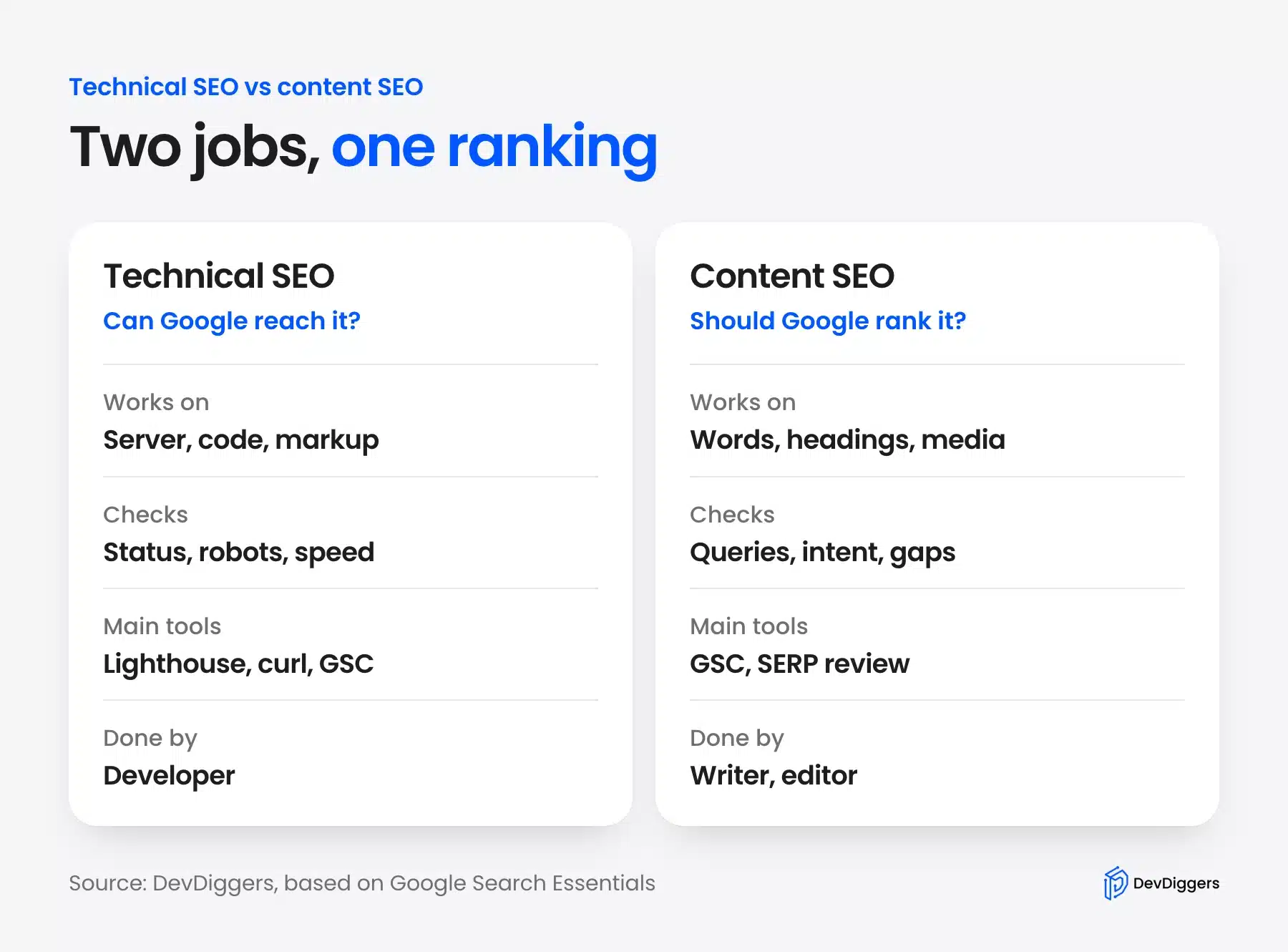
The two also fail in different ways. A technical fault is usually binary: a page is indexed or it is not, and a fix often works within days.
A content gap is a matter of degree. The page is indexed but ranks at position 60, and closing the gap takes research, writing and weeks of waiting.
They share a few areas, too. Title tags, internal links and structured data sit in both camps, because they need correct code and the right words.
Both feed the same goal in Google Search Essentials, which lists technical requirements, spam policies and key best practices side by side. Neither side ranks a page on its own.
How to Check Technical SEO on a Live Page
To check technical SEO, test the HTTP status, robots.txt and the sitemap. Then test the robots meta tag and canonical. Finish with a Lighthouse SEO audit and the structured data. Each check takes a minute with curl or a browser, and each one can block ranking by itself. These checks sit inside a wider review, which our website audit guide runs in eight steps.
I ran all five on devdiggers.com pages in October 2026. The steps below show the real output.
Step 1: Check the Status Code and Headers
Start with the HTTP response because a page that does not return 200 cannot be indexed. Run curl -sI with the page URL and read the first line and then scan the headers for caching and security.
Our test post returned a clean response:
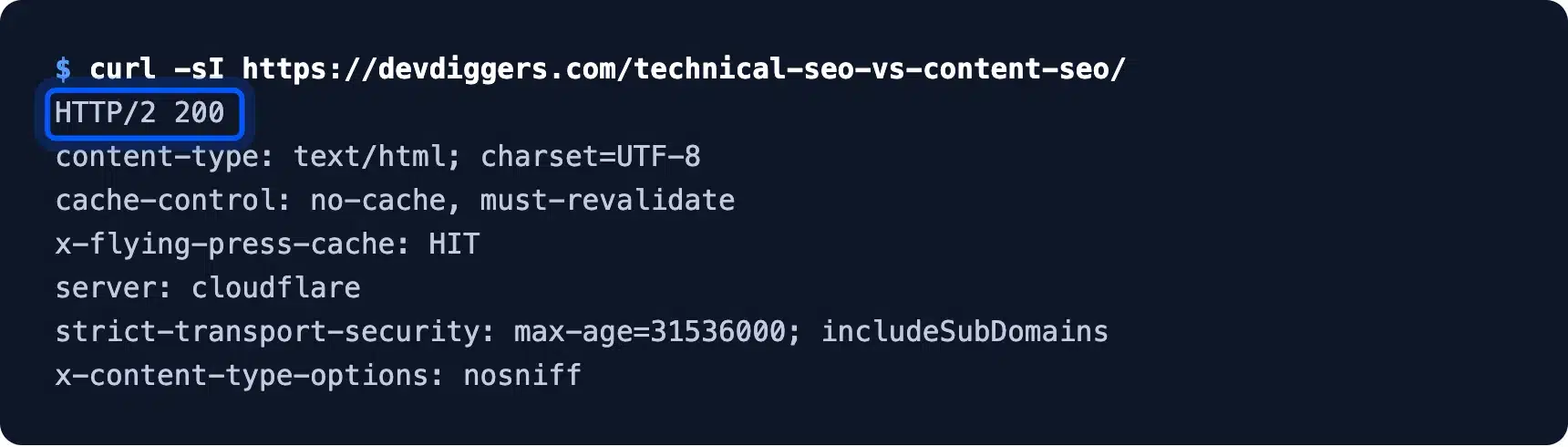
The status was HTTP/2 200, the page came from the FlyingPress cache, and HSTS was set for a year. None of that blocks indexing.
Watch for a 301 or 302 on a URL you link to internally, or a 404 or 5xx on any page you want ranked. Redirect chains waste crawl time and should point straight to the final URL.
Step 2: Check Robots.txt and the Sitemap
Next, read robots.txt to confirm nothing important is disallowed and check that it points to a sitemap. Open the file at your domain followed by /robots.txt and then open the sitemap it lists.
Here is the live devdiggers.com file:
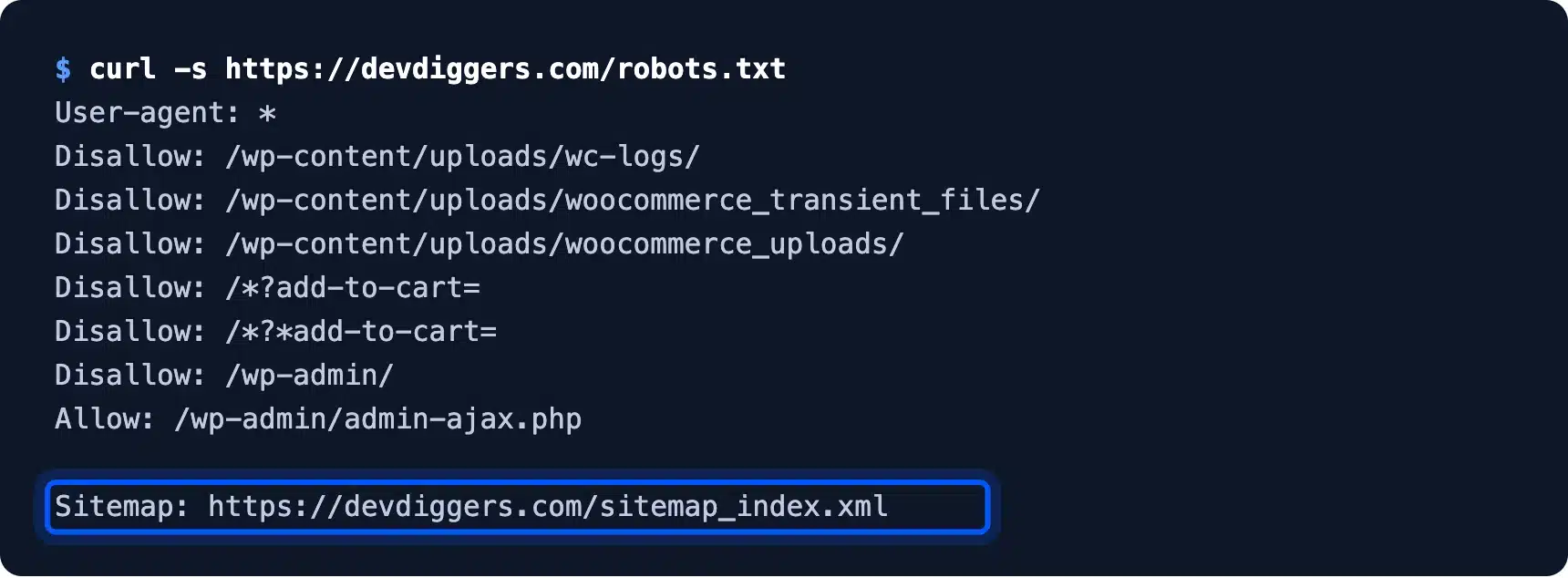
It blocks only WooCommerce log folders, add-to-cart URLs and wp-admin, and it lists the Rank Math sitemap index. That sitemap held 275 post URLs when I counted them in October 2026.
Remember that robots.txt controls crawling, and indexing is a separate step. Google’s robots.txt introduction warns that a blocked URL can still show in results if other pages link to it.
Step 3: Check the Robots Meta Tag and Canonical
The robots meta tag tells Google whether a page may be indexed. Read it on every page that should rank. Search the page source for the robots meta tag and the canonical link, or use the grep command below.
This is where our test post failed. It carried “follow, noindex” and had no canonical at all, while an indexed post on the same site had both:
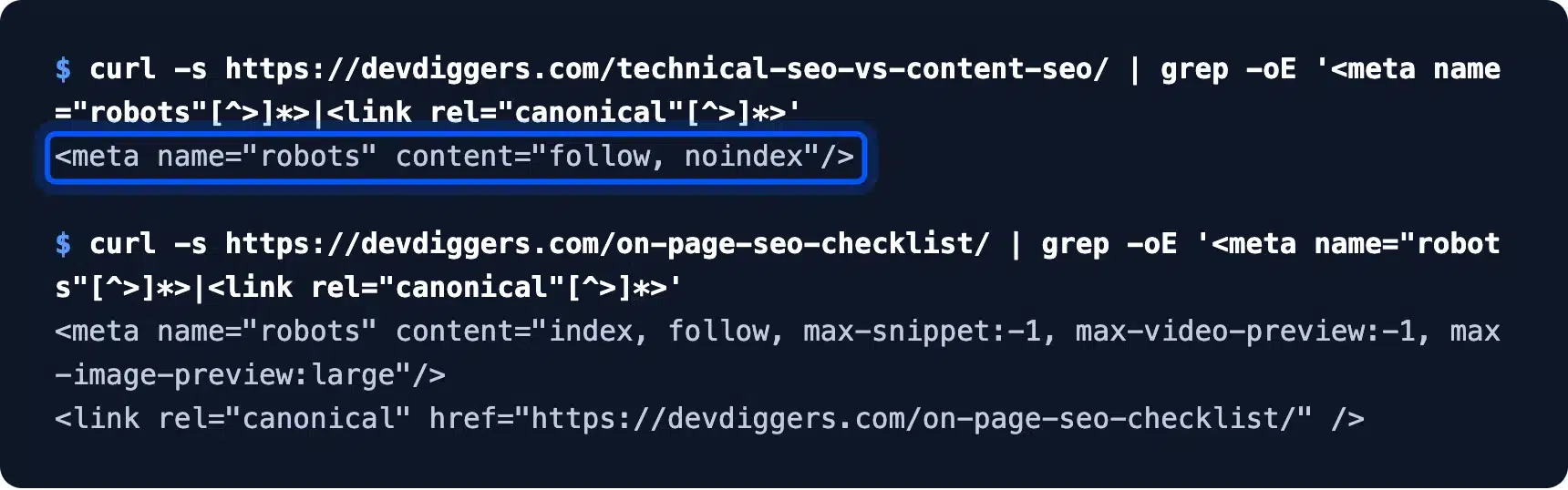
Google’s guide to blocking indexing with noindex explains that Google drops a page with this tag from results entirely.
On WordPress with Rank Math, the setting lives in the post editor under Rank Math > Advanced > Robots Meta. Switch it back to index once the page is ready to rank.
Step 4: Run a Lighthouse SEO Audit
Lighthouse runs a quick set of SEO checks in Chrome, including crawlability, title, meta description, link text and image alt text. Open DevTools, pick the Lighthouse tab, tick SEO and run it on a mobile profile.
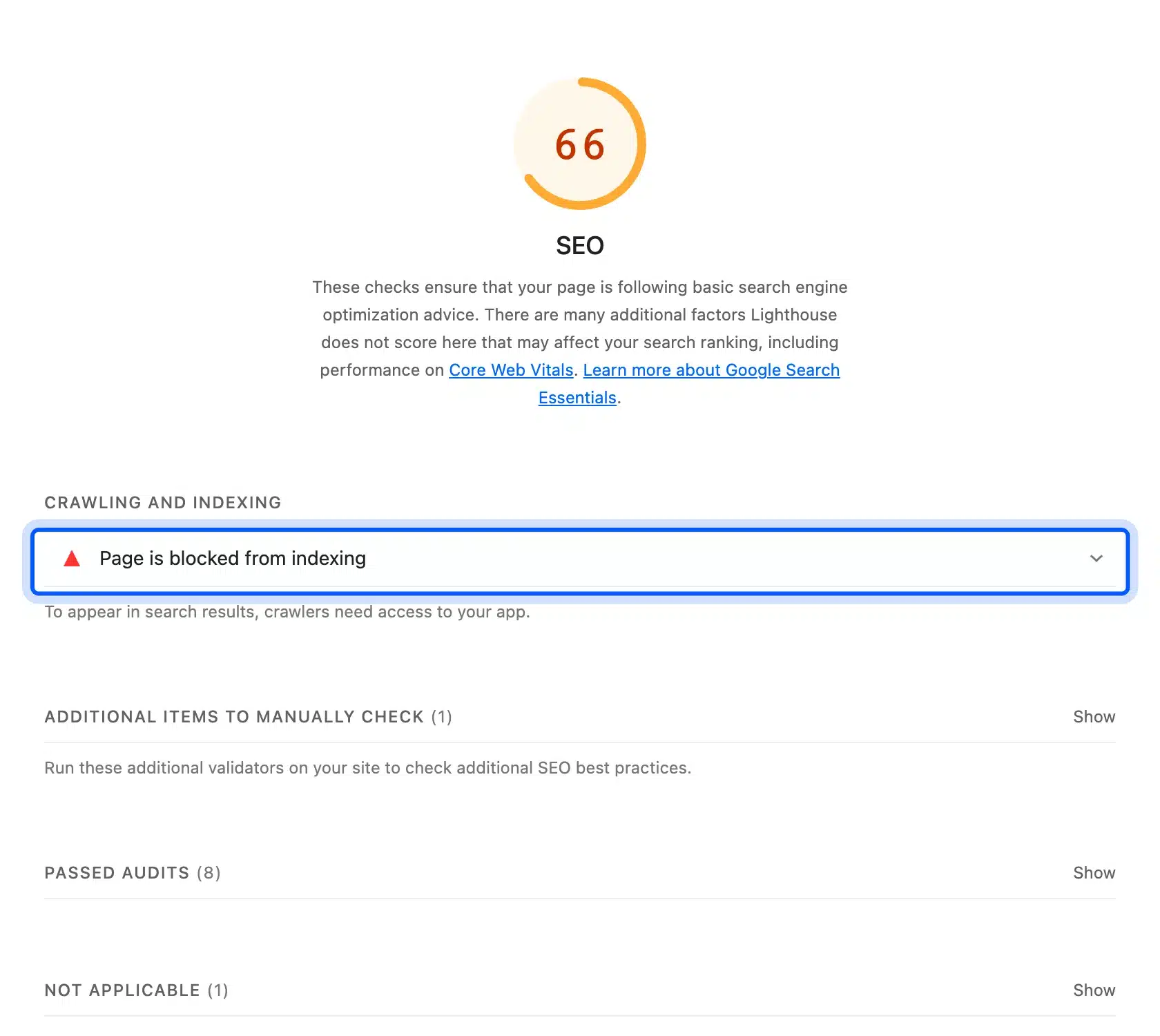
On our noindexed test post, the SEO score was 66. One audit failed, “Page is blocked from indexing”, which carries most of the weight:
The same test on our indexed on-page SEO checklist scored 100 with 10 audits passed:
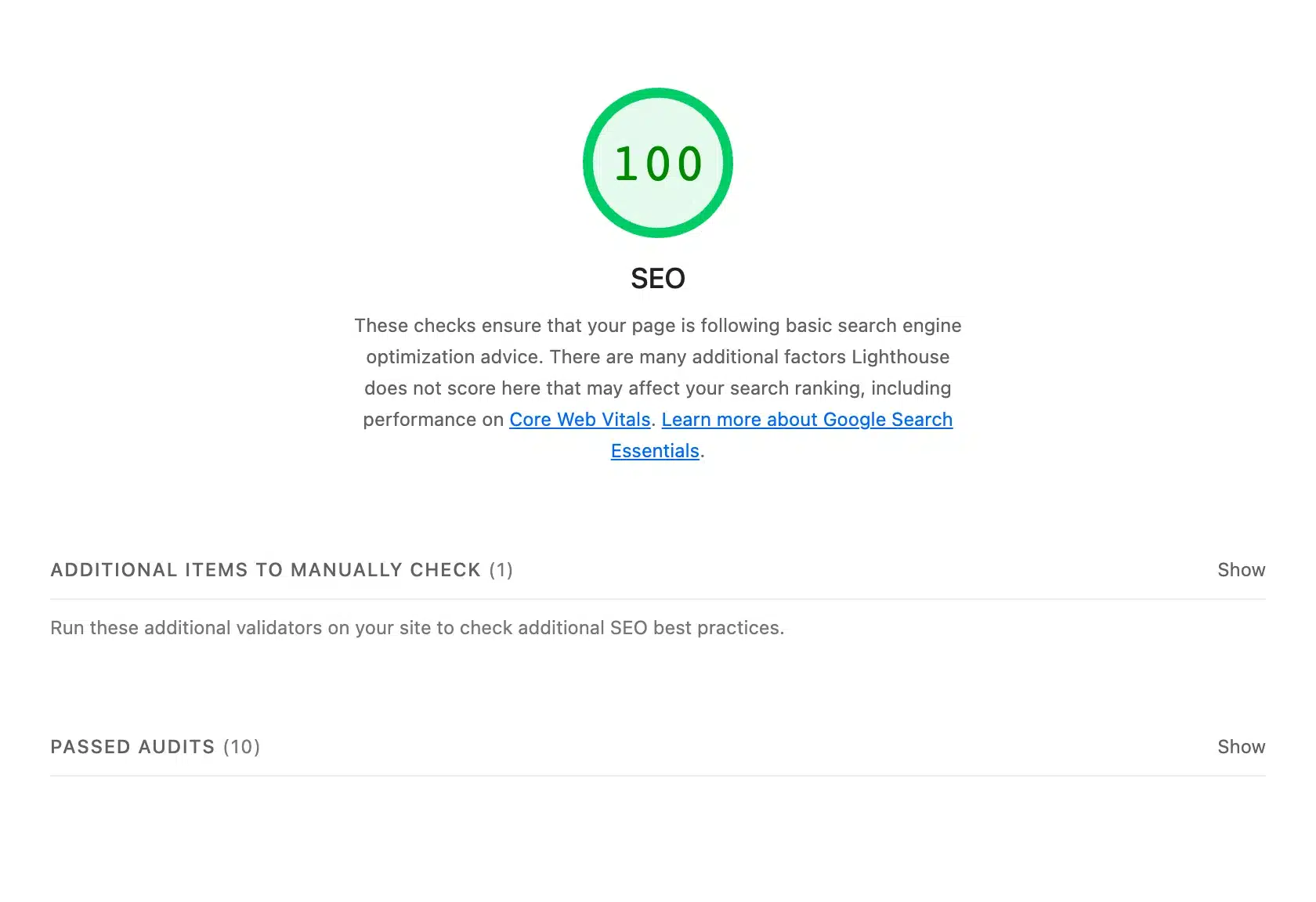
Both pages scored 100 for accessibility and best practices. So one tag moved the SEO score by 34 points, and nothing else differed.
The Lighthouse is-crawlable audit docs list what triggers that failure. A 66 with everything else green almost always means a noindex or a blocked robots rule.
Step 5: Check the Structured Data
Structured data tells Google what a page is, such as an article, a product or an FAQ. Read the JSON-LD in the page source, or paste the URL into Google’s Rich Results Test, and confirm the types match the page.
Our indexed checklist post output eight schema types and every one came from Rank Math:
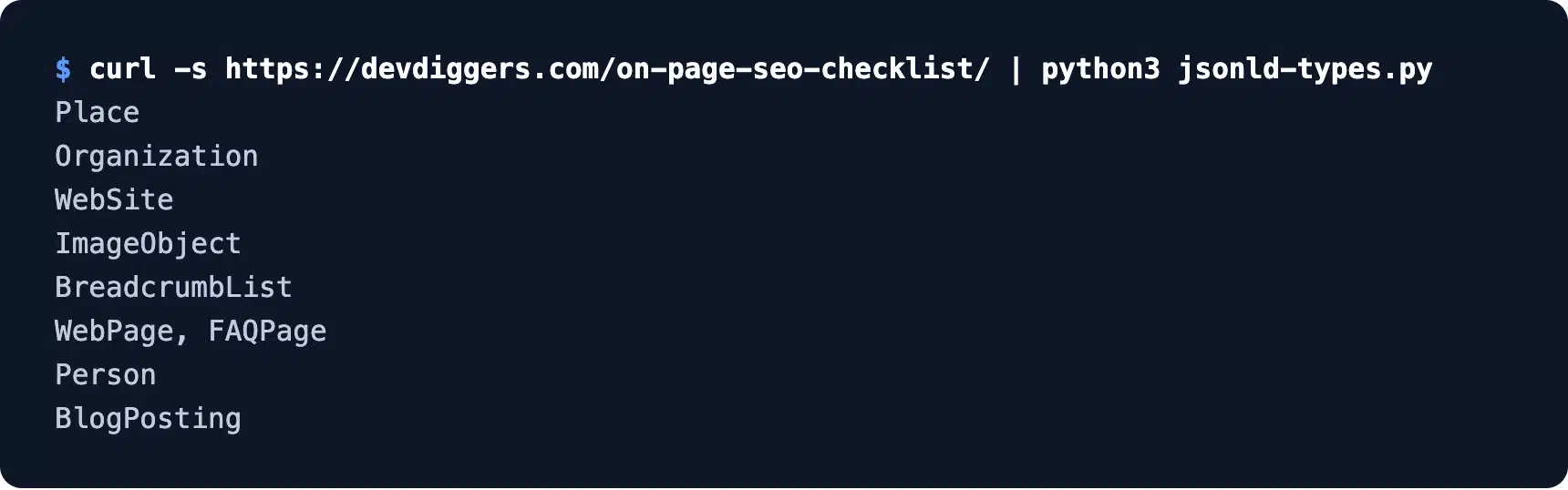
BlogPosting, Person, BreadcrumbList and FAQPage are the ones that matter for a post. The structured data introduction explains which types can earn rich results.
The noindexed page output the same eight types. Schema cannot help a page that Google is told not to index, which is why the robots check comes first.
How to Check Content SEO on a Page
To check content SEO, compare the queries the page shows for with the shape of the top three results. Then test how well each section answers its heading. Search Console gives the first, a manual SERP review gives the second, and a section by section read gives the third.
I ran all three on that same post before it was rewritten. The steps below show what each check found.
Step 1: Match the Page to Its Real Queries
Open Search Console > Performance, filter by the page URL and read the Queries tab. Each query is a promise the page must keep. Any query without an answer on the page is a gap.
From May to September 2026, that post showed for six queries. The biggest surprise was the top one:
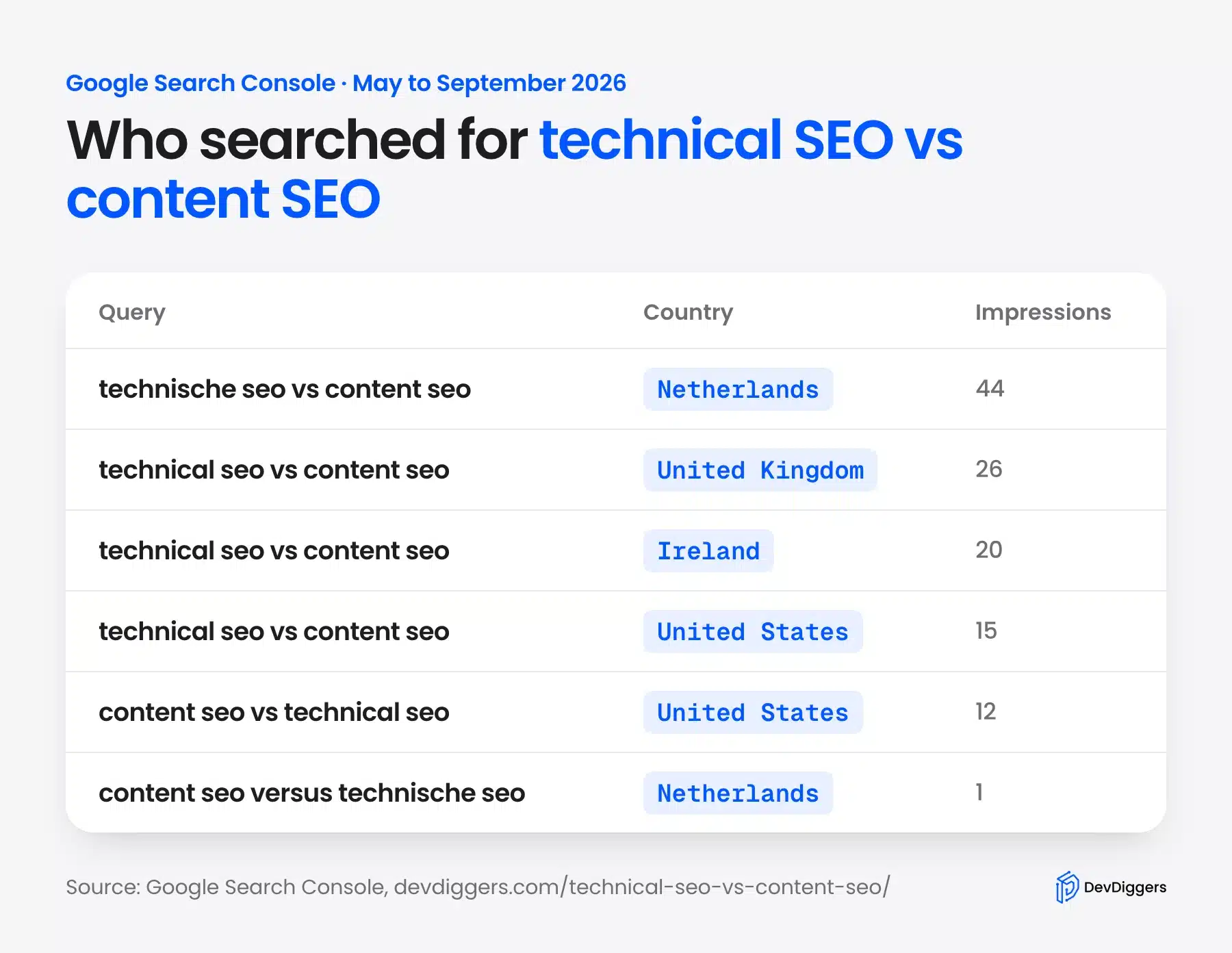
“Technische SEO vs content SEO” drew 44 impressions, all from the Netherlands, more than any English query. The post never mentioned the Dutch term once.
The English query “technical SEO vs content SEO” came from the UK, Ireland and the US. Every one sat near position 90, where almost nobody clicks.
Step 2: Compare the Page With the Top Results
Read the top three pages for your query and count their words, headings and tables. You are measuring the depth that already ranks for the query. Your page can match it and then add what the others lack.
Here is what the top three showed in October 2026:
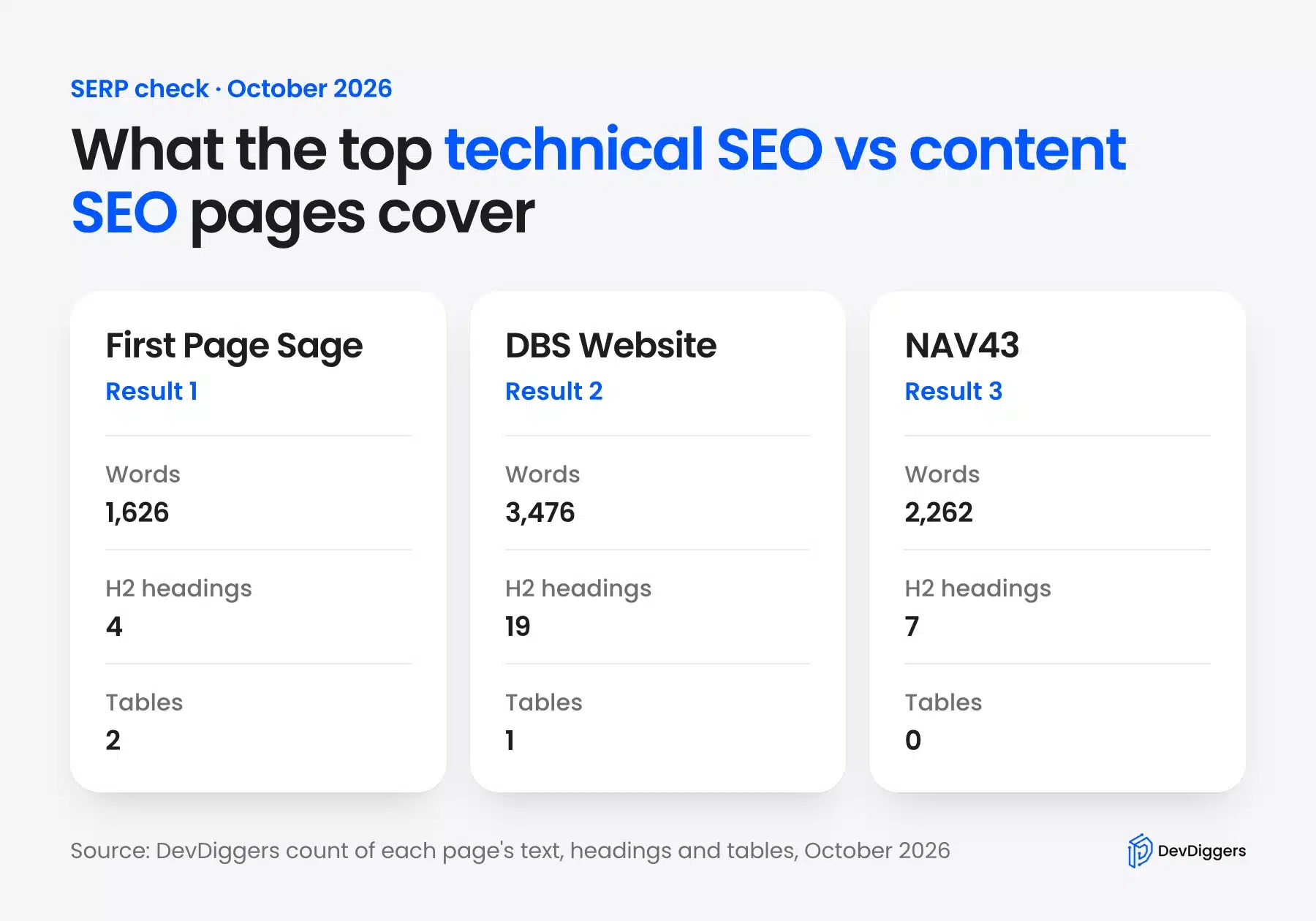
They ran 1,626 to 3,476 words, and two of the three used a comparison table. None of them showed a single real test on a live site.
That gap is the angle to take. Anyone can list the differences. A page earns its place with checks readers can repeat on their own site.
Step 3: Check That Each Section Answers Its Heading
Read every H2 and the paragraph under it. The first two or three sentences should answer the heading on their own. That paragraph is the one a featured snippet is most likely to quote.
Our test post failed this check in several places. Headings such as “Think of It this way” and “Bottom line?” promised nothing a searcher would type:
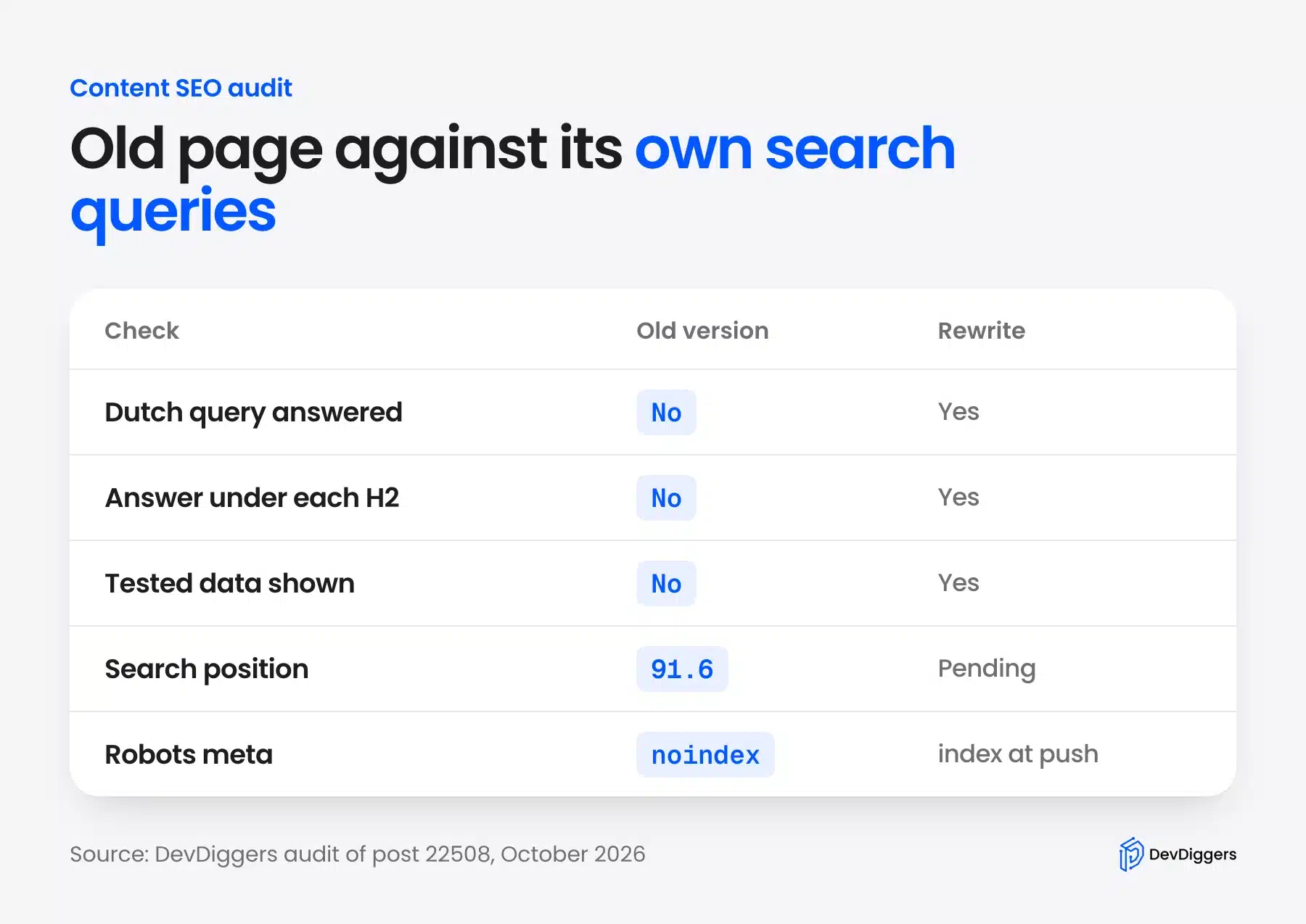
It also had no tested data and no answer for the Dutch query. Those three gaps, plus the noindex, explain a page stuck near position 92 with zero clicks.
Fixing them is content work, and no code changes are needed. The fix is an answer paragraph under every H2, real test results and a line for the Dutch term.
Which Matters More: Technical SEO or Content SEO?
Technical SEO comes first, because a page Google cannot index cannot rank at any position. Once the technical checks pass, content SEO matters more, since it decides where an indexed page ranks. For most WordPress sites, the technical side is a short checklist and the content side is ongoing work.
Content SEO vs technical SEO is the same comparison read in reverse, and our test post shows the order. With noindex on, no amount of writing could have moved it, because Google was told to leave it out.
After the technical basics pass, the gains come from content. A page stuck near position 90 on a clean server needs better answers.
Think about effort, too. The five technical checks above are one command or one click each, while content checks mean reading pages and rewriting sections.
So fix technical blockers the day you find them and then spend most of your SEO time on content. Recheck the technical side after any theme change, plugin update or migration.
Content work also includes old posts. Learn how to find and fix content decay before traffic slips.
A practical split for a small site is a monthly technical check and weekly content work. If you would rather hand both to a team, our WordPress SEO services cover audits, fixes and content plans.
New pages need one more technical step. After publishing, submit your website to Google Search through Search Console so the page gets crawled sooner.
Conclusion
Technical SEO vs content SEO is not a choice between two options. Technical SEO opens the door, and content SEO gives Google a reason to rank what it finds.
Our own test shows why the order matters. One noindex tag cut our test post’s Lighthouse SEO score from 100 to 66. It also kept the post out of search whatever the text said.
So run the five technical checks first and then match each page to its real queries and the top results. Repeat both on a schedule because settings drift and search results change.
Frequently Asked Questions (FAQs)
Q1. Is technical SEO harder than content SEO?
Technical SEO needs more tools and some code knowledge, but the checks are fixed and repeatable. Content SEO is harder to finish, because there is always a better answer to write and the results change.
Q2. Can a site rank with only content SEO?
Yes, if the platform gets the technical basics right by default, as most WordPress setups with an SEO plugin do. One wrong setting, such as a noindex tag, still removes a page entirely.
Q3. How often should I check technical SEO?
Check monthly on a stable site, and right after any theme change, migration or major plugin update. Those are the moments when robots rules, redirects and canonical tags change.
Q4. Does page speed count as technical SEO?
Yes. Speed and Core Web Vitals are technical work, done in hosting, caching and code. Google uses page experience signals, but a fast page with weak content still ranks poorly.
Q5. Is on-page SEO the same as content SEO?
They overlap but are not the same. On-page SEO covers everything on the page, including titles, headings, alt text and schema. Content SEO focuses on the words and their match to search intent.
Q6. Why does a noindexed page still show schema?
The SEO plugin prints schema on every page it builds whether or not the page is indexable. A page that noindex keeps out of results cannot show a rich result. The markup does nothing there.