Creating a loyalty program for your WooCommerce store requires the following steps: installing a loyalty (points and rewards) plugin, establishing the points earning rules, defining how to redeem points, and displaying the program to customers throughout your shop.
If implemented correctly, loyalty programs can convert one-time purchasers into repeat purchasers who select your shop over lower-priced stores. Many tutorials may cover how to add the loyalty plugin, but this tutorial will go beyond just plugin installation.
You will receive instructions on how to set up a loyalty program in WooCommerce within minutes, configure earning rules, set VIP tiers, develop a referral program, market the program, and identify indications that a program is not working as intended.
What Is WooCommerce Loyalty Program?
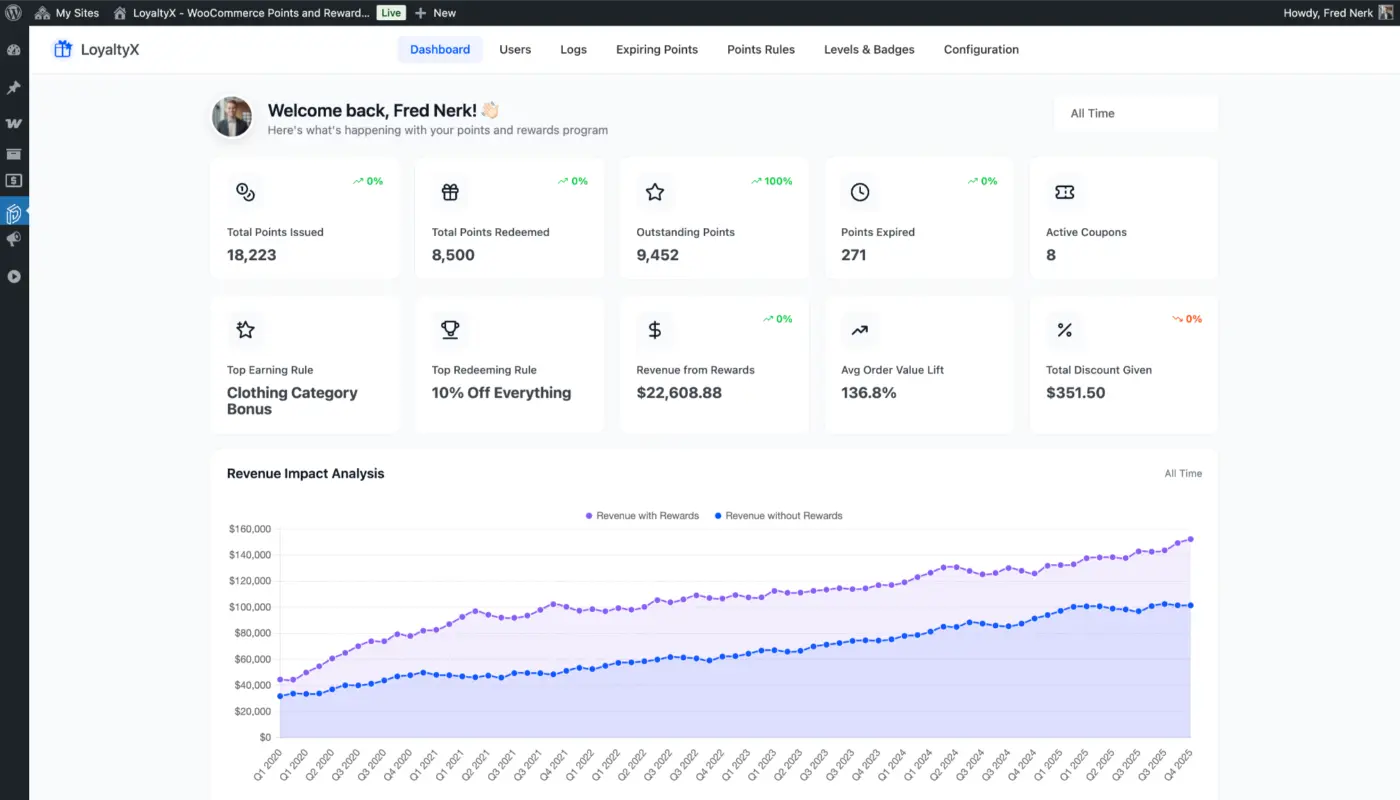
A WooCommerce Loyalty Program is a rewards-based loyalty system utilised with your WooCommerce online retail business. Customers have the opportunity to earn points for any of the defined actions you provide, e.g., placing an order, leaving a review, referring a friend, etc. Additionally, customers can use those earned points to gain discounts, redeem a free product, or gain in-store credits or free shipping.
The largest differentiation between a loyalty program and a coupon is the intent of each. Coupons serve as a one-time incentive for customers. Conversely, the loyalty program provides customers with an ongoing reason to return to the business. When customers have a point balance, it increases their desire to grow their points and gives them more reasons to shop at your business rather than that of a competitor.
It also needs to be stated plainly: there is no loyalty program offered as part of the functionality of WooCommerce; a plugin is needed to incorporate a loyalty program into your WooCommerce business.
Why Your WooCommerce Store Needs a Customer Loyalty Program
Here’s a number worth sitting with. Research from Bain & Company, referenced widely across customer retention research, shows that a 5% increase in customer retention can raise profits by 25% to 95%. A new customer also costs five times more to acquire than keeping an existing one.
The economics flip in your favour quickly once a loyalty program starts working. Returning customers spend more per order. They’re also more likely to refer friends, leave reviews, and forgive the occasional shipping delay.
For WooCommerce store owners specifically, this matters because the default platform gives you no natural incentive for customers to return after checkout. There’s no balance, no progress bar, no reward waiting. A WooCommerce loyalty program adds that layer.
And the data backs it up. According to loyalty program ROI data from Capital One Shopping, loyalty program members generate between 12% and 18% more revenue per year than non-members. That’s not a marginal improvement. For a store doing $200,000 in annual revenue, that’s an extra $24,000 to $36,000 from customers you already have.
Choose the Right WooCommerce Reward Points Plugin
Before you configure anything, you need a plugin. And the plugin you choose matters more than most guides admit.
When we are looking for the best WooCommerce Reward Points Plugin, a lot of people get confused about which one to use. Let’s all agree on one thing: there isn’t a perfect solution out there! We want our customers to enjoy multiple avenues (ways) of earning & redeeming Points while having as much variety of options as to how they can redeem these points (types of cashback).
If you want to create an effective scheme, however, you’ll need to consider options for your customers, some of which include:
- Earning rule flexibility: Can you award points for purchases, reviews, signups, referrals, and birthdays separately? Some plugins lock you into a single “points per dollar” rule and nothing else.
- Shortcode or block support: You’ll need to display points on product pages and at checkout. A plugin that only works in one location limits how visible your program can be.
- Options for Redemption: Users should have multiple ways of being shown what they’ve earned through their Points program. Some examples may include a percentage off items, a dollar off their purchase, receiving free items, or attempting to receive free products.
- Support for Tier Levels: If you would like to have a VIP system for your customers, you will need to use something that supports this method of working with them. This will prevent you from needing an additional membership program to offer them tiered pricing.
- Clean Customer Dashboard: As a customer, you want to be able to see your balance, what you spent and what rewards you can claim as well. If this information is hard to find, it may cause your customer to lose interest quickly and stop engaging with you.
We have created over 25 WooCommerce plugins, and we have been exposed to many different methods for creating loyalty systems for eCommerce stores. The LoyaltyX is a points and rewards for WooCommerce plugin that has combined all of these elements into one single plugin with the following features:
- 8 ways to earn points
- 7 ways to redeem points
- VIP Membership Tiers
- Automated Referral Program
- Customer Dashboard
- And much more
The LoyaltyX plugin also has a free version, so you can test it out before you purchase it.
If you would like to compare the different WooCommerce loyalty options available, please check out our post on the best WooCommerce points and rewards plugins, where we provide a comprehensive breakdown of all the best WooCommerce points and rewards plugins.
How to Set Up a Loyalty Program in WooCommerce — Step by Step
The steps below use LoyaltyX as the working example. The logic applies to any equivalent plugin.
Step 1: Installing and Activating LoyaltyX
- Go to your WordPress dashboard.

- Then, go to Plugins > Add New.

- Click on Upload Plugin at the top of the screen with the intent to upload the plugin zip file and select the plugin file from your computer that you wish to install.
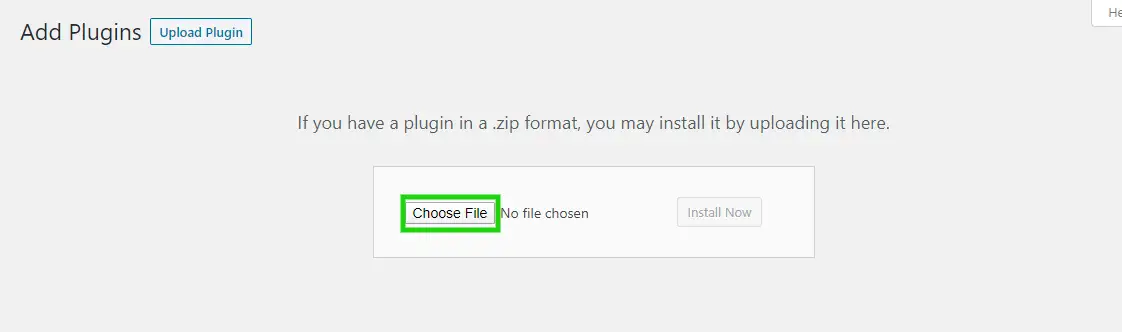
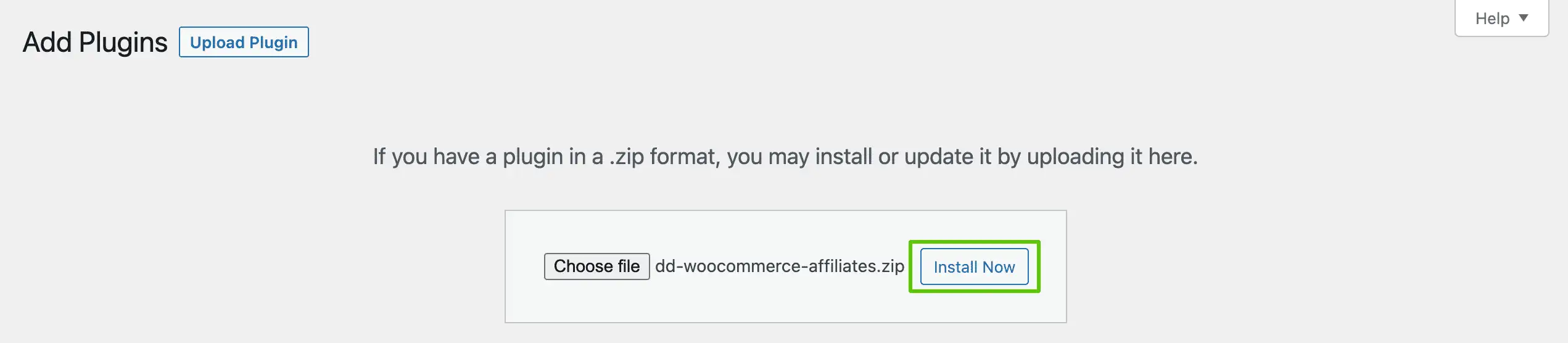
- Click on Install Now to install the plugin.
- Click on Activate to use the plugin on your website.

Once activated, you’ll see a new LoyaltyX menu item in your dashboard sidebar. Click it to open the main settings panel. The first screen is General Configuration. Here you’ll set:
- Points label: What do you call your currency? “Points,” “Coins,” “Stars,” and “Gems” all work. Pick something that fits your brand.
- Points icon: Optional, but customers respond well to a visual symbol.
- Rounding rules: Whether partial points round up or down.
Save your settings before moving to the next tab.
Step 2: Configure Your Points Earning Rules
This is the most important configuration decision you’ll make. The earning ratio determines whether your program actually changes customer behaviour.
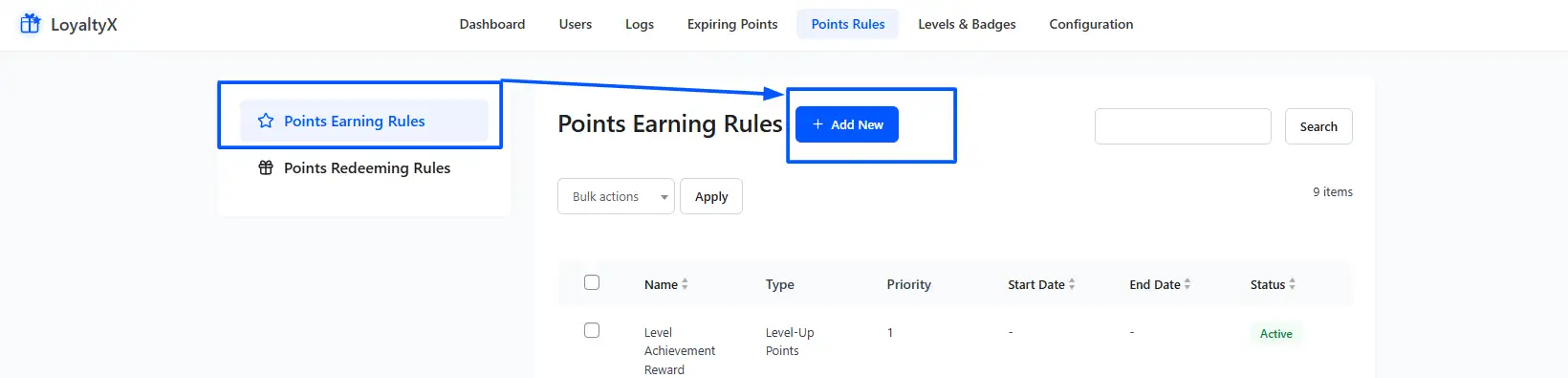
- Go to DevDiggers Plugins > LoyaltyX > Points Earning Rules.
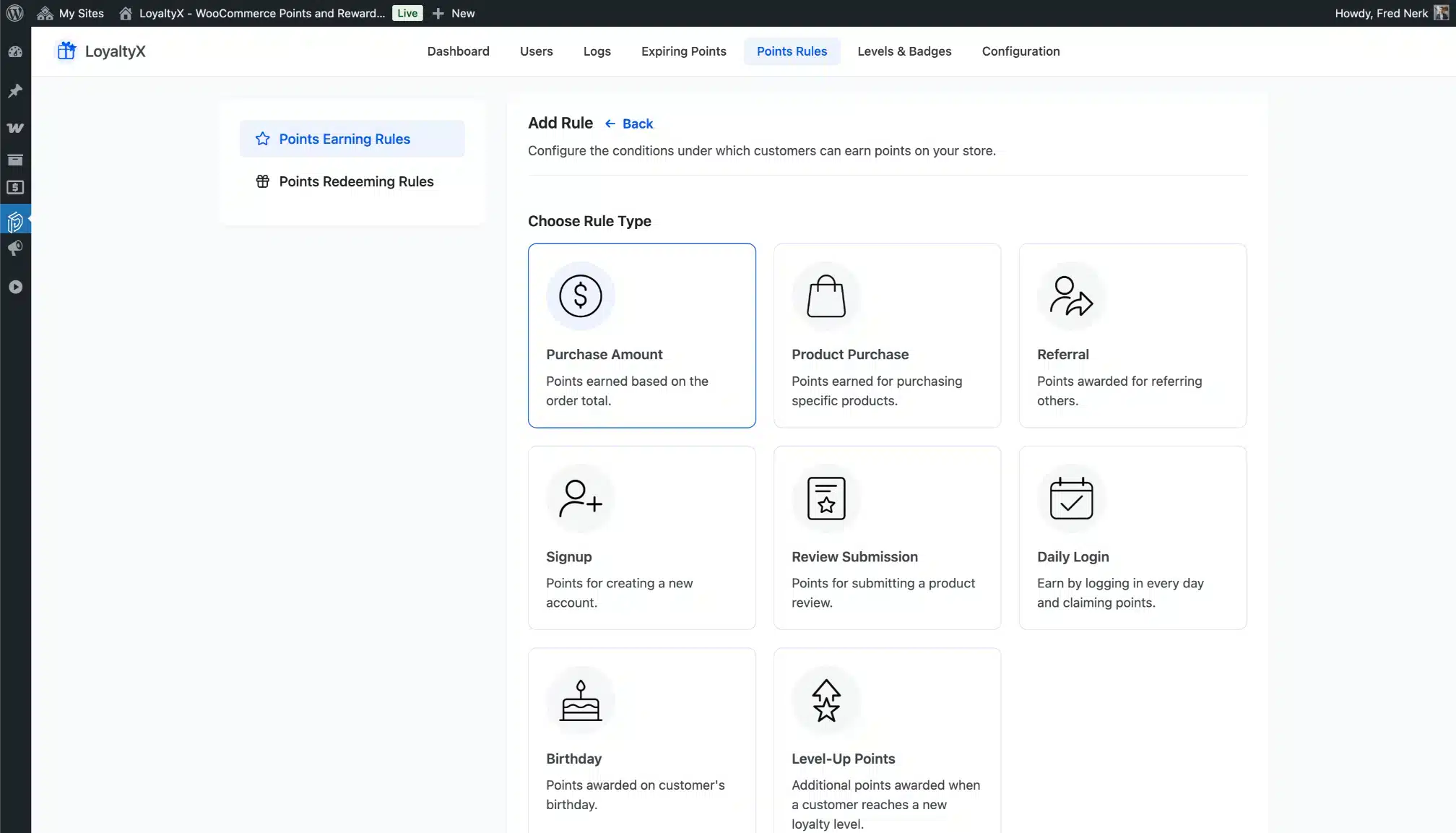
- Click Add New.
The most common rule is purchase-based: award X points for every $1 spent. A starting ratio of 1 point per $1 is safe. But here’s something most guides skip: if 500 points only earn a $1 discount, customers will calculate this instantly and ignore the program. The ratio has to feel meaningful.
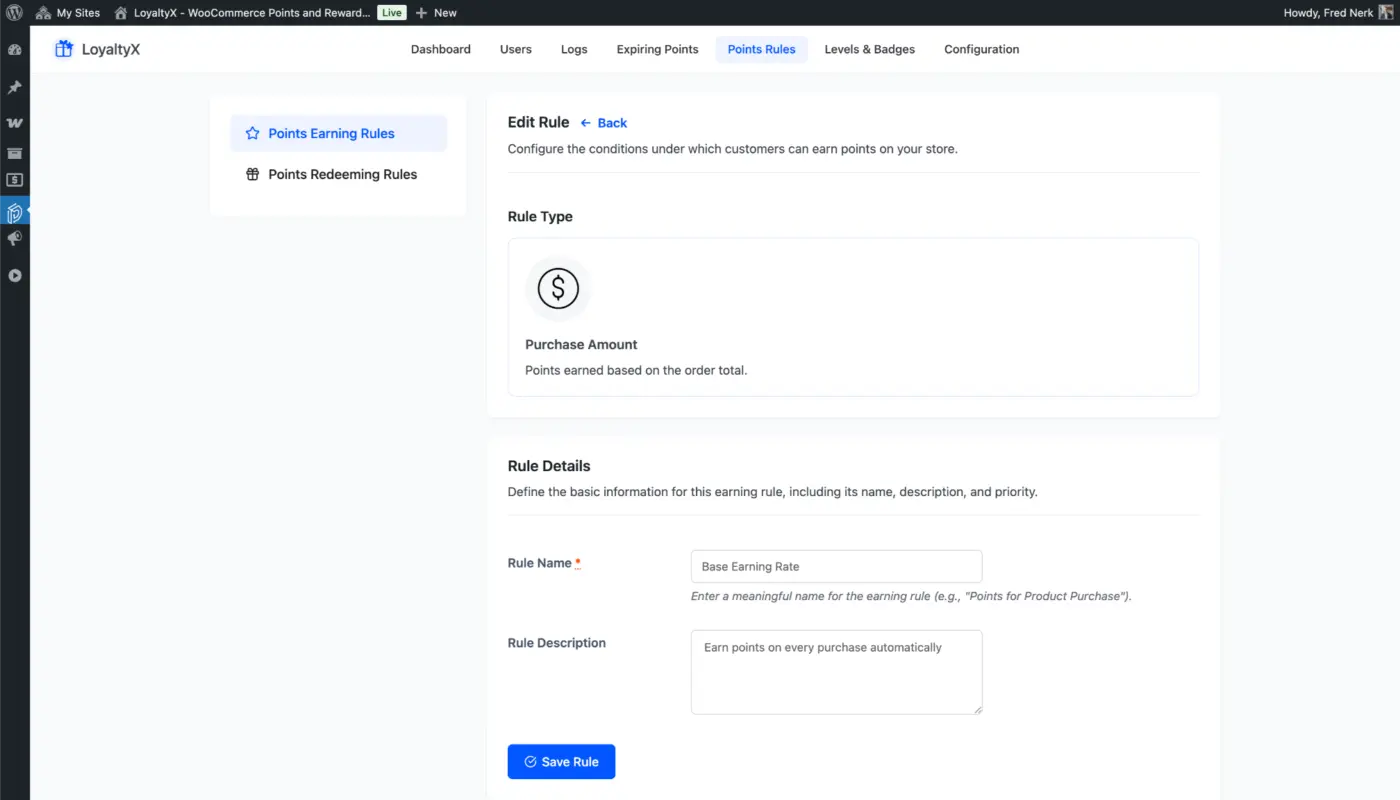
A practical benchmark: customers should be able to earn enough for a $5 to $10 reward within two or three purchases. Work backwards from that. If your average order is $60, and the customer earns 60 points per order, they’d need 250 points for a $5 reward. That means about four orders. Reasonable. If they need 2,000 points for that same $5 reward, you’ll have near-zero redemption.
Beyond purchase points, set up:
- Sign-up bonus: 50 to 100 points for creating an account. This encourages registration immediately.
- Review rewards: 25 to 50 points per product review. This doubles as a review acquisition strategy.
- Birthday bonus: A points gift on a customer’s birthday. Few stores bother with this. It’s low effort, and customers remember it.
- Referral points: Points awarded when a referred friend completes their first purchase. More on this in Step 5.
Step 3: Establish Your Redemption Rules
- Go to LoyaltyX > Point Redeeming Rule > Add Rule
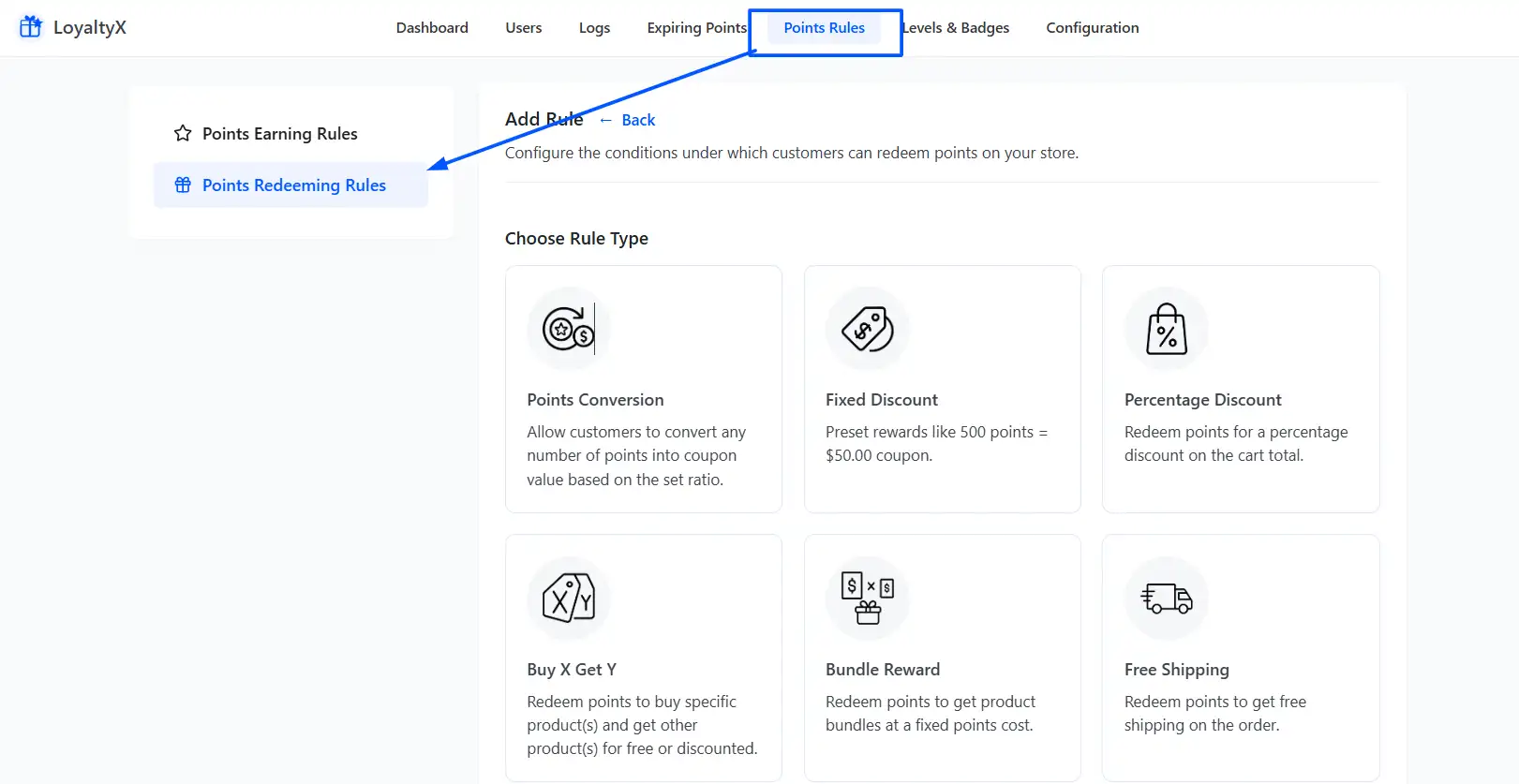
You have the following options for redeeming points:
- Fixed Discount – Five hundred points equals five dollars off your next purchase. Simple for your customers and easy to predict.
- Percentage Discount – Two hundred points equals ten per cent off an order. Best for customers with a higher average order value.
- Free Product – Customers can redeem points for specific products. If you want to set up free product rewards in WooCommerce, this rule will allow you to set it up directly in LoyaltyX.
- Free Shipping – Great option for your business since this is often a barrier to purchasing online.
Establish a minimum points requirement; however, it should also be attainable. When minimum points requirements are set above 200 to 250 points for a five-dollar reward, we often see a dramatic decline in engagement.
With your points earned at a 1-to-1 ratio, a customer who spends $50 will earn 50 points per transaction. If they have to earn 500 points before they can redeem any points, then it’ll take them 10 purchases before they are able to redeem anything. Way too long!
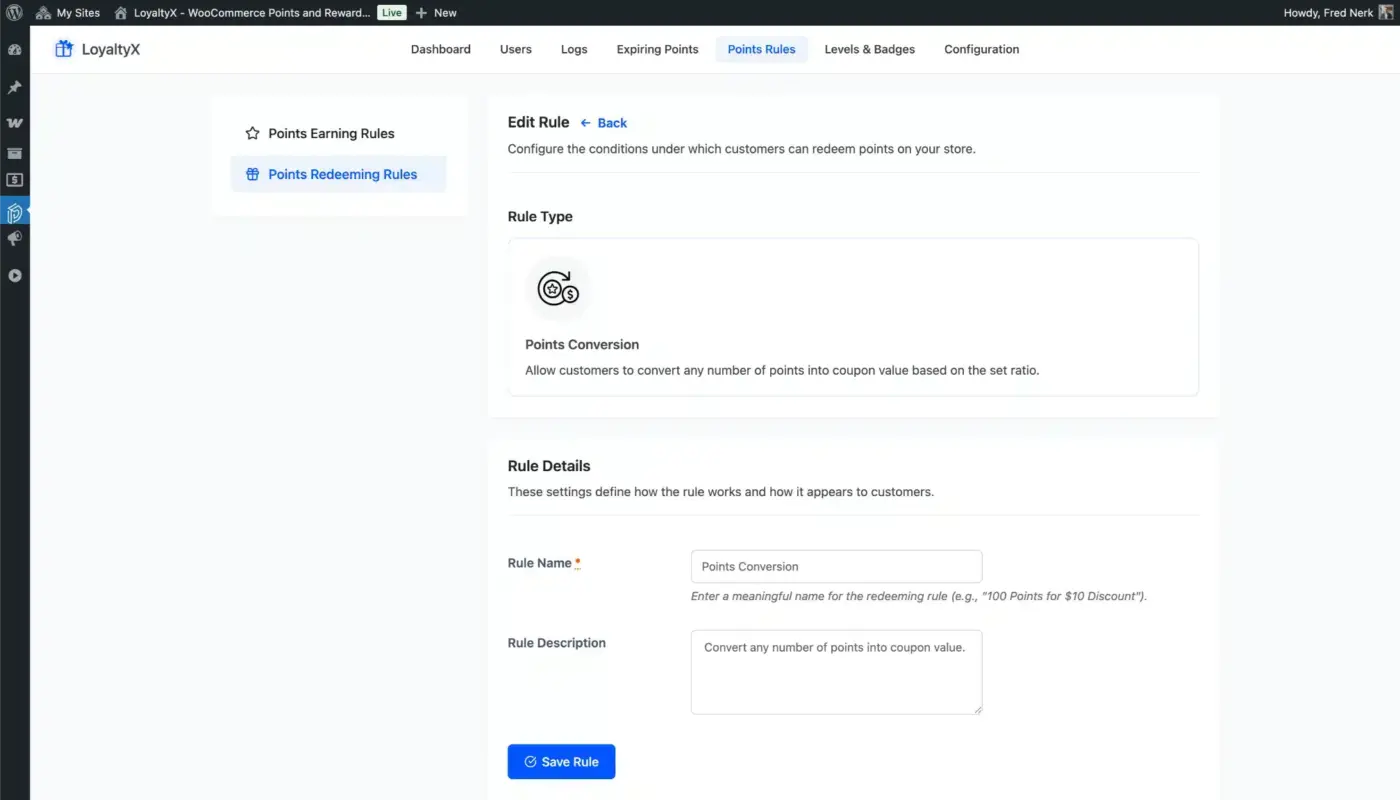
You can also establish whether or not to allow points to be applied on top of existing sale prices or only on full-priced items. For most businesses, allowing customers to redeem points on items that are already on sale helps encourage larger basket sizes.
Step 4: Add VIP Tiers to Your Loyalty Program
The WooCommerce loyalty program becomes increasingly robust at this step, while many competitor guides stop short here.
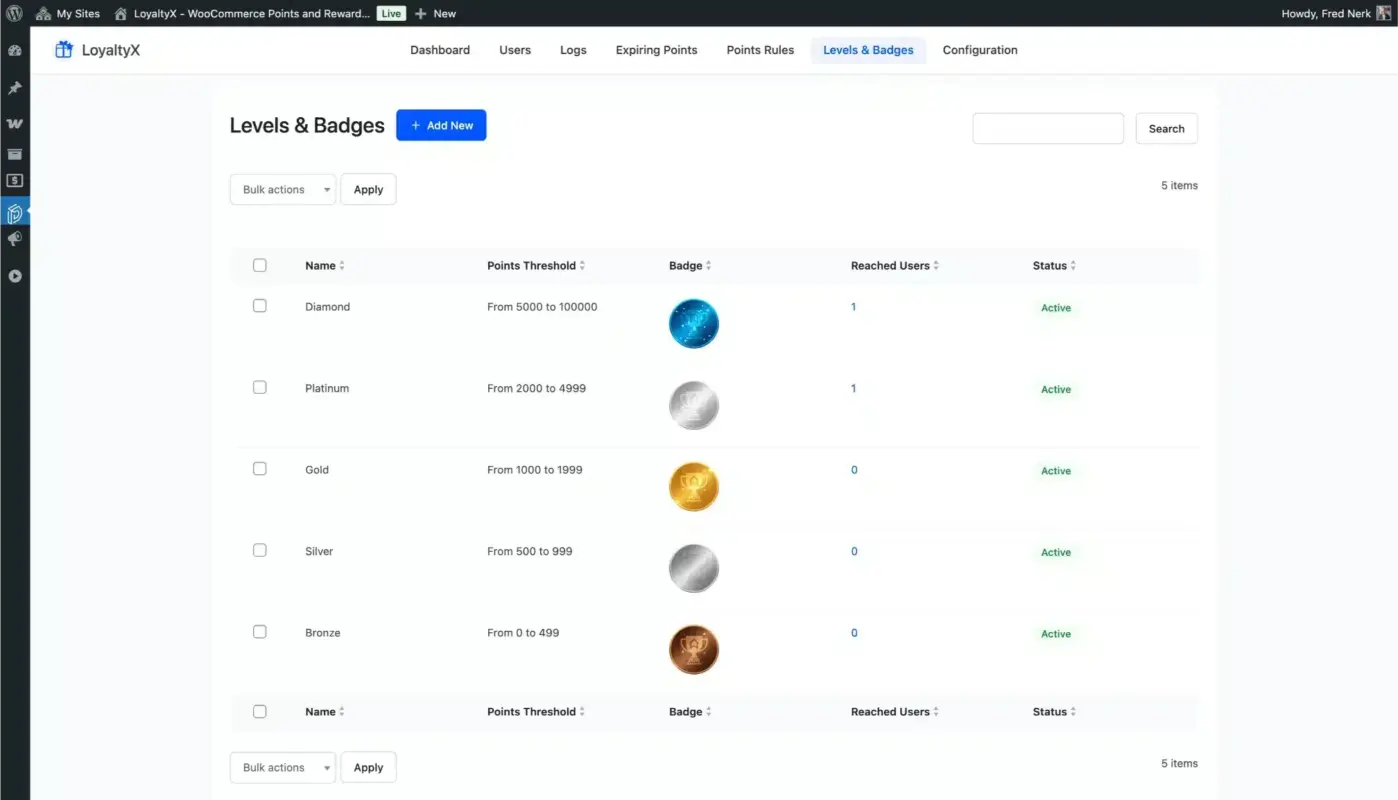
To establish your tier structure, go to the LoyaltyX section of WooCommerce and choose ‘Levels.’ The proposed three-tier program works well for most retailers and is described below:
- Bronze (The standard tier for all registered customers).
- Silver (Offered after customers have spent at least $200 or earned a minimum of 500 points). Customers receive 1.5x points for their purchases, along with a small welcome coupon.
- Gold (This tier is granted to customers who spend a minimum of $500 or earn 1,500 points). Customers receive 2x points awarded for every dollar spent and have early access to sales, plus receive free shipping (on all orders).
When setting up your tiers, there are a few things you will want to keep in mind. First, you always want to publicise your tier thresholds (so that customers know how close they are; it creates excitement). Second, when setting up a new rewards program, you always want to start with only 3 tiers; see how well customers respond and build from there.
Thirdly, you will also want to have clear messaging regarding your tier reset logic (if you reset to the Bronze tier on an annual basis, regardless of spending, communicate this clearly; resetting tiers unexpectedly will quickly destroy goodwill).
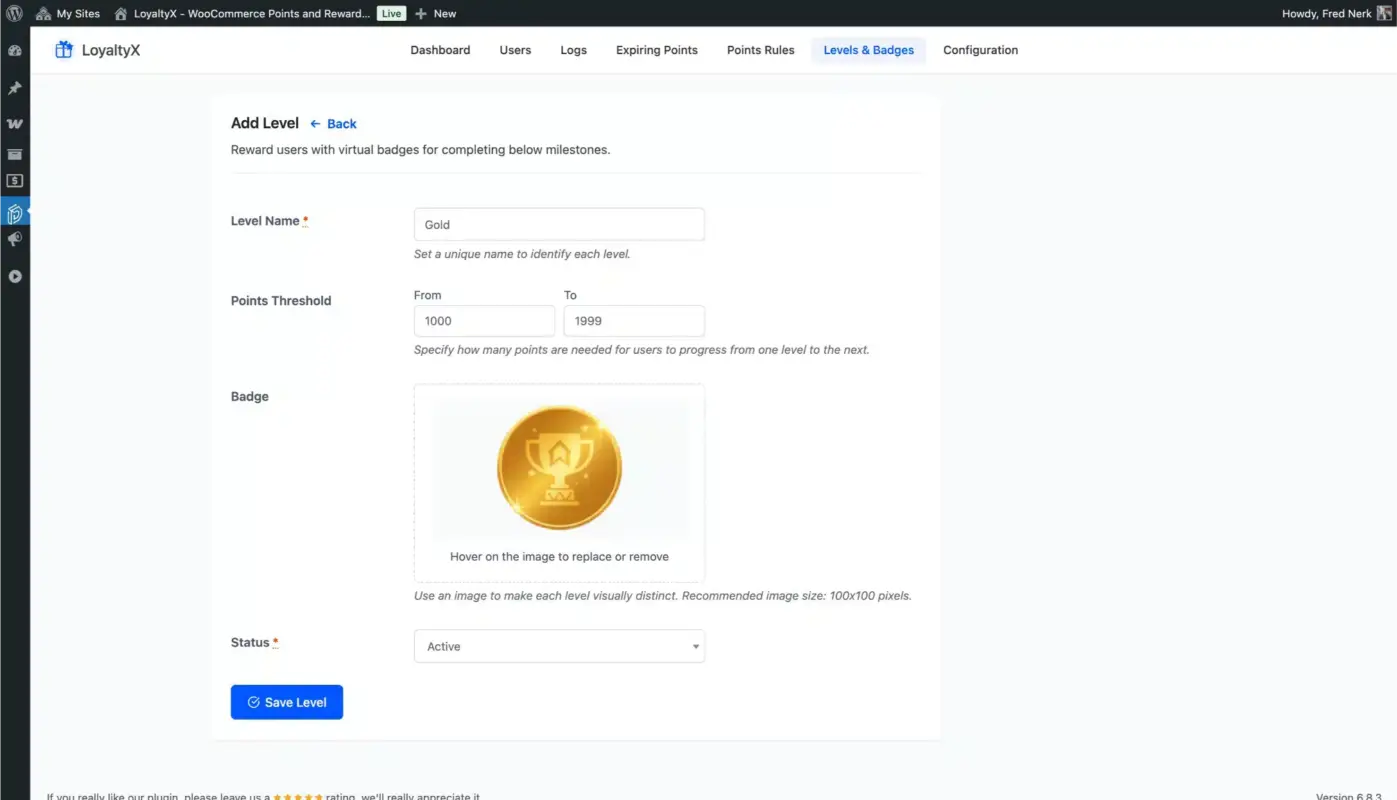
VIP tiers offer a unique approach to involve customers in your loyalty program because they rely on status-based motivation. If a customer sees that they are only 2 purchases from achieving the Gold tier, they may be more inclined to shop at your location versus at a comparable competitor (even if your competitor offers lower prices).
Step 5: Set Up a Referral Rule
You can create a referral rule by visiting DevDiggers Plugins > LoyaltyX > Points Earning Rules > Add Rule > Referral and activating it.
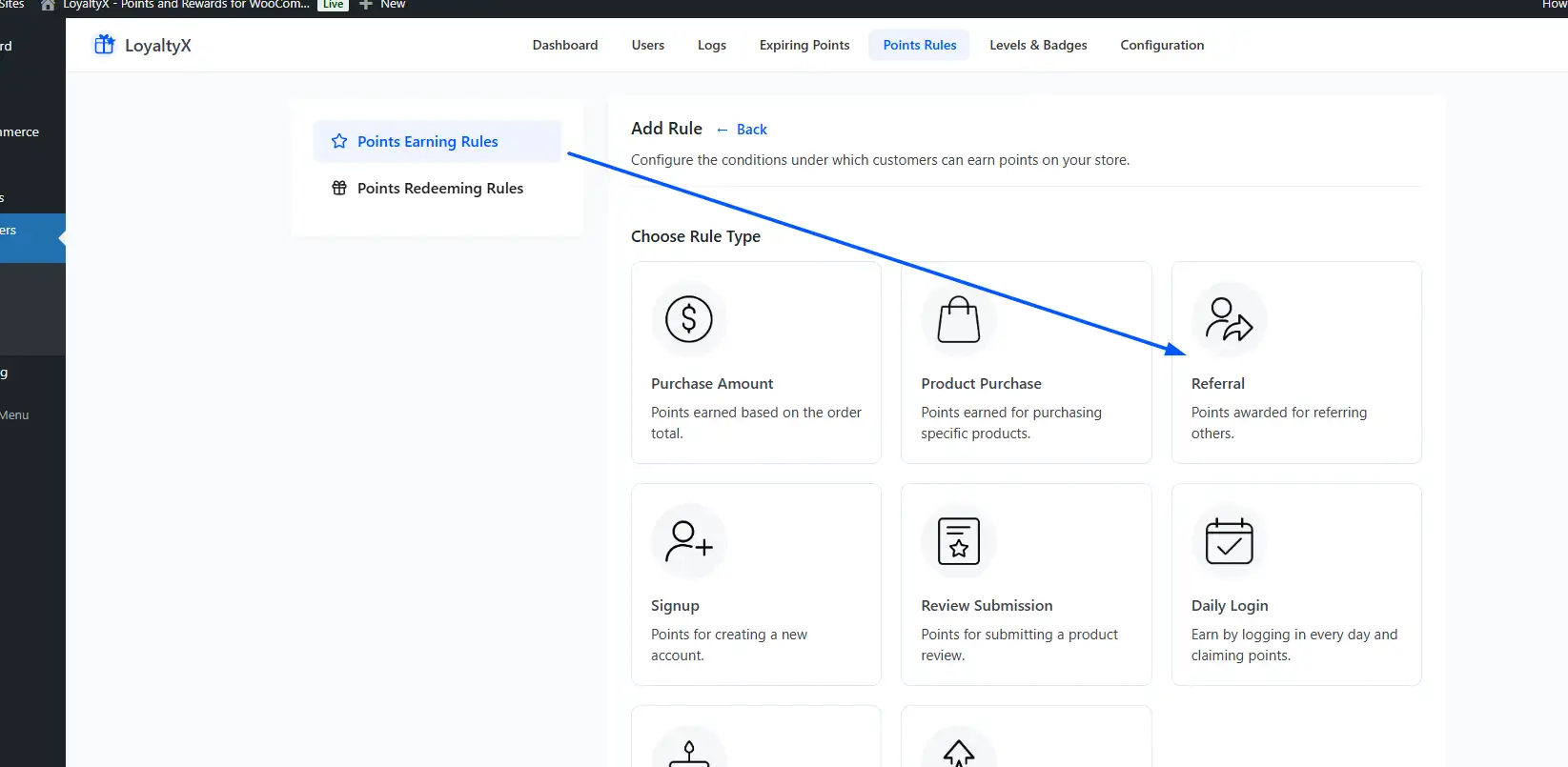
Every customer will receive their very own referral link upon creating their account. If a new customer registers via that referral link and makes his/her first purchase, both customers (the one bringing in the new customer and the new customer) will earn points.
Feel free to be generous at the beginning with this referral program. A referral has a high value, so if you have a customer whose lifetime value is $300, giving away 200 points (at $4 worth of a discount) is a solid return on investment for you since the original customer brought in the new customer.
You should also reward both customers with something (the customer bringing in the new customer, as well as the new customer). This will encourage the new customer to use their discount right away and make that first purchase.
Step 6: Handle Guest Customers
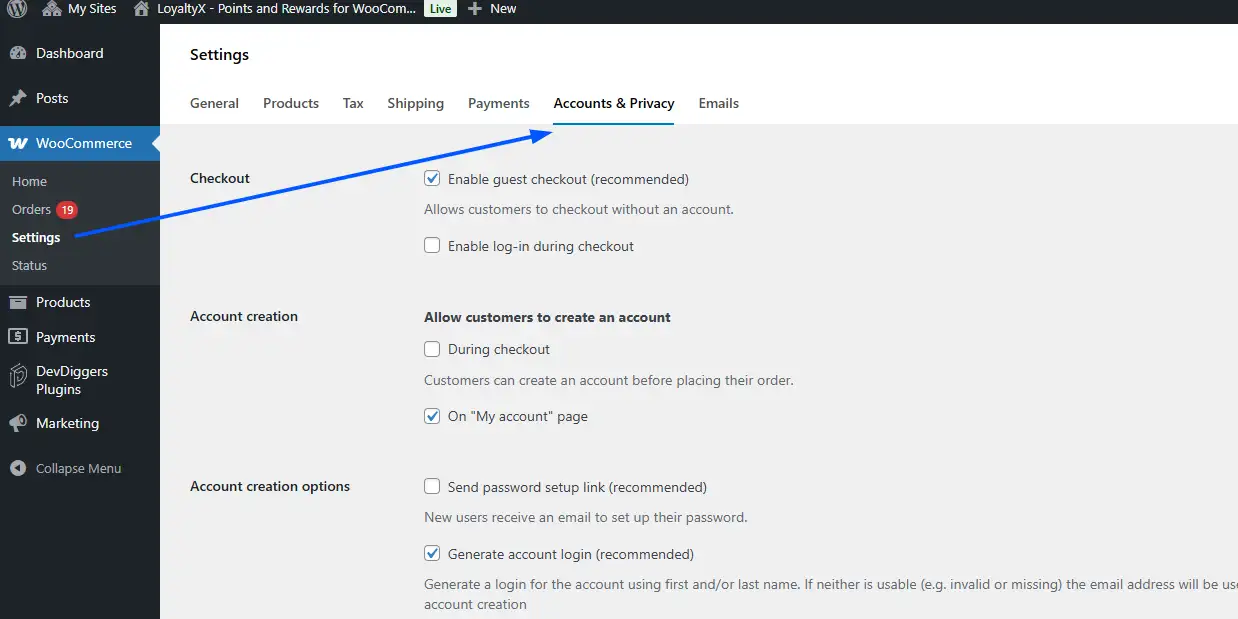
This is a real friction point that most guides gloss over.
WooCommerce has an Accounts and Privacy setting that controls whether customers must create an account to check out. Points-based loyalty programs require an account because there’s nowhere to store a guest’s balance.
You have two options. The first is to require account creation at checkout. This is simple, but it will reduce conversions for some segments, especially mobile shoppers completing a quick purchase.
The second is to allow guest checkout but show a prompt after purchase: “Create an account to claim your points from this order.” Some plugins, including LoyaltyX, support retroactive points claiming when a guest creates an account post-purchase.
For most stores, the second approach is the right balance. Don’t force it. Invite it.
How to Promote Your WooCommerce Loyalty Program to Customers
This is the section no competitor covers, and it’s the reason many loyalty programs fail quietly.
You can configure the most generous earning structure in the world and still see zero engagement if customers don’t know the program exists. Most store owners set it up, add one line to the footer, and wonder why no one is using it.
Here’s where your program needs to be visible:
- On product pages: Show a message below the Add to Cart button: “Buy this product and earn 45 points toward your next reward.” LoyaltyX supports this via shortcodes or blocks. Customers see the points they’ll earn before they commit to buying. That’s a purchase nudge, not just a notification.
- At checkout: Display the customer’s current points balance and what they could redeem right now. This is the highest-intent moment in the shopping journey. A customer with 400 points who sees they’re 100 points away from a $5 reward will often add one more item to bridge the gap.
- In the My Account area: The customer dashboard should show their full balance, tier progress, referral link, and redemption history. LoyaltyX includes a dedicated tab for this automatically.
- By email: Send a welcome email the moment a customer earns their first points. Then set up a re-engagement email for customers whose balance hasn’t moved in 60 days. According to loyalty email engagement data from LoyaltyLion, loyalty program emails generate click-through rates three to five times higher than standard promotional emails. That’s a significant channel most stores underuse.
- By combining loyalty with wallet cashback: If you’re already using a cashback strategy, pairing it with your loyalty program creates a second incentive layer. Our post on WooCommerce wallet cashback strategies explains how this works in practice.
Mistakes That Will Kill Your WooCommerce Loyalty Program
Let’s be honest about what goes wrong, because it goes wrong often.
- Setting the earning ratio too low: If customers feel like they’re collecting points toward a reward they’ll never reach, they stop caring. Check your ratio: can an average customer redeem something meaningful within two to three orders?
- Making redemption too complicated: If a customer has to navigate three screens, apply a coupon manually, and figure out the conversion rate themselves, most won’t bother. Redemption should be a single click at checkout.
- Not telling anyone: The program exists on your backend and is nowhere visible in your store. This is the single most common mistake. No product page mentioned. No email. No account dashboard. Fix this before anything else.
- Creating too many tiers too soon: A five-tier system with different multipliers, unique perks per tier, and complex qualification rules is confusing on day one. Start with two or three tiers. Add complexity once you understand how your customers actually engage.
- Setting points to expire too quickly: Points that expire in 30 days create anxiety, not excitement. Twelve months is a reasonable starting expiry. If you do set expiry, email customers before their points expire. Most don’t check their balance unprompted.
How to Measure and Optimise Performance After Launch
Most guides end at setup. Here’s what to do after you go live.
- Redemption Rate: The redemption rate is the key metric to monitor (the percentage of total points issued that customers actually use). It can vary significantly across industries, but an appropriate redemption rate is between 20-35%. If a business has a less than 10% redemption rate, there is typically an issue with either the earning ratio, minimum threshold, or that customers are unaware of the loyalty program.
- Repeat Purchase Rate: The repeat purchase rate measures the frequency of purchasing for actively enrolled Loyalty Program Customers (members) in comparison to non-active Loyalty Program Customers (non-members). If there is no difference between these groups after 60-90 days, there is an issue with your earning rules to provide a strong enough incentive to drive repeat purchases.
- Average Order Value among Enrolled Loyalty Program Members: Loyalty Program Members should average more sales per order than non-members once they have accumulated a point balance. If they do not, then you should examine the redemption mechanic (are they utilising their points to redeem at the checkout process?).
- Tier Progression: Lastly, you need to establish how many customers have progressed from Bronze to Silver or Gold. If you have gone 3 months or more and very few customers have progressed into the next tier, then your tier thresholds may be too high.
Making only one variable change at a time, it allows you the ability to determine what changes are having the desired effect (i.e., if you change the earning ratio, then the minimum threshold, and the tier structure at the same time, you won’t know which of these changes is causing the effect to occur).
Conclusion
Setting up a loyalty program in WooCommerce is a straightforward process with the right plugin. Choose a plugin that handles earning rules, redemption types, tiers, and referrals natively.
Set a ratio that lets customers reach their first reward within two or three purchases. Make the program visible on product pages, at checkout, and by email. And track your redemption rate regularly so you know whether the program is actually changing behaviour.
The stores that get the most out of loyalty programs aren’t the ones with the most complex structures. They’re the ones that make it easy to earn, easy to redeem, and hard to ignore.
If you want to get started today, our LoyaltyX – WooCommerce Points and Rewards plugin has a free version you can install and configure in under five minutes. It’s also worth exploring the full range of essential WooCommerce plugins for your store to build a complete customer experience around your loyalty program.
Have questions about setup or configuration? Drop them in the comments below.
Frequently Asked Questions
Q1. Is there an integrated loyalty program on WooCommerce?
No, WooCommerce does not come with a built-in points or loyalty system. You will need to use a different plugin to add that functionality to your store. One solution to consider is LoyaltyX, which offers points, tiers, referrals, and redemption rules in a single free plugin.
Q2. How many points will I give my customers based on how much they spend?
1 point per $1 spent is an excellent place to start, but the real driver of point value is how much their points are worth at the time they redeem them. Customers should earn enough points to get rewarded with a $5 to $10 reward within 2 to 3 average orders. To do this, you need to set up a points-to-spent ratio backwards based on your average order total, so that it feels realistic to them.
Q3. Can guest customers earn loyalty points using WooCommerce?
Most loyalty plugins will require you to set up a customer account in order for them to earn points for their purchases. However, some loyalty plugins, including LoyaltyX, will allow a guest customer to retroactively earn points once they create a customer account after placing an order. This way, you preserve conversion rates at the checkout and also allow for guest customers to earn and use loyalty points.
Q4. What is an acceptable loyalty program redemption rate for WooCommerce stores?
A redemption rate between 20% and 35% indicates that the program is healthy. If it is below 10%, it usually means that either the earning ratio is too low, the threshold to redeem is too high, or the program is not being shown prominently enough to customers. This is a metric that you should evaluate monthly for your early months of operation, not just something to evaluate solely once.
Q5. Should we reset customer tier levels each year?
This is up to you based on your goals, but if you choose to reset tiers once a year, you need to communicate the reset to customers ahead of time. Surprise resets frustrate loyal customers and can lead to churn. If you’re trying to re-engage inactive customers instead of penalising them, consider doing a “soft reset” where customers drop one tier instead of dropping all the way back down to Bronze.