Adding a referral program to your WooCommerce store isn’t built into WooCommerce by default, but with the right plugin, you can have one running in under 5 minutes.
Having built dozens of WooCommerce plugins, including a full loyalty and rewards system, we’ve seen referral programs consistently outperform paid ads for repeat customer acquisition across stores of every size. Most guides stop at “install a plugin and set a coupon.”
That misses the most important decisions: which reward structure actually drives sharing, how to promote the program after setup, and how to know if it’s working.
In this guide, you’ll learn exactly how a WooCommerce referral program works, how to set one up step by step using LoyaltyX, which reward types convert best, and which metrics to track once it’s live.
What Is a WooCommerce Referral Program?
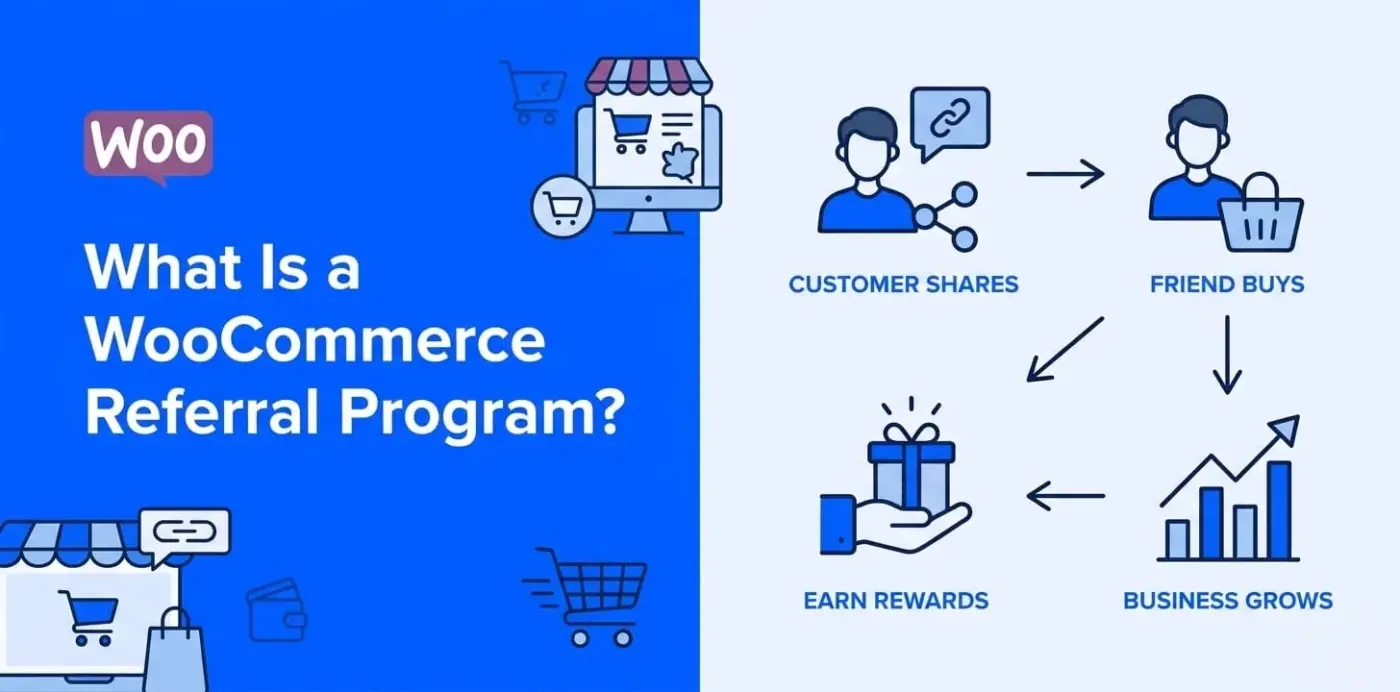
The WooCommerce referral program is simply a word-of-mouth referral program that gives your current customers a unique referral link. They can share that referral link, and when someone clicks on it and makes a purchase from your store, they will both receive a reward for their efforts.
The process of going through the referral process looks like this: share > click > buy > receive a reward. This system seems simple to use. WooCommerce does not come with this type of functionality natively, so you will need to install a plugin in order to provide your site with the capabilities to generate unique referral links, track referrals, and automatically issue rewards.
Let’s see how this works from a real-world example: Customer A buys a coffee subscription from your site and absolutely loves it; then they share their referral link with their friend on WhatsApp; therefore, their friend clicks on it, goes to your store, and orders a coffee subscription as well.
Your referral plugin uses cookies to track Customer A as the person who referred a new customer to you, and gives them a certain amount of points or discounts for being the referring customer. This will also create a welcome reward for Customer B (the new customer). All this occurs automatically, which means no more tedious work of creating manual coupon codes or having to send out emails to offer coupons.
Referral Program vs Affiliate Program
These two often get confused, so let’s be direct about the difference.
- A referral program is aimed at your existing customers. They share because they had a good experience. The rewards are typically modest: points, a discount on their next order, or free shipping. The relationship is personal and trust-based.
- An affiliate program is aimed at content creators, bloggers, and marketers. They share because it’s a business activity. Commissions are higher and often paid in cash. The relationship is commercial.
Both have a place in a WooCommerce store’s growth strategy. If you’re building both, our post on WooCommerce affiliate marketing programs covers the affiliate side in detail. This guide focuses entirely on referral programs for customers.
Why Your WooCommerce Store Needs a Referral Program
Let’s face it, there’s a real problem with the cost of advertising. Customer acquisition costs for most of the WooCommerce stores are increasing, and therefore, the cost per click you’re paying is getting higher while at the same time competing with other tools and budgets. You end up with too many customers who just purchase once and then never come back.
A referral program allows your customers to acquire new customers for you, and you only pay if a new customer actually buys something.
The numbers speak for themselves. According to referral marketing statistics compiled by DemandSage, referred customers are 18% more likely to stay loyal than customers acquired through other channels. They also have a lifetime value that is 16% higher than the value of non-referral customers. That is not a small margin; that is the difference between two purchases from a customer and providing regular customer service.
There is also the issue of trust that advertising cannot duplicate. According to Firework, 92% of consumers are influenced by a recommendation from someone they know over an advertisement for the same or a similar product. A referral link sent by a customer carries authority that a banner advertisement cannot.
The Problem of Customer Acquisition Costs
The costs associated with using WooCommerce for advertising in order to gain customers are very high. Year after year, the average cost of customer acquisition by ecommerce continues to increase.
In contrast to the significant costs associated with paid ads, referral programs allow for inherent cost control because they only pay for referrals that actually result in a sale. This eliminates wasted clicks and impressions.
If you’ve committed to maximising sales through customer rewards, using referral programs to find new customers is among the least expensive and highest-quality ways of finding new customers.
How Referral Rewards Double as a Retention Tool
It is not uncommon for customer referral programs to focus primarily on bringing in new customers. However, a well-implemented referral program will also keep your existing customers engaged with your business.
Your customers who refer other customers to your business know they can earn points or rewards for doing so and, therefore, have an ongoing reason to stay connected to your store. They will continue to check back with you to see if any of their referrals have resulted in a sale.
This ongoing communication provides a strong incentive for your customers to continue to refer others to you. Consequently, you will have established an ongoing relationship with your customers rather than just a series of one-time transactions.
How to Add a Referral Program to Your WooCommerce Store (Step by Step)
WooCommerce has no native referral feature. You need a plugin that handles link generation, tracking, and reward distribution automatically. Our Points and Rewards for WooCommerce plugin includes a full referral module built specifically for this.
Here’s the complete setup process.
Step 1: Install and Activate LoyaltyX
- Log in to your WordPress dashboard.
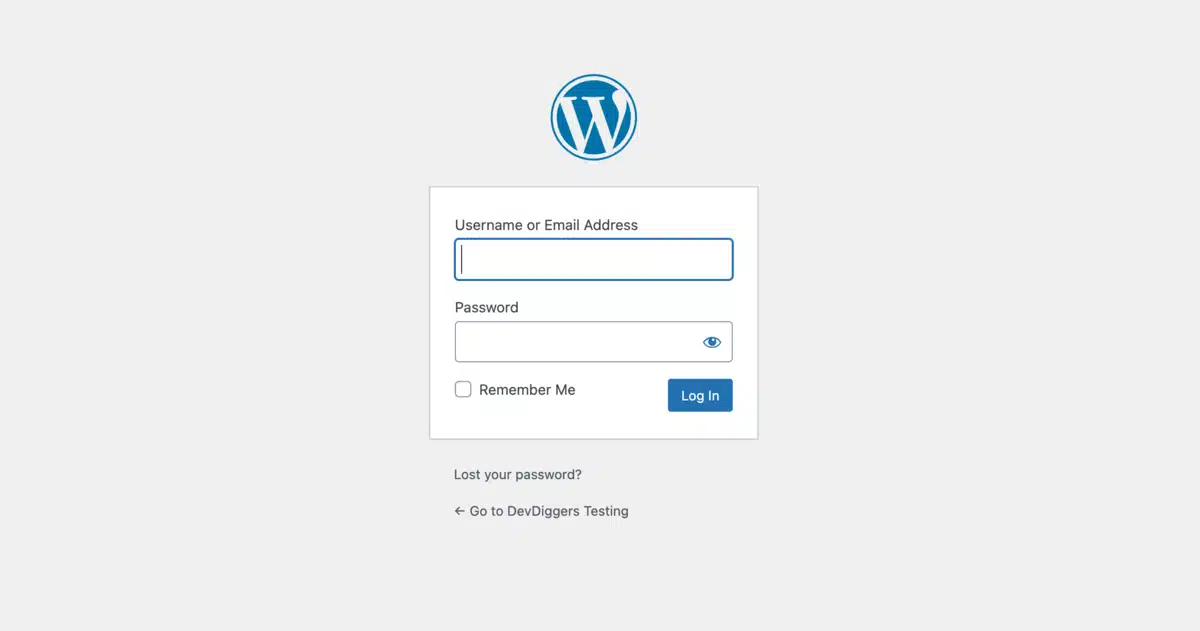
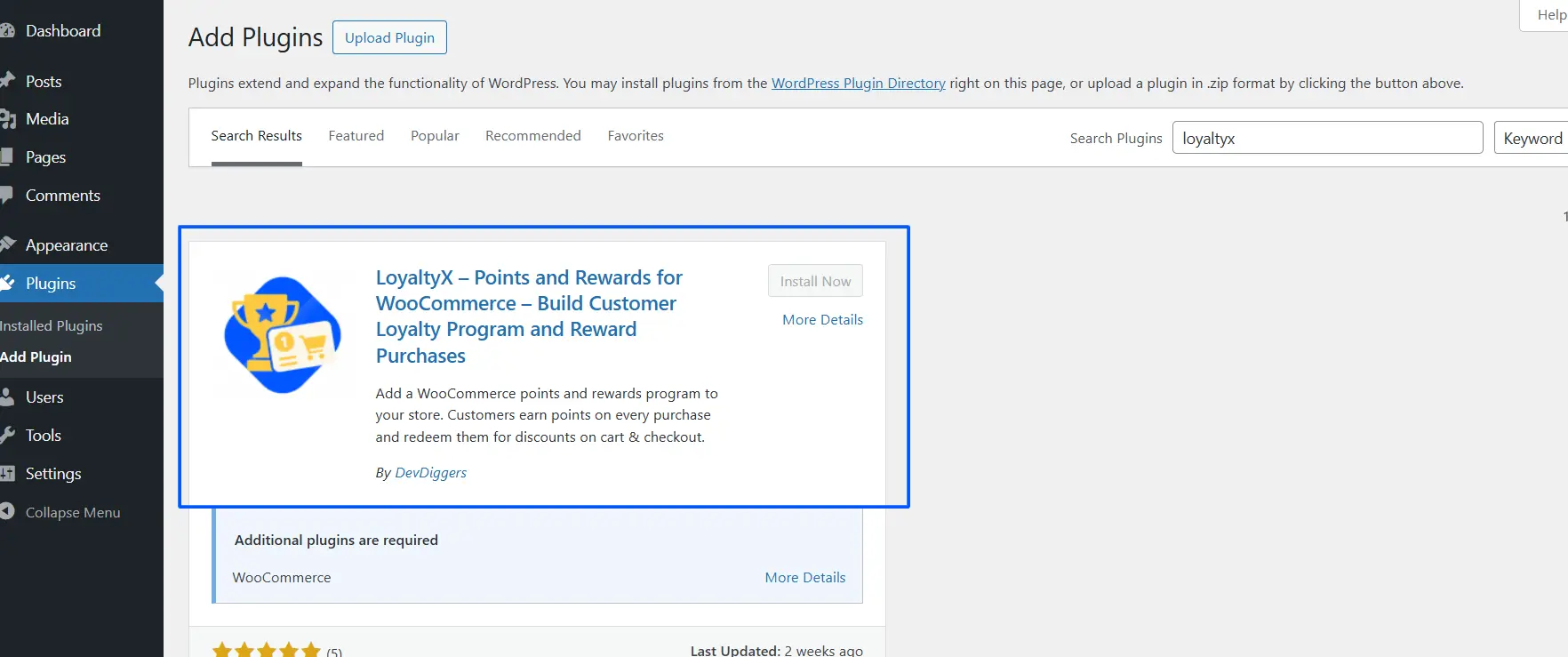
- Go to Plugins > Add Plugin.

- Search for “LoyaltyX” and install it, or upload the zip file if you’re on the Pro version. Click Activate.
Step 2: Enable the Referral Program
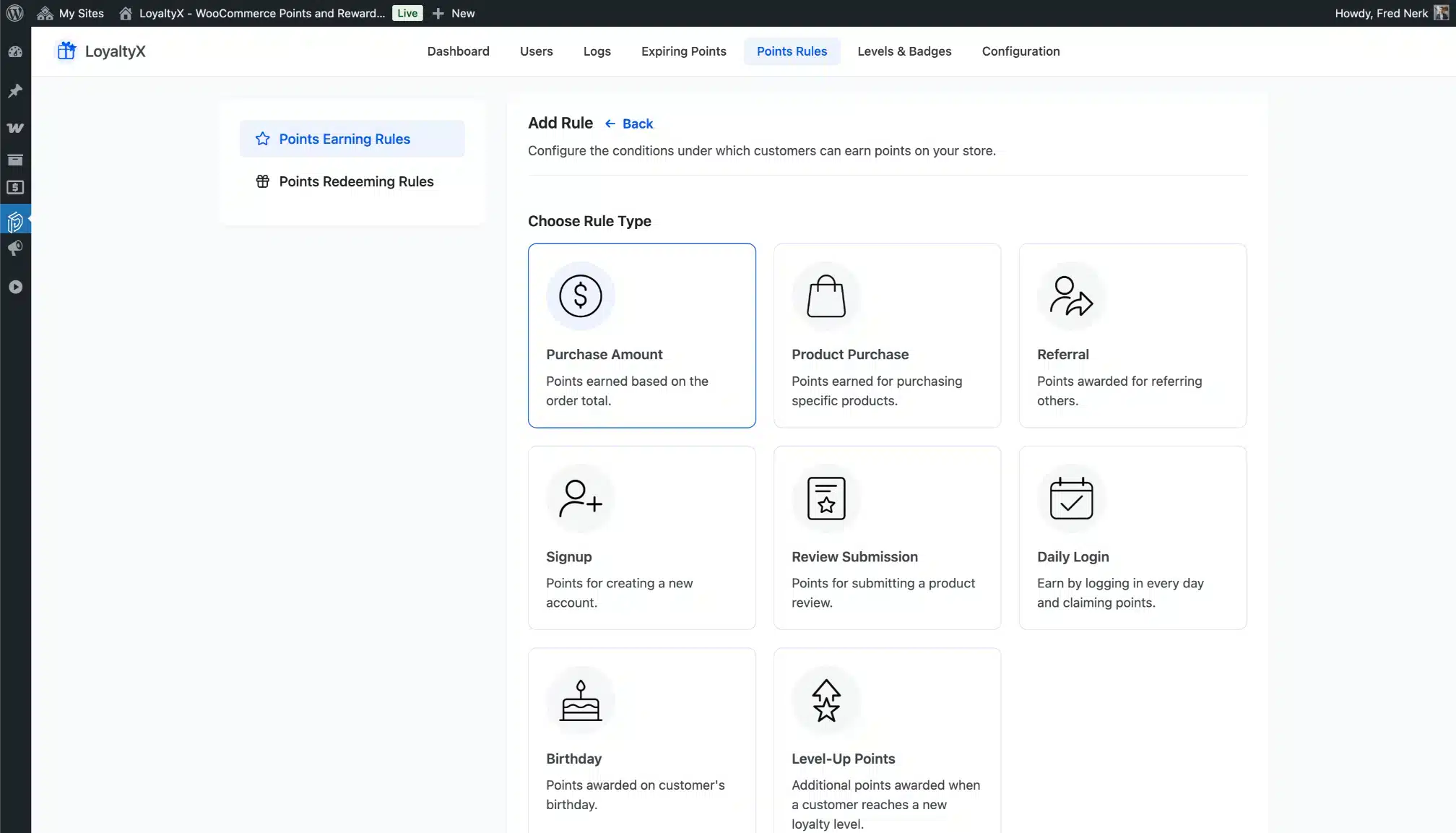
- Navigate to Loyaltyx > Points Earning Rules
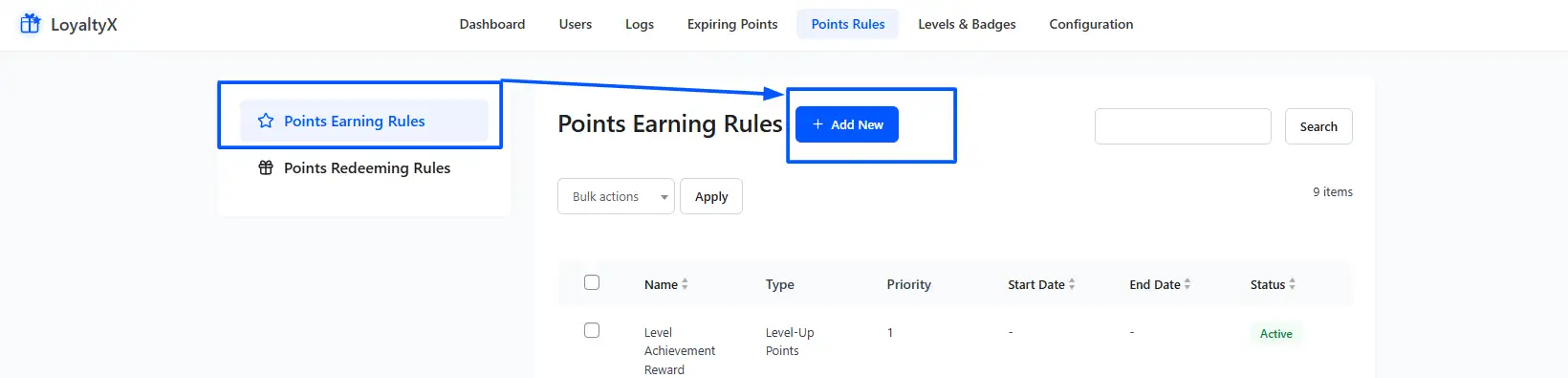
- Click Add New
- Choose Referral Program
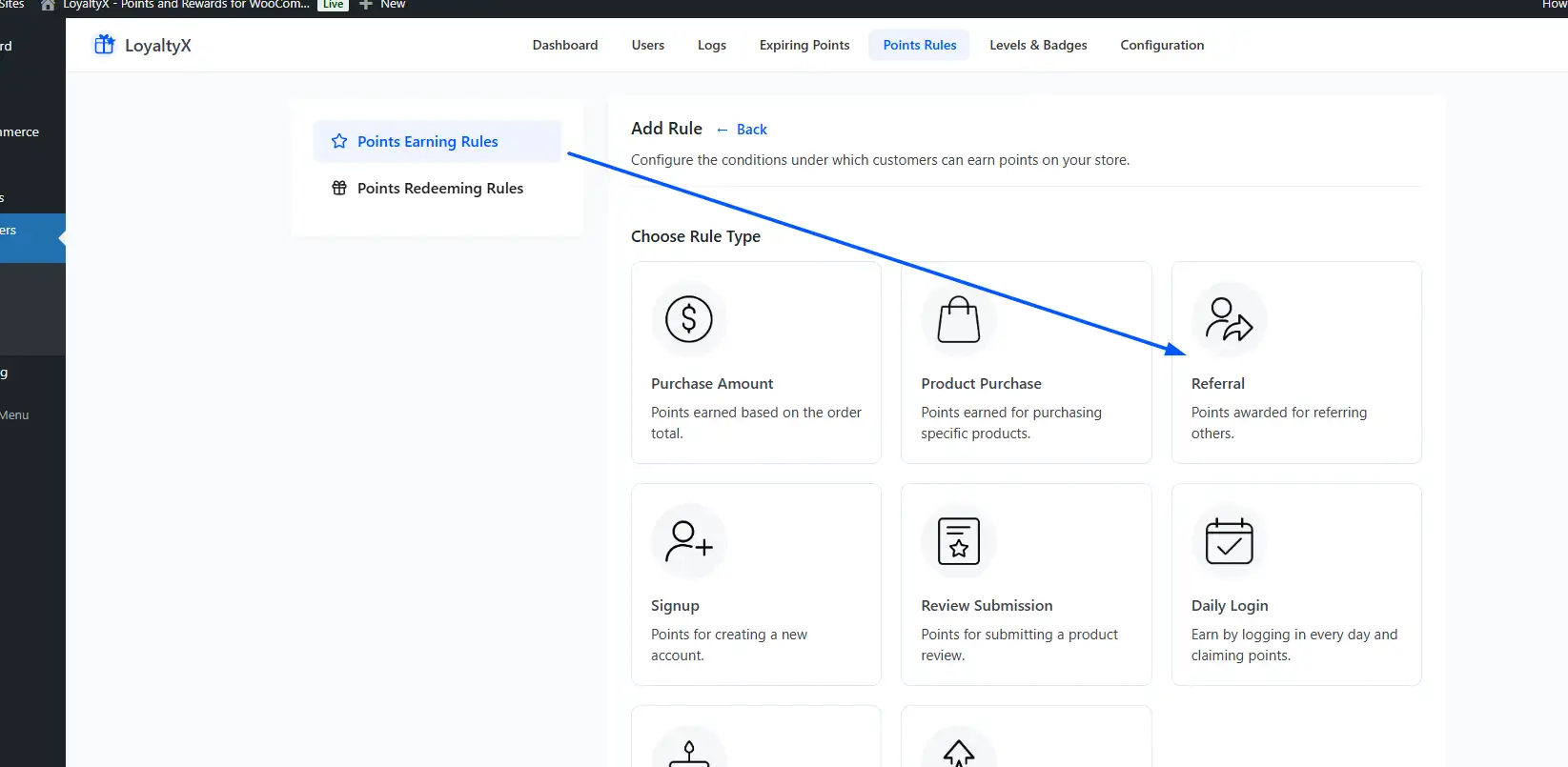
- Enable it
Step 3: Configure Referral Rewards
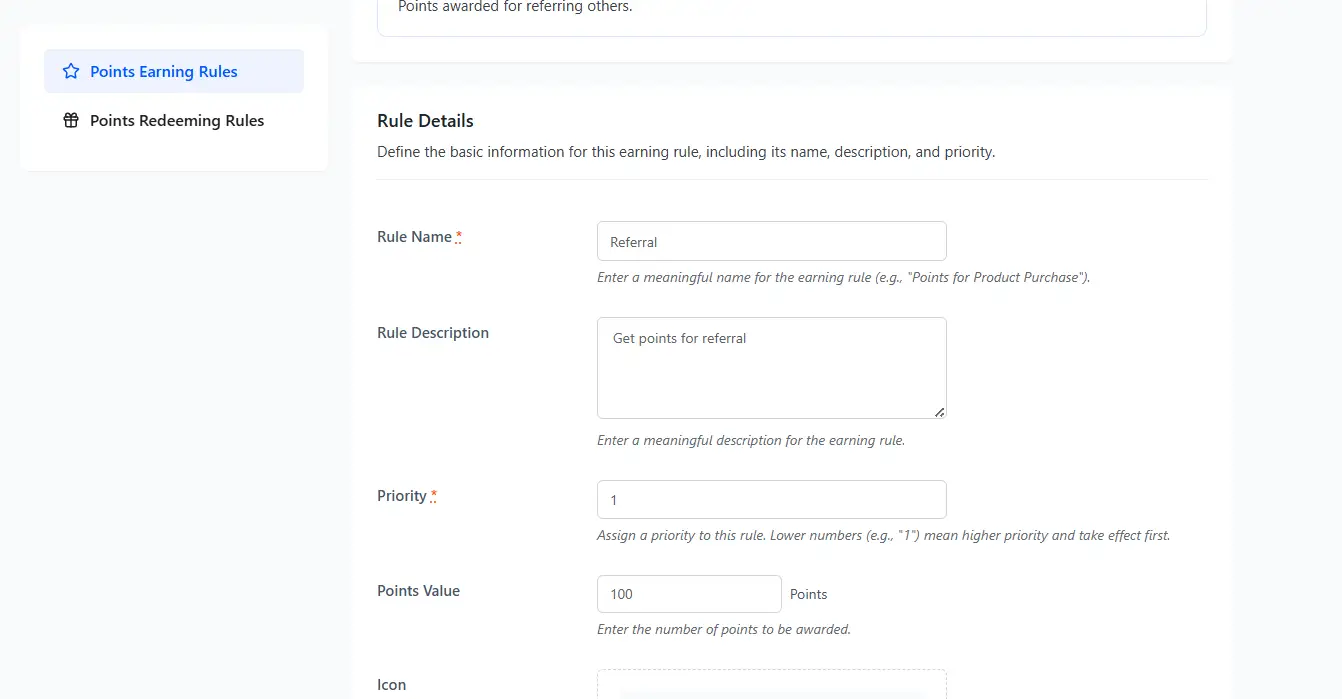
Now set rewards for both users:
- Referrer (Existing Customer): Points or discount reward
- Referred Customer (New User): Signup bonus or discount
Step 4: Set Conditions
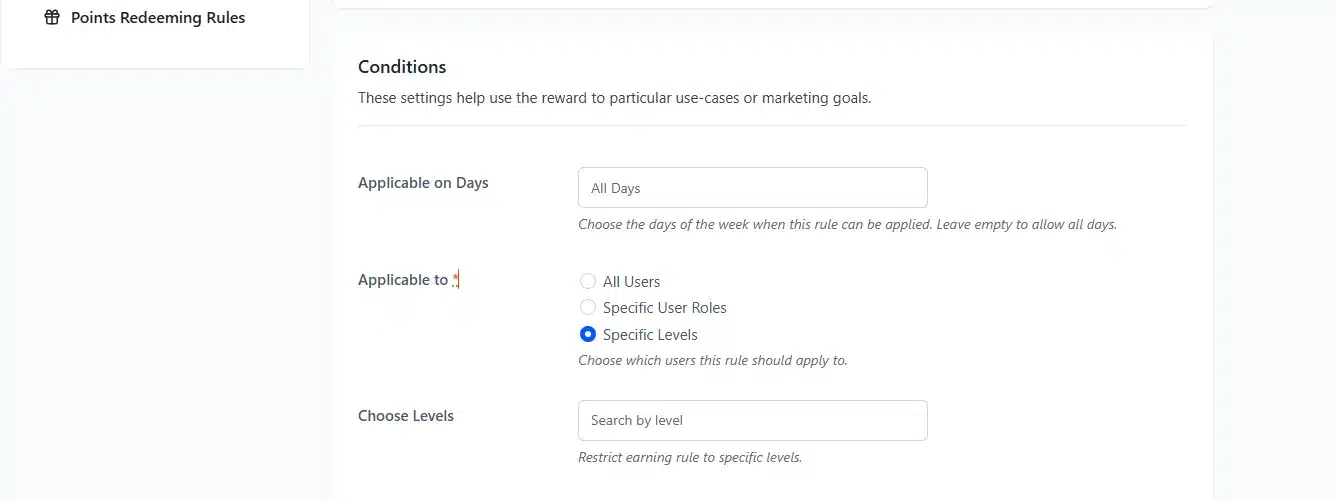
Conditions allow for a more precise application of rules:
Minimum Order Spend:
- Purpose: The rule will only apply to orders that total more than this amount.
- Example: “Referral point awarded only when the order totals more than $50.”
- Leave Blank: There is no minimum order amount.
Maximum Points per Order:
- Purpose: A limit on what can be earned per transaction.
- Example: You could set this to a maximum point value of 500 if you don’t want their order to exceed a total of 50,000+ points.
Applicable on Days:
- Purpose: Limit the rule to specific days. (e.g. only apply during weekends or Mondays).
- Example: Double points weekend promo”.
- Leave Blank: Make the rule apply for any/all days.
Applicable To:
- All Users: Rule applies to all users.
- Specify User Role: Rule only applies to users with specific user roles (e.g. VIP, wholesale, etc).
- Specify Level: Rule only applied to users at a specific point level.
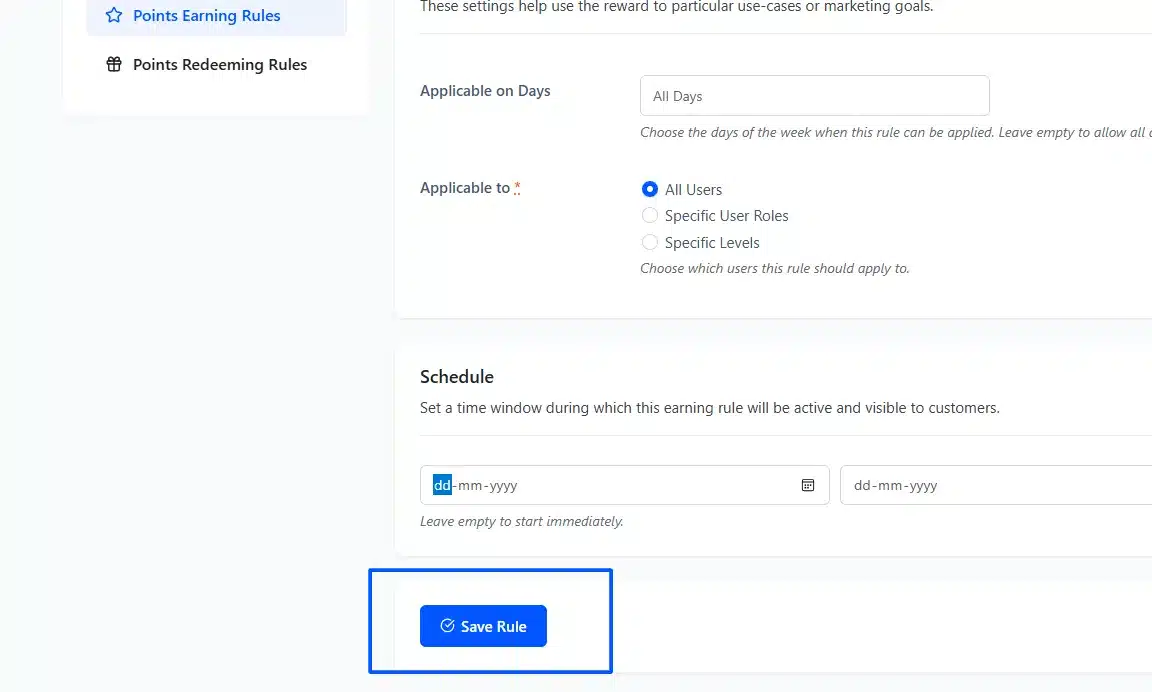
Step 5: Save and Activate Rule
- Click Save Rule
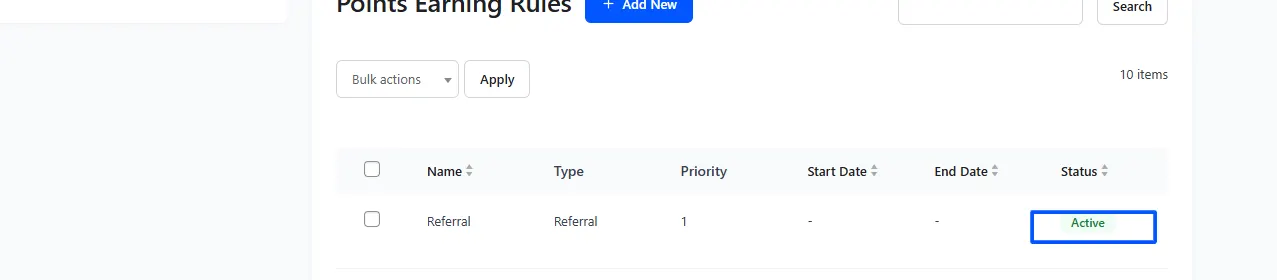
- Make sure the rule is Active
Step 6: Verify the My Account Page Display
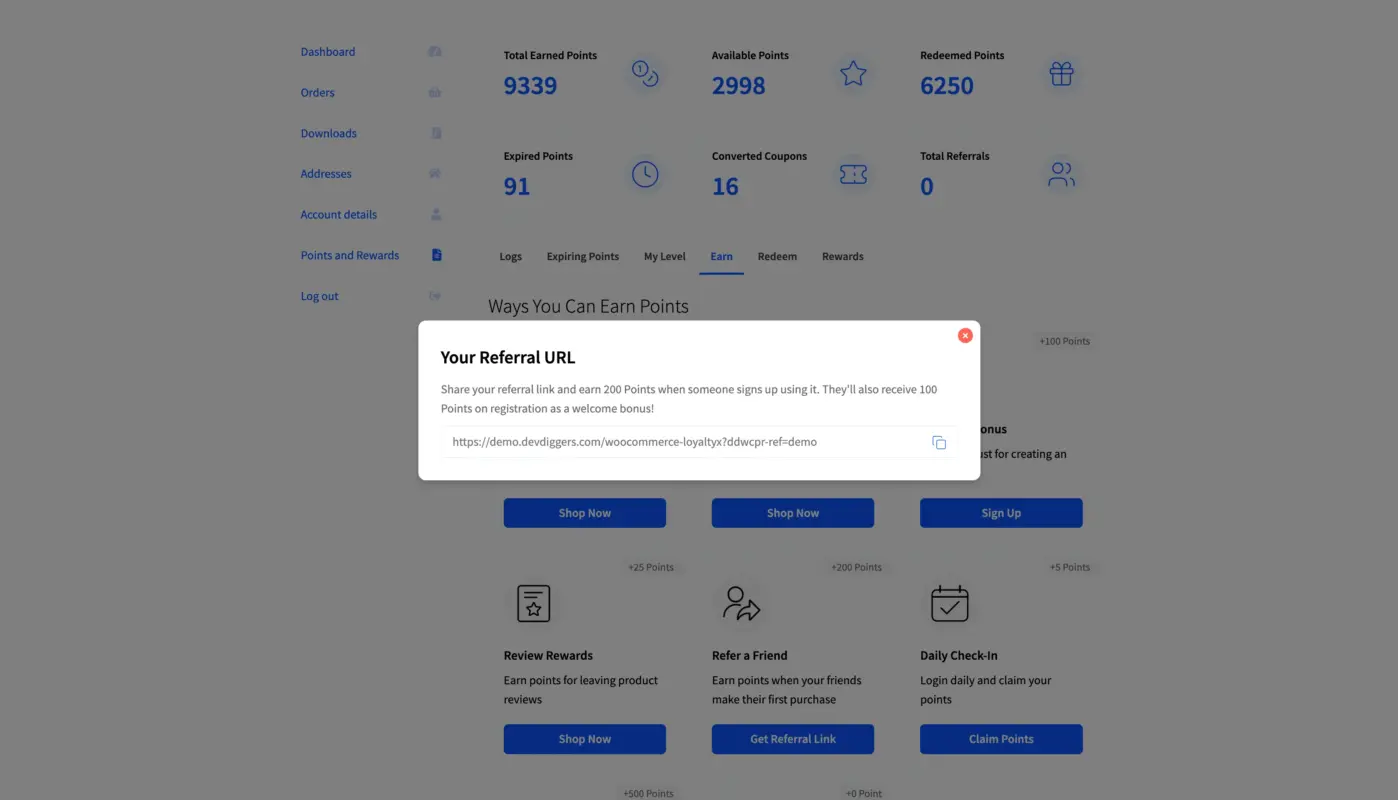
Log in as a test user. Go to your My Account page and confirm your Referral section contains your unique link and the number of referrals you have.
Test sharing this link by opening a new browser session and registering on the link as a new user. Confirm your points have been added to your original account.
If your points do not show immediately, confirm you’ve allowed your browser settings for cookie tracking and that the referrals rules are based on the order status of either Completed or Processing.
Step 7: Launch Your Program and Promote It
Now that your program is active, you can share it with your customers! Details about how to promote your program will follow.
Choosing the Right Referral Reward (Where Most Stores Get It Wrong)
Most plugins make it easy to set a coupon as the referral reward. Most stores stop right there. That’s a mistake. The reward type you choose has a direct impact on how many customers actually share and whether referred customers convert.
Double-Sided vs Single-Sided Rewards
A single-sided reward only pays out to the person who referred. A double-sided reward gives something to both the referrer and the new customer.
Double-sided programs consistently outperform single-sided ones in both share rate and conversion rate. Impact.com’s research on referral marketing shows double-sided programs produce higher loyalty outcomes than programs that reward only the referrer. The reason is straightforward: the referring customer has a better story to tell.
Instead of “click my link so I get a discount,” they can say “click my link, and you’ll get 500 points towards your first order.” That’s a genuinely useful offer, and it’s easier to share.
The trade-off is cost. You’re rewarding two people instead of one. In most cases, the increase in conversion rate more than covers the extra reward cost, but this won’t apply to every store. If your average order value is low, a single-sided program may be more sustainable.
Points vs Coupon Rewards
Here’s where reviewing the best WooCommerce points and rewards plugins gives you useful context. The consensus from stores running loyalty programs is consistent: points drive more repeat purchases than coupons.
A coupon has a single redemption moment. Once it’s used, it’s gone, and the customer has no further pullback to your store. Points accumulate. Every time the customer earns more, they have a reason to check their balance, consider spending it, or earn more by referring again. The engagement loop is built in.
That said, coupons have one advantage: they’re instantly understood. If your audience is less familiar with point systems, a simple “get 10% off your next order” may have a higher immediate share rate. You know your customers best.
Free Product Rewards vs Discount Rewards
A free product reward feels more exciting than a percentage discount of the same monetary value. This is well-documented in consumer psychology. “Get a free item worth $12” outperforms “get $12 off” even though they’re financially identical.
If you’re using LoyaltyX, setting up free gift rewards in WooCommerce is a built-in redeeming rule. You can assign a specific product as the referral reward, which also has the side benefit of introducing customers to new products in your catalogue.
How to Promote Your WooCommerce Referral Program
Setting up the program is only half the job. If customers don’t know it exists, your share rate will be zero. Most competitors skip this section entirely.
- Post-purchase email: The moment after a completed order is the best time to invite a referral. Your customer is happy. They just got what they wanted. Add a referral CTA to your order confirmation email: “Love your order? Share your link and earn points.”
- Thank-you page CTA: Add a referral prompt to the WooCommerce order received page. LoyaltyX includes a shortcode for displaying the customer’s referral link anywhere on the frontend.
- My Account page widget: LoyaltyX displays the referral section automatically in My Account once the feature is enabled. Make sure the tab label is clear. “Refer a Friend” works better than “Loyalty Program.”
- Transactional emails: Any email that contains an order update is an opportunity. A short line at the bottom with the referral link keeps the program visible without being intrusive.
- Announcement email: If you’re launching the referral feature to an existing customer base, send a dedicated email explaining the program. One email sent to customers who have already purchased at least once will drive more referral signups than any other single action.
How to Measure Your WooCommerce Referral Program Performance
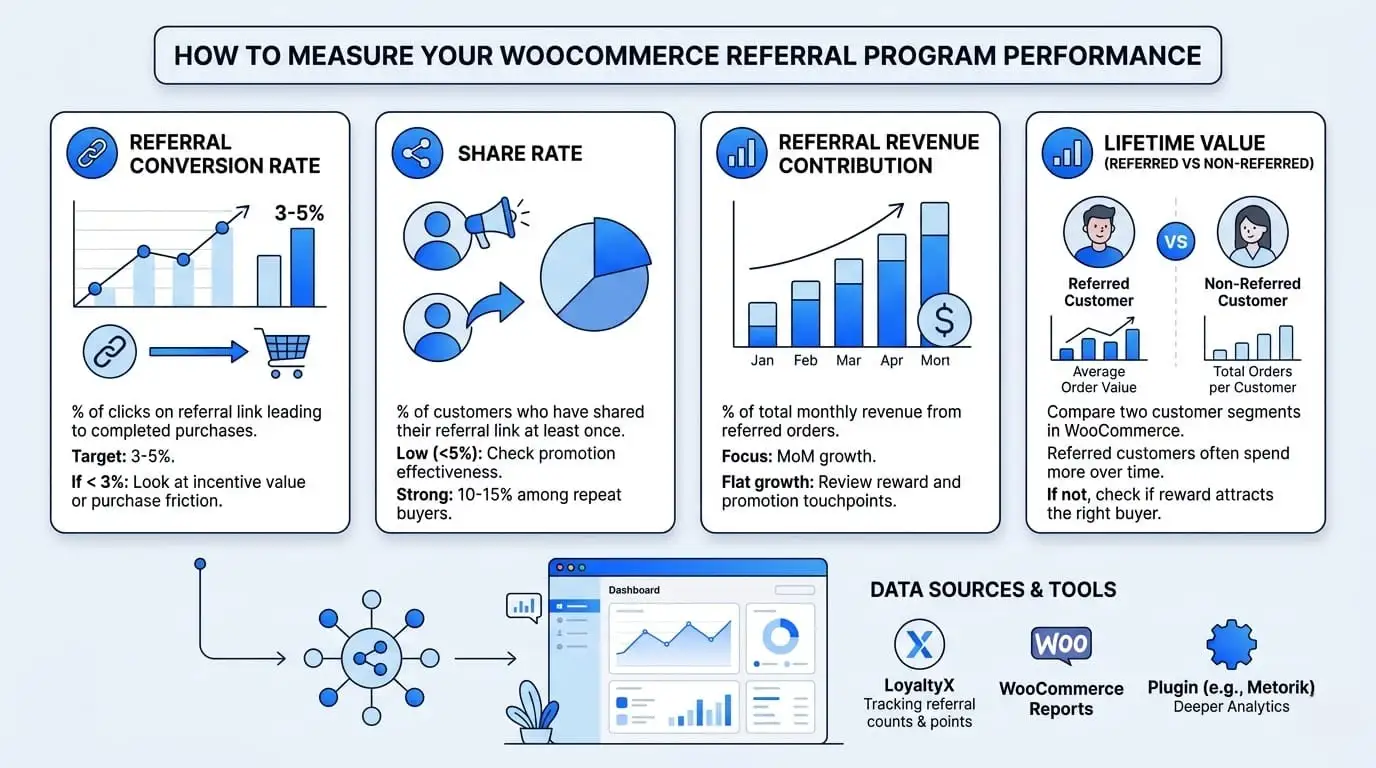
This is the section missing from every first page of results about this topic. Most guides stop after providing instructions on how to set up your referral program. Without accurately measuring the performance of your referral program, it will be difficult for you to make improvements.
Here are the four metrics that matter.
- Referral Conversion Rate: The percentage of clicks on the referral link leading to completed purchases. An established WooCommerce store should have a conversion rate between 3 and 5%. If your conversion rate is below 3%, that means either the incentive or compensation offered through the referral program is not attractive or valuable enough, and/or there may be friction in the purchase process for your new customers during/when attempting to purchase from the store.
- Share Rate: What percentage of your customers have ever shared their referral link at least once? If fewer than 5% of your customer base has ever shared, the program isn’t being promoted effectively. Strong programs see share rates of 10 to 15% among repeat buyers.
- Referral Revenue Contribution: What percentage of your total monthly revenue is coming from referred orders? This number should grow month-on-month in a healthy program. If it’s flat, look at whether your reward value is compelling enough and whether your promotion touchpoints are active.
- Lifetime Value(Referred vs Non-Referred): Pull two customer segments in WooCommerce: customers acquired through referral links and customers acquired through other channels. Compare average order value and total orders per customer. Research consistently shows that referred customers spend more over time. If your data doesn’t show this, check whether the referral reward is attracting the right kind of buyer.
LoyaltyX tracks referral counts per customer and attributes points automatically. For deeper analytics, combine this data with WooCommerce’s built-in reports or a plugin like Metorik.
Common Mistakes That Kill WooCommerce Referral Programs
These are the patterns we’ve seen repeatedly across stores that set up a referral program and see almost no results.
- Referral incentives lack sufficient value to incentivise sharing: In this case, offering the referrer a discount of 2% ($0.40) is nothing to tell a story about. In order for the incentive to have perceived value to the referrer, it must be proportional to the average purchase price. A safe guideline would be that the total value of the offer to the referrer equals 10% of the average order value.
- Referral incentive is hard to locate: If a customer must click through three pages in order to locate his/her referral link, most customers will not take the time to find it. Make the link accessible to the customer from the first page that the customer sees after he/she logs in.
- Only one side is rewarded: The only benefit the original customer receives is an incentive, but the new customer does not receive an incentive. When new customers click on the original customer’s referral link, the first question they will ask is “What’s in it for me?” If the answer is zero, your chances of converting will decrease.
- The program is never promoted: Simply turning the feature on is not sufficient to run a successful program. Customers will not find your program if you do not let them know it exists. A substantial way to do so is to send at least one post-purchase email and one My Account email to customers.
- Points expire before customers redeem them: If you’re using a points-based reward, be careful with expiry settings. Points that disappear before customers accumulate enough to redeem feel like a bait-and-switch. Either set a long expiry window or remove expiry entirely for referral rewards.
Conclusion
Adding a referral program to your WooCommerce store is one of the highest-return, lowest-effort growth moves available to you. The setup is fast. The ongoing management is minimal. And the compounding effect of referred customers who then refer more customers is something paid advertising simply can’t replicate.
Three things to take away from this guide. First, choose a double-sided reward structure wherever possible. Second, don’t set the reward value so low that it fails to motivate sharing. Third, measure performance after launch. Referral conversion rate, share rate, and referred customer LTV are the three numbers that tell you whether the program is working.
If you’re ready to get started, our LoyaltyX – WooCommerce Points and Rewards plugin includes a full referral module alongside points earning, tier systems, birthday rewards, and more. You can try the free version today or go Pro to unlock the complete referral feature set.
Have questions about setting up your referral program? Drop them in the comments.
Frequently Asked Questions
Q1. Does WooCommerce have an inbuilt referral program?
No.WooCommerce generates no referral program by default. To generate unique referral links, track clicks & purchases and automatically reward referrers and referees, you will need to install a third-party plugin. One example of a third-party plugin that will do all of the above for you is LoyaltyX, which manages the whole referral flow, including rewards for the referrer and the new customer.
Q2. For WooCommerce stores, what is the default setting for the lifetimes of referral cookies, and how long should they last?
A standard 30-day lifetime for referral cookies should provide accurate referral attribution to most WooCommerce stores. Customers need to be allowed to purchase after clicking on a referral link within 30-days. If a customer spends time browsing products prior to purchasing, a referral cookie window of less than 30-days will miss that purchase. On the other hand, if a customer decides to visit your online store later (without the benefit of a referral link), the purchase will create inflated attribution for the referral. LoyaltyX uses the default duration of 30 days, but allows you to set your preferred duration in the Referral settings in LoyaltyX.
Q3. Is it possible for me to reward both the referrer and the new customer?
Yes. You should reward both referred customers and referrers. This is called a Double-Sided Referral Structure. LoyaltyX allows you to set conditions by which a referrer may earn a reward when their referred customer completes a purchase. LoyaltyX also allows you to set conditions by which your new customer may earn a reward once they sign up as a referred customer via a referral link. Double-Sided Referral Programs consistently produce higher referral share rates and better conversion rates than Single-Sided Referral Programs.
Q4. What is the difference between a referral program using WooCommerce and an affiliate program?
A referral program rewards current customers by sharing their business with other people through various channels (e.g., Social Media). Customers usually receive point-based rewards, discounts, or free shipping. In comparison, an affiliate program compensates marketers/content creators with cash for promoting your business outside Your Website. While both programs can be implemented at the same time, each program is used to acquire new customers in separate ways.