
Adding a referral program to your WooCommerce store takes a plugin, because WooCommerce has no referral feature of its own. With LoyaltyX, our WooCommerce points and rewards plugin built by DevDiggers, the setup is one earning rule and a test sign-up.
We wrote the LoyaltyX steps from the plugin’s own settings screens and code and rechecked them in October 2026. The plugin comparison uses each vendor’s own listing from the same month. Statistics link to the original study.
This guide explains how a WooCommerce referral program works and compares four referral plugins. Then it walks through the LoyaltyX setup step by step. The last sections cover reward choice, promotion and the metrics to track once the program is live.
What Is a WooCommerce Referral Program?
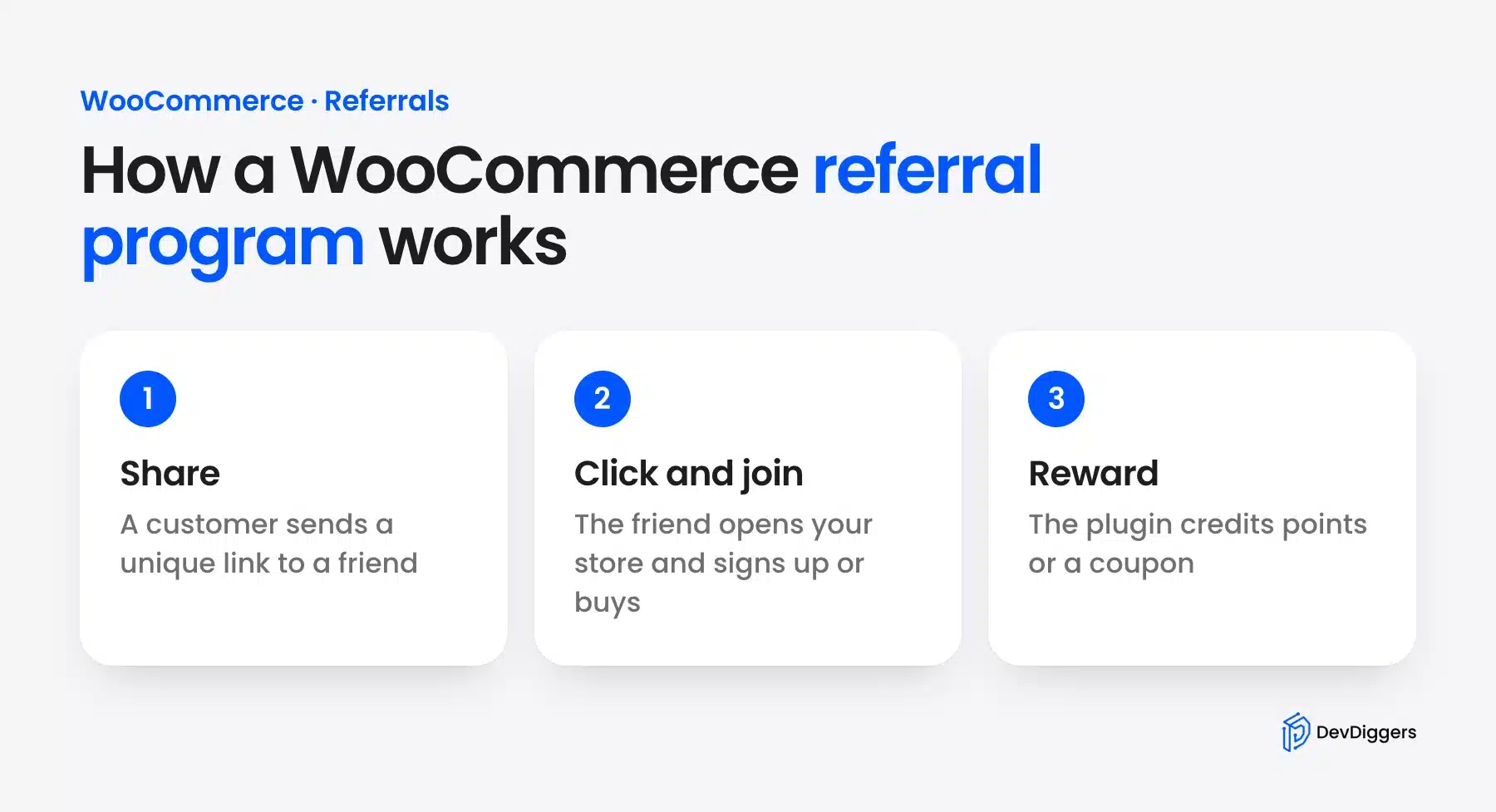
A WooCommerce referral program gives each customer a unique link to share with friends. When a friend arrives through that link, the plugin credits the customer with a reward such as points or a coupon. Some plugins pay out when the friend creates an account, and others wait for the first order.
The flow looks like this: share > click > sign up or buy > receive a reward. WooCommerce does not include it natively. You need a plugin that creates the links, tracks referrals and issues the rewards on its own. To reward shoppers for sharing a product page, see our review of WooCommerce social share discount plugins.
Here is an example. Customer A buys a coffee subscription from your store and loves it. They send their referral link to a friend on WhatsApp, and the friend clicks it and opens your store.
In LoyaltyX the link adds ?ddwcpr-ref= and the referrer’s username to your store address. A cookie remembers it for 30 days. When the friend registers, LoyaltyX credits Customer A with the referral points, and a Signup rule can give the friend a welcome bonus. Nobody has to create coupon codes by hand. Need ideas? See these referral program names.
Referral Program vs Affiliate Program
These two often get confused, but they reward different people for different reasons.
- A referral program is aimed at your existing customers. They share because they had a good experience. The rewards are usually modest: points, a discount on their next order or free shipping. The relationship is personal and trust-based.
- An affiliate program is aimed at content creators, bloggers and marketers. They share because it’s a business activity. Commissions are higher and often paid in cash. The relationship is commercial.
Both have a place in a WooCommerce store’s growth strategy. If you’re building both, our post on the best WooCommerce affiliate plugins covers the affiliate side in detail. For commission payouts, our WooCommerce referral and affiliate plugin runs referrals as a full affiliate program. This guide focuses entirely on referral programs for customers.
Why Your WooCommerce Store Needs a Referral Program
A WooCommerce store needs a referral program because referred customers cost less to win and tend to stay longer. You pay the reward only when a referral turns into an account or an order. Paid ads charge for every click, whether or not that visitor ever buys.
Your happy customers do the outreach, and they reach people who already trust them.
A study in the Journal of Marketing tracked about 10,000 bank customers for nearly three years. Referred customers were worth at least 16% more than similar customers won through other channels. They also churned more slowly.
There is also the issue of trust that advertising cannot copy. In Nielsen’s global trust survey, 92% of consumers said they trust recommendations from friends and family. A referral link sent by a customer carries that trust in a way a banner ad cannot.
The Problem of Customer Acquisition Costs
Paid ads charge for clicks and impressions whether or not the visitor buys. That cost adds up fast for a small store with a modest ad budget.
A referral program flips that. You pay only for referrals that become an account or a sale. No money goes to wasted clicks.
If you’ve committed to maximizing sales through customer rewards, referrals are one of the cheaper ways to find new customers who stick around.
How Referral Rewards Double as a Retention Tool
It is not uncommon for customer referral programs to focus primarily on bringing in new customers. However, a well-implemented referral program will also keep your existing customers engaged with your business.
Customers who refer others know they can earn points for it, which gives them a reason to stay connected to your store. They come back to check whether their friends have signed up and how many points they hold.
Each visit is another chance for them to buy again or share the link again. Over time you build a relationship with these customers and not just a string of one-time orders.
WooCommerce Referral Plugin Options
Four WooCommerce referral plugins cover most stores. LoyaltyX and WPLoyalty add referrals to a points program, and AutomateWoo Refer A Friend pays advocates in store credit. Our WooCommerce Affiliate plugin pays cash commissions to the marketers and bloggers who share your store.
Here is how the four compare on reward type and timing:
- LoyaltyX (DevDiggers): Points go to the referrer when the friend registers. The friend can get a sign-up bonus. Referrals are a Pro feature.
- WPLoyalty: Points or rewards go to both sides after a completed referral sale. Referrals are in its PRO plan.
- AutomateWoo Refer A Friend: Store credit goes to the advocate after the friend orders. It is a paid add-on that needs AutomateWoo.
- WooCommerce Affiliate plugin (DevDiggers): Cash commission goes to the partner on each referred sale. It is a paid plugin.
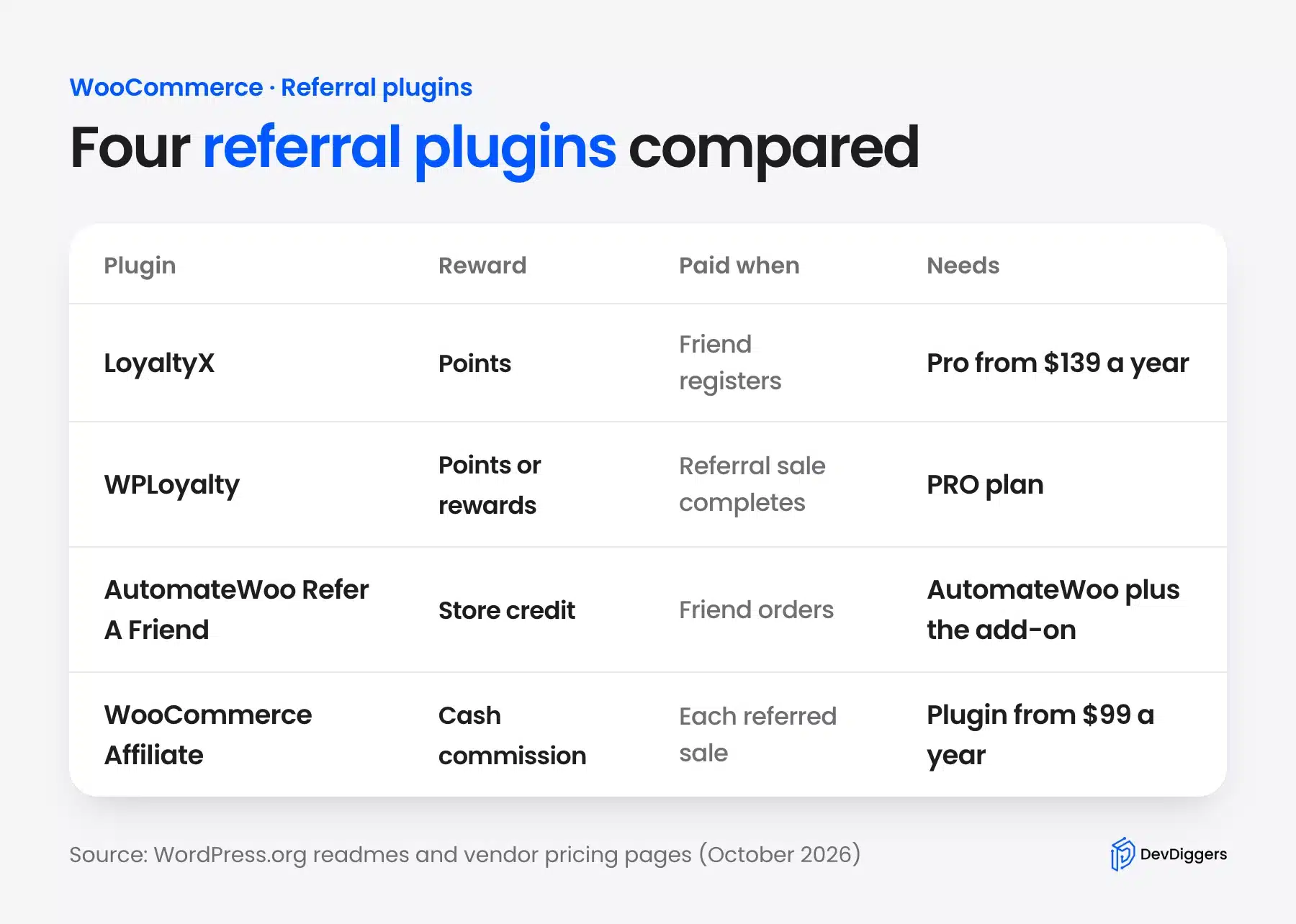
Our own plugin leads the list because we build and support it, and the tutorial below uses it. LoyaltyX Pro starts at $139 a year as of October 2026. The free LoyaltyX plugin covers purchase points but not referrals.
WPLoyalty lists referral links, rewards for both sides and email alerts in its WordPress.org readme, with referral points in its PRO plan. AutomateWoo Refer A Friend is sold on WooCommerce.com as a separate purchase. It supports coupon sharing or link sharing, and only the coupon mode gives the friend a discount.
Pick a points plugin when you want referrals to feed a loyalty program. Pick the WooCommerce Affiliate plugin when bloggers and partners send the traffic and expect cash. It starts at $99 a year as of October 2026.
Running a SaaS product rather than a store? Its payments happen in your billing tool and never reach WooCommerce. For that setup I wrote up how I built OpenPromoter, an open source referral and affiliate tracker.
How to Add a Referral Program to Your WooCommerce Store (Step by Step)
To add a referral program in LoyaltyX, install the Pro plugin and create a Referral earning rule with a points value. Add a Signup rule if the friend should get a welcome bonus too. Then save, set the rule to Active and test the link with a new account.
The full setup takes seven steps.
Step 1: Install and Activate LoyaltyX
- Log in to your WordPress dashboard.
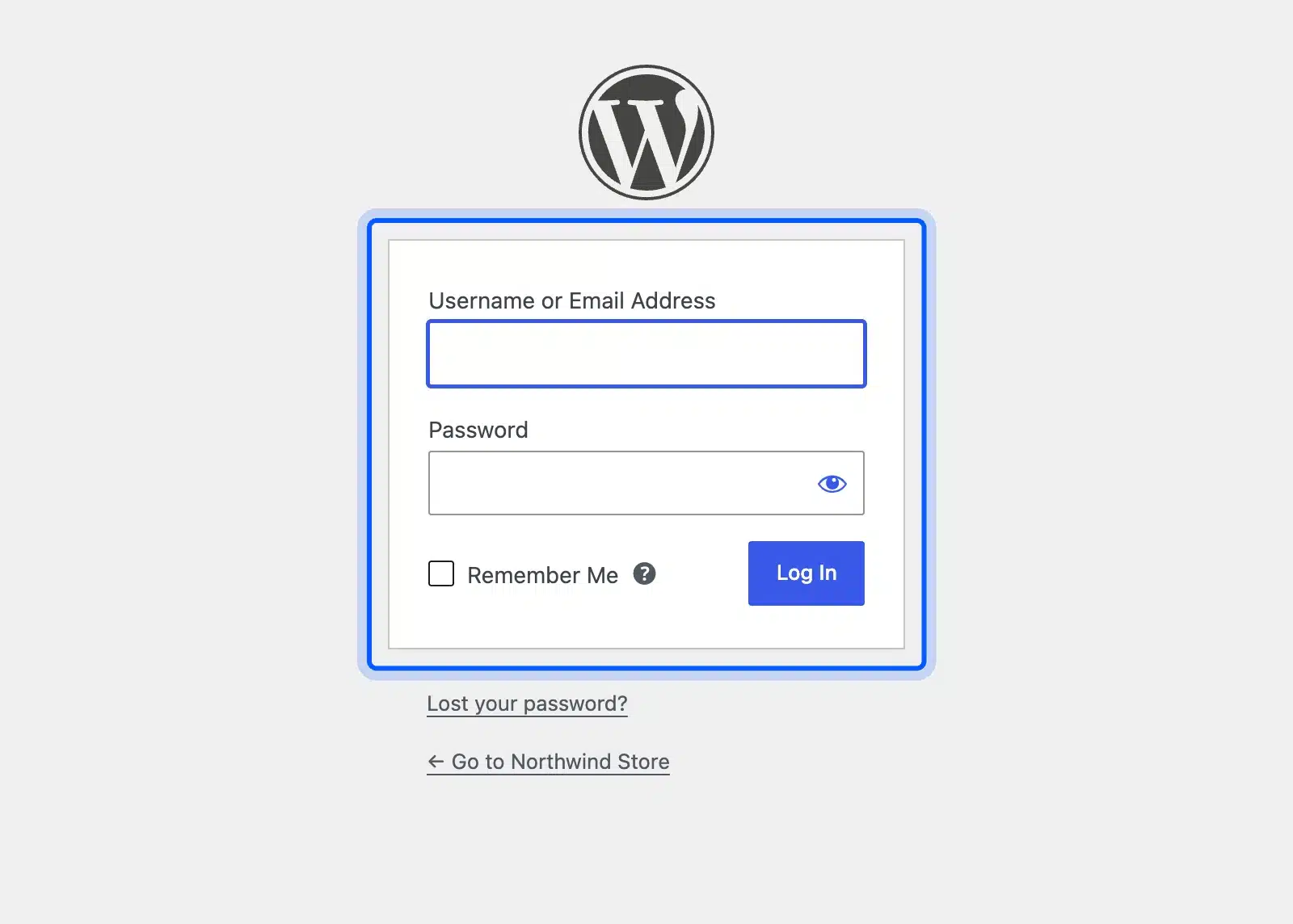
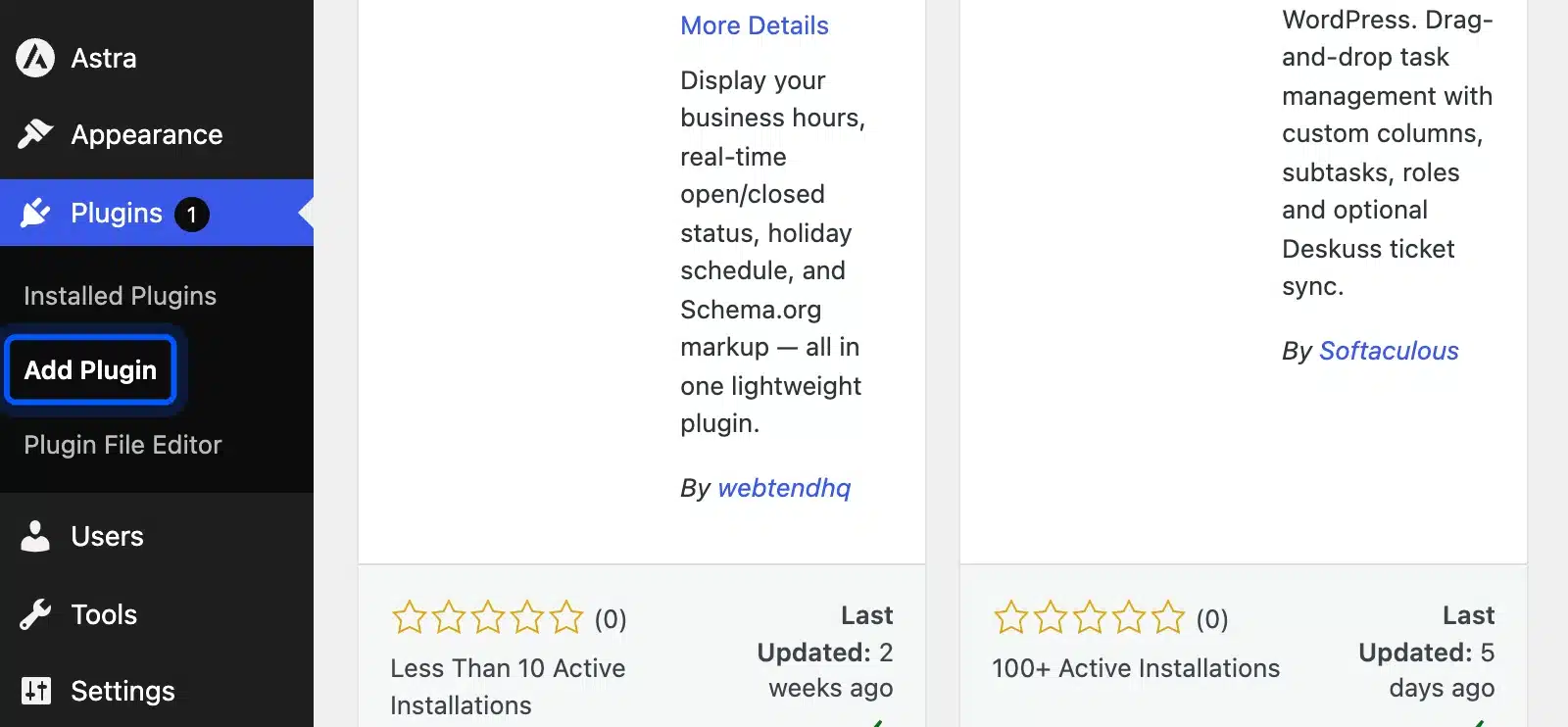
- Go to Plugins > Add Plugin.
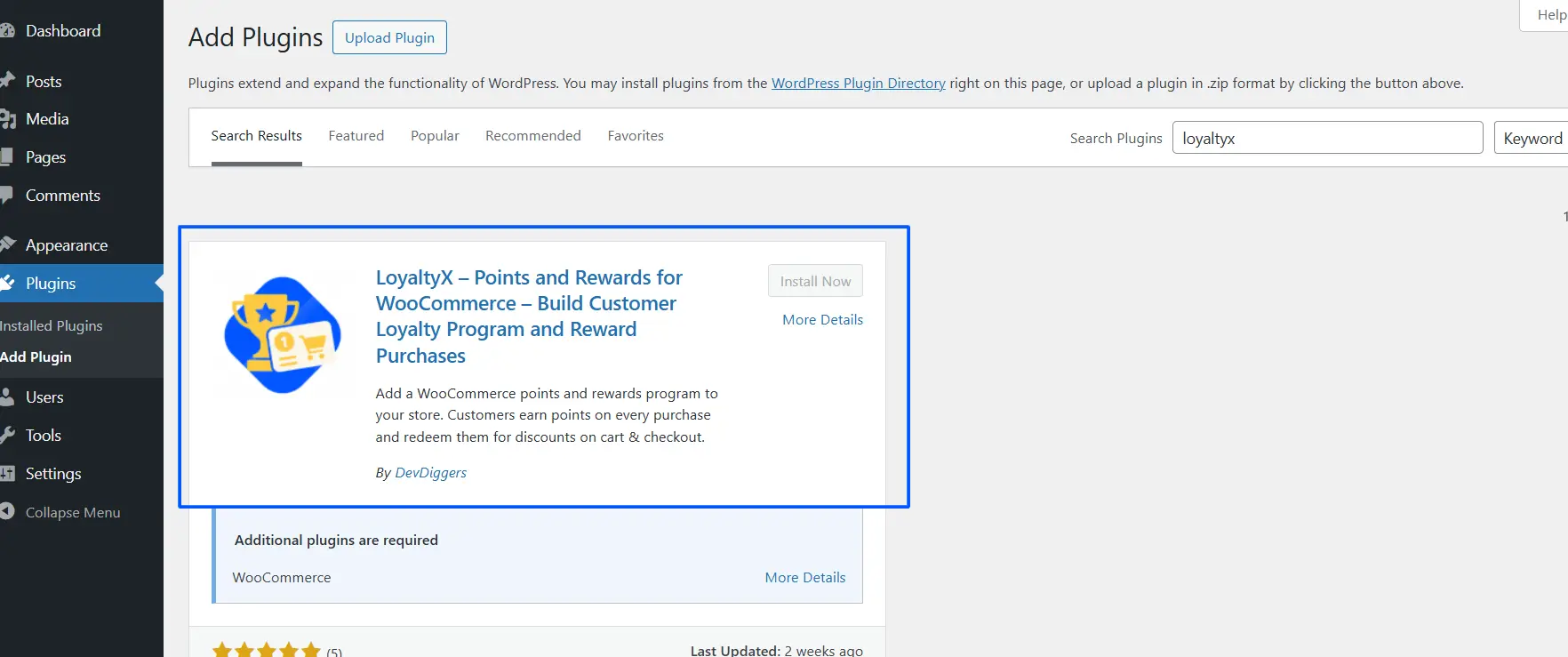
- Referrals are part of LoyaltyX Pro. Click Upload Plugin, choose the Pro zip from your DevDiggers account and click Activate.
Step 2: Add a Referral Earning Rule
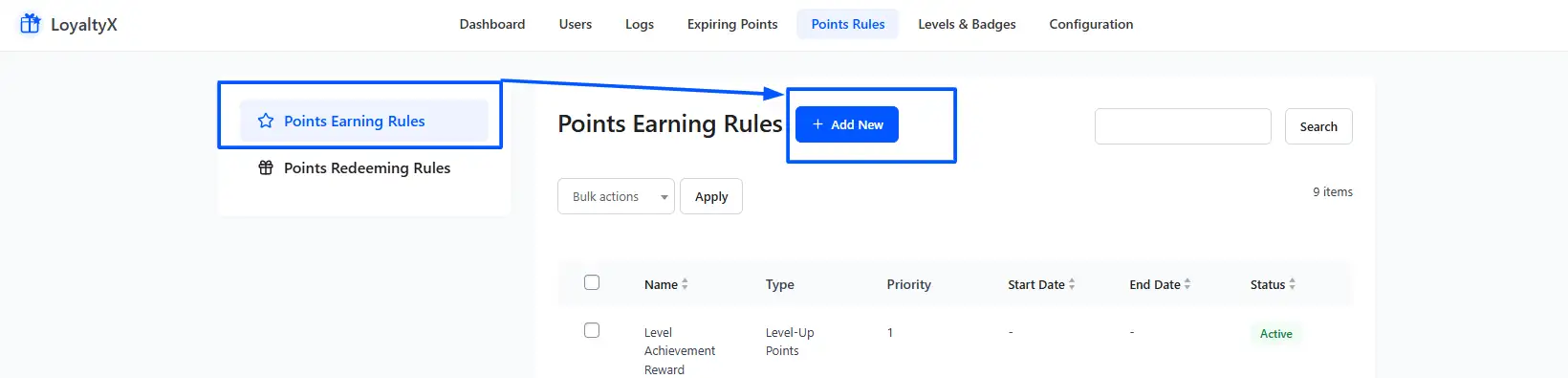
- Go to LoyaltyX > Points Rules > Points Earning.
- Click Add New.
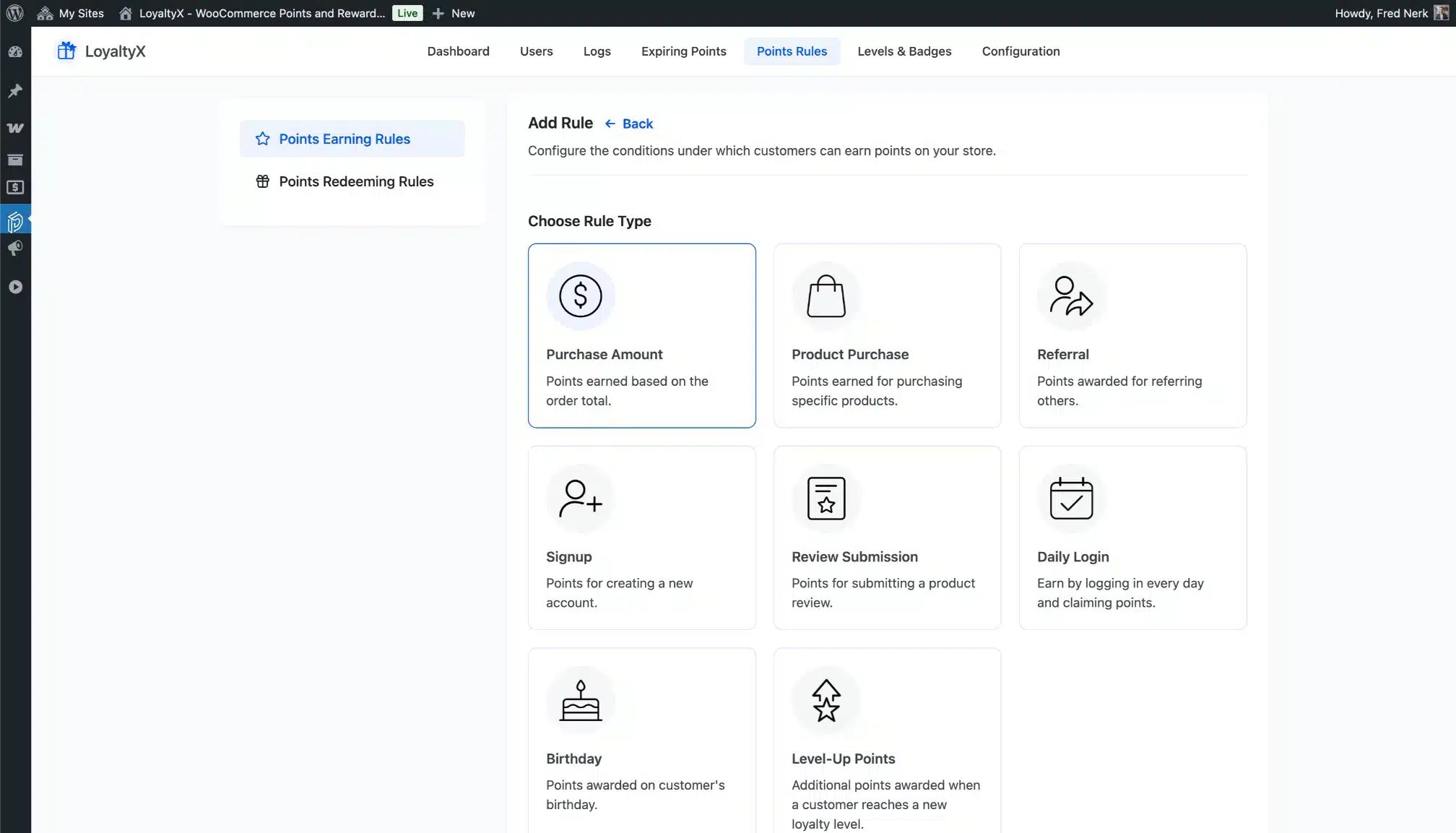
- Choose the Referral rule type.
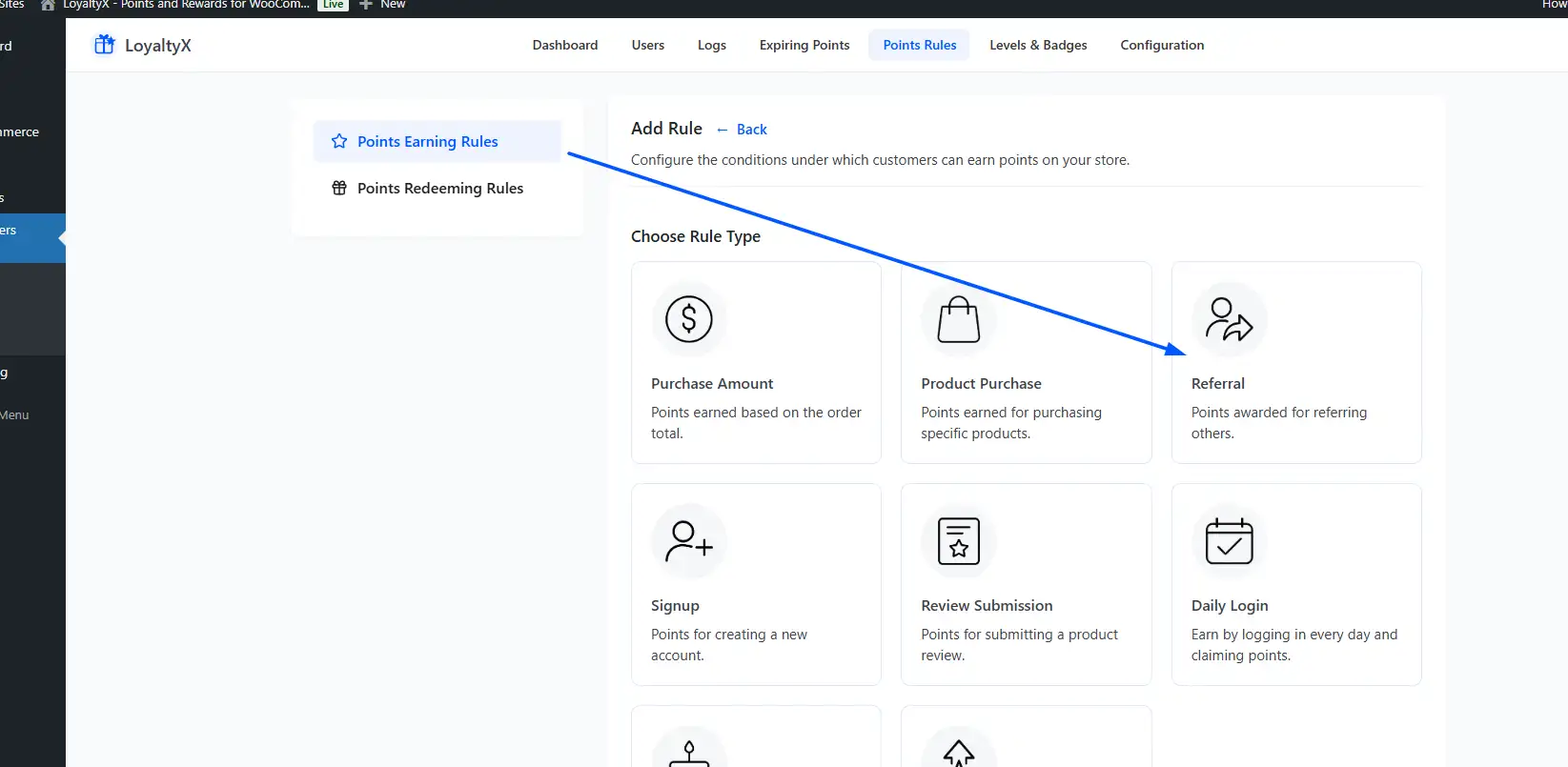
- Give the rule a name and set its Status to Active.
Step 3: Configure Referral Rewards
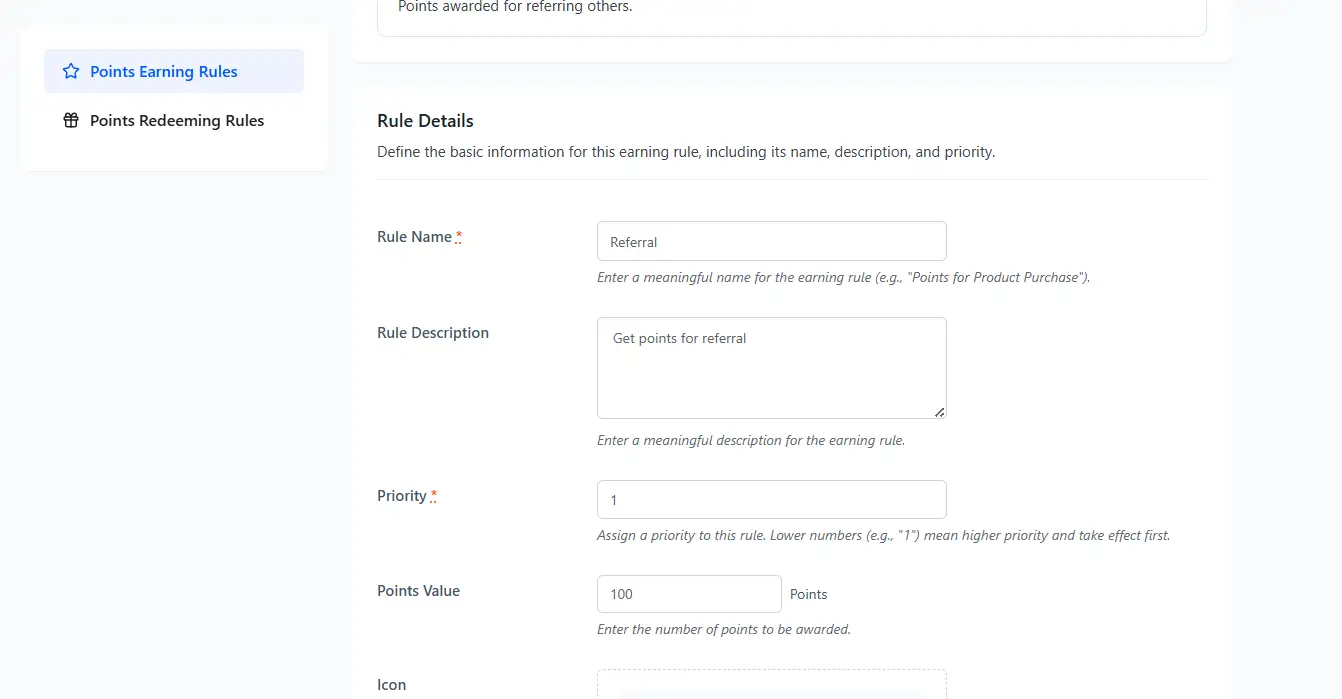
The Referral rule has one reward field, Points Value. Set rewards for both people like this:
- Referrer (existing customer): The Points Value on the Referral rule. LoyaltyX adds it when the friend registers.
- Referred customer (new user): The Points Value on a separate Signup rule. The friend gets it on registration.
Step 4: Set Conditions
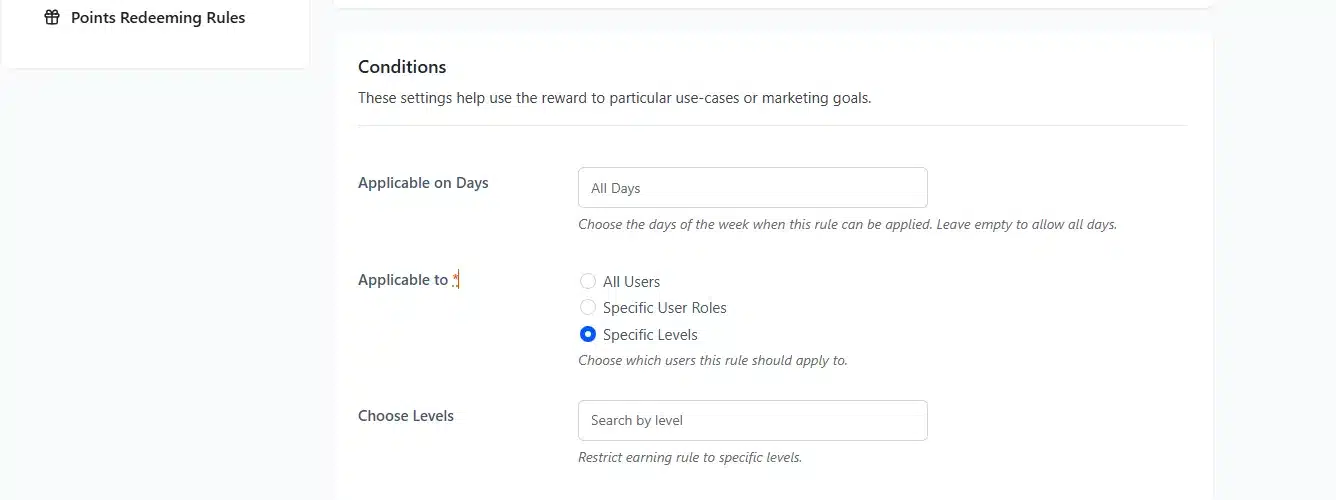
Two conditions apply to a Referral rule. The Minimum Order Value and Maximum Points Per Order fields only show on purchase rules. A referral rule does not use them.
Applicable on Days
- Purpose: Limit the rule to chosen days of the week such as weekends.
- Example: A “Double referral points weekend” promotion.
- Leave Blank: The rule applies on every day.
Applicable To
- All Users: Rule applies to all users.
- Specific User Roles: Rule only applies to users with the roles you pick.
- Specific Levels: Rule only applies to users at the loyalty levels you pick.
Tip: LoyaltyX checks these conditions against the new customer who signs up. A brand new account has no loyalty level yet. Keep Applicable To on All Users for referral rules.
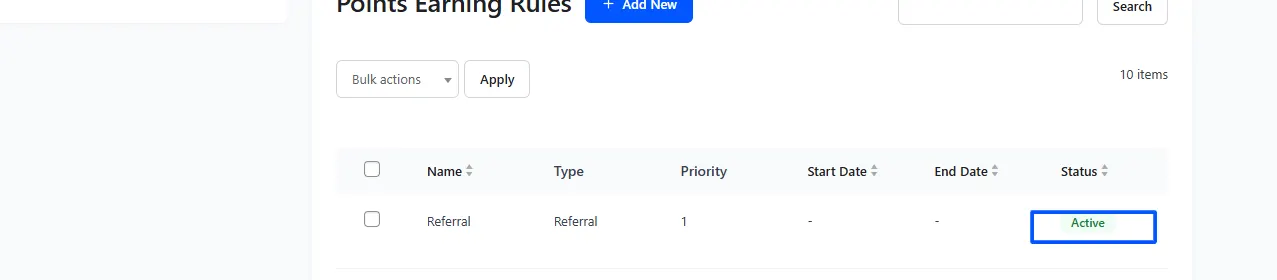
Step 5: Save and Activate Rule
- Click Save Rule.
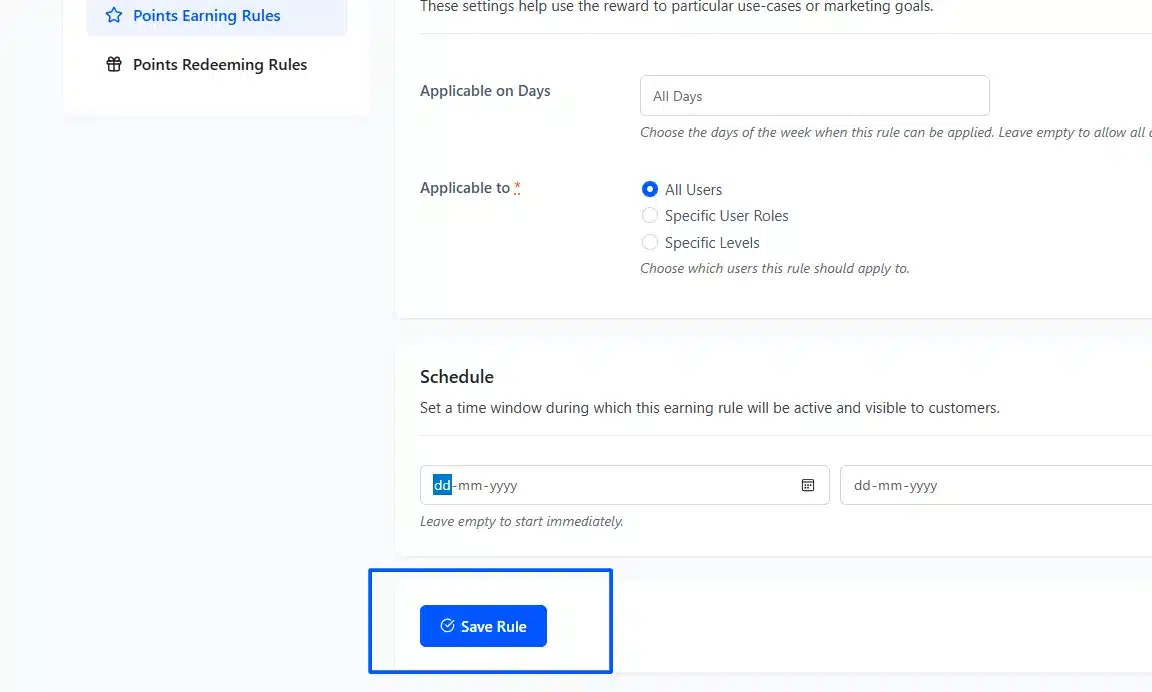
- Make sure the rule is Active.
Step 6: Verify the My Account Page Display
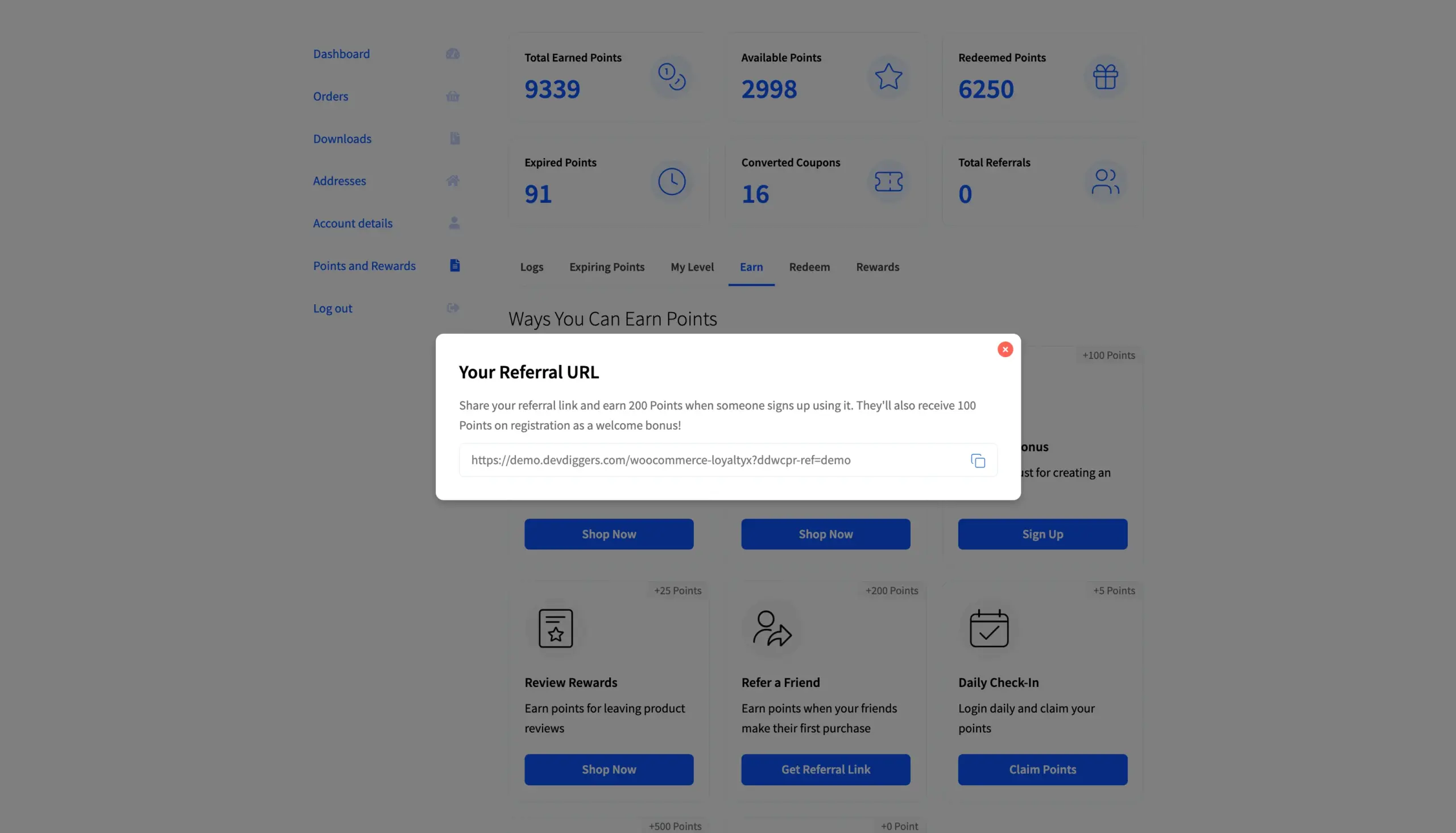
Log in as a test customer. Open the My Account page and confirm the points dashboard shows a Get Referral Link button and your total referrals.
Copy the link and open it in a private browser window. Register a new account there and check that the referral points reach the first account.
No points? Check that the rule is Active and that today is one of its Applicable on Days. Also check that the test account registered from the referral link or typed the referrer’s username into the Referral Code field.
Step 7: Launch Your Program and Promote It
Your program is now live. The promotion section below shows where to put the referral link so customers find it.
Choosing the Right Referral Reward
The right referral reward is one the friend can use and the referrer wants to talk about. Most stores choose between a double-sided or single-sided reward and between points or a coupon. A free product is the third option, and the choice affects how often customers share.
Double-Sided vs Single-Sided Rewards
A single-sided reward only pays out to the person who referred. A double-sided reward gives something to both the referrer and the new customer.
A double-sided reward gives the friend a reason to click. In LoyaltyX you build one by pairing the Referral rule with a Signup rule. The referrer then has a better story to tell.
Instead of “click my link so I get a discount,” they can say “click my link, and you’ll get 500 points towards your first order.” That is a useful offer, and it is easier to share.
The trade-off is cost. You’re rewarding two people instead of one. Test whether the extra sign-ups cover the second reward for your store. If your average order value is low, a single-sided program may be more sustainable.
Points vs Coupon Rewards
Our roundup of the best WooCommerce points and rewards plugins compares how each one handles this choice. Points and coupons pull customers back in different ways.
A coupon has a single redemption moment. Once it’s used, it’s gone, and the customer has no further pullback to your store. Points accumulate. Every time the customer earns more, they have a reason to check their balance, consider spending it, or earn more by referring again. The engagement loop is built in.
That said, coupons have one advantage: they’re instantly understood. If your audience is less familiar with point systems, a simple “get 10% off your next order” may have a higher immediate share rate. You know your customers best.
Free Product Rewards vs Discount Rewards
A free product can feel bigger than a discount of the same value. “Get a free item worth $12” reads as a gift, while “get $12 off” reads as a price cut. Try both and compare the share rate.
In LoyaltyX the referrer always earns points. A Free Product redeeming rule then lets them spend those points on an item you choose. Our guide to setting up free gift rewards in WooCommerce shows how. It also introduces customers to new products in your catalog.
How to Promote Your WooCommerce Referral Program
Promote a WooCommerce referral program where happy customers already look: the order email, the thank-you page and My Account. If customers never see the link, nobody shares it. Five touchpoints cover most stores without extra tools.
- Post-purchase email: The moment after a completed order is the best time to invite a referral. Your customer is happy. They just got what they wanted. Add a referral CTA to your order confirmation email: “Love your order? Share your link and earn points.”
- Thank-you page CTA: Add a referral prompt to the WooCommerce order received page. The
[ddwcpr_points_dashboard]shortcode shows the LoyaltyX points dashboard, with its referral link, on any page. - My Account page widget: LoyaltyX adds its points dashboard to My Account once the plugin is active. The referral link sits in the Earn Points view.
- Transactional emails: Any email that contains an order update is an opportunity. A short line at the bottom with the referral link keeps the program visible without being intrusive.
- Announcement email: If you’re launching the referral feature to an existing customer base, send a dedicated email explaining the program. Send it to customers who have bought at least once, since they know your products.
How to Measure Your WooCommerce Referral Program Performance
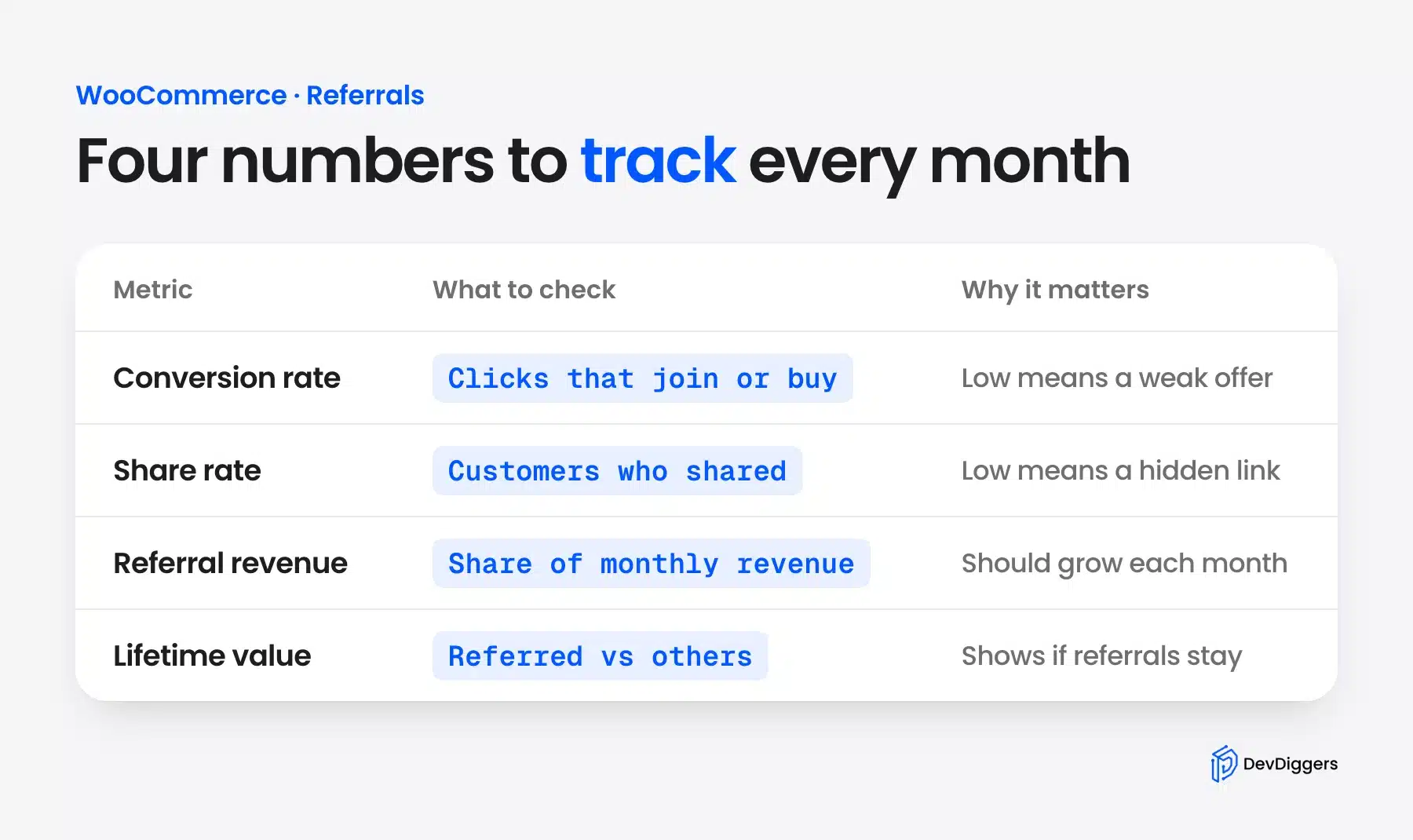
Measure a WooCommerce referral program with four numbers: conversion rate, share rate, referral revenue and the lifetime value of referred customers. Check them monthly. Without them you cannot tell whether the reward or the promotion is the weak point.
Here are the four metrics that matter.
- Referral Conversion Rate: The share of referral clicks that become an account or an order. In LoyaltyX the reward fires on sign-up. Also track how many referred accounts place a first order. A low rate points to a weak reward or friction at registration.
- Share Rate: The share of your customers who have sent their referral link at least once. A low share rate usually means the program is hard to find or rarely promoted.
- Referral Revenue Contribution: What percentage of your total monthly revenue is coming from referred orders? This number should grow month-on-month in a healthy program. If it’s flat, look at whether your reward value is compelling enough and whether your promotion touchpoints are active.
- Lifetime Value (Referred vs Non-Referred): Pull two customer groups in WooCommerce: referred customers and everyone else. Compare average order value and orders per customer. The Journal of Marketing study above found referred customers worth at least 16% more. A reversed result means the reward is attracting the wrong buyers.
LoyaltyX tracks referral counts per customer and attributes points automatically. For deeper analytics, combine this data with WooCommerce’s built-in reports or a plugin like Metorik.
Common Mistakes That Kill WooCommerce Referral Programs
Most referral programs that get no results fail for one of a few reasons. The reward is too small, the link is hard to find or only one side gets anything. The fixes below are simple settings changes.
- Reward too small to share: A 2% discount on a $20 order is $0.40, which nobody tells a friend about. Size the reward against your average order value and test a few levels.
- Referral link is hard to find: If customers must click through three pages to reach their link, most will not bother. Put the link on the first page they see after logging in.
- Only one side is rewarded: The referrer gets a reward but the friend gets nothing. The friend asks “What’s in it for me?” With no answer, the friend often leaves.
- The program is never promoted: Turning the feature on is not enough. Customers will not find the program unless you tell them. Send at least one post-purchase email and add the link to My Account.
- Points expire before customers redeem them: If you’re using a points-based reward, be careful with expiry settings. Points that disappear before customers accumulate enough to redeem feel like a bait-and-switch. Either set a long expiry window or remove expiry entirely for referral rewards.
- No check on fake sign-ups: When the reward fires on registration, someone could create throwaway accounts to farm points. Keep the referral reward modest and review new referrals in the points log now and then.
Conclusion
Adding a referral program to your WooCommerce store turns happy customers into a low-cost source of new ones. The setup takes one earning rule. Referred customers who go on to refer others keep the program growing in a way paid ads do not.
Three things to take away from this guide. First, choose a double-sided reward structure wherever possible. Second, don’t set the reward value so low that it fails to motivate sharing. Third, measure performance after launch. Referral conversion rate, share rate and referred customer LTV are the three numbers that tell you whether the program is working.
LoyaltyX, our WooCommerce points and rewards plugin, includes the referral rule alongside points earning, loyalty levels and birthday rewards. Referrals are part of the Pro version.
Frequently Asked Questions (FAQs)
Q1. Does WooCommerce have an inbuilt referral program?
No. WooCommerce has no referral program by default. You need a plugin to create referral links, track them and reward people. LoyaltyX Pro, built by DevDiggers, handles the whole flow, including rewards for the referrer and the new customer.
Q2. What is the default setting for the lifetimes of referral cookies for WooCommerce stores and how long should they last?
A 30-day referral cookie suits most WooCommerce stores. It gives a friend time to browse and come back before they sign up or buy. LoyaltyX sets a fixed 30-day cookie when someone opens a referral link.
Q3. Is it possible for me to reward both the referrer and the new customer?
Yes. Rewarding both people is called a double-sided referral program. In LoyaltyX the Referral rule rewards the referrer when the friend registers. A Signup rule gives the friend a welcome bonus on the same registration.
Q4. What is the difference between a referral program using WooCommerce and an affiliate program?
A referral program rewards current customers by sharing their business with other people through various channels (e.g., Social Media). Customers usually receive point-based rewards, discounts, or free shipping. In comparison, an affiliate program compensates marketers/content creators with cash for promoting your business outside Your Website. While both programs can be implemented at the same time, each program is used to acquire new customers in separate ways.