WordPress vs WooCommerce is one of the most searched comparisons in the WordPress space and also one of the most misunderstood.
WordPress is your website foundation. It runs your pages, your blog, and your content. WooCommerce is a plugin you install on top of this when you want to sell products online. You cannot run WooCommerce without WordPress, but you can absolutely run WordPress without WooCommerce.
Most people asking this question are not really trying to pick one over the other. They are asking something simpler. Do I need a store, or is a content site enough?
This guide answers exactly that. You will learn what each one actually does, where the real costs sit in 2026, how the two work together under the hood, and a clear checklist to figure out which setup your project needs.
What Is WordPress and What Does It Do?
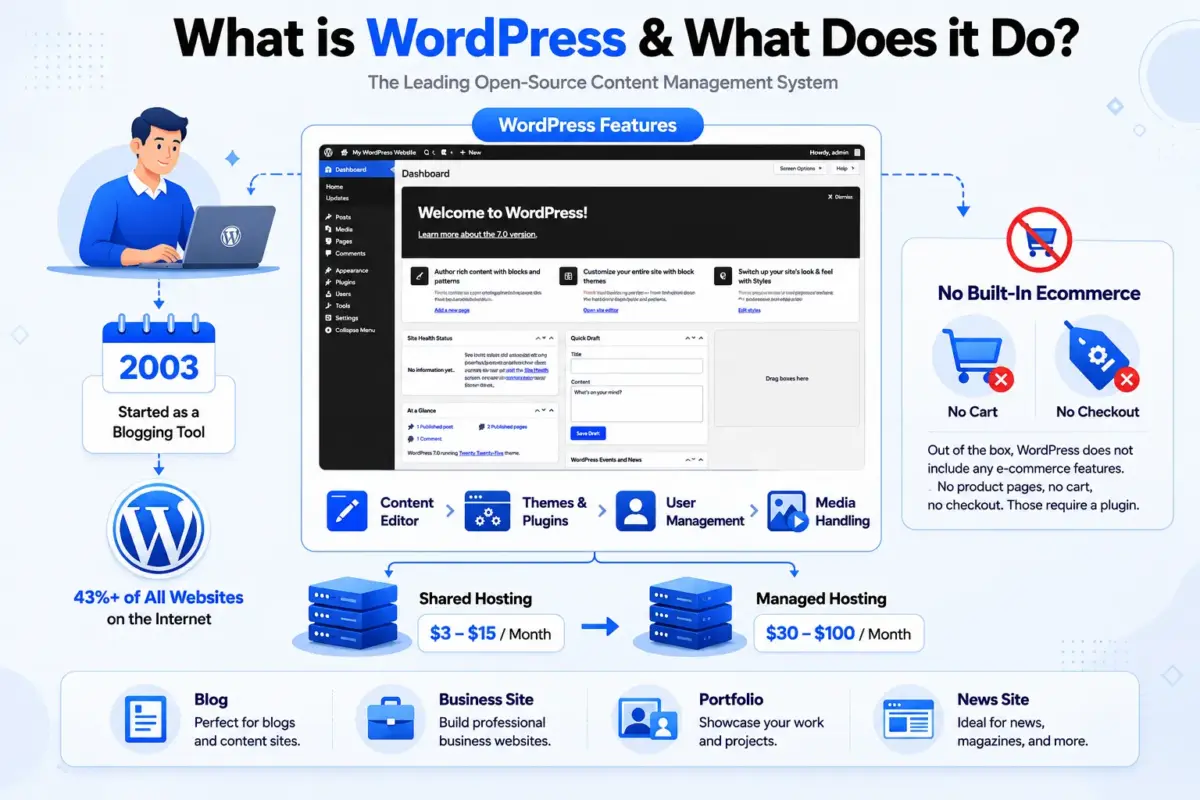
WordPress is an open-source content management system that currently powers over 43% of all websites on the internet. It started as a blogging tool in 2003, built by Matt Mullenweg and Mike Little, and it has grown into the most widely used website platform on the planet, running everything from personal blogs to enterprise news sites.
Out of the box, WordPress gives you a content editor, page and post management, user roles, media handling, theme support, and a plugin system that lets you extend the platform in almost any direction. It does not include any eCommerce features by default. No product pages, no cart, no checkout. Those require a plugin.
The platform itself is free to download and use. What costs money is the hosting, the domain, any premium themes, and any paid plugins you choose to add. A basic WordPress site on shared hosting runs about $3-$15/month. A properly tuned setup on managed WordPress hosting sits closer to $30-$100/month, depending on traffic.
WordPress is the right choice when you need a blog, a portfolio, a business brochure site, a news site, a membership platform, or any other content-driven project where selling physical or digital products is not the goal. If that describes your project, you do not need WooCommerce at all.
What Is WooCommerce and What Does It Do?
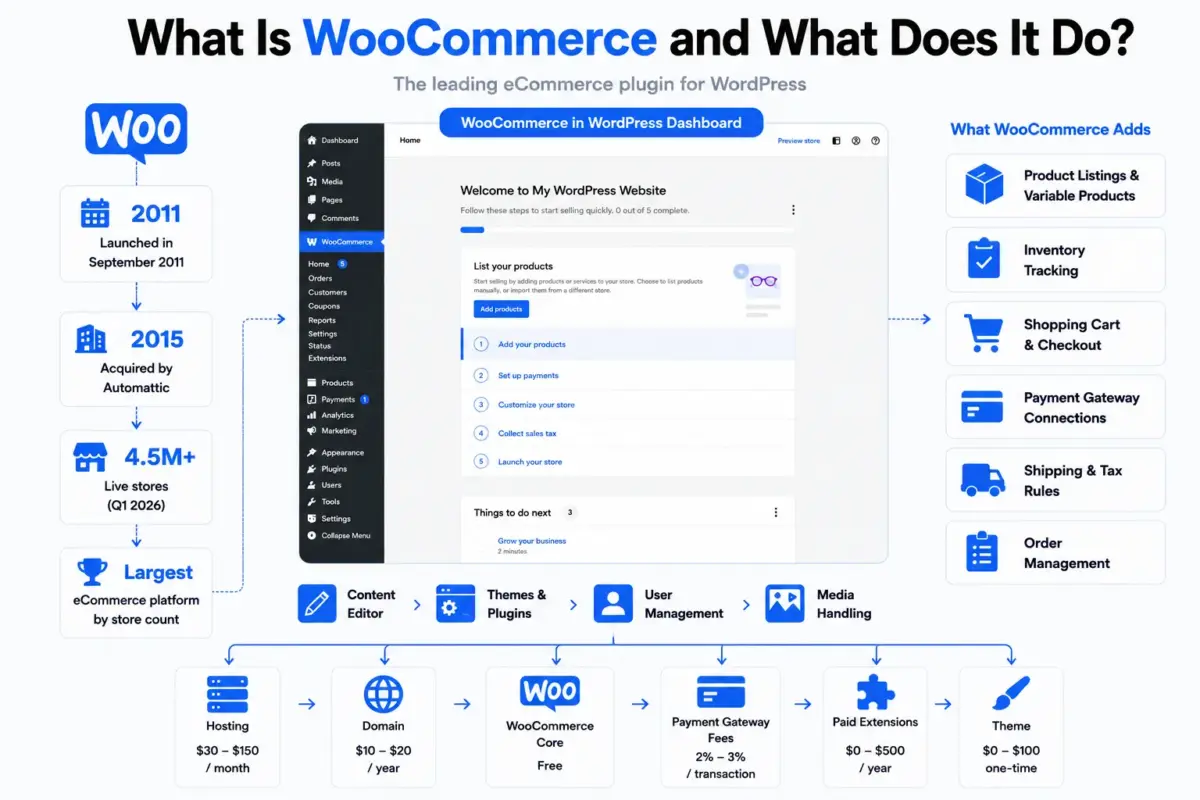
WooCommerce is a free, open-source eCommerce plugin built specifically for WordPress. It launched in September 2011 and was acquired by Automattic (the company behind WordPress.com) in May 2015. As of Q1 2026, StoreLeads data shows approximately 4.5 million live stores running on WooCommerce worldwide, making it the largest eCommerce platform by store count globally.
When you install WooCommerce on a WordPress site, it adds a whole new layer of functionality: product listings, variable products, inventory tracking, a shopping cart, a checkout flow, payment gateway connections, tax and shipping rules, and order management. All of it integrates directly into your existing WordPress dashboard. No separate admin panel. No second login.
The core WooCommerce plugin is free. But most real stores need at least a few paid extensions. Payment gateways beyond the defaults, subscriptions, bookings, advanced reporting, and multi-currency support all come via paid add-ons. A realistic budget for a WooCommerce store often looks like this:
- Hosting: $30-$150/month (eCommerce sites need more resources than content sites)
- Domain: $10-$20/year
- WooCommerce core: free
- Payment gateway fees: 2-3%/transaction depending on provider
- Paid extensions: $0-$500/year, depending on what you need
- Theme: $0-$100 one-time
That last point matters. The difference between running WordPress alone and running WordPress with WooCommerce is roughly $20-$80/month on hosting alone, because WooCommerce sites need to handle transaction processing, session data, and dynamic cart calculations that a static content site does not.
WordPress vs WooCommerce: 6 Key Differences
These are not competing platforms, so the comparison is really about what changes when you add WooCommerce to WordPress.
1. Purpose
WordPress manages content. WooCommerce manages commerce. WordPress lets you publish posts, build pages, and organise media. WooCommerce adds the ability to list products, take payments, track inventory, and manage orders. They solve completely different problems, which is why they work together rather than against each other.
2. Technical Requirements
A standard WordPress site needs a web server, PHP 7.4 or higher, and a MySQL database. WooCommerce adds to that: you need PHP 8.0 or higher for WooCommerce 8.x, at least 256MB of PHP memory, and a MySQL database with the InnoDB storage engine. WooCommerce also creates an additional 14 database tables on top of WordPress’s default 12. Something we often see in support: stores running on shared hosting with the default PHP memory limit of 128MB will run into constant checkout errors and plugin conflicts. Increasing memory_limit in wp-config.php or php.ini fixes most of those without any plugin changes.
3. Performance
WordPress alone is faster than WordPress with WooCommerce. This is expected. A content site serves mostly static pages that can be heavily cached. WooCommerce pages like the cart, checkout, and account areas are dynamic by design. They must bypass caching to show correct prices, real inventory counts, and session-specific cart data.
According to W3Techs and Google’s 2025 Core Web Vitals data, the average WordPress page loads in about 3.4 seconds. Well-optimised WooCommerce stores land closer to 2-2.5 seconds with proper caching, a CDN(content delivery network), and image optimisation. Unoptimized stores with overloaded plugin stacks can push 5-8 seconds, which is where you see incomplete checkouts and lost revenue. If you want to speed up a WooCommerce store, the most reliable place to start is our WooCommerce speed optimisation guide.
4. SEO(Search Engine Optimization)
Both WordPress and WooCommerce use the same SEO foundation. The same Yoast or RankMath setup works across both. WooCommerce adds product schema markup automatically, which enables rich snippets in search results showing price, availability, and star ratings.
The real SEO complexity with WooCommerce comes from scale. A store with 500 products generates page numbering, filtered URLs, and potentially duplicate content issues that a 20-page WordPress site never faces. Getting product category pages properly structured, setting preferred URLs for filtered shop pages, and handling filter navigation correctly are all things that matter at scale but are completely irrelevant for a content-only WordPress site.
5. Security
WordPress sites face the standard CMS threats: repeated login attacks, outdated plugins, and file permission issues. WooCommerce stores carry all of those, plus PCI meeting requirements considerations because you are handling payment data. This does not mean WooCommerce is insecure. It means the security requirements are higher and the consequences of getting it wrong are more serious.
WooCommerce itself does not store raw card data (payment gateways handle that), but you still need SSL, strong authentication, regular backups, and a reliable security plugin. The WooCommerce security checklist covers the full setup.
6. Cost Over Time
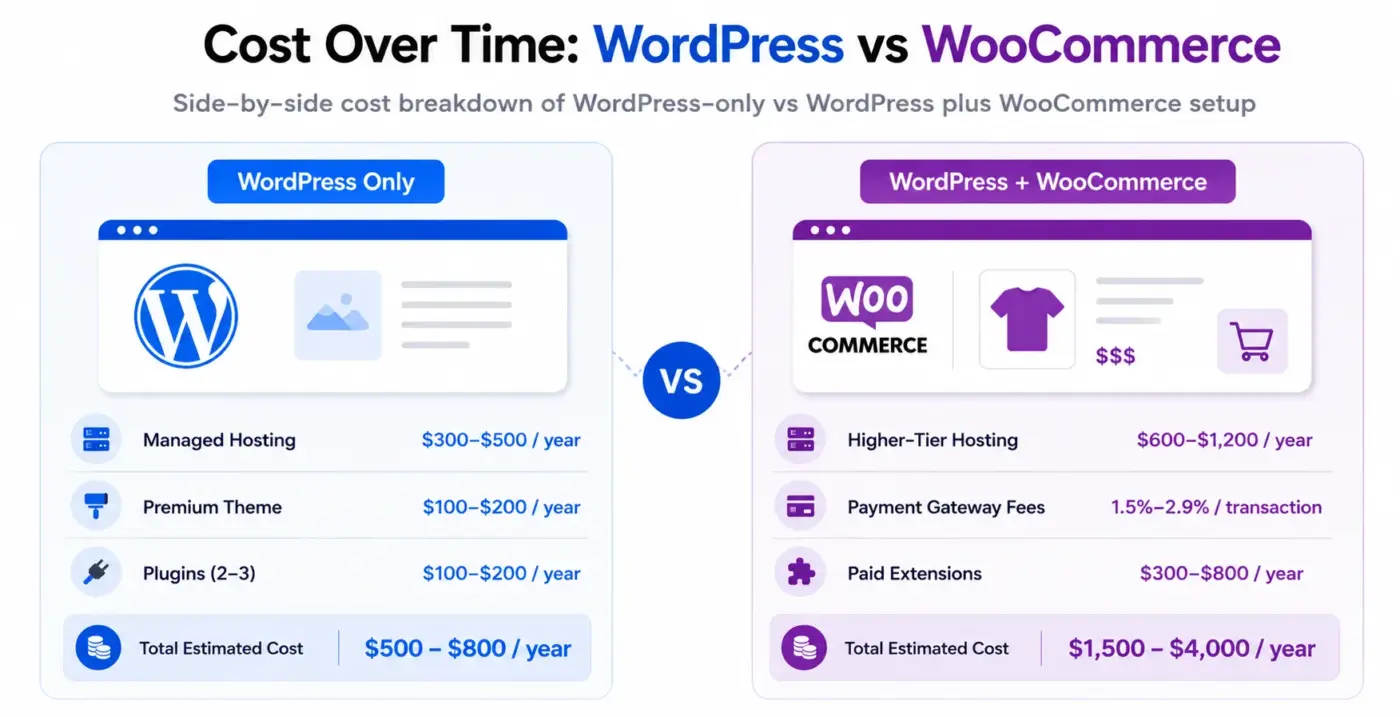
WordPress alone is cheap to run. A small business site on managed hosting with a premium theme and two or three paid plugins might cost $500-$800/year all-in.
WooCommerce adds real cost. Between higher-tier hosting, payment gateway fees on every transaction, and the paid extensions a real store needs, a properly set-up WooCommerce store costs $1,500-$4,000/year before any marketing spend. That is not a reason to avoid WooCommerce. It is a reason to build the budget honestly before you start.
How Do WordPress and WooCommerce Work Together?
WooCommerce runs inside WordPress. Not alongside it. Not separately from it. It hooks into the WordPress plugin system, uses the WordPress database, inherits the WordPress theme, and appears as additional menu items inside the WordPress admin panel.
When a customer visits your store, WordPress handles the page rendering, the template logic, and the content output. WooCommerce handles the product data, the cart session, the checkout process, and the order recording. They share the same database and the same codebase. Updates to WordPress can affect WooCommerce and vice versa, which is why you should always test updates on a testing site before pushing to production.
This tight integration is both a strength and a limitation. It means you get a fully combined site where a blog post can sit one click away from a product page, where SEO settings apply across everything, and where a single theme controls the full look and feel.
It also means a problematic plugin can break both your content and your store at the same time. This is one case where having a staging environment set up before you need it really does save you.
Do You Need WordPress, WooCommerce, or Both?
Here is a simple way to decide.
Use WordPress alone if:
- You are building a blog, news site, portfolio, or business information site
- You have no plans to sell products or services with a checkout process
- You want maximum speed and the simplest possible hosting setup
- Your site’s main job is generating leads via contact forms rather than direct sales
Add WooCommerce if:
- You need to sell physical products, digital downloads, or services with online payment
- You want subscriptions, automatic payments, or membership access with Paid access
- You are building a marketplace or multi-vendor setup
- You already have a WordPress site and want to add a shop without switching platforms
Consider alternatives to WordPress entirely if:
- You want fully managed hosting with no plugin maintenance (Shopify is worth comparing)
- Your team has zero technical resources and needs everything handled for you
- You are selling at a very high volume and need a platform built specifically for enterprise scale
For most small to mid-size businesses, the combination of WordPress plus WooCommerce hits a sensible balance between control, cost, and capability. The open-source model means no licensing fees, no vendor lock-in, and no platform deciding what you can or cannot do with your store. There is a reason WooCommerce holds a 33.4% share of global eCommerce by store count as of 2026.
If you are at the point where WooCommerce is the right call and you want to extend what it can do, DevDiggers builds plugins specifically for WooCommerce stores, including a WooCommerce Points and Rewards plugin for stores that want to run loyalty programs and a WooCommerce Wallet plugin for stores that want to offer store credit and cashback to customers.
Common Mistakes When Setting Up WordPress with WooCommerce
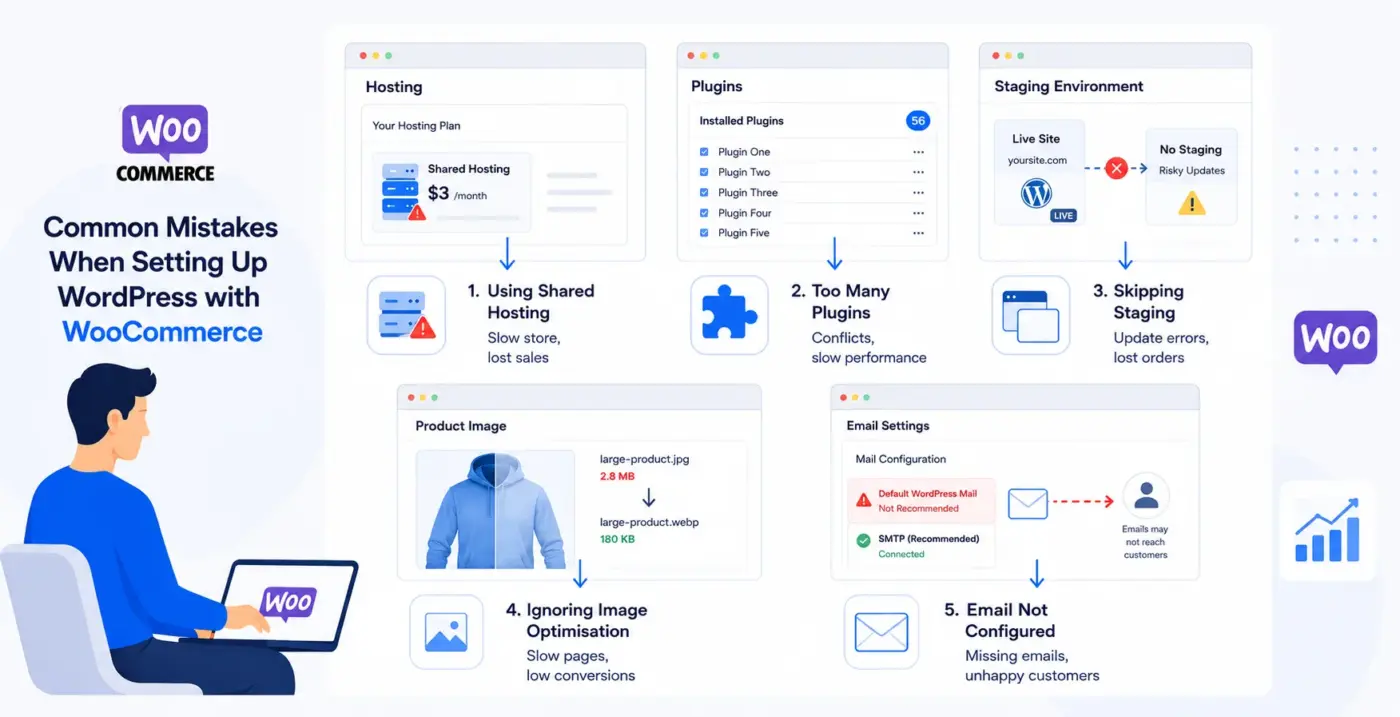
This section covers the setup errors that cause the most support tickets and the most avoidable revenue loss.
- Using shared hosting. WooCommerce on a $3/month shared host will be slow. Slow checkout pages kill conversions. Budget for properly managed hosting from the start. Kinsta, WP Engine, and Cloudways all have WooCommerce-specific plans that are worth the difference.
- Installing too many plugins. A WooCommerce store does not need 50 plugins. Every plugin adds database queries, script load, and a potential conflict point. Review your plugin list before going live. If two plugins solve the same problem, remove the one you use less.
- Skipping a staging environment. WordPress makes it easy to test updates before applying them to a live store. Most good hosts offer one-click staging. Use it. A WooCommerce update that breaks checkout on a live store costs far more in lost orders than the ten minutes it takes to test first.
- Ignoring image optimisation. Product pages are heavy. Uncompressed product images are one of the top causes of slow WooCommerce stores. Serve WebP format, set image dimensions correctly in your theme, and use a CDN(content delivery network). The WordPress image optimisation guide covers the exact steps.
- Not setting up email correctly. WooCommerce sends transactional emails for order confirmations, shipping updates, and password resets. WordPress’s default mail function is unreliable. Use an SMTP plugin connected to a proper email delivery service. If customers are not getting order confirmations, they call you.
What Has Changed in 2026?
A few things have shifted in the WordPress and WooCommerce space that are worth knowing about before you build.
WooCommerce’s block-based checkout is now stable and recommended for new stores. It replaces the older shortcode checkout with a Gutenberg block structure that is easier to customise visually and faster to load.
If you are building a new store in 2026, use the block checkout by default. If you are running an existing store on the shortcode checkout, transfer is possible but not urgent unless you are seeing performance issues.
WordPress’s Gutenberg full-site editing has matured enough that block themes are a practical starting point for WooCommerce stores. Classic themes still work fine, but block themes tend to be leaner and faster out of the box.
WooCommerce High-Performance Order Storage (HPOS) is now the default for new installations. This moves order data from the old WordPress post meta tables into dedicated custom tables, which improves query performance significantly on high-volume stores. Stores still on the legacy storage system can migrate with no downtime through WooCommerce’s built-in transfer tool.
Conclusion
WordPress vs WooCommerce is not a choice between two platforms. WordPress is the base. WooCommerce is what you add when you need to sell. If your project is purely content, stay on WordPress alone and keep your setup clean.
If you need eCommerce, WooCommerce on WordPress gives you more control and lower platform cost than most alternatives at the same capability level. The real decisions are around hosting quality, plugin selection, and whether your team has the technical resources to maintain an open-source stack over time.
If you are building a WooCommerce store and want plugins that extend what the platform does by default, check out the full DevDiggers WooCommerce extensions library.
Frequently Asked Questions(FAQs)
Q1. Can I use WooCommerce without WordPress?
No. WooCommerce is a WordPress plugin and cannot function independently. You must install WordPress before using WooCommerce. It relies on WordPress for website management, themes, plugins, user accounts, and content handling. If you want a standalone eCommerce platform, consider Shopify, BigCommerce, or Wix eCommerce instead.
Q2. Is WooCommerce free?
The core WooCommerce plugin is free to download and install. The costs come from hosting, domain registration, premium themes, paid extensions, and payment gateway transaction fees. Most real stores spend $1,500-$4,000/year to run properly.
Q3. Does WooCommerce slow down WordPress?
Yes, adding WooCommerce does increase server load and page weight compared to a content-only WordPress site. Cart, checkout, and account pages are dynamic and cannot be fully cached. With proper hosting and a caching plugin configured to exclude those pages, most WooCommerce stores load well within acceptable performance ranges.
Q4. Is WordPress good for eCommerce?
WordPress with WooCommerce is one of the most widely used eCommerce setups in the world. It works well for most business sizes. Where it starts to feel limited is at very high transaction volumes or when you need complex B2B features out of the box. For most small to mid-size stores, it is a solid choice.
Q5. Do I need a developer to set up WooCommerce?
Not for a basic store. WooCommerce has a setup wizard, and many quality themes are designed specifically for it. You will likely need developer help if you need custom functionality, integrations with external systems, or performance optimisation beyond what plugins provide.
Q6. What is the difference between WordPress.com and WordPress.org?
WordPress.org is the free, self-hosted platform this guide covers. WordPress.com is a hosted service run by Automattic, where WordPress is managed for you, with more limitations on what you can customise. WooCommerce is available on some WordPress.com plans, but self-hosted WordPress.org gives you full control.
Q7. Can WordPress handle a large WooCommerce store?
Yes, with the right infrastructure. WooCommerce stores with tens of thousands of products and high order volumes run on WordPress regularly. The difference is hosting: you need dedicated or cloud hosting, a well-configured caching layer, database optimisation, and potentially a search plugin like an advanced search system for product search at scale.