
By providing tangible benefits to your customers, loyalty programs create value in Redemption. Customers who do not redeem their points lose faith in your company, and as a result, will tend to go elsewhere. If your program provides easy and rewarding ways to redeem points, it will create higher repeat purchases, as well as higher lifetime customer values.
The purpose of this tutorial is to provide you with insight into the redemption process from the customer’s perspective and help your consumers maximize the use of their points through the redemption process of our WooCommerce loyalty plugin.
The Importance of Redemption #
Redemption serves as a key reward for consumers who are loyal to your company. Without an easy, clear way to redeem points:
- Customers will feel as though their points are of no value.
- Customers’ engagement levels will decrease when they cannot see what rewards are available for redeeming points.
- The conversion from earned points to redeemed points will not take place (all points earned will be wasted).
- Customers will not be making additional repeat purchases.
- The Customer Lifetime Value for all of your customers will decline.
Customers will feel rewarded the moment they redeem their points, and therefore, will have meaningful experiences in earning additional points. Additionally, increased repeat purchasing behaviour will encourage Customers to earn even more rewards through the program and thus create a program that feels valuable to your customers and builds loyalty to your company’s brand.
Where Customers Will Find Access To Redeem #
Where To Redeem:
- My Account → Points and Rewards (Main Redeeming Location):
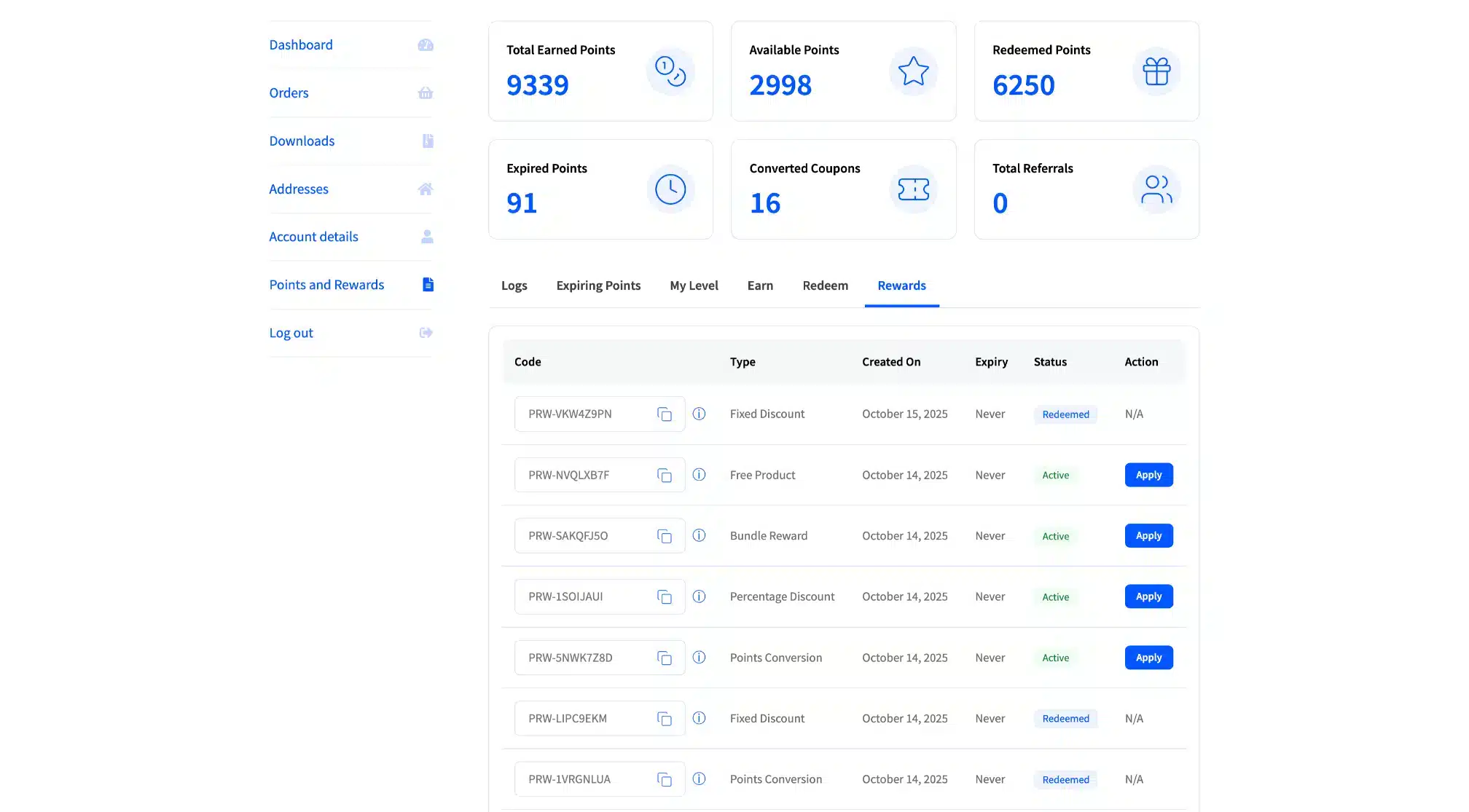
- Has a separate “Redeem” page dedicated to showing the entire list of options.
- The most advantageous way to obtain & choose what you want to redeem.
- This is where you will find the complete list of all rewards and anything else associated with them.
- You will also see the quantity of available inventory for all of your Rewards.
- Cart/Checkout Page (Choose Rewards from the Notice):
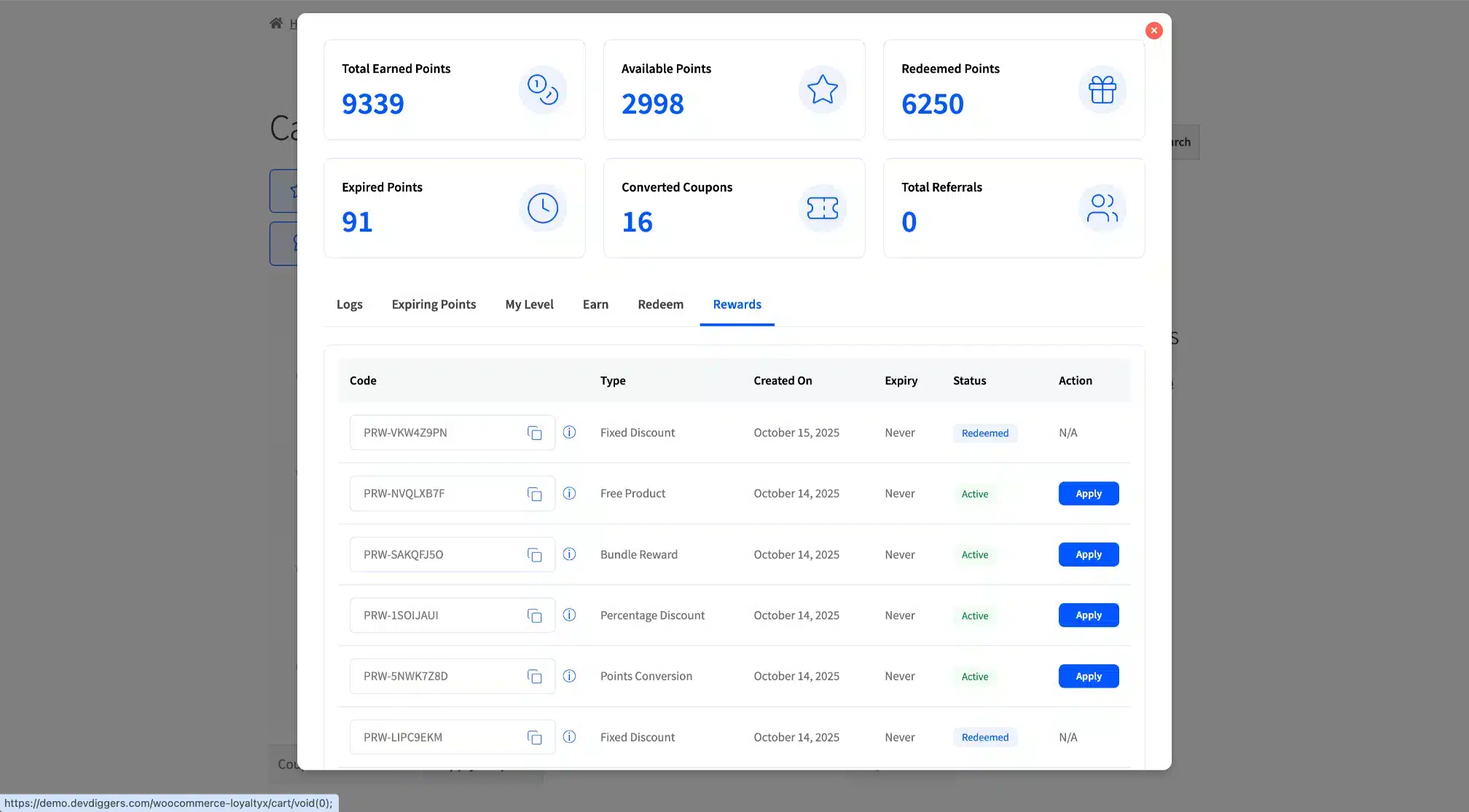
- Allows quick access to Redeem without needing to leave the Cart Page.
- You will only see a limited list of Reward Options available.
- Usually good for last-minute Redeems/Impulse Redeeming.
Customer Experience of Redeeming Points #
Step 1: Visit Redeem Tab #
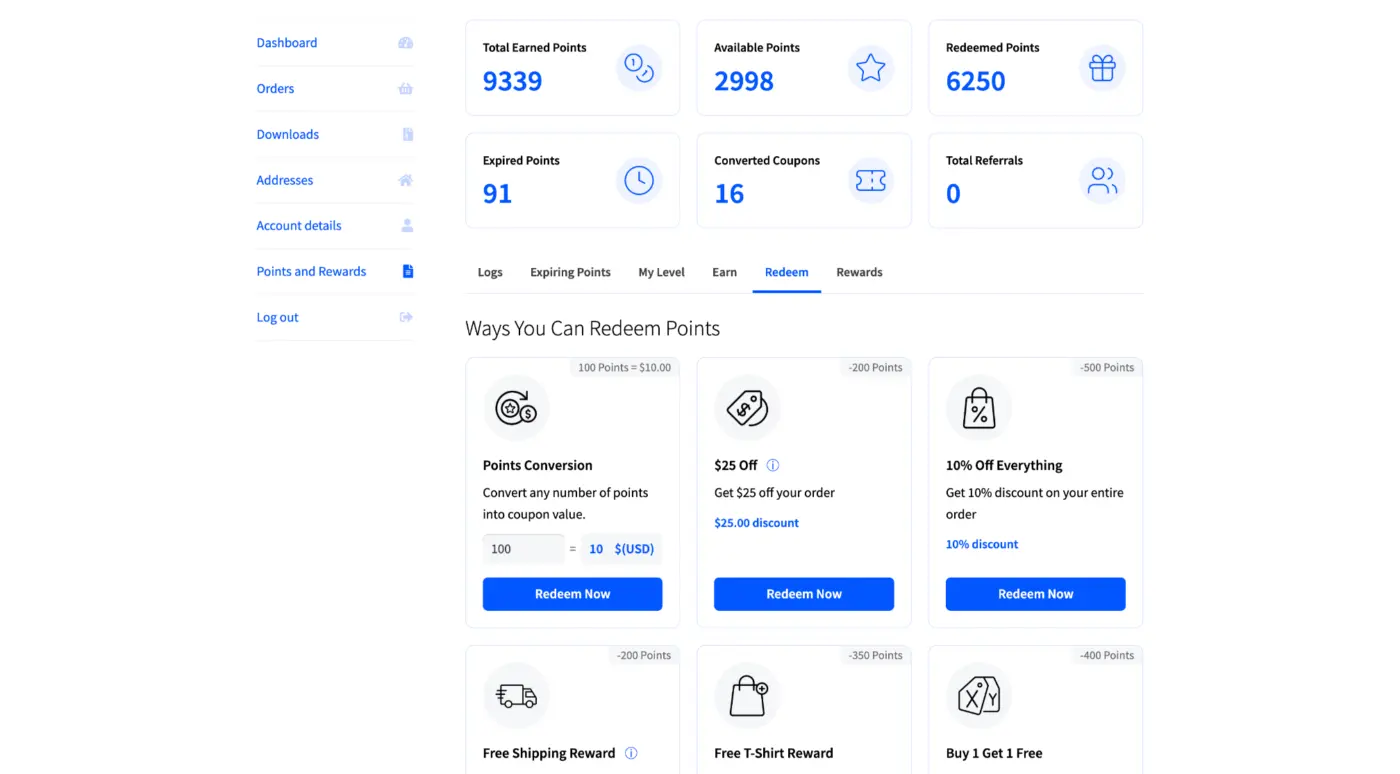
- Log in to your WooCommerce account.
- Navigate to Your Account → My Account → Points & Rewards.
- Click on the Redeem tab and review available redeemable rewards.
Step 2: Available Rewards #
When you go to the Redeem Tab, you will see information about how to get your points and a summary of the available types of Rewards that you can get as reward cards. Each card indicates:
- Icon graphics.
- Amount of Points needed to get the card (e.g., 200, 500 or 100 points for $10.00).
- Description of the Reward (e.g., $25 off or shipping).
- What the available rewards will provide.
- The monetary value of each reward.
- Value of reward ($25.00 discount or 10% Discount).
- “Redeem Now” button to use the currently available reward.
Typically, customers can earn points and convert those points to redeem coupons or discounts.
Step 3: Redeeming Your Reward #
- The customer identifies the reward they want and confirms that there are enough points.
- When customers click the “Redeem Now” button located on the reward card, the system creates the coupon code (this happens automatically).
- The coupon code will be presented with the following success messages:
- “Coupon [CODE] created successfully!”
- “Coupon code applied successfully.”
- Your available points balance will be decreased by the new amount of points that you have redeemed.
- If applicable, the coupon will automatically apply during checkout.
Step 4: Applying Your Coupon To Your Purchase #
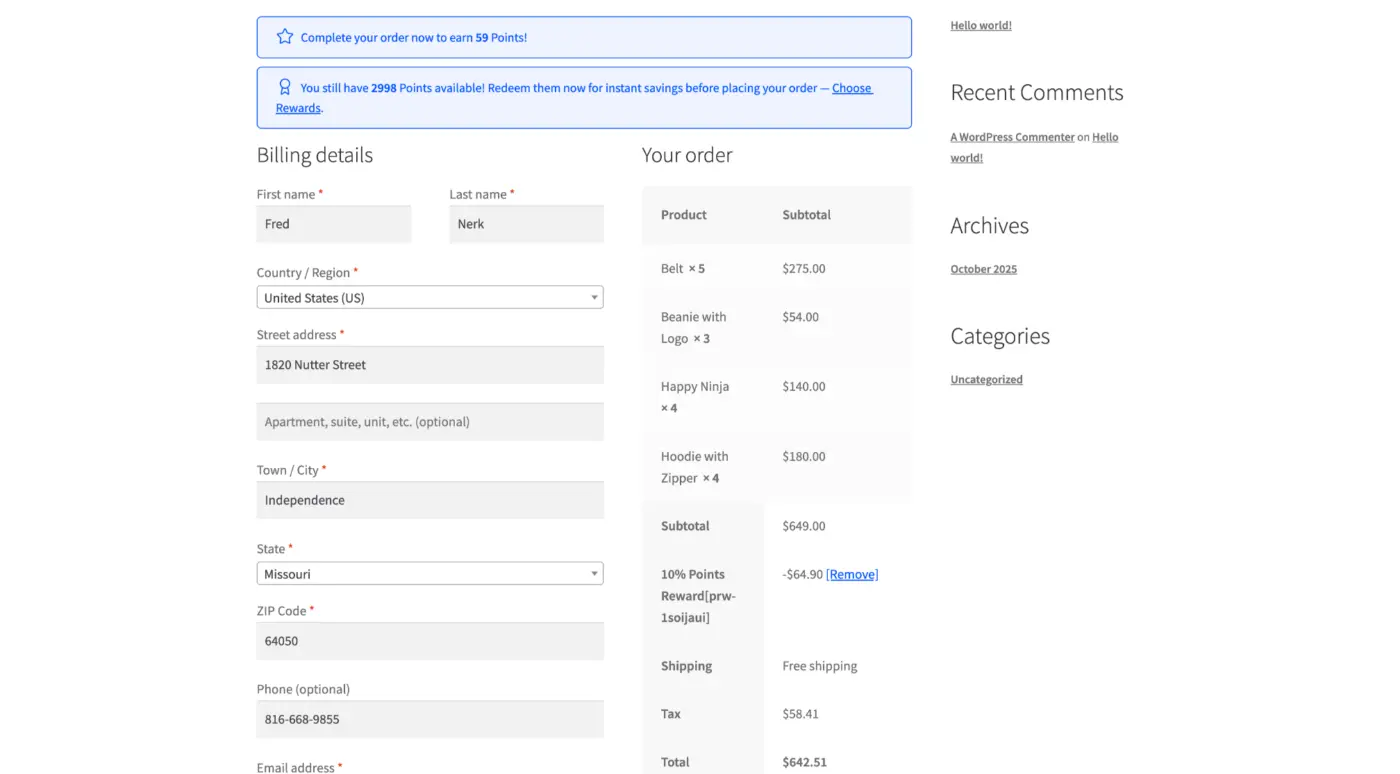
If you’ve redeemed rewards, you’ll need to do these 5 simple things to apply the coupon you received when redeeming your rewards:
- You received a coupon code.
- Add your respective products & items to your shopping cart.
- Proceed to checkout and enter your coupon code in the “Apply Coupon” section of the checkout page.
- Discount applied to your order.
- Complete your order based on the discounted price/deal.
Step 5: Reviewing Redeemed Rewards #
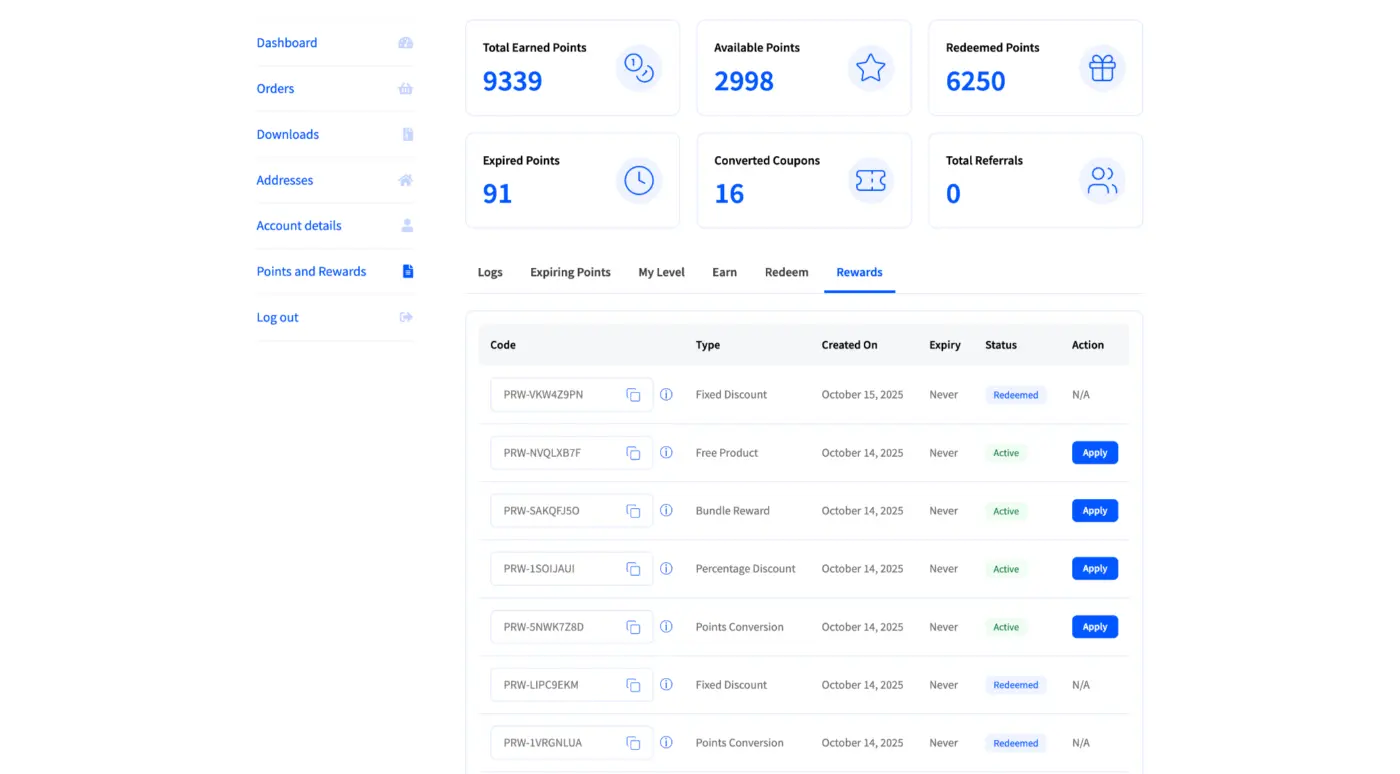
After redeeming their rewards, customers can view redeemed reward coupons by clicking the “Rewards” tab; there, customers can see all of their redeemed coupons as they were created, along with:
- Code – Coupon Code (Example: PRW-3HQLIQA)
- Type – Type of Reward (Example: Points Conversion, Fixed Discount)
- Created On – Date coupon was created
- Expiry – Date coupon expires (if coupon does not expire, customer will see “never”)
- Status – Either “Active” (not yet redeemed), “Redeemed” or “Expired”, so customers can click the “Apply” button next to their active coupons to use them in their next order.
Summary #
A seamless redemption process is essential for the success of loyalty programs. The more points of friction in a redemption, the less likely a consumer will redeem and the greater the loss of both engagement and redemptions.
Understanding the entire customer journey from the administrator and customer perspectives will enable you to create intuitive and rewarding loyalty programs.
Now your loyalty program is prepared to create customer loyalty, increase customer lifetime value and promote long-term loyalty.


