What is WooCommerce Order Communication?
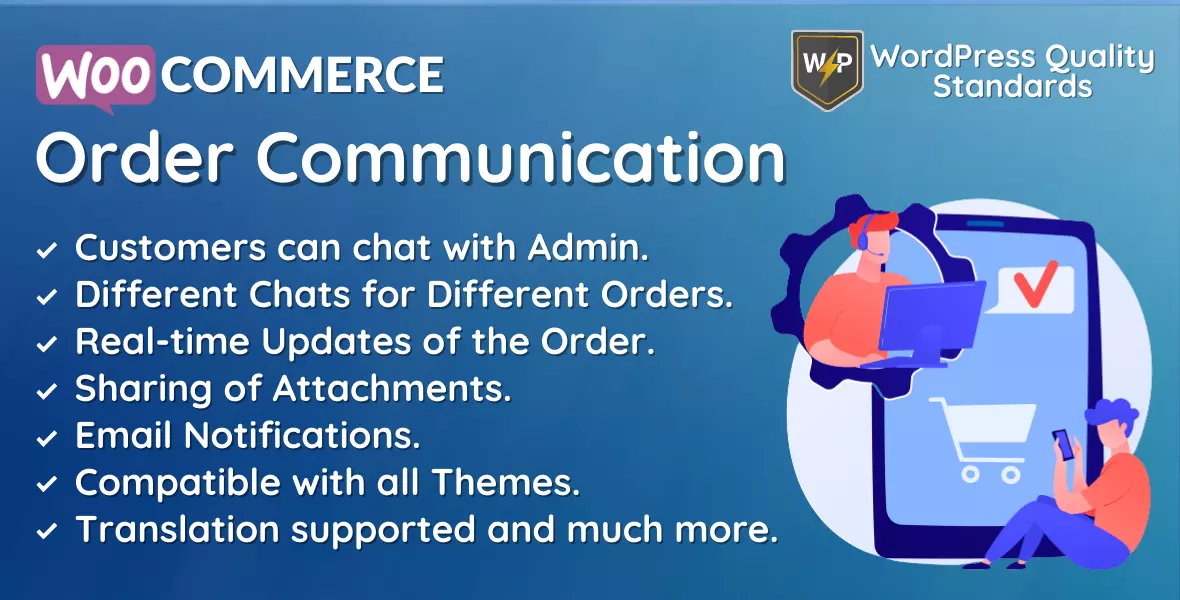
WooCommerce Order Communication is a private messaging plugin that adds a chat thread to each WooCommerce order. Customers send messages from the view order page, admins reply from the order edit screen, and both sides can be notified by email. Attachments, saved templates, and business hours are supported.
Order chat versus email support
Email support loses the connection to the order. The customer writes from a personal address, does not quote an order number, and describes a product by memory. Someone then has to work out which order they mean before anything useful can be said.
An order chat has that context built in. Every message sits on the order it concerns, next to the line items, the status, and the payment record. Nothing has to be reconstructed, and no thread ends up in the wrong person’s inbox.
Where each side works
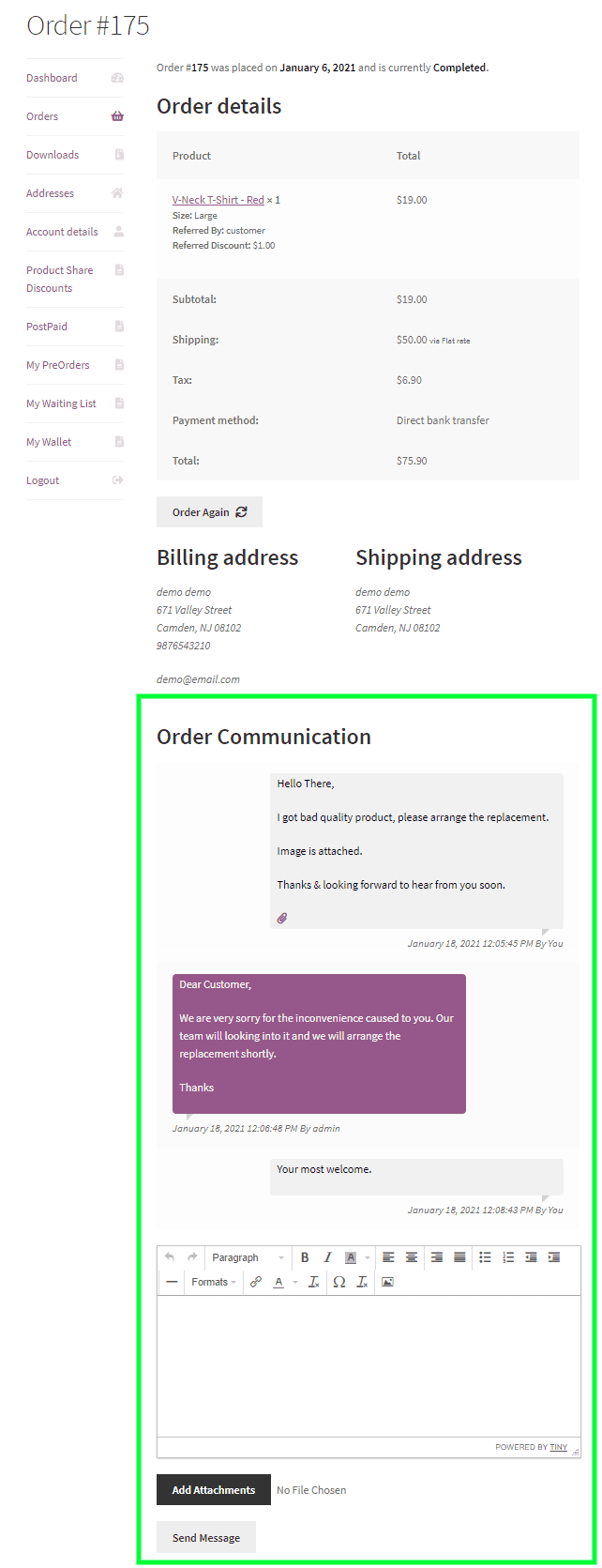
- Customers use an Order Communication area on the view order page in My Account.
- Admins use an Order Communication meta box on the order edit screen.
Both sides get a full editor, and attachment sharing can be enabled so files move in either direction. Messages are private to that order.
Keeping the workload under control
- Message templates store your standard replies so common questions do not get retyped.
- Business hours restrict messaging to the days and times you choose, with your own message shown outside them.
- Auto-reply acknowledges a customer message immediately, with an optional delay, and supports the placeholders {customer_name}, {order_number}, and {order_date}.
- Message limits cap how many messages one customer can send per day, with your own message shown when the limit is hit.
- Allowed order statuses decide which orders can be discussed at all. Leave it empty to allow every status.
Seeing the whole picture
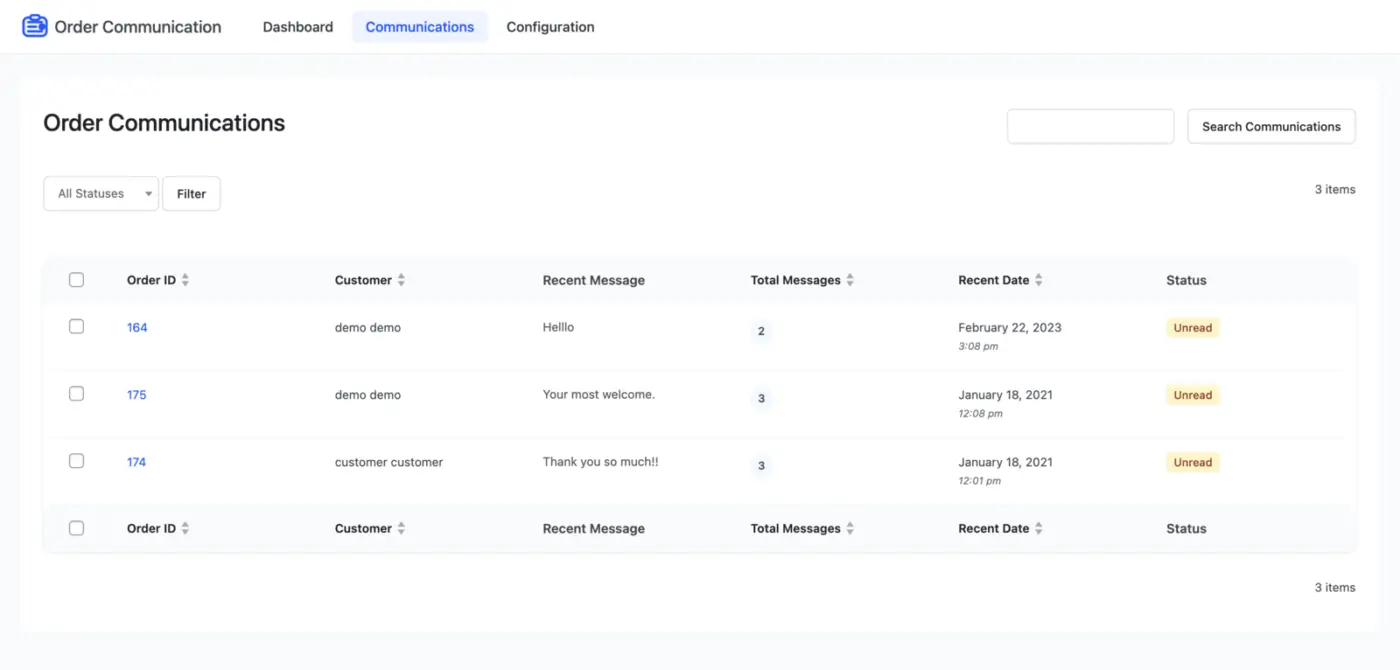
A dashboard summarises plugin activity and message statistics. A communications list shows every thread with its order ID, customer name, most recent message, total message count, date, and status, so nothing waits unanswered.
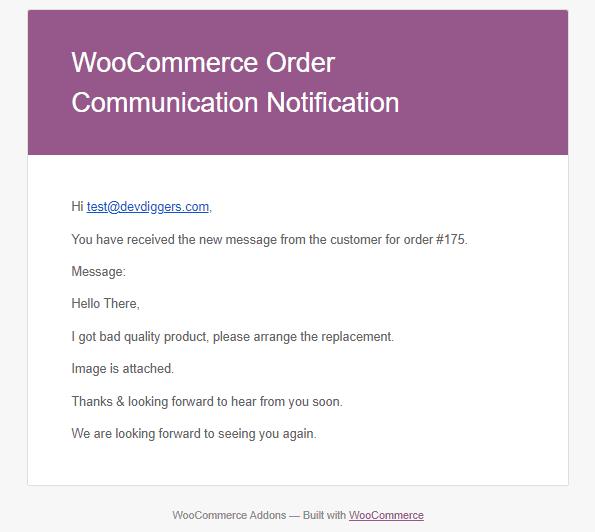
Email notifications can be enabled in both directions and use the WooCommerce email template system. The interface is responsive, works with themes using standard WooCommerce templates, and ships with a .pot file for translation.
Who this plugin is for
Stores selling made-to-order, customised, or high-value items where questions arrive after the order is placed. Stores handling returns and damage claims that need photo evidence. Any store where support currently runs through a shared inbox with no link back to the order.
Why choose our plugin?
All our products meet the WordPress quality standards, including security, quality, performance and modern coding standards. For this, we also got awarded with the WP Requirements Compliant Badge by Envato for our CodeCanyon Portfolio.
Features of WooCommerce Order Communication
- Turn order chat on or off for the whole store.
- Allow communication only on the order statuses you choose.
- Turn attachment sharing on or off.
- Email the admin when a customer replies.
- Email the customer when the admin replies.
- Set the font colour of the sender’s message.
- Set the background colour of the sender’s message.
- Set the font colour of the receiver’s message.
- Set the background colour of the receiver’s message.
- Customers message you from the view order page.
- You reply from the order edit screen.
- A full editor on both sides of the conversation.
- Messages stay private to that order.
- Responsive interface on phones and tablets.
- Works with themes using standard WooCommerce templates.
- Notifications use the WooCommerce email templates.
- Translation ready, with a .pot file included.
Setting up WooCommerce order chat
General configuration
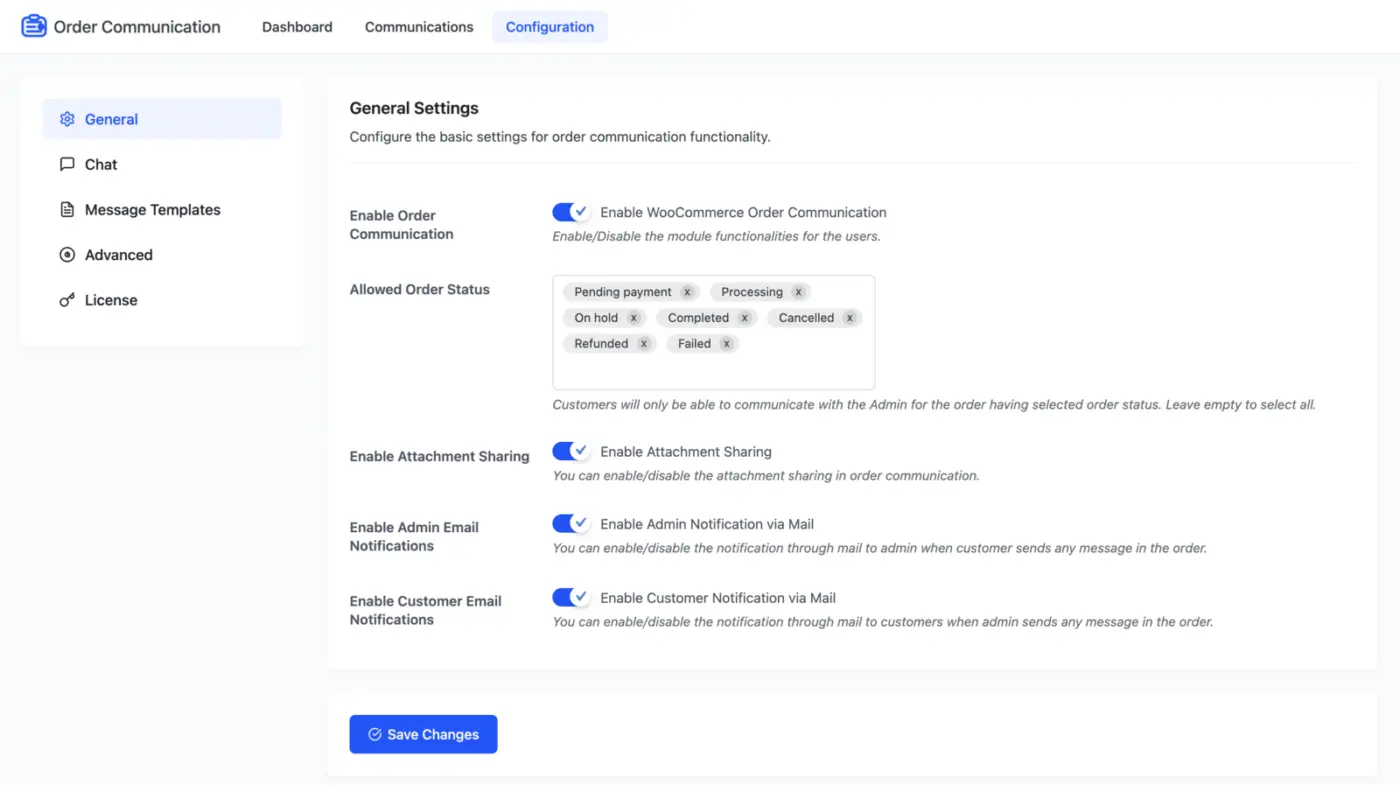
- Enable order communication: turn the messaging module on or off for customers.
- Allowed order status: customers can only start a conversation on orders in these statuses. Leave it empty to allow every status.
- Enable attachment sharing: let files move in both directions. This is how customers send photos of a damaged or incorrect item.
- Enable admin email notifications: email you when a customer sends a message.
- Enable customer email notifications: email the customer when you reply.
Chat appearance
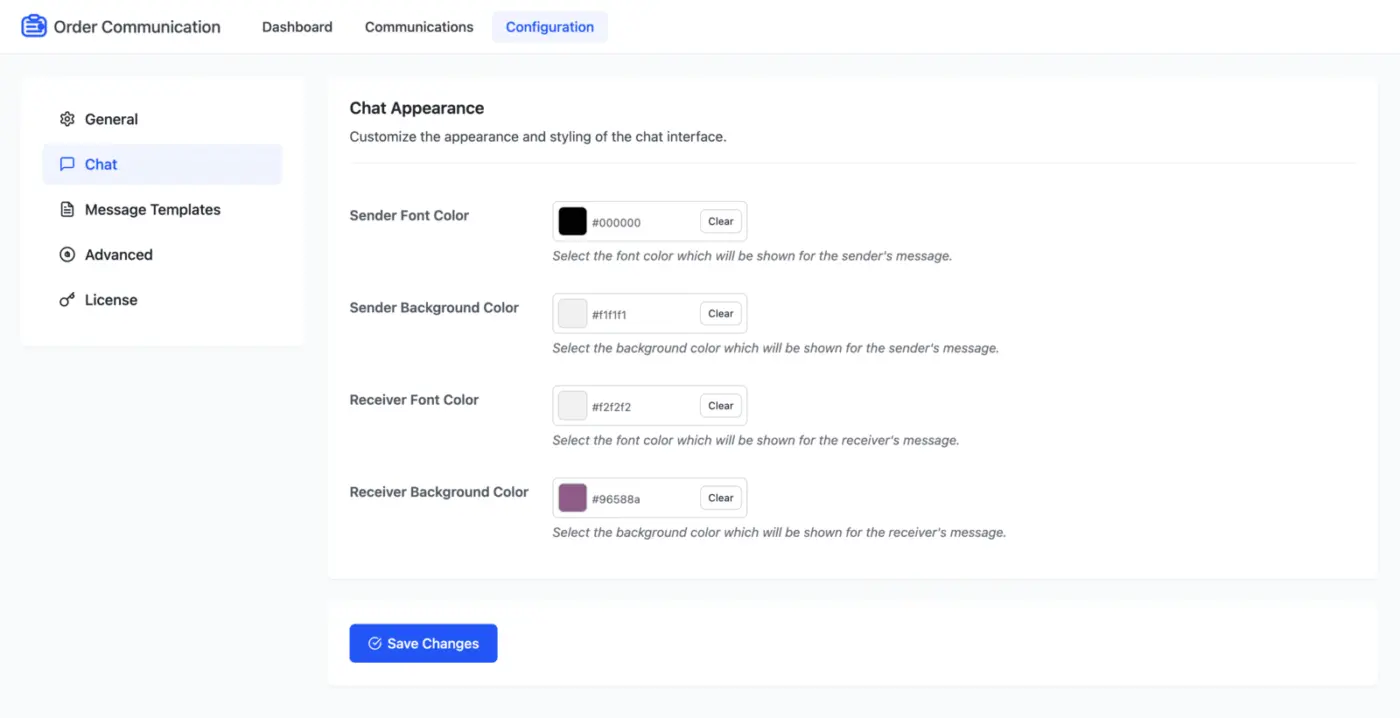
Style the message bubbles so the chat reads as part of your store rather than a bolted-on widget.
- Sender font colour: text colour of the sender’s message.
- Sender background colour: bubble colour of the sender’s message.
- Receiver font colour: text colour of the receiver’s message.
- Receiver background colour: bubble colour of the receiver’s message.
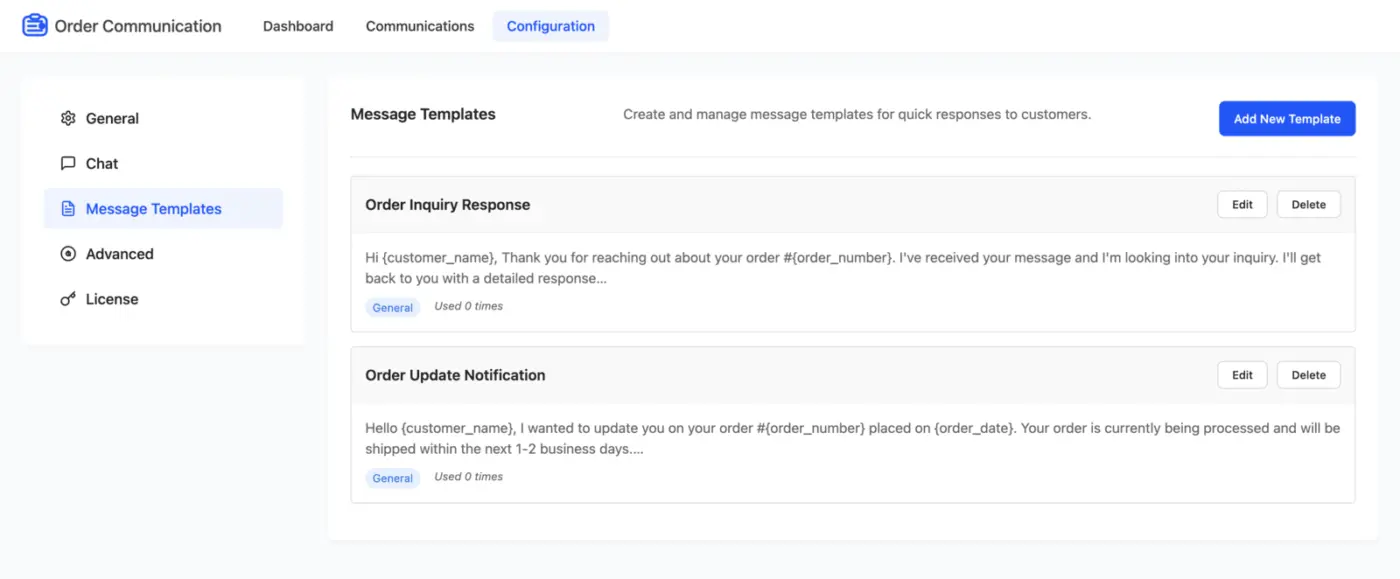
Message templates
Save your standard replies once and reuse them. Most support volume is the same handful of questions, and templates stop your team retyping the same answer every day.
Advanced configuration
Business hours
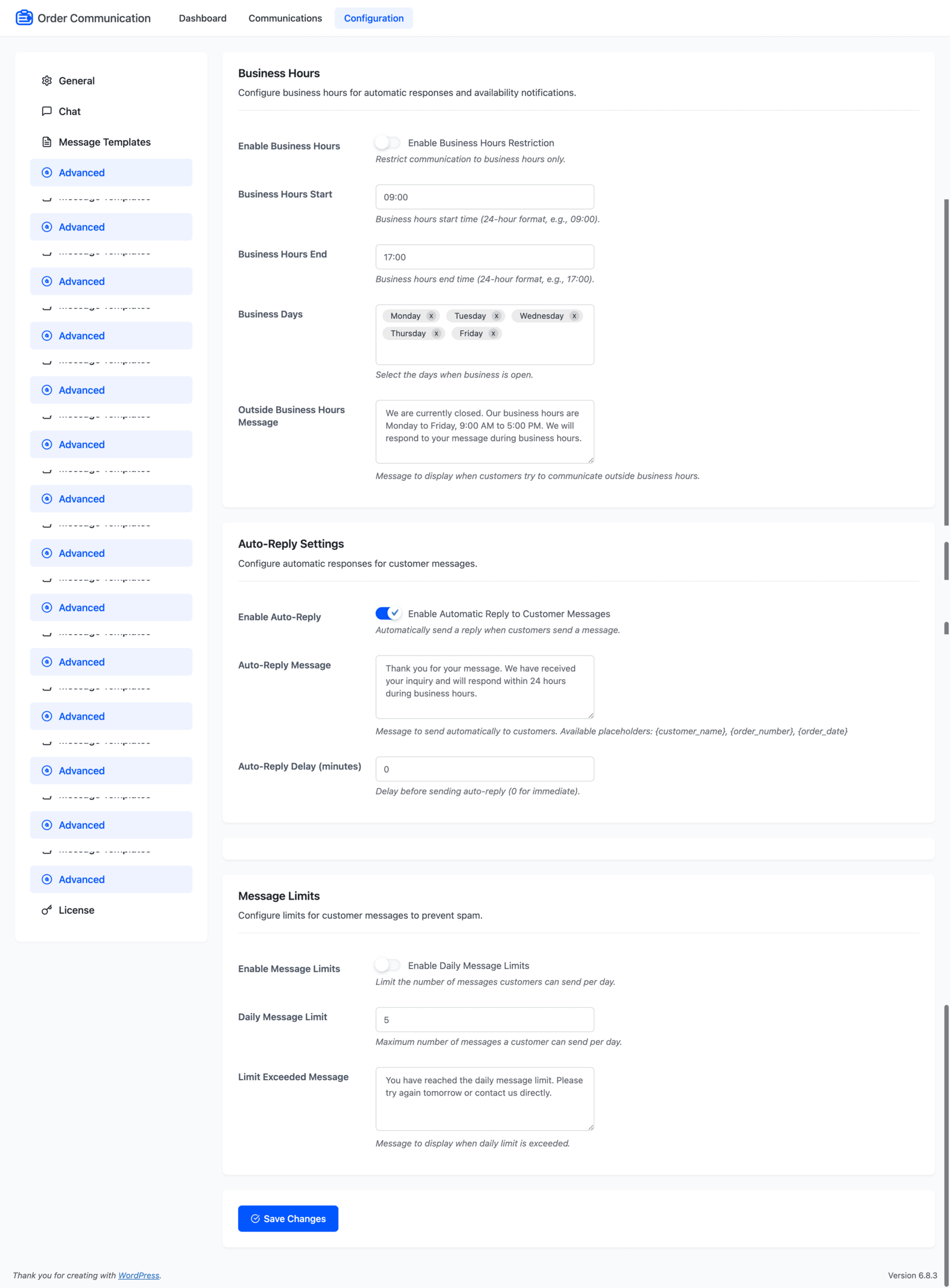
Set when customers can message you, so an order chat does not become a promise of round the clock support.
- Enable business hours: restrict messaging to your open hours.
- Business hours start: opening time in 24-hour format, such as 09:00.
- Business hours end: closing time in 24-hour format, such as 17:00.
- Business days: the days you are open.
- Outside business hours message: what customers see when they message you after hours.
Auto-reply
Acknowledge every message straight away, so nobody sits wondering whether it arrived.
- Enable auto-reply: answer automatically when a customer sends a message.
- Auto-reply message: the text to send. Placeholders available: {customer_name}, {order_number}, {order_date}
- Auto-reply delay (minutes): how long to wait before sending. Use 0 for immediate.
Message limits
Cap how much one customer can send per day, which keeps a single frustrated buyer from flooding the queue.
- Enable message limits: apply a daily cap per customer.
- Daily message limit: the maximum messages one customer can send in a day.
- Limit exceeded message: what they see once they pass it.
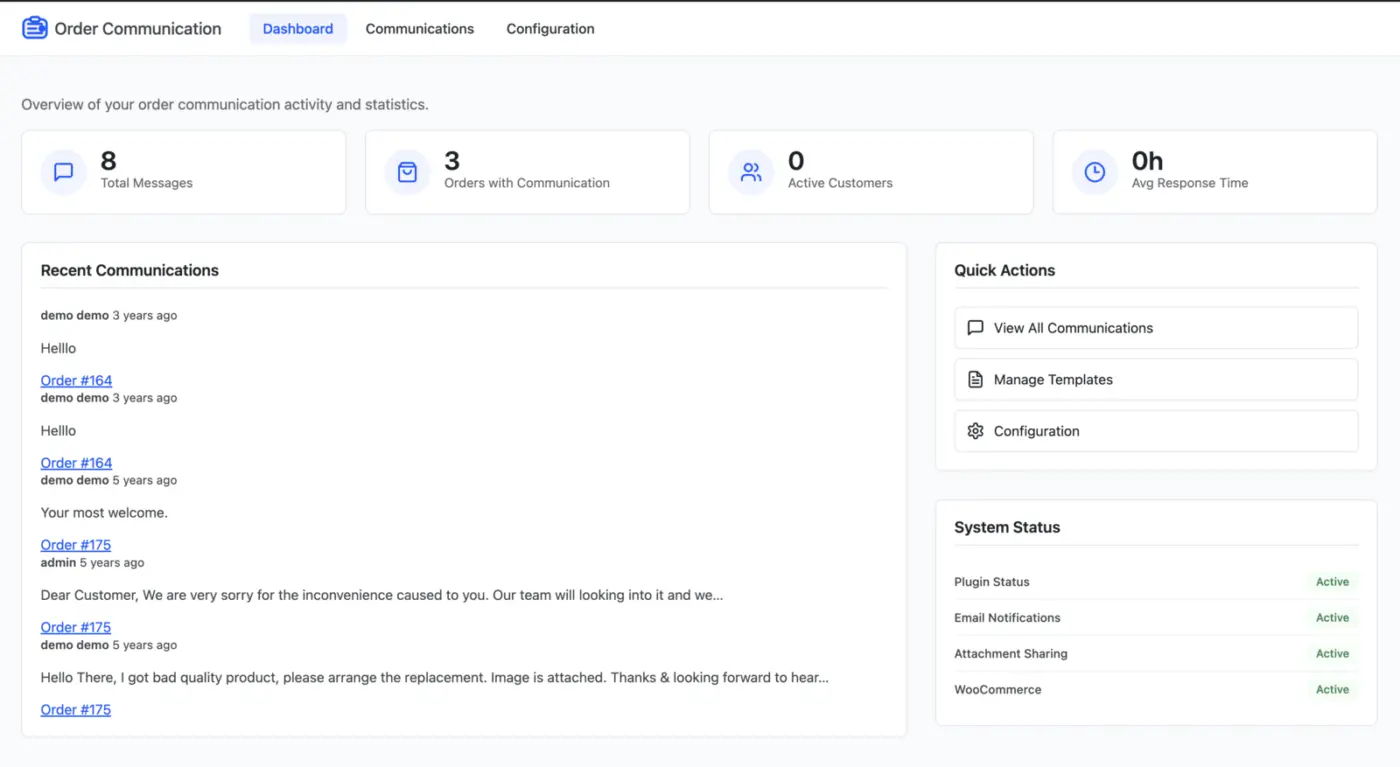
Dashboard
An overview of messaging activity and statistics across the store.
Communications list
Every conversation with its order ID, customer name, most recent message, total message count, date, and status. This is the screen that stops a thread going unanswered.
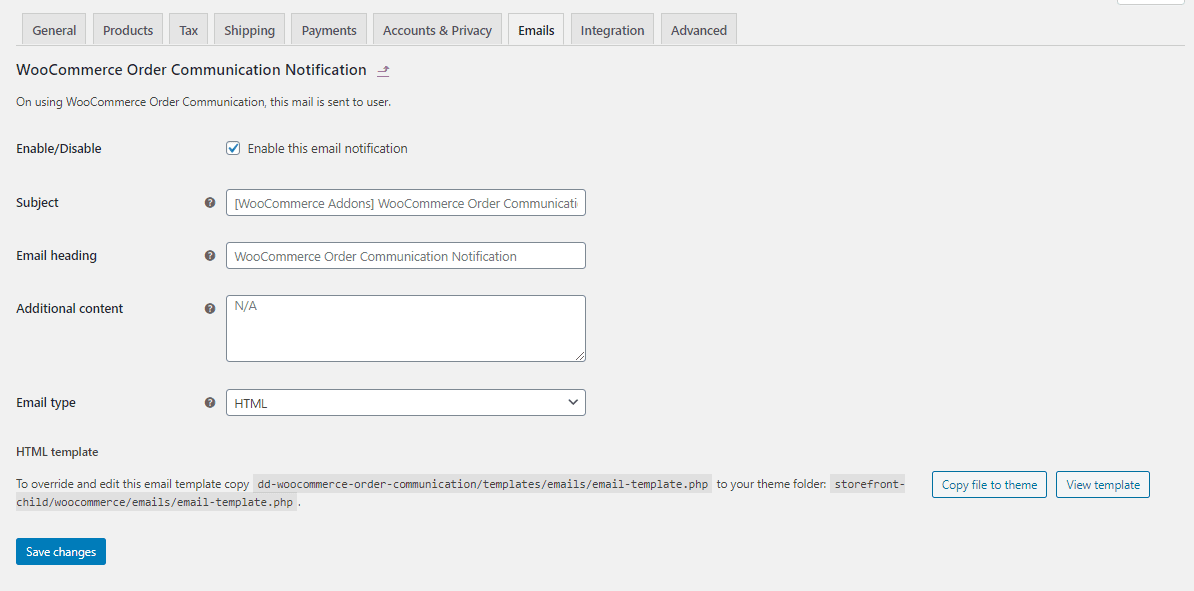
WooCommerce email template
Order communication notifications use the WooCommerce email template system, so replies land looking like the rest of your store mail.
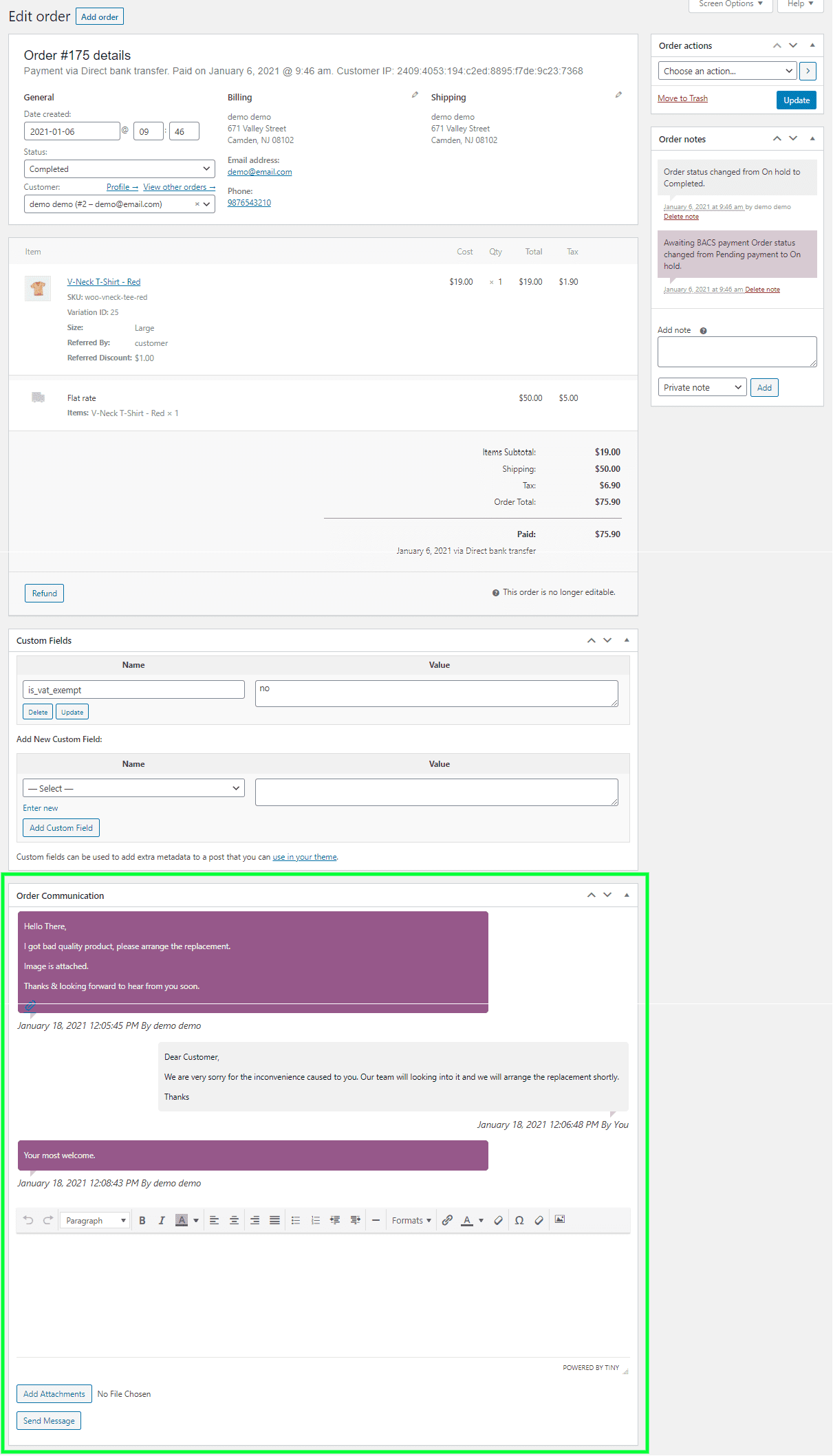
Replying as the admin
The order edit screen carries an Order Communication meta box. Reply to the customer from there, with the line items, order status, and payment record on the same page. Attachments can be sent if enabled.
Nothing has to be reconstructed. The context an email thread makes you hunt for is already on screen.
Messaging as the customer
The view order page carries an Order Communication area. Customers write to you about that specific order, and can attach files if enabled.
Email notifications
Both sides can be emailed when the other replies, so a conversation keeps moving without either party watching the page.
Frequently Asked Questions (FAQs)
Q1. Where do customers send messages from?
From the Order Communication area on the view order page inside My Account. Each thread belongs to that specific order.
Q2. Can customers send files or photos?
Yes, when attachment sharing is enabled. This is how customers send photos of a damaged or incorrect item.
Q3. Are messages private?
Yes. A thread is visible only to the customer who owns the order and to the store admin.
Q4. Can I limit which orders customers can message about?
Yes. Choose the allowed order statuses. Customers can only start a conversation on orders in those statuses. Leave the setting empty to allow all of them.
Q5. Can I set office hours for replies?
Yes. Set the start time, end time, and business days. Outside those hours customers see the message you have written.
Q6. Can messages be answered automatically?
Yes. Enable auto-reply, write the message, and set a delay. The placeholders {customer_name}, {order_number}, and {order_date} fill in from the order.
Q7. How do I stop one customer flooding the thread?
Enable message limits and set a daily maximum. When a customer passes it they see the message you have configured.
Q8. Do we get emailed about new messages?
Yes, when notifications are enabled. Admin and customer notifications are separate settings, and both use the WooCommerce email templates.


maidot –
Incredible Support and Great Team
These guys are incredible! The support is super fast, very kind, and highly professional. I truly recommend working with them and supporting their products. I’m definitely going to be a long-term customer! 😊
arlun –
Useful Communication Plugin for Store Owners
Good and well-built plugin that makes it easy to communicate directly with online shop customers. It works like a message board and even supports attachments, which is very helpful. A great and useful tool for store admins. I’d definitely recommend it.
ronbir2020 –
Perfect WooCommerce Order Chat Plugin
Great work! The plugin fits my needs perfectly, and the attention to detail is really impressive.
surferbrother –
Great Plugin Support
I genuinely enjoyed the support provided. The team was helpful, responsive, and made the whole experience smooth.
solheimtech –
Highly recommend this plugin
I had an issue with some features not working correctly, and the support team went above and beyond to help. They resolved everything within minutes. Truly deserving of their great ratings. Thank you!
queryamit –
Clean Design and Well-Built Script
Nice script with a clean design. Everything looks well-built and works smoothly. Highly recommended!
albertikus90_123 –
Quick Support and Great Experience
Got a fast response from the support team, and they resolved my issue quickly. Really happy with the overall experience!
kenlyle –
Reliable Order Communication Plugin
The plugin does exactly what it promises. I faced a small issue where the additional content wasn’t showing, but the support team fixed it within an hour. Great and reliable service!
marwygafentw –
Beautiful Plugin with Quick Support
Well-designed plugin! The support was quick and helpful. Looking forward to even more useful and beautiful features in future updates.
CFinoro –
Fast Support and Helpful Guidance
Customer support was awesome. They fixed my issue within minutes. They even offered to help with customizing the email template, which was really helpful.
In my case, I managed it through my child theme, and it worked well. The plugin runs smoothly, and the support team is incredibly fast and responsive. Great experience overall!