WooCommerce Order Communication Plugin

(12 customer reviews)
Documentation Live Demo

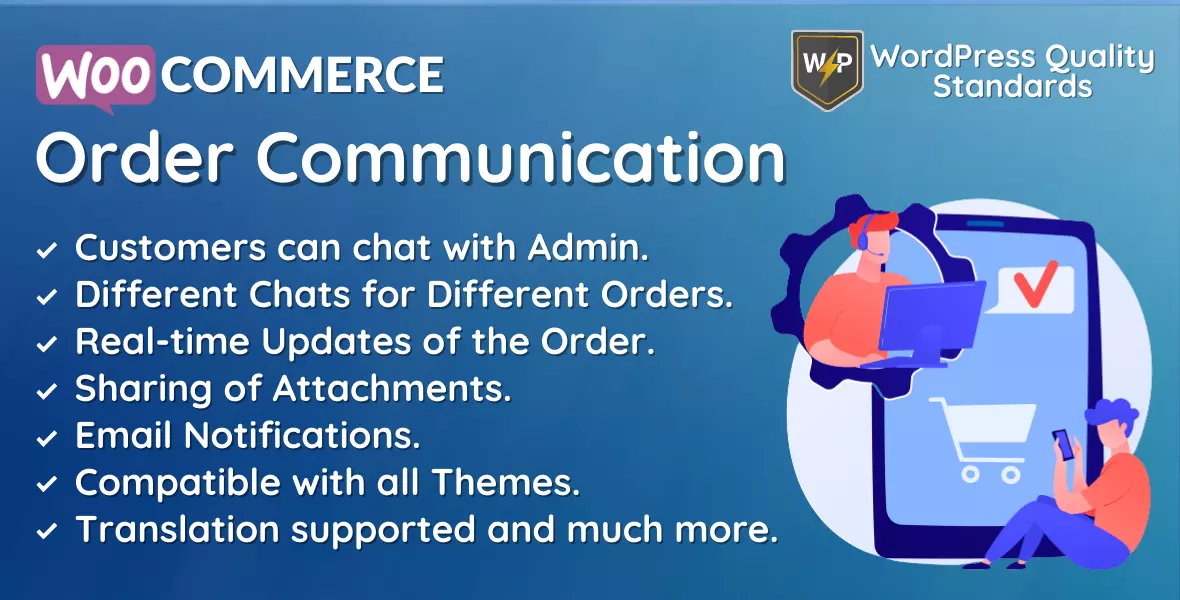
WooCommerce Order Communication plugin allows the admin to chat with customers during the order process to handle queries & provide updates.

Why choose our plugin?

All our products meet the WordPress quality standards, including security, quality, performance and modern coding standards. For this, we also got awarded with the WP Requirements Compliant Badge by Envato for our CodeCanyon Portfolio.
Features of WooCommerce Order Communication

  • Admin can enable/disable the module functionality.
  • Admin can enable communication for different types of order statuses.
  • Admin can enable/disable attachment sharing in order communication.
  • Admin can enable/disable admin notification via email when a customer responds.
  • Admin can enable/disable customer notification via email when the admin responds.
  • Admin can set the font color of the sender’s message.
  • Admin can set the background color of the sender’s message.
  • Admin can set the font color of the receiver’s message.
  • Admin can set the background color of the receiver’s message.
  • Customers can communicate with the admin from the order view page.
  • Admin can communicate with customers from the edit order page.
  • The complete Editor will be there for the communication.
  • Messages will be private and secure.
  • UI is completely responsive.
  • Compatible with all the themes.
  • WooCommerce Email Templates are supported for notifications.
  • Multilingual support is there with the given .pot file in the plugin.

General Configuration

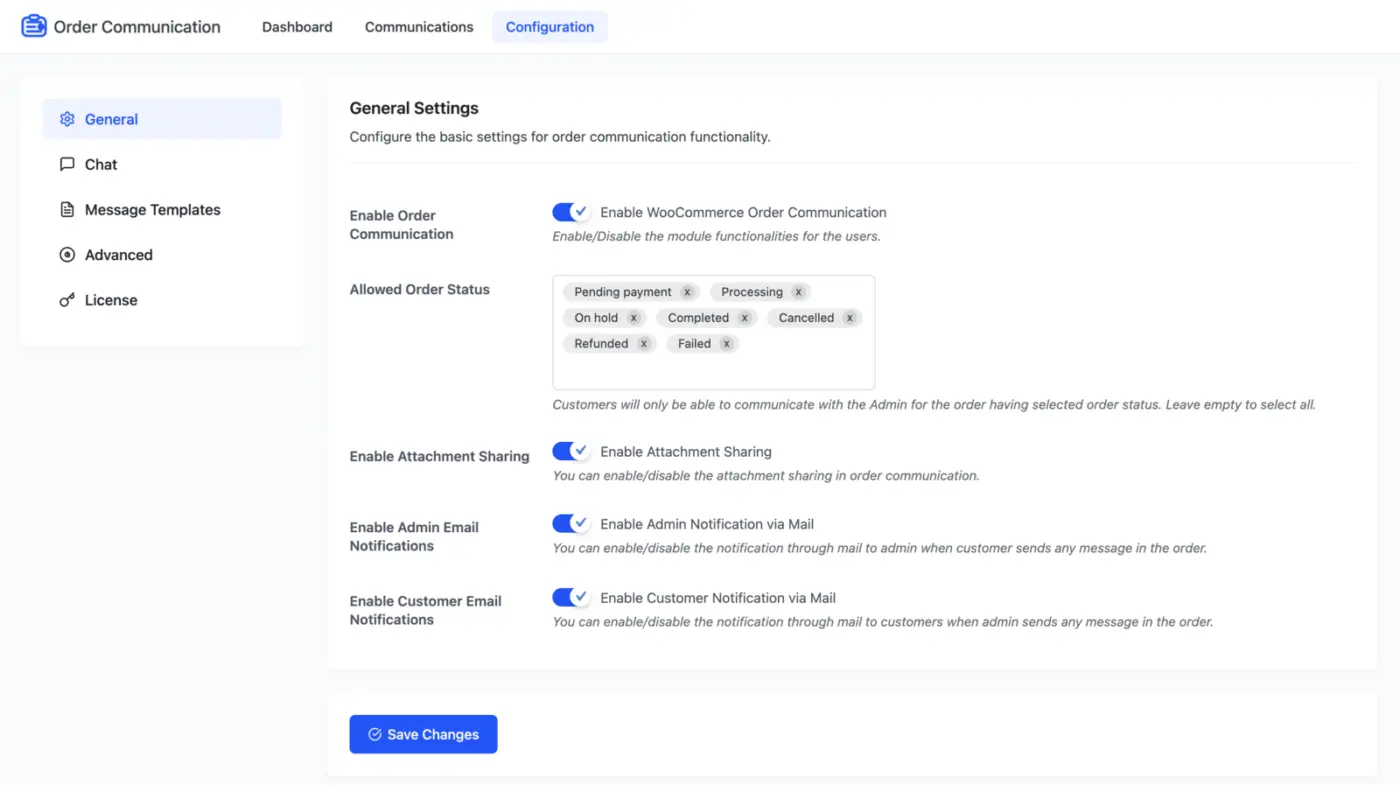
WooCommerce Order Communication General Configuration


Configure the basic settings for order communication functionality.
  • Enable Order Communication: Enable/Disable the module functionalities for the users.
  • Allowed Order Status: Customers will only be able to communicate with the Admin for orders having the selected order status. Leave empty to select all.
  • Enable Attachment Sharing: You can enable/disable the attachment sharing for order communication.
  • Enable Admin Email Notifications: You can enable/disable the notification through email to the admin when a customer sends any message in the order.
  • Enable Customer Email Notifications: You can enable/disable the notification through email to customers when the admin sends a message in the order.

Chat Configuration

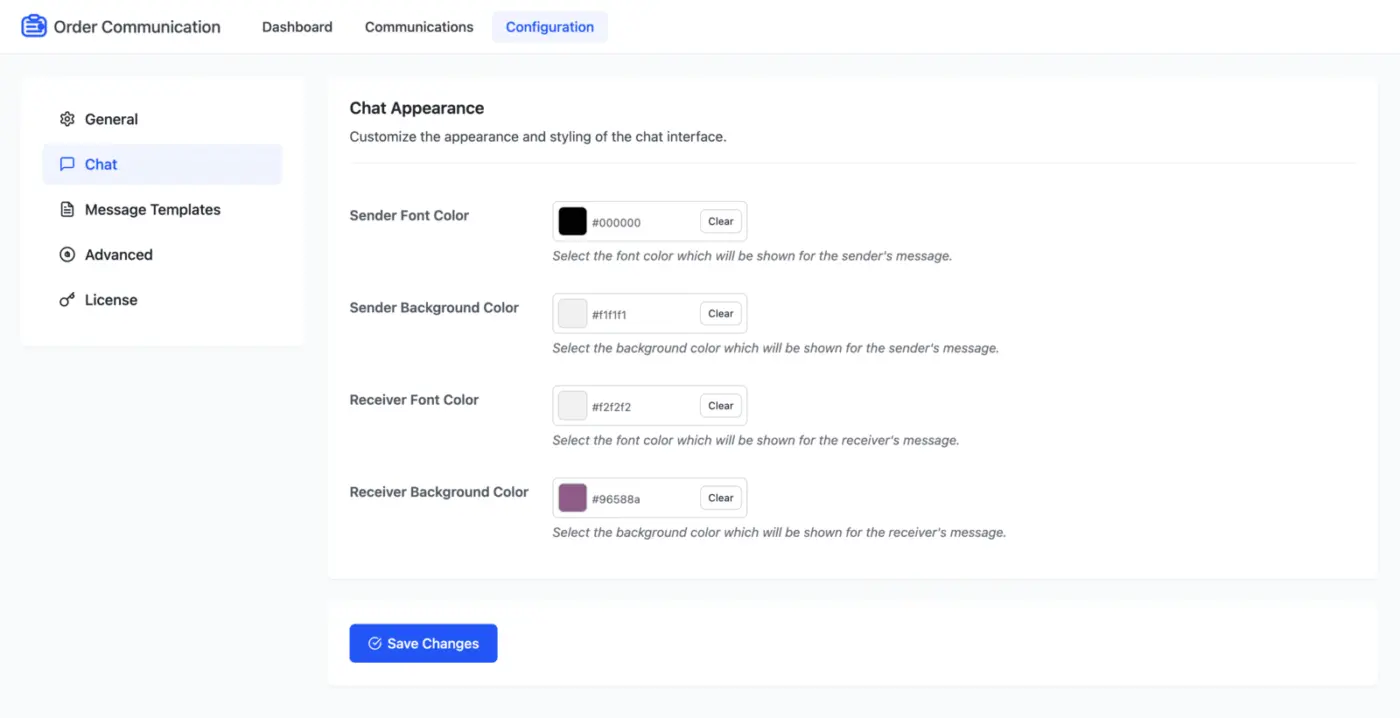
WooCommerce Order Communication Chat Configuration

Customize the appearance and styling of the chat interface.

  • Sender Font Color: Select the font color that will be shown for the sender’s message.
  • Sender Background Color: Select the background color that will be shown for the sender’s message.
  • Receiver Font Color: Select the font color that will be shown for the receiver’s message.
  • Receiver Background Color: Select the background color that will be shown for the receiver’s message.

Message Templates Configuration

You can create and manage message templates for quick responses to customers, which will be helpful when you’re communicating with your customers, so you don’t have to re-write the same messages again and again.
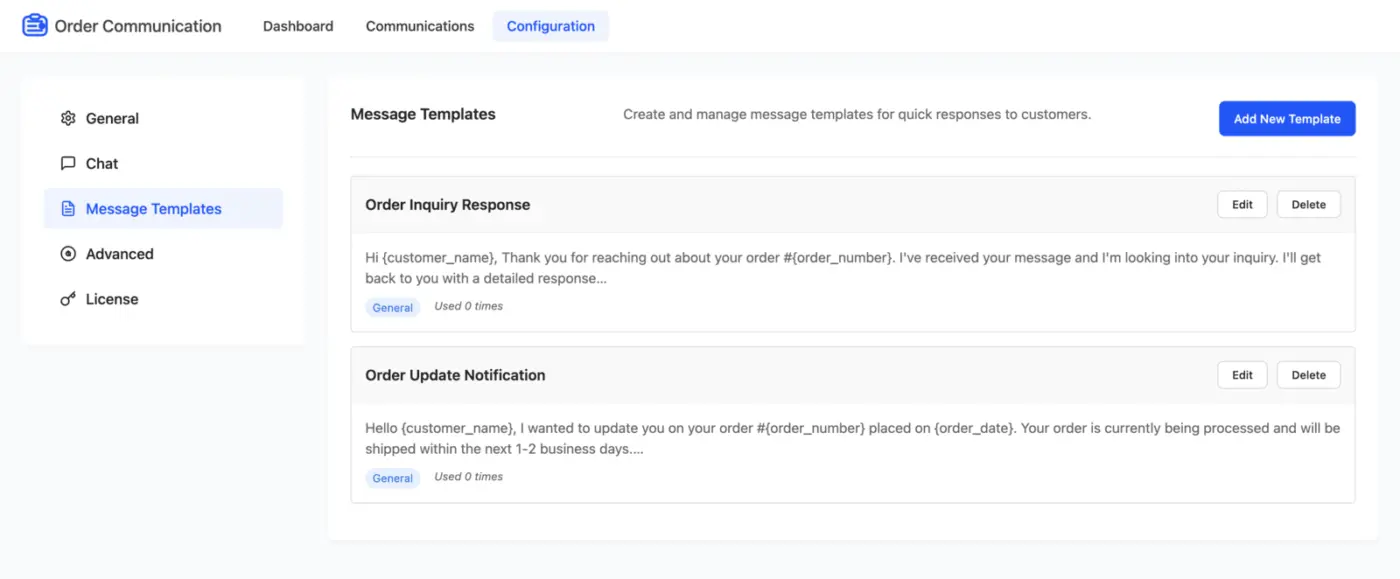
WooCommerce Order Communication Message Templates Configuration

Advanced Configuration

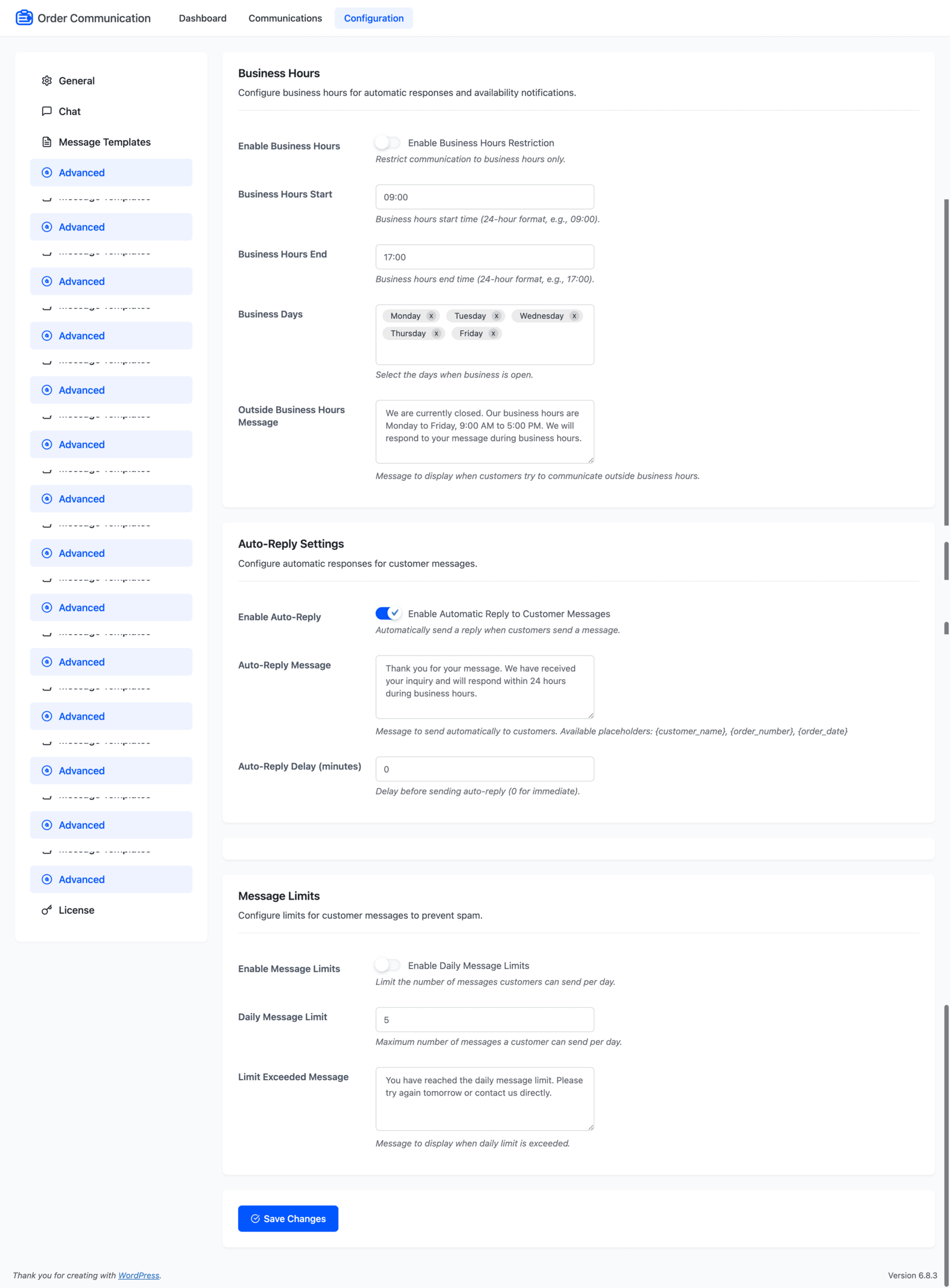
WooCommerce Order Communication Advanced Configuration

Business Hours

Configure business hours for automatic responses and availability notifications.

  • Enable Business Hours: Restrict communication to business hours only.
  • Business Hours Start: Business hours start time (24-hour format, e.g., 09:00).
  • Business Hours End: Business hours end time (24-hour format, e.g., 17:00).
  • Business Days: Select the days when business is open.
  • Outside Business Hours Message: Message to display when customers try to communicate outside business hours.

Auto-Reply Settings

Configure automatic responses for customer messages.

  • Enable Auto-Reply: Automatically send a reply when customers send a message.
  • Auto-Reply Message: Message to send automatically to customers. Available placeholders: {customer_name}, {order_number}, {order_date}
  • Auto-Reply Delay (minutes): Delay before sending auto-reply (0 for immediate).

Message Limits

Configure limits for customer messages to prevent spam.

  • Enable Message Limits: Limit the number of messages customers can send per day.
  • Daily Message Limit: Maximum number of messages a customer can send per day.
  • Limit Exceeded Message: Message to display when the daily limit is exceeded.

Dashboard

Here, you can view the overview of your plugin activities and statistics.
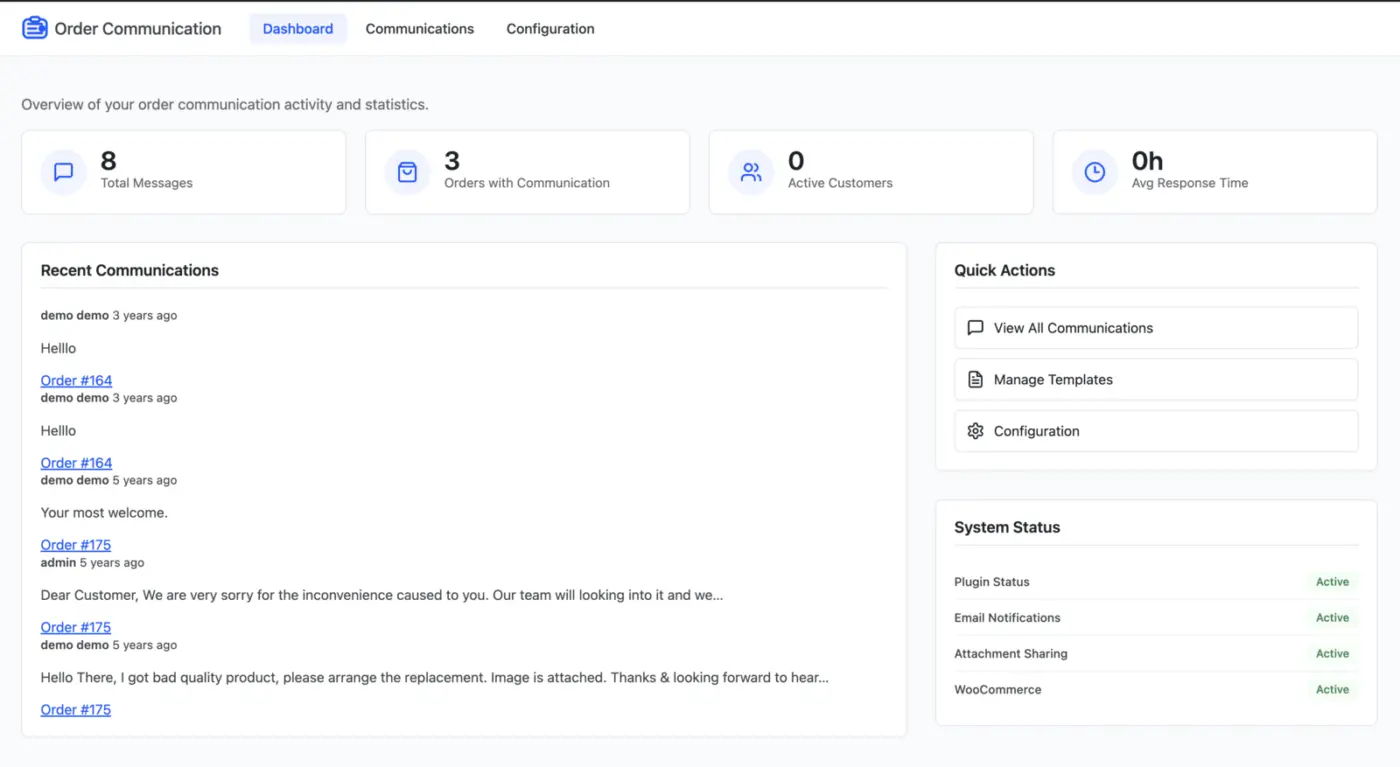
WooCommerce Order Communication Dashboard

Communications

Here, you can find all your communications for the respective orders with the details like order ID, customer name, recent message, total messages, recent message date and the status of the message.
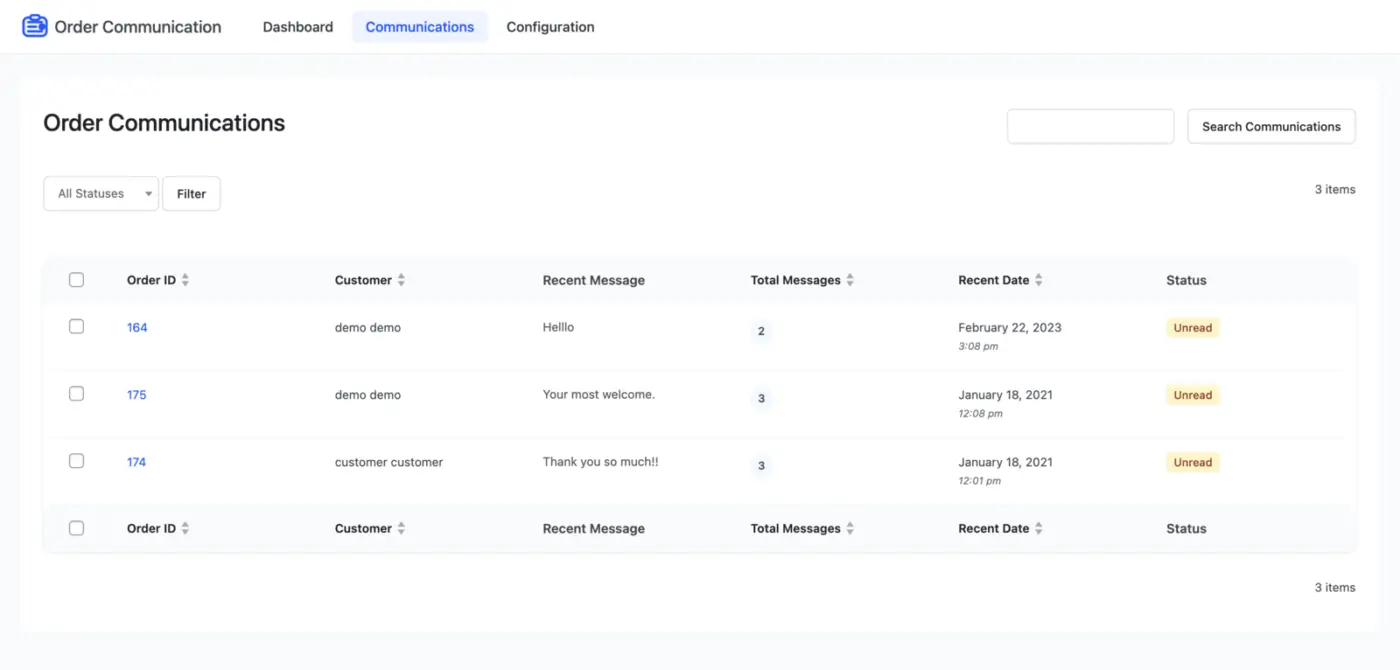
WooCommerce Order Communications

WooCommerce Email Template

Admin can configure Email Templates for the WooCommerce Order Communication notification mails, which will be delivered to customers.
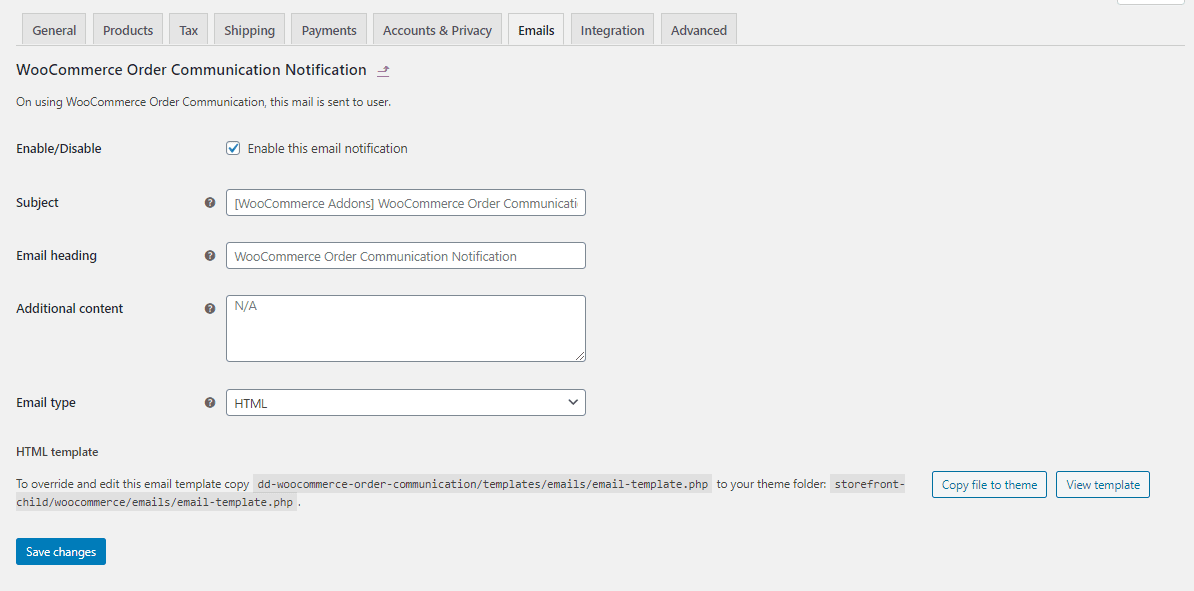
WooCommerce Order Communication WooCommerce email template

Admin End Communication – WooCommerce Order Communication

On the edit order page at the backend, the admin can find a meta box for Order Communication from where the admin can send messages to the customers for their query for that particular order. Admin can also send attachments if enabled from the configuration.
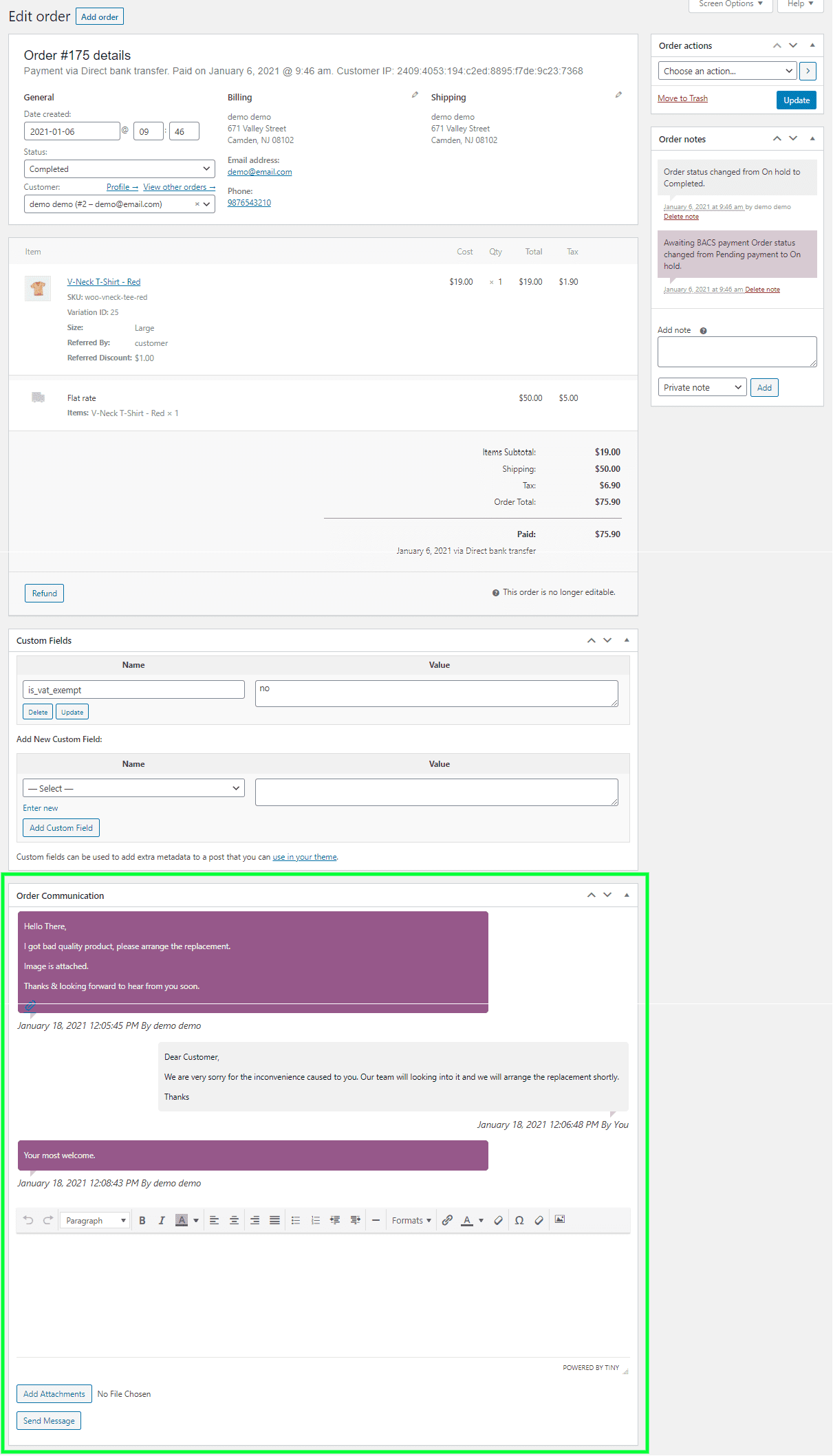
WooCommerce Order Communication admin end communication

Customer End Communication – WooCommerce Order Communication

On the order view page at the front end, customers can find an area for Order Communication from where they can send messages to the admin for their query for that particular order. Customers can also send attachments if enabled from the configuration.
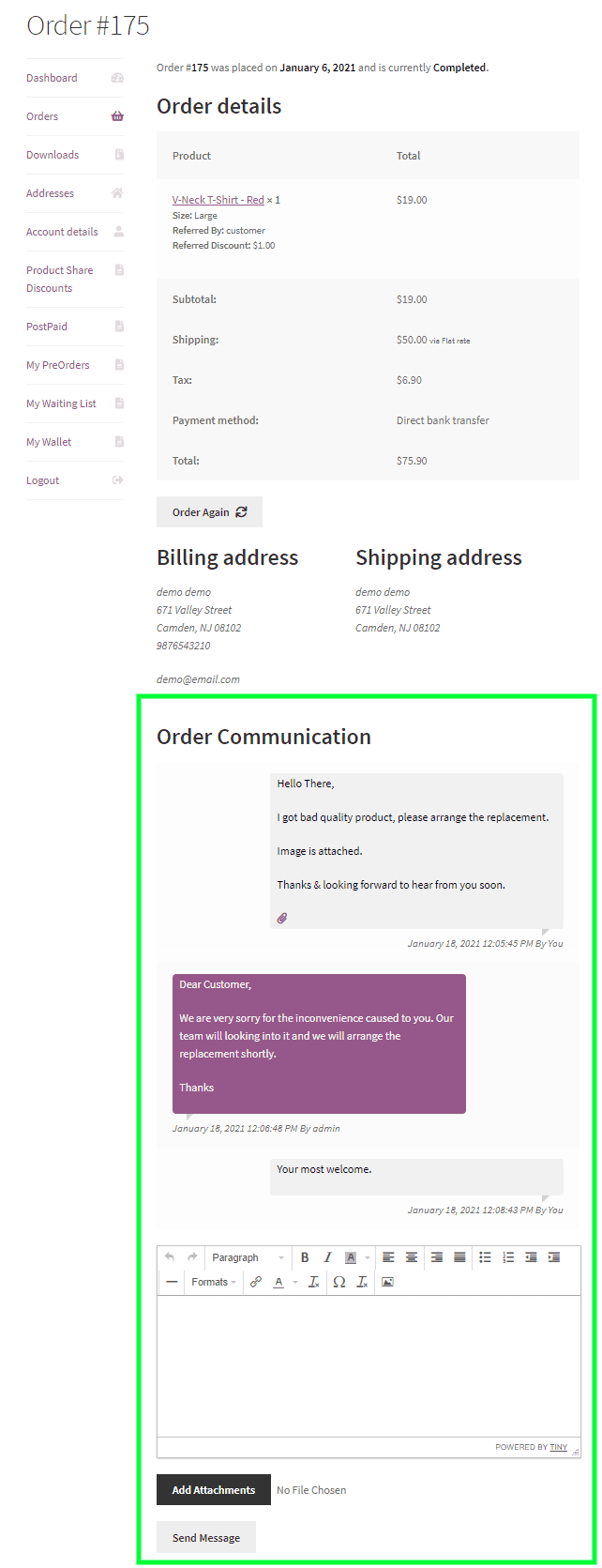
WooCommerce Order Communication customer end communication

Email Notification

Both admin and customers will be notified via mail if enabled from the configuration for the message response in the communication.
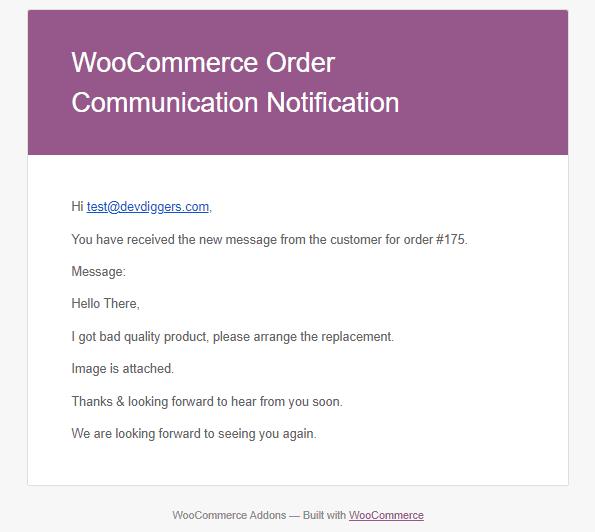
WooCommerce Order Communication email notification

12 reviews for WooCommerce Order Communication Plugin

  1. Avatar of polboonlapo

    polboonlapo Verified Buyer

    Useful Communication Plugin

    A creative plugin that offers an easy way to communicate with customers. It’s simple, useful, and adds real value to the store experience.

  2. Avatar of Djiin

    Djiin Verified Buyer

    Helpful Support Team

    The support team is absolutely amazing. They are very helpful, quick to respond, and make the whole experience smooth.

  3. Avatar of CFinoro

    CFinoro Verified Buyer

    Fast Support and Helpful Guidance

    Customer support was awesome. They fixed my issue within minutes. They even offered to help with customizing the email template, which was really helpful.

    In my case, I managed it through my child theme, and it worked well. The plugin runs smoothly, and the support team is incredibly fast and responsive. Great experience overall!

  4. Avatar of marwygafentw

    marwygafentw Verified Buyer

    Beautiful Plugin with Quick Support

    Well-designed plugin! The support was quick and helpful. Looking forward to even more useful and beautiful features in future updates.

  5. Avatar of kenlyle

    kenlyle Verified Buyer

    Reliable Order Communication Plugin

    The plugin does exactly what it promises. I faced a small issue where the additional content wasn’t showing, but the support team fixed it within an hour. Great and reliable service!

  6. Avatar of albertikus90_123

    albertikus90_123 Verified Buyer

    Quick Support and Great Experience

    Got a fast response from the support team, and they resolved my issue quickly. Really happy with the overall experience!

  7. Avatar of queryamit

    queryamit Verified Buyer

    Clean Design and Well-Built Script

    Nice script with a clean design. Everything looks well-built and works smoothly. Highly recommended!

  8. Avatar of solheimtech

    solheimtech Verified Buyer

    Highly recommend this plugin

    I had an issue with some features not working correctly, and the support team went above and beyond to help. They resolved everything within minutes. Truly deserving of their great ratings. Thank you!

  9. Avatar of surferbrother

    surferbrother Verified Buyer

    Great Plugin Support

    I genuinely enjoyed the support provided. The team was helpful, responsive, and made the whole experience smooth.

  10. Avatar of ronbir2020

    ronbir2020 Verified Buyer

    Perfect WooCommerce Order Chat Plugin

    Great work! The plugin fits my needs perfectly, and the attention to detail is really impressive.

Only logged in customers who have purchased this plugin may leave a review.

Clear
  • Plugin Updates
  • Priority Support
  • 24×7 Customer Support

If you have any questions or queries or need assistance with the extension, kindly reach out to us. We will do our best to answer as quickly as possible.

Contact Us
WordPress: Supported upto 6.x.x WooCommerce: Supported upto 10.x.x WooCommerce HPOS: Supported Translation: Ready Categories: ,

Customer-Friendly Refund Policy

Our refund policy is designed to ensure your satisfaction and peace of mind. Get a full refund if things do not work out well for you.