There are many proven ways to promote your wallet in eCommerce, and the most effective ones combine smart incentives, checkout visibility, and automated follow-up to turn a passive feature into one of your top retention tools.
Having built the WooCommerce Wallet Management plugin and worked with store owners across dozens of industries, we’ve seen one pattern repeat itself constantly: stores that actively promote their wallet see customer return rates climb, while stores that barely see anyone use it.
Most guides on this topic hand you a list of tactics and leave it at that. But wallet promotion isn’t just about offers. It’s about understanding the difference between adoption and usage, knowing which tactics drive each, and setting up a system your store runs on autopilot.
In this guide, you’ll learn how to get customers to create and fund their wallet for the first time, how to make wallet payments the natural choice at checkout, and how to keep wallet balances driving repeat purchases over time.
Why Wallet Adoption Doesn’t Happen on Its Own?
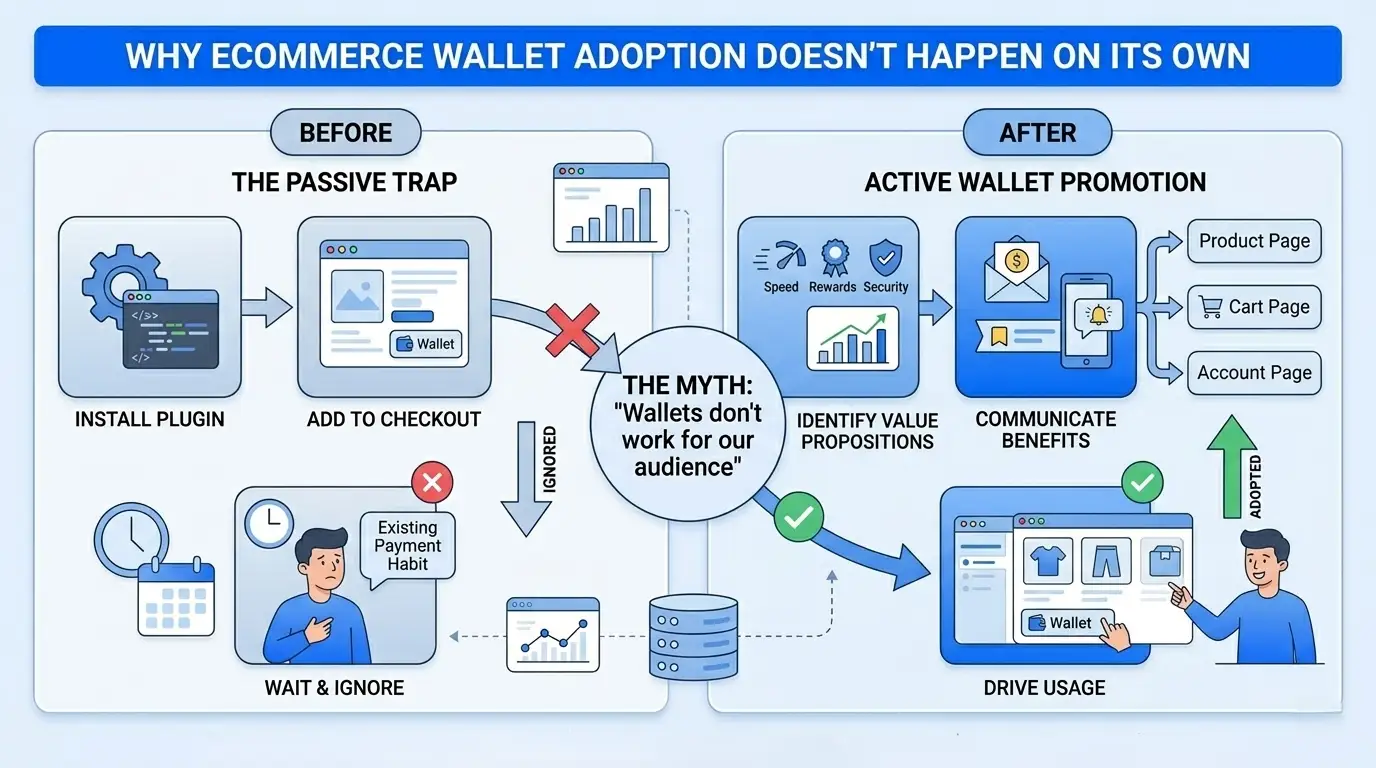
A lot of store owners install a wallet plugin, add it to the checkout page, and wait. The wallet sits there. Customers ignore it. Then the store owner concludes that wallets don’t work for their audience.
That conclusion is almost always wrong. The real issue is that no one told the customer the wallet exists, why it benefits them, or what they get for using it.
Even features customers would genuinely value go unnoticed if you don’t surface them. Your wallet is competing with every other payment method on your checkout page, plus the habits customers already have. Without a deliberate promotion strategy, the default always wins.
Adoption vs. Usage: Two Very Different Problems
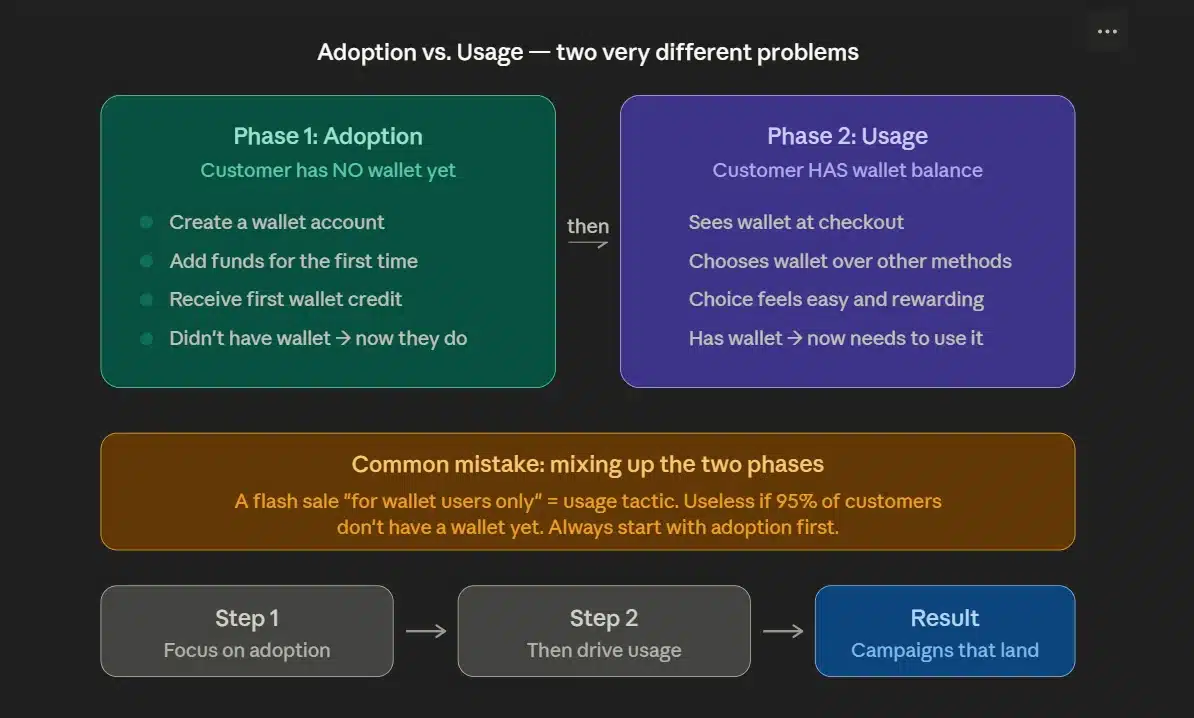
Wallet promotion has two distinct phases, and most articles treat them as one. They’re not.
- Adoption means getting a customer to create a wallet, add funds, or receive their first wallet credit. They didn’t have a wallet before. Now they do.
- Usage means getting a customer who already has a wallet balance to choose it at checkout. They have the wallet. Now you need to make that choice feel easy and rewarding.
Most of the tactics in this guide map to one of these two phases. Mixing them up leads to campaigns that don’t land. For example, a flash sale exclusive to wallet users only works for customers who already have a wallet. If 95% of your customers don’t have one yet, a usage tactic won’t move the needle.
Start with adoption. Then focus on usage. That sequencing matters.
1. Start with a Registration Credit to Get Customers Through the Door
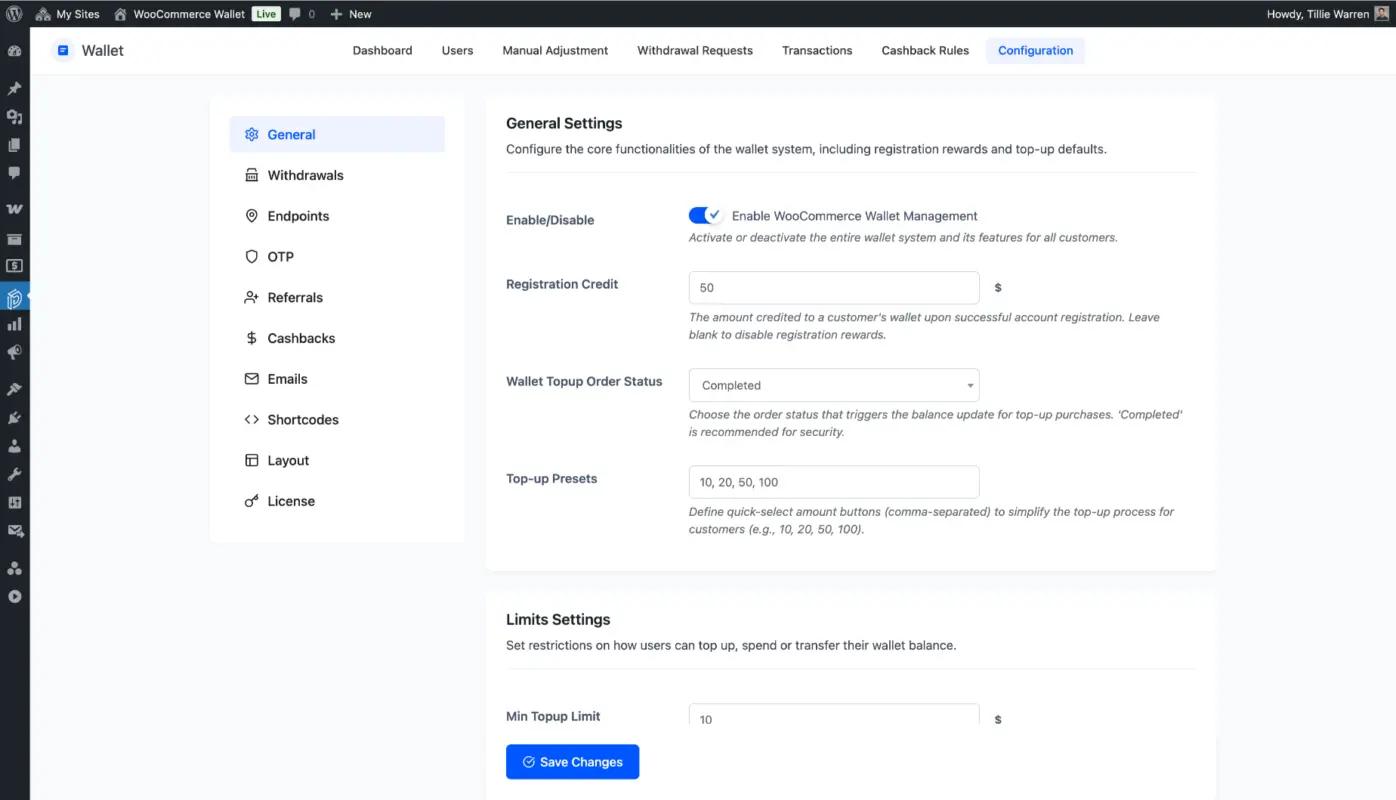
The fastest way to drive eCommerce wallet adoption is to give customers a reason to create their wallet on day one. A registration credit does exactly that. When a customer creates an account or opts into your wallet, they receive a small store credit automatically. No action required beyond signing up.
This one tactic consistently produces the biggest jump in wallet creation rates. The reward is immediate, tangible, and requires almost no effort, which was the reason. The customer doesn’t need to buy anything first.
According to a study on digital wallet adoption factors published by MDPI on consumer attitudes toward digital wallets, perceived benefit is one of the strongest predictors of wallet adoption. A registration credit is a direct, visible benefit that shows up before the customer has spent a cent.
How Much Should the Registration Credit Be?
This depends on your average order value, but a practical starting range is $3-$5 for stores with orders under $50, and $5-$10 for higher-ticket stores. The credit needs to feel meaningful without eating into your margins on every registration.
A small credit beats no credit every time. If a customer joins your store’s wallet program and immediately sees “$4.00 added to your wallet,” that’s a far stronger hook than a generic “enjoy faster checkout” message.
If you run a WooCommerce store, our Wallet for WooCommerce plugin handles registration credits automatically. You set the amount once in the plugin settings, and every new account gets credited without any manual work on your end.
Promote the Registration Credit Everywhere
The credit only works if customers know it exists. Mention it in the signup flow, on your account creation page, and in your welcome email. A banner on your homepage saying “Create an account and get $5 in wallet credit” works better than a hidden line in your footer.
Some stores also offer a top-up bonus, like add $20 to your wallet and receive $22 in credit. This is an adoption tactic that also funds the wallet in one step, which makes the next phase usage much easier.
2. Use Cashback Rules to Make Wallet Payments the Obvious Choice
Once a customer has a wallet, the question becomes “why would they choose it over their saved card?”
Cashback is the answer, and the research backs this up strongly. A study on cashback and customer loyalty behaviour found that cashback incentives produce a loyalty coefficient of 0.58, compared to lower scores for flat one-time discounts. Cashback doesn’t just drive a single transaction. It builds a habit.
Here’s why cashback works so well in the wallet context. When a customer pays with their wallet and earns 5% cashback, that cashback goes straight back into the same wallet. Now they have a reason to come back and spend it. And when they spend it, they earn more cashback. The loop is self-reinforcing.
A flat 10% coupon code, by contrast, gets used once and forgotten. Cashback keeps customers coming back on their own.
How Cashback Creates a Spending Loop
Picture this scenario. A customer buys a $40 product and pays with their WooCommerce wallet. They earn $2 in cashback, automatically credited to their wallet. Their balance is now $2.
Next time they browse your store, they see “You have $2.00 in your wallet.” That balance is sitting there, waiting to be spent. It creates a pull toward your store that a coupon code never creates. The customer isn’t thinking about your store because they got a good deal once. They’re thinking about it because there’s money there for them to use.
Most plugins don’t handle this well. They either don’t offer cashback rules at all, or they make the rules so complex to configure that store owners give up. The WooCommerce Wallet Management plugin makes cashback straightforward.
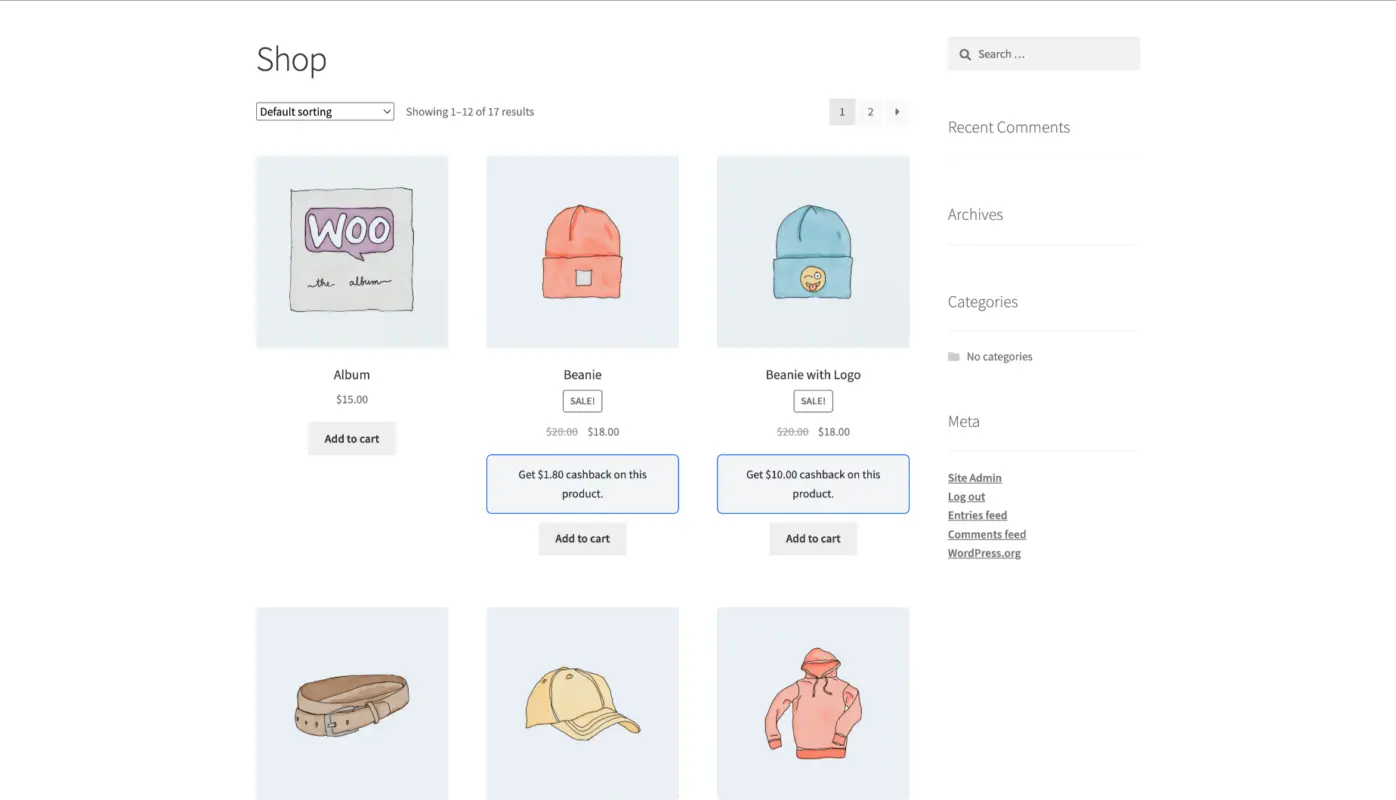
You set a percentage, choose which products or categories it applies to, and the plugin handles the rest. You can configure different cashback rates for different product categories or customer groups if you want to create tiered incentives for your best buyers.
3. Make the Wallet Unmissable at Checkout
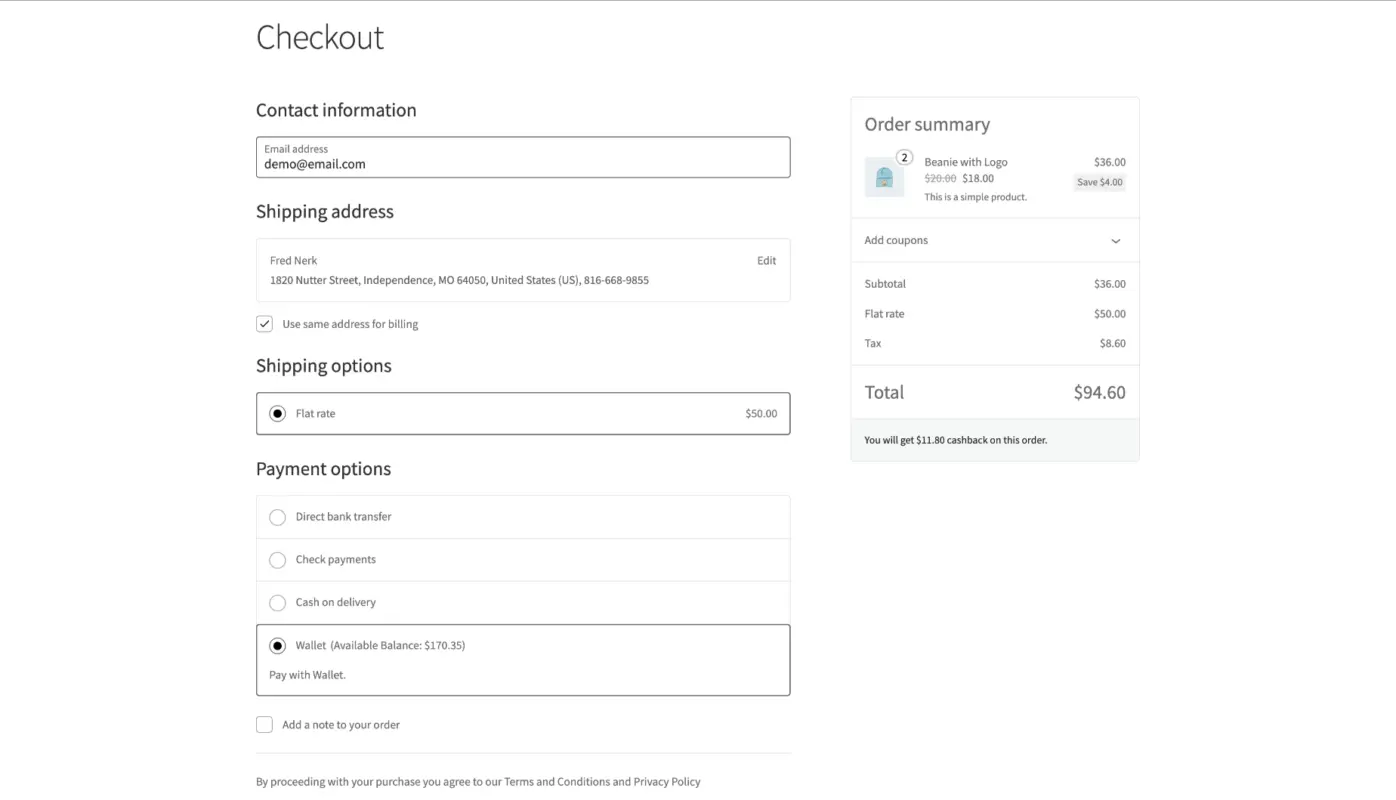
Here’s a promotion tactic that costs nothing and most stores completely overlook, showing the customer their wallet balance prominently on the checkout page.
Customers don’t think about their wallet until they see it. If your checkout shows “Pay with wallet: $6.80 available” right alongside the other payment methods, a meaningful portion of customers will choose it. If the wallet option is buried, labelled confusingly, or shown without a balance reminder, most customers will default to their card.
This isn’t about design for its own sake. It’s a direct checkout conversion lever. According to cart abandonment data for WooCommerce stores from Omnisend, a friction-heavy checkout is one of the top reasons customers abandon before completing a purchase. A wallet with a visible balance removes friction. The customer knows exactly what they have and can apply it with one click.
Why Wallet Balance Visibility at Checkout Reduces Cart Abandonment
When a customer sees they have wallet credit available, a few things happen. First, the perceived cost of the order drops immediately. A $35 order with $5 in wallet credit feels like a $30 order. That’s a real psychological shift that makes completing the purchase easier.
Second, partial wallet payment reduces the total amount charged to their card. For customers who are budget-conscious, this is a genuine reason to complete rather than abandon. They’re not spending more. They’re spending less, using credit they already have.
Third, and perhaps most overlooked that showing the wallet balance at checkout reminds the customer they have a reason to stay loyal to your store. Their wallet balance is tied to you. They can’t spend it anywhere else.
For developers building on WooCommerce, make sure your wallet plugin renders the balance clearly on both the cart page and the checkout page. Test it on mobile. Most customers are checking out on a phone, and if the wallet option isn’t clean and legible on a small screen, you’re losing usage you’ve already earned. Our guide on optimising your wallet for mobile shoppers covers this in detail.
4. Run Wallet-Exclusive Offers, Flash Sales, and Referral Programs
Once you have a base of wallet users, you can run promotions that reward them specifically for being wallet users. It gives existing wallet users a reason to keep paying with their wallet, and it creates visible social proof that makes non-wallet customers want to join.
Wallet-Only Flash Sales
A 24-hour flash sale that’s only accessible to wallet-paying customers is one of the most effective wallet usage promotions you can run. The structure is simple: any customer who checks out using their wallet gets 15% off for the next 24 hours. Customers without a wallet can’t access the deal.
This creates urgency, exclusivity, and a clear reward for wallet usage all at once. Announce it via email and on your store homepage. Use language like “Wallet users save 15% today only.” Customers who don’t have a wallet yet will ask how to get one. That’s the acquisition effect kicking in.
Keep flash sales occasional. Running them too often trains customers to wait rather than buy at full price.
Referral Programs That Credit the Wallet
Referral programs work best when the reward lands in a place the customer is already engaged with. If your customers use their wallets regularly, referral credits paid directly into the wallet feel more valuable than generic discount codes.
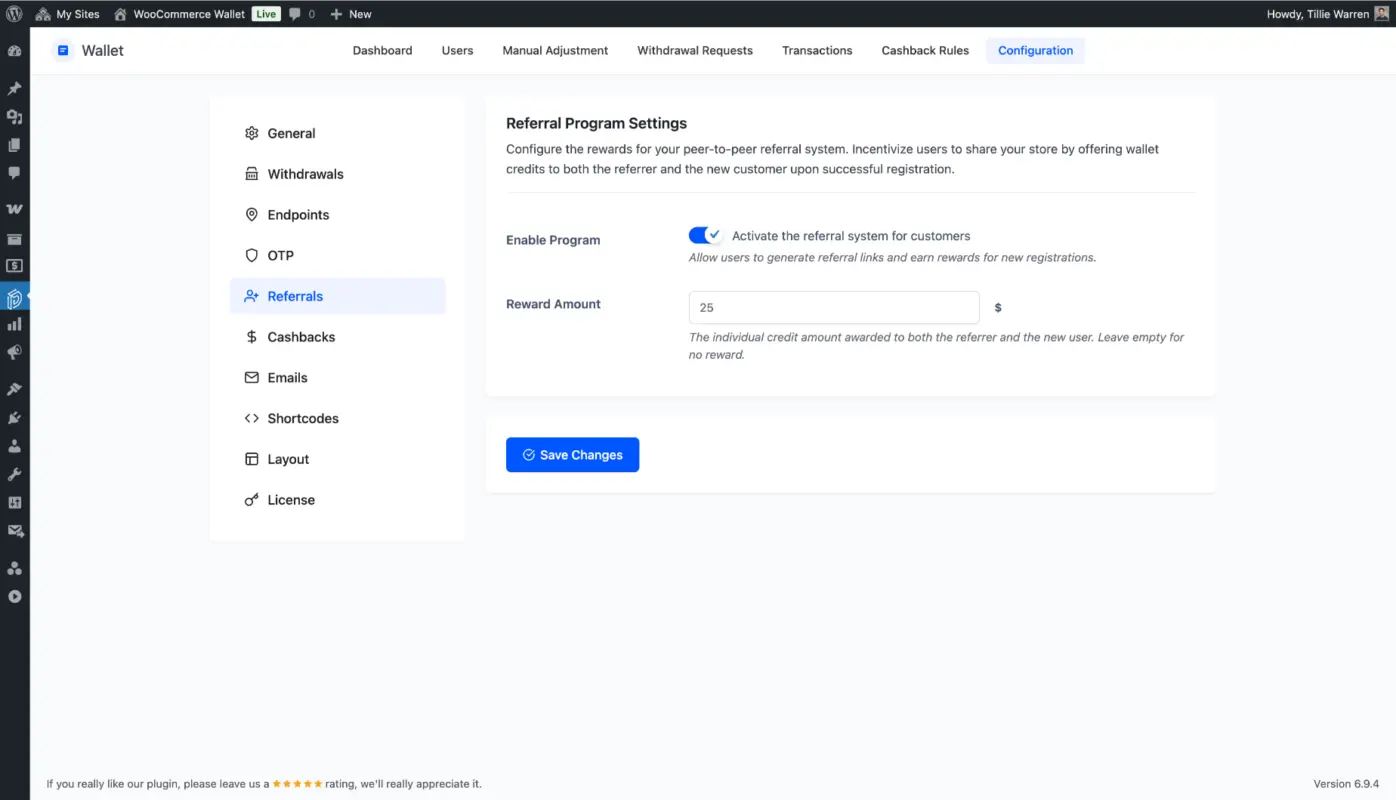
Set up your referral program so that both the referrer and the new customer receive wallet credit when the new customer makes their first purchase. For example, the referrer gets $5 in wallet credit, and the new customer gets a $3 registration credit. Both parties win, and both now have a wallet balance they want to spend.
This is a tactic that most eCommerce referral guides don’t connect to wallet promotion specifically. You can read more about referral program best practices for additional structure if you’re building this from scratch.
5. Use Email and On-Site Promotions to Keep Wallet Balance Top of Mind
Getting a customer to create and fund a wallet is only half the job. The other half is making sure they remember it’s there. This is where most stores fall short.
Customers accumulate wallet credits and then forget about them. They go to checkout, select their saved card out of habit, and the wallet balance sits untouched. Over time, it feels like the wallet isn’t working. But the problem isn’t the wallet. It’s the absence of reminders.
Automated Wallet Balance Reminder Emails
Set up an automated email that triggers when a customer has a wallet balance above a certain threshold, say $3 or more, and hasn’t made a purchase in the past 14-30 days.
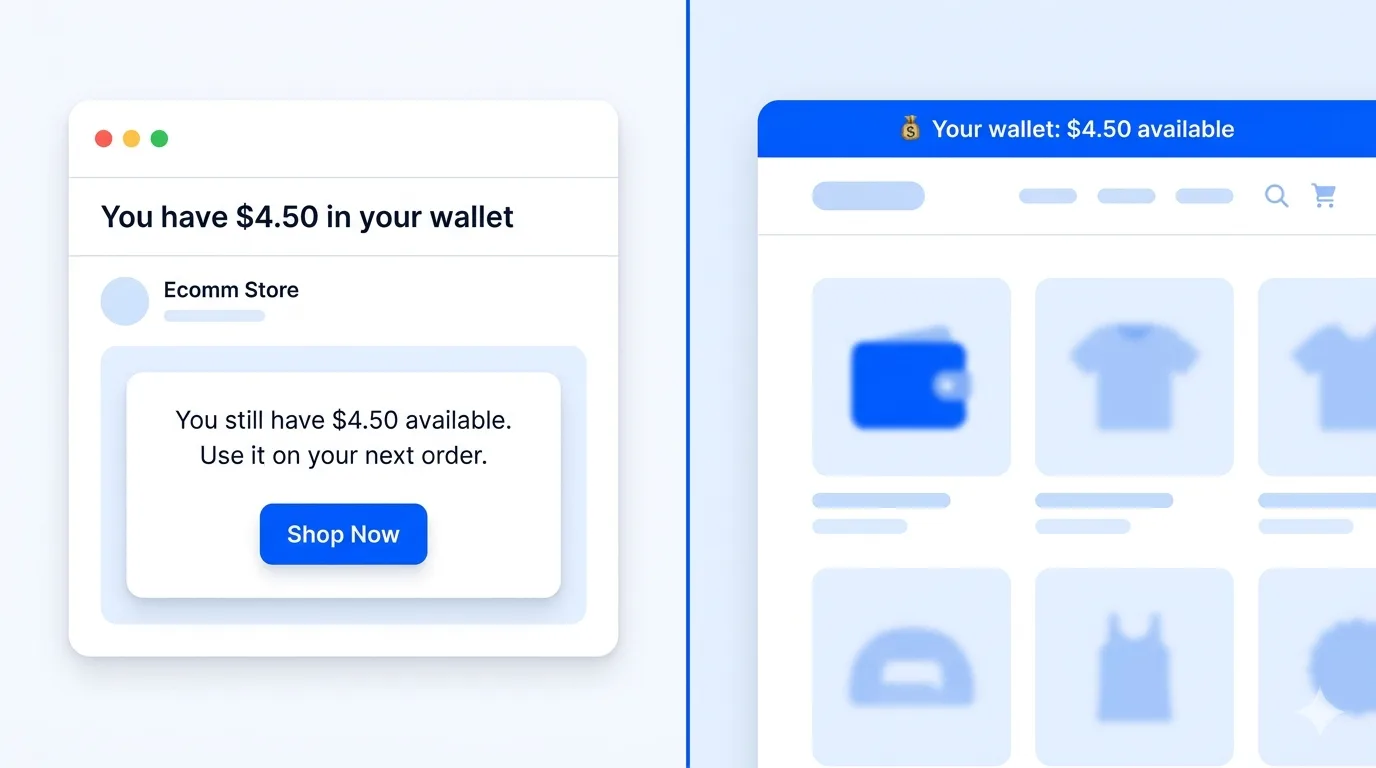
The email is “You have $4.50 in your wallet. Use it on your next order.” Include a clear CTA that takes them directly to your store. This type of email works because it doesn’t ask the customer to spend money. It reminds them they already have money ready to spend. That’s a very different frame, and it converts far better than a standard re-engagement email.
For context on how this type of sequence fits into a broader wallet strategy, our guide on maximising sales with a WooCommerce wallet covers the email angle alongside checkout optimisation in more depth.
The Right Timing for Wallet Balance Reminder Emails
Timing matters here. Send too soon after a purchase, and the email feels pushy. Wait too long, and the customer has already moved on.
A reliable sequence looks like this. The first email comes 14 days after the last purchase if a balance exists. The second email comes 30 days after, if still no purchase. After that, fold wallet reminders into your standard re-engagement flow rather than a dedicated wallet sequence.
Pair the emails with on-site balance reminders. A logged-in customer visiting your store should see a persistent header notification like “Your wallet: $4.50 available.” This takes seconds to configure in most WooCommerce wallet plugins, but produces a visible nudge at the exact moment the customer is already browsing.
What Doesn’t Work When Promoting an eCommerce Wallet?
Most articles on this topic only cover what to do. Here’s an honest look at what to avoid.
- Hiding the wallet option: If customers have to scroll to find your wallet payment method or dig through their account settings to find their balance, they won’t use it. Visibility drives usage. Make the wallet the first or second option at checkout, not the last.
- The credits are too small to feel real: A $0.50 registration credit doesn’t motivate anyone. Customers weigh whether the effort of understanding a new payment method is worth the reward. If the credit doesn’t feel like real money, they’ll skip it. Anything under $2 for most stores is too small to drive action.
- No expiry-based urgency: Wallet credits that never expire create no urgency to spend. Adding an expiry date of 90-180 days gives customers a genuine reason to act. Done respectfully, this is a normal and effective retention tool, not a trick.
- Setting up cashback and then not telling anyone: Cashback rules that are invisible to the customer achieve nothing. Mention your cashback rates on product pages, in order confirmation emails, and at checkout. Customers won’t look for cashback. You have to tell them it exists.
- Promoting wallet adoption to customers who already have one: Once a customer has a wallet, switch your messaging from adoption to usage. Continuing to pitch “join our wallet program” to someone who’s already in it is wasted effort and signals poor segmentation.
Understanding how digital wallets work in eCommerce more broadly can also help you think through how your store’s wallet fits into the wider digital payments landscape your customers already navigate.
Conclusion
The ways to promote your wallet in eCommerce that actually move the needle are the ones that treat wallet adoption and wallet usage as separate goals with different tactics. Start with a registration credit to get customers through the door. Use cashback rules to make wallet payments a repeating habit.
Make the wallet balance visible and prominent at checkout. Follow up with automated reminders so balances don’t go unspent. And run wallet-exclusive offers that give your existing wallet users a reason to keep choosing it over their card.
None of these tactics requires a big budget. They require a bit of setup and a commitment to promoting the wallet like any other product feature.
If you’re running a WooCommerce store and want a wallet that supports cashback rules, registration credits, referral bonuses, and balance reminders out of the box, take a look at our WooCommerce Wallet plugin. It’s built specifically for stores that want to turn wallet credit into a genuine retention engine, not just a payment shortcut.
Frequently Asked Questions(FAQs)
Q1. How do I get customers to actually use a wallet on my WooCommerce store?
The most effective starting point is a registration credit paired with visible cashback on wallet payments. Customers need an immediate reason to create a wallet and a recurring reason to use it. Showing the wallet balance prominently at checkout then removes the last barrier. Without at least one of these elements, most customers will default to their saved card every time.
Q2. What’s the best cashback percentage for a WooCommerce wallet promotion?
A range of 3% to 7% works well for most stores. Too low and it doesn’t feel meaningful. Too high and it can hurt margins. Start at 5% on wallet payments and check whether your repeat purchase rate increases over 60 to 90 days. You can always adjust the rate by product category if you want to protect margin on lower-margin items.
Q3. Can wallet promotions help reduce cart abandonment?
Yes, and this is one of the more underrated benefits. When a customer sees a wallet balance on the checkout page, the perceived cost of the order drops. That shift in perceived price directly reduces the likelihood of abandonment. Partial wallet payment also lowers the amount charged to their card, which removes a practical barrier for budget-conscious buyers.
Q4. Should wallet credits have an expiry date?
In most cases, yes. An expiry date of 90 to 180 days creates a reasonable urgency without feeling punitive. Credits that never expire often sit untouched indefinitely, which means they’re not serving their purpose as a retention tool. Let customers know the expiry date clearly in their wallet dashboard and in any reminder emails. Transparency here builds trust rather than frustrating customers.
Q5. How is an eCommerce wallet different from a regular coupon or discount code?
A coupon is a one-time transaction. A wallet is an ongoing relationship. When a customer uses a coupon, the value is consumed, and the interaction ends. When a customer uses and earns wallet credit, they have a balance tied to your store that pulls them back. Cashback deposits, referral bonuses, and registration credits all compound over time. The result is a customer who has a financial reason to return to your store specifically, rather than just shopping wherever has the best code this week.
Q6. Do wallet promotions work for B2B WooCommerce stores?
They can work very well, particularly for repeat-order B2B customers. Cashback on bulk orders and registration credits for business accounts can meaningfully reduce the cost per repeat order. The key difference is that B2B customers are often more price-sensitive and more likely to respond to a tangible monetary reward than to gamification or badge-style loyalty mechanics. Keep the structure simple and the value clear.