A 302 status code means the page you asked for is temporarily at another URL. The server sends that URL in a Location header, and the browser follows it without asking you.
So a 302 is not an error on its own. WordPress sends one every time a logged out visitor opens /wp-admin/, and we traced that redirect with curl while writing. It only becomes a problem when a page that moved for good uses one, or when a redirect sends visitors somewhere they should not go.
This guide covers what a 302 does, how it differs from 301 and 307, and what Google does with it. Then you get the commands that show who sent a redirect and five WordPress fixes. The last section covers the form problem most redirect guides skip.
What Is a 302 Status Code?
A 302 status code, named “302 Found,” is an HTTP response telling the browser that a resource sits at a different URL for now. The new address comes in the Location header. Browsers follow it at once, and the original URL keeps its place as the real address.
MDN’s 302 Found reference defines it as a resource that “has been temporarily moved to the URL in the Location header.” That word “temporarily” is the whole point of the code. The server expects visitors to use the old URL again later.
Here is a real 302 from this site, captured with curl on 23 September 2026 by opening the admin area while logged out:
$ curl -sI https://devdiggers.com/wp-admin/
HTTP/2 302
location: https://devdiggers.com/wp-login.php?redirect_to=https%3A%2F%2Fdevdiggers.com%2Fwp-admin%2F&reauth=1
cache-control: no-cache, must-revalidate, max-age=0, no-store, private
x-redirect-by: WordPress
Four lines tell the whole story. The status is 302, the location is the login page, the cache rule stops anyone from saving the redirect, and x-redirect-by names WordPress as the sender.
That is a 302 doing its job. The admin area has not moved, you just need to log in first, so a temporary redirect is the honest answer.
You may also see the code called “Moved Temporarily.” That was its name in HTTP/1.0, and the wp_redirect() reference still describes WordPress’s default status as '302' (Moved Temporarily). The number and the behavior are the same under both names.
When people search for the status code 302, they usually hit it in one of three places. A login or account page redirects guests, a redirect plugin moves an old URL, or a server rule forces HTTPS or a preferred domain. Only the second one tends to be set up wrong.
302 vs 301 vs 307: Which Redirect Does What
The difference between a 302 and a 301 status code is permanence. A 301 says the page moved for good, and a 302 says it moved for now. A 307 is a stricter 302 that never changes the request method, which matters the moment a form is involved.
This table compares the redirect codes you will meet on a WordPress site. The Google column comes from Google’s own redirects and Google Search documentation, updated in April 2026.
| Code | Name | Permanent? | Can the browser change POST to GET? | What Google does with it |
|---|---|---|---|---|
| 301 | Moved Permanently | Yes | Yes | Treats the target as the strong canonical signal |
| 302 | Found | No | Yes | Follows it, but does not treat the target as canonical |
| 303 | See Other | No | Always switches to GET | Same as other temporary redirects |
| 307 | Temporary Redirect | No | No | Same as 302 |
| 308 | Permanent Redirect | Yes | No | Same as 301 |
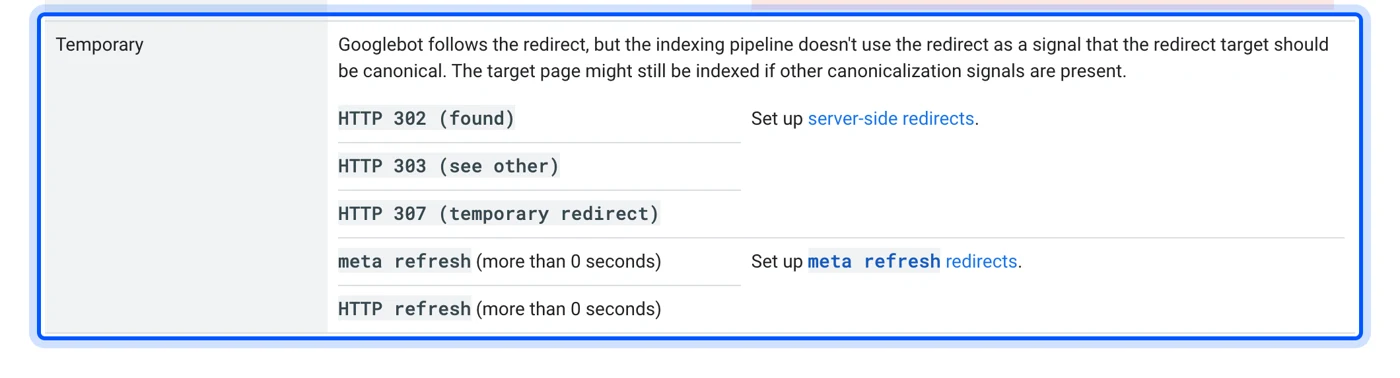
Google’s page puts 302, 303 and 307 in one “temporary” group. It says Googlebot follows the redirect, but the indexing pipeline “doesn’t use the redirect as a signal that the redirect target should be canonical.” In plain words, the old URL stays in search results while the 302 is in place.
This is where most summaries go wrong. You will read that a 302 “passes no SEO value,” and MDN’s page says something close to that too.
Google’s own wording is narrower: the target might still be indexed “if other canonicalization signals are present.” The practical effect is the same, though, so send a 301 when you want the new URL to rank in place of the old one. That is the whole 301 vs 302 decision in one sentence.
Here is how to choose in one line each:
- Moved for good: Use a 301, or a 308 if the URL receives form posts.
- Moved for a day or a campaign: Use a 302, and remove it when the old page comes back.
- A form must reach the new URL intact: Use a 307.
- A form should land on a thank-you page: Use a 303.
Is a 302 Redirect Bad for SEO?
A 302 redirect is not bad for SEO when the move is temporary. It keeps the original URL in Google’s index, which is what you want during maintenance or a short sale. It hurts when a page has moved for good, because the old URL keeps its place.
Google even asks for a 302 in one case. Its guide to testing website changes says that a test sending users to a variation URL should “use a 302 (temporary) redirect, not a 301.” A 301 there would tell Google the variation is the new home of the page.
The most common version of the opposite mistake is a merge done with a 302. Say you combine two posts and redirect the weaker one with a temporary redirect. Google keeps showing the old URL, and the stronger post never picks up its searches.
We merged 25 old posts on this site this week, and every one of them returns a 301. You can see it in the response for one of them:
$ curl -sI https://devdiggers.com/is-ecommerce-worth-it/
HTTP/2 301
location: https://devdiggers.com/is-wordpress-good-for-ecommerce/
x-redirect-by: Rank Math
The x-redirect-by: Rank Math line shows which plugin answered. Rank Math’s Redirections module lets you pick the redirect type per rule. A merge, a deleted page or a changed slug should always use 301.
Worth knowing: Google’s redirect documentation lists 302 as temporary and sets no time limit after which it counts as permanent. If a move is permanent, switch the rule to 301 rather than waiting for search engines to guess.
For a full walk through of setting up the right redirect type, see our guide on how to redirect a page or URL in WordPress.
How to Find What Sent a 302 Redirect
The fastest way to find what sent a 302 redirect is to read the response headers with curl -I. The location header shows where it goes, and the x-redirect-by header often names the plugin that sent it. That turns a guessing game into one line of output.
WordPress adds that header on purpose. The wp_redirect() reference lists an $x_redirect_by parameter described as “the application doing the redirect,” with a default of 'WordPress'. Well written plugins pass their own name, which is why our merge redirects say Rank Math.
This is the command we ran for every trace in this guide:
curl -sI https://example.com/page/
A status code 302 with no x-redirect-by line usually came from outside WordPress. Our own http:// to https:// redirect has no such header, because the server sends it before WordPress loads. The same is true of redirects from .htaccess, Nginx rules, Cloudflare page rules and your host’s control panel.
Follow the Whole Redirect Chain
One request can pass through several redirects before it lands. Add -L to follow every hop and print each response:
$ curl -sIL http://www.devdiggers.com/wp-admin/
HTTP/1.1 301 Moved Permanently
Location: https://devdiggers.com/wp-admin/
HTTP/2 302
location: https://devdiggers.com/wp-login.php?redirect_to=...&reauth=1
x-redirect-by: WordPress
HTTP/2 200
That chain has two hops. The server-level 301 fixed the protocol and the domain, then WordPress sent the 302 to the login page. Each hop adds a round trip, so a chain of three or four redirects is worth collapsing into one.
Use Your Browser’s Network Panel
In Chrome, open Developer Tools, go to the Network tab and tick Preserve log before you load the page. Without that box ticked, the panel clears on each redirect and you only see the final page. With it, each hop shows its status code, and clicking one shows its Location and x-redirect-by headers.
Tip: Test in a private window as well. Logged in and logged out visitors often get different redirects on WordPress, and your cookies can hide the one your visitors see.
How to Fix Unwanted 302 Redirects in WordPress
To fix an unwanted 302 redirect in WordPress, find the layer that sent it, then change the rule there. That layer is usually a redirect plugin, a server rule, a cache, a security or membership plugin, or custom code. The header checks above tell you which one to open first.

1. Check Your Redirect Plugin’s Rules
Open the redirect manager you use, such as Rank Math under Redirections, and search for the source URL. Look at the redirect type column. A rule set to 302 for a page that moved for good should be changed to 301.
Also check for rules that match more than you meant. A pattern like /shop/* can catch product URLs you never intended to redirect.
2. Check Server, Host and CDN Rules
If the response has no x-redirect-by header, look outside WordPress. Check the .htaccess file on Apache, the site configuration on Nginx, and your host’s redirect settings.

Then check your CDN. Cloudflare redirect rules and page rules let you pick 301 or 302 per rule, and they run before the request ever reaches your server.
3. Deactivate Plugins to Find the Source
When the header is missing or unhelpful, deactivate plugins one at a time on a staging copy. Test the redirect after each one. Security, membership, maintenance mode and login plugins are the usual suspects, because redirecting visitors is part of their job.
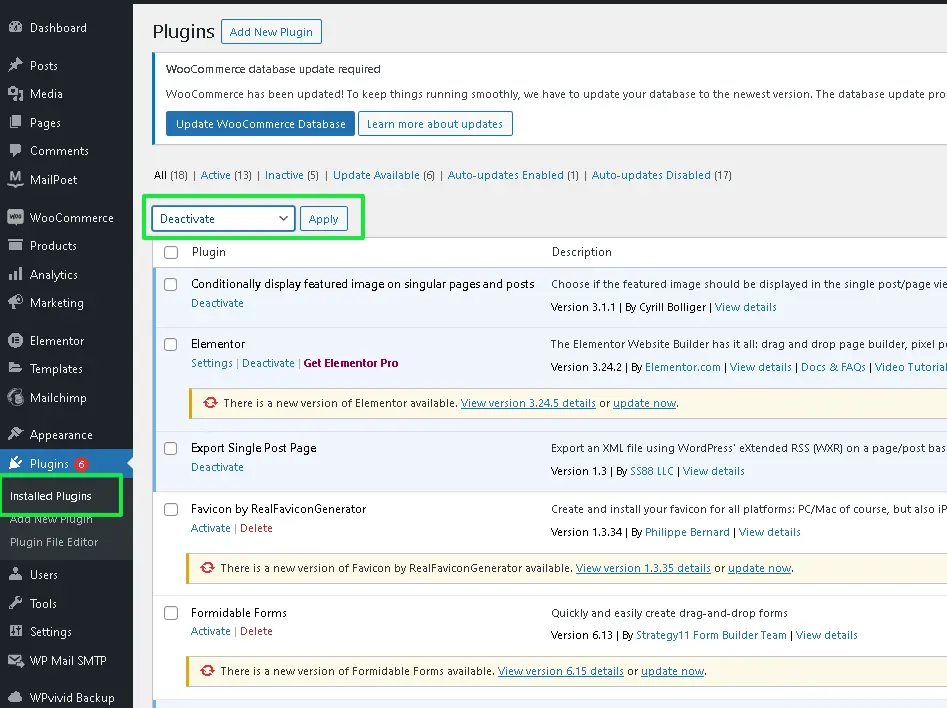
Never do this on a live store during trading hours. Deactivating the wrong plugin can switch off checkout or payments, and a staging copy costs nothing.
4. Clear Every Cache Layer
Browsers can remember redirects, and so can page caches and CDNs. After you change a rule, clear your caching plugin, your CDN cache and your browser data, then test again in a private window.
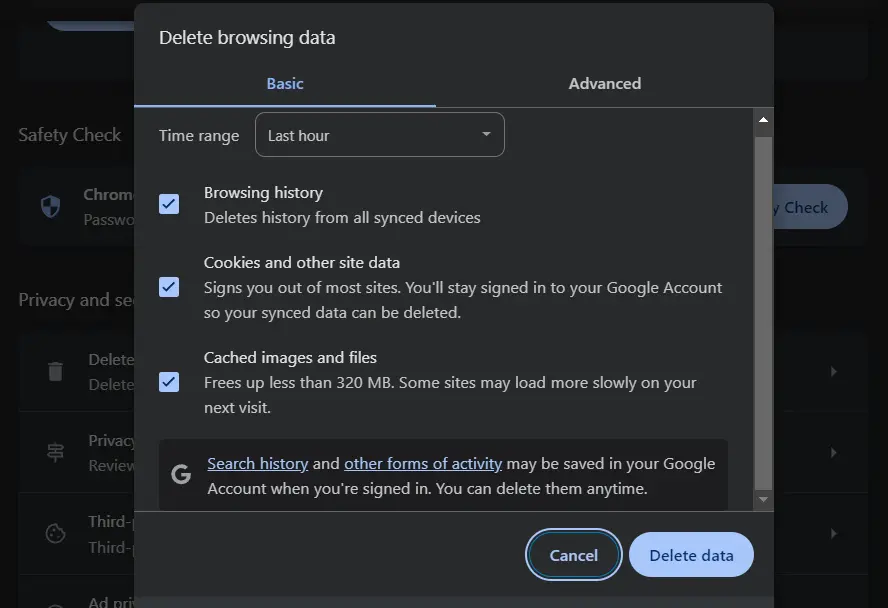
The response headers help here too. Our 302 above carries no-store, so no cache is allowed to keep it. A redirect without that rule may be served from cache long after you fixed it.
5. Fix Code That Calls wp_redirect()
Theme and plugin code often calls wp_redirect() without a status code. The wp_redirect() documentation sets the default status to 302, so every redirect written that way is temporary.
For a permanent move, pass the status and stop the script straight after:
wp_safe_redirect( home_url( '/new-page/' ), 301, 'My Theme' );
exit;
The third argument sets the x-redirect-by header, which makes your own redirects easy to trace later. The same documentation notes that the function “does not exit automatically,” so the exit; line is not optional.
Some redirect problems keep pulling you into theme code and server rules at once. For those, our WordPress SEO services team audits and cleans up redirect rules as part of a technical SEO review.
Why Forms Break After a 302 Redirect
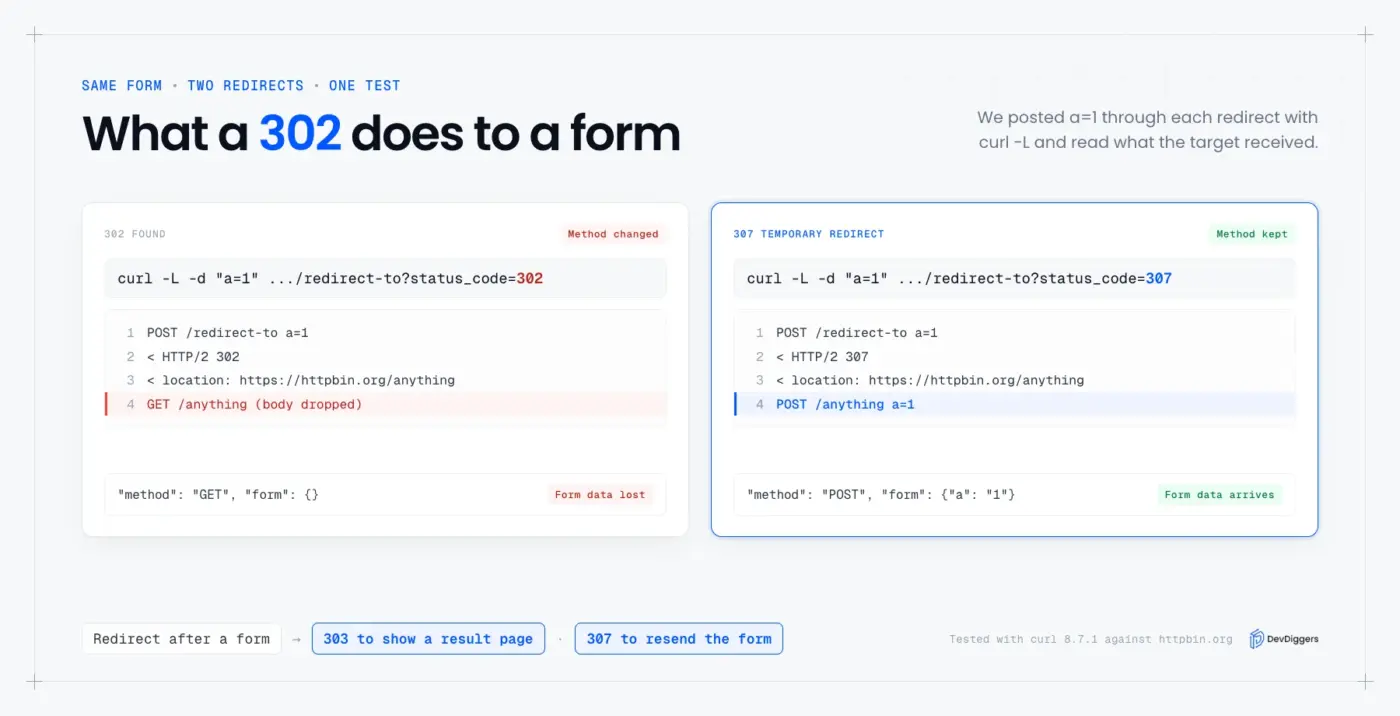
A form can lose its data after a 302 redirect because browsers are allowed to resend the request as a GET. The submitted fields are dropped on the way, so the next page receives nothing. A 307 redirect forbids that switch and delivers the form intact.
We tested this with curl, which follows the same rule browsers do. We posted a=1 to an address that redirected with a 302, then did the same with a 307, and read what the final URL received:
# after the 302
"method": "GET", "form": {}

# after the 307
"method": "POST", "form": {"a": "1"}
After the 302 the request arrived as a GET with an empty form. After the 307 it arrived as a POST with the field still in it. MDN’s reference gives the same advice: to stop user agents changing the request, “use 307 Temporary Redirect instead.”
On WordPress this shows up with contact forms, checkout steps and login forms sitting behind a redirect. A common trigger is an http:// form action on an https:// site, or a form posting to a URL without its trailing slash.
Fix the form’s action URL so it matches the final address exactly, and no redirect happens at all. Sometimes a redirect after posting is the goal, such as sending buyers to a thank-you page. For that, use a 303 See Other response, which is built for the job.
A 301 has the same weakness as a 302 here. Browsers may also resend a POST as a GET after a 301. That is why the table above lists 308 for permanent moves of URLs that receive forms.
An old API endpoint or a moved checkout step is the typical case for a 308. Both receive posted data, and both break quietly if a redirect drops it.
The HTTP 302 form problem is easy to miss in testing. A form that redirects still shows a normal looking page afterwards, so the only sign is that nothing was saved. Check the submission list in your form plugin after each test, because the page you land on looks fine either way.
Conclusion
A 302 status code is a temporary redirect, and most of the ones on a WordPress site are working as intended. The login redirect on /wp-admin/ is the clearest example.
The problems start when a permanent move uses a 302, because Google keeps the old URL. They also start when a form posts through one and loses its data.
Read the headers first with curl -I, because the x-redirect-by line usually names the sender. Then fix the rule at that layer: 301 for permanent moves, 307 for forms that must arrive intact, 303 for a thank-you page. For other errors on the same site, see our guides to the 403 Forbidden error and the 400 Bad Request error on WordPress.
Frequently Asked Questions (FAQs)
Q1. Why does a page return a 302 instead of a 200?
A 200 means the page answered directly, and a 302 means the server pointed you somewhere else first. On WordPress the usual reason is a login check, a redirect rule or a plugin such as a maintenance mode tool. Run curl -I on the URL to see the location and x-redirect-by headers.
Q2. What is the difference between the 302 and 304 status codes?
A 302 sends the browser to a different URL. A 304 Not Modified sends no page at all, because it tells the browser its cached copy is still current. They are unrelated, apart from both being in the 3xx range.
Q3. Is 302 Found an error?
No. A 302 is a redirect, and the page it points to usually loads normally. It only looks like an error when the redirect loops, points to the wrong page, or hides a problem on the target URL.
Q4. Can a 302 redirect cause a redirect loop?
Yes, when two rules send visitors back and forth, such as an HTTPS rule and a plugin rule that disagree. Browsers stop after a set number of hops and show ERR_TOO_MANY_REDIRECTS. Our guide to fixing the ERR_TOO_MANY_REDIRECTS error walks through finding both rules.
Q5. How long can a 302 redirect stay in place?
There is no fixed limit, but a 302 is meant for moves that will be undone. Google’s redirect documentation groups it with temporary redirects that do not make the target canonical. If the move is permanent, change it to a 301 instead of waiting.
Q6. Does a 302 status code affect database errors on the target page?
No. A 302 only changes which URL loads, and the page it lands on runs its own code. If the target page shows a database message, such as MySQL error 1046, fix that separately with our guide to MySQL error 1046.