MySQL error 1046 means the server got a query but has no default database to run it against. You fix it by naming the database, either with a USE statement, a db_name.table_name reference, or a database set when you connect.
We reproduced every version of this error on a clean MySQL 8.4.0 server before writing this guide, including the two cases most guides skip. One is a dump file that imports fine on its source server and fails on the next one. The other is dropping the database you are working in.
Below you get the exact message each tool prints, six fixes with the commands we ran, and a full section on SQL dump imports. The last two sections cover PHP and WordPress code, and how to confirm which database you are in.
What MySQL Error 1046 Means
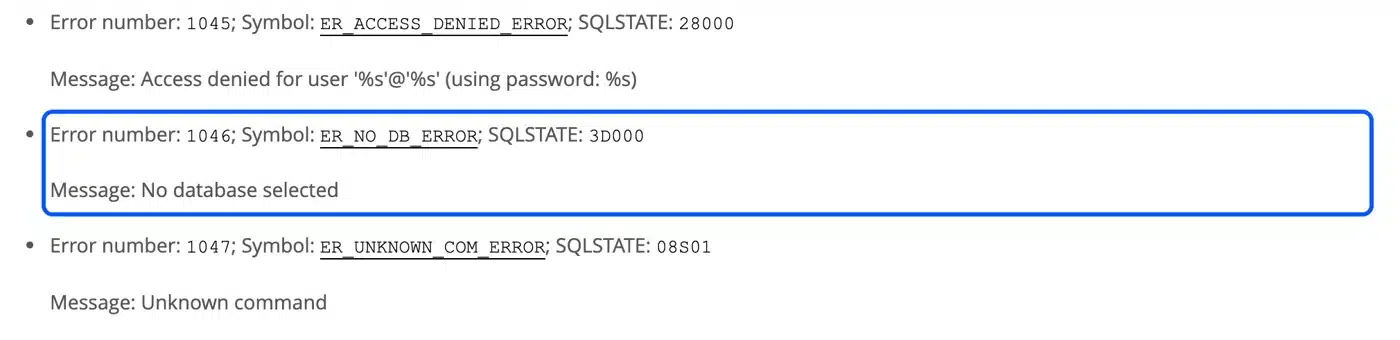
MySQL error 1046 is the server’s way of saying no default database is set for your session. The official error reference lists it as ER_NO_DB_ERROR with SQLSTATE 3D000 and the message “No database selected.” Any statement that names a table without its database triggers it.
The MySQL 8.4 error reference describes 1046 in just those three parts: the number, the symbol, and the message. The SQLSTATE class 3D stands for an invalid catalog name, and in MySQL a catalog is a database.
A default database is the one MySQL assumes when a query says orders instead of shop.orders. You can see it at any time with SELECT DATABASE();, which the MySQL function reference says returns NULL when no default database exists. That NULL is the whole cause of this error.
Here is what that looked like on our test server, straight after connecting with no database named:
mysql> SELECT DATABASE();
+------------+
| DATABASE() |
+------------+
| NULL       |
+------------+
Note: Error 1046 is not error 1049. Error 1049 says Unknown database 'name', which means you did name a database and it does not exist. Error 1046 means you never named one.
Where the Error Shows Up
Error code 1046 looks different in each tool, but every version has one cause. The command line client, phpMyAdmin, MySQL Workbench and PHP all wrap the same server error in their own words. Knowing the exact text helps you search for it, and it tells you which fix belongs to your tool.

This table lists the message each tool prints. The rows marked “tested” come from our own MySQL 8.4.0 server and PHP 8.5.5.
| Where you run the query | The message you see | Source |
|---|---|---|
| mysql command line | ERROR 1046 (3D000) at line 1: No database selected | Tested |
| PHP with PDO | SQLSTATE[3D000]: Invalid catalog name: 1046 No database selected | Tested |
| PHP with mysqli | No database selected with error code 1046 | Tested |
| phpMyAdmin | #1046 - No database selected | phpMyAdmin’s own error format |
| MySQL Workbench | Error Code: 1046. No database selected Select the default DB to be used by double-clicking its name in the SCHEMAS list in the sidebar. | MySQL bug report 61821 |
The Workbench message is the most helpful of the five, because it tells you the fix. The command line version gives you something else worth reading: the line number. On a one-line query it always says line 1, but on an imported file it points at the first statement that needed a database.
Also, the mysql no database selected error is never a sign of lost data. Your tables are still there. MySQL just does not know which database you mean.
How to Fix MySQL Error 1046: 6 Tested Fixes
The fix for error 1046 is to tell MySQL which database to use, and there are six ways to do that. Pick the one that matches where you run your queries. Every command below was run on our MySQL 8.4.0 test server against a small shop database with an orders table.

1. Select the Database With USE
The USE statement makes a database the default for the rest of your session. The MySQL USE documentation says it stays the default “until the end of the session or another USE statement is issued.”
USE shop;
SELECT COUNT(*) FROM orders;
On our server the same SELECT failed with 1046 before the USE line and returned 2 after it. This is the fix for most people typing queries by hand.
2. Name the Database Inside the Query
You can skip USE completely by writing the table as database.table. MySQL then knows exactly where to look, whatever the default is.
SELECT * FROM shop.orders;
This worked on our server with no default database set at all. It is the safer choice for scripts that touch more than one database, because a stray USE cannot send a later query to the wrong place.
3. Pass the Database When You Connect
Most clients let you name the database on the connection itself, so no query ever runs without one. On the command line that is the -D flag, or the database name as the last argument:
mysql -u root -p -D shop -e "SELECT COUNT(*) FROM orders;"
That returned 2 on the first try. The same idea applies to code, and the PHP section below shows it for PDO and mysqli.
4. Create the Database First
If SHOW DATABASES; does not list the database you expected, you need to create it before you can select it. Run these two lines, then load your tables:
CREATE DATABASE shop;
USE shop;
Run USE on a database that does not exist and you get error 1049 instead, which confirms this is the step you were missing.
5. Select the Database in phpMyAdmin or Workbench
Graphical tools track the default database through what you click. In phpMyAdmin, click the database name in the left panel before you open the SQL or Import tab. The #1046 - no database selected message almost always means the tab was opened from the server home screen.
In MySQL Workbench, double-click the schema in the SCHEMAS list until its name turns bold. You can also right-click it and choose Set as Default Schema.
6. Set a Default Database in Your Option File
For a database you use every day, you can make the mysql client select it on every connection. Add a database line under the [mysql] group of your option file:
[mysql]
database=shop
We tested this with --defaults-file pointing at that file, and SELECT DATABASE(); returned shop with no USE needed. Leave it out of shared servers, since every session would start in that database.
Fixing Error 1046 When You Import a SQL Dump
A dump import fails with error 1046 when the file has no CREATE DATABASE or USE line and no database is named on the import. That is the default shape of a mysqldump export of one database. The fix is one extra word on the import command.
We exported our shop database with mysqldump shop > shop.sql, then searched the file for CREATE DATABASE or USE lines.
There were zero, and the table definition started on line 25. So the file only loads when the import command names a database for it.
Importing that file without a database name failed straight away:
$ mysql -u root -p < shop.sql
ERROR 1046 (3D000) at line 22: No database selected
Line 22 is the DROP TABLE IF EXISTS statement that comes before the table, which is the first line that needs a database. Nothing was written, so a failed import leaves no half-loaded tables behind.
Naming the target database on the import fixed it on the first run:
mysql -u root -p -e "CREATE DATABASE shop_copy;"
mysql -u root -p shop_copy < shop.sql
SELECT COUNT(*) FROM shop_copy.orders; then returned 2, the same as the source.
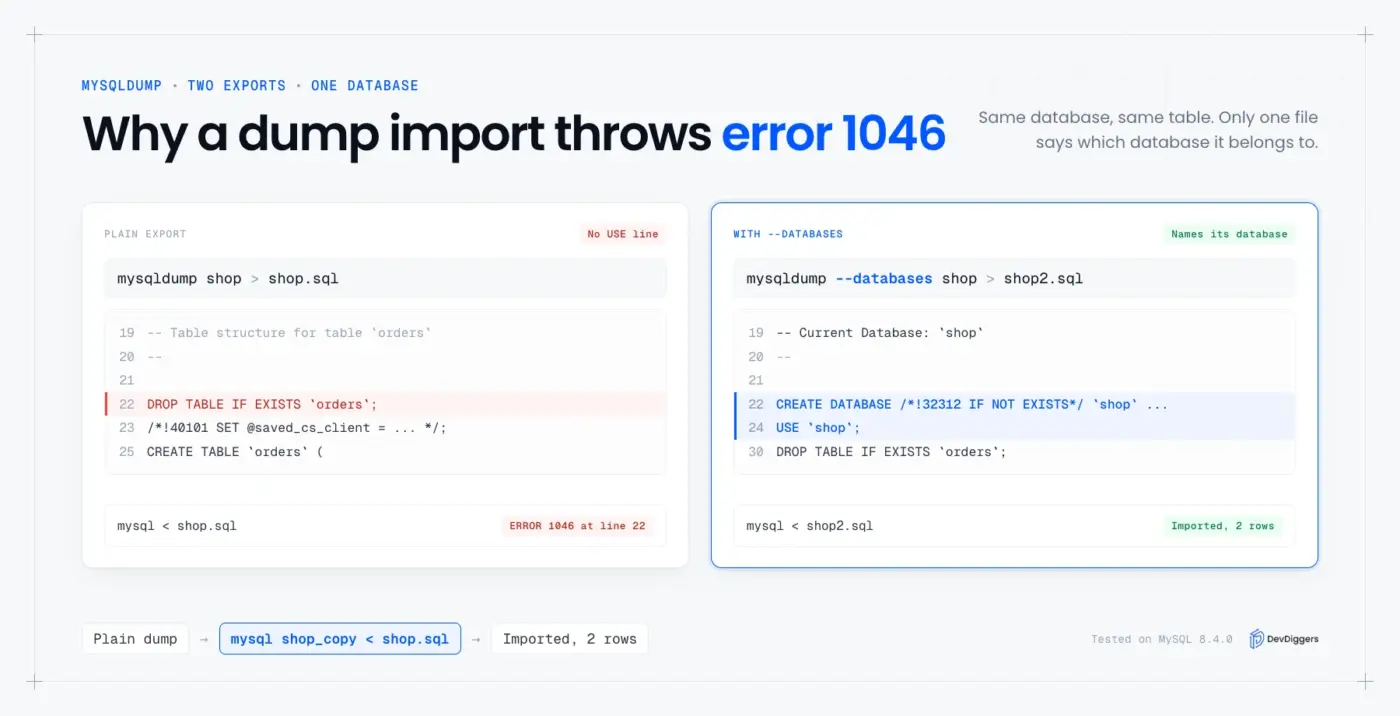
If you want the dump to carry its own database name, export it with the --databases option instead. The mysqldump documentation describes that option as one that treats every name argument as a database. Our second export with mysqldump --databases shop had CREATE DATABASE on line 22 and USE shop on line 24, so it imported cleanly with no name passed.
The trade off is control. A file with USE shop inside it always loads into shop, even when you meant to load a copy somewhere else. For restores onto a staging server, the plain dump plus a named import is the safer habit.
Tip: Moving a WooCommerce store to a new host is where this shows up most. Our guide to backing up the WooCommerce database covers taking the export in a shape that restores cleanly.
The Case Most Guides Miss: Dropping the Database You Are In
If you drop the database your session is using, MySQL does not switch you to another one. Your default database becomes NULL, and the very next query without a database name fails with error 1046. This catches people who rebuild a database by dropping and recreating it.
We ran exactly that sequence on our test server:
CREATE DATABASE tmpdb;
USE tmpdb;
DROP DATABASE tmpdb;
SELECT DATABASE();
CREATE TABLE t (id INT);
SELECT DATABASE() returned NULL, and the CREATE TABLE failed with ERROR 1046 (3D000). Recreating the database is not enough on its own. You need to run USE tmpdb; again after CREATE DATABASE, or name it in every statement.
Reset scripts are where this bites. A script that drops, recreates and then fills a database needs its USE line after the recreate. At the top of the file it points at a database that is about to disappear.
Error 1046 in PHP and WordPress
In PHP, error 1046 means the connection was opened without a database name and a later query used a bare table name. The fix is to put the database in the connection itself. We reproduced it with both PDO and mysqli on PHP 8.5.5 against MySQL 8.4.0.
A PDO connection with no dbname in its DSN threw SQLSTATE[3D000]: Invalid catalog name: 1046 No database selected on the first query. Adding the database to the DSN fixed it:
$pdo = new PDO( 'mysql:host=localhost;dbname=shop', $user, $pass );
For mysqli, the database is the fourth argument of new mysqli(), or you can call $mysqli->select_db( 'shop' ) after connecting.
WordPress itself rarely produces this error, because it always connects with the DB_NAME value from wp-config.php. The wp-config.php documentation lists DB_NAME as the database WordPress uses.
So on a WordPress site, a 1046 usually comes from a custom script or plugin that opens its own connection. Importing a dump by hand is the other common source.
WP-CLI avoids the import problem as well. The wp db import command runs using the DB_NAME and other credentials in wp-config.php, so a plain dump loads into the right database with no USE line. If you are changing those database settings, read our guide on changing the WordPress database prefix first, since wp-config.php is where both live.
Worth checking: Connection problems look different. If MySQL cannot be reached at all, you get error 2003, which we cover in how to fix MySQL error 2003.
How to Check Which Database You Are In
SELECT DATABASE(); tells you which database your session is using, and it is the quickest way to confirm a fix for error 1046. A database name means you are set. NULL means no database is selected and any query on a bare table name will fail again.
Run it right after connecting, after any USE, and after any DROP DATABASE. On our server it returned NULL, then shop, then NULL again after the drop test, which matched every error we saw.
Two more checks help when the name looks right but queries still fail. The SHOW DATABASES; command lists what exists on the server, so a typo in the name shows up at once.
The SHOW TABLES; command lists the tables inside the current database. That confirms your import loaded what you expected.
If the database exists and you still hit errors on a live site, a different HTTP or server fault may be hiding behind it. Start with the 403 Forbidden error and the 400 Bad Request error on WordPress.
A login page that keeps sending you back to itself points at a redirect instead. Our guide to the HTTP 302 status code walks through that one.
Some migrations keep failing on database errors while the store has to stay online. For those, our WordPress migration services team moves the site and its database for you.
Conclusion
MySQL error 1046 always has the same cause: the session has no default database. USE db_name; fixes it for manual queries, and db_name.table_name fixes it inside scripts. Naming the database on the connection or the import command fixes it for everything else.
The two traps worth remembering are dump files without a USE line and dropping the database you are in. Both left our test session with SELECT DATABASE() returning NULL, and both were fixed by naming the database again. Run that one check whenever the error comes back, and you will know which fix you need.
Frequently Asked Questions (FAQs)
Q1. What does 3D000 mean in error 1046 (3D000)?
3D000 is the SQLSTATE code, a standard error class shared across SQL databases. Class 3D means an invalid catalog name, and MySQL treats a catalog as a database. So ERROR 1046 (3D000) and the plain “No database selected” text describe the same problem.
Q2. Is error 1046 the same as error 1049?
No. Error 1046 means you did not name a database at all. Error 1049, Unknown database, means you named one that does not exist on that server, so check the spelling with SHOW DATABASES;.
Q3. Can I run a query without selecting a database first?
Yes. Write every table as database.table, for example SELECT * FROM shop.orders;. MySQL runs it with no default database set, which is how our test server answered while SELECT DATABASE() still returned NULL.
Q4. Why does phpMyAdmin show #1046 when I import a file?
The import was started from the server home screen, so no database was selected. Click the database name in the left panel first, then open the Import tab. If the database does not exist yet, create it on the Databases tab before importing.
Q5. Does the no database selected error in MySQL delete any data?
No. The server refuses the statement before it runs, so nothing is written or removed. In our dump test the failed import left no partial tables behind, and the retry with a database name loaded every row.
Q6. How do I stop error 1046 coming back in scripts?
Put the database in the connection, such as dbname= in a PDO DSN or -D on the command line. Then add a USE line after any CREATE DATABASE in the script. Scripts that name database.table everywhere never depend on the default at all.