Website builder vs coding is a choice between speed and control, with WordPress sitting in the middle. A builder gets you online fast, custom code gives you full freedom, and WordPress offers a good share of both.
In October 2026 we checked the plan pages for Wix, Squarespace and Hostinger. We also read the vendors’ own help articles on exporting a site and Patchstack’s 2026 security report. Then we opened the WordPress Site Editor on our own WordPress 7.1 test site to see what a builder-style screen looks like inside WordPress.
You get a side-by-side table, real prices, a security reality check, the lock-in question and a short list for picking. We also correct a few myths, such as the idea that hand-coded sites are safe by default.
Website Builder vs Coding vs WordPress at a Glance
A website builder is a hosted tool where you drag blocks onto a template and pay a plan. Coding means you write the HTML, CSS and server code yourself and run it on your own host. WordPress is a free content management system between the two, with themes, a block editor and plugins.
| Factor | Website builder | WordPress | Custom code |
|---|---|---|---|
| Skill needed | None | Low to medium | HTML, CSS and a server language |
| Where it runs | The vendor’s servers | Your host | Your host |
| Design control | Template limits | High with themes and plugins | Total |
| New features | The vendor’s app store | Plugins or custom code | You build each one |
| Updates and upkeep | The vendor | You or a care plan | You |
| Moving later | Limited by the vendor | Files and database | Files and database |
WordPress runs 40.0% of all websites, according to W3Techs, as of 14 October 2026. That puts it at 58.5% of sites with a known CMS. Most people who outgrow a builder land there.
How Much Does Each Option Cost?
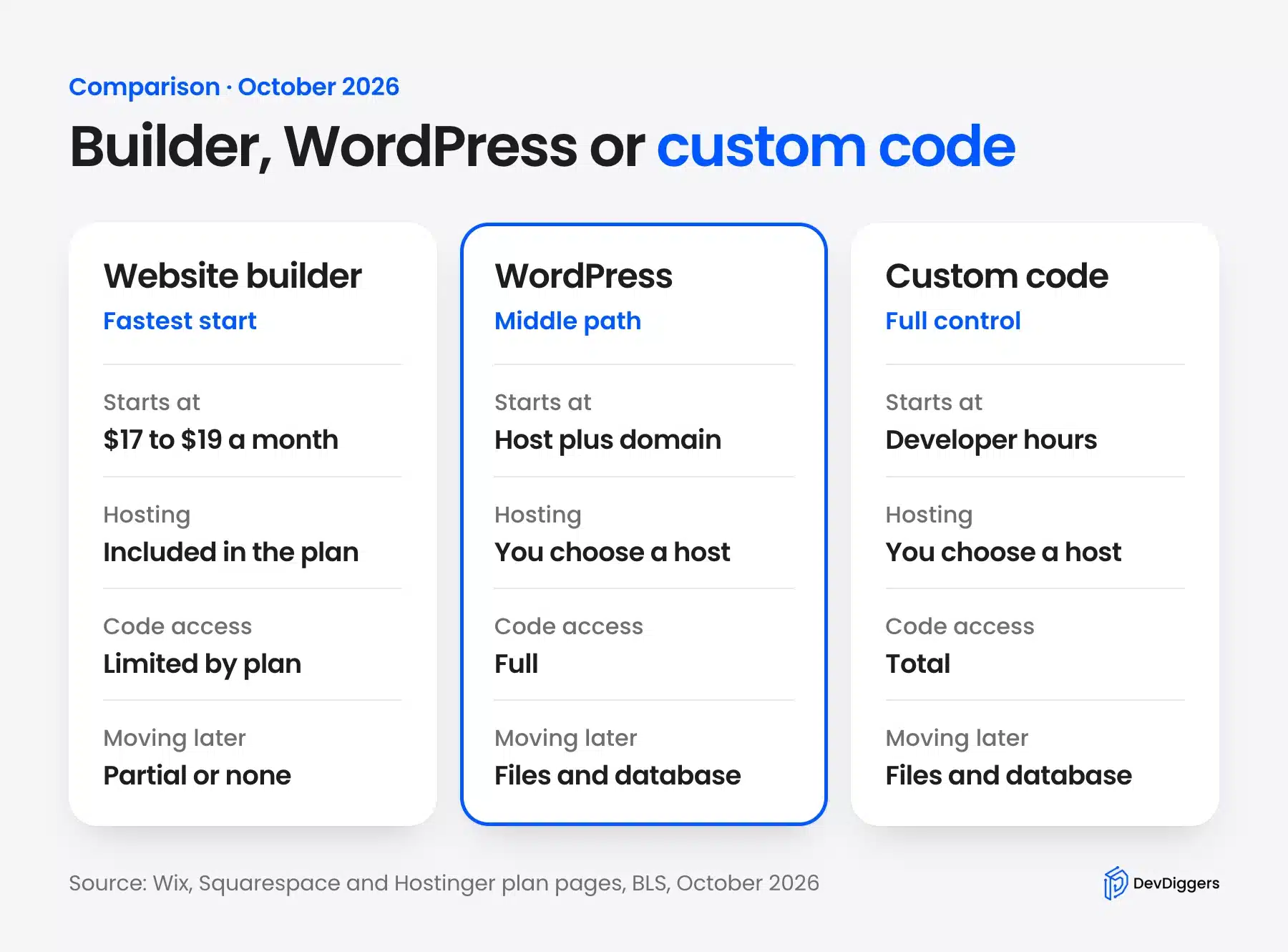
Builders charge a monthly plan that includes hosting, starting near $17 to $19 a month on yearly terms. WordPress software is free, but you pay for a host and a domain. Custom code costs developer time, billed by the hour or the project.
Here is what the vendors list in October 2026. Wix shows its Light plan at $17 a month with a custom domain, 2 GB of storage and a free domain for one year. Its Core plan is $29 a month and adds payments and 50 GB of storage.
Squarespace lists Basic at $19 a month yearly or $25 billed monthly. Core is $29 a month yearly and $39 monthly. Both include hosting and SSL, and every site starts with a 14-day free trial.
WordPress prices depend on the host. As one example, Hostinger’s Premium WordPress plan is $2.99 a month on a 48-month term, which is $143.52 up front. It renews at $10.99 a month, and the first year of a domain is free.
Say you compare year five. Hostinger’s renewal is 12 × $10.99 = $131.88 a year. Wix Light is 12 × $17 = $204, and Squarespace Basic on a yearly term is 12 × $19 = $228.
WordPress looks cheaper on paper. You may still add a premium theme or plugins and pay for backups. Treat the host above as one example and not a recommendation.
Note: Introductory prices change often. Read the plan page before you buy. The pattern that holds is the shape of the bill: builders charge one subscription, WordPress charges hosting plus add-ons, and custom code charges for hours.
How much does a custom website cost? The U.S. Bureau of Labor Statistics reports a median pay of $99,520 for web developers and digital designers in 2025, about $47.85 an hour.
Suppose a small business site takes 80 hours. That is an example and not a quote. At that wage the work is 80 × $47.85 = $3,828, before any agency overhead.
How Long Does Each Option Take?
A builder is the shortest path to a live page because the host, editor and templates arrive as one product. WordPress adds a hosting and install step. Custom code adds design, front end, back end, forms and testing, and you own each task.
No vendor publishes a launch time that holds for every site. Count the steps instead of trusting a headline number. Wix describes five steps from a prompt to promotion: create the site, customize it, add business tools, connect a domain and start promoting.
WordPress needs a host that meets its requirements. It lists PHP 8.3 or newer plus MariaDB 10.11 or newer or MySQL 8.0 or newer.
A managed host often sets this up for you. Our guide to creating a WordPress site from scratch walks through the whole install.
Before the first page goes live, each route asks for these tasks:
- Builder: Pick a template, edit the text, connect a domain and publish.
- WordPress: Buy hosting, install WordPress, choose a theme, add the plugins you need and publish.
- Custom code: Design the layout, write HTML and CSS, build a form handler, add spam protection, set up hosting and test on real phones.
A static page is quick in any of them. A store or a member area is a long project with custom code, because login, payments and emails are all yours to build and test.
The hidden time cost is upkeep. A builder updates itself, WordPress needs regular updates, and custom code needs a developer who still understands it after a year. That is why a site that looks cheap to launch can cost more to keep.
How Much Control Do You Get?
Control means how far you can change the design and add features before you hit a wall in the tool you chose. Builders stop at the vendor’s tools. WordPress stops where a plugin or theme stops, and you can write code past that.
Plan tiers can limit builder control in small ways. On Squarespace, the Basic plan has a basic code block only. The advanced code block, which accepts CSS, HTML, iFrames and JavaScript, and code injection start on Core at $29 a month on a yearly term.
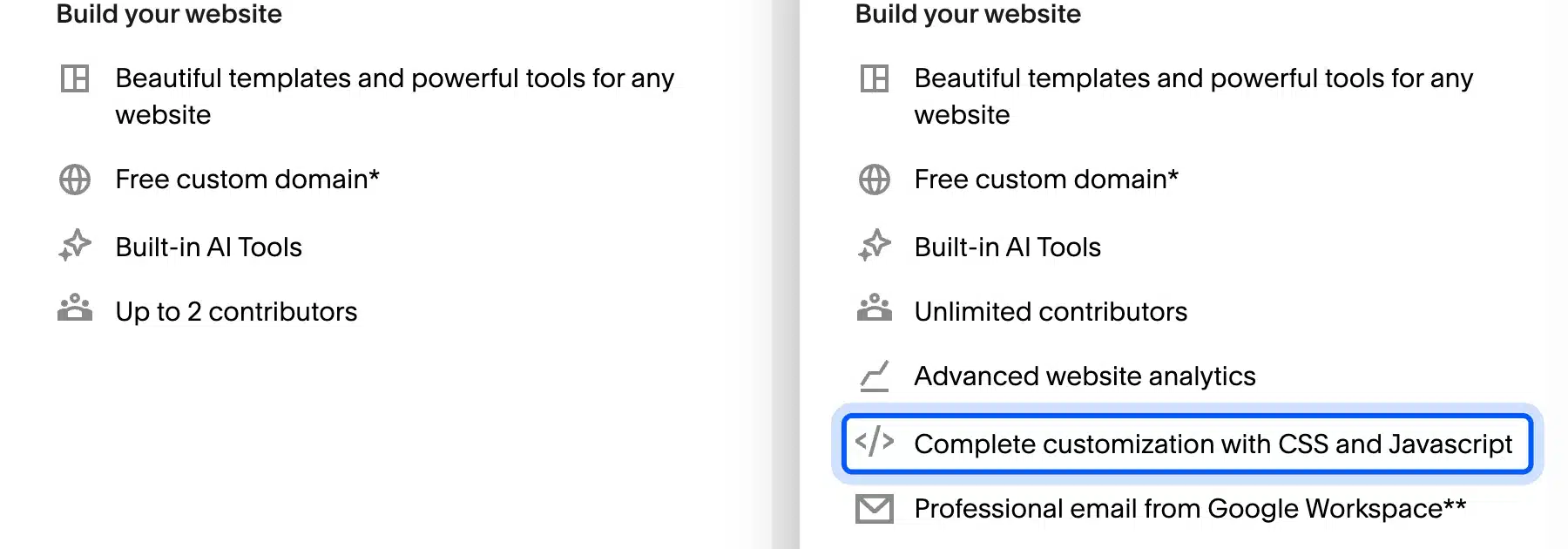
The Wix plans page lists an “Advanced developer platform” only on Business Elite. That plan is $159 a month at the regular rate. So a feature you could add with a plugin on WordPress may sit behind a plan upgrade on a builder.
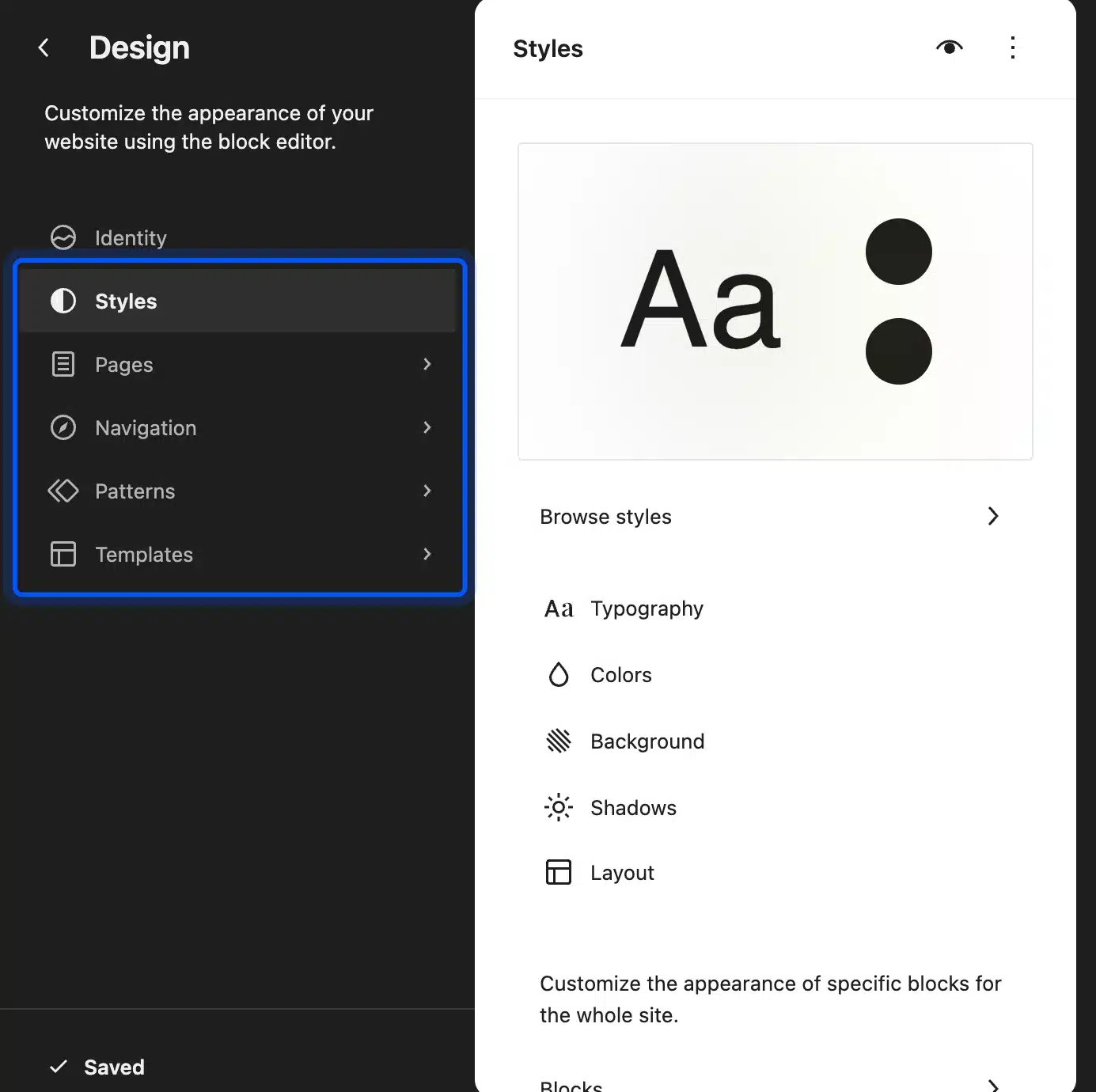
The design side of WordPress works like a builder when you want it to. On our WordPress 7.1 test site the path is Appearance > Editor. That opens the Site Editor, where you edit templates, patterns and global styles with no code.
People also mix up a website builder and a page builder. Elementor is a page builder plugin that runs inside WordPress. You still own the hosting and the code behind it. A website builder such as Wix is the whole stack in one account.
A page builder speeds up layout work. Hand-written code is the better fit when a design needs behavior that no builder block offers, such as a custom calculator or an animated chart. You trade hours for freedom.
Publishers who want memberships and newsletters built in can also compare Ghost with WordPress before they choose a platform.
Which Option Is More Secure?
No option is safe by default. A builder hands server patching to the vendor, while WordPress splits the work between core, your host and your plugins. Custom code puts every line on you. Risk follows whoever maintains the code.
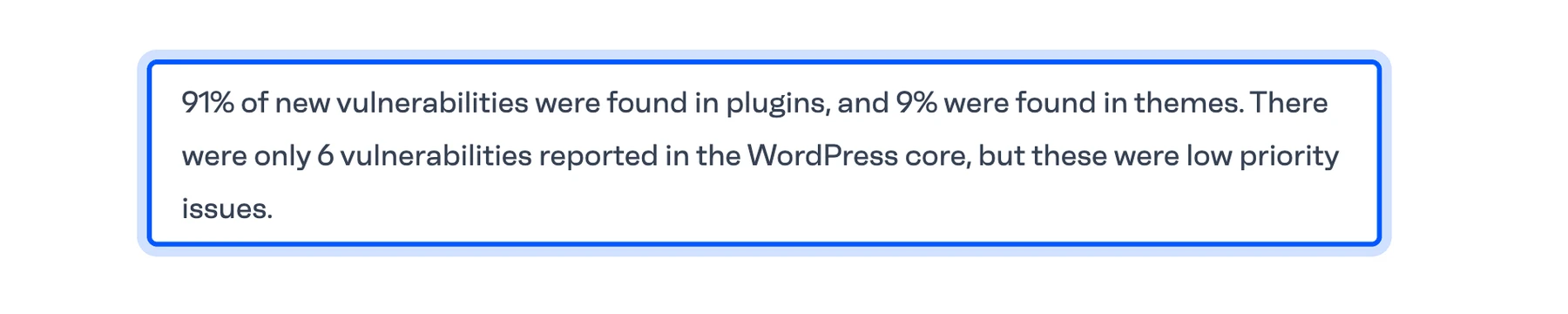
For WordPress, the numbers are specific. Patchstack counted 11,334 new vulnerabilities in 2025, with 91% in plugins and 9% in themes. It reports only 6 in WordPress core, all low priority.
So a WordPress site stays safe by keeping plugins few and updated. Our WordPress security checklist lists the habits that matter most.
Builders take the plugin risk away from you. Squarespace says every plan includes fully managed cloud hosting. The vendor runs the servers. You still protect your login and any third-party extensions you connect.
Hand-coded sites have no plugin directory. That removes one source of bugs. They also have no security team watching your code. You carry input validation, updates to your server language and every library you import.
Worth knowing: The claim that a coded site is “more secure than a builder” confuses fewer parts with fewer flaws. A small static site gives an attacker little to work with. A custom store with logins is a different risk class.
Can You Move Your Site to Another Platform Later?
Moving a site later is where the three options differ most. A Wix site cannot move to another host, and Squarespace exports only part of what you built. WordPress and custom code are yours to move as files and a database.
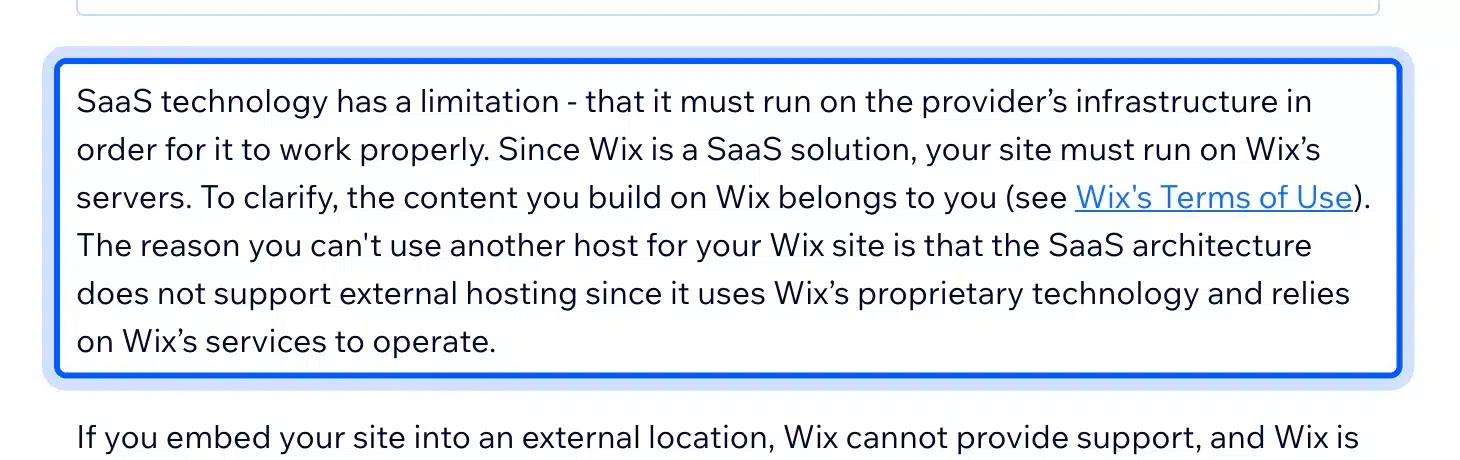
Wix states that its SaaS architecture does not support external hosting because it uses Wix’s proprietary technology. You keep your content and your domain, but you rebuild the pages elsewhere.
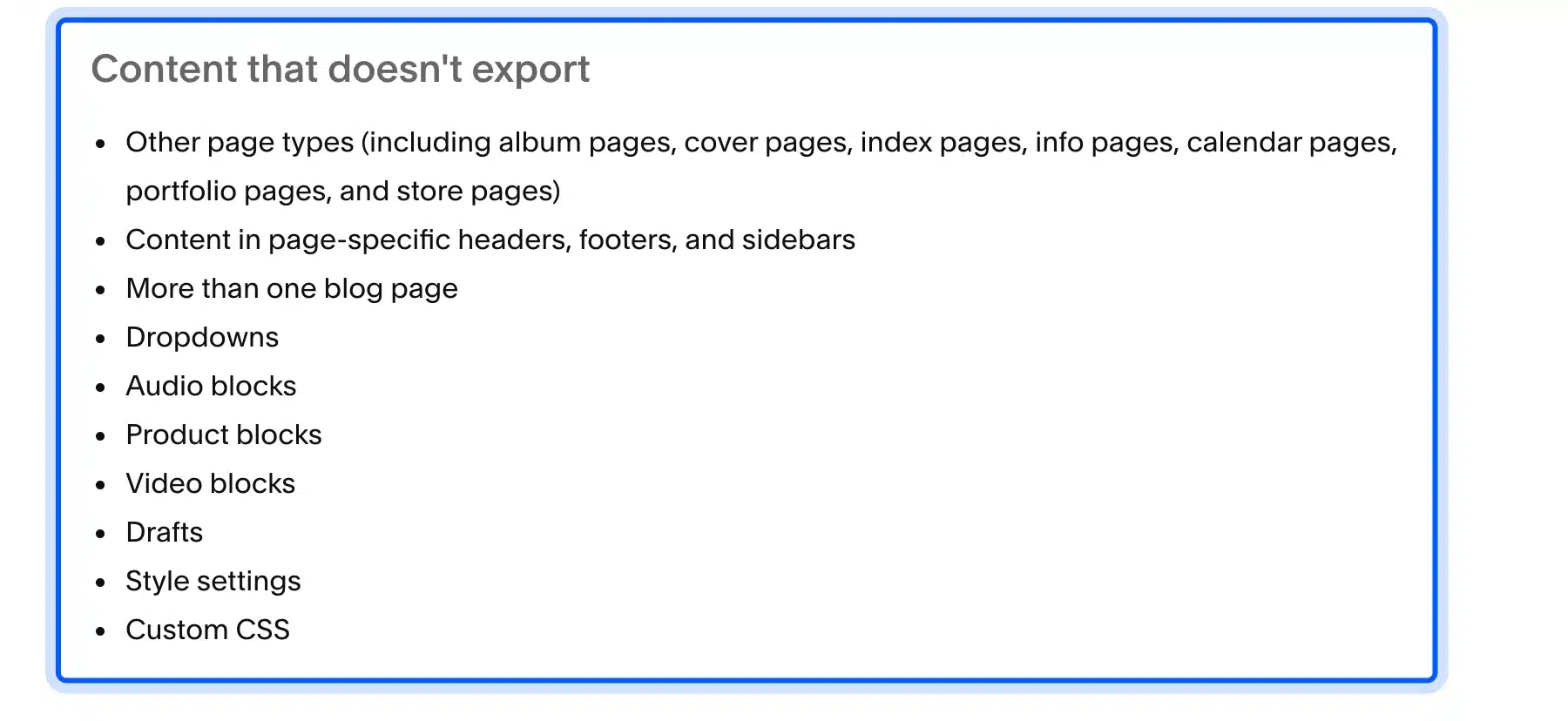
Squarespace can export a WordPress-format file, but the file is partial. Its export help article says the file covers layout pages, one blog page with its posts, text blocks, image blocks and gallery pages. Product blocks, drafts, style settings and custom CSS are left out.
If you already run on Squarespace, our guide to migrating from Squarespace to WordPress covers what to rebuild. For a self-hosted WordPress site, moving means copying files and the database, as in our guide to moving a WordPress site to a new domain.
Is WordPress a Website Builder?
WordPress is a content management system, and it is not a hosted website builder. The software is free and you run it on your own host. It behaves like a builder when you use the block editor, the Site Editor or a page builder plugin.
The name causes confusion because WordPress.com is a hosted service and WordPress.org is the free software. We explain the split in our guide to self-hosted WordPress.
Website builder vs WordPress comes down to ownership. On self-hosted WordPress you pick the host, the theme and every plugin, and you can leave at any time. On a builder, the vendor decides what you can add and where the site can run.
That freedom has a cost. You make more decisions, you update more parts and you own the backups. Many beginners find WordPress harder at first for this reason.
Our post on why WordPress feels hard to use explains where people get stuck and how to get past it. Most of the pain comes from picking too many plugins on day one.
Website Builder vs Web Developer: Who Builds It?
A website builder means you build the site yourself. A web developer means someone else builds or customizes it for you. Hire a developer when the site needs custom features, integrations or speed work that a builder’s tools cannot reach.
A builder cannot open the server. A custom checkout rule, a sync with your inventory system or a member portal usually needs code, and that code lives outside a drag-and-drop editor. A WordPress site can hold that code, which is why developers often work there.
Some builders sell developer tools at a higher price, as the Wix plan above shows. That route still keeps the code on the vendor’s platform. You can write it, but you cannot take it with you.
Here is a quick way to decide whether to hire help:
- Hire a developer: The site needs logins, payments, an API connection or a design that no template matches.
- DIY: The site is a few pages, you have the time, and a template fits the brand.
- Split the work: Build the pages yourself and then hire a developer for the one feature you cannot add.
Building alone has a limit. When a plugin conflict or a slow page eats your week, paid help is cheaper than your time. Our WordPress development services team builds and maintains WordPress sites, and a simple brochure site may not need it.
Which Should You Choose?
Website builder vs coding has no universal winner. Pick a builder for a small brochure site, WordPress for a site that needs to grow, and custom code for an app with unusual logic. Your answer depends on the feature list, the budget and who maintains the site after launch.
Use these situations to decide:
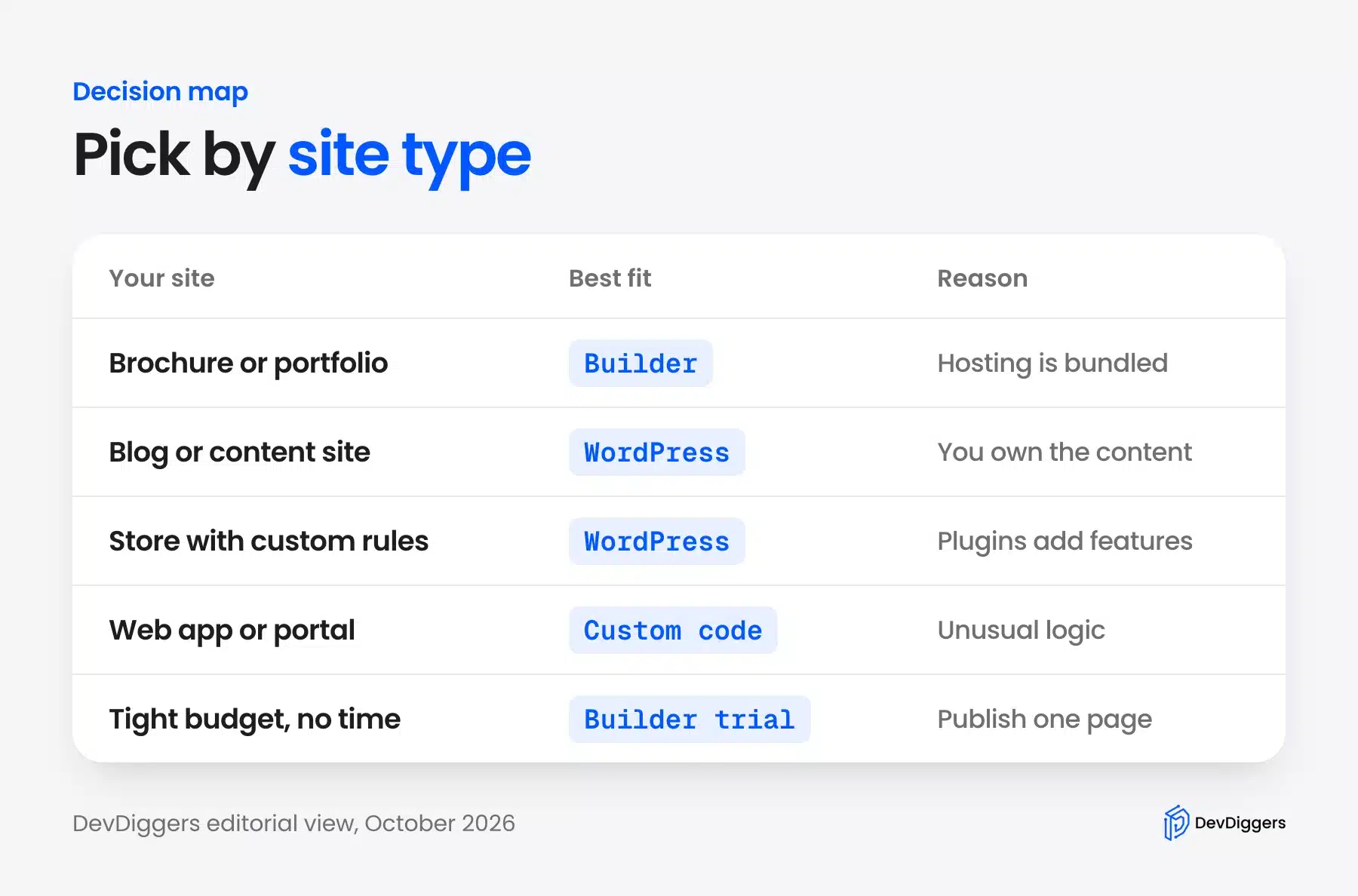
- Brochure or portfolio site: Choose a builder. A few pages and a contact form fit inside a plan, and the vendor handles hosting.
- Blog or content site: Choose WordPress. You own the content and can move hosts without rebuilding the pages.
- Online store with custom rules: Choose WordPress with WooCommerce and then add plugins for features such as loyalty points or wallets.
- Web app or member portal: Choose custom code, or hire a developer to build on WordPress where it fits.
- Tight budget and no time: Start a builder trial, publish one page and see whether the limits matter to you.
You can change your mind later, but the cost differs. Moving from WordPress to custom code is a redesign project. Moving from a builder to WordPress means rebuilding pages by hand, as the export limits above show.
Conclusion
Website builder vs coding is not a skill test. It is a trade between speed, control and upkeep. A builder is fastest, custom code is the most flexible, and WordPress is the usual middle path.
Pick the option that fits your next two years, because your first week matters less. If you start on a builder, check how you would leave before you invest in the design. If you want help with the WordPress route, our team can build it.
Frequently Asked Questions (FAQs)
Q1. Is coding better than using a website builder?
Neither is better for every site. Coding gives full control but costs time or developer fees, and a builder trades control for speed and a bundled plan. Choose coding when the site needs logic a builder cannot run.
Q2. Is a website builder worth it for a small business?
Yes, when the site is a few pages and a contact form. The Wix and Squarespace plans include hosting and a domain for the first year. Check the exit options first, because Wix sites cannot be hosted elsewhere.
Q3. Do I need to know how to code to use WordPress?
No. You install a theme, edit pages in the block editor and add features with plugins. Code only matters when you want a change that no plugin or theme setting offers.
Q4. Can I switch from a website builder to WordPress later?
Yes, but you rebuild part of the site. Squarespace’s export leaves out product blocks, drafts and custom CSS, and Wix sites cannot be hosted elsewhere. Plan for a manual rebuild of pages.
Q5. How much does a custom website cost?
It depends on the hours. Using the median wage from the Bureau of Labor Statistics of about $47.85 an hour, an 80-hour project is about $3,828 before agency costs. Stores and apps take many more hours.
Q6. WordPress vs Wix: which is better?
WordPress gives you free software, your own host and plugins, and you can leave at any time. Wix bundles hosting and a builder in one subscription. Choose Wix for a small site you will not outgrow and WordPress for a site that needs to grow.