

Sketch to WordPress in 2026 means rebuilding your Sketch file as a block theme. Colors and type go into theme.json, and each section becomes a block pattern. Our three-section landing page took one working session, and a full site takes longer.
We built this guide on our WordPress 7.1.3 test site in October 2026, as a child theme of Twenty Twenty-Five. Every Sketch step is checked against Sketch’s own documentation from that month, because the Sketch Mac app is paid and Mac only. Every WordPress step was built and captured there.
You get the four routes compared with real cost lines and a Sketch export checklist. Then come the exact files we wrote for theme.json and the patterns, plus two child theme traps we hit. It ends with WooCommerce pages and the FAQs.
What Converting a Sketch Design to WordPress Means in 2026
To convert a Sketch design to WordPress today, you turn its tokens and frames into the parts of a block theme. Color Variables and Text Styles become presets in theme.json, Symbols become block patterns, and each frame becomes a template. Nothing imports the .sketch file itself, and a person or a tool always rebuilds it.
Converting a design to WordPress used to mean slicing images and writing PHP templates. Block themes changed the target. The theme.json reference now holds the design system, and the Site Editor shows those values to whoever edits the site later.
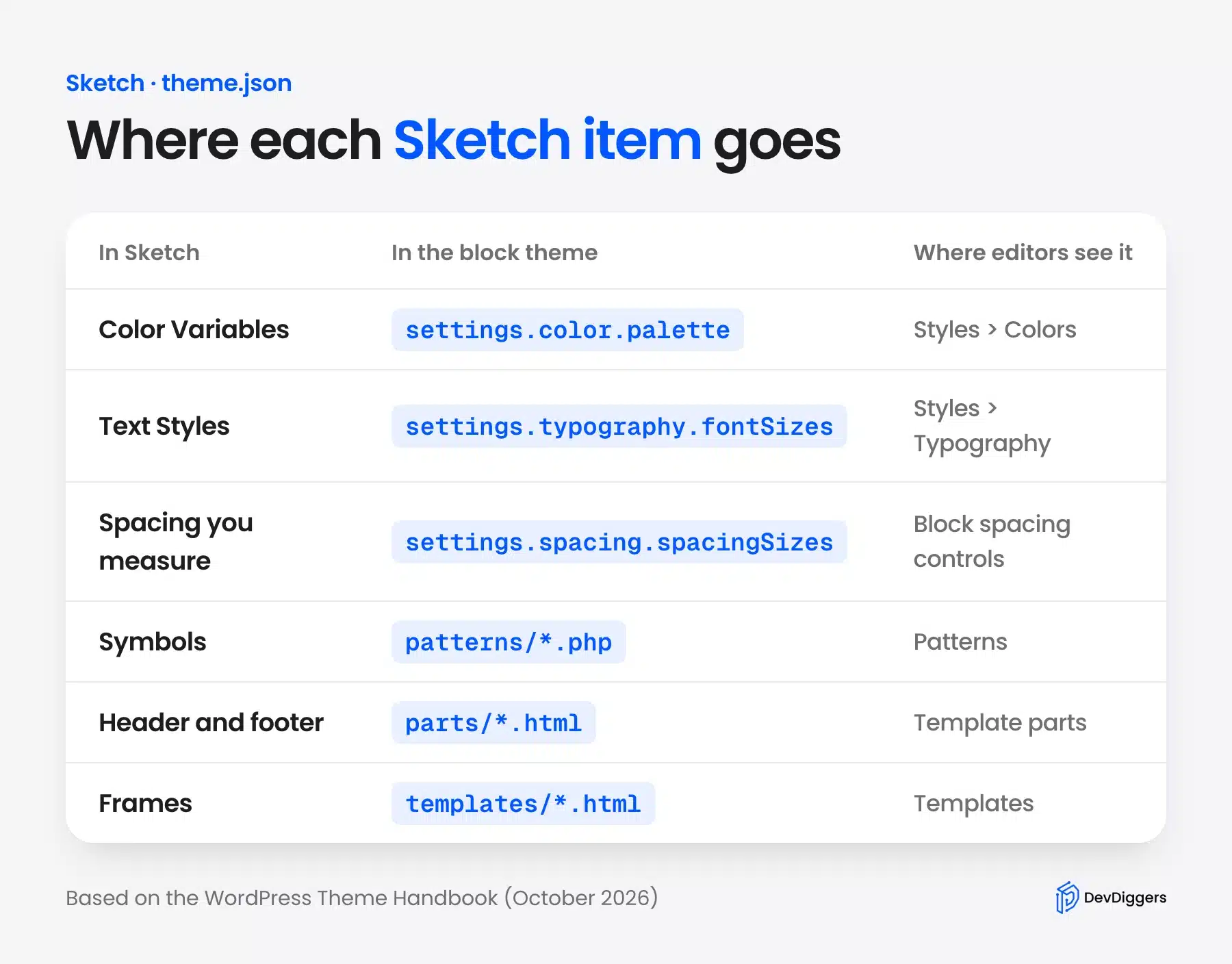
Sketch also changed what it hands over. Its web app exports Color Variables and Text Styles as design tokens in JSON.
Its 2026 Mac app also runs a local MCP Server for AI tools. Both appear later in this guide.
One honest note on the market. The UX Tools 2024 Design Tools Survey reports a 46:1 Figma-to-Sketch ratio for UI design tools. Most design-to-code tools follow that market, which matters when you pick a route below.
Sketch to WordPress Routes Compared
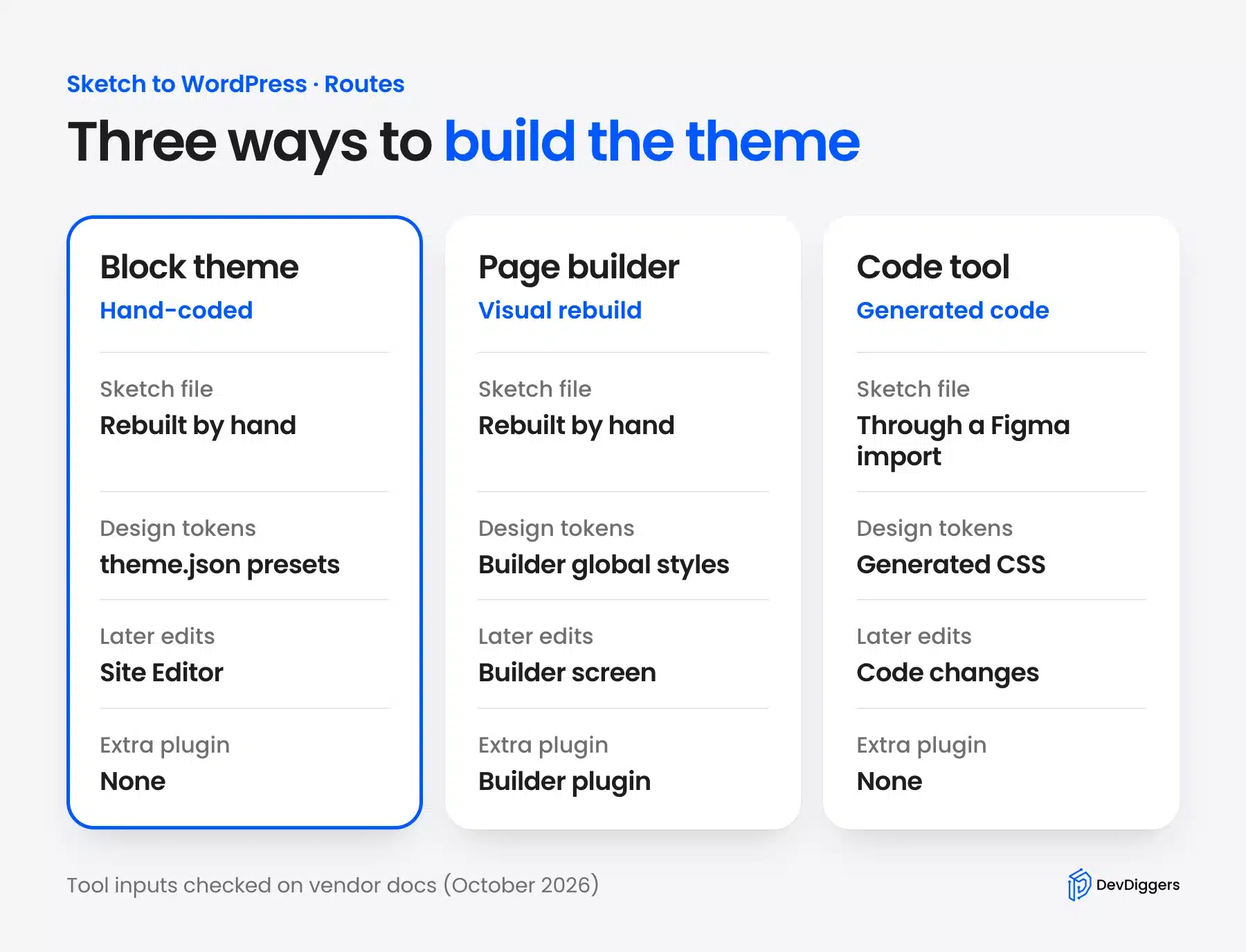
There are four Sketch to WordPress routes: a hand-coded block theme, a page builder, a design-to-code tool, or hiring a developer. A block theme gives the cleanest result that editors can change later. A page builder is faster for non-coders, and code tools need an extra Figma step for Sketch files.
We checked which design-to-code tools still take Sketch input in October 2026. Anima’s documentation marks its Sketch plugin as deprecated. Locofy’s plugin installation docs cover Figma and Penpot only.
The workaround is a Figma import. Figma’s help center lists Sketch files (.sketch) among the file types its file browser imports. That adds a conversion step before any code tool even starts.
| Route | Who it suits | Software cost (October 2026) | Example time for a 5-page site | Main trade-off |
|---|---|---|---|---|
| Hand-coded block theme | Developers and agencies | WordPress is free; developers inspect Sketch files free in a browser | 30 to 60 hours (our planning example) | Needs theme.json and block markup skills |
| Page builder | Site owners who do not code | Elementor plans start from $60 a year | 15 to 30 hours (our planning example) | Layout lives in the builder plugin |
| Design-to-code tool | Teams that already use Figma | Varies by tool plan | Depends on cleanup | Sketch files need a Figma import first |
| Hire a developer | Owners who want it done for them | Hourly or fixed quote | Set by the provider | Cost and the quality of the brief |
The hour ranges are our own planning example for five templates plus a header and footer. They are not a measured average.
Elementor’s price comes from its pricing page, which lists plans “starting from $60/year”. A page builder still needs a light base theme, and our list of fast WooCommerce themes helps there.
Pick the block theme when editors will change content for years. Pick a page builder when nobody on the team writes code. Treat code tools as a draft generator, since their output still needs a person to turn it into templates and patterns.
Prepare and Export Assets From Sketch
Exporting from Sketch for WordPress means marking layers as exportable, choosing presets and formats, and exporting design tokens from the web app. SVG suits icons and logos, while WebP or PNG at 2x suits photos. Developers do not need a Mac, because Sketch’s browser Inspector lets them inspect and export for free.
Sketch’s importing and exporting docs say the Mac app “exports everything as a PNG at its actual size (1x) by default”. Change that in the Export Presets panel of the Inspector before anyone exports. Add a 2x preset for raster images and an SVG preset for icons.
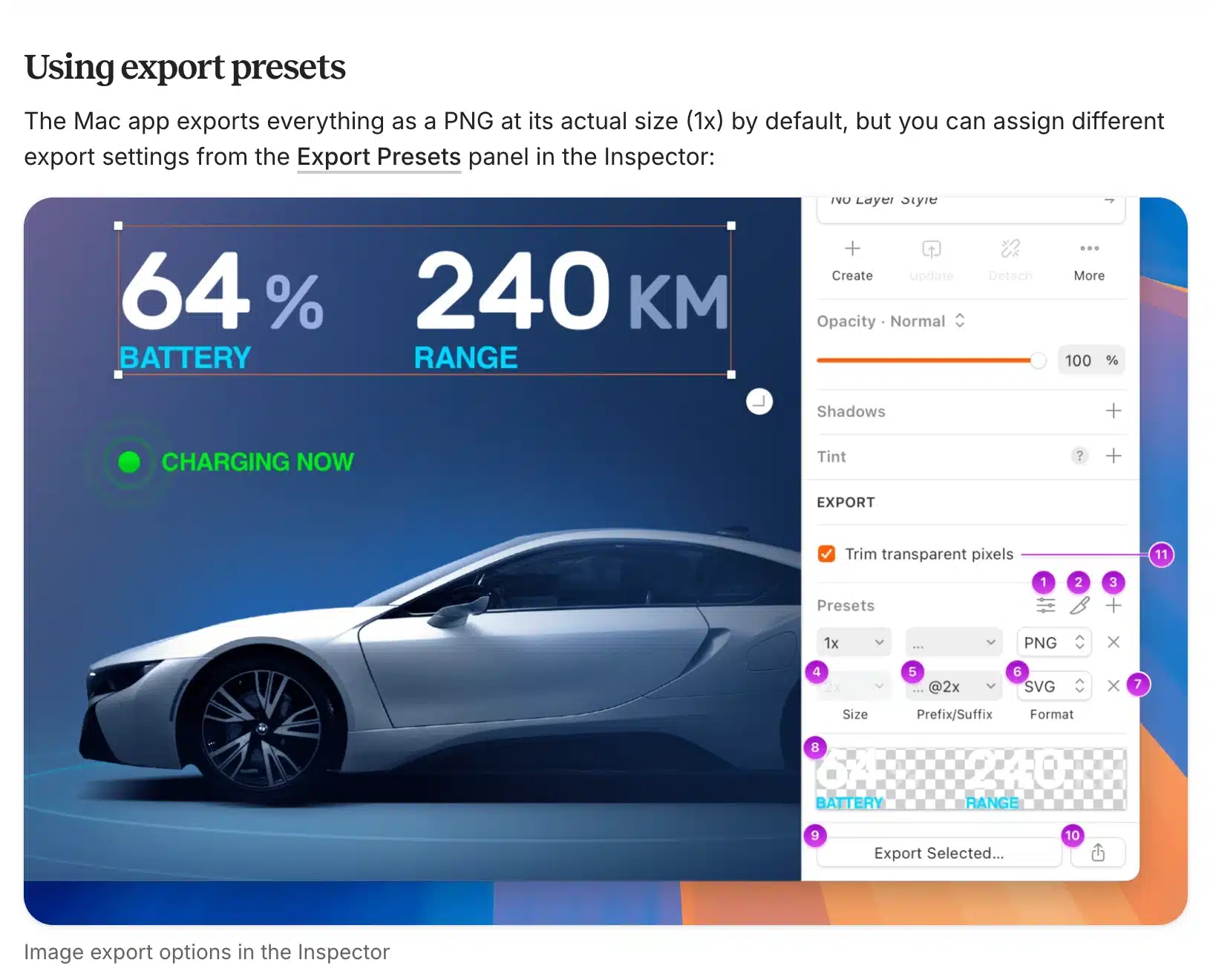
SVG has a known gap. The same docs note that inner and outer borders are not supported in SVG exports. So check any icon with a stroke after export, or convert the border to a centered one first.
Developers get a better handoff in the browser. Sketch’s developer handoff docs say you can “invite developers to inspect designs in your Workspace for free”, with no Mac needed. The Inspector copies hex values, measures spacing and copies CSS for any layer.
The most useful export for a block theme is the design token export. Sketch’s web app export docs say Color Variables and Text Styles can export “in CSS or JSON formats”. Pick JSON, because Text Styles only export in that format.
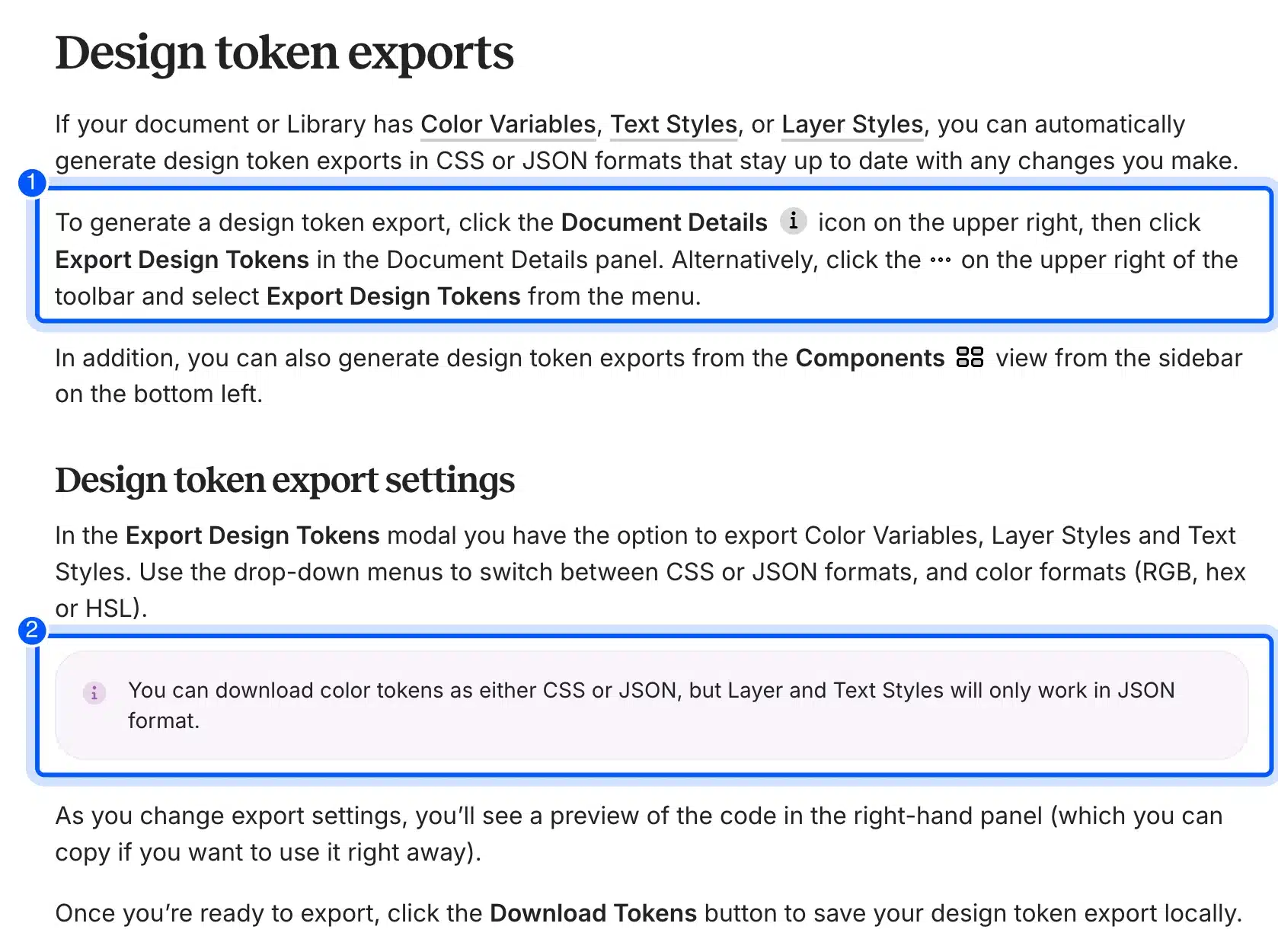
Tip: Name every Color Variable by its role in Sketch, such as Ink or Paper. Those names become the preset names editors see in the Site Editor.
How to Build a Block Theme From Your Sketch File
Building the block theme takes six steps: write the spec, create a child theme, and turn the tokens into theme.json. Then turn Symbols into patterns, build the page and test two widths, and save the theme to version control. We ran every step on WordPress 7.1.3 with Twenty Twenty-Five 1.5 as the parent theme.
Step 1: Write Down the Design Spec
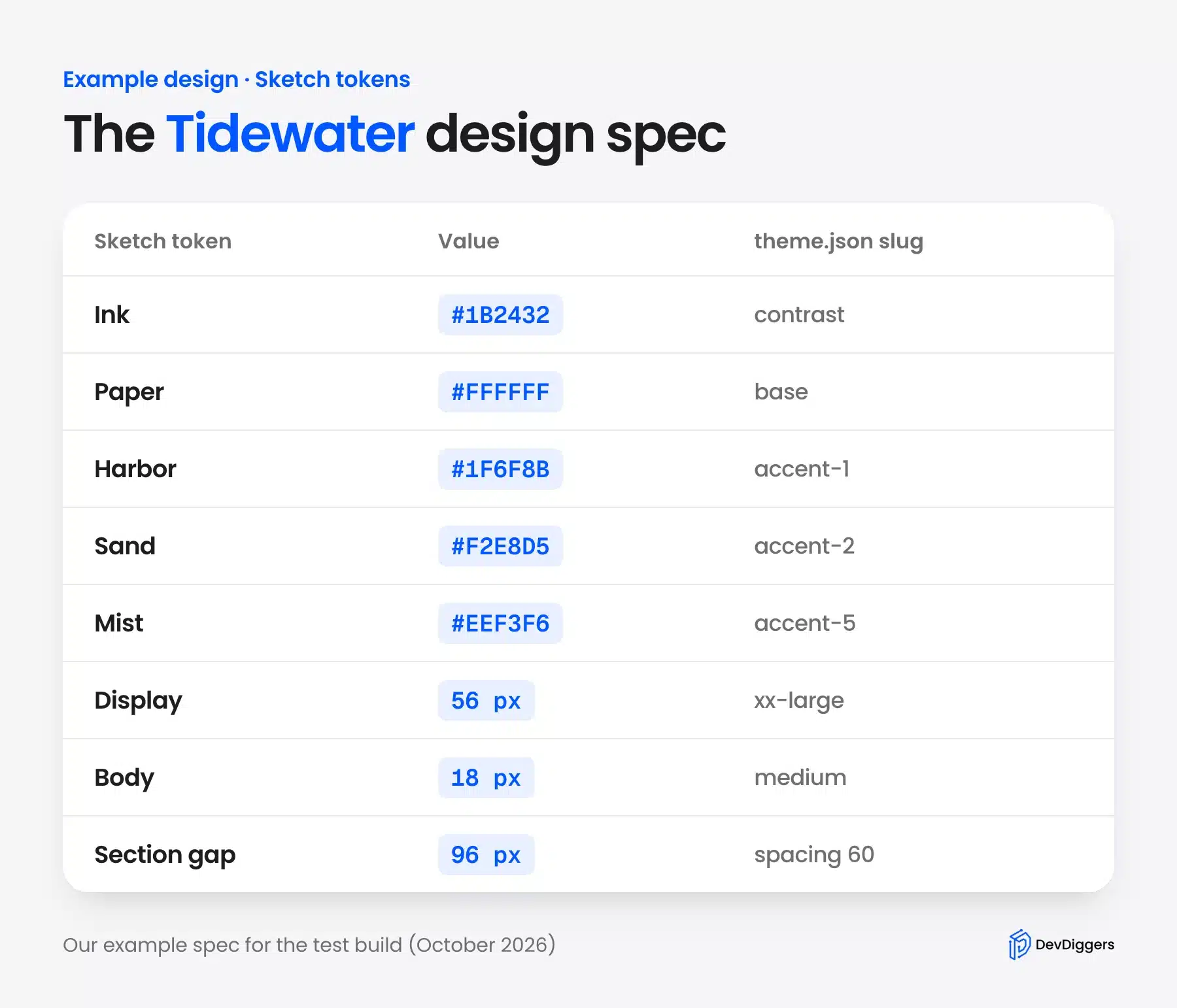
Our test design is a small landing page for a made-up studio called Tidewater. It has a hero, a three-card feature grid and a call to action. We defined exact values the way a Sketch file would hold them: five colors, two support colors, five text styles and a spacing scale.
The spec below is the contract between the design and the theme. Each Sketch token gets a value and the theme.json slug it will use. Writing the slug column now saves a rename later, for a reason Step 3 explains.
Step 2: Create the Child Theme
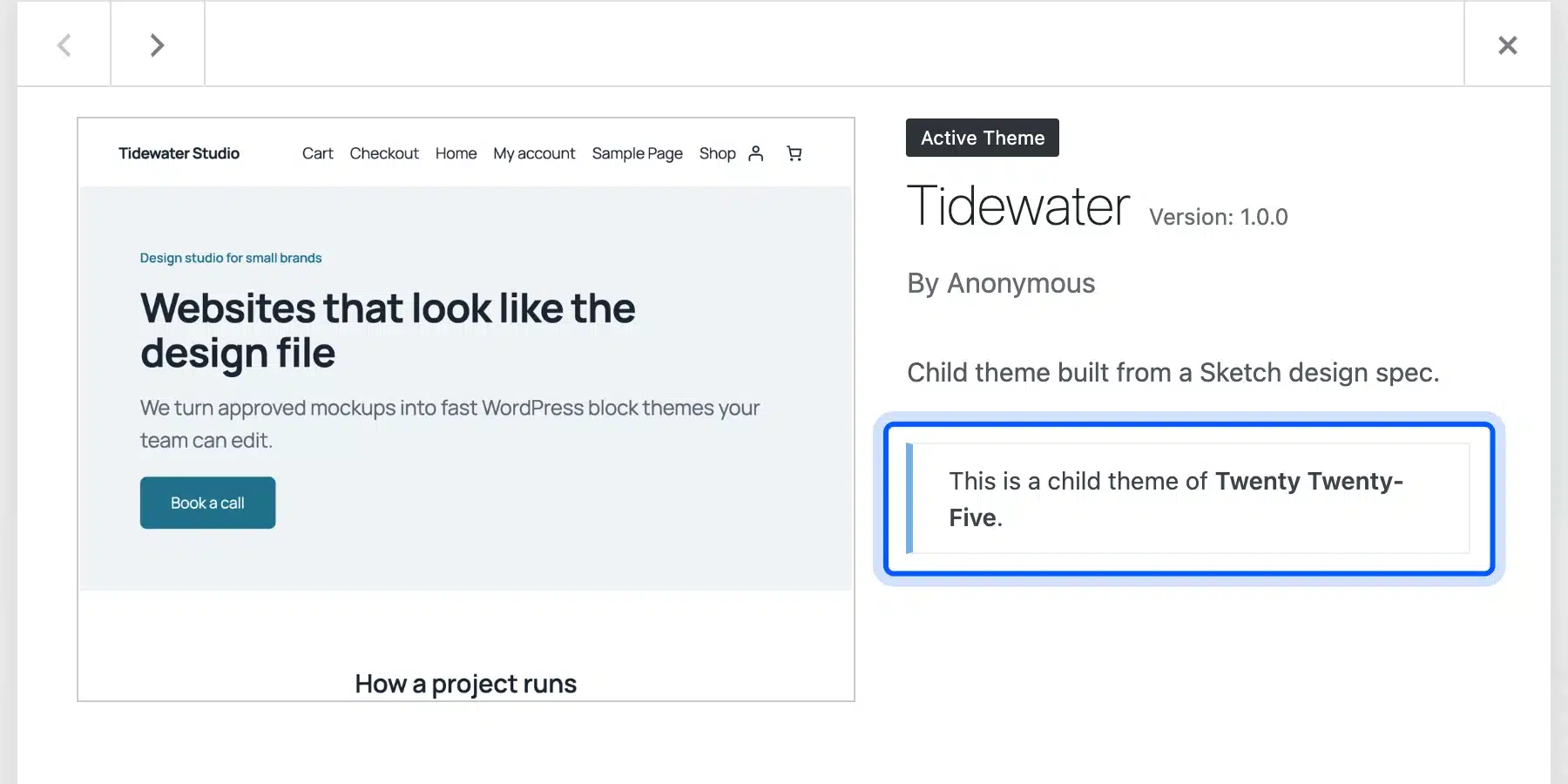
A child theme keeps the parent’s templates and lets you override only the design layer. The child themes handbook page says “You must add the Template header field” to style.css. That one line points WordPress at the parent folder.
We created a folder called tidewater in wp-content/themes with this style.css:
/*
Theme Name: Tidewater
Template: twentytwentyfive
Description: Child theme built from a Sketch design spec.
Version: 1.0.0
Requires at least: 6.7
Text Domain: tidewater
*/
After activation, Appearance > Themes confirmed the parent link. Our guide on how to create a WordPress child theme covers the plugin method too, if you prefer not to make folders by hand.
Step 3: Turn Sketch Tokens Into theme.json
This is where the Sketch file and the theme meet. The handbook says custom colors must go in the settings.color.palette array, and WordPress then writes a CSS variable for each one. Font sizes go in the settings.typography.fontSizes property.
We wrote a token file in the shape Sketch uses, copied from Sketch’s own design tokens example repository. Each color sits under Colors with a $type and a $value. Each text style sits under Typography with its font size.
This small Node script reads that token file and writes the two preset arrays into theme.json:
// Turns a Sketch design token export (JSON) into theme.json presets.
// Usage: node tokens-to-theme-json.mjs tokens.json theme.json [slug-map.json]
import fs from 'node:fs';

const [ , , input, output = 'theme.json', mapFile ] = process.argv;
const tokens = JSON.parse( fs.readFileSync( input, 'utf8' ) );
const map = mapFile ? JSON.parse( fs.readFileSync( mapFile, 'utf8' ) ) : {};
const slug = ( name ) => map[ name ] ?? name.toLowerCase().replace( /[^a-z0-9]+/g, '-' );
const rem = ( px ) => `${ parseFloat( px ) / 16 }rem`;

// Every Color Variable becomes a palette preset.
const palette = Object.entries( tokens.Colors ?? {} ).map( ( [ name, t ] ) => ( {
	name,
	slug: slug( name ),
	color: t.$value,
} ) );

// Every Text Style becomes a font size preset, in rem.
const fontSizes = Object.entries( tokens.Typography ?? {} ).map( ( [ name, t ] ) => ( {
	name,
	slug: slug( name ),
	size: rem( t.text.$value.fontSize ),
} ) );

const theme = fs.existsSync( output ) ? JSON.parse( fs.readFileSync( output, 'utf8' ) ) : { version: 3 };
theme.settings ??= {};
theme.settings.color = { ...theme.settings.color, palette };
theme.settings.typography = { ...theme.settings.typography, fontSizes };
fs.writeFileSync( output, JSON.stringify( theme, null, '\t' ) + '\n' );
console.log( `${ palette.length } colors and ${ fontSizes.length } font sizes written to ${ output }` );
The optional slug map keeps the parent theme’s slugs. With it, Ink becomes contrast and Paper becomes base:
{
	"Paper": "base",
	"Ink": "contrast",
	"Harbor": "accent-1",
	"Sand": "accent-2",
	"Slate": "accent-4",
	"Mist": "accent-5",
	"Line": "accent-6",
	"Small": "small",
	"Body": "medium",
	"Subhead": "large",
	"Heading": "x-large",
	"Display": "xx-large"
}
On our run the script printed “7 colors and 5 font sizes written to theme.json”.
Spacing does not come out of Sketch’s token export. We typed that scale by hand from the Inspector measurements. The spacingSizes property takes an array of size objects for that.
Here is the finished theme.json, with fluid sizes and the base styles added by hand:
{
	"$schema": "https://schemas.wp.org/trunk/theme.json",
	"version": 3,
	"settings": {
		"color": {
			"palette": [
				{"name": "Ink", "slug": "contrast", "color": "#1B2432"},
				{"name": "Paper", "slug": "base", "color": "#FFFFFF"},
				{"name": "Harbor", "slug": "accent-1", "color": "#1F6F8B"},
				{"name": "Sand", "slug": "accent-2", "color": "#F2E8D5"},
				{"name": "Mist", "slug": "accent-5", "color": "#EEF3F6"},
				{"name": "Slate", "slug": "accent-4", "color": "#5B6573"},
				{"name": "Line", "slug": "accent-6", "color": "#D5DEE5"}
			]
		},
		"typography": {
			"fontSizes": [
				{"name": "Display", "slug": "xx-large", "size": "3.5rem", "fluid": {"min": "2.25rem", "max": "3.5rem"}},
				{"name": "Heading", "slug": "x-large", "size": "2rem", "fluid": {"min": "1.625rem", "max": "2rem"}},
				{"name": "Subhead", "slug": "large", "size": "1.5rem", "fluid": false},
				{"name": "Body", "slug": "medium", "size": "1.125rem", "fluid": false},
				{"name": "Small", "slug": "small", "size": "0.9375rem", "fluid": false}
			]
		},
		"spacing": {
			"spacingSizes": [
				{"name": "8px", "slug": "20", "size": "0.5rem"},
				{"name": "16px", "slug": "30", "size": "1rem"},
				{"name": "24px", "slug": "40", "size": "1.5rem"},
				{"name": "48px", "slug": "50", "size": "clamp(1.5rem, 5vw, 3rem)"},
				{"name": "96px", "slug": "60", "size": "clamp(3rem, 8vw, 6rem)"}
			]
		}
	},
	"styles": {
		"color": {"background": "var:preset|color|base", "text": "var:preset|color|contrast"},
		"typography": {"fontSize": "var:preset|font-size|medium", "fontWeight": "400", "lineHeight": "1.6"},
		"elements": {
			"heading": {"typography": {"fontWeight": "600", "lineHeight": "1.2"}},
			"h1": {"typography": {"fontSize": "var:preset|font-size|xx-large", "fontWeight": "700", "letterSpacing": "-1px", "lineHeight": "1.1"}},
			"h2": {"typography": {"fontSize": "var:preset|font-size|x-large"}},
			"h3": {"typography": {"fontSize": "var:preset|font-size|large"}},
			"button": {"color": {"background": "var:preset|color|accent-1", "text": "var:preset|color|base"}, "border": {"radius": "8px"}}
		}
	}
}
The Site Editor picked the presets up at once. Under Styles > Colors > Palette, the Theme row showed our seven colors, which you can also reach through the Styles tab in WordPress.
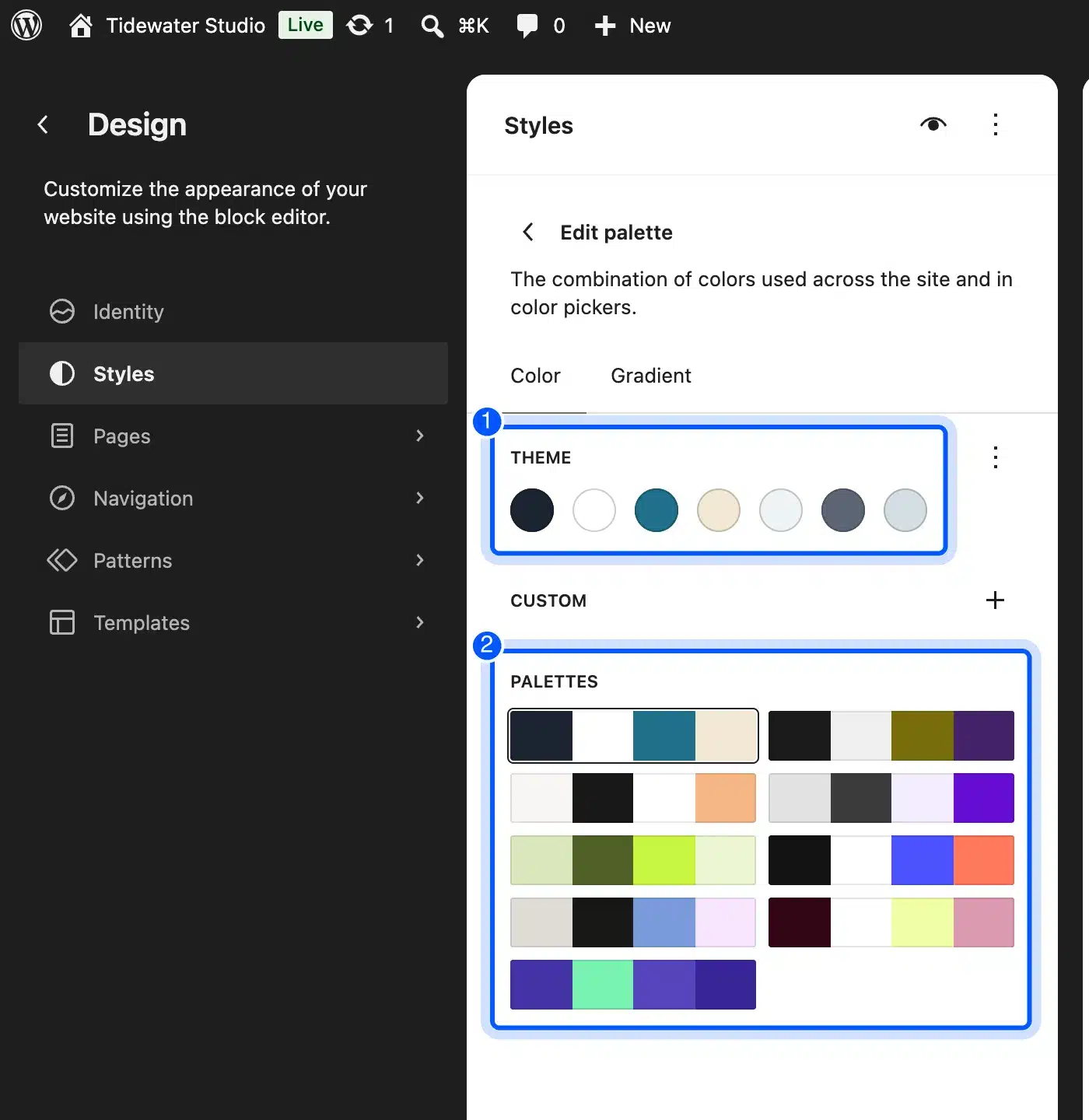
The Palettes grid under it still lists Twenty Twenty-Five’s color variations. An editor who clicks one replaces your Sketch colors in a single move. Tell the client to leave that grid alone.
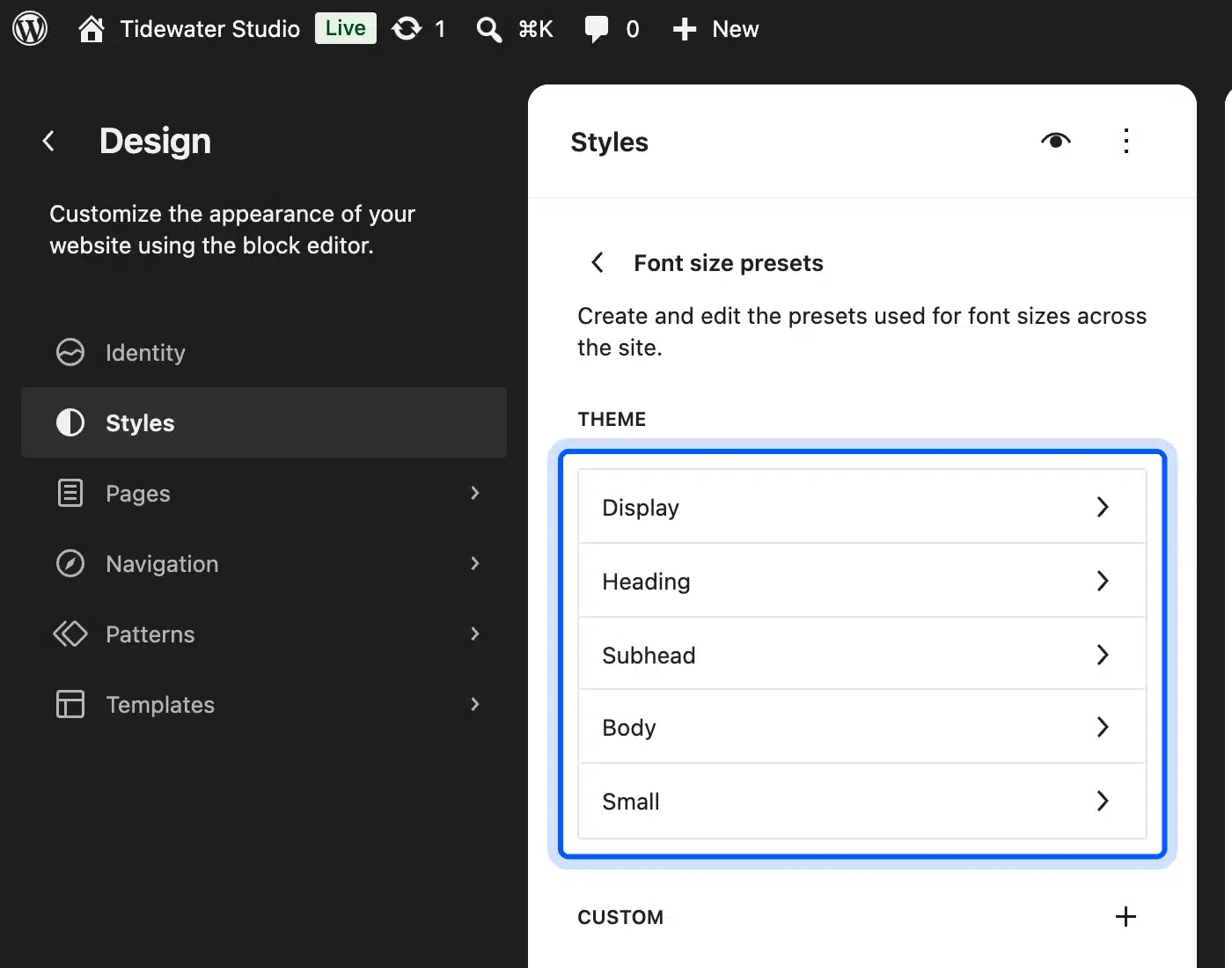
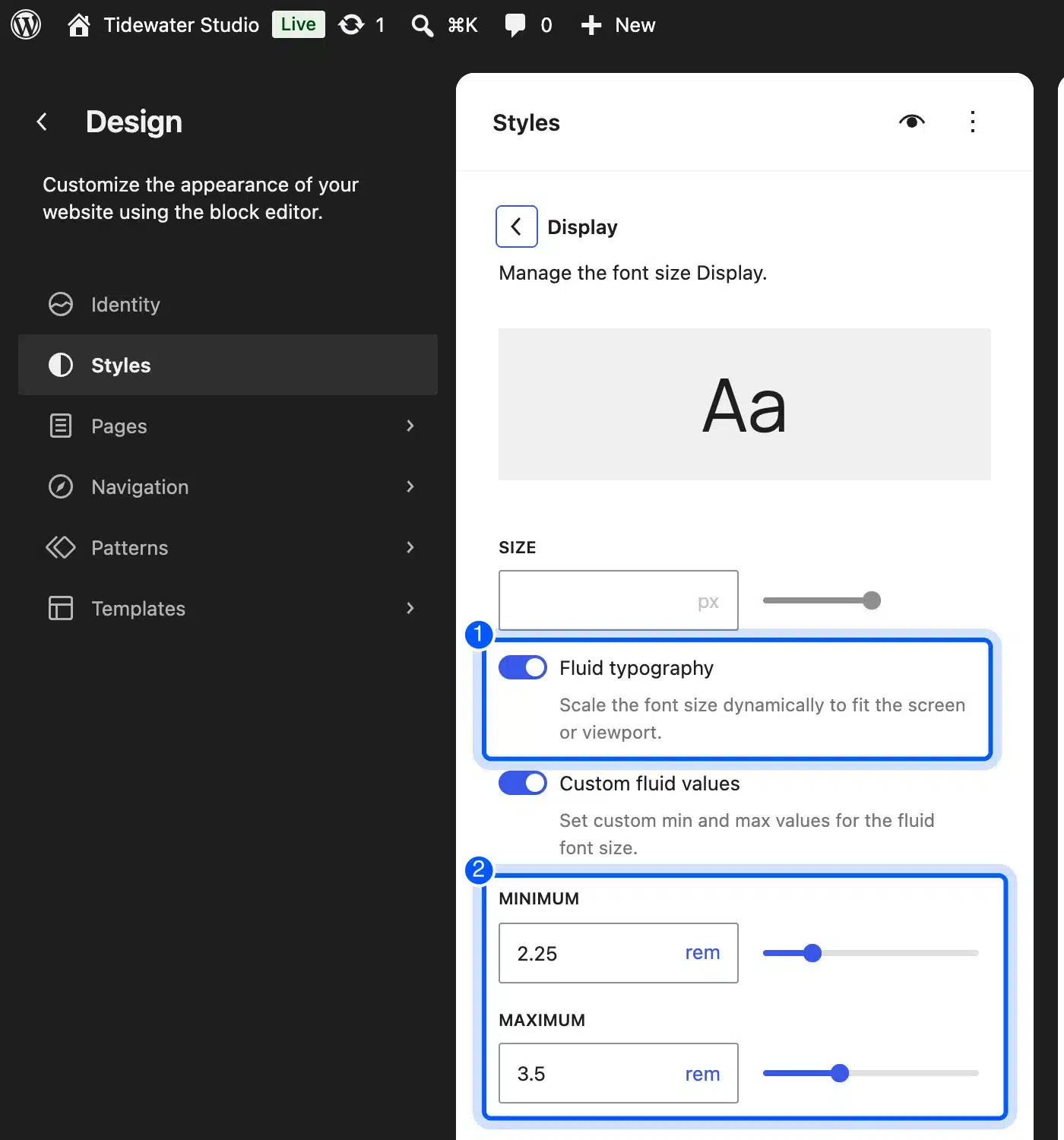
Styles > Typography > Font size presets listed Display, Heading, Subhead, Body and Small by their Sketch names. Opening Display showed the fluid range we set, from 2.25 rem to 3.5 rem.
Step 4: Turn Sketch Symbols Into Block Patterns
Each Sketch Symbol or repeated section becomes a pattern file. The block patterns handbook page says WordPress will “automatically register it for you, provided that it has a valid pattern file header”. So no PHP registration code is needed.
We built three files in the patterns folder: hero.php, features.php and cta.php. This is the hero, with every string escaped and ready for translation:
<?php
/**
 * Title: Tidewater Hero
 * Slug: tidewater/hero
 * Categories: banner
 * Description: Hero section from the Sketch "Home / Hero" frame.
 */
?>
<!-- wp:group {"align":"full","backgroundColor":"accent-5","style":{"spacing":{"padding":{"top":"var:preset|spacing|60","bottom":"var:preset|spacing|60"}}},"layout":{"type":"constrained","contentSize":"760px"}} -->
<div class="wp-block-group alignfull has-accent-5-background-color has-background" style="padding-top:var(--wp--preset--spacing--60);padding-bottom:var(--wp--preset--spacing--60)">
	<!-- wp:paragraph {"textColor":"accent-1","fontSize":"small","style":{"typography":{"fontWeight":"600"}}} -->
	<p class="has-accent-1-color has-text-color has-small-font-size" style="font-weight:600"><?php esc_html_e( 'Design studio for small brands', 'tidewater' ); ?></p>
	<!-- /wp:paragraph -->

	<!-- wp:heading {"level":1} -->
	<h1 class="wp-block-heading"><?php esc_html_e( 'Websites that look like the design file', 'tidewater' ); ?></h1>
	<!-- /wp:heading -->

	<!-- wp:paragraph {"textColor":"accent-4","fontSize":"large","style":{"typography":{"fontWeight":"400"}}} -->
	<p class="has-accent-4-color has-text-color has-large-font-size" style="font-weight:400"><?php esc_html_e( 'We turn approved mockups into fast WordPress block themes your team can edit.', 'tidewater' ); ?></p>
	<!-- /wp:paragraph -->

	<!-- wp:buttons {"style":{"spacing":{"margin":{"top":"var:preset|spacing|40"}}}} -->
	<div class="wp-block-buttons" style="margin-top:var(--wp--preset--spacing--40)">
		<!-- wp:button -->
		<div class="wp-block-button"><a class="wp-block-button__link wp-element-button" href="#contact"><?php esc_html_e( 'Book a call', 'tidewater' ); ?></a></div>
		<!-- /wp:button -->
	</div>
	<!-- /wp:buttons -->
</div>
<!-- /wp:group -->
Notice that the markup names presets, never hex values. The hero uses accent-5 for its background and spacing 60 for its padding. Change a color in theme.json and every pattern follows.
The feature grid loads its three icons from an assets/icons folder through get_theme_file_uri(). Those are the SVG files you exported from Sketch in the previous section, and each one weighed under 1 KB in our build.
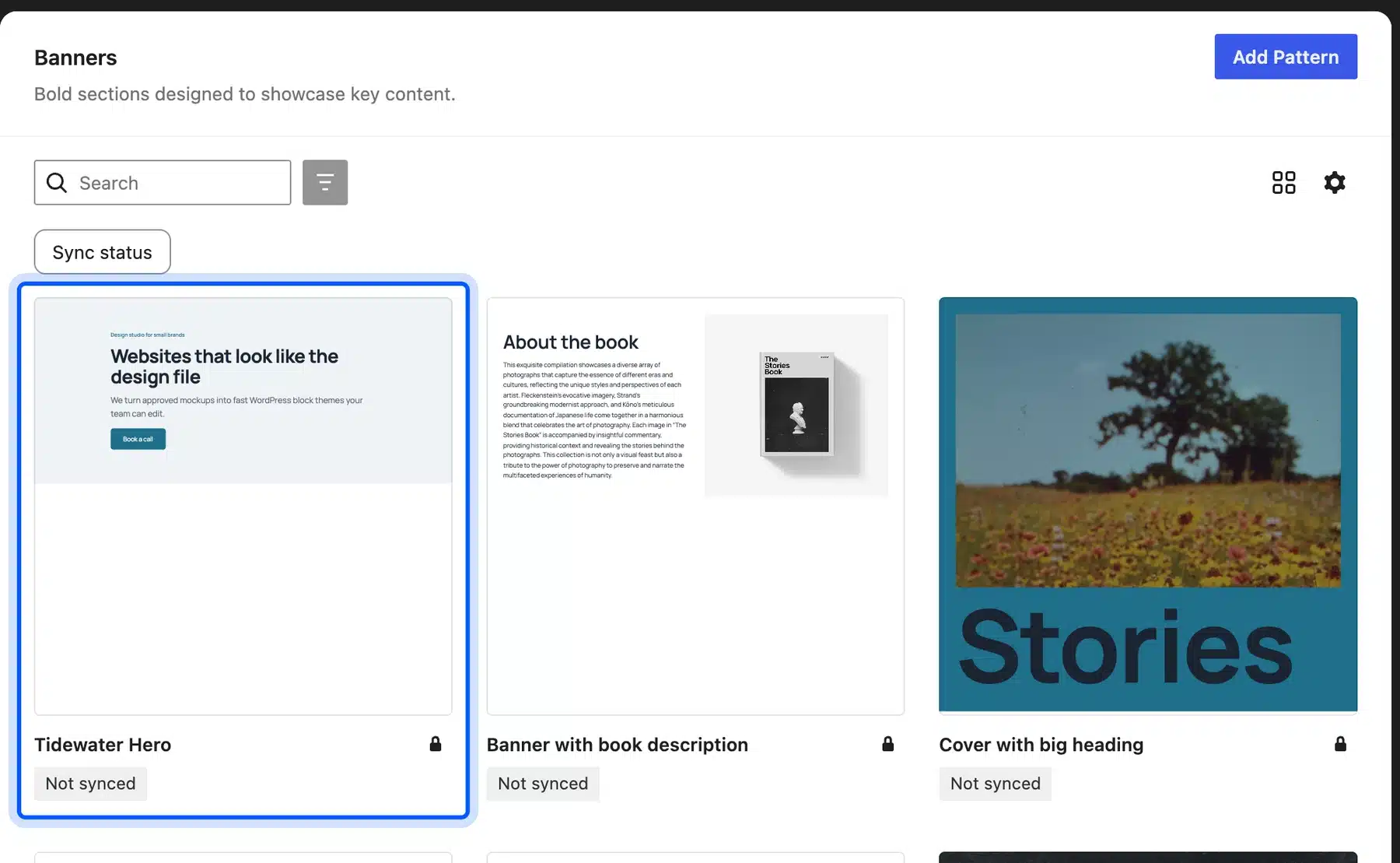
The Site Editor listed the hero under Patterns > Banners, marked “Not synced”. That label means each page gets its own copy. Editors can change its text without touching other pages.
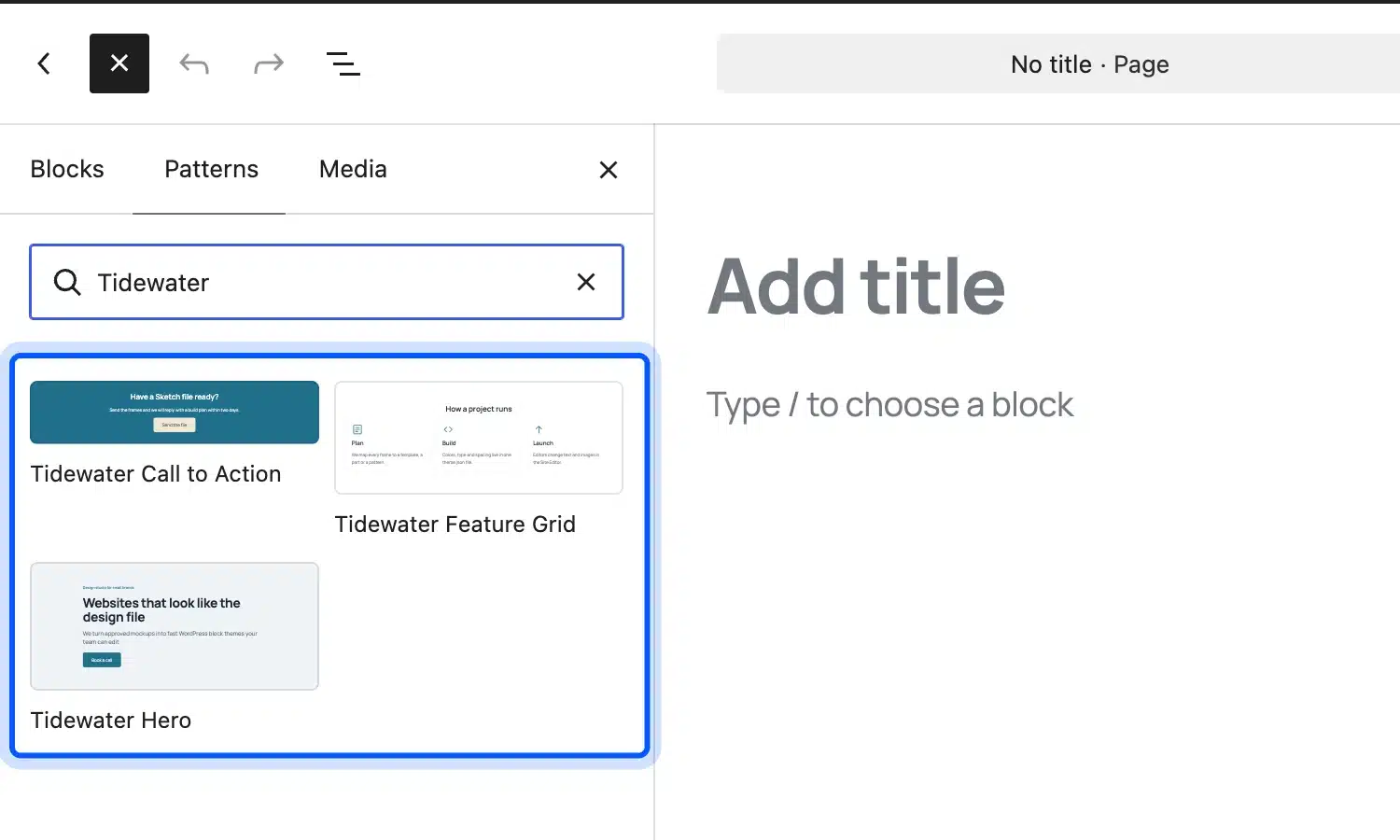
In the WordPress block editor, a search for “Tidewater” in the Patterns tab showed all three patterns with live previews.
Step 5: Build the Page and Check It at Two Widths
We made a page called Home with the three patterns, set it as the front page, and used Twenty Twenty-Five’s Page No Title template. That template keeps the hero heading as the only H1 on the page.
The result matched the spec at a 900 pixel window. The fluid Display size rendered the H1 at about 47 pixels, between its 36 and 56 pixel limits.
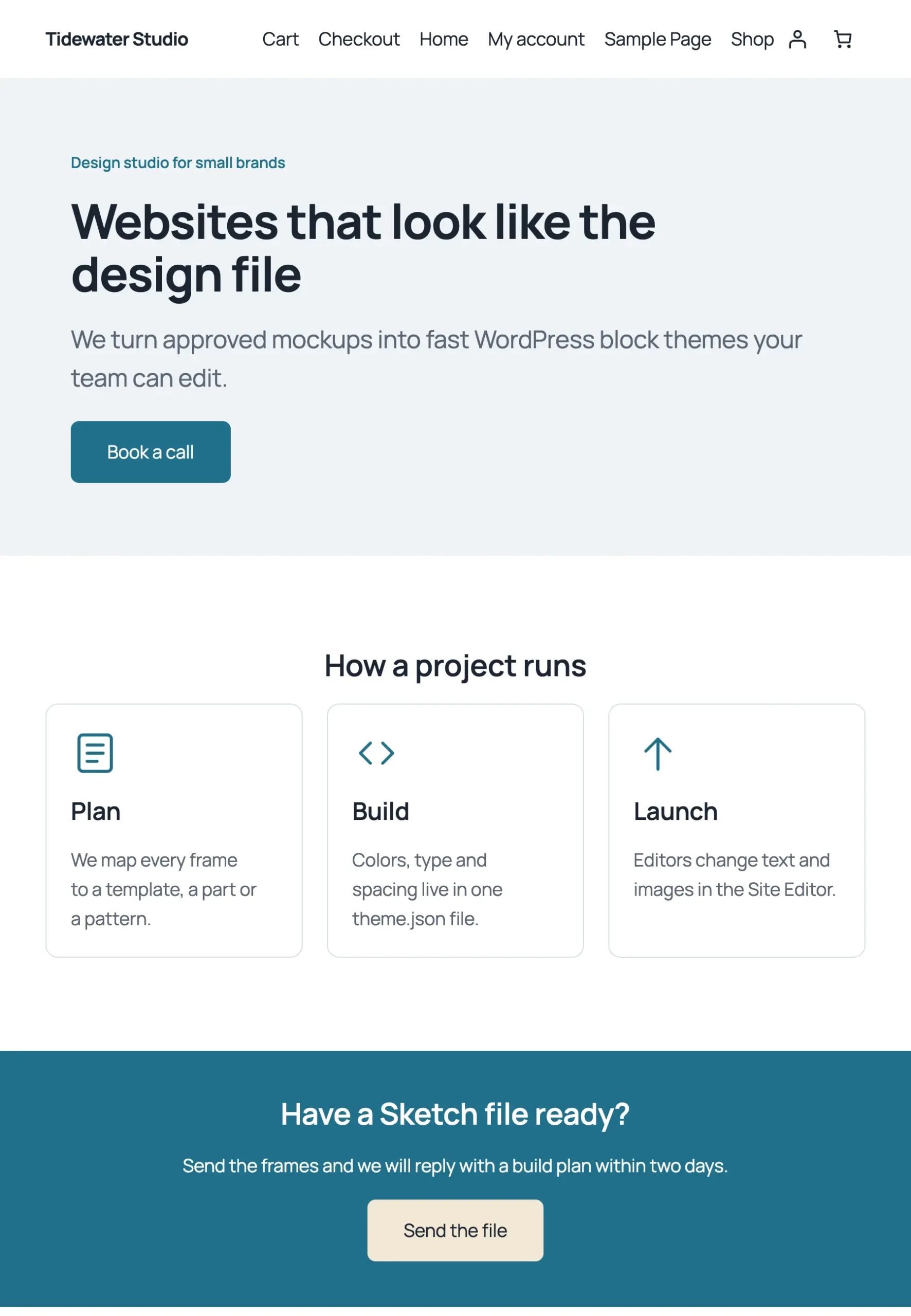
At 390 pixels wide, the three columns stacked into one and the H1 dropped to about 37 pixels. The page had no horizontal scroll, and we wrote no media queries for any of it.
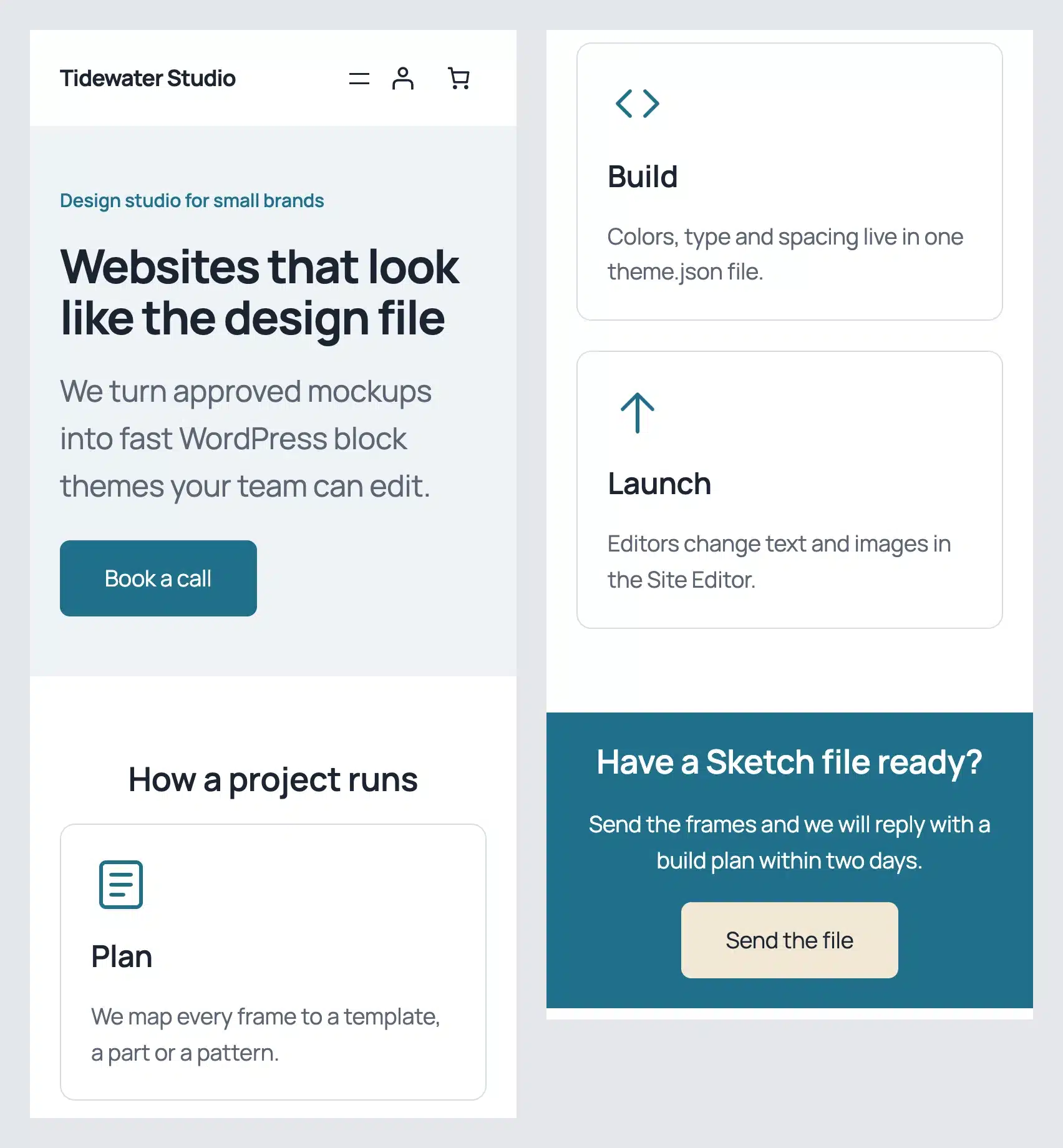
Compare each frame to its Sketch artboard at the widths the designer drew. Sketch designs use fixed widths. The space between two artboards is where layouts break first.
Step 6: Save the Theme and Put It in Version Control
Changes made in the Site Editor live in the database until you write them back to files. The free Create Block Theme plugin does that through its Save Changes panel. It can save styles, templates and patterns into the theme folder.
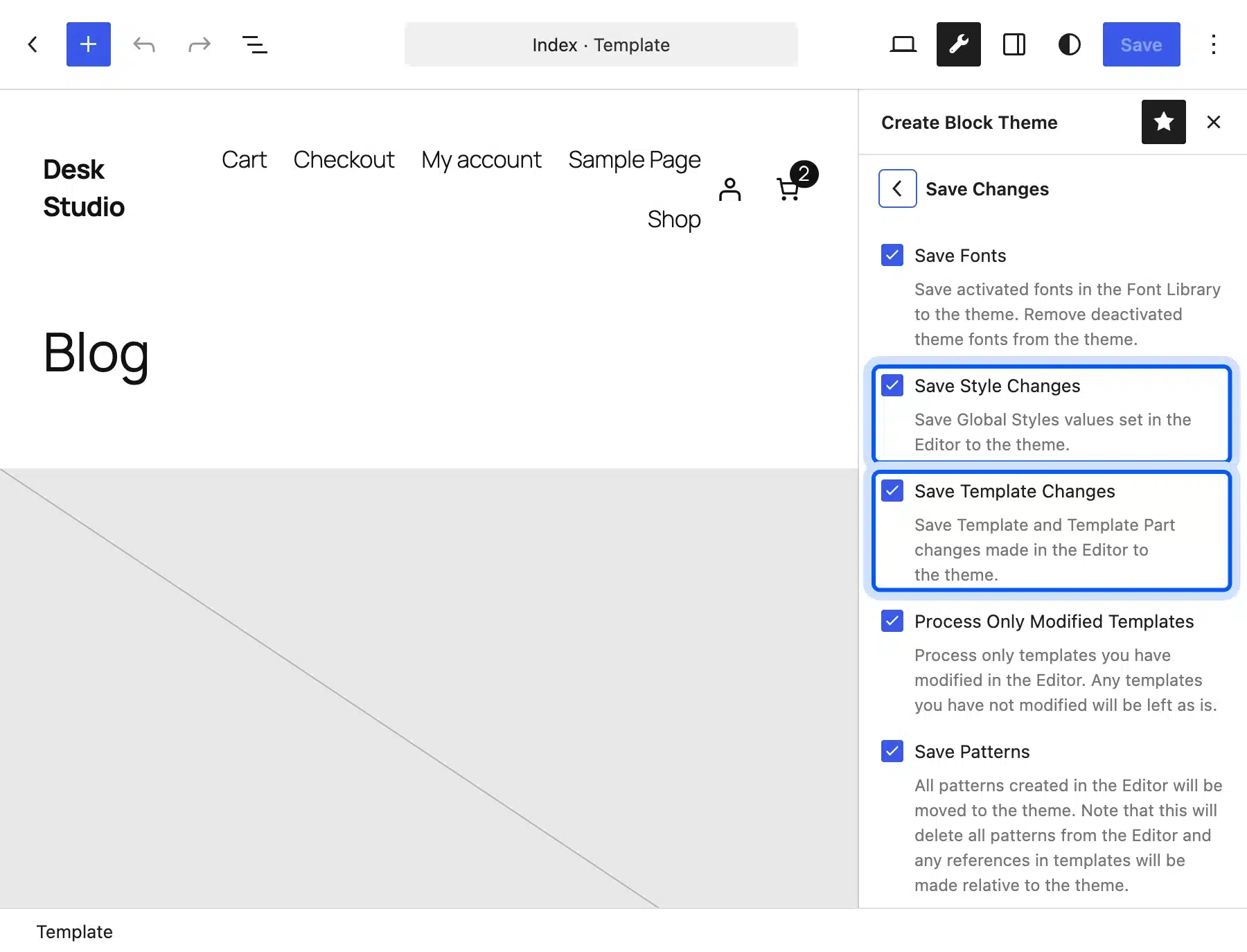
Commit the theme folder after each save so the files stay the source of truth. Our Git workflow for WordPress shows how to deploy those commits.
Two Child Theme Traps We Hit on WordPress 7.1.3
Two silent problems appeared in our build, and neither shows an error message. A child theme palette replaces the parent’s palette entirely, and new pattern files can stay hidden behind a cache. Both took a few minutes to find, and here is what we saw and how we fixed each one.
The first version of our theme.json used Sketch’s names as slugs, such as ink and paper. Twenty Twenty-Five’s styles still pointed at base, contrast, three accent slugs and the xx-large font size.
We counted 6 preset variables used in the site’s CSS with no definition. The body colors fell back to browser defaults.
Mapping each Sketch color to a parent slug brought that count to 0. That is why the slug map in Step 3 exists. Keep the parent’s slugs and change only the names and hex values.
The second trap hit when we added the pattern files. WordPress listed none of them at first. The core code caches the theme’s pattern list in a transient and reuses it while the theme’s Version header stays the same.
Note: Bump the Version in style.css after adding a pattern file, or set WP_DEVELOPMENT_MODE to theme on a local site. The wp_is_development_mode() reference explains that setting.
Where Sketch’s MCP Server and AI Tools Fit
Sketch’s MCP Server lets an AI coding tool read and change a Sketch document from your Mac. It helps with exporting assets and checking a design system for gaps, but it does not write a WordPress theme by itself. Treat its output as a first draft that a developer reviews.
Sketch’s MCP Server docs, updated 26 October 2026, describe it as a local-only web server inside the Mac app. It “requires Sketch 2025.2.4 or later” and is not in the Mac App Store version.
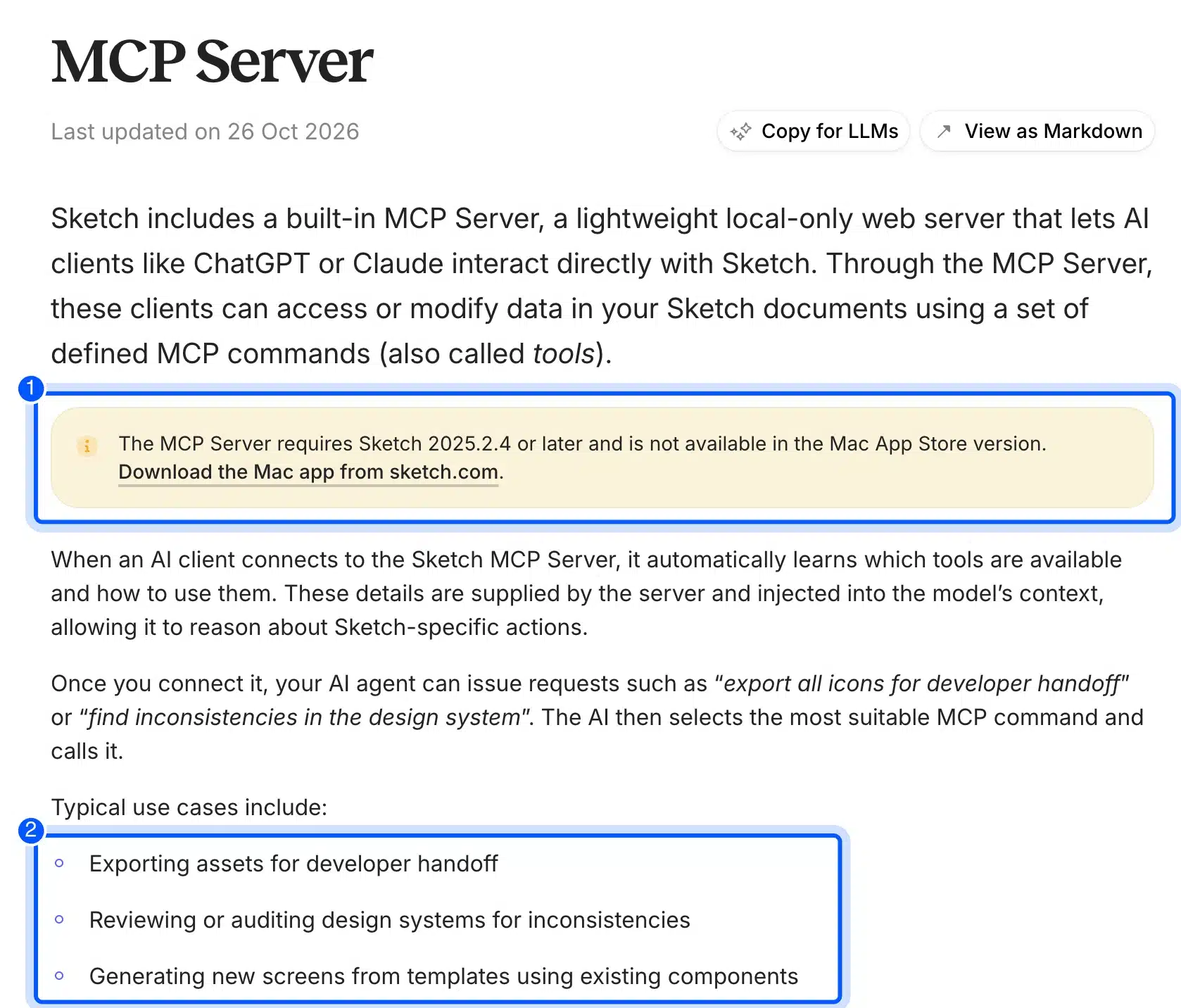
The listed use cases are exporting assets for handoff, auditing a design system and generating new screens from components. For a WordPress build, the first two help most. An agent can export every icon as SVG or list Color Variables that no layer uses, before the developer writes theme.json.
We did not run it here, because it needs the paid Sketch Mac app on a Mac. Treat this section as advice drawn from the docs. Any code an AI tool writes from a Sketch file still needs the slug, escaping and pattern header checks from the steps above.
WooCommerce Pages in a Sketch Design
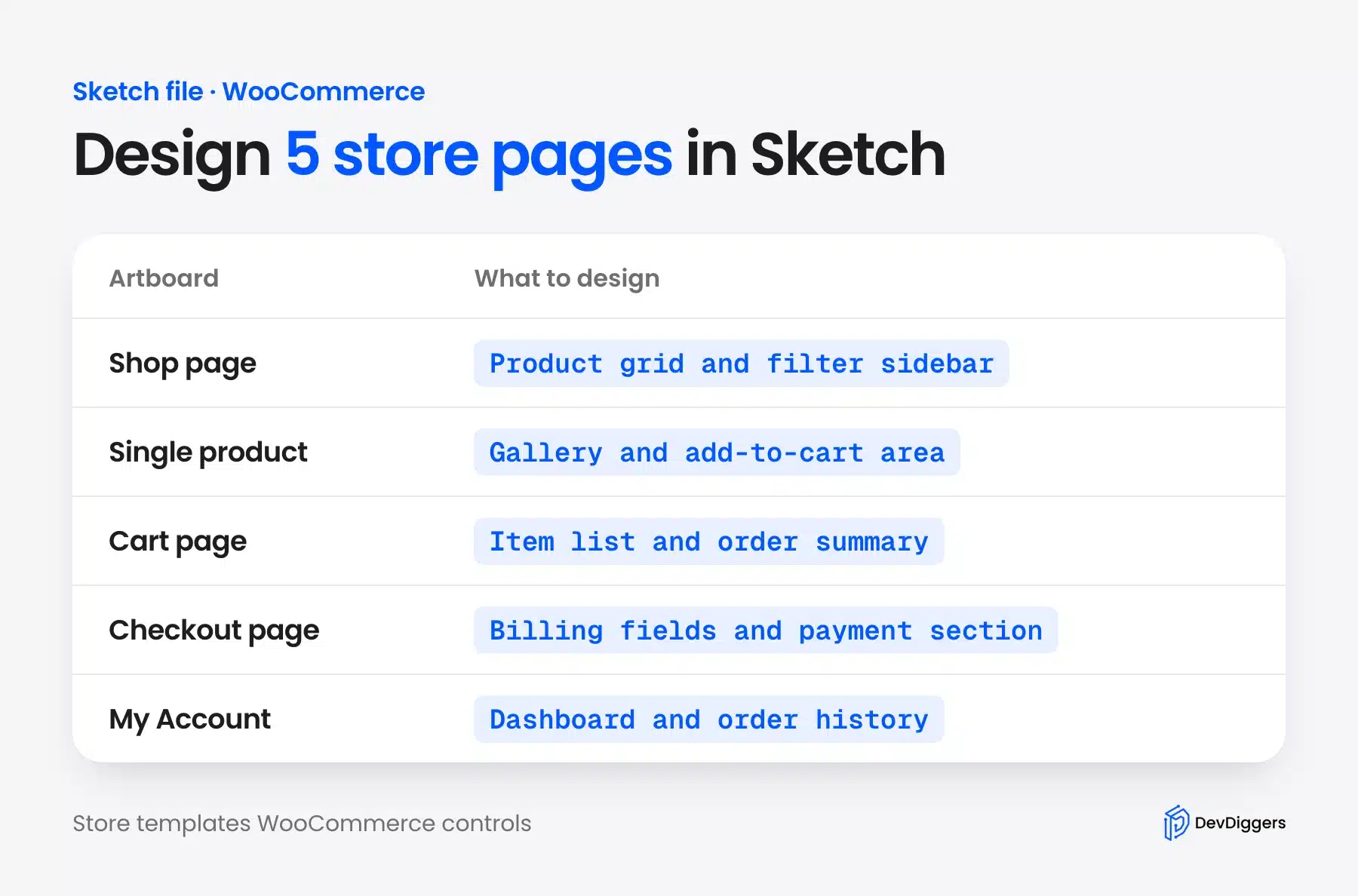
A WooCommerce store needs five more frames in the Sketch file: shop, single product, cart, checkout and My Account. In a block theme, each one is a template you edit in the Site Editor. Plan them in Sketch first, or the store pages keep WooCommerce’s default look next to a custom homepage.
WooCommerce adds templates such as Single Product to the Site Editor’s Templates list. You rebuild the frame there with WooCommerce blocks and the same presets from theme.json. Prices and buttons then pick up the Sketch colors.
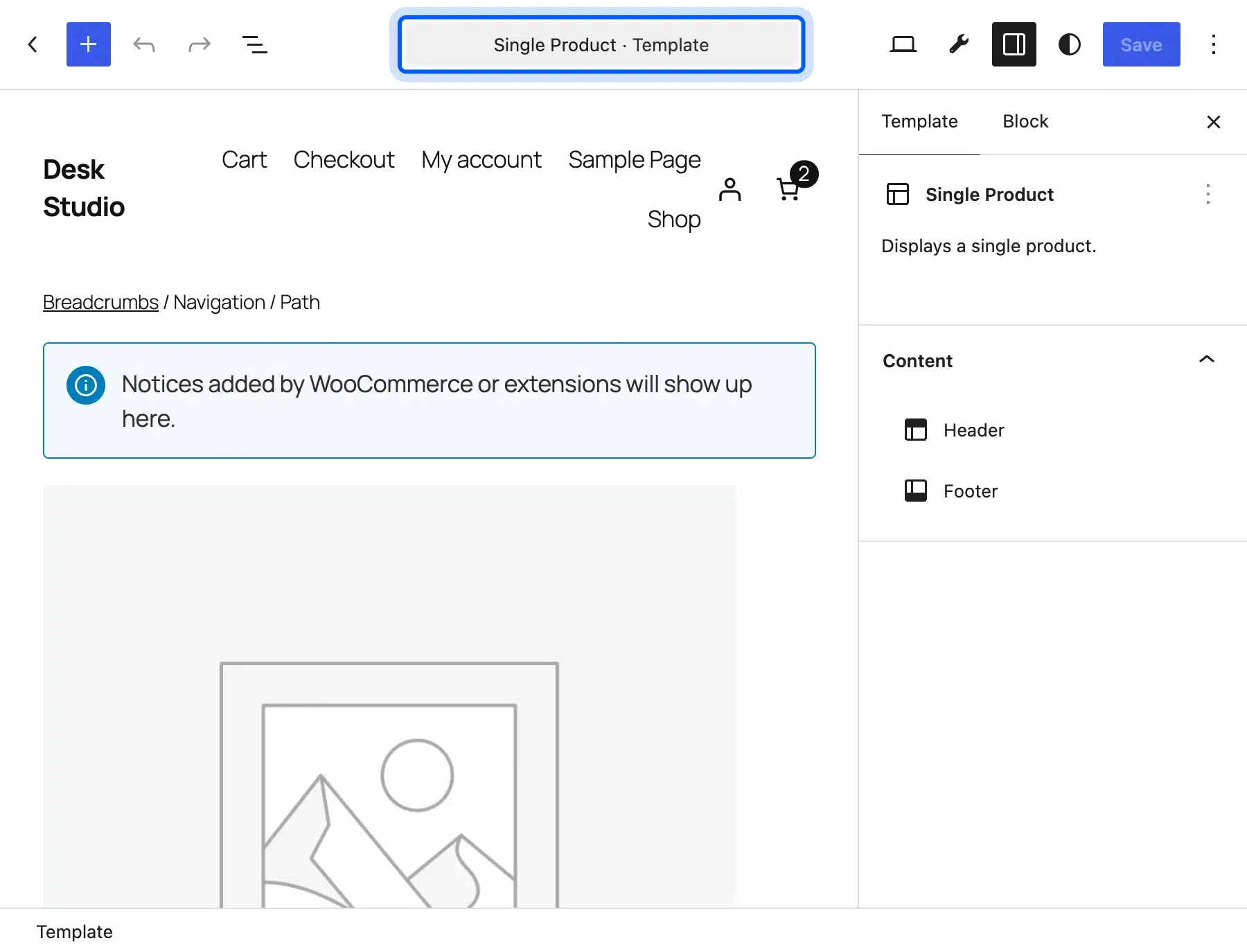
The product page is where most Sketch layouts differ from the default. Our guide on how to customize the WooCommerce product page covers the block and code options for that template.
What a Sketch to WordPress Conversion Costs
A Sketch to WordPress conversion costs software plus hours. Software is the small part: WordPress is free, and a Sketch editor seat costs $12 a month billed yearly. Hours decide the total, and the number of templates and patterns drives them more than the tool choice.
Sketch’s pricing page lists the Standard plan at $12 per editor a month, billed yearly. It also sells a Mac-only license at $120 per seat with one year of updates. Viewers and developers inspecting a Workspace document do not need a paid seat.
For hiring, the US Bureau of Labor Statistics puts the median pay for web developers at $47.85 an hour in 2025. That is an employee wage. Freelance and agency rates are set by each provider and include their overheads.
Here is a worked example with round numbers. Say a five-page Sketch design needs 40 hours of Sketch to WordPress development. At the BLS median wage, 40 times $47.85 comes to $1,914 in labor before any markup.
The same example at 80 hours, for a design with a store, comes to $3,828. Quotes outside that band are common in both directions. Ask each provider for hours per template and a list of patterns.
Doing it yourself costs time instead of money. The theme.json and pattern steps above take real practice. Our WordPress development services team builds Sketch files into block themes and hands back the files.
Conclusion
Sketch to WordPress in 2026 is a rebuild into a block theme, because nothing imports the file. Export tokens and assets from Sketch first. Map Color Variables and Text Styles into theme.json with the parent theme’s slugs.
Turn each Symbol into a pattern file with escaped strings, and check every frame at the widths the designer drew. Bump the theme version after adding patterns, and save Site Editor changes back to files before you commit.
Code tools and Sketch’s MCP Server can speed up exports, but a person still owns the templates. Plan the WooCommerce frames early if you sell anything.
Frequently Asked Questions (FAQs)
Q1. Can I import a Sketch file directly into WordPress?
WordPress cannot open a .sketch file. The design is rebuilt as a theme by hand, in a page builder or with a code tool. Figma can import .sketch files if you want to use a Figma-based code tool first.
Q2. Do I need a Mac to convert a Sketch design to WordPress?
Only the designer needs a Mac for the Sketch editor. Sketch’s developer handoff docs say developers can inspect designs and export assets in any web browser for free. The WordPress developer can work on Windows or Linux.
Q3. Is Figma or Sketch better for a WordPress project?
Both export the same things a theme needs: colors, text styles, spacing and assets. Figma is used far more, with a 46:1 lead over Sketch in the UX Tools 2024 survey. Sketch’s JSON token export and free browser handoff cover a block theme build well.
Q4. Can I use Elementor instead of a block theme?
Yes, and it suits teams with no developer. You rebuild each Sketch frame in Elementor and set its global colors and fonts from your tokens. The trade-off is that the layout depends on the builder plugin staying installed and updated.
Q5. Should I build a child theme or a standalone block theme?
A child theme is faster when a parent such as Twenty Twenty-Five already matches your layout, since you override only theme.json and patterns. Build a standalone theme when the design differs in most templates, and you avoid the palette slug trap entirely.
Q6. How do I add the fonts from my Sketch file to WordPress?
Register them in theme.json under settings.typography.fontFamilies, with font files stored in the theme. The WordPress typography handbook page covers web fonts with fontFace entries. Our test used Manrope, which ships with Twenty Twenty-Five and needed no extra font files.
Q7. How long does a Sketch to WordPress conversion take?
It depends on the number of templates and patterns. Our planning example puts a five-page block theme at 30 to 60 hours for a developer, and a store adds more. A three-section landing page like our test fits in a single working session.