WordPress affiliate marketing means earning a commission when readers buy a product you recommend on your own site. You can set up this affiliate marketing WordPress workflow in an afternoon. It needs a free WordPress install, one link plugin and a handful of honest reviews.
I tested every setup step in October 2026 on a WordPress 7.1.3 test site, using Pretty Links 4.0.16 for the link work. I read the Amazon Associates policies, the FTC endorsement guidance and Google’s link documentation the same month. Each rule below links to its source.
You get seven steps in order, the disclosure wording that regulators and Google expect, a simple funnel, and the mistakes that cost beginners their accounts. A short section at the end covers recruiting affiliates of your own.
What Is WordPress Affiliate Marketing?
WordPress affiliate marketing is the practice of recommending another company’s product on a WordPress site and earning a commission on each sale. A tracking link records the click. The company pays you only if the reader buys within the program’s time window.
You never ship, stock or support anything. That makes it a low-cost way to turn a blog into income, but it also means you earn only when your content earns trust.
The model has three parts: a merchant with an affiliate program, your site with its content, and a reader who clicks. Every step below strengthens one of those links.
The merchant sets the commission structure, which is the rate and the rules for earning it. The program also fixes the cookie window, the time during which a click can still earn you a sale.
Your part is the content. A review that helps a reader choose turns a click into a purchase. It also keeps your account in good standing.
How to Start WordPress Affiliate Marketing in 7 Steps
You can start WordPress affiliate marketing in seven steps. Pick a niche, set up the site, choose a theme, join programs, add a link manager, write reviews and track clicks. Each step below shows the screen where you do the work and what I saw on the test site.
Step 1: Pick a Niche That Buyers Search For
A good niche has readers who already search for products to compare, programs that pay on every sale, and a topic you can test yourself. Start with a niche where people type “best” or “vs” before they buy.
Score each idea on five checks before you spend money on a domain. The table below is the checklist I use, and it takes about ten minutes per idea.
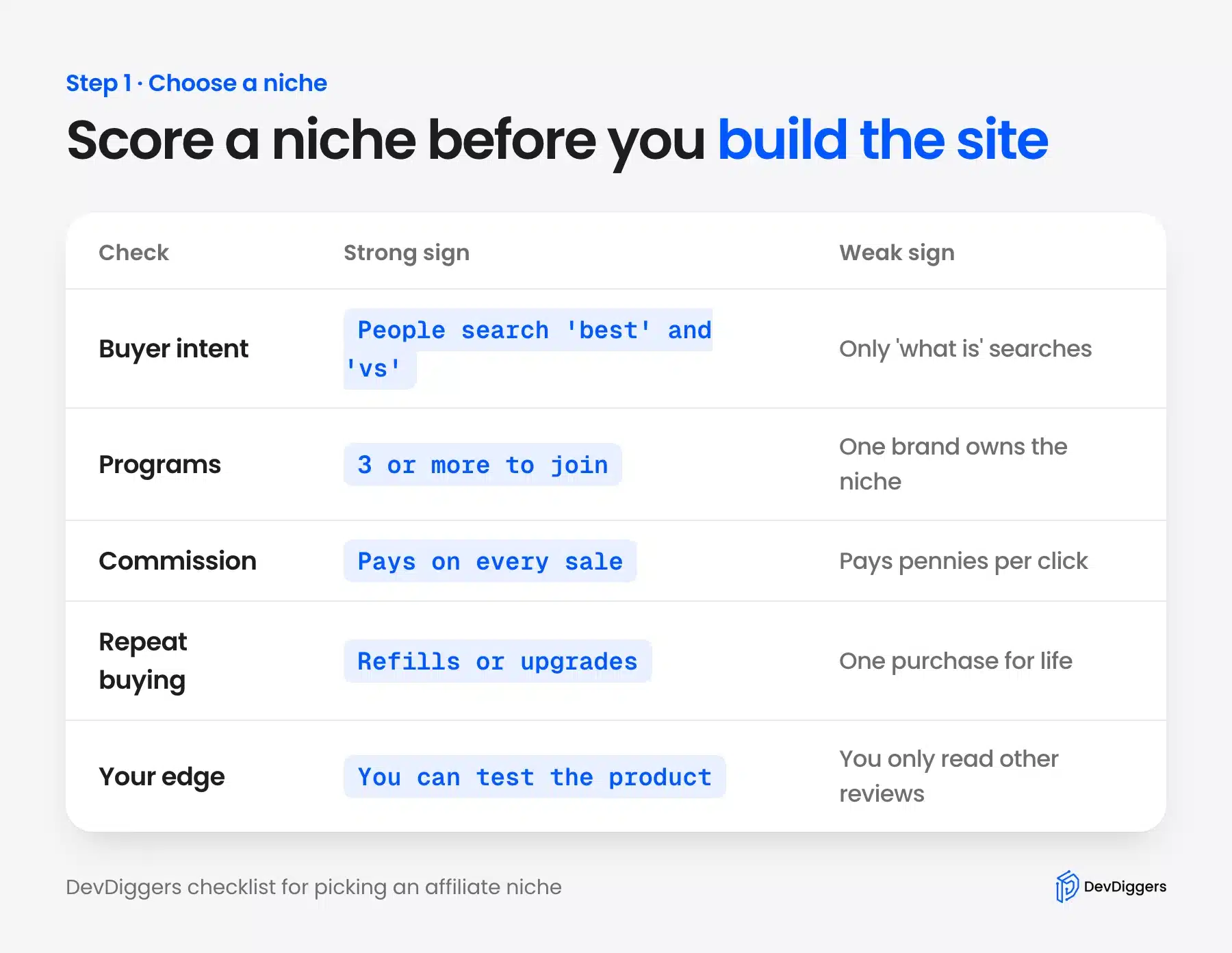
Two checks decide most cases. If you cannot find three programs to join, you will depend on one company’s rules. If you cannot test the products, your reviews will match every other site’s.
This post uses a made-up coffee gear blog called Brew Notes as its example. Every number on the example pages is sample data, and the screens come from our test site.
Step 2: Set Up a WordPress Site for Affiliate Content
Set up the site on a self-hosted WordPress install so you control the links, the pages and the data. Buy a domain, choose hosting, install WordPress, and switch permalinks to the post name structure before you publish anything.
The permalink change matters early because it shapes every URL you publish. Go to Settings, then Permalinks, pick Post name and save. Changing it after Google has indexed pages forces redirects.
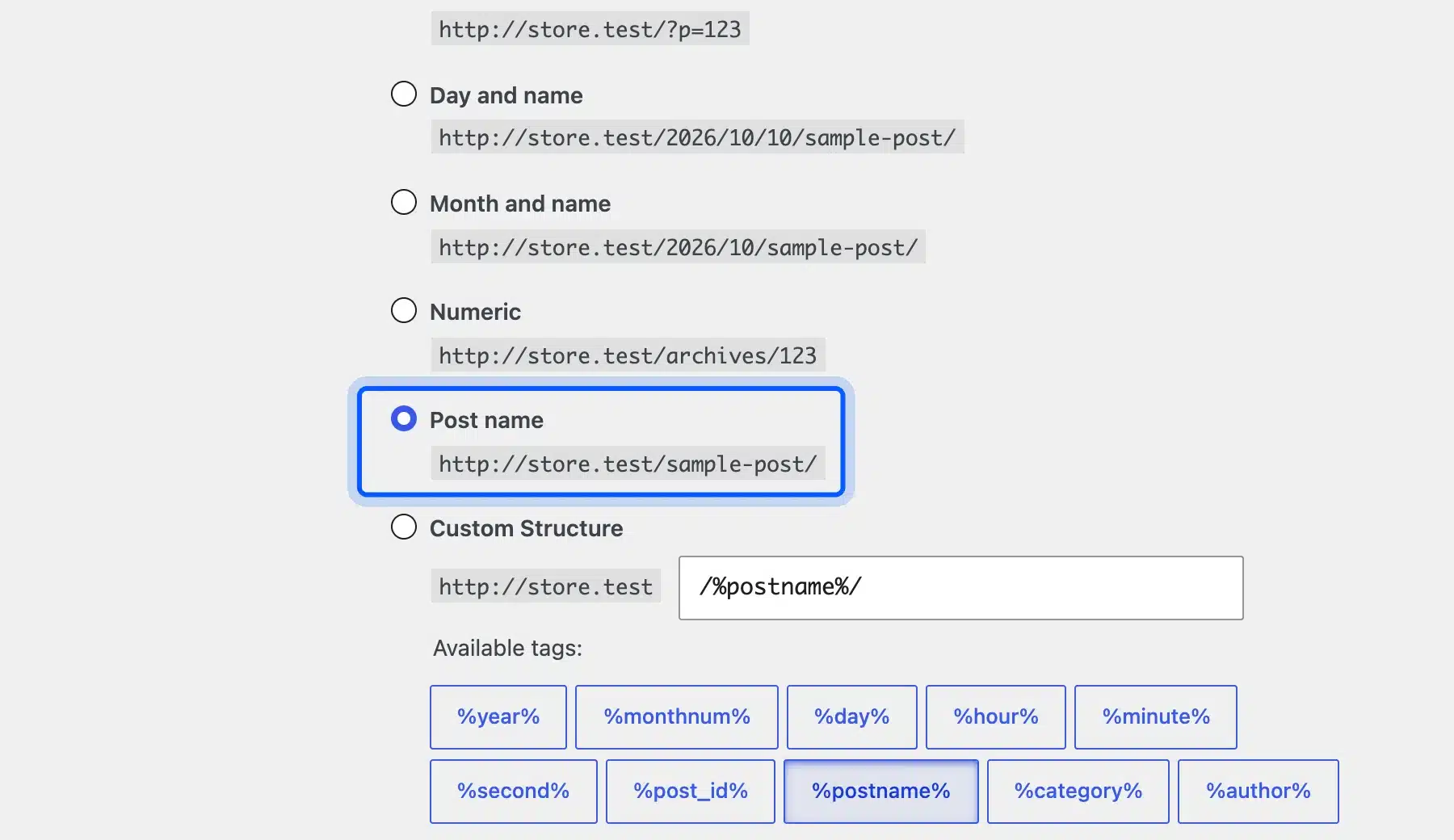
Our guide to creating a WordPress site from scratch covers hosting and the install in detail. The permalink choice has its own walkthrough on setting up pretty permalinks in WordPress.
Tip: Keep the site on WordPress.org software, which you host yourself. A hosted plan can restrict plugins, and the next steps need a link plugin.
Step 3: Choose a Fast Theme for Affiliate Marketing
Choose a theme that loads fast, supports the table and button blocks, and does not lock your content into its own page builder. Any lightweight block theme meets that bar, so you do not need a special affiliate theme.
That answers what WordPress theme to use for affiliate marketing. I built the example review page on Twenty Twenty-Five, the default theme. It handled a table, a call-to-action link and a disclosure with no extra plugin.
You can browse more options under Appearance, then Themes, then Add Theme. The Popular tab lists what other site owners install, and the WordPress theme directory shows the same list with previews.
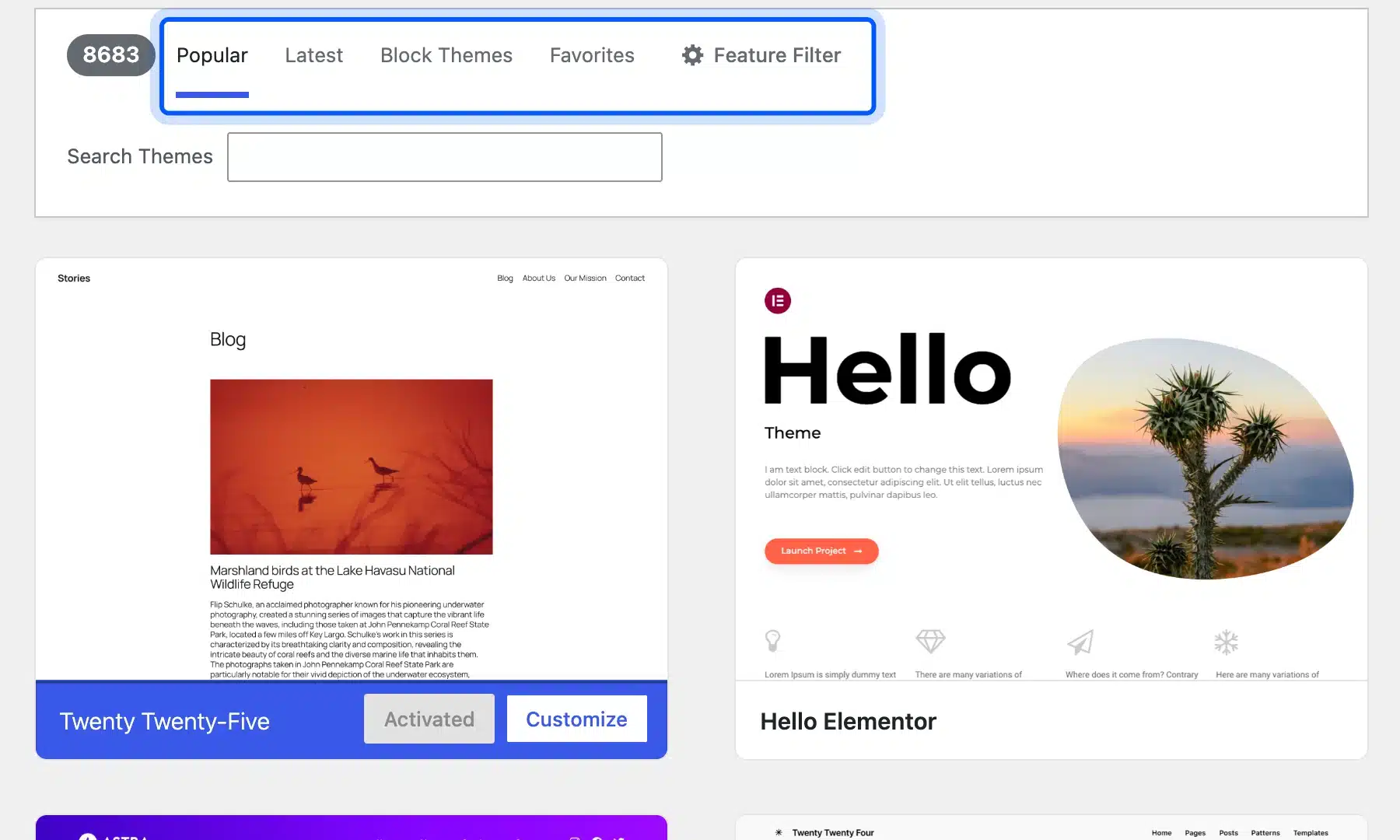
Test a theme on one review page before you commit. Check that the table does not overflow on a phone and that the button link is easy to tap.
Step 4: Join Affiliate Programs and Compare Commission Structure
Join two or three programs before you write, because the commission structure shapes which products are worth reviewing. Compare the rate, the cookie window, the payout rules and the allowed promotion methods.
Amazon Associates is the common starting point. Its standard commission table pays 4.50% on Kitchen products and 3.00% on Home and Outdoors in October 2026.
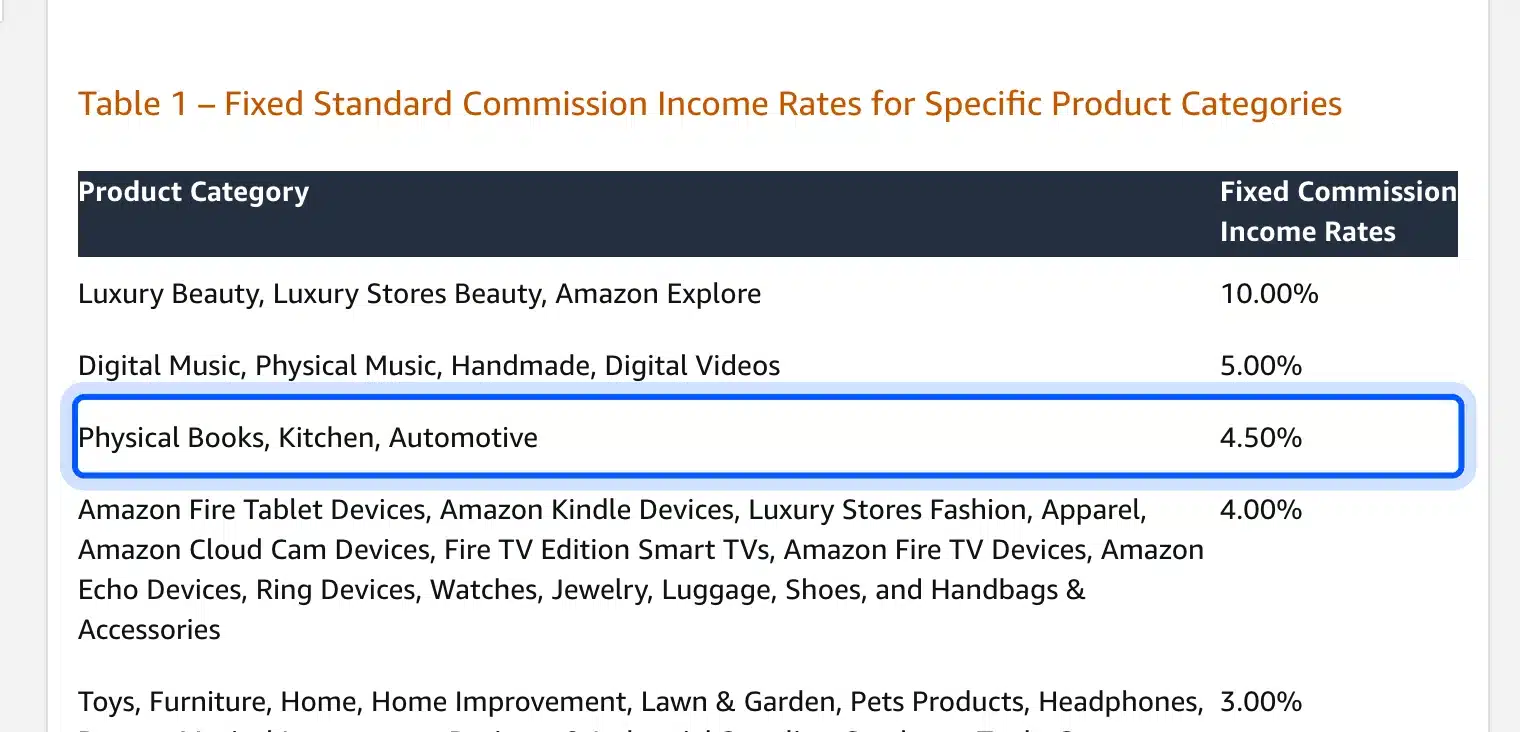
Say a grinder sells for $100 in the Kitchen category. A 4.50% rate pays $4.50 per sale, so 100 sales earn $450. Treat that as an example and never as a forecast.
The cookie window matters as much as the rate. Amazon’s program policies end a session when “24 hours elapse from that click”, so a reader who buys two days later earns you nothing. The reader must come back through your link first.
Check these four items in every program before you join:
- Commission structure: Look for a flat rate, a tiered rate or a recurring share, and whether it changes by category.
- Cookie window: A longer window pays you for slower buying decisions.
- Payout rules: Note the minimum balance, the payment method and how often you are paid.
- Promotion rules: Read what the program bans, because a banned method can close your account.
Step 5: Add a Link Manager and Mark Links as Sponsored
Add a link manager so every affiliate link lives in one place and carries the right attributes. I installed Pretty Links 4.0.16, created a link to an example offer, and turned on the sponsored attribute before saving.
The setup takes one screen. Enter a name and the target URL, choose a short slug, and check the Attributes toggles. On our test install, Apply nofollow was on by default and Apply sponsored was off.
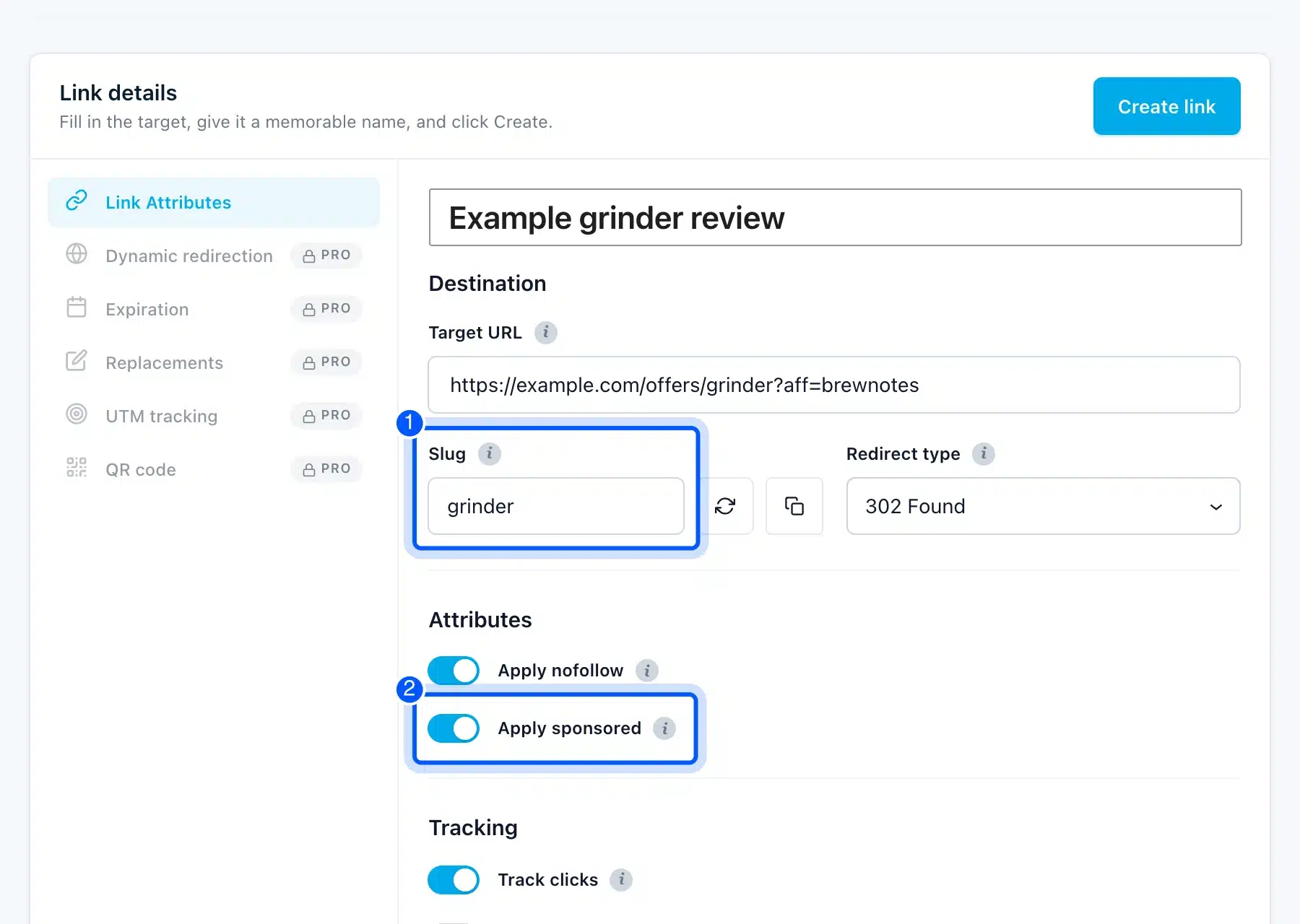
The sponsored value matters because Google tells site owners to mark paid links with it. I cover the exact wording in the disclosure section below. Our post on creating a vanity URL in WordPress shows the same idea without a plugin.
I then requested the short link like a visitor. It answered with a 302 redirect and sent the header X-Robots-Tag: noindex, nofollow, sponsored, which keeps the redirect itself out of search results.
Worth checking: A HEAD request to the same link returned 404 on our install, while a normal GET returned 302. A link checker that uses HEAD may flag a working link as broken.
Warning: Amazon’s policies say “You will not cloak, hide, spoof, or otherwise obscure the URL” of your site. They also ban link shortening services. Confirm what is allowed before routing Amazon links through a redirect.
Step 6: Write Reviews That Earn the Click
Write reviews from your own testing, then place the affiliate link where the reader has decided. Google’s guidance on product reviews asks you to share quantitative measurements and to discuss benefits and drawbacks from original research. It also wants any “best” pick justified with first-hand evidence.
A review page needs only a few parts. Put the disclosure at the top, add a comparison table, name one pick for each use, and end the section with the link. The example page below uses three core blocks and no extra plugin.
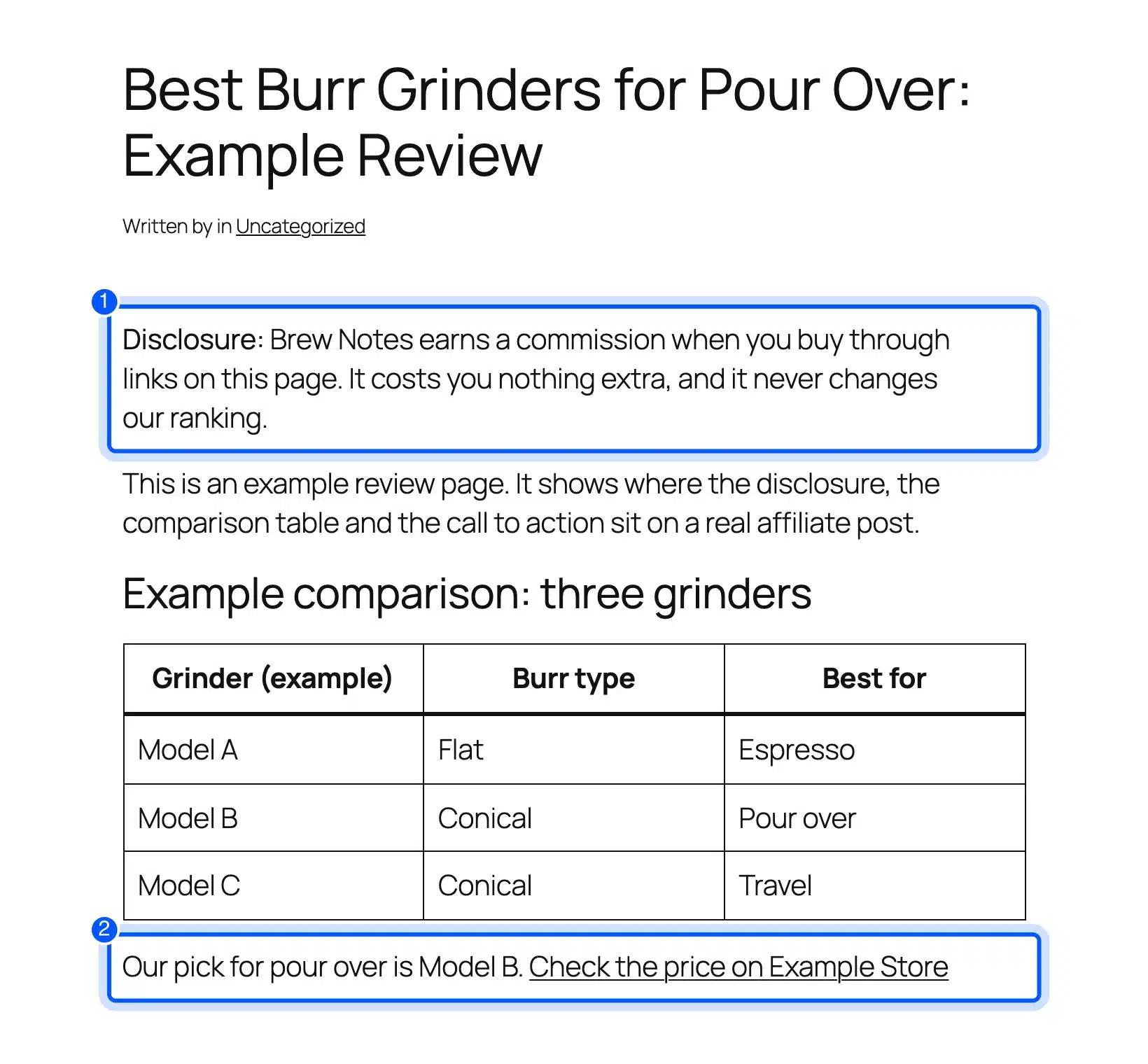
Google also points reviewers to its spam policy on thin affiliate pages. A page that only repeats the merchant’s description gives readers no reason to click your link instead of the merchant’s. Our on-page SEO checklist helps you cover titles, headings and images on each review.
Step 7: Track Clicks and Test Your Pages
Track clicks from day one so you know which pages send readers to the merchant. Pretty Links counts every redirect and shows totals on its dashboard, and you can compare that number with the merchant’s own report.
I sent seven test visits to the example link. The dashboard then showed 7 total clicks, 7 unique visitors and one link, which matched the seven requests exactly.
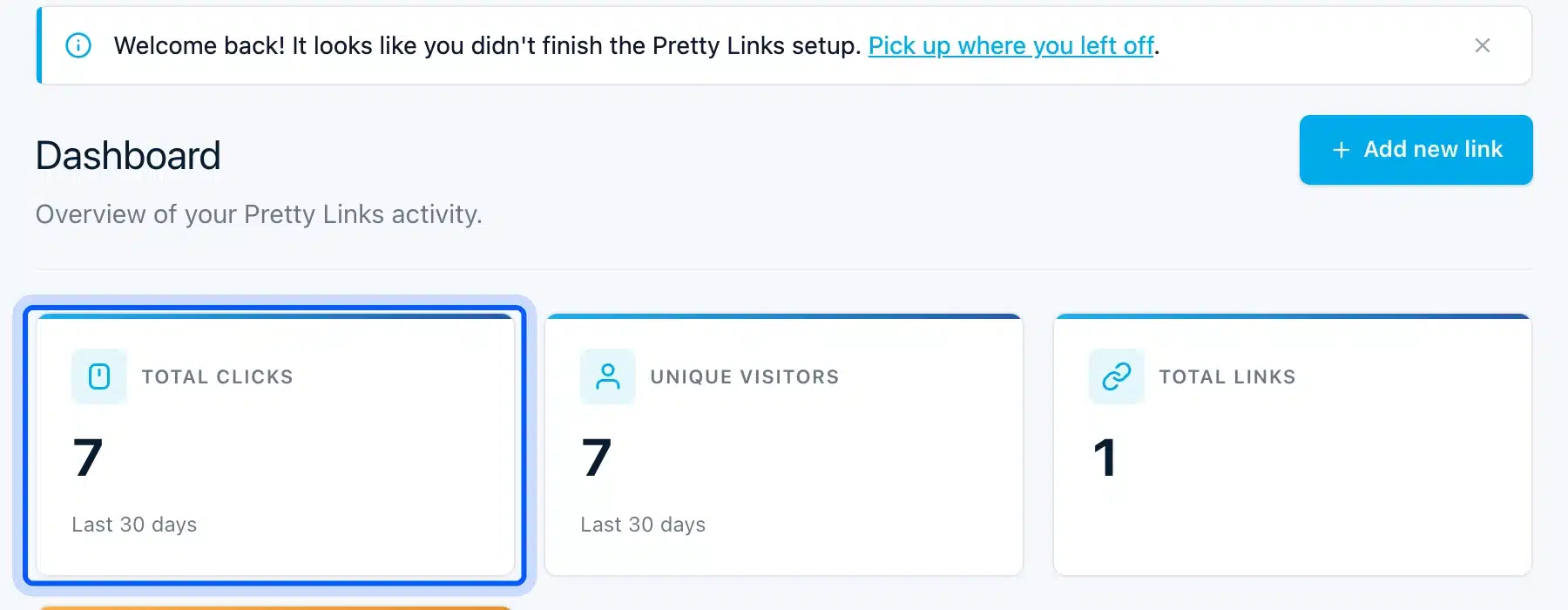
Use the numbers to decide what to change. A page with many clicks and no sales needs a better offer or a clearer comparison. A page with few clicks needs a stronger call to action or a better position for the link.
How to Disclose Affiliate Links on WordPress
Disclose affiliate links with a short, plain statement placed next to the recommendation, and mark the links themselves as sponsored. The FTC wants the disclosure clear and close to the endorsement. Google wants paid links flagged in the code of the page.
The FTC’s endorsement guidance says you should disclose your relationship to the retailer in a clear and conspicuous way on your site. It adds that the closer the disclosure sits to your recommendation, the better.
The same page says “Paid link” right next to an affiliate link should be an adequate disclosure. It also warns that “Commissionable link” is probably not a clear disclosure, so avoid jargon.
Some programs add their own wording. Amazon’s Operating Agreement requires you to state “As an Amazon Associate I earn from qualifying purchases.” on your site.
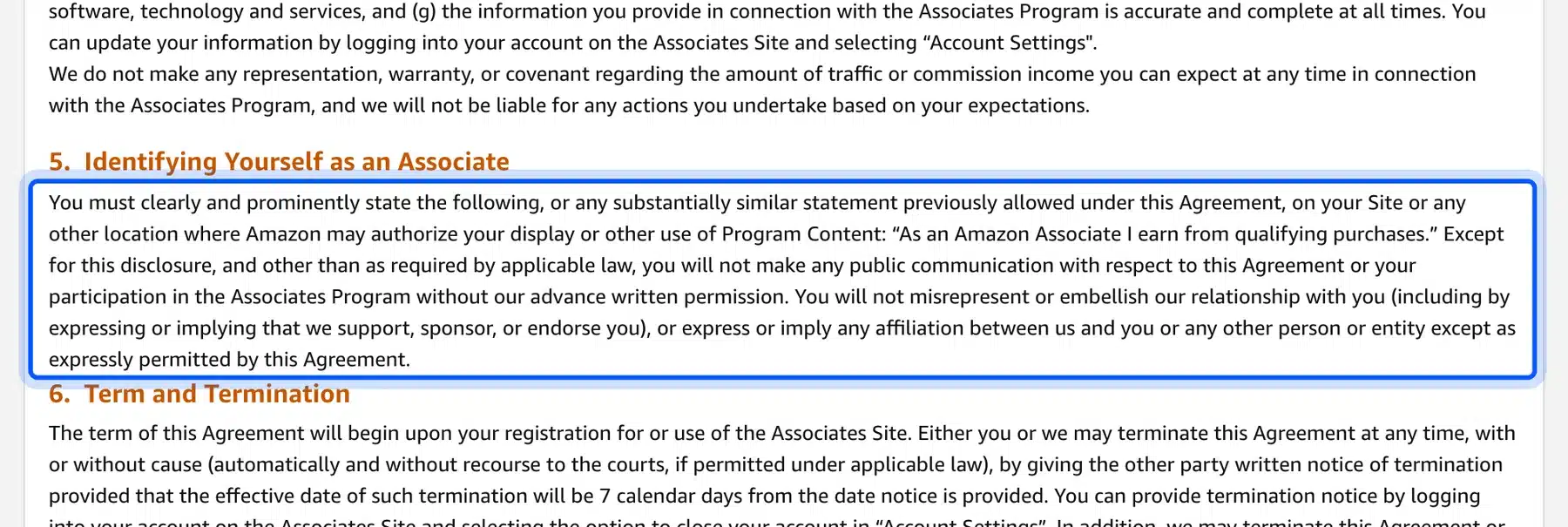
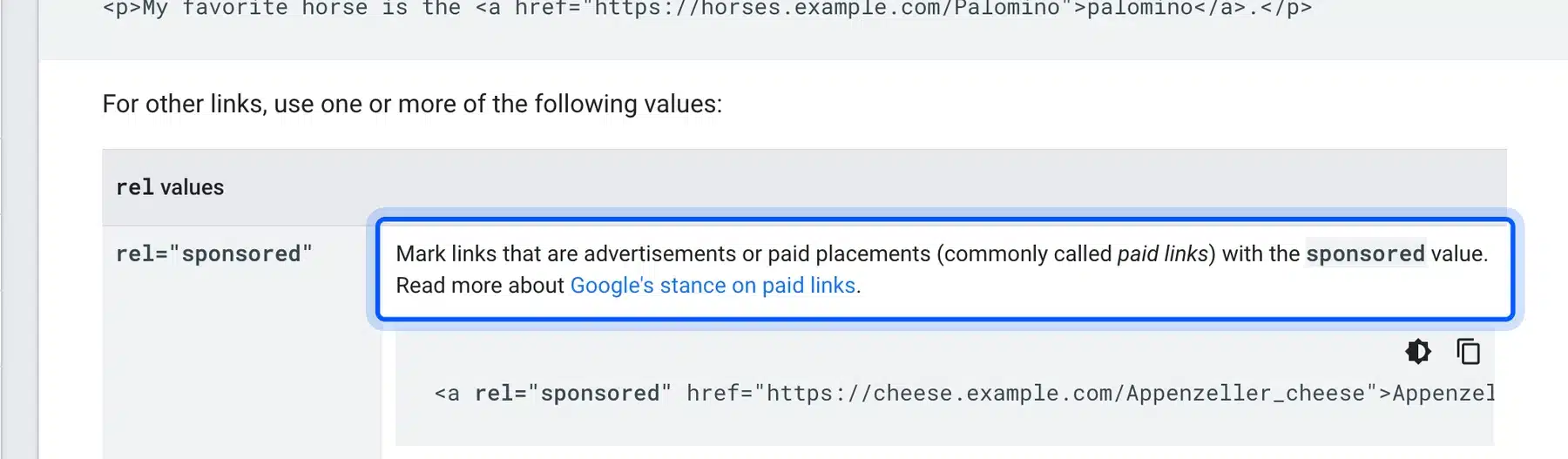
Google asks for a code-level signal too. Its outbound link documentation says to mark links that are advertisements or paid placements with the sponsored value.
Place the statement where the reader sees it before the first link. Three spots cover most pages:
- Top of the post: One sentence above the first recommendation, written in plain words.
- Next to the button: A short label such as “Paid link” beside each call to action.
- In emails: The same statement above any message that carries a program link.
The same page notes that nofollow is still acceptable, though sponsored is preferred. A link manager that sets both, as Pretty Links does when you switch the toggle on, covers either reading.
Note: The FTC page does not name affiliate links in Google’s sense, and Google’s page does not name affiliate programs. Treating affiliate links as paid placements is the safe reading of both.
How to Create an Affiliate Marketing Funnel in WordPress
An affiliate marketing funnel in WordPress is a short path from a search result to a purchase. It runs from a review post to a free resource that captures an email, then to a few follow-up emails. You can build it with core blocks and an email plugin.
The path matters because a first-time reader may not be ready to buy. An email address lets you send a comparison or a tested recommendation later, which a one-time click cannot do.
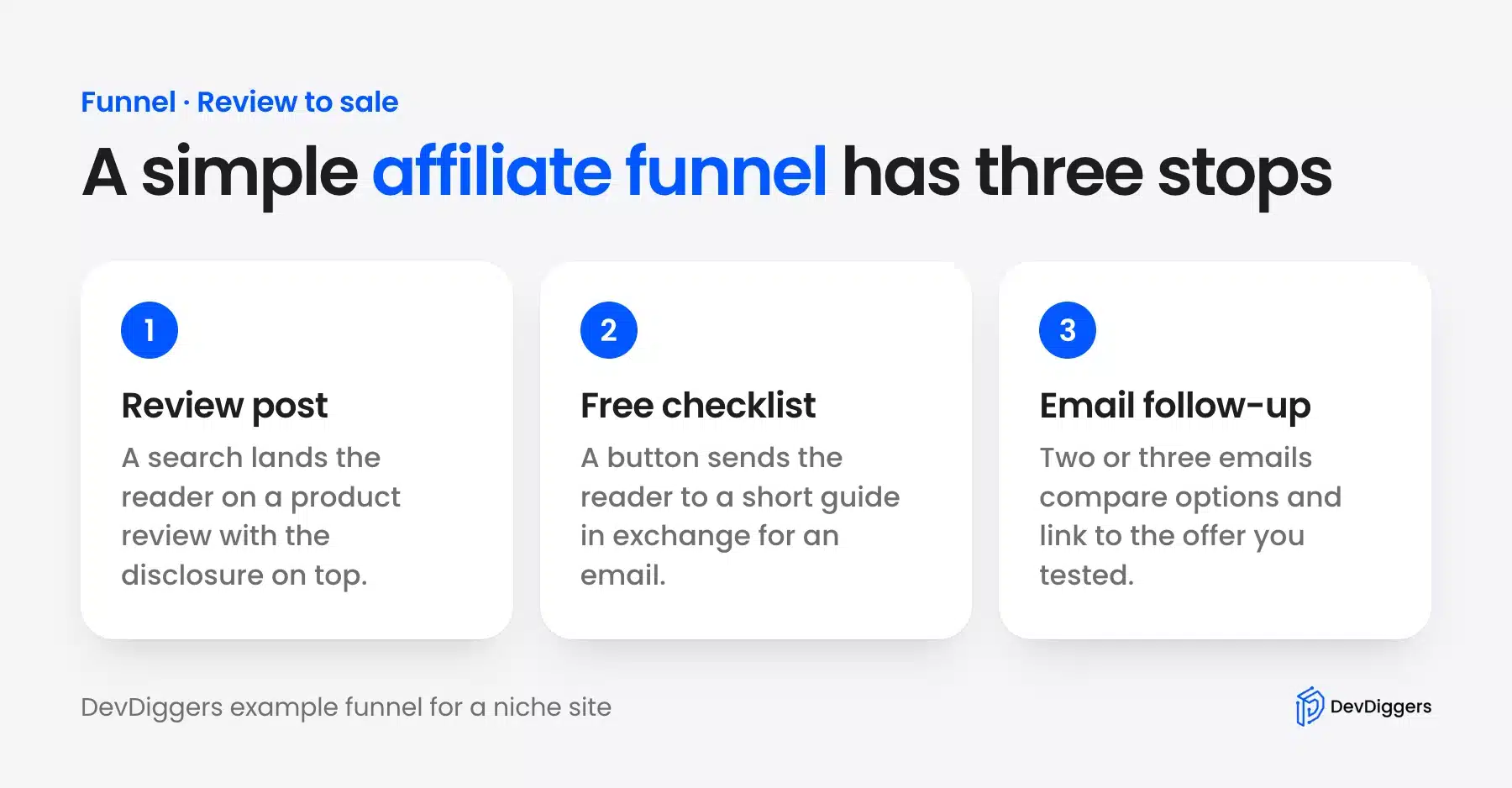
Build each stop with what WordPress already has:
- Review post: Use the page from Step 6 with the disclosure at the top and one clear link.
- Free checklist: Add a button block that links to a page with a signup form and a one-page guide.
- Email follow-up: Send two or three emails that compare options and link to the product you tested.
Our roundup of email marketing plugins for WooCommerce compares tools that handle the signup and the sequence.
Mind each program’s email rules. Amazon’s policies allow special links in emails only when the readers opted in, so a solicited newsletter is fine and a cold blast is not.
Affiliate Marketing Mistakes and Fraud to Avoid
The costliest affiliate mistakes are hiding the relationship, copying merchant text and ignoring program rules. Fraud also reaches beginners from two sides. Fake reviews mislead readers, and offers that never pay cost you the work you put into the pages.
Four mistakes cause most of the damage:
- Hidden disclosure: A statement in the footer is far from the recommendation, and the FTC says closer is better.
- Fake or paid-for reviews: The FTC’s 2024 rule bans fake and false reviews and testimonials, including AI-generated ones, so write only what you tested.
- Broken program rules: Cloaking, link shorteners and cold emails can end an account, as Amazon’s policies show.
- Unverified programs: Check that a company publishes its terms and pays on time before you build pages around it.
Treat every offer as unproven until you have read its terms. Warning signs include a fee to join, no public terms and commission promises with no product behind them. A program that hides how it pays may not pay.
Fraud can also reach you through your own pages. Open each affiliate link from a private window after you publish, and confirm it lands on the right merchant page. A broken or outdated link sends your reader, and your commission, nowhere.
The FTC announced that rule on August 14, 2024, and it applies to anyone who writes reviews for money.
Pro Tip: Keep a note of every program’s rules and the date you read them. Policies change, and Amazon’s program policies page showed an April 14, 2026 update when I checked.
Should You Recruit Your Own Affiliates Too?
Recruit your own affiliates only if you sell a product of your own and have an audience that would recommend it. Affiliate recruitment means inviting bloggers and customers to promote your store. You set the commission they earn and the rules they follow.
A site that promotes others’ products often grows into one that sells its own. When that happens, the roles flip. You choose the commission structure, the cookie window and the payout rules.
Before you invite anyone, decide five things: the rate, the cookie window, the payout threshold, the payment method and the rules that ban misuse. Write them on one plain page, because affiliates will judge your program by that page.
Plan for fraud on your own program too. Self-referrals and fake sign-ups are the usual abuse, so approve new affiliates by hand and review the first payouts before you send them.
Start with the tooling guides rather than a plugin shortlist here. Our roundup of the best WooCommerce affiliate plugins compares options for stores, and the guide to adding a referral program to WooCommerce shows the setup.
If your store runs WooCommerce, the WooCommerce Affiliate plugin from DevDiggers is one of the options. As of October 2026 it sells as a yearly license with tiers from $99 to $599.
Conclusion
WordPress affiliate marketing works when you treat it as publishing first and linking second. Pick a niche you can test, join programs whose rules you have read, and put an honest disclosure next to every recommendation.
The tools are small. A theme, a link manager and a few review pages cover the whole setup, and the click counts tell you what to improve next.
Start with one program and five reviews. Then add the funnel once you know which pages bring readers.
Frequently Asked Questions (FAQs)
Q1. How much money can you make with affiliate marketing on WordPress?
It depends on traffic, trust and the commission rate. As an example, 100 sales of a $100 Kitchen product at Amazon’s 4.50% rate pay $450. No source can promise your results.
Q2. Is WordPress good for affiliate marketing?
Yes, because you own the site, the links and the data. Self-hosted WordPress lets you install a link manager and edit every page. Hosted plans can restrict plugins, which is why Step 2 recommends the self-hosted software.
Q3. Do you need a plugin for affiliate marketing on WordPress?
No. You can paste a program’s link into a post and add the sponsored attribute yourself. A link manager helps once you have many links, because it centralizes edits and counts clicks.
Q4. Do affiliate links hurt SEO?
Google’s link documentation asks you to mark paid links with the sponsored value. Its review guidance also points to the spam policy on thin affiliate pages, which add nothing beyond the merchant’s description.
Q5. Can you add the disclosure to every post automatically?
Yes. Save the disclosure paragraph as a synced pattern and insert it on each review. The WordPress documentation says editing a synced pattern updates it wherever it is used, and I confirmed that on two test posts.
Q6. Can you put Amazon affiliate links in emails?
Only in solicited emails. Amazon’s program policies allow special links in emails and direct messages when the receiving customer opted in. Unsolicited promotion is not allowed.
Q7. Which affiliate programs are best for beginners?
Start with a program that publishes clear terms and has products you can test. Amazon Associates is the common first choice because the rates and rules are public, as the commission table above shows.