Is WordPress Good for eCommerce in 2026? That’s the question most store owners ask before committing to a platform, and the honest answer is: yes, but with an important condition.
WordPress is good for eCommerce but only if you pair it with the right plugin, hosting, and setup. Used correctly, it gives you a fully functional online store with complete ownership of your data, no transaction fees, and more customisation control than most hosted platforms can offer.
The catch is that it is used correctly in that sentence more than it looks like. Most store owners who struggle with WordPress eCommerce aren’t fighting a platform problem. They’re fighting a setup problem.
This guide covers what makes WordPress clearly strong for eCommerce, where it falls short, who it suits best, how it stacks up against Shopify, and what to get right from day one.
What Does WordPress for Ecommerce Mean?
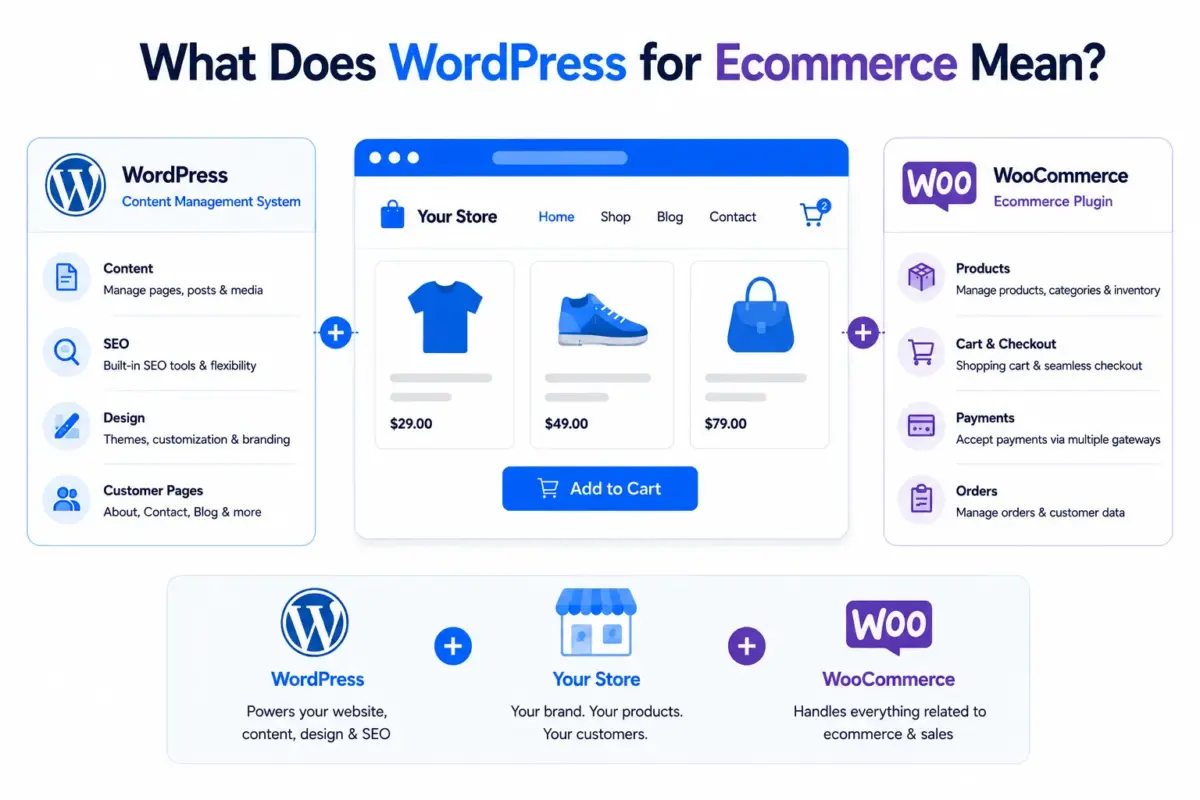
WordPress itself is a content management system, not a store. To sell products, you add an eCommerce plugin on top of it. The most widely used option is WooCommerce, a free, open-source plugin that turns any WordPress site into a fully functional online store.
WordPress for eCommerce means running your store on WordPress with WooCommerce (or a similar plugin) handling the commerce layer, including product pages, cart, checkout, payment processing, and order management, while WordPress handles everything else: content, SEO, design, and customer-facing pages.
That difference matters. When people say “WordPress eCommerce,” they’re really talking about WooCommerce for eCommerce on WordPress. The two work together, but they’re separate pieces.
The numbers back up how widely this combination is used. According to W3Techs, 42.2% of all websites on the internet run on WordPress as of April 2025. On the commerce side, Store Leads tracking data shows over 4.53 million active WooCommerce stores globally as of August 2025, giving WooCommerce a 33.4% share of all tracked eCommerce sites.
That is not a small platform. That is the default choice for a sigle large portion of online retail.
If you want to understand how WooCommerce fits into a WordPress site from the ground up, our guide on how to set up WooCommerce on WordPress walks through every step.
Why WordPress Is Good for Ecommerce?
Full Ownership and No Revenue Cuts
When you build an online store with WordPress, you own everything. Your data, your customer records, and your product database all live on your server and stay under your control. That is not a given on hosted platforms, where exporting your data can be bulky and your store’s existence depends on a third-party account staying active.
Also Worth Knowing: WooCommerce does not charge transaction fees. You pay your payment gateway (Stripe, PayPal, or another provider), but WooCommerce itself takes nothing per sale. At low volumes, the savings are small. At $30,000 or $50,000 per month in revenue, it adds up fast.
The Content-Commerce Advantage
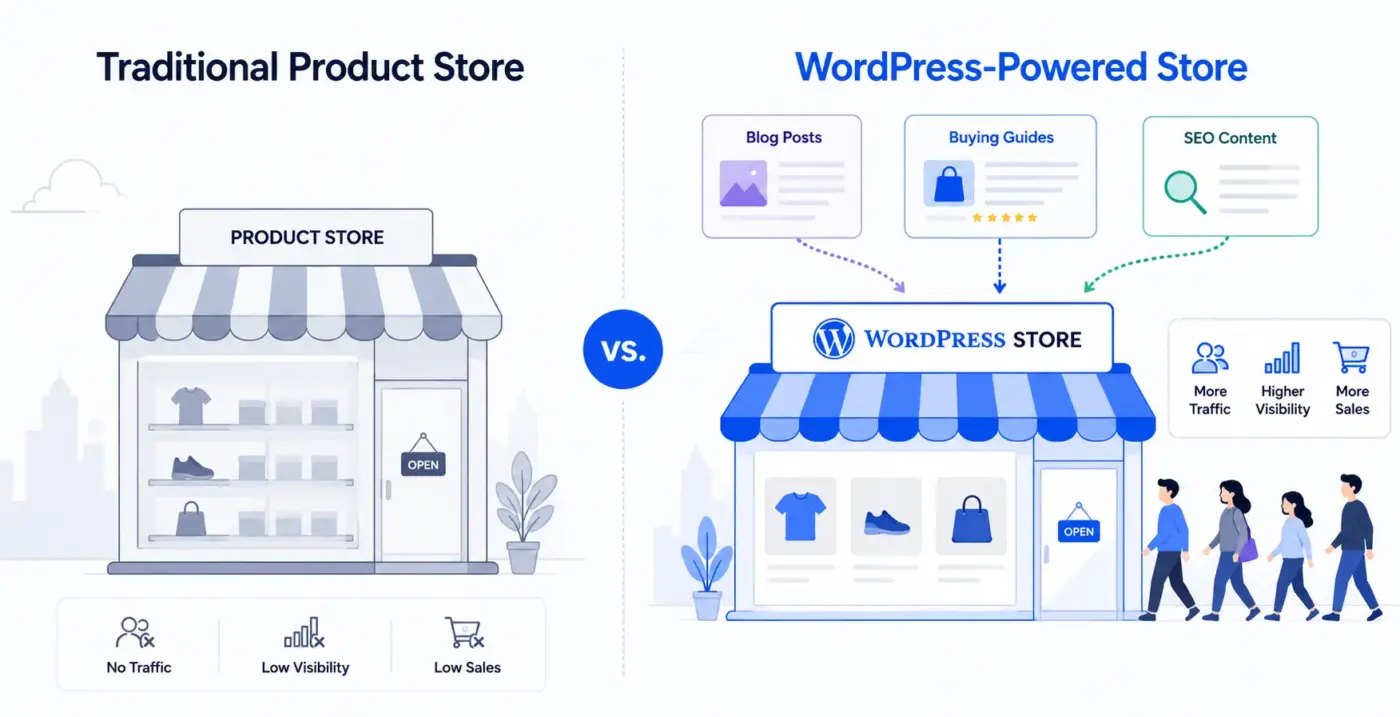
Here is where WordPress earns its reputation as an eCommerce platform. Most store builders are built around products. WordPress was built around content, and that is a different thing.
A store on WordPress can run a full blog, publish buying guides, create comparison pages, and build a library of content that drives free google traffic directly to product pages. Businesses that use content to educate customers before they buy see better conversion rates, lower paid advertising dependency, and higher repeat traffic.
For businesses that need to educate their customers, build trust through content, or integrate their store with their broader marketing strategy, the content-driven eCommerce approach WordPress enables is genuinely hard to copy on a hosted platform.
This is what people mean when they call WordPress “good for SEO.” It is not just that you can install Yoast SEO or Rank Math and tick boxes. The whole CMS is designed around creating and publishing content at scale alongside your store.
Plugin Depth
The WooCommerce plugin ecosystem is large. The WordPress plugin directory lists over 4,600 plugins with the WooCommerce tag covering payment gateways, subscriptions, loyalty programs, product customization tools, inventory management, booking systems, wholesale pricing, and dozens of other use cases.
If you need a specific feature, there is a good chance a plugin already handles it. If not, WooCommerce’s hook system makes it easy to build custom functionality on top without touching core files.
Worth mentioning: WooCommerce introduced High-Performance Order Storage (HPOS) in late 2023. It moves order data from the old wp_postmeta table to dedicated order tables, which improves database speed for stores with large order volumes. If you’re on WooCommerce 8.0+ and PHP 8.1 or above, enabling HPOS is worth doing. Most tutorials still skip this entirely.
Features like a WooCommerce wallet and store credit system are good examples of what the plugin ecosystem unlocks, functionality that would require a custom build on most platforms, dropping in as a plugin on WooCommerce.
Honest Limitations of WordPress for Ecommerce
This is the section most WordPress eCommerce articles avoid writing. Here it is.
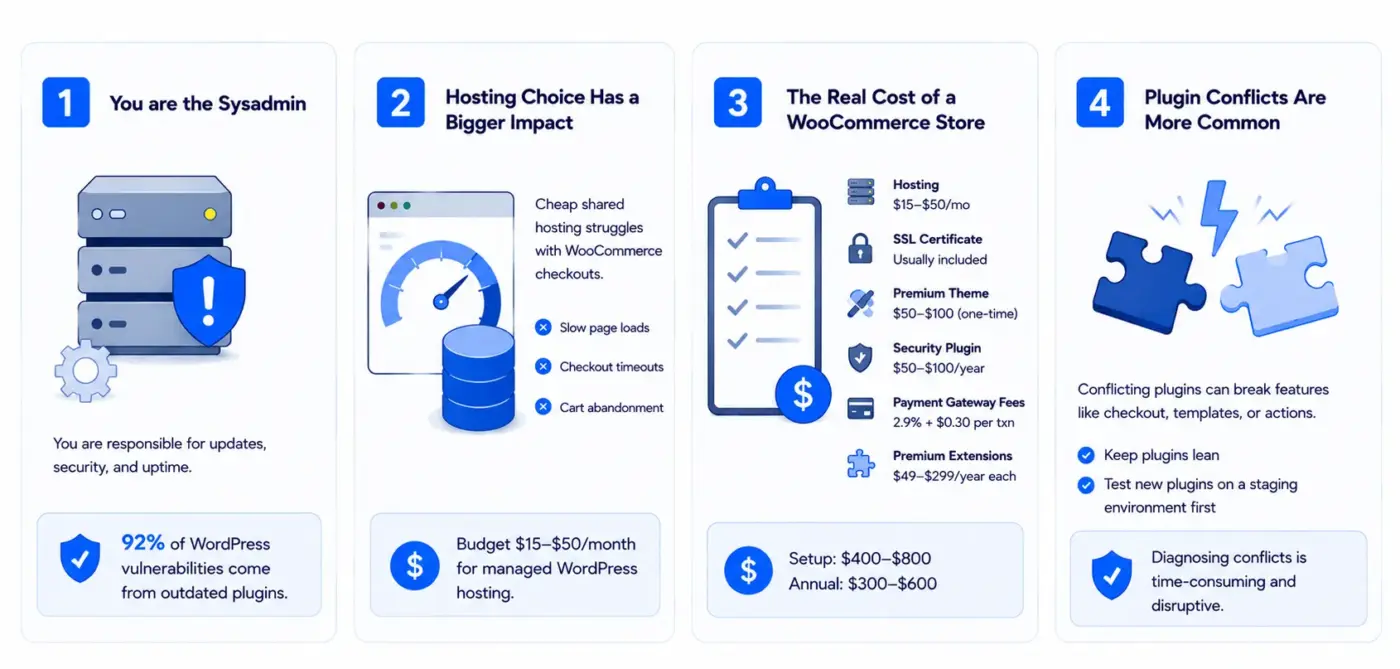
You are the Sysadmin (short for system administrator)
On a hosted platform, someone else handles server updates, security patches, and uptime. On WordPress, that responsibility falls on you or whoever you hire.
Keeping WordPress core, WooCommerce, and your plugins updated is not optional. Security research consistently shows that 92% of WordPress vulnerabilities stem from outdated plugins. Skipping updates is an active security risk, not a best practice you can defer.
This is not a dealbreaker. It is a trade-off. But it is real, and competitors who glossed over it are doing you no favours.
Hosting Choice Has a Bigger Impact Than Most Guides Admit
Cheap shared hosting and WooCommerce do not get along. A WooCommerce checkout page generates multiple database queries, loads session data, and runs PHP processes simultaneously for each visitor. On shared hosting with limited CPU and memory allocation, this causes slow page loads, checkout timeouts, and cart abandonment.
We regularly see this in WooCommerce development work. The store owner blames WooCommerce. The actual problem is a $5/month hosting plan that cannot handle concurrent checkout sessions.
For a reliable WordPress eCommerce store, budget for managed WordPress hosting typically $15–$50/month, depending on traffic. That cost is not optional if you care about checkout performance.
The Real Cost of a WooCommerce Store
WordPress is free. WooCommerce is free. But running a production eCommerce store on WordPress is not free. Here is what to budget for:
- Managed WordPress hosting: $15–$50/month
- SSL certificate: Usually included with hosting, but verify
- Premium theme: $50–$100 one-time (optional, but free themes are often slow)
- Security plugin: $50–$100/year
- Payment gateway fees: Stripe charges 2.9% + $0.30 per transaction (separate from WooCommerce)
- Premium WooCommerce extensions: $49–$299/year each, depending on what you need
A lean, well-built WooCommerce store costs about $400–$800 to set up properly and roughly $300–$600/year to maintain. That is competitive with hosted alternatives, but it is not zero.
Plugin Conflicts Are More Common Than Competitors Admit
When two plugins try to do the same thing, like modify the checkout page, override a product template, or hook into the same WooCommerce action, they can break each other. Most guides say “plugins might conflict.”
What they do not explain is that finding a conflict means deactivating plugins one by one until the problem disappears. On a live store, that is problematic.
Simple fix: Keep your plugin count low and test every new plugin on a test website first. That process takes discipline, and many store owners skip it.
WordPress vs Shopify for Ecommerce: The Real Comparison
Both platforms power real, successful stores. The question is not which is better in the abstract. It is what suits your specific situation.
| Factor | WordPress + WooCommerce | Shopify |
|---|---|---|
| Monthly platform cost | Hosting only ($15–$50) | $39–$399/month |
| Transaction fees | None from WooCommerce | 0.5–2% on non-Shopify Payments |
| Customisation ceiling | Very high | Moderate |
| Technical overhead | High | Low |
| Content capabilities | Excellent | Limited |
| SEO control | Full | Partial |
| Data ownership | Full | Limited export options |
| Setup complexity | Higher | Lower |
The honest summary: WordPress wins on long-term cost at scale, customisation, content capabilities, and data control. Shopify wins on simplicity, managed infrastructure, and built-in point-of-sale integration.
If your primary focus is the store itself and you want a fully managed platform that works well from day one, Shopify is a solid choice. If you sell via a content-focused model, already run WordPress, need deep custom integrations, or want to avoid fees at volume, WordPress is the stronger option.
One thing no comparison table captures: Shopify’s costs tend to grow faster than WordPress costs as revenue scales. A store doing $100,000/month on Shopify Advanced at $399/month plus 0.5% transaction fees pays a lot more than the same store on WordPress with managed hosting and no per-transaction cut from the platform.
If you’re already on a different platform and considering a move, our guide on migrating to WooCommerce from Magento covers the full process.
Who Should Use WordPress for Ecommerce?
Most articles answer “Is WordPress good for eCommerce?” with a single verdict. The more useful answer is: it depends on what kind of store you’re running.
WordPress eCommerce is a strong fit if you:
- Already run a WordPress site and want to add selling without migrating platforms
- Use content marketing such as blogs, buying guides, and tutorials to drive traffic and sales
- Need deep customisation that hosted platforms cannot support
- Want to build a content-driven eCommerce model where the blog and shop work together
- Plan to sell across multiple product types: physical goods, digital downloads, subscriptions, and services, all in one store
- Have a developer who can manage the technical layer
It is likely the wrong choice if you:
- Want a store that runs with zero technical involvement
- Have no content strategy and just need a clean, fast product catalogue
- Need built-in point-of-sale hardware integration out of the box
- We are selling in a highly regulated category where a pre-built, compliant checkout matters more than flexibility
There is no shame in that second list. Shopify exists and works well for those use cases. The mistake is forcing WordPress to be something it was not designed to be.
A brief technical note: If you’re on PHP 7.4 or below, WooCommerce performance drops noticeably. In particular, with HPOS-enabled stores. PHP 8.1 or higher is the current recommended version. Worth checking before you build anything on top of an older server stack.
How to Get the Right WordPress Ecommerce Store: Step-by-Step Guide
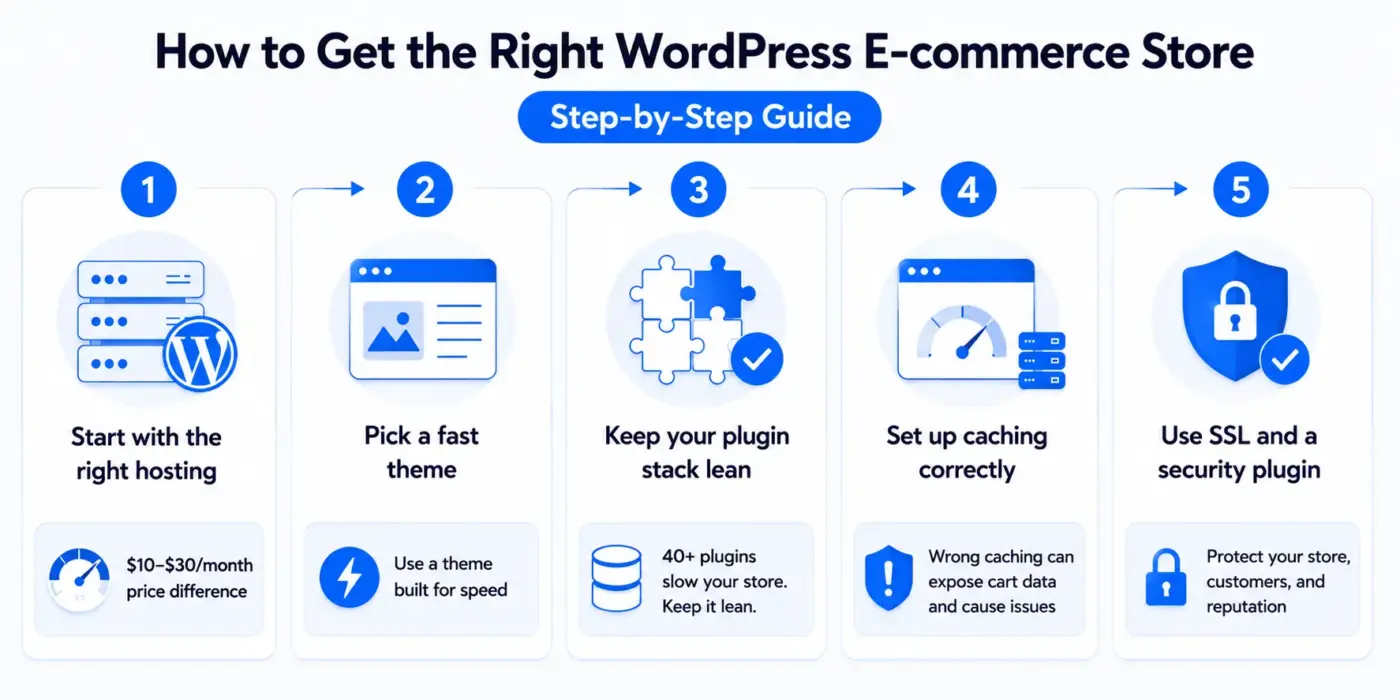
Getting WordPress eCommerce right is mostly about the decisions made before you install anything.
- Start with the right hosting: Choose a managed WordPress host, not shared hosting. The price difference is $10–$30/month. The performance difference at checkout is large.
- Pick a fast theme: A slow theme affects every page in your store. Our roundup of the fastest WooCommerce themes covers the top options tested for performance.
- Keep your plugin stack lean: Every WooCommerce plugin adds database queries. A store with 40 plugins is almost always slower than one with 15 well-chosen ones. Audit before launch.
- Set up caching correctly: WooCommerce pages like cart and checkout must be excluded from full-page caching. Getting this wrong means customers see each other’s cart data, a problem that appears in support queues more often than it should.
- Use SSL and a security plugin from day one: Not when you launch before you go live.
If the technical setup is not something you want to handle yourself, our WooCommerce development services cover everything from initial store build to ongoing maintenance. Most store owners find that a professional setup pays for itself quickly by avoiding the common performance and security mistakes that come with a DIY approach.
Conclusion
WordPress is good for eCommerce but it is not the right answer for every store. It rewards businesses that treat their website as a long-term asset: investing in quality hosting, maintaining a lean plugin stack, and using content to drive organic traffic alongside product sales.
For stores that need that level of control and flexibility, WordPress with WooCommerce is hard to beat. For founders who want a managed platform with minimal technical overhead, other options may suit them better.
The key takeaways: Is WordPress good for eCommerce? Yes, for the right store type. WooCommerce powers over 4.5 million active stores globally. The platform itself is free, but running it properly is not. Hosting, security, and plugin selection matter as much as the platform choice itself. And if you are already on WordPress, adding eCommerce through WooCommerce is almost always the path of least resistance.
If you want to skip the trial-and-error phase of WooCommerce setup, our custom WooCommerce development services are built for exactly that.
Frequently Asked Questions(FAQs)
Q1. Can I use WordPress for eCommerce without WooCommerce?
Yes. Other options include Easy Digital Downloads (best for digital products and subscriptions), SureCart (a hosted commerce layer that connects to WordPress), and BigCommerce for WordPress (external store data served through your WordPress front end). WooCommerce is the most widely used and the most flexible, but it is not the only route.
Q2. Does WordPress eCommerce work for digital products as well as physical goods?
WooCommerce handles both. For digital products, you can set items as downloadable, control download limits and expiry, and force secure downloads so files are not directly accessible via URL. Easy Digital Downloads is a strong alternative if digital products are your primary or only product type.
Q3. How many products can a WooCommerce store handle?
There is no hard limit. Stores with tens of thousands of products run on WooCommerce. Performance at scale depends on hosting quality, database optimisation, and whether HPOS is enabled. A well-configured store on managed hosting handles large catalogues without problems. A poorly configured store will struggle at a few hundred products.
Q4. Is WordPress eCommerce secure enough for payment processing?
Yes, with the right setup. WooCommerce does not store card data. Payment processing happens through your gateway (Stripe, PayPal, etc.). Your responsibility is keeping WordPress core, WooCommerce, and all plugins updated, using SSL, and running a security plugin. These steps are not optional on a live store.
Q5. What is the difference between WordPress.com and WordPress.org for eCommerce?
WordPress.org is the self-hosted, open-source version where you install WooCommerce and have full control. WordPress.com is a hosted service with plan-based restrictions. For eCommerce, you need WordPress.org,
either self-hosted or through a managed WordPress host. WordPress.com eCommerce plans have improved, but still restrict customisation compared to a self-hosted install.
Q6. Do I need a developer to run a WooCommerce store?
Not necessarily for a basic store. WooCommerce has a setup helper, and most extensions have their own admin screens. For custom checkout flows, complex pricing rules, plugin conflicts, or performance optimisation, though, developer involvement saves a large amount of time and avoids costly mistakes.