Site structure is the way a website’s pages are grouped, ordered and linked, and it decides how easily visitors and search engines find things. Most sites use one of four types: hierarchical, sequential, matrix or database-driven. A small business site usually needs a hierarchical tree with a few cross-links.
We tested this on our own site. We crawled devdiggers.com from the homepage, followed every internal link and counted how many clicks each page sits from the start. The results are in the click depth section below, and they changed what we recommend.
This guide explains each website structure type with examples and shows the web page structure behind every URL. It also walks through six steps to plan your own and the mistakes that hide pages from Google.
What Is Site Structure?
Site structure is the organization of a website’s pages and the links between them. It has three parts: the hierarchy of pages, the navigation that exposes them and the internal links that connect them. Google reads the same links your visitors click.
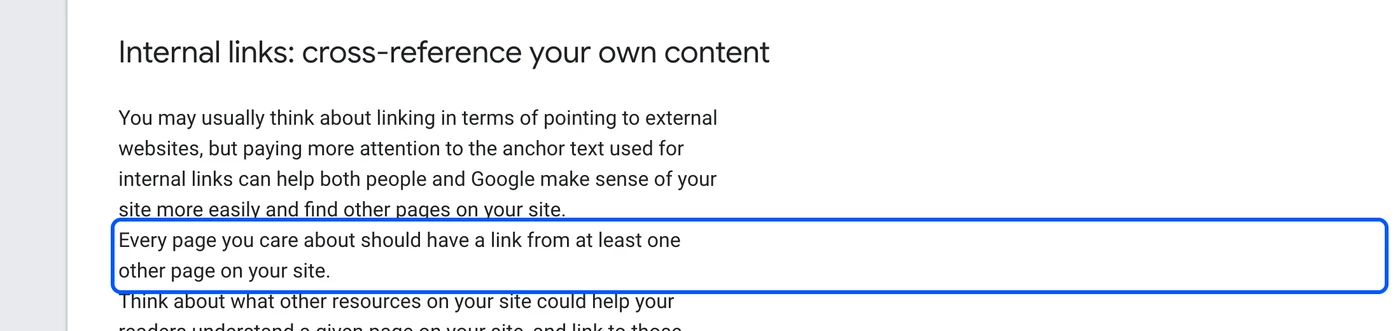
Google’s documentation says every page you care about should have a link from at least one other page on your site. It also says Google can only crawl a link that is an <a> element with an href attribute. A menu built from JavaScript buttons is invisible to the crawler.
Site structure is different from URL structure. The structure is how pages connect, and the URL is the address each page carries.
A page can sit at /website-structure/ and still be three clicks from the homepage. That gap matters more than the address.
Google also gives advice on the address side. It recommends readable words instead of long ID numbers and hyphens instead of underscores. Follow both, then spend your time on the links.
Website Structure Types
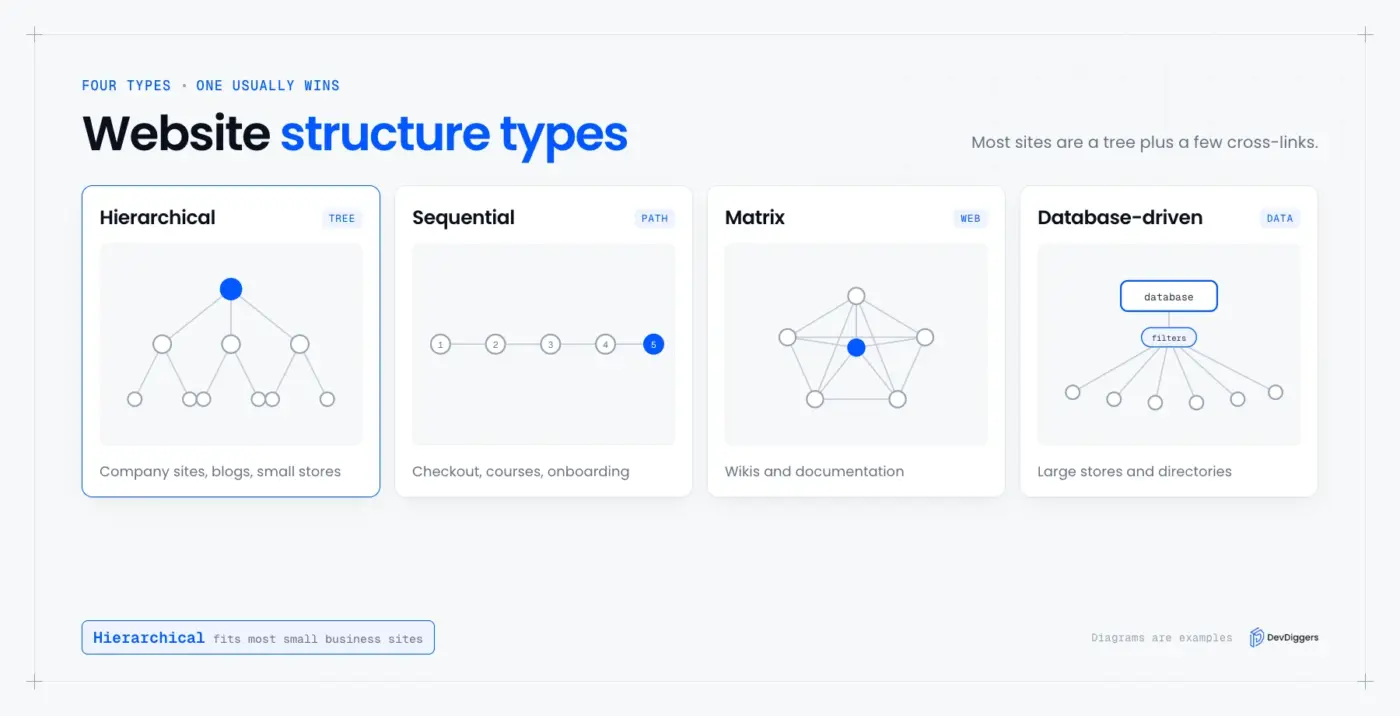
There are four website structure types: hierarchical, sequential, matrix and database-driven. Most real sites are a hybrid of two, and the right choice depends on how your visitors move. Guides that list website structures types usually stop at these four, so each one gets an example below.
| Type | Shape | Best for | Main risk |
|---|---|---|---|
| Hierarchical | Tree from the homepage down | Company sites, blogs, small stores | Deep pages get buried |
| Sequential | One path, step by step | Checkout, courses, onboarding | Visitors cannot skip around |
| Matrix | Pages link to many peers | Wikis, documentation | Hard to keep organized |
| Database-driven | Pages generated from data and filters | Large stores, directories | Thousands of thin or duplicate URLs |
Hierarchical structure
A hierarchical structure is a tree. The homepage links to a few main sections, and each section links to its own pages. It is the most common website structure because visitors and search engines both understand it at once.
Our own site is a hierarchical example. The homepage links to a services hub and to each of the eight service pages, and to a store that lists 26 products. The blog sits beside them, and the sitemap lists 21 pages, 26 products and 264 posts.
The main menu keeps that shape visible. It has five top-level items: WooCommerce Extensions, Services, Store, Blog and Contact.

Keep the tree shallow and each branch focused. If a section holds pages on unrelated topics, split it. Add cross-links between related branches, so the tree does not become a set of closed rooms.
Sequential structure
A sequential structure sends visitors down one path, one step at a time. Checkout is the classic case. A WooCommerce order moves from cart to checkout to the order received page, and each step exists only to move you to the next one.
Use this shape for tasks and never for content you want ranked. Sequential steps rarely need their own search traffic. Keep the path short and remove every link that lets a buyer wander off.
Matrix structure
In a matrix structure, pages link to many other pages with no fixed order. Visitors choose their own route. Wikis and documentation sites work this way, because any article can link to any related one.
The strength is discovery. The weakness is control. Without a clear home for each page, a matrix site turns into a web that even its authors cannot map.
Database-driven structure
A database-driven site builds pages from stored data. A store with filters for size, color and price can create thousands of URLs from a few product records. Large marketplaces and directories work this way.
This structure scales, but it needs discipline. Filter combinations create near-duplicate pages, so decide which ones deserve to be indexed. Our crawl skipped every address with a query string for this reason, and you should audit yours the same way.
Hybrid structure
A hybrid structure mixes two types, and it is what most WordPress and WooCommerce sites use. The core is a hierarchy of pages, categories and products. Related-post links and tags add a matrix layer on top, and the checkout adds a short sequential path.
Website Structure Examples
The best website structure examples are the ones you can measure. Below are three: a service business, a WooCommerce store and a blog. Each uses a hierarchy as its spine and adds a small number of cross-links between related branches.
Service business: The homepage links to a services hub. The hub links to one page per service, and each service page links to a contact page. That is three levels, and every page is reachable within two clicks.
WooCommerce store: The homepage links to product categories. Each category lists products, and each product links to related products and back up to its category. The cart and checkout form a separate sequential path.
Blog: The homepage or blog page links to categories and to recent posts. Each post links to related posts and to the pages that sell the related service. Category pages are the hubs, so keep them limited and meaningful.
Click Depth: What We Found When We Crawled Our Own Site
Click depth is the number of clicks a page sits from the homepage. We crawled devdiggers.com, followed internal links only and recorded the shortest path to each page. Most of the site sits within a few clicks, and the deepest pages are the ones with the fewest links.
We crawled devdiggers.com from the homepage on September 29, 2026. The crawl followed internal links only and skipped query strings, the cart and checkout, feeds and files. It found 402 URLs, and none sat deeper than three clicks.
| Clicks from the homepage | Pages | Share |
|---|---|---|
| 0 | 1 | 0.2% |
| 1 | 31 | 7.7% |
| 2 | 310 | 77.1% |
| 3 | 60 | 14.9% |
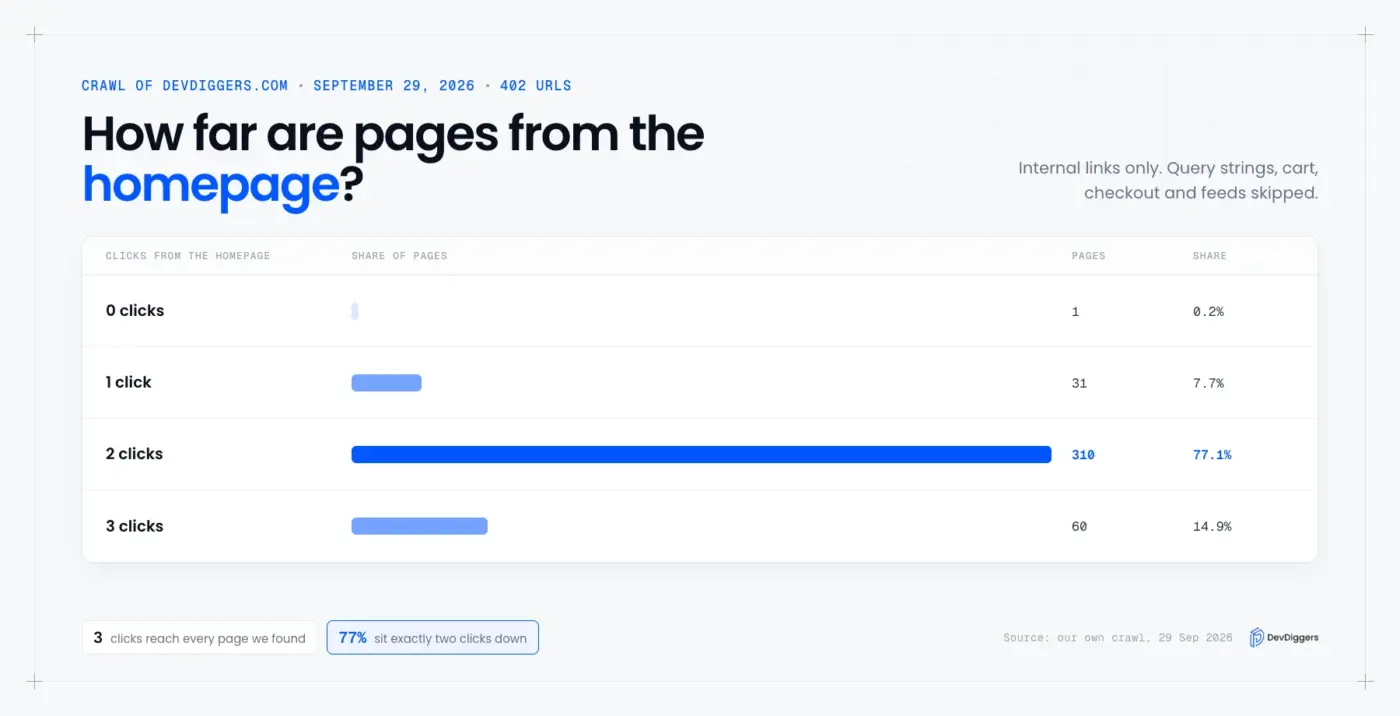
The homepage links straight to 31 pages, which we counted in the crawl. They include the eight service pages, the services hub, the store, the blog page and five products. Depth 2 holds 310 pages, or 77 percent, because the blog page and the category pages list posts.
Every URL in our sitemap sits at two clicks or fewer. The 60 pages at three clicks are all outside the sitemap. Nineteen are paginated archive pages, and 41 are posts we keep out of search on purpose.
The result taught us two things.
First, a flat address says nothing about depth. Every blog post uses an address like /website-structure/. Even so, 262 of the 329 posts and pages we found sit two clicks down, and 41 sit three clicks down.
Second, the sitemap and the link graph agreed. All 337 URLs in the sitemap were reachable by clicking, so we have no orphan pages among the pages we want indexed.
The other 65 URLs the crawl found are 21 paginated archive pages and 44 posts and pages we keep out of the sitemap. They are still linked, so we treat that list as a cleanup queue.
Note: A crawl from the homepage shows what a visitor can reach by clicking. It does not show how Google prioritizes pages, so pair it with the Pages report in Search Console. Crawl slowly, because fast requests can trigger bot protection.
Web Page Structure: The Elements Behind Every URL
Web page structure is the layout of one page, and HTML gives you elements to mark each part. MDN describes header as a group of introductory content and nav as the main navigation. It defines main as content unique to the page and footer as a group of end content.
A clean page uses each element once for its job:
<body>
  <header>Logo and site name</header>
  <nav>Main menu</nav>
  <main>
    <h1>One page title</h1>
    <article>The content that stands on its own</article>
    <aside>Related links</aside>
  </main>
  <footer>Legal links and contact details</footer>
</body>
Use one h1 per page and keep headings in order. Skip levels and screen readers and crawlers lose the outline. The MDN guide on structuring documents covers each element.
The structure of a homepage
A homepage is the top of the tree, so its structure shows your priorities. Put the sections in the order a visitor needs them: what you do, proof, the main offers, then the next step. Every section should link to the page that goes deeper.
Our own homepage runs in this order: a hero, trusted-by logos, an authority block and the plugin products. The services, customer reviews, the affiliate program and the latest blog posts follow. Each one is a section element that links to a deeper page.
How Site Structure Affects SEO
Site structure affects SEO because Google finds and understands pages through the links between them. Google says it uses links as a signal for relevance and to find new pages to crawl. A clear structure gives every page a place, a path and an anchor that names it.
Google’s link guidance is specific. It says anchor text tells people and Google something about the page you link to, and that good anchor text is descriptive and reasonably concise. So write the anchor as the name of the destination page, not as “click here”.
Structure also decides which page wins for a topic. When two pages target one search, they compete with each other.
Give each topic one home page and link the supporting pages up to it. That is the same tree shape from the types section, used on purpose.
Think of your hub pages as the trunk of each branch. A services hub, a product category and a blog category are all hubs. Link from every child page back to its hub with a plain text link, and link from the hub to every child.
How to Plan Your Site Structure in 6 Steps
To plan a site structure, list your goals, group topics, inventory content, sketch a tree, set navigation and links, and then test the result. The steps below take an afternoon for a small site. Do them before you build, because a structure is cheap to change on paper.
- Define goals and audience: Write down what visitors must do, such as buy, book or read. Every top-level section should serve one goal.
- Group topics: Use keyword research to see how people phrase their searches. Put related searches in the same branch.
- Inventory your content: List every page you have or plan. Merge pages that answer the same question.
- Sketch the tree: Draw the homepage, the main sections and the pages under each. Aim to keep every important page within three clicks.
- Set navigation and internal links: Put the main sections in the menu. Link related pages to each other with descriptive anchor text.
- Test with a crawl: Crawl the site and check the depth of each important page. Fix orphan pages and deep pages.
Site Structure Mistakes That Hide Pages
The biggest site structure mistakes are orphan pages, deep pages, menus that crawlers cannot follow and duplicate paths to one page. Each one keeps a page from being found by visitors or by Google. All four are easy to test with a crawl.
- Orphan pages: A page with no internal link pointing to it can be missed. Add a link from a related page, then list it in your sitemap.
- Deep pages: A page six clicks down gets less attention from visitors and crawlers. Link to it from a section hub.
- Script-only menus: If the menu is not made of
<a>links with anhref, Google cannot follow it. - Duplicate paths: One page reachable at many URLs splits its signals. Pick one address and redirect the rest.
Site Structure in WordPress
WordPress builds its structure from pages, posts, categories and menus. Set permalinks to Post name, group posts in a few real categories and build the main menu by hand. Rank Math or Yoast can add breadcrumbs, which show visitors and search engines where a page sits.
Our blog posts use flat URLs, such as /website-structure/, and the category pages act as hubs. That is a choice and not a rule. What matters is that every post is linked from a category page or a related post.
Conclusion
Site structure is how your pages are grouped and linked, and a hierarchy with a few cross-links suits most sites. Choose a type by how your visitors move, then keep every important page within a few clicks.
Test the result. Our crawl showed that the address of a page tells you little about its click depth, so measure the links instead.
Related guides cover the pieces around structure. Read Brotli vs Gzip for faster responses and reCAPTCHA alternatives for your forms. You can also check whether PHP is still relevant for your stack.
Frequently Asked Questions (FAQs)
Q1. What is the best website structure?
For most sites, a hierarchical structure with a few cross-links works best. It is easy for visitors to follow and easy for Google to crawl. Keep every important page within three clicks of the homepage.
Q2. How many clicks deep should a page be?
Keep important pages within three clicks of the homepage. Google gives no fixed number. Its documentation asks only that every page you care about is linked from at least one other page.
Q3. What is the structure of a website homepage?
A homepage usually has a header with the logo and menu. A main area holds the key sections, and a footer carries legal and contact links. It links to every main section of the site.
Q4. What is the difference between site structure and URL structure?
Site structure is how pages link to each other. URL structure is the address each page has. A page can have a short address and still sit many clicks from the homepage.
Q5. Does site structure affect SEO?
Yes, because Google finds pages through links. Google says it uses links to find new pages to crawl, so a page with no links is easy to miss.
Q6. What is a hybrid website structure?
A hybrid structure combines two types, usually a hierarchy plus a set of cross-links. Most WordPress and WooCommerce sites are hybrids.