

The best WooCommerce returns plugins differ on guest returns, exchanges, labels, warranty and the EU withdrawal button. Our checklist ranks WPReturns first with 8 of 8, followed by Return Refund and Exchange for WooCommerce at 6 of 8. Zorem Returns, Flexible Refund and Returns and Warranty Requests complete the five.
One thing to know first: we make WPReturns. The order follows an eight-job checklist that we wrote before scoring and applied to every plugin, ours included. We scored the other four from each vendor’s own pages, read on 17 November 2026.
In November 2026, we ran a guest return, a partial return and an EU withdrawal through the free WPReturns build on our test store. Below you will find a quick pick for each type of store, the checklist, the five plugins with their limits and the EU withdrawal button.
Which WooCommerce Returns Plugin Fits Your Store?
The best WooCommerce returns plugins for your store depend on who starts your returns and what you give back. Guest buyers need a guest portal and high-value goods need warranty handling, and stores that sell to the EU need the withdrawal button. Each line below names one plugin and its main catch:
- Guests, credit and the EU button: WPReturns scores 8 of 8, but it is new and has no public reviews yet.
- A big free tier and a track record: Return Refund and Exchange for WooCommerce has 4,000+ installs, though guests and partial returns are paid.
- Exchanges and store credit with analytics: Zorem Returns costs $129 a year and its product pages never mention return labels.
- Cheap guest forms and partial returns: Flexible Refund starts at $59 a year for Pro, but the free version handles full orders only.
- Warranties sold at checkout: Returns and Warranty Requests suits electronics, though it has a 2 of 5 rating from 7 reviews.
This table puts every score next to the price and the public track record we could find:
| Plugin | Checklist score | Price of the paid tier | Public track record |
|---|---|---|---|
| WPReturns | 8 of 8 | $99 a year for one site | No reviews yet |
| Return Refund and Exchange | 6 of 8 | $79 a year for one site | 4,000+ installs and 124 reviews |
| Zorem Returns | 5.5 of 8 | $129 a year for one site | No public rating found |
| Flexible Refund | 5 of 8 | $59 a year for one site | 2,000+ installs and 4 reviews |
| Returns and Warranty Requests | 4.5 of 8 | $99 a year | 2K+ installs and 7 reviews |
What Is a WooCommerce Returns Plugin?
A WooCommerce returns plugin adds a customer-facing return request to your store and a place for your team to handle it. WooCommerce itself only refunds an order from the edit screen. The plugin fills the gap before that step with the request, the reason, the photos, the label and the decision.
WooCommerce’s own documentation says you can process a refund automatically through the payment gateway or manually. A manual refund only records the refund in your store and you still return the money yourself. That is the whole built-in toolset, and it has no request form or status tracking.
Most stores start with email. A customer writes in and you ask for the order number. You then ask for photos and work out the refund by hand.
A returns plugin turns those four emails into one form that you review once.
Plugins in this group do two jobs that overlap.
A WooCommerce RMA plugin tracks the return from request to receipt. A refund plugin focuses on paying the money back. Several products on this list do both, and the checklist below scores them on the same eight jobs.
How We Ranked These WooCommerce Returns Plugins
We ranked seven plugins on eight jobs and wrote the list before scoring anything. A job scores 1 when the vendor’s own page states it and 0.5 when it is partial. A job scores 0 when the page does not mention it, and we keep the top five here.
These are the eight jobs, in the order a customer meets them:
- Guest returns: A customer can start a return without an account.
- Partial returns: The customer picks items and quantities and not the whole order.
- Photo uploads: Photos or files go with the request.
- Credit and exchanges: The plugin offers both store credit and exchanges. One of the two earns half a point.
- Return labels: A carrier or shipping account supplies the label. An uploaded label file earns half a point.
- Warranty claims: Warranty terms or claims are part of the plugin.
- Rules and abuse limits: Return windows or conditions, plus limits or blocks for serial returners. One of the two earns half a point.
- EU withdrawal button: The plugin states the two-step withdrawal function that Article 11a describes.
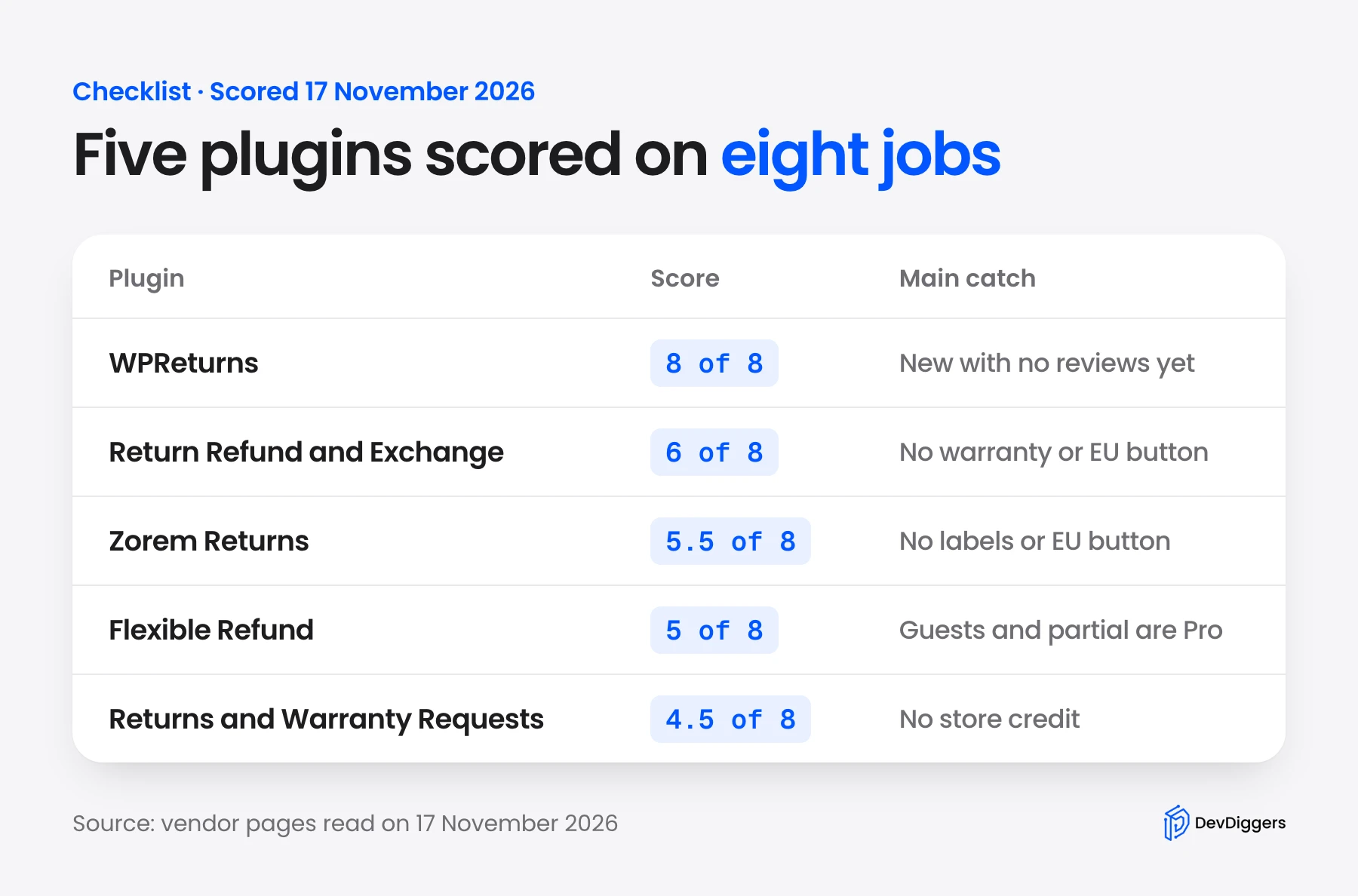
Ties went to the plugin with more public reviews. A low score can mean a thin vendor page and not a missing feature. Read the page before you rule a plugin out.
We also scored YITH Advanced Refund System and Advanced Returns and Refunds from KoalaApps. Both landed at 3 of 8 and neither made the five.
The checklist leaves out four things, and other plugins lead on each. Return Refund and Exchange has the longest track record and the most reviews, while ours has none yet. Flexible Refund has the lowest paid price.
Zorem and Return Refund and Exchange both state analytics, which we did not score. Returns and Warranty Requests carries the official WooCommerce Marketplace listing.
We also built the checklist after reading these pages, and WPReturns was designed with several of them open. A plugin that matches a list written after studying the field will score well. Weigh the track record column as much as the score.
5 Best WooCommerce Returns Plugins Ranked
The five plugins below run from 8 of 8 down to 4.5 of 8, and each one names a real limit. Prices come from each vendor’s own page on 17 November 2026. Where a page showed only another currency, we used the US price shown on the vendor’s public listing.
1. WPReturns
WPReturns is our own WooCommerce returns plugin and ranks first on the checklist with 8 of 8. Customers start a return from My Account or a guest portal, and your team approves, labels and refunds it on one screen. The free base plugin already includes the EU withdrawal button that Article 11a requires.
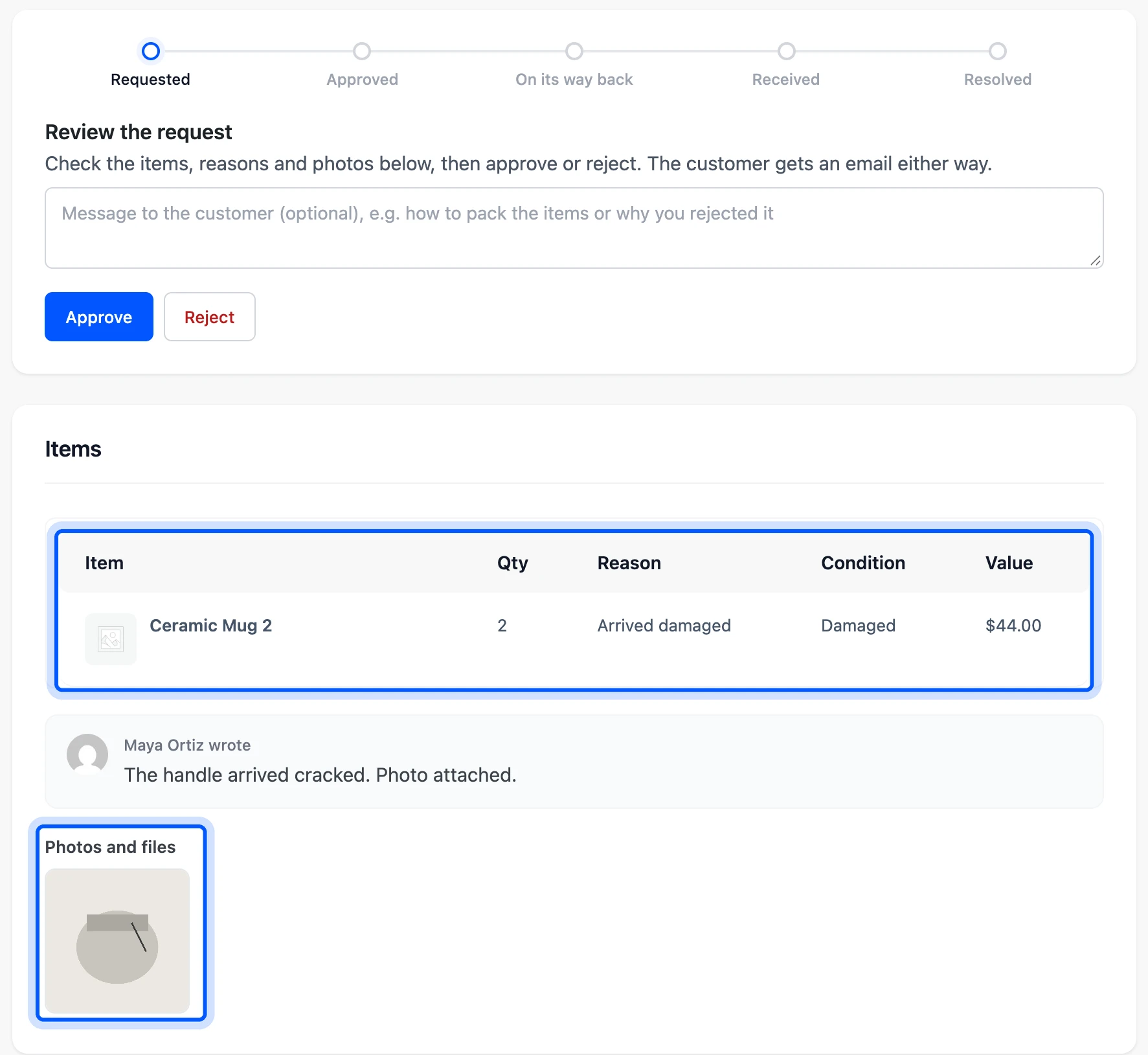
We ran two returns through the free 1.0.0 build on our WooCommerce 11.2 test store.
You can try the Pro screens in the live returns plugin demo. A guest found a completed order with its order number and billing email, picked items and added a photo. The request then appeared in the Requests list with its status, value and reason.
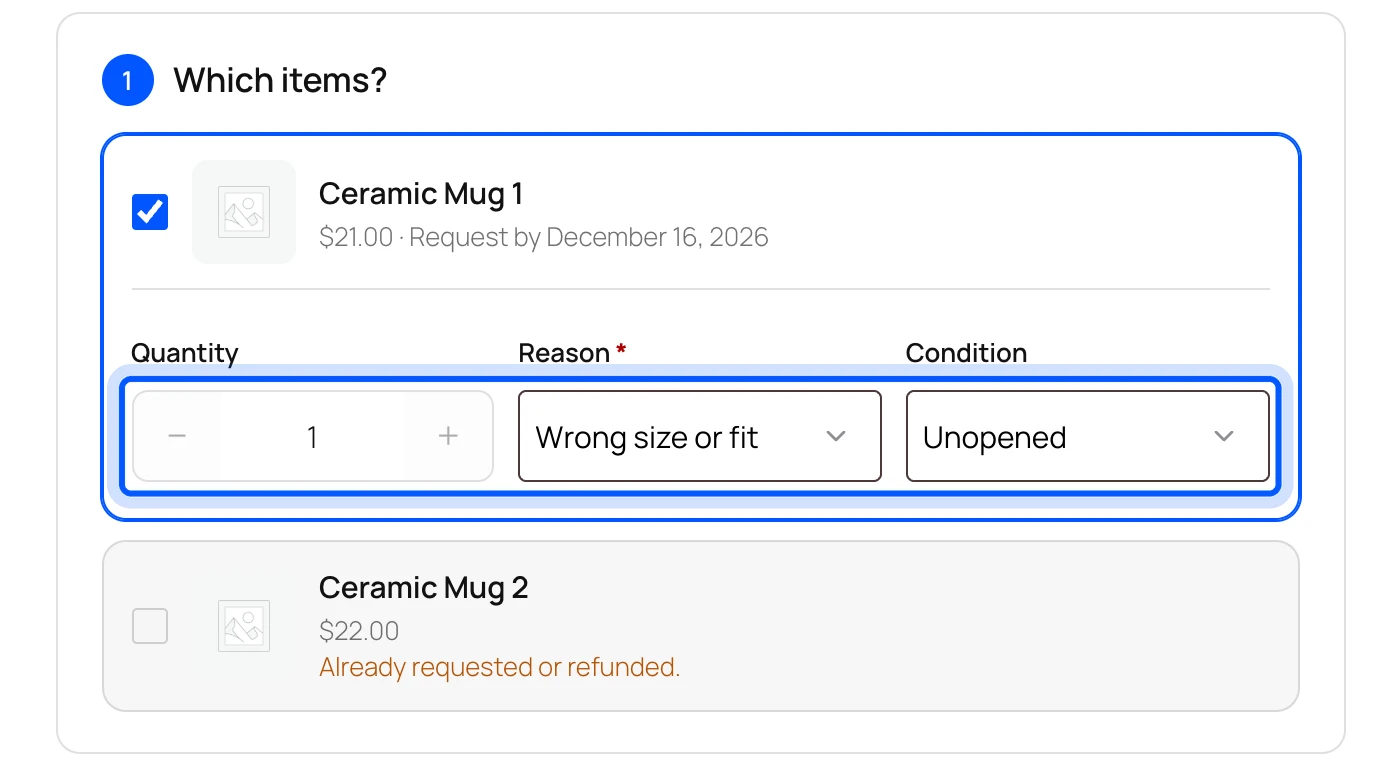
Each item has its own quantity, reason and condition. A reason can require a photo, and the form told our test customer so before submitting. An item that was already in a request showed “Already requested or refunded” and could not be picked twice.
The WooCommerce RMA plugin features page lists every other setting.
Key features:
- Checklist score: 8 of 8. It states every job and we ran all but the carrier label purchase.
- Guest portal: Guests use an order number and billing email, and the free plugin includes it.
- Per-item returns: Quantity, reason and condition are set for each item.
- Pro store credit and exchanges: Credit as a coupon or WooCommerce wallet balance, plus exchanges with the price difference handled.
- Labels: The free plugin accepts an uploaded label file, and Pro buys labels from EasyPost or Shippo.
- Rules and fraud flags: Pro adds rules for return windows and fees, a blocklist and flags for serial returners.
- Warranty: Pro adds warranty per product and extended warranties sold on the product page.
Pricing: Free on WordPress.org. Pro costs $99 a year for one site, $249 for five and $399 for ten, from the Pro license pricing on 17 November 2026. The launch price is $79 for the first year until 1 December 2026.
Best for: Stores that need guest returns, store credit and the EU withdrawal button in one plugin.
Its limits are real. Pro stops running when its license is not active, and you then renew it or deactivate Pro to return to the free plugin. We saw this on our test store, where the guest portal went dark.
2. Return Refund and Exchange for WooCommerce
Return Refund and Exchange for WooCommerce from WP Swings scores 6 of 8 and has the biggest public track record on this list. It handles returns, refunds, exchanges and cancellations, with a free version on WordPress.org. Guests, partial returns and the wallet need the Pro version.
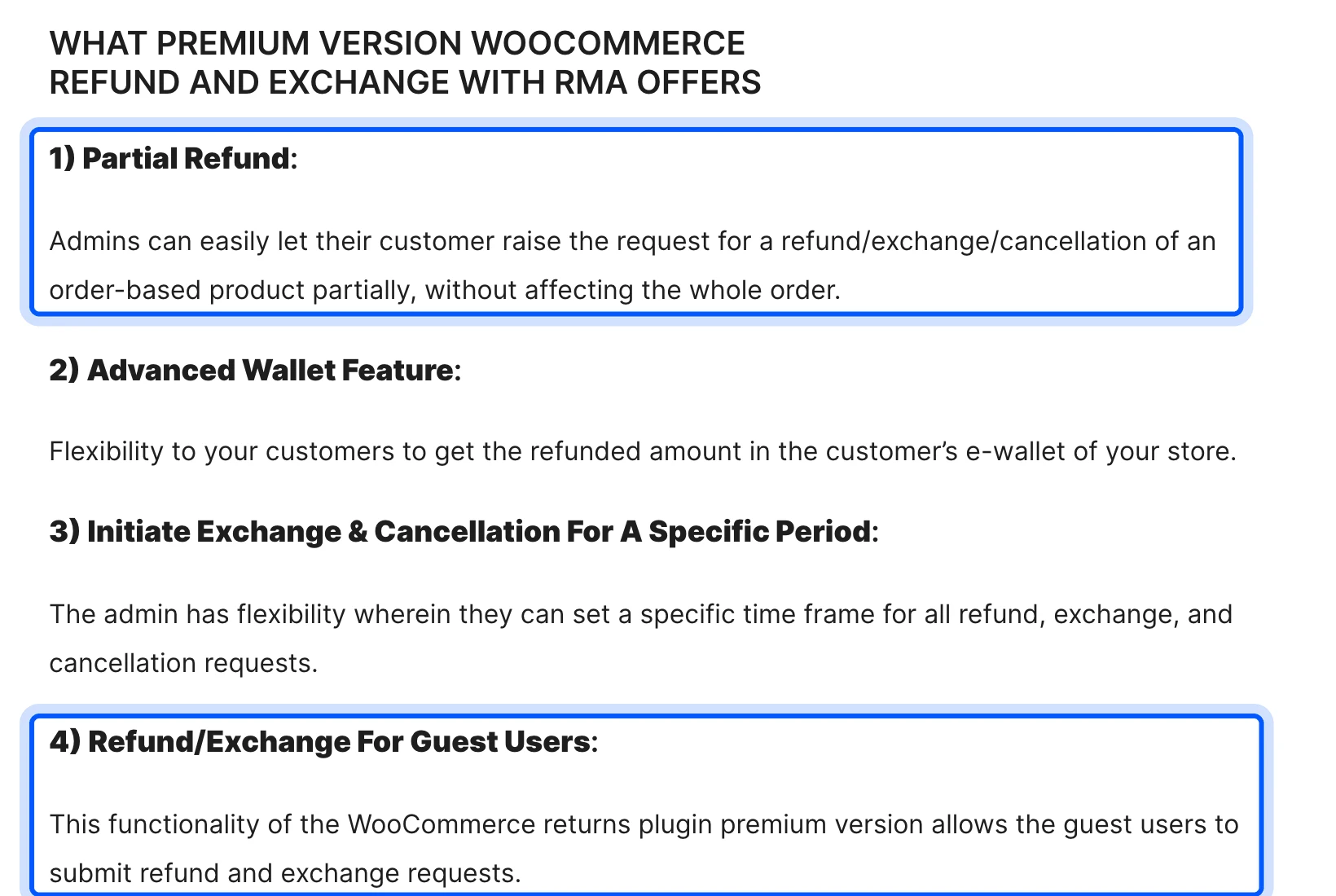
The WordPress.org listing showed 4,000+ active installs and 124 reviews on 17 November 2026. Version 4.7.0 was updated on 12 November 2026 and declares testing up to WordPress 7.1.4. The listing puts guest requests, partial refunds, the wallet and automated refund acceptance under the premium version.
Key features:
- Checklist score: 6 of 8. It states guests, partial returns, uploads, credit with exchanges, shipping labels and abuse limits.
- Attachments: Customers add images or video, and the free version includes it.
- Fraud controls: You can restrict customers by email and set a user limit for refunds.
- Labels: Return labels come through ShipStation and ShipRocket.
- Analytics: A dashboard shows request totals, return value and top returned products.
- Pro extras: SMS notifications and AI photo inspection are listed on the Pro page.
Pricing: Free core plugin. Pro costs $79 a year for one site, $149 for five and $289 for ten, from the WP Swings Pro page on 17 November 2026.
Best for: Stores that want a proven free start and may add guests and the wallet later.
The pages state no warranty claims and no EU withdrawal button. The free listing also names a usage tracker and a notification service in its external services section. Read that part if your privacy policy is strict.
3. Zorem Returns
Zorem Returns scores 5.5 of 8 and is the strongest here on exchanges, restocking fees and analytics. Customers choose a refund, an exchange or store credit from My Account. It sells for $129 a year for one site, which is the highest price on this list.
The Zorem product page lists version 1.7.7, updated in November 2026 and compatible with WooCommerce 11.2.2. It describes cross-product exchanges and store credit with a bonus. A restocking fee can be a flat amount or a percentage, and defective items skip it.
Key features:
- Checklist score: 5.5 of 8. It states partial returns, uploads, credit with exchanges, warranty and rules with limits. It earns half a point on guests, because the product page does not state them.
- Three resolutions: Refund, exchange or store credit, and credit can carry a bonus.
- Return windows: A global window with overrides per product and category, plus longer windows for chosen customers.
- Fraud limits: A cap on returns per customer and restrictions by payment method.
- Analytics: Return rate, revenue kept and top returned products with reasons.
- Keep the item: Low-value items skip the return shipment.
Pricing: $129 a year for one site, with five-site and ten-site licenses. The page says the license renews at the price you paid.
Best for: Stores that want to keep revenue through exchanges and store credit and track it.
The product pages never mention return labels or the EU withdrawal button, so both score 0. The page also shows no public rating. The Zorem site lists a 14-day guarantee, so test one return inside that window.
4. Flexible Refund for WooCommerce
Flexible Refund for WooCommerce from WP Desk scores 5 of 8 and is the cheapest paid option here. The free version lets customers request a refund for a full order. Pro adds partial refunds, guest forms and file uploads for $59 a year.
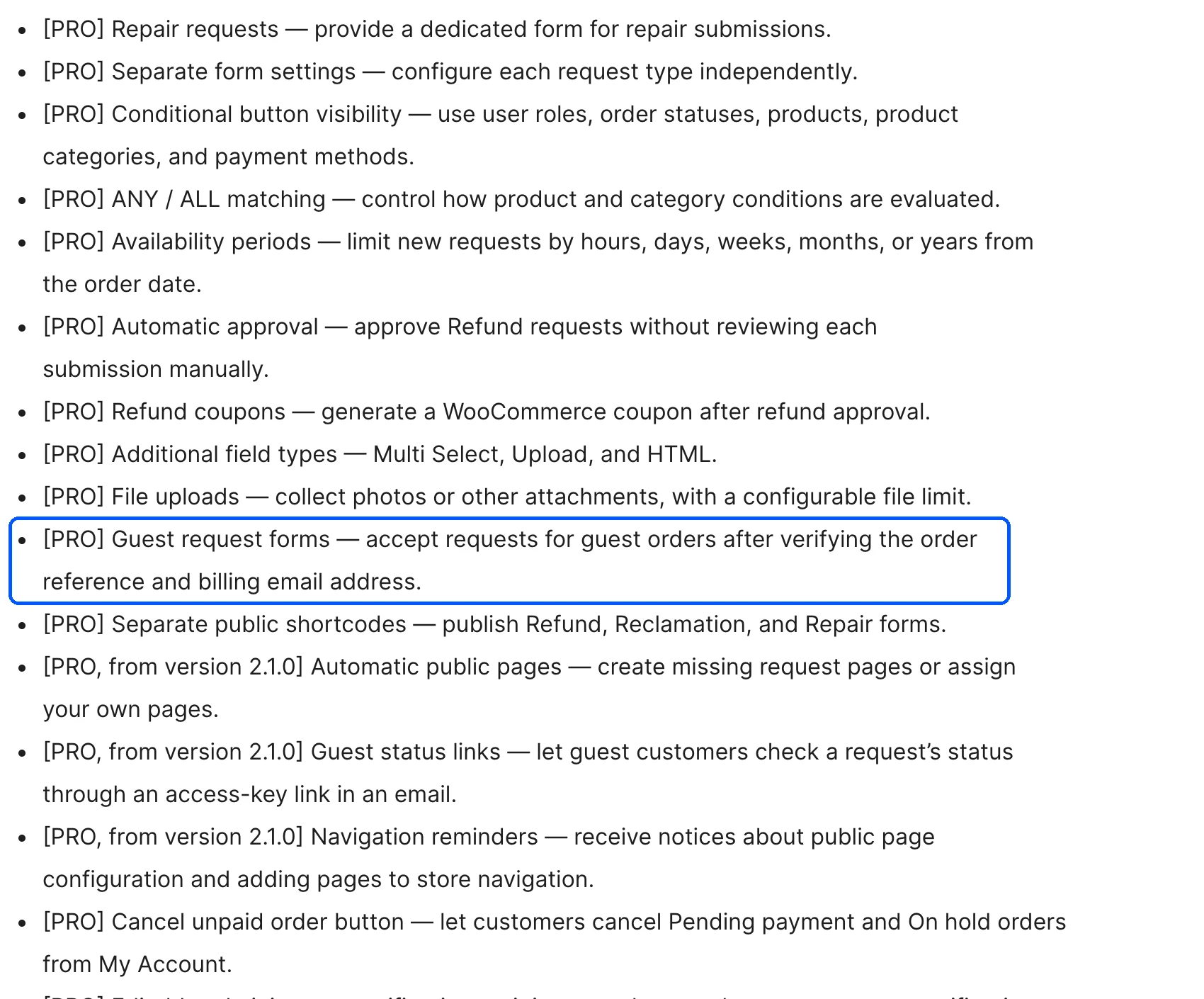
The WordPress.org listing showed 2,000+ installs and 4 reviews on 17 November 2026. Version 2.1.3 was updated on 9 November 2026. The free form builder collects reasons and comments, and approving a request creates a WooCommerce refund and restores stock.
Key features:
- Checklist score: 5 of 8. It states guests, partial returns and uploads, with half points for coupons, repair requests, conditional rules and the EU naming.
- Form builder: Drag and drop fields collect reasons, comments and policy confirmations.
- Partial refunds: Pro lets customers choose items and quantities.
- Guest forms: Pro accepts requests for guest orders after an order and email check.
- Complaint and repair forms: Pro adds separate forms for these request types.
- Conditional rules: Pro limits the button by role, status, product, category or payment method.
Pricing: Free core plugin. Pro costs $59 a year for one site, from the WP Desk plugin page on 17 November 2026.
Best for: Stores that want guest forms and a custom request form at the lowest paid price.
There is no store credit beyond a refund coupon, no exchange and no return labels. The free version covers whole orders only, so most stores with multi-item orders end up on Pro.
5. Returns and Warranty Requests for WooCommerce
Returns and Warranty Requests scores 4.5 of 8 and is the best fit when warranty is the main job. It is an official WooCommerce Marketplace extension that manages RMA requests and product warranties. You can give warranty terms to each product or variation and even sell extended warranties at checkout.
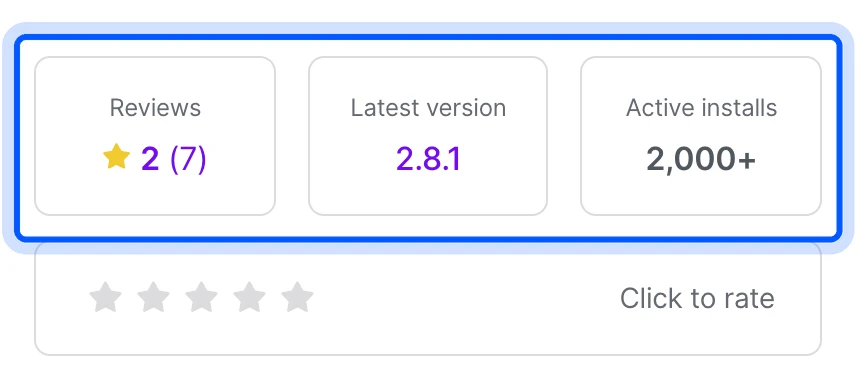
The WooCommerce.com listing showed version 2.8.1, 2K+ active installs and a 2 of 5 rating from 7 reviews on 17 November 2026. It declares testing with WooCommerce 11.3. Guests receive a claim link in the Order Completed email and can start a request without logging in.
Key features:
- Checklist score: 4.5 of 8. It states guests, uploads and warranty, with half points for exchanges, label files and rules.
- Warranty types: No warranty, included warranty or a paid add-on, set per product.
- RMA codes: You set the start number, length and a prefix or suffix.
- Form builder: Text fields, drop-downs and file uploads collect the details.
- Label and tracking: You add a label for the customer or ask for a tracking code.
- Team permissions: Access is set by warranty status.
Pricing: $99 a year for the one-year plan, from WooCommerce.com on 17 November 2026. The page can show another currency in some regions.
Best for: Stores that sell electronics or appliances and want warranties as a product.
The page states no store credit and no partial returns, and it has no abuse limits for serial returners. The 2 of 5 rating from 7 reviews is small, so read those reviews before you buy.
Does Your WooCommerce Store Need an EU Withdrawal Button?
Yes, if you sell online to consumers in the EU. Article 11a of Directive 2011/83/EU requires a withdrawal function labeled “withdraw from contract here” for contracts made through an online interface. EU countries apply the rule from 19 June 2026, and the function must stay available throughout the withdrawal period.
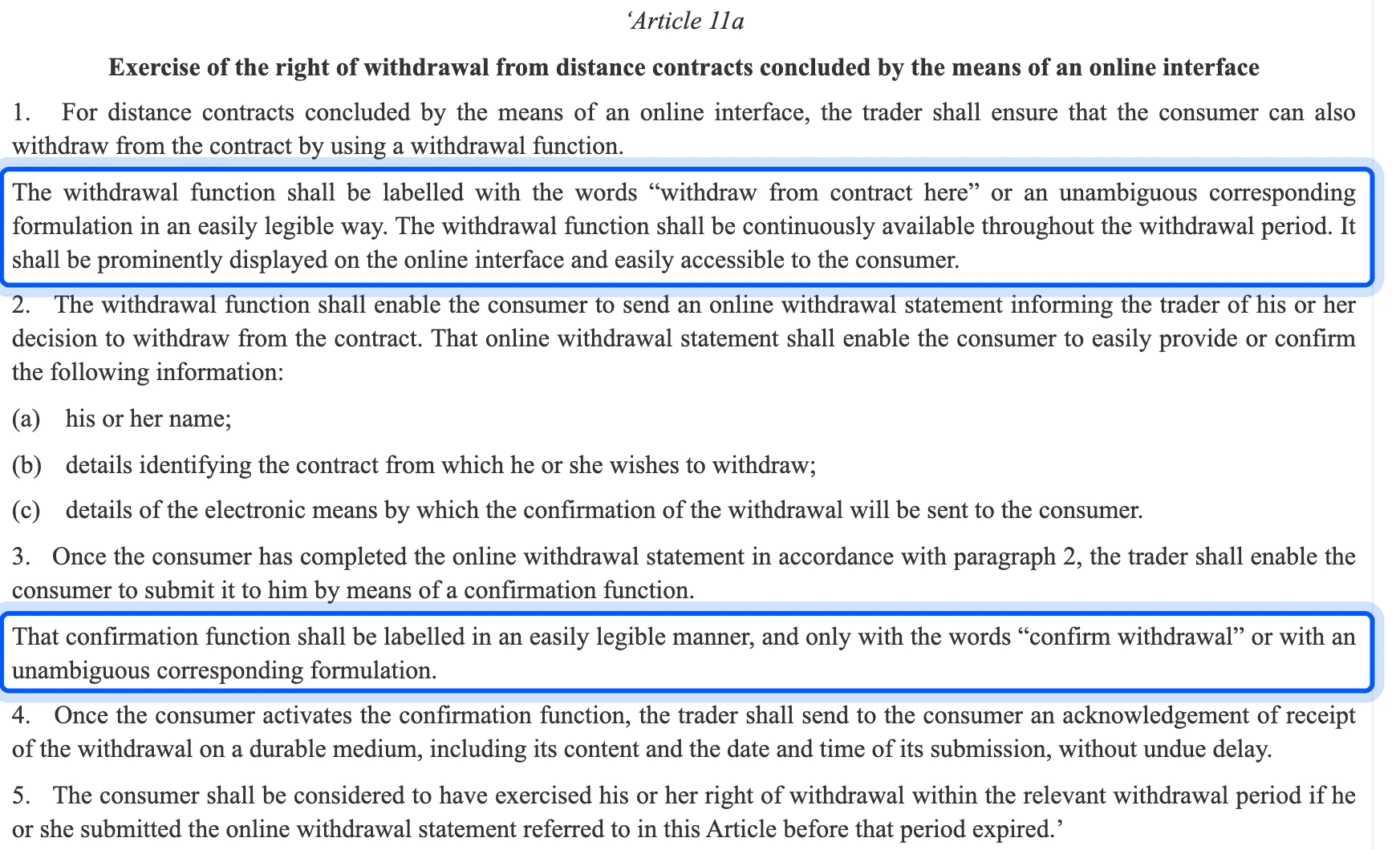
The same article sets a two-step flow. The customer completes an online statement with a name, details of the contract and an email for confirmation.
A confirmation button labeled “confirm withdrawal” sends it. The trader then sends an acknowledgement on a durable medium with the content and the date and time. You can read the text in Directive (EU) 2023/2673 on EUR-Lex.
WooCommerce 11.1 added a basic version.
The developer blog says Order Withdrawal ships in WooCommerce 11.1 and is off by default. You switch it on under WooCommerce > Settings > Advanced > Features and the form then lives at /my-account/withdraw-order.
WooCommerce adds no link to that page. You must place one in your footer or order emails.
The core form also does not change the order status or issue a refund.
Our EU withdrawal button checklist walks through Article 11a step by step. That is fine if you already refund by hand. If you want the withdrawal to open a return with a refund decision and a tracked status, a plugin does that part.
Note: On our test store the free WPReturns form refused an order shipped to the US and accepted one shipped to Germany. The plugin switches the withdrawal flow on by country, and the US is off by default. Check which countries your store has turned on.
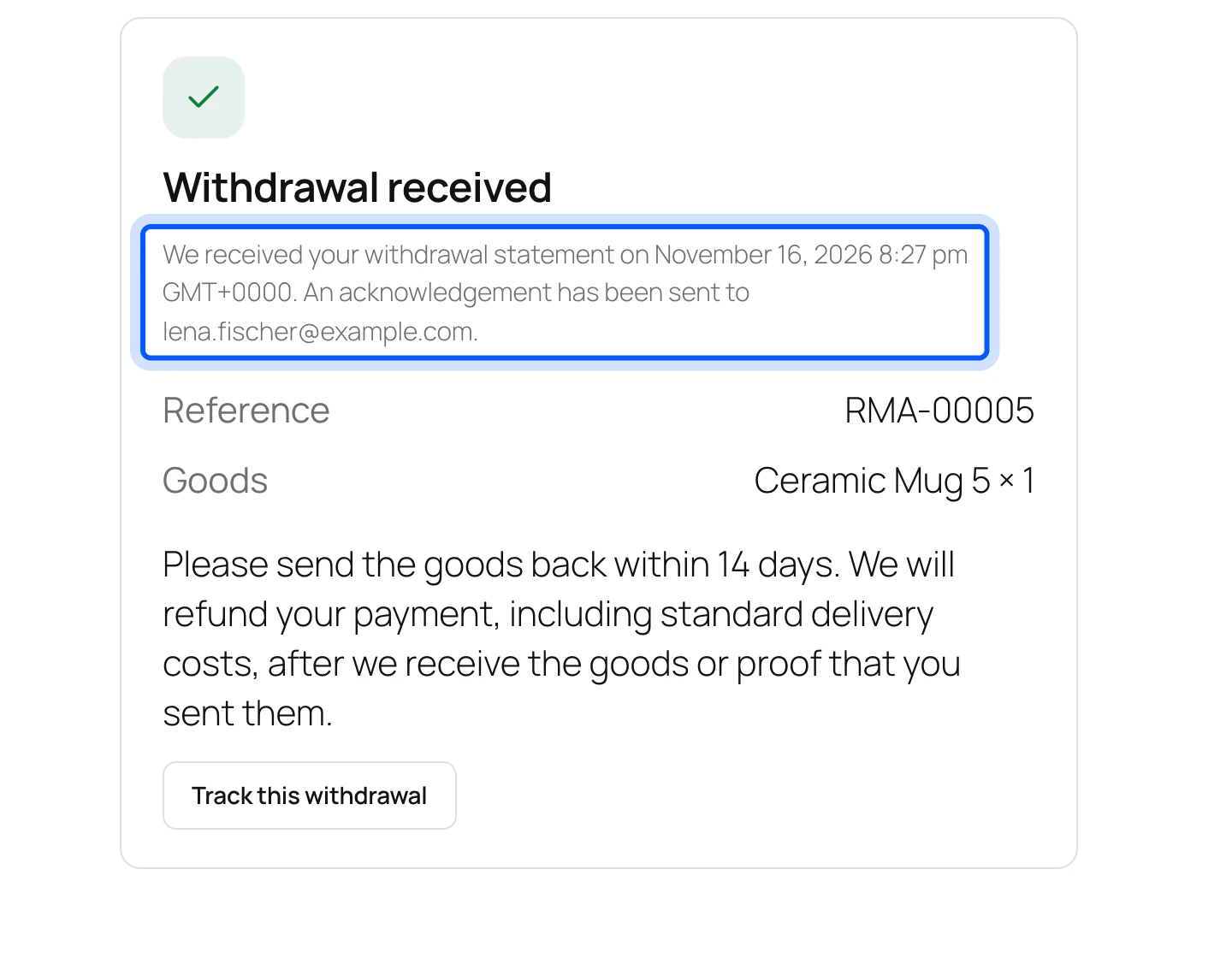
Among the five plugins, only WPReturns describes the full two-step flow with an acknowledgement. Flexible Refund names its product “EU One Click Return” but its listing does not describe the two steps, so it earns half a point. Ask a lawyer about your own duties in each country you sell to.
Are There Free WooCommerce Returns Plugins?
Yes, three of the five have a free version, and they cover different gaps. The free WooCommerce returns plugin from WPReturns is the only one whose free version includes guest returns and the EU withdrawal button. Return Refund and Exchange and Flexible Refund keep guests and partial returns behind a paid plan.
This list shows what each free version stated on 17 November 2026:
- WPReturns free: Guest portal, photos, per-item returns, cancel requests and the EU withdrawal button.
- Return Refund and Exchange free: Attachments, user restrictions, a time frame for requests and a refund shipping option.
- Flexible Refund free: Whole-order refund requests with a form builder and status emails.
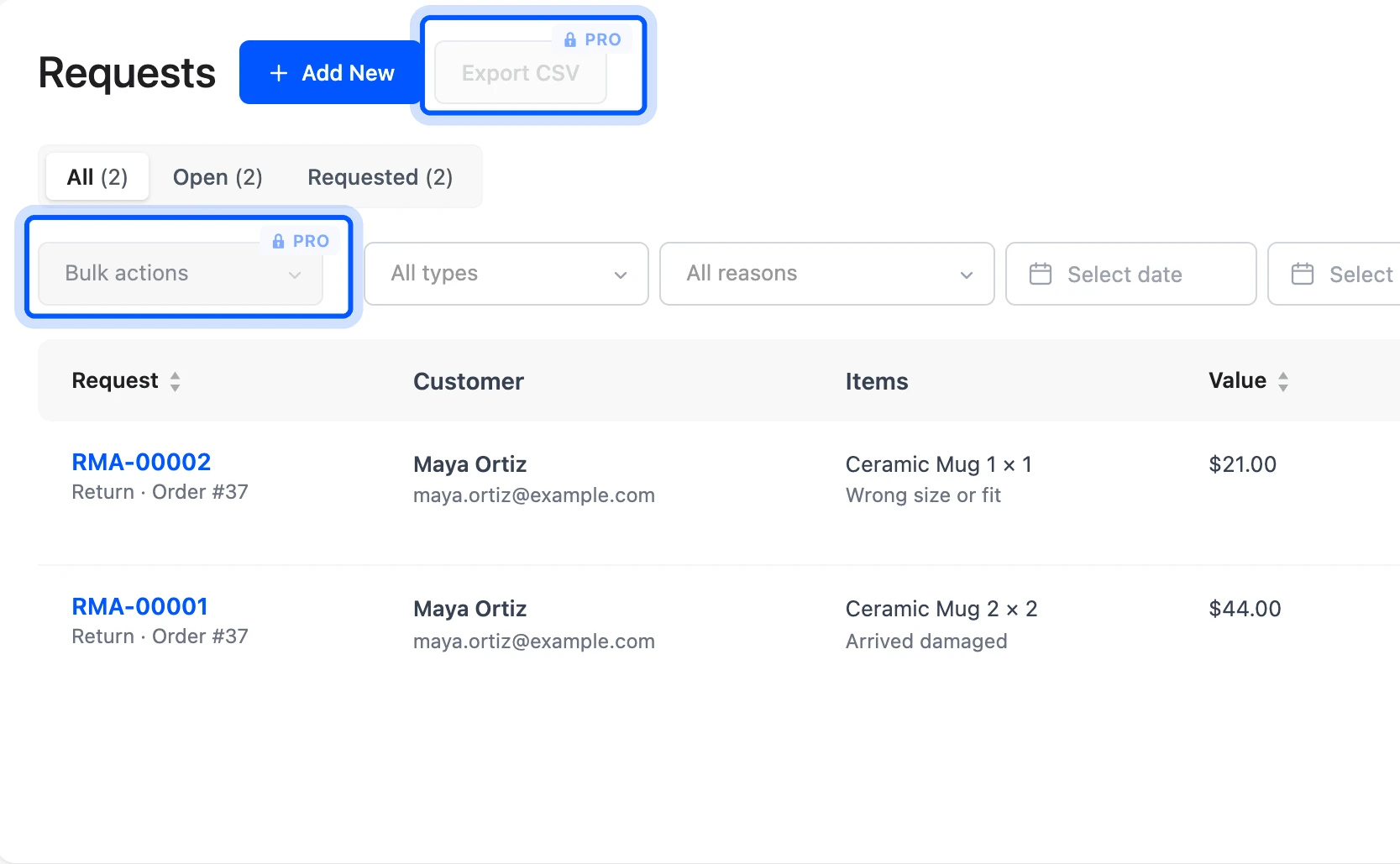
Free has limits on every list entry. The WPReturns free build showed a locked Export CSV and bulk actions on the Requests list, both marked Pro. Each free version also stops short of store credit and exchanges, so a store with real return volume will want a paid tier.
How to Choose a WooCommerce Returns Plugin
Choose a returns plugin by the job that costs your store the most time or money today. Guest buyers who email you point to a guest portal, and refunds that eat revenue point to store credit and exchanges. Stores that sell in the EU need a plugin that states the withdrawal flow.
Price comes last, once those jobs are settled. Start with a worked example. Say you handle 40 returns a month and 15 of them come from guest checkouts.
That is 15 email threads you answer by hand each month. At 10 minutes per thread, that costs 150 minutes a month, and a guest portal pays back first.
Check three things before you buy. Look at the tested-up-to versions on the listing and confirm HPOS support there.
Then test one real return from request to refund on a staging copy, including the refund through your own payment gateway.
Your gateway matters because refunds depend on payment gateway support for automatic refunds. A cash on delivery order always needs a manual refund. Labels matter too, and our guide to WooCommerce shipping plugins shows what carrier accounts cost.
If you need something none of these do, such as a custom RMA flow tied to your ERP, our WooCommerce development services build it. Returned stock also needs a count, so see our guide to WooCommerce inventory tracking.
Conclusion
The best WooCommerce returns plugins in 2026 are the ones that fit the returns your store handles each week. WPReturns ranks first on our checklist and Return Refund and Exchange has the strongest track record. Zorem leads on exchanges, Flexible Refund on price and Returns and Warranty Requests on warranty.
Pick one job, test one return and read the limit under each plugin before you pay. If you sell in the EU, check your withdrawal flow today, because the rule applies from 19 June 2026.
Frequently Asked Questions (FAQs)
Q1. Does WooCommerce have a built-in returns system?
No. WooCommerce can refund an order from the edit screen. It has no return request form and no return statuses.
WooCommerce 11.1 added a basic Order Withdrawal form for EU customers, and it is off by default. You still need a plugin for the full return flow.
Q2. What is the difference between a return and a refund in WooCommerce?
A return is the customer sending goods back, and a refund is you paying money back. WooCommerce handles only the refund. A returns plugin tracks the request, the parcel and the decision before the refund happens.
Q3. Can guests request a return without an account?
Yes, with the right plugin. WPReturns includes a guest portal in the free version, and Return Refund and Exchange and Flexible Refund include guests in Pro. Returns and Warranty Requests emails guests a claim link instead.
Q4. Do I need a plugin for the EU withdrawal button?
You need the function, and WooCommerce 11.1 has a basic form you switch on yourself. The core form does not add a link, change the order status or issue a refund. A plugin adds the button placement and the refund workflow.
Q5. Will a returns plugin work with HPOS?
Most state it. WPReturns, Return Refund and Exchange and Zorem list HPOS support. Check the listing of any plugin you choose and test on a staging site before you go live.
Q6. Which returns plugin is best for a small store?
A small store should start with a free version. WPReturns free covers guests and the EU button, and Return Refund and Exchange free has a track record of 4,000+ installs. Upgrade only when store credit or exchanges would save you real money.