
WooCommerce dropshipping means your store sells a product and a supplier ships it straight to the customer. You never hold stock, and you keep the gap between your retail price and the supplier’s cost.
In October 2026 we built a dropshipping store on our WordPress 7.1.3 test site with WooCommerce 11.2.1. We installed four free WordPress.org plugins, imported an example supplier feed, placed an order and followed it to the tracking email. No supplier account was connected, so every product and supplier in the screenshots is an example.
This guide covers how the model works and which plugin does which job. Then come five setup steps with real screens, a margin worked example with stated numbers, and the shipping, returns and tax rules. The last section says when dropshipping is the wrong model.
What Is WooCommerce Dropshipping?
WooCommerce dropshipping is a way of running a WooCommerce store where products live in a supplier’s warehouse. When a customer pays, the order details go to the supplier, who packs and ships the parcel under your store’s name. Your job is the catalog, the price, the marketing and the customer service.
WooCommerce itself has no dropshipping switch. It sells the product and takes the payment. Plugins fill the gaps: one brings the supplier’s products in, one tells the supplier about each order, and one returns tracking.
That split matters more than any single plugin choice. A store owner who knows which plugin owns which job can swap one out later without rebuilding the store.
How WooCommerce Dropshipping Works
A dropshipping order passes through six stages, from the supplier’s product feed to the tracking email. The supplier’s file creates the products, you set the retail price, and WooCommerce takes the payment. Then the order goes to the supplier, the supplier ships it, and the customer gets a tracking number.
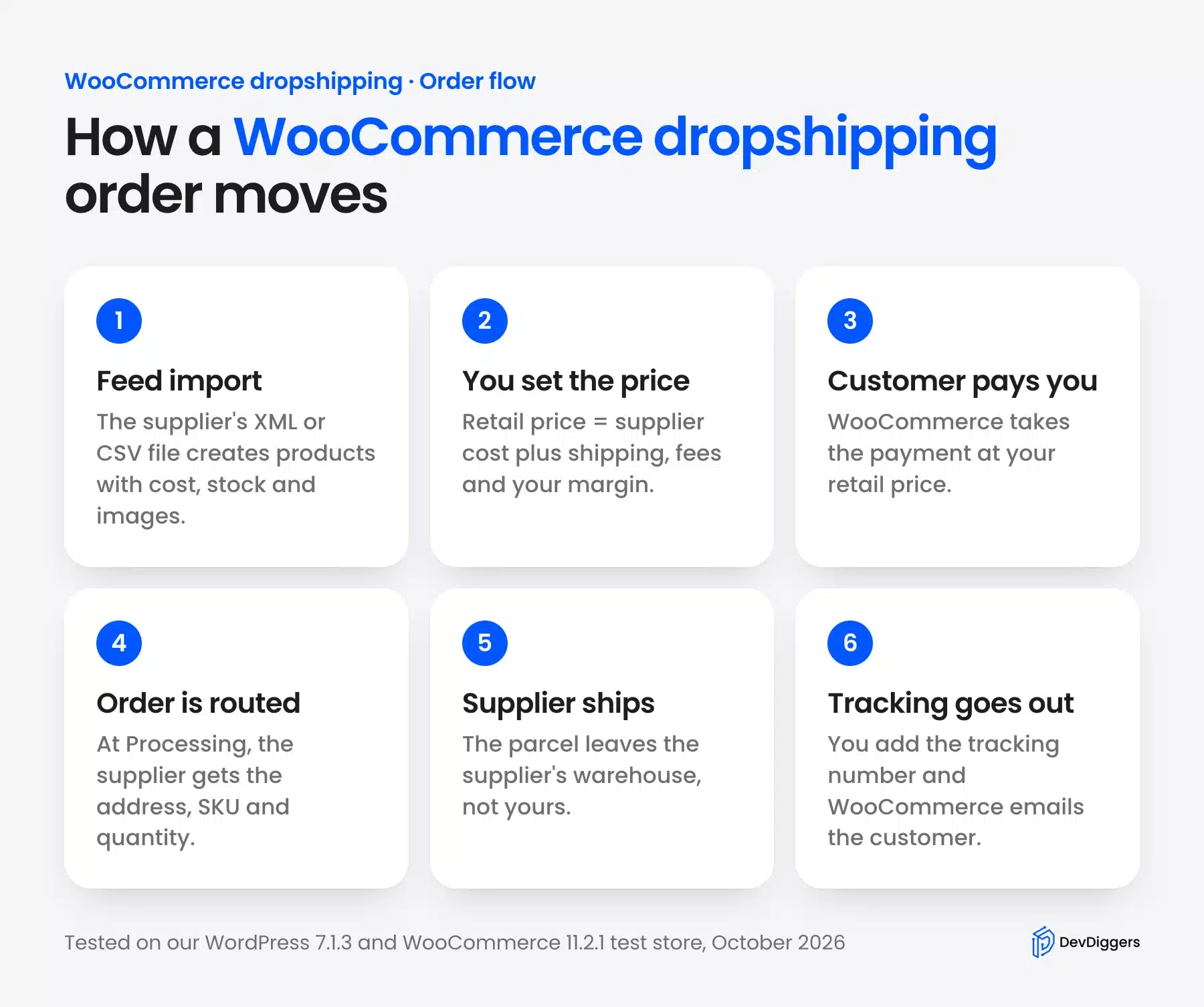
The two stages that cost store owners money are the second and the fourth. A wrong price eats the margin on every sale, and an order the supplier never hears about turns into a refund and an angry review.
Supplier sync is the part most guides skip. Suppliers change cost and stock often, so the feed has to run again. Each run can overwrite the work you did on your own product pages.
Which WooCommerce Dropshipping Plugin Do You Need?
You need one WooCommerce dropshipping plugin per job: product import, order routing and shipment tracking. Some paid tools do all three for one marketplace, but free plugins on WordPress.org each cover one job. The table shows the four free plugins we installed in October 2026 and what each did on our test store.
| Job | Free plugin we tested | What it did in our test | Locked behind Pro |
|---|---|---|---|
| Import products from a supplier file | Dropshipping XML for WooCommerce 1.7.4 | Created 4 products from an XML feed in 7 seconds | Price modifier, cron schedule, removed-product rules |
| Send each order to the supplier | Supplier Order Email 3.6.16 | Emailed the supplier when the order reached Processing | PDF packing slips, custom email fields |
| Send tracking to the customer | Advanced Shipment Tracking 4.0.4 | Added a USPS number and sent the shipped email | Tracking import from carriers |
| Import from AliExpress | ALD Dropshipping and Fulfillment 2.2.5 | Showed price rules, blocked imports without HTTPS | Order fulfillment logs, API import |
Pick the import plugin by how your supplier delivers products. A wholesaler with an XML or CSV feed suits Dropshipping XML. A marketplace like AliExpress needs a plugin built for it, and those usually depend on a browser extension.
How to Start Dropshipping With WooCommerce
You can start dropshipping with WooCommerce in five steps once the store is live with HTTPS. Install the plugins, import the supplier feed, then set retail prices and stop the feed from overwriting them. Last, route each order to the supplier and send the tracking number to the customer.
Most of the setup time goes into the product mapper in Step 2. Place a test order with a cash on delivery method before you take real payments, as we did.
Step 1: Install the Dropshipping Plugins
Install the plugins from Plugins, then Add New, by searching each name. Activate WooCommerce first: ALD and Advanced Shipment Tracking both list it as a required plugin, and WordPress will not activate them without it.
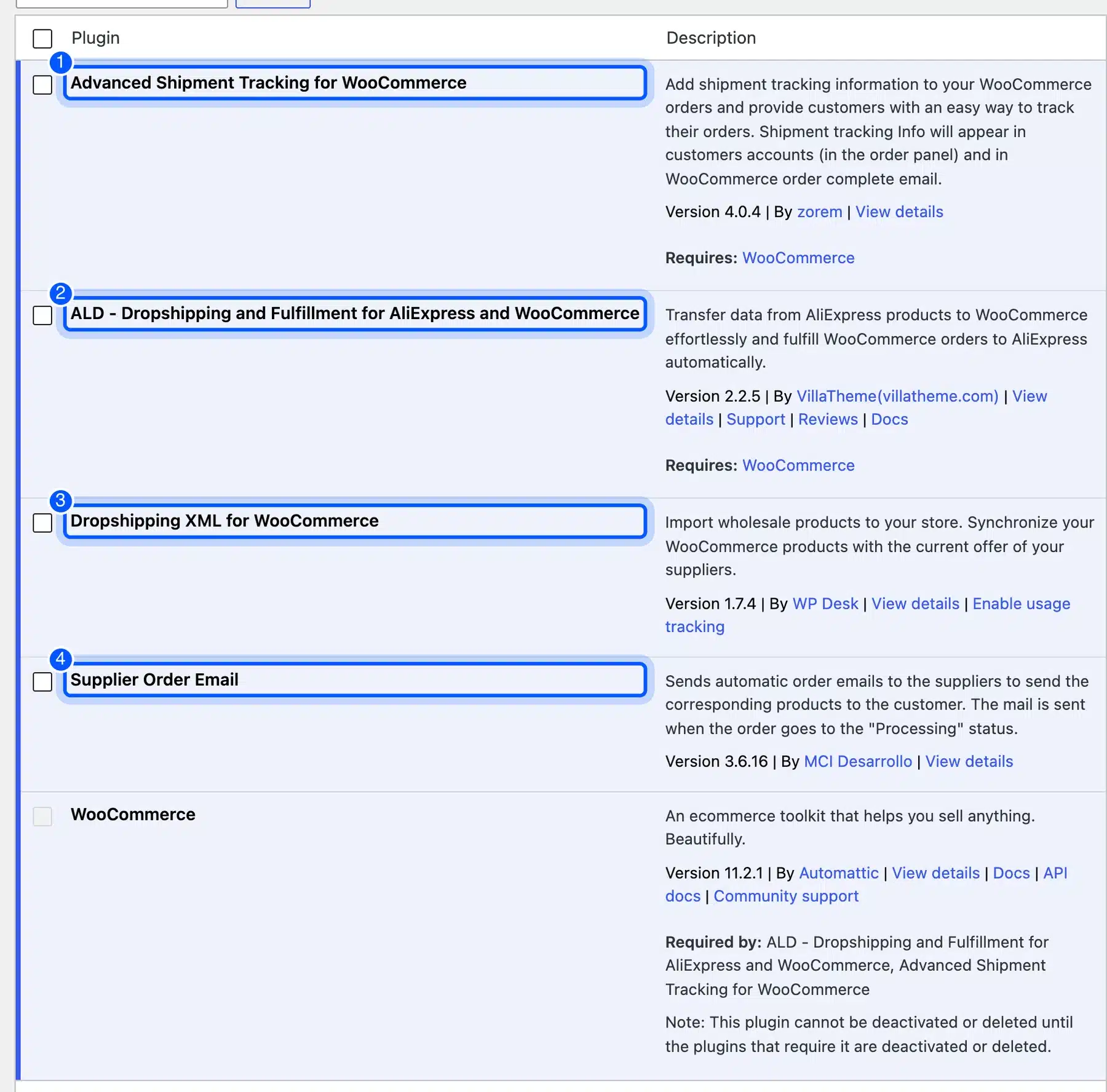
Install only the ones you need. A store with one wholesale supplier needs Dropshipping XML, Supplier Order Email and a tracking plugin, and can skip the AliExpress plugin entirely.
Step 2: Import the Supplier Feed
Your supplier gives you a link to a product file, usually XML or CSV. Ours was an example feed of four products with SKU, name, description, wholesale price, stock, image and shipping days.
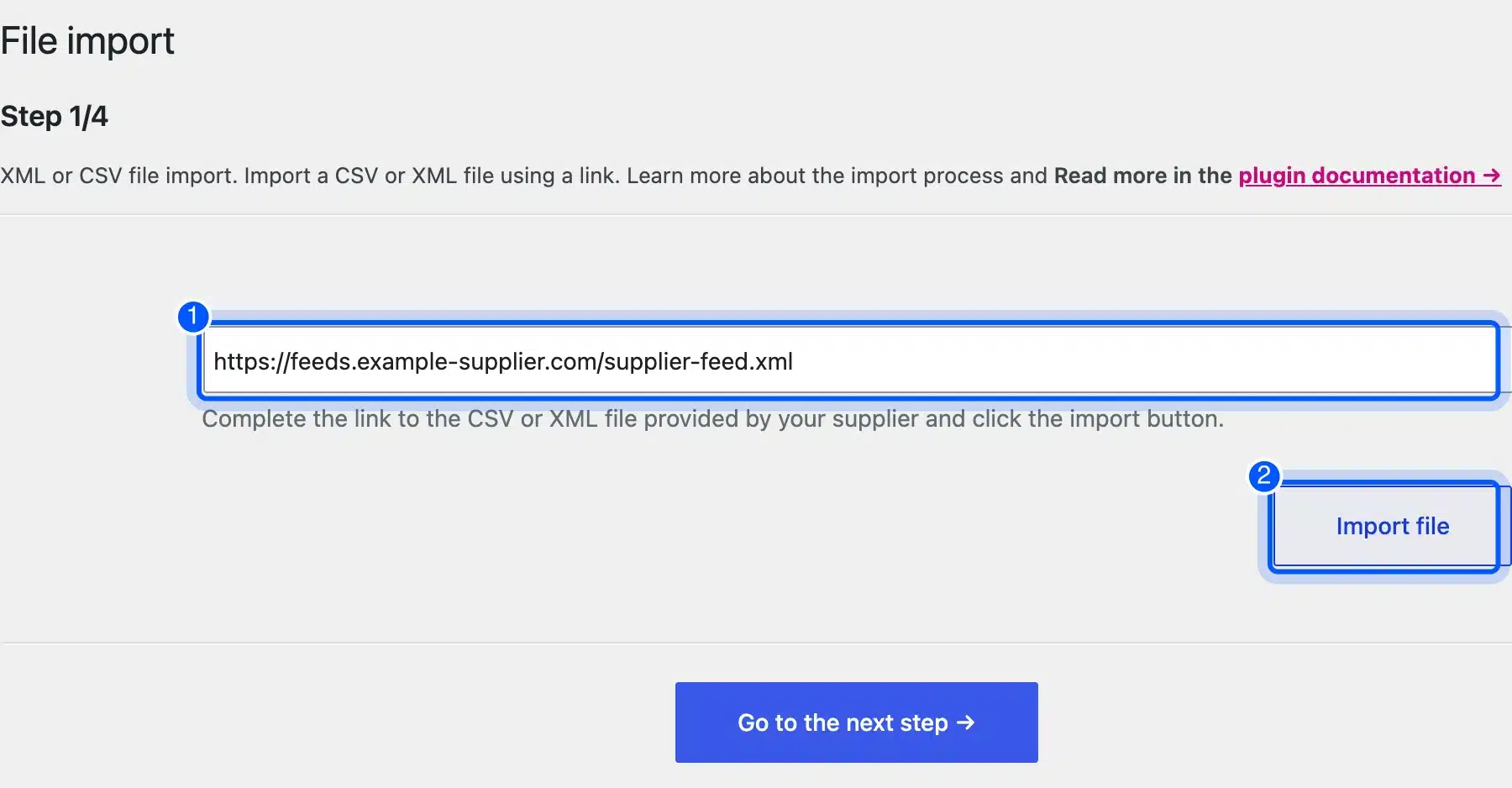
- Add the feed link: Go to Dropshipping import, then Import, paste the file URL and click Import file.
- Pick the product tag: The preview lists every tag in the file with a count. The plugin picked
productwith 4 items on its own, which is the right choice for most feeds.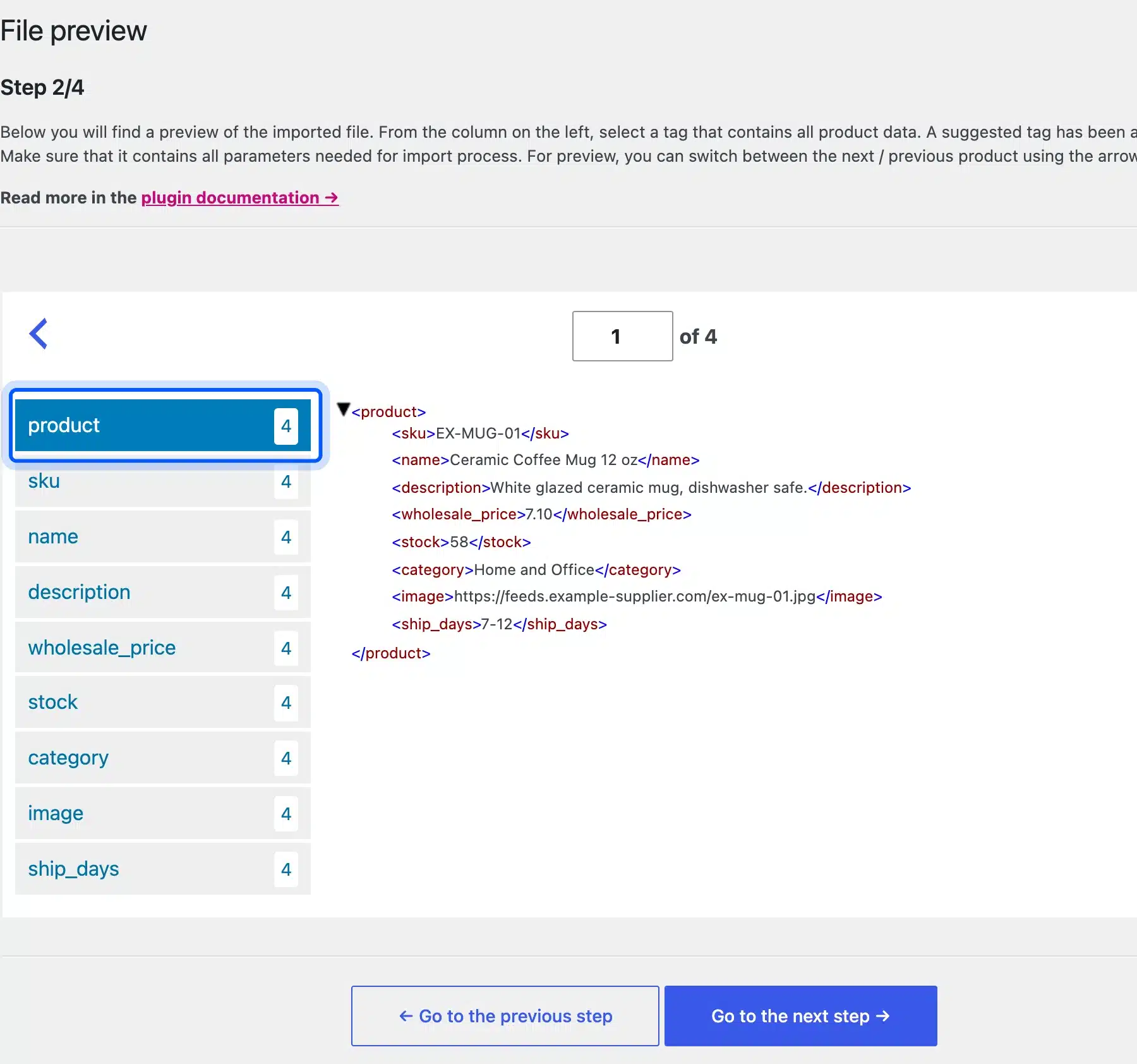
- Map the fields: Drag each tag from the XML view onto a WooCommerce field. The field then holds a path like
{//product/name}for the title. - Map price, SKU and images: We mapped
wholesale_priceto Price,skuto SKU,imageto Images andship_daysto a custom meta field.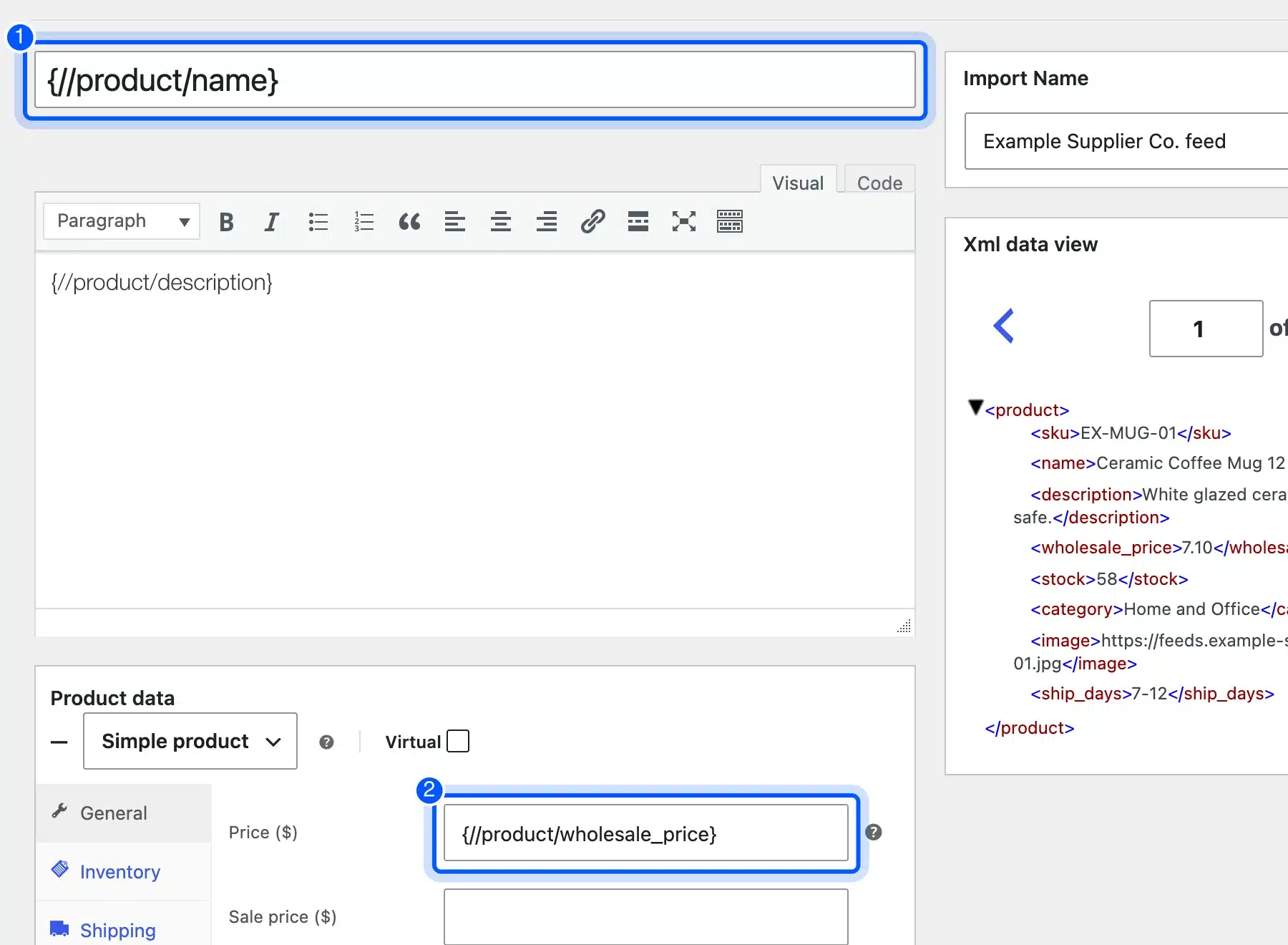
- Start the import: On the options step, keep SKU as the match field and click Start import.
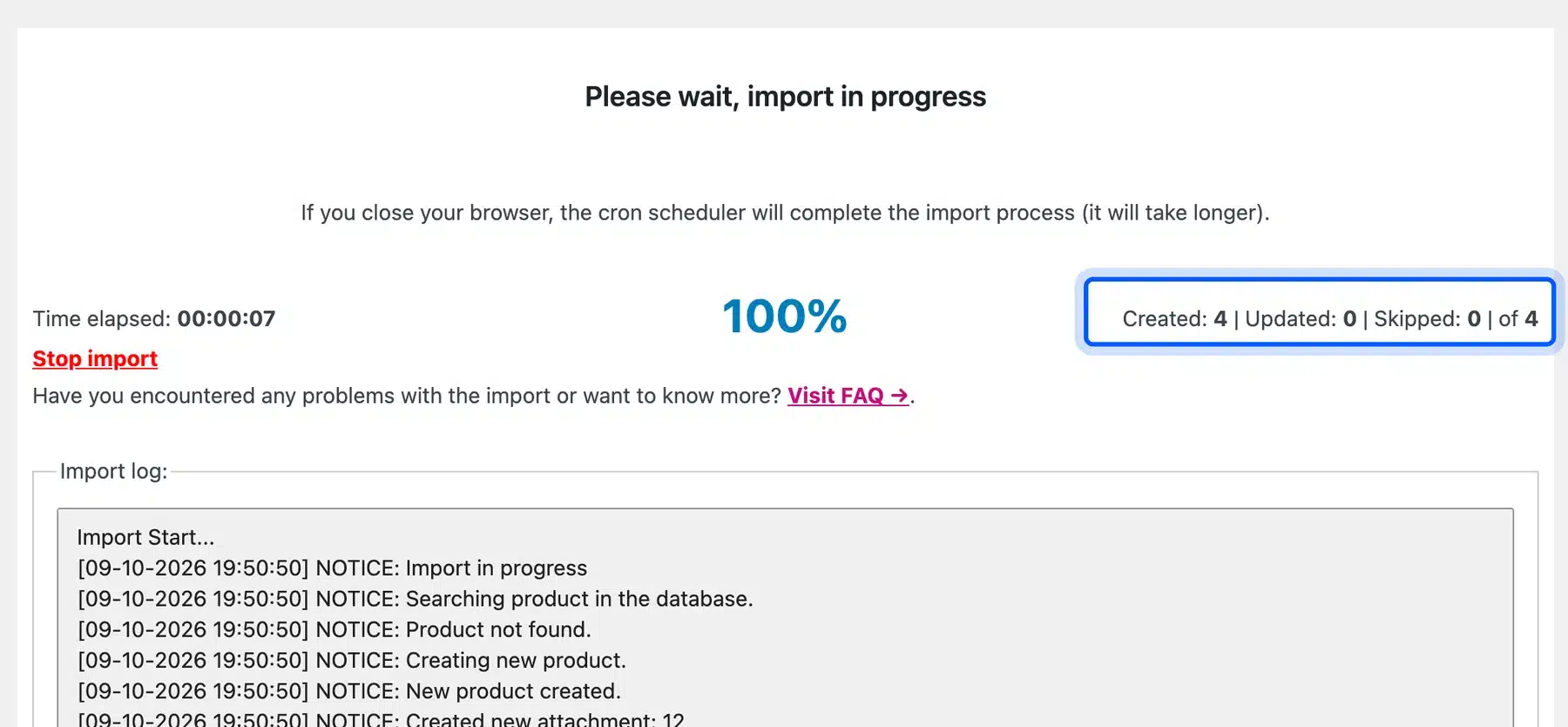
The import created four products with images in 7 seconds. Every product went live at the supplier’s price. The free version has no price modifier, so the Price field took the wholesale number as it was.
Warning: Tick “Create new products as drafts” on the first run and check prices before publishing. On our first run the mug went live at $6.40, which was the supplier’s cost and not a retail price.
A real supplier feed often holds thousands of rows. Before importing a big one, check how many products WooCommerce can handle on your hosting plan.
Step 3: Set Retail Prices and Stop Price Sync
Set your retail price on each product, then remove Product price from the feed’s sync fields. The sync list sits on the import’s options screen under Edit options in the Import Manager.
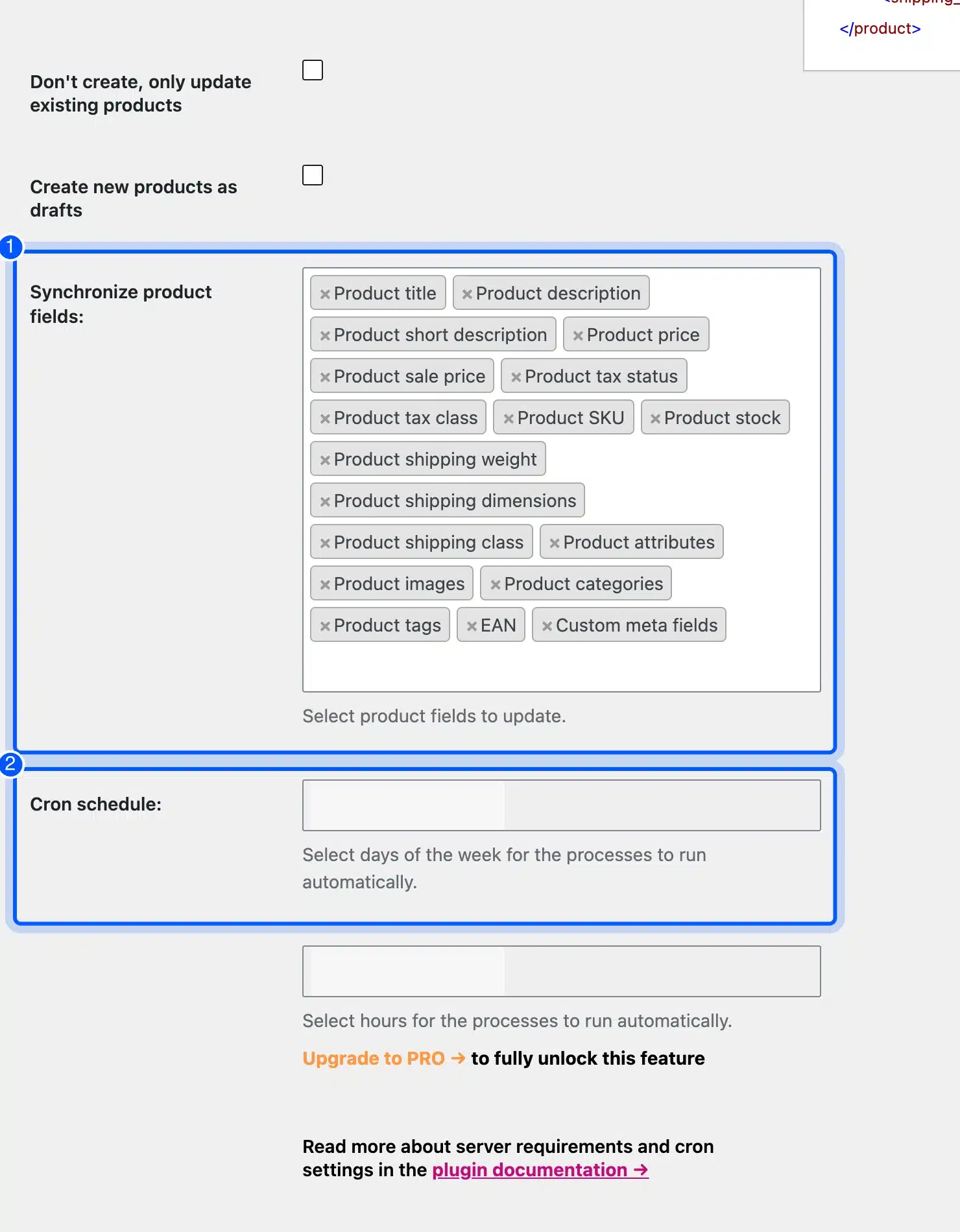
We tested why this matters. We set the mug to $19.00 by hand, changed its feed cost to $6.90 and clicked Import now. The run updated all 4 products and put the mug back to $6.90.
Then we removed Product price from the sync fields and raised the feed cost to $7.10. The next run updated the 4 products again, and the mug stayed at $19.00.
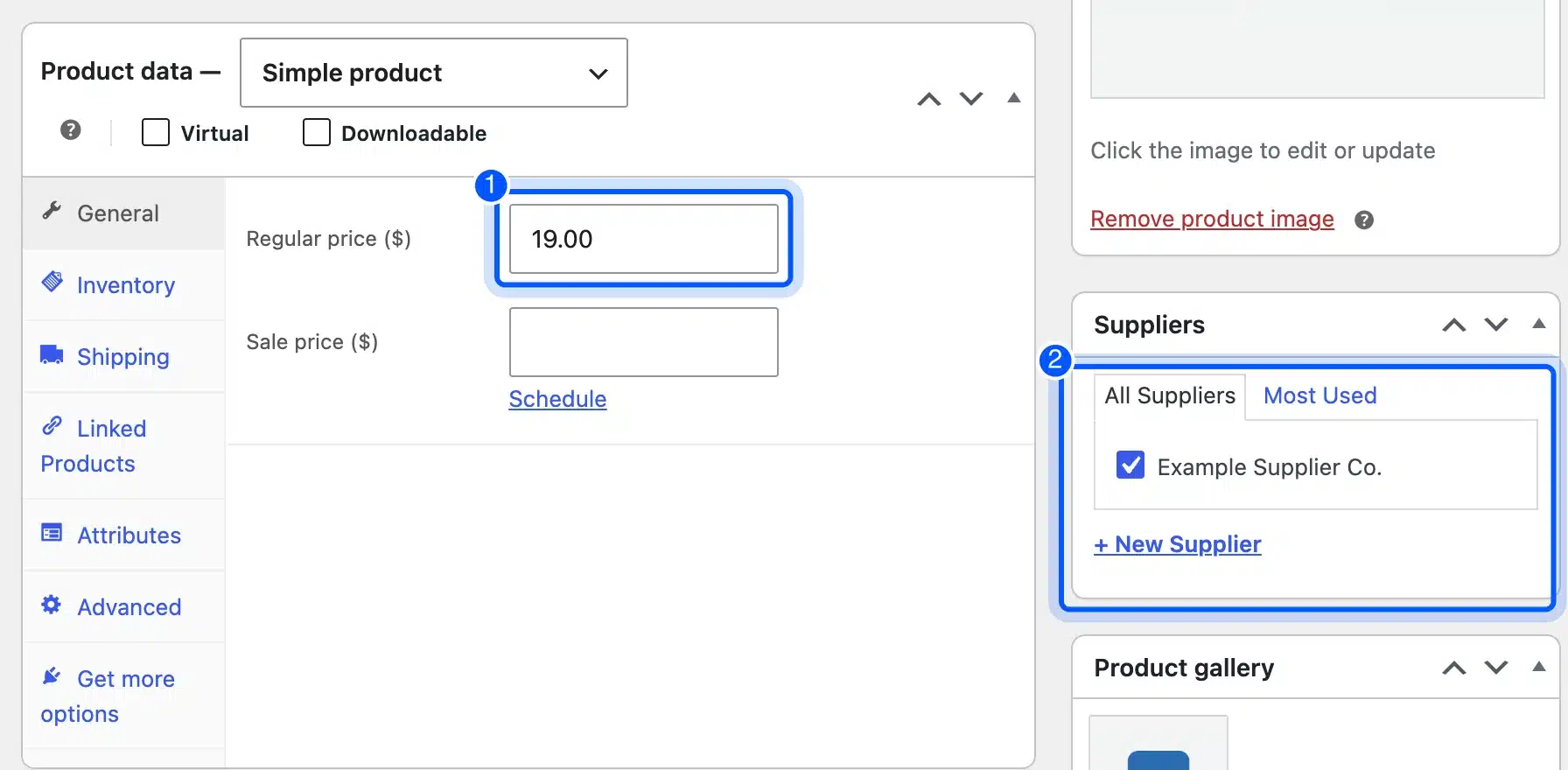
Stock and images can keep syncing, which is the reason to run the feed at all. The free plugin runs only when you click Import now, since the cron schedule needs the Pro version. Put a weekly reminder in your calendar.
Step 4: Route Orders to the Supplier
Order routing in Supplier Order Email starts with a supplier record. Go to Products, then Suppliers, enter the supplier’s name and order email, and click New Supplier.
- Create the supplier: Enter the name and email, then save. The supplier appears in the list on the right.
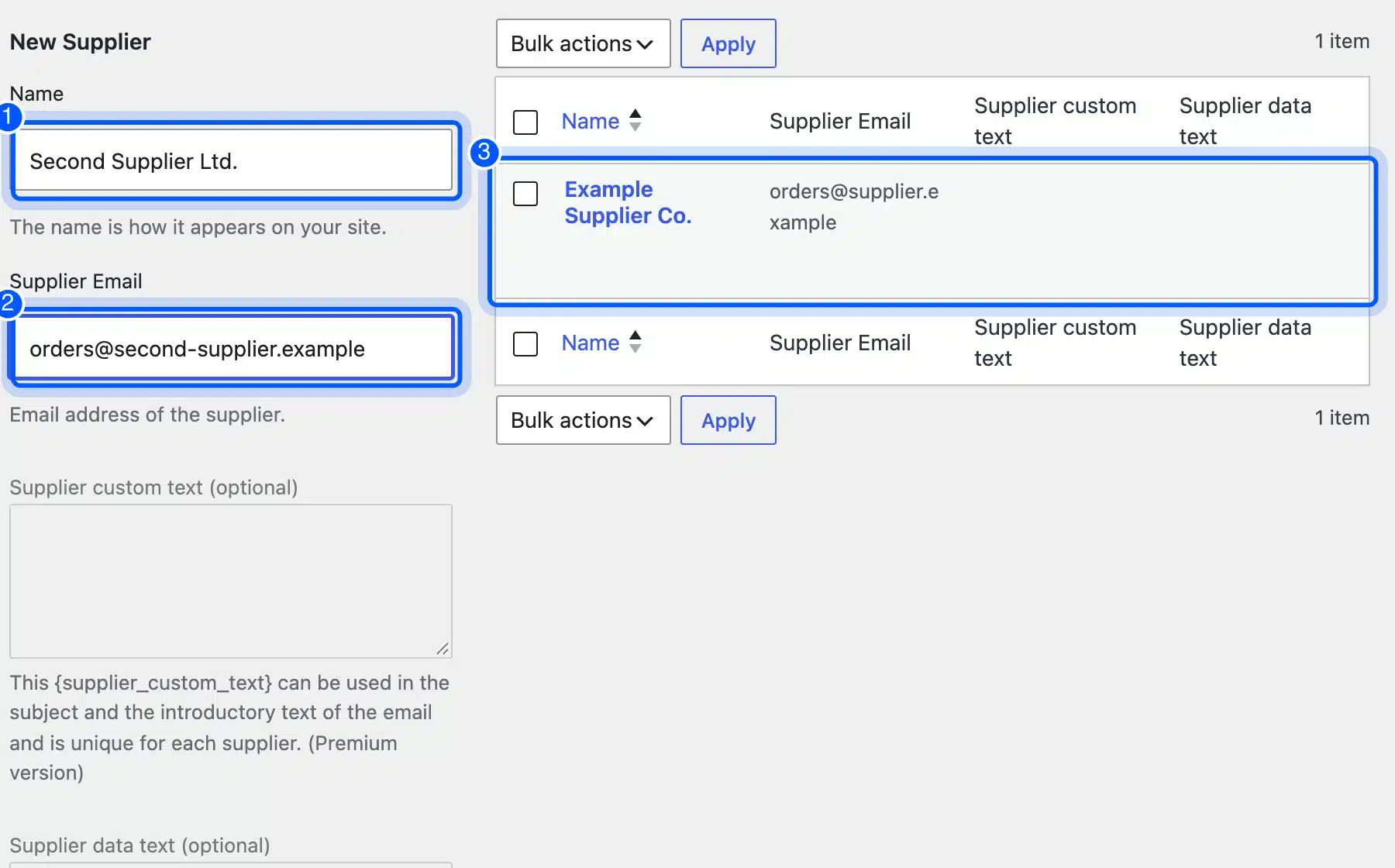
- Assign products: Open each product and tick the supplier in the Suppliers box on the right.
- Check the settings: Under Supplier Order Email, confirm the subject and intro text. We kept “Send copy of emails to admin” on.
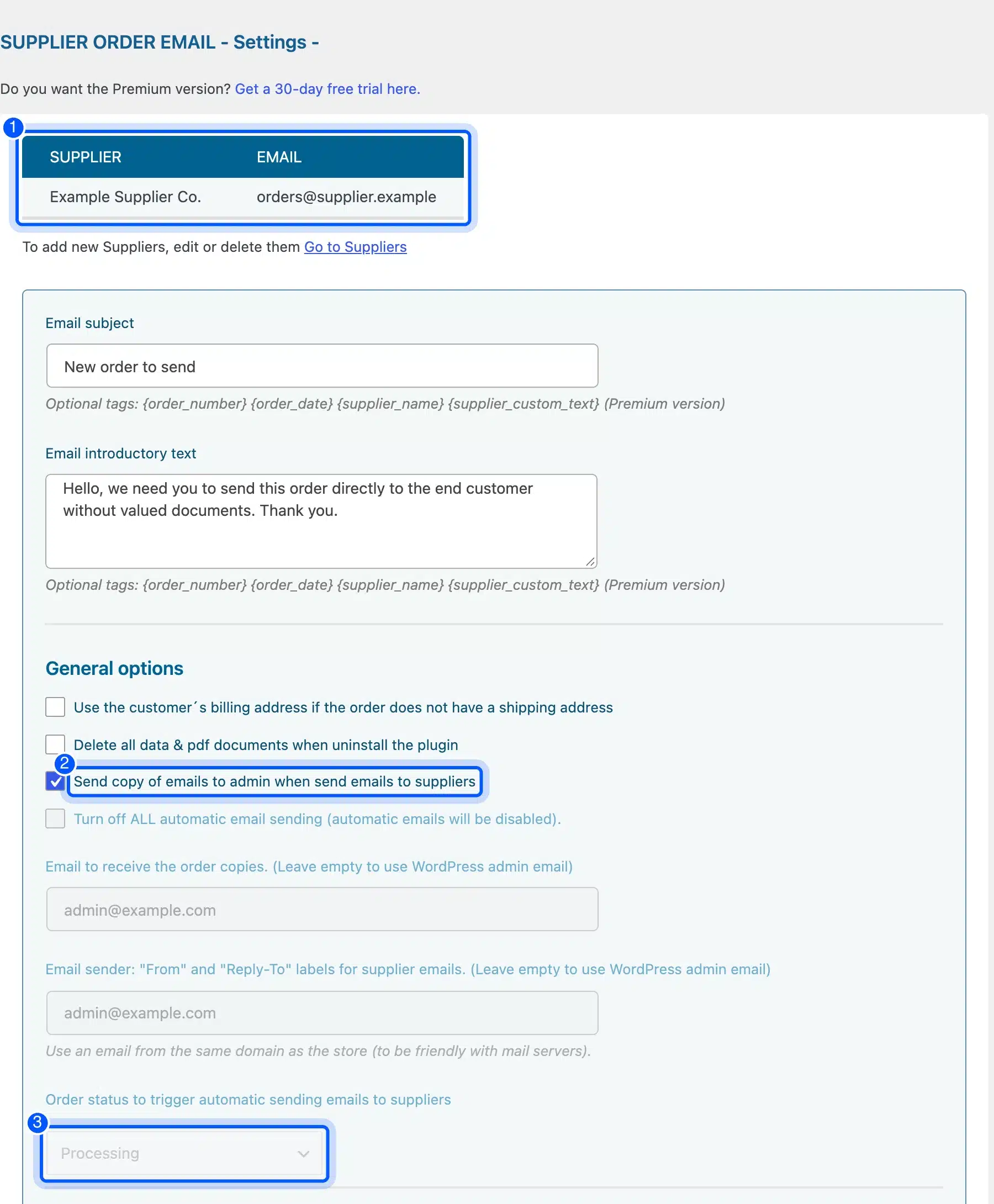
- Place a test order: We ordered two mugs for $38.00. When the order reached Processing, the supplier got an email.
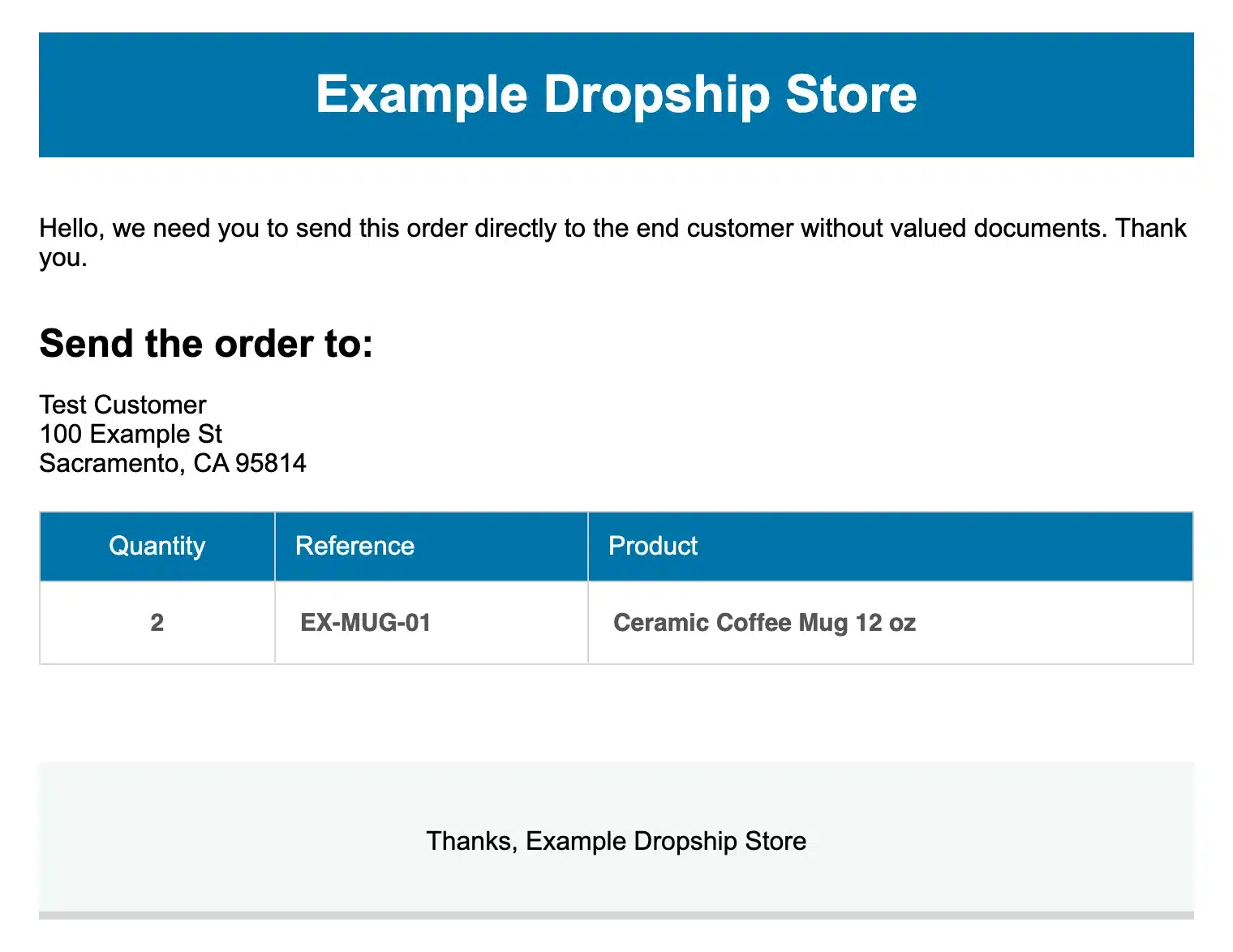
The supplier email held the shipping address, quantity, SKU and product name. It showed no prices. That is what you want, since the parcel should not carry your retail price or your cost.
The order screen also gained a Supplier column next to each item. That makes it easy to see who ships what when one order mixes products from two suppliers.
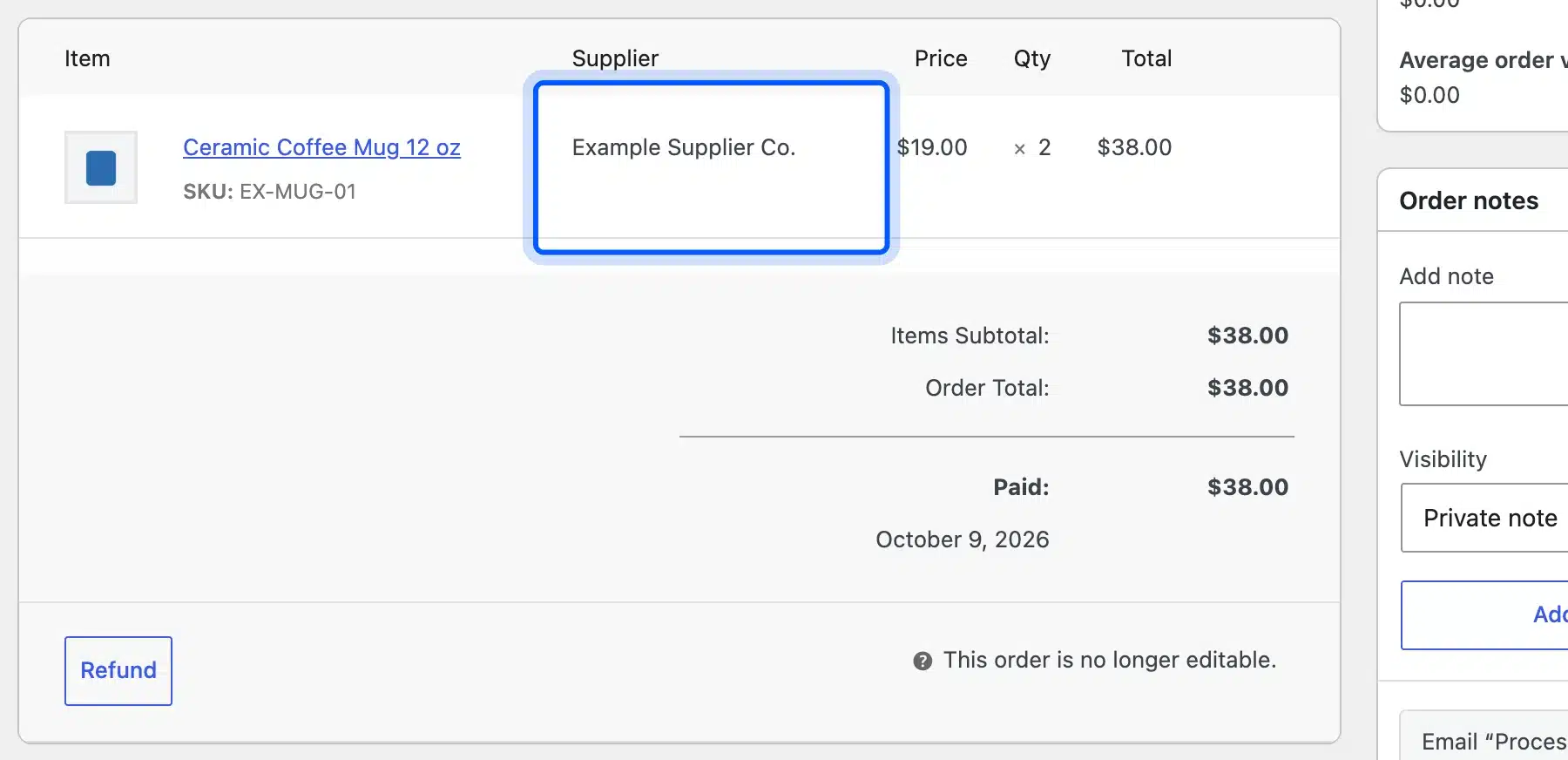
One trap: the order note list did not record the supplier email. The admin copy is your only proof that the email left, so keep that option on.
Step 5: Send Tracking to the Customer
When the supplier replies with a tracking number, add it to the order and mark it shipped. In Advanced Shipment Tracking, enable your carriers first under Shipping Carriers: the plugin ships with 1,083 carriers and none of them switched on.
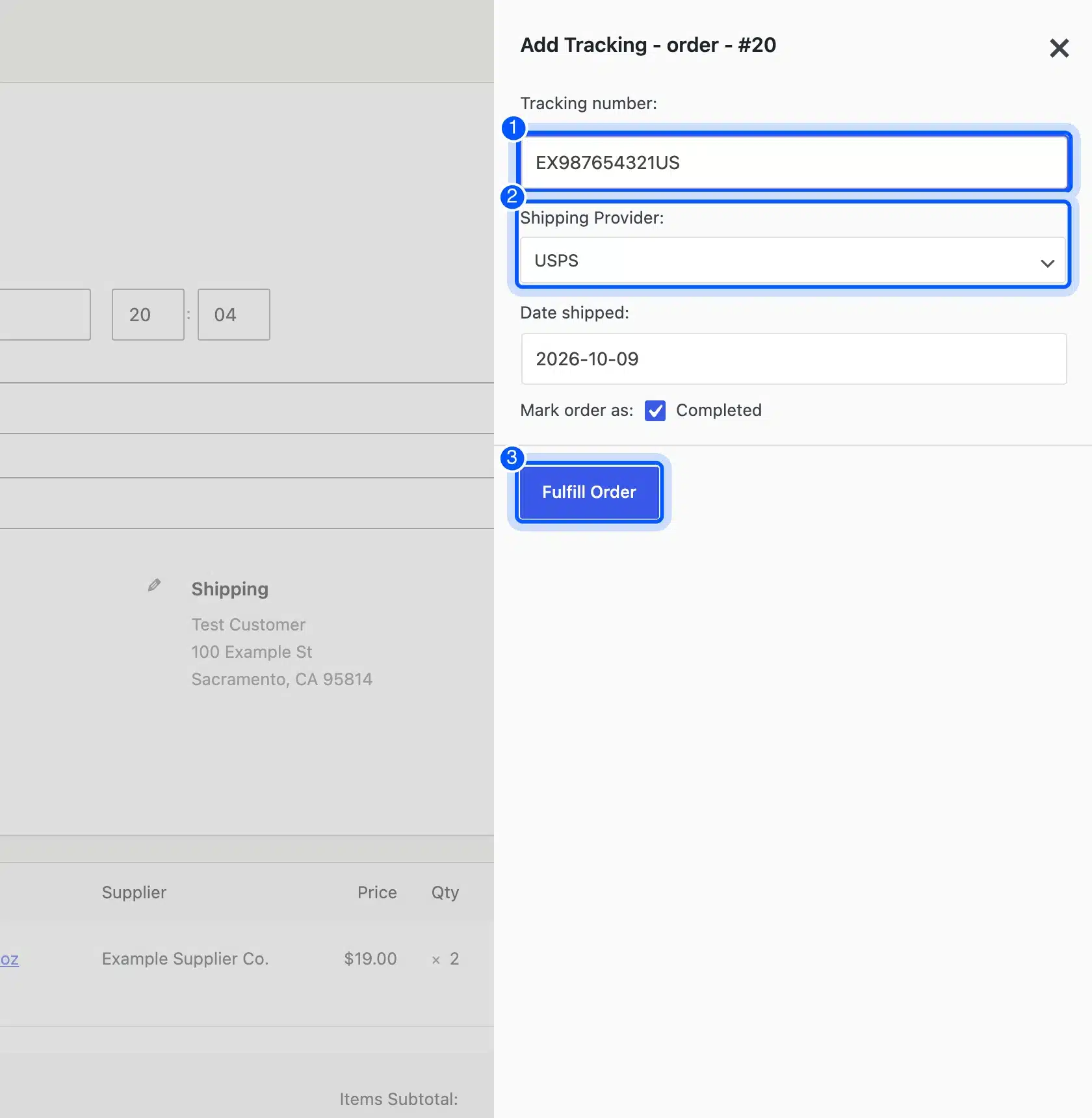
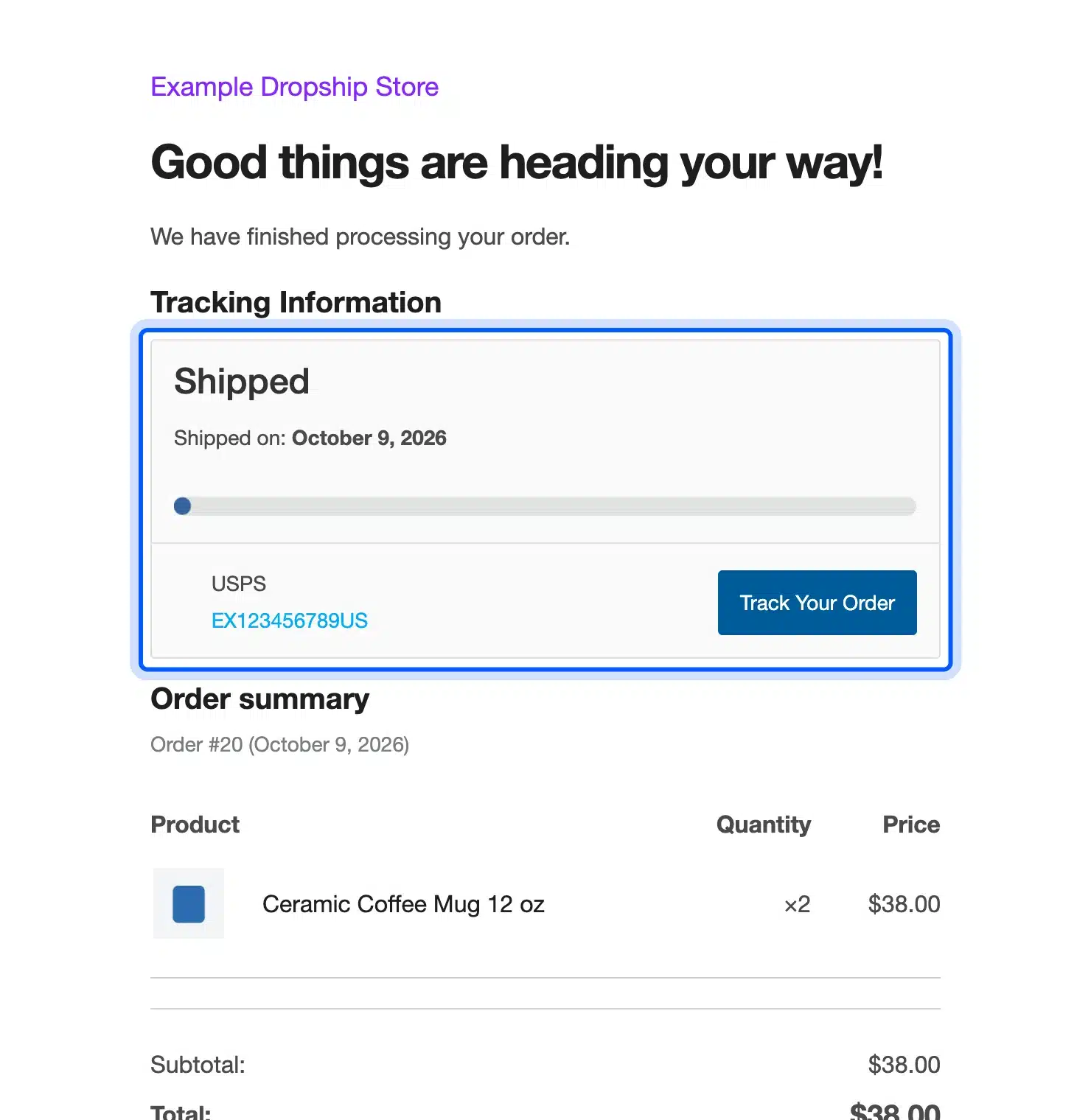
After enabling USPS, UPS and FedEx, we opened the order, clicked Add Tracking Info and entered a USPS number. Fulfill Order moved the order to Completed and sent the customer an email with the number and a Track Your Order button.
Other plugins do the same job with different extras. Our guide to the best WooCommerce order tracking plugins compares them.
These five steps are the manual version, and they hold up for a few dozen orders a week. Past that, a custom feed parser or a supplier API connection saves hours. Our custom WooCommerce development team builds those for stores that have outgrown free plugins.
WordPress Dropshipping From AliExpress
WordPress dropshipping from AliExpress works differently from a wholesale feed. Plugins like ALD import products through a Chrome extension that you install and connect to your store. The plugin then applies a price rule to each product, and it refuses to import on a site without HTTPS.
The price rule is the screen to check first. On our test store, the default rule raised the regular price by 200% for every price from $0 up. So a $5.00 item would list at $15.00.
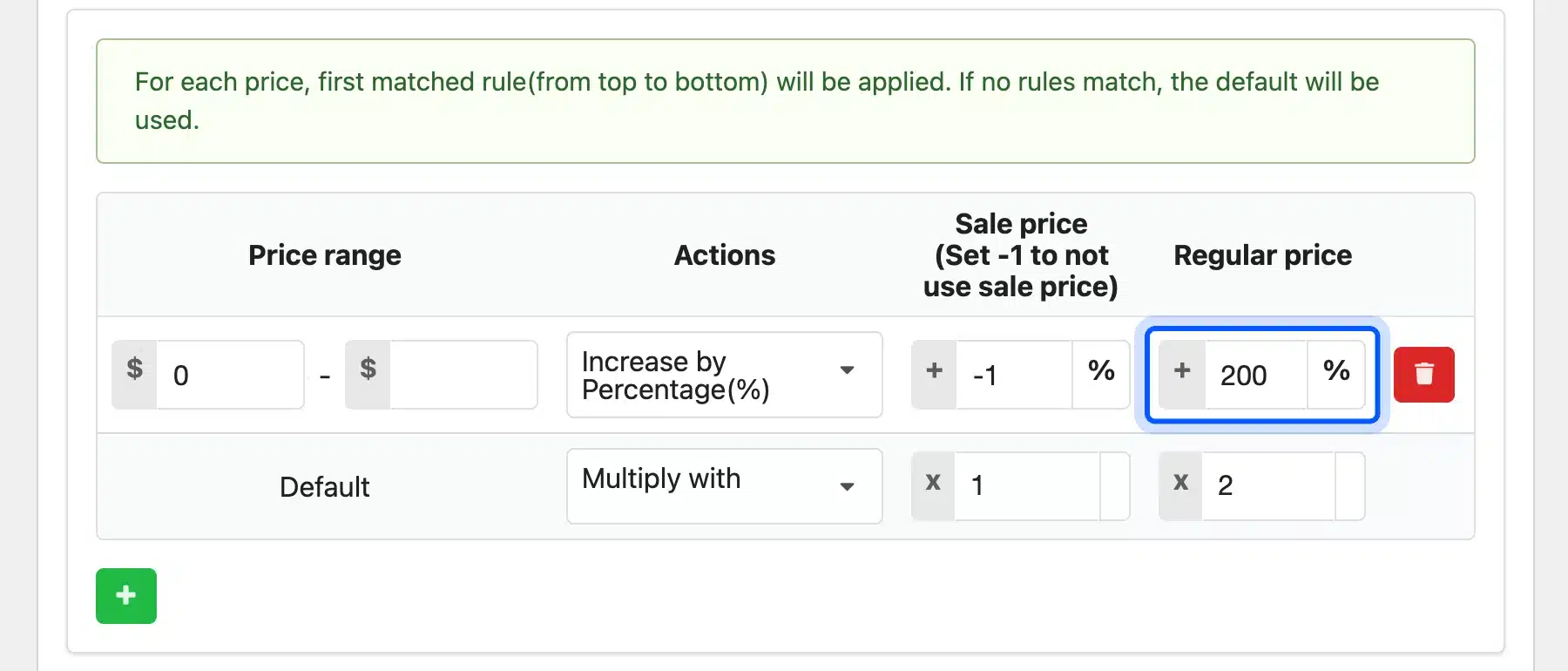
The fallback rule below it multiplies by 2, but it only applies when no other rule matches. Since the first rule covers every price, the fallback never runs until you edit it.
AliExpress items also change price and stock often, and the free version syncs them only when you trigger it. Treat the plugin as a fast way to test products, then move winners to a supplier with a feed. Any dropshipping store WordPress runs needs that second supplier once orders grow.
Dropshipping Margins: A Worked Example
Dropshipping margins are thin because the supplier’s cost, the supplier’s shipping and the payment fee all come out of one retail price. In our example, a $19.00 mug keeps $6.55 before ads. One $6.00 ad click per order leaves $0.55, which is 3% of the sale.
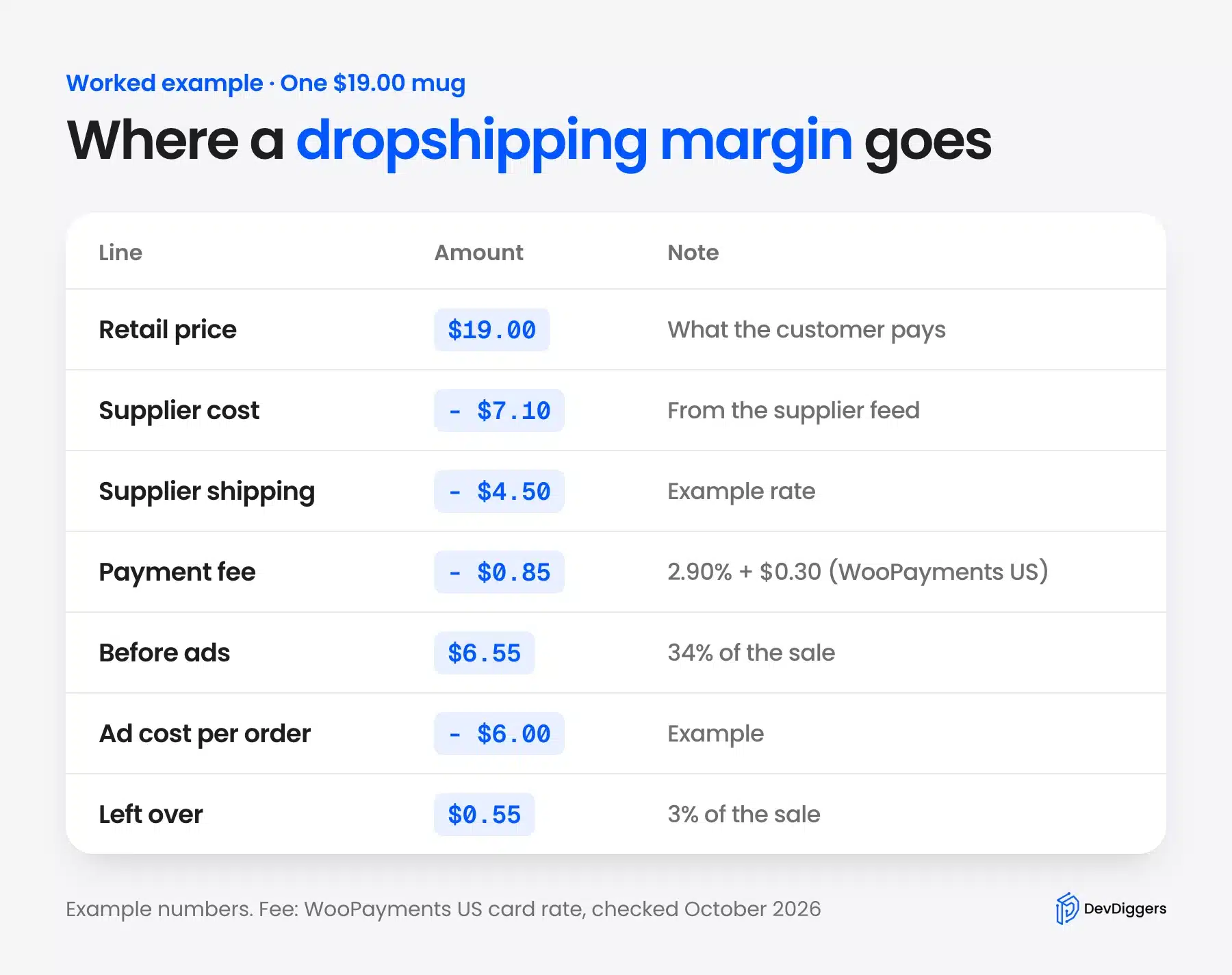
The math, written out once:
- Retail price: $19.00, the price we set in Step 3.
- Supplier cost: $7.10, the last cost in our example feed.
- Supplier shipping: $4.50, an example rate for a small parcel.
- Payment fee: $0.85, from the WooPayments fee schedule of 2.90% + $0.30 for US cards. That is $0.55 plus $0.30.
- Before ads: $19.00 minus $7.10, $4.50 and $0.85 leaves $6.55, or 34% of the sale.
Advertising is where the margin goes. If each sale costs $6.00 in ads, you keep $0.55, and a single return wipes out the profit from many orders.
So run the numbers before you import a product. If you plan to advertise, a Google Shopping feed for WooCommerce puts your price next to other sellers of the same item. That tests the price before you spend on ads.
Shipping Times, Returns and Sales Tax
A dropshipping store owes customers the same promises as any online store, even though a supplier ships the goods. US law holds the seller to its stated shipping time. EU buyers can cancel most online orders within 14 days, and sales tax depends on resale certificates.
Each rule below links to its official source:
- Shipping times: The FTC’s Mail, Internet, or Telephone Order Merchandise Rule says you must ship within the time you state. With no stated time, you need a reasonable basis to ship within 30 days.
- Delays: The same FTC guide says you must ask the customer to accept a delay, or cancel and refund. It names the seller, not the drop shipper, as the one responsible.
- Returns in the EU: The EU’s Your Europe returns page says buyers can cancel within 14 days without giving a reason. Your supplier’s return address and policy must support that.
- Sales tax: The Mississippi Department of Revenue drop shipment notice.pdf) shows how one state treats it. A valid resale certificate from the retailer means the supplier does not collect the tax.
Our example feed listed 7 to 12 shipping days for every product. That window is the promise the FTC rule holds you to. Show it on the product page, and per region when you set up WooCommerce shipping zones.
Note: Sales tax rules differ by state and country, and this is not tax advice. If WooCommerce shows the wrong rate at checkout, our guide on WooCommerce tax not working covers the usual causes.
When Dropshipping Is the Wrong Model
Dropshipping is the wrong model when your margin cannot absorb ads and returns, or when customers expect fast delivery. It also fails when you cannot see or test the product you sell. In those cases, holding a small stock of your best sellers often beats the dropship route.
Watch for these signs before you commit:
- Low price items: A $10 product with $4.50 shipping leaves almost nothing once the payment fee and one ad click come out.
- Slow shipping in a fast category: A 7 to 12 day promise loses to stores that deliver in two days, and the FTC rule still applies if you miss it.
- No feed or API: A supplier that only takes orders by phone means you route every order by hand.
- High return categories: Clothing and shoes come back often, and each return passes through a supplier you do not control.
- Brand building: You cannot add inserts, custom packing or a better box when someone else packs the parcel.
None of this makes dropshipping a bad idea for testing products. It makes it a bad idea as the only plan for a store you want to keep for years.
Conclusion
WooCommerce dropshipping works with free plugins, as long as each plugin owns one job: import, order routing and tracking. Our test store imported four products, emailed the supplier on Processing and sent the customer a tracking number without any paid add-on.
The two settings that cost money if missed are the price sync and the carrier list. Remove Product price from the feed’s sync fields, and enable your carriers before the first order ships.
Then run the margin math on every product. If $19.00 leaves $6.55 before ads, the ad budget decides whether the store makes money.
Frequently Asked Questions (FAQs)
Q1. Is WooCommerce good for dropshipping?
Yes, if you are fine with plugins doing the supplier work. WooCommerce has no built-in dropshipping, but free plugins import supplier feeds, email orders to suppliers and add tracking numbers, as our October 2026 test showed.
Q2. Can you dropship on WooCommerce for free?
The plugins can be free. Our test used four free WordPress.org plugins, but you still pay for hosting, a domain and payment fees. The free import plugin also needs a manual Import now click.
Q3. Is dropshipping legal?
Yes, dropshipping is legal in the US and the EU. The store that takes the order is still the seller, so shipping time and refund rules apply to you. The FTC’s mail order guide says so for US orders.
Q4. How do I find dropshipping suppliers?
Look for wholesalers that offer a product feed in XML or CSV, plus an order email or API. Ask for sample orders before listing their products, so you can check packing and real delivery times.
Q5. Do I need a business license to dropship?
Most places require some form of business registration, and sales tax registration often follows. Rules depend on your state or country, so check with your local tax office or an accountant before your first sale.
Q6. How much stock should a dropshipping store hold?
None, by definition, since the supplier holds the stock. Many store owners still keep a few units of best sellers for fast orders and photos. The store then becomes a mix of dropship and stocked items.