
An Upwork WordPress developer can make a living, but only with a clear niche, a strong profile and a plan for fees. The public numbers are modest, and Upwork’s cost page puts the median WordPress rate at $20 an hour.
This guide uses Upwork’s own help pages and pricing pages, read on 14 October 2026, plus pay data from the U.S. Bureau of Labor Statistics. The worked examples use round numbers and are labeled as examples.
You will see what Upwork takes, what proposals cost, what rates look like and how to start. If you are the one hiring, the later sections cover client fees and when an agency is the safer choice.
Can an Upwork WordPress Developer Make a Living?
An Upwork WordPress developer can make a living when they bill enough paid hours at a rate that survives fees. The Upwork WordPress developer cost page says the median hourly rate is $20 and typical rates run between $15 and $28. That is a modest base. Profit depends on volume and niche.
Here is a worked example that makes no promise. Say you want to take home $20 an hour after fees, and you bill 30 hours a week for 50 weeks. That is 1,500 paid hours and $30,000 before tax, software and Connects.
The same hours at $66 an hour after fees come to about $99,000.
That figure matches the median pay the U.S. Bureau of Labor Statistics reports for web developers and digital designers at $99,520 a year in 2025. Those are employee wages. Treat the match as a benchmark and not a forecast.
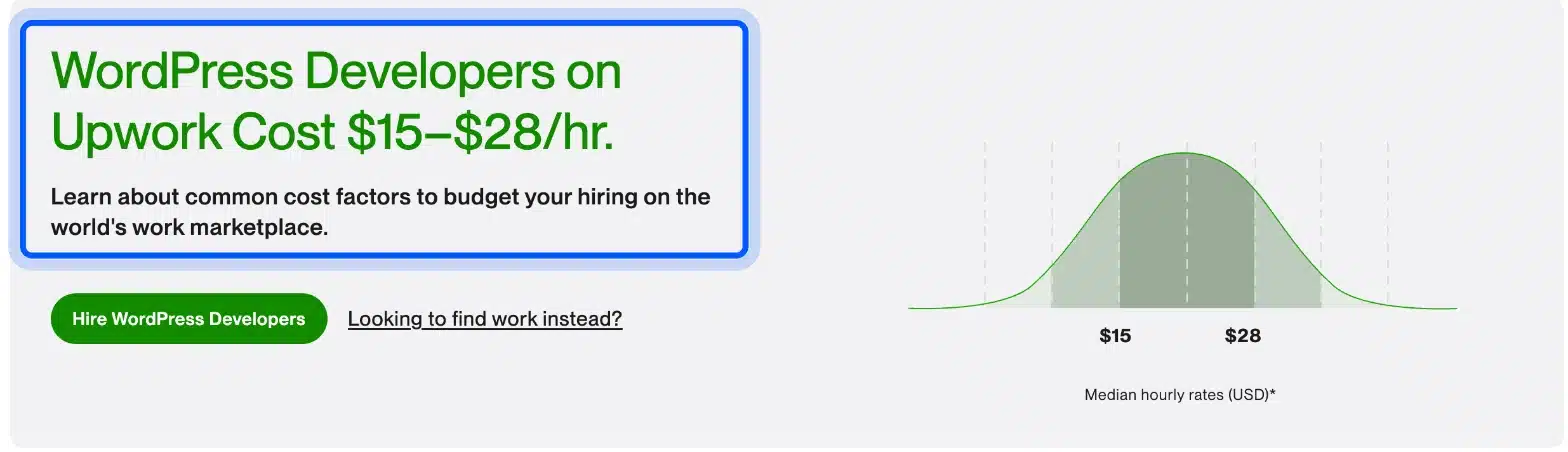
The jobs page tells a slightly different story. Upwork’s WordPress freelance jobs page lists median hourly rates of $20 to $35. The two pages measure different groups. Use the range as a guide and test your own WordPress developer hourly rate against live job posts.
What Upwork Charges a WordPress Freelancer
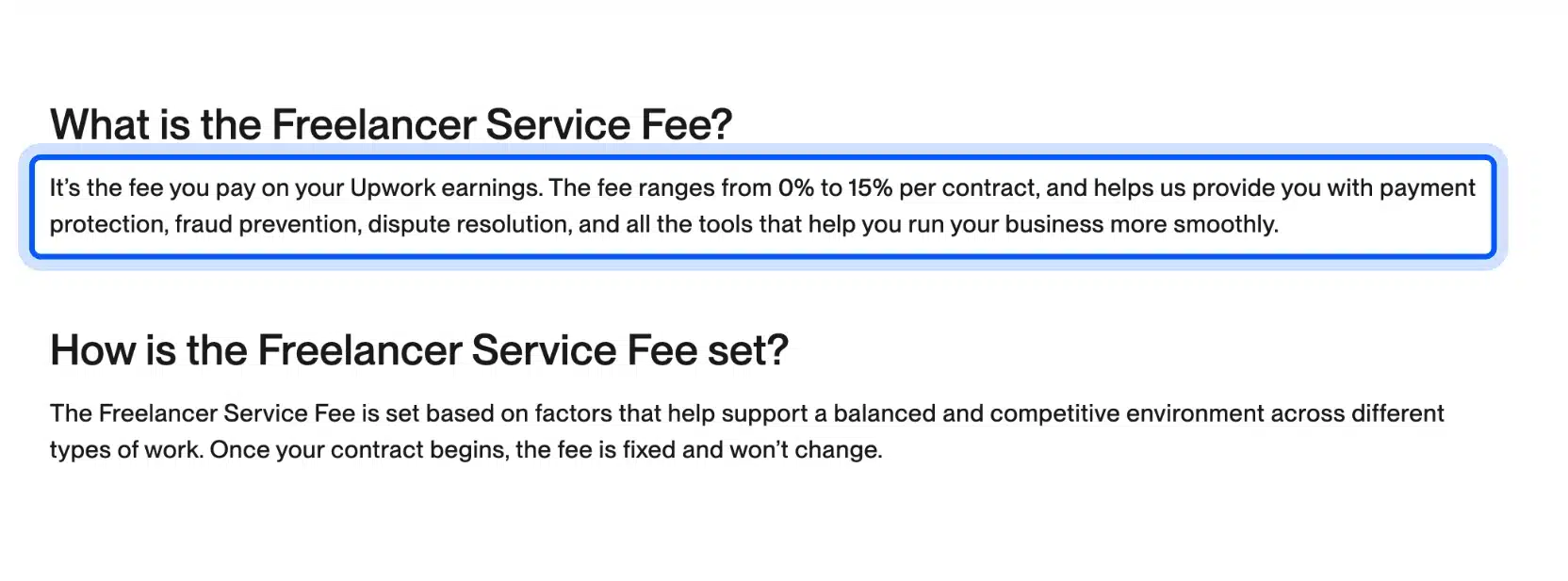
Upwork fees for freelancers range from 0% to 15% per contract, as a service fee. The fee is fixed once the contract starts, and you see it before you send a proposal or accept an offer. Always price your hourly rate with the fee already included.
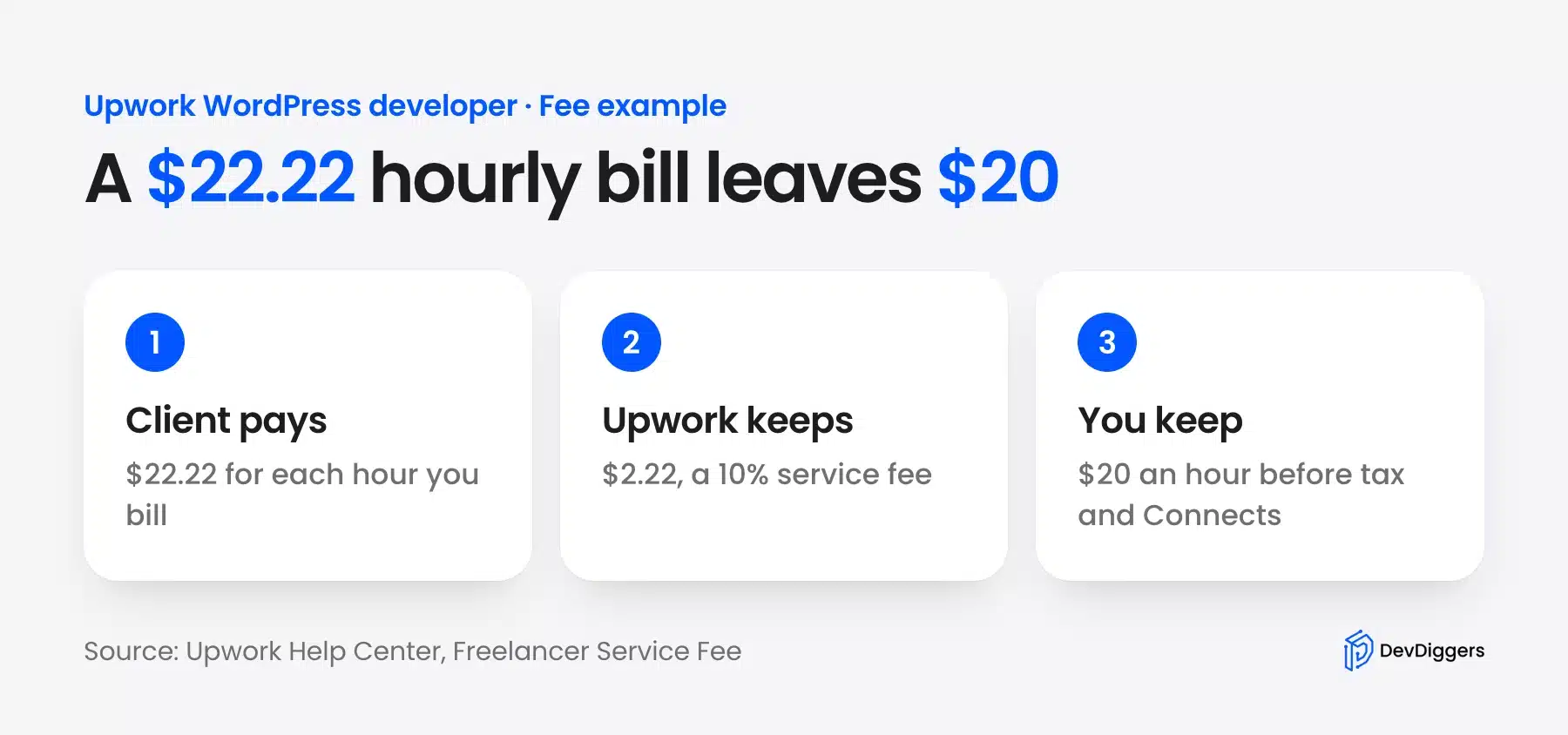
The Upwork help page for the Freelancer Service Fee gives a clean example. To take home $20 an hour at a 10% fee, you charge the client $22.22 an hour. Upwork keeps $2.22 of that.
Upwork’s rate calculator does this arithmetic for you when you send a proposal. The fee can differ between contracts. Check it each time rather than assuming 10%.
There are lower-fee paths as well:
- Direct Contracts: If you bring a client to Upwork, you pay a reduced 5% freelancer service fee on that contract.
- Any Hire: Contracts with a client you met off Upwork can carry no freelancer service fee, as the same help page states.
- Refunds: If a client is refunded, Upwork returns the fee you paid on that amount.
Upwork Connects: What Proposals Cost
Upwork Connects are the tokens freelancers spend to send proposals, and each Connect costs $0.15 in US dollars. The number you need varies by job and can change while the post is live. Upwork shows the Connects required in the job post before you apply.
Upwork says the number depends on project size, scope and market demand.
Say a WordPress job asks for 12 Connects. A hundred proposals then cost 1,200 Connects, which is $180 at $0.15 each. That is only an example. Read each job post.
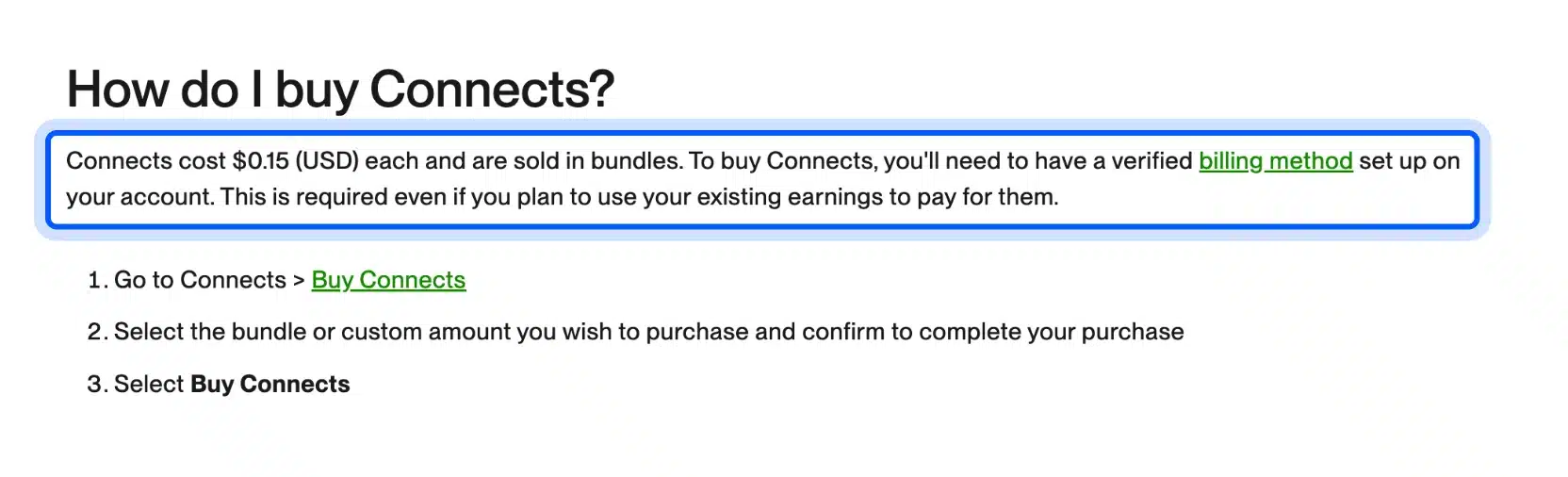
You can earn some Connects instead of buying them. Upwork’s Connects help page lists these routes:
- Talent badges: You earn 30 free Connects for each badge: Rising Talent, Top Rated and Top Rated Plus, up to 90 in total.
- New users: New users may get a one-time bonus of 50 Connects after buying Connects or joining Freelancer Plus.
- Onboarding: Profile setup and identity verification can also earn Connects.
Connects are not refunded when a client rejects or ignores your proposal. They return only in cases such as a client canceling the project before a contract starts. Write fewer, better proposals instead of many weak ones.
What Eats Into Your Upwork Income
Three costs eat into an Upwork WordPress income. They are the freelancer service fee, the Connects you spend on proposals and the unpaid hours around each job. The first two are visible numbers, but the third decides whether the work pays.
Here is a monthly example. Say you bill 120 hours at $22.22 an hour, which is $2,666.40, and the fee is 10%. Upwork keeps $266.64 and you keep about $2,400.
Now add 40 proposals at 12 Connects each. That is 480 Connects, or $72 at $0.15 each. Tax and software come out of the rest, and freelancers pay those themselves, unlike the employees in the BLS figure.
Repeat clients are the fix for the fee. A client you bring yourself on a Direct Contract carries a 5% fee. A $100 job then leaves you $95, according to Upwork’s Direct Contracts help page.
Unbilled time costs the most. Writing proposals, answering client questions and fixing small issues after delivery all take hours that earn nothing. Track those hours for one month before you set your rate.
How Much Do WordPress Developers Make on Upwork?
WordPress developers on Upwork usually bill between $15 and $28 an hour, according to Upwork’s cost page, and a few charge $40 or more. A freelancer’s real income depends on paid hours more than on the rate. Time spent on proposals and client calls is unpaid.
The table below puts the sources side by side. It keeps their definitions apart, since they measure different things.
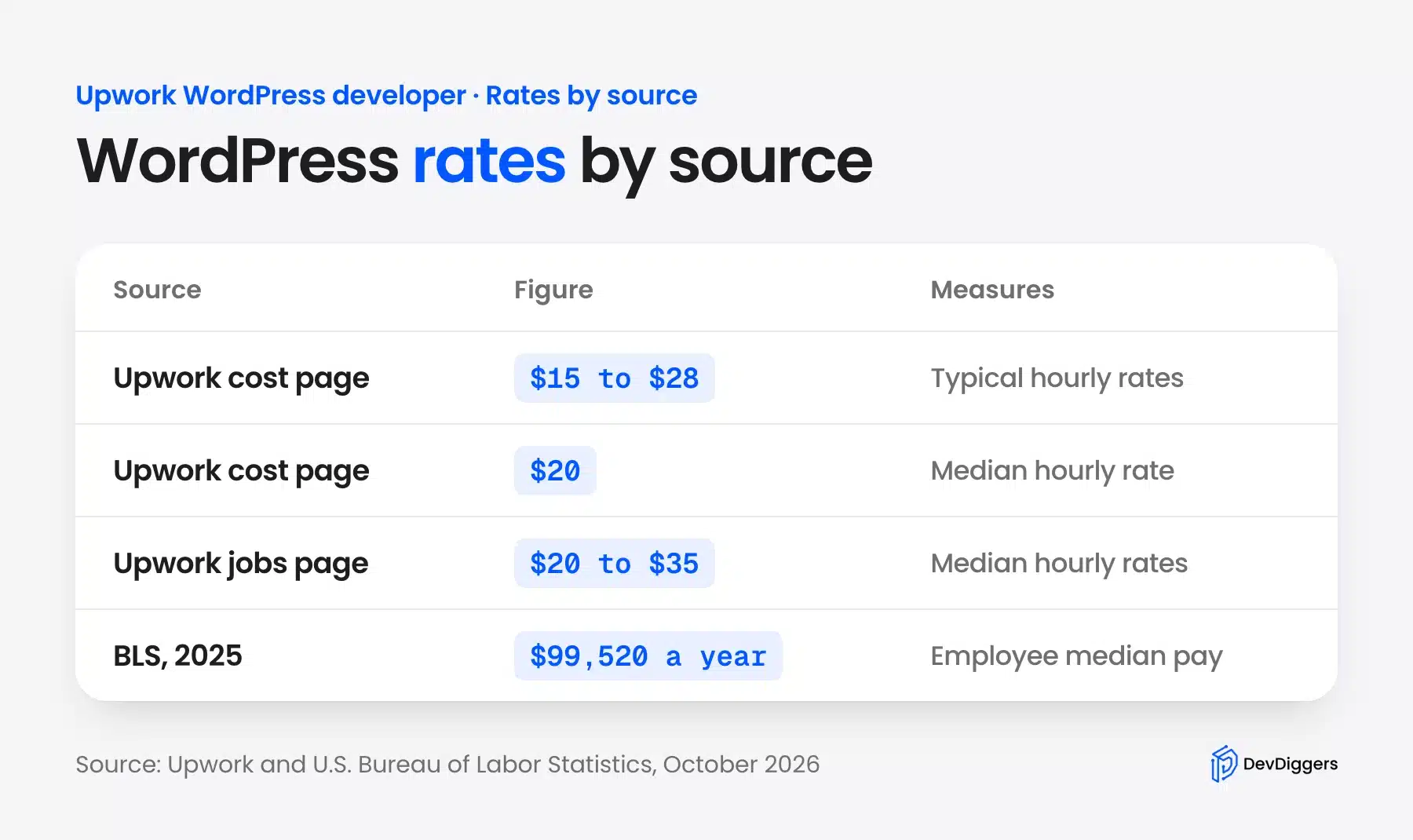
Before you set a price, test your rate against the market. Open ten live WordPress job posts in your niche and note each budget, the Connects required and the number of proposals. If most budgets sit below your target rate, that niche is too crowded for your price.
The BLS figure is a salary for employees. A freelancer pays their own tax, software, hosting for demos and downtime between projects. So an employee wage of $99,520 equals a much higher freelance rate before it leaves you the same take-home.
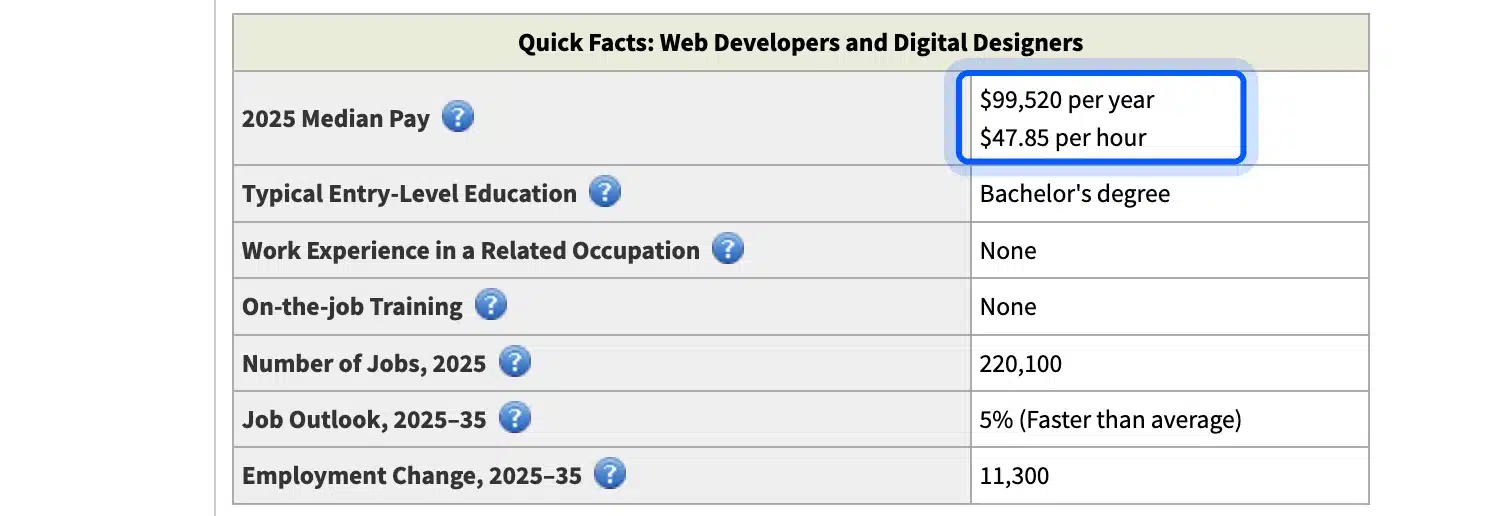
The BLS Occupational Outlook Handbook also projects 5% job growth for web developers and digital designers from 2025 to 2035. That is faster than the average for all jobs, according to the same page.
What Kind of WordPress Work Pays on Upwork
The work you pick sets your ceiling, because scope decides the hours and the price. Upwork’s cost page describes projects from a simple marketing site to a big eCommerce store with thousands of products. The bigger the scope, the more a client expects to pay.
The same page gives time estimates. A landing page takes about 1 to 10 hours or more.
A simple WordPress site takes about 5 to 20 hours or more. A custom site or eCommerce build takes about 5 to 100 hours or more.
WooCommerce is a natural niche for repeat work. WordPress.org lists more than 7 million active installations of the WooCommerce plugin, and each store needs changes to checkout, payments and shipping over time.
At the $20 median rate, those estimates give a rough income. A 100-hour custom build brings $2,000, and a 10-hour landing page brings $200. Specializing in plugin work or store builds helps you bid on the larger jobs and avoid the crowded cheap ones.
Choose one or two skills and sell them well instead of listing everything. Good candidates are:
- Theme and site builds: Setting up and customizing a site from a design.
- WooCommerce stores: Product setup, checkout and payment tweaks. Stores need the care in our WordPress security checklist.
- Maintenance: Updates, backups and fixes after launch, as our explainer on WordPress care plans shows.
How to Start as a WordPress Freelancer on Upwork
You can start as a WordPress freelancer on Upwork in five steps, and the first month is slow. Pick a niche, build a profile with real samples, verify your identity and send targeted proposals. Upwork rewards early steps such as identity verification with free Connects.
- Pick one niche: Choose a service such as WooCommerce setup, speed fixes or theme edits, and write it in your headline.
- Build a profile with proof: Add two or three real sites you built, with links a client can open.
- Verify your identity: Upwork lists the identity verification badge and onboarding tasks as ways to earn Connects.
- Send a short list of proposals: Read the job post, check the Connects needed and answer the client’s actual problem.
- Raise your rate with reviews: Start modestly and move up once you have completed jobs.
Keep your first jobs small. A one-hour fix with a five-star review helps more than a big project you lose. Upwork’s Connects page also tells freelancers to check the client’s history and the activity on a job post before applying.
If you also run your own sites, our guide on how to make money with WordPress covers other routes beyond freelancing.
Is Upwork Good for Hiring WordPress Developers?
Upwork is good for hiring a WordPress developer when your task is small and well defined, such as a fix or a small build. It gives you profiles, ratings and work history to judge candidates. You still do the vetting yourself. The quality of your brief matters.
Upwork says it verifies every freelancer’s identity and location before you connect, and profiles show portfolios, ratings and work history, per its client pricing page.
Those checks confirm who the person is. They do not confirm a fit with your site. Ask for a similar site they built and read the reviews.
Clients pay a fee on top of the freelancer’s price. The Basic plan charges a 5% service fee. A $100 contract then costs $105 plus a one-time contract initiation fee of $0.99 to $14.99. Business Plus charges 10%. That makes the same contract $110 according to Upwork’s client pricing page.

Upwork’s pages also show other client fee figures in places. A help article on the Client Marketplace Fee mentions a cap of up to 7.99%. Check your own account before you budget.
Rates are the other half of the budget. Upwork says WordPress developers charge from $15 to $40 or more an hour, and many set a fixed price for a site instead. A fixed price should state the number of revision rounds, as the same cost page notes.
Upwork Freelancer or WordPress Agency: Which Should You Hire?
Hire a freelancer for a narrow task you can describe in one page. Hire an agency when the work needs several skills and one person accountable. A freelancer sets their own rate, while an agency is a team under one profile and payments go to the agency.
Upwork explains that split in its help page on the difference between a freelancer and an agency. With a freelancer you work one-on-one. With an agency you may work with an owner, a project manager or team members.
Whichever route you pick, write the brief first. List the pages, plugins, deadline and who owns the hosting and logins. For a fixed price, ask for the number of revision rounds in writing, as Upwork’s cost page advises.
The risk with one freelancer is continuity. If that person is busy or leaves, your project stops, and you hold the knowledge of how the site works. An agency spreads that risk across a team and usually handles project management.
When your site is also a store or a long-term asset, the safer route is a team that supports it after launch. Our WordPress development services cover custom plugins, themes, integrations and migrations, and you work with the same developers who build our plugins. You can start with a fixed-scope project or a dedicated developer.
Conclusion
An Upwork WordPress developer can earn a living, but the median rates are modest and fees, Connects and unpaid time all cut into them. The reliable path is a narrow niche, strong proof and proposals aimed at jobs you can win. Price your rate with the fee included.
If you hire on Upwork, budget for the client fee and write a tight brief. If your project needs several skills or long-term care, compare the cost of an agency against the cost of managing contractors yourself. For a store, see our WooCommerce development services.
Frequently Asked Questions (FAQs)
Q1. How much do WordPress developers make on Upwork?
Upwork says the median hourly rate for WordPress developers is $20, with typical rates from $15 to $28. Its jobs page lists $20 to $35. Your income depends on paid hours, the Upwork service fee and the time you spend finding work.
Q2. How much are Upwork Connects?
Each Connect costs $0.15 in US dollars, and Connects are sold in bundles, according to Upwork’s help page. The number a proposal needs varies by job. Talent badges, new user bonuses and onboarding tasks can earn free Connects.
Q3. What does Upwork take from freelancers?
Upwork charges a freelancer service fee between 0% and 15% per contract, and the fee is fixed once the contract starts. Direct Contracts carry a reduced 5% fee. You can see the fee before you send a proposal.
Q4. Is Upwork worth it for WordPress freelancers?
Upwork is worth it if you use it to build reviews and a client base in a clear niche. The fees, Connects and competition make it a hard place to live on low rates. Direct Contracts carry a reduced fee for clients you bring yourself.
Q5. How much does it cost to hire a WordPress developer on Upwork?
Upwork says WordPress developers charge from $15 to $40 or more an hour, with a typical range of $15 to $28. Clients also pay a service fee of 5% on the Basic plan, plus a contract initiation fee. Fixed-price projects are common.
Q6. How long does a WordPress project take?
Upwork’s estimates are about 1 to 10 hours or more for a landing page and 5 to 20 hours or more for a simple site. A custom site or store can run from 5 to over 100 hours. The scope and how ready your content is change the number.