
How many tables are there in default WordPress? A fresh install creates 12 database tables, and that number holds true whether you just ran the five-minute install or you’re staring at a client site that hasn’t been touched in years. It only changes once a plugin adds its own tables on top.
Every post, comment, user, and setting on a WordPress site lives inside one of those 12 tables. Knowing what each one stores makes troubleshooting, backups, and migrations far less stressful.
This guide answers how many tables are in default WordPress in full, clears up why you might see a different number online, and shows you how to check your own site’s count in under a minute.
What a WordPress Database Actually Stores?
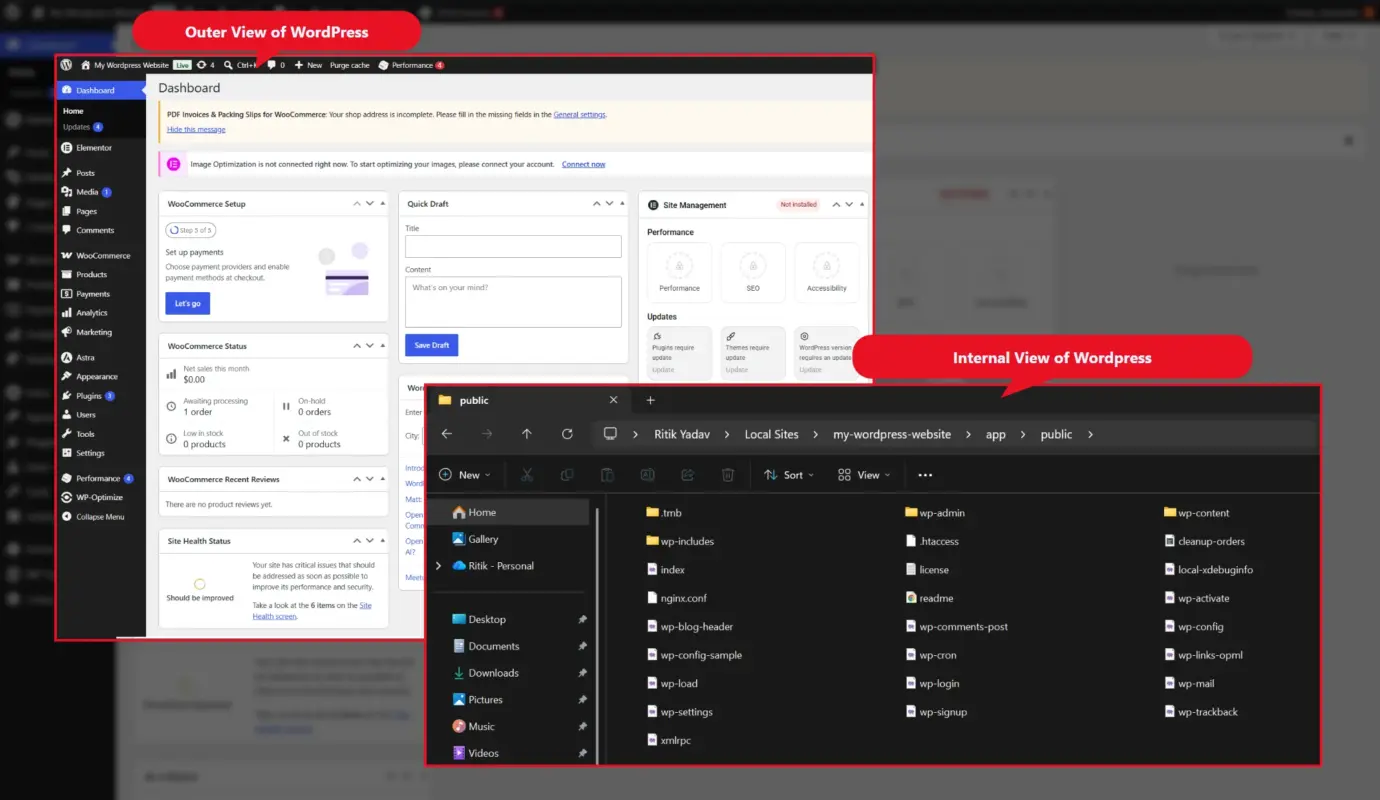
Before answering how many tables are in default WordPress in more detail, it helps to know what a WordPress database actually is. WordPress runs on MySQL or MariaDB. That’s a relational database: a structured set of tables built from rows and columns. Think of it like a spreadsheet with a fixed set of headers. WordPress’s own database description reference documents this same structure in more depth.
Nothing about your site’s actual content lives in the theme files. Your theme controls how things look. The database controls what gets shown. Every post you publish, every comment a visitor leaves, every plugin setting you toggle lands in one of these 12 tables. It happens the moment you hit save.
This is also why a database backup matters just as much as a file backup. Lose the database and your theme files become an empty shell with nothing to display. A store owner who’s only ever backed up /wp-content/ has backed up half a site.
We see this mistake often in support tickets. Someone restores a site from files alone after a hosting migration, gets a working theme, and wonders why every post and setting is gone. The files were never the problem. The database was the part left behind.
The 12 Default WordPress Database Tables at a Glance
So, how many tables are there in default WordPress, exactly? Here’s the full list, with the default wp_ prefix attached. Your prefix might look different if it was changed during setup.
| No. of Table | Table | What It Stores |
|---|---|---|
| 1 | wp_posts | Posts, pages, media, custom post types, revisions |
| 2 | wp_postmeta | Extra data attached to posts (custom fields, SEO data) |
| 3 | wp_users | Usernames, hashed passwords, emails |
| 4 | wp_usermeta | User roles, capabilities, profile fields |
| 5 | wp_comments | Comments and reviews |
| 6 | wp_commentmeta | Extra data attached to comments (spam flags, ratings) |
| 7 | wp_terms | Category and tag names |
| 8 | wp_term_taxonomy | Defines whether a term is a category, tag, or custom taxonomy |
| 9 | wp_term_relationships | Links posts to their categories and tags |
| 10 | wp_termmeta | Extra data attached to terms (images, custom fields) |
| 11 | wp_options | Site URL, active plugins, theme settings |
| 12 | wp_links | Legacy blogroll data, mostly unused today |
That table is your quick answer to how many tables are there in default WordPress. The next section walks through what each one does and why it matters.
What Each Default Table Does: Actual Working
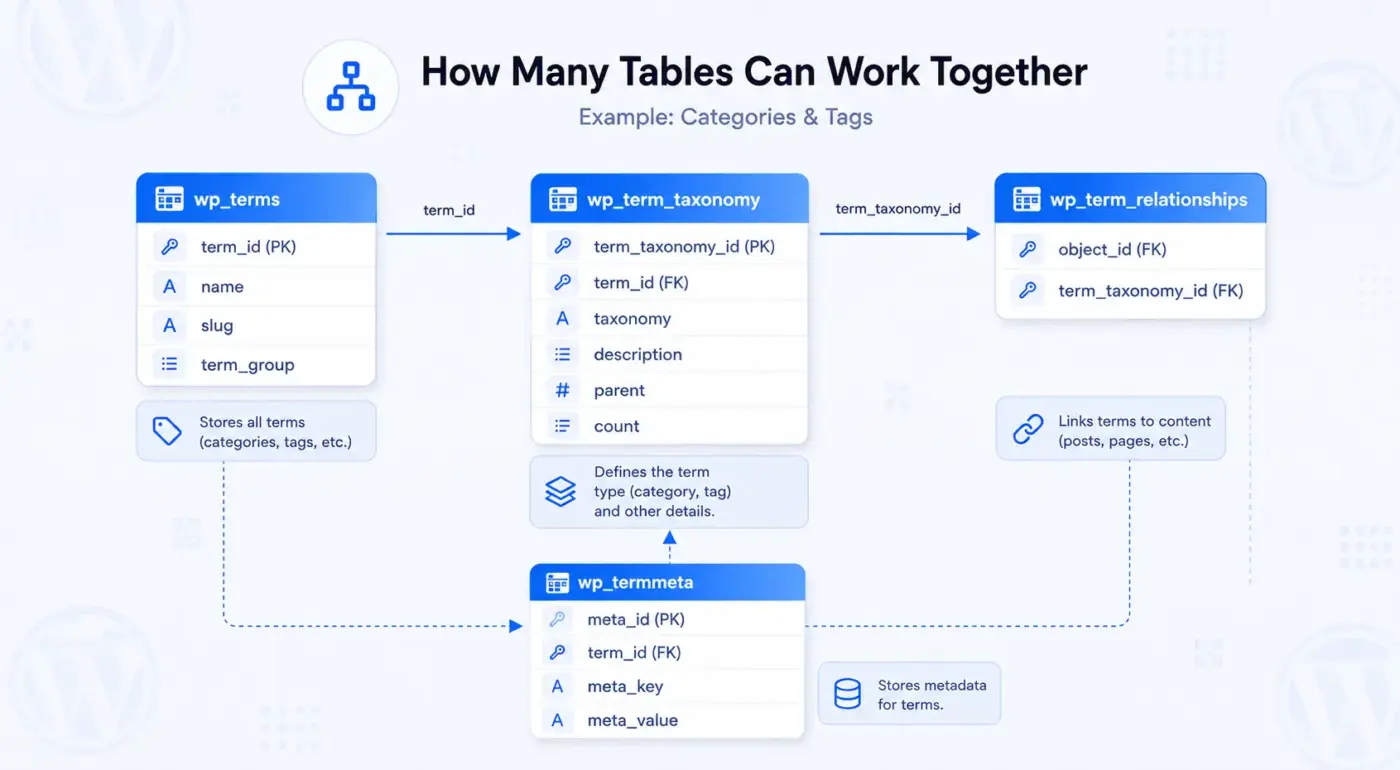
Answering how many tables are there in default WordPress is only half the picture. Knowing what each of the 12 actually stores is what makes the number useful.
1. Content Tables: wp_posts and wp_postmeta
wp_posts is the single most important table in the database, despite the misleading name. It stores far more than blog posts. Pages, media attachments, navigation menu items, revisions, and any custom post type a theme or plugin registers all live here too. That covers where WordPress pages are stored, alongside every post. A column called post_type tells WordPress whether a given row is a post, a page, or something else entirely.
wp_postmeta extends that table with extra data. Featured image references, SEO fields from a plugin like Yoast, and custom field values all sit here, each one tied back to a post ID. That’s also where images are stored in the WordPress database. It works through attachment references rather than the image files themselves. This is usually the fastest-growing table on an active site. Most plugins default to storing their data here instead of building a dedicated table.
2. User Tables: wp_users and wp_usermeta
wp_users hold every registered account: usernames, hashed passwords, emails, and registration dates. wp_usermeta extends that with roles, capabilities, and any custom profile field a plugin adds. A standard WordPress installation ships with five user roles: Subscriber, Contributor, Author, Editor, and Administrator. All of that role data gets stored as usermeta entries rather than as separate columns.
3. Taxonomy Tables: wp_terms, wp_term_taxonomy, wp_term_relationships, wp_termmeta
Four tables work together to power categories and tags. wp_terms Stores the term names and slugs. wp_term_taxonomy defines what kind of term each one is: category, tag, or a custom taxonomy a plugin introduced. wp_term_relationships is the connector. It links an actual post to its assigned terms. wp_termmeta Stores anything extra attached to a term, like a category image or custom SEO data.
Four separate tables for what feels like one feature might look excessive at first. It’s a deliberate split, though. It lets WordPress handle categories, tags, and any custom taxonomy through the exact same underlying structure.
[IMAGE: Diagram showing how wp_terms, wp_term_taxonomy, and wp_term_relationships connect | alt: “WordPress taxonomy table relationships”]
4. Comment Tables: wp_comments and wp_commentmeta
wp_comments stores every comment, pingback, and trackback left on the site, along with author details and approval status. wp_commentmeta holds anything extra: spam scores from an anti-spam plugin, custom ratings, or moderation flags. On a site without solid spam filtering, this pair of tables tends to accumulate unnecessary data fast. Rejected spam often gets stored before it’s caught.
5. wp_options: The Site’s Settings Table
wp_options is where nearly every site-wide setting lives, and it’s one of the 12 tables anyone asking how many tables are there in default WordPress should know by name. The site URL, the active theme, the list of active plugins, and most plugin configuration data all sit here. A setting called autoload controls whether an option loads on every single page request. An unnecessary data set of autoloaded options is one of the most common causes of a slow WordPress admin dashboard.
6. wp_links: The Table Nobody Uses Anymore
wp_links is a holdover from WordPress’s early blogroll feature, and it’s the twelfth table anyone counting how many tables are in default WordPress will find. As of WordPress 3.5, the Link Manager was removed from the admin interface entirely. This table sits empty on almost every modern site as a result. It stays in the default install for backward compatibility, in case an old theme or plugin still calls it directly.
Why You Might See a Different Number (11, 12, or 20)
Search around and you’ll find different answers to how many tables are in default WordPress. Some sources claim 11 tables. Others say 12. A few say “12-20.” All three answers are technically true, depending on what’s being counted.
- The 11-table claim usually comes from an outdated source written before
wp_termmetawas introduced in WordPress 4.4. Before that release, taxonomy metadata had nowhere dedicated to live, so the table simply didn’t exist yet. This is also a good moment to check your own install. See whether it still uses the defaultwp_prefix. If not, changing the WordPress database prefix has already been done on that site. - The 12-table answer is correct for a truly fresh install: no plugins, no theme customizations, nothing added. That’s the number this guide uses throughout.
- The “12-20” range shows up because almost no real WordPress site stays plugin-free for long. A contact form plugin, a caching plugin, or an SEO plugin can each add their own tables on top of the original 12. By the time a typical site has five or six active plugins, 18 to 20 tables isn’t unusual at all.
So the honest answer to how many tables are there in default WordPress depends on the question being asked. “How many tables does a brand-new install create?” The answer is 12. “How many tables does my live site have right now?” That’s a different question, and the section below shows you exactly how to check it.
This distinction matters more than it sounds like it should. A developer quoting a client for a migration needs the real, current count, not the textbook number. Guessing “12” on a site running eight plugins and a forum add-on can throw off both the timeline and the price.
How to Check Your Own Site’s Table Count: Best Three Methods
Curious how many tables are there in default WordPress on your own install right now, rather than in theory? Here are three ways to check.
1. Using phpMyAdmin
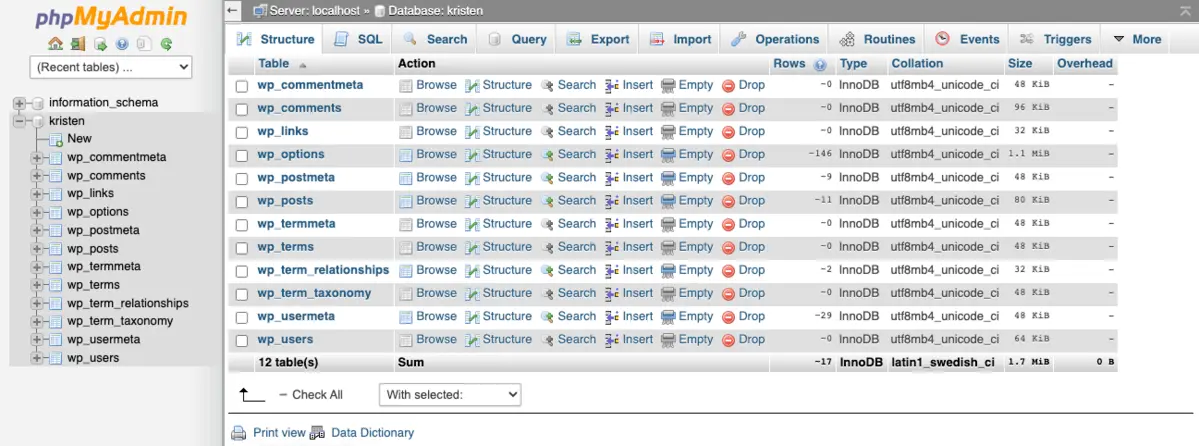
Most hosting providers include phpMyAdmin in the control panel. Log in, select your WordPress database from the sidebar, and the full table list appears immediately. Each table shows its row count right next to it.
This is the fastest option for anyone who isn’t comfortable with a command line. It works the same way whether you’re troubleshooting a database issue or just curious what plugins have added over the years.
2. Using WP-CLI
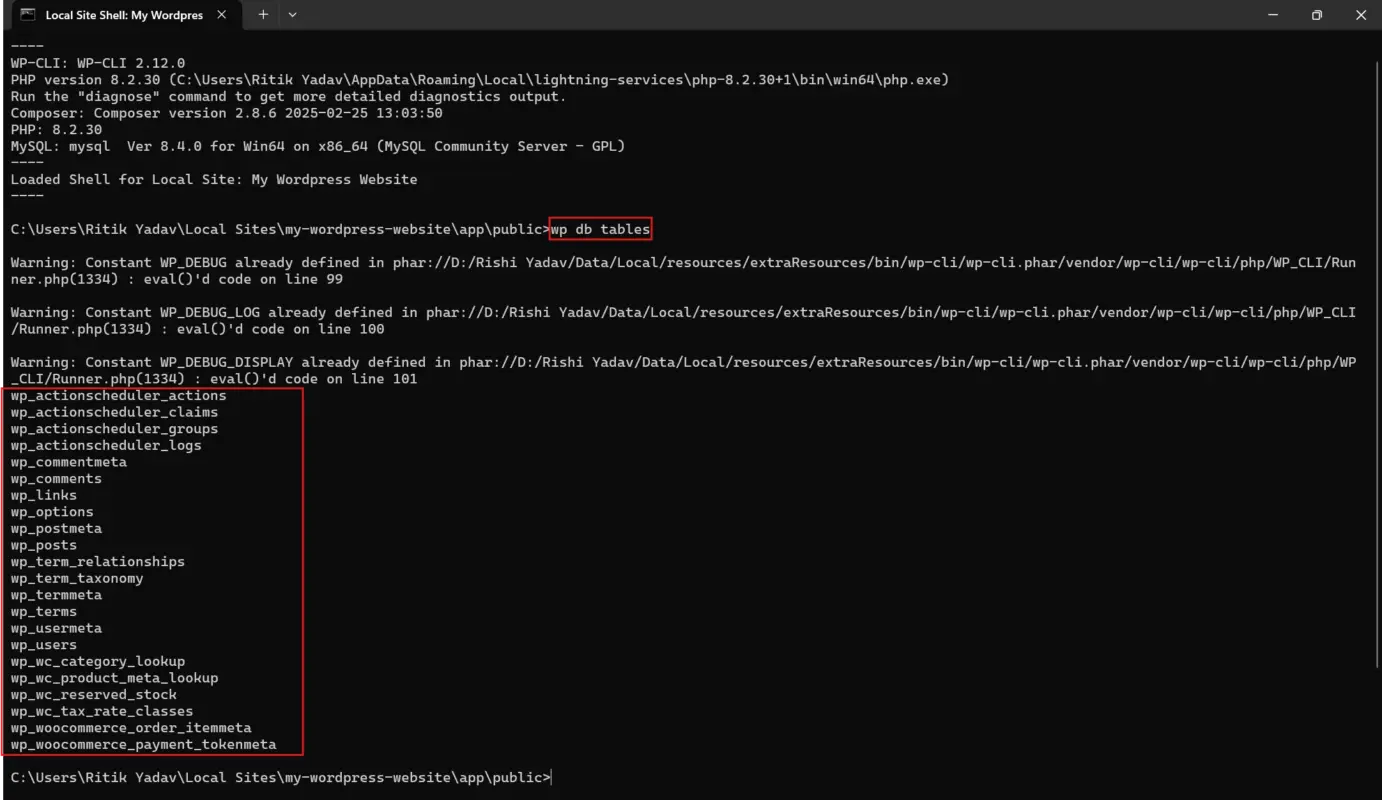
Developers working from the command line can skip phpMyAdmin entirely. The command wp db tables--all-tables also picks up any Leftover tables WordPress itself doesn’t track. Full options for the command are in the official WP-CLI documentation.
wp db tables --all-tables
This method is especially useful during a migration. It can feed directly into an export command that pulls only the tables you need.
3. Using a Direct SQL Query
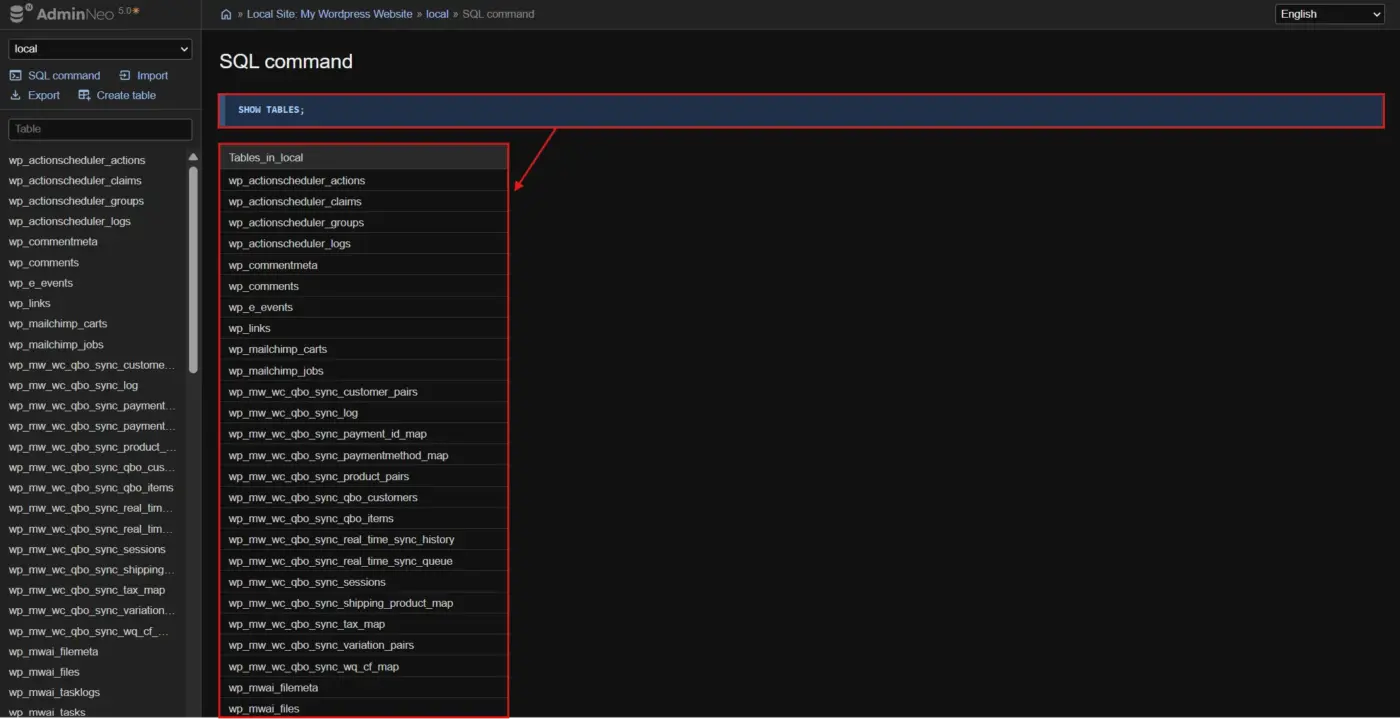
For anyone comfortable running a raw query, SHOW TABLES; inside phpMyAdmin’s SQL tab or a MySQL console returns the same list instantly. No plugin or CLI tool required.
What Happens to the Count with Plugins, WooCommerce, or Multisite
Plugins and Themes
The moment a plugin needs to store structured data that doesn’t fit neatly into wp_postmeta or wp_options, it usually creates its own table. This is the biggest reason the answer to how many tables are there in default WordPress and how many tables exist on a real, active site are two different numbers. Contact form plugins, booking plugins, and forum plugins are common examples. None of this breaks anything. It’s expected behavior, and the original 12 tables stay untouched underneath whatever gets added on top.
WooCommerce
Running a store changes the answer to how many tables are there in default WordPress significantly. WooCommerce adds its own set of database tables on top of WordPress’s core 12. Orders, order line items, and several other store-specific structures live there. These wouldn’t fit well inside the generic post and postmeta tables. If you’re weighing WordPress against WooCommerce for a new store build, it helps to see how those two layers split the work. One handles content. The other handles commerce data.
If your site’s database has grown slow under order volume, that’s usually where to look first. A proper database audit is one of the things DevDiggers handles as part of general WordPress development services. That’s especially true for stores that have never had one.
Multisite Networks
A multisite network duplicates a subset of these tables for every individual site on the network. The content tables, like wp_posts and wp_postmeta, plus comments and terms, get copied per site. User data stays shared across the whole network instead. Each site’s tables get a numeric identifier in the name. Site ID 2, for example, gets tables like wp_2_posts and wp_2_postmeta, separate from the base tables site 1 uses.
What’s Coming in WordPress 7.1
WordPress 7.0 has already shipped, and it did not end up including a new collaboration table. Real-time editing, where multiple people work on the same post at once, was originally planned to ship with its own wp_collaboration table.
That plan changed. In May 2026, the WordPress core team pulled real-time collaboration from the 7.0 release. Testing had turned up concerns about server load, race conditions, and recurring bugs under real editing conditions.
The feature is now being rebuilt for WordPress 7.1, with a revised storage design. Early performance testing across several hosting environments pointed toward a custom table paired with transients as the strategy going forward. That’s a shift away from leaning on wp_postmeta the way early betas did. Writing data that frequently into post meta was quietly disabling WordPress’s persistent post query cache the entire time an editor session stayed open.
Until 7.1 actually ships with a finalized schema, the answer to how many tables are there in default WordPress stays at 12 for every currently supported version. This is worth revisiting once the 7.1 release notes go final, since the exact table name and structure could still shift during testing.
Conclusion
So, how many tables are there in default WordPress? A default installation creates 12 database tables. That number only grows once plugins, WooCommerce, or a multisite network enter the picture. Knowing what lives in each table isn’t just minor facts. It’s the difference between a five-minute fix and a panicked restore-from-backup when something on a site suddenly breaks.
Whether you manage one WordPress site or a dozen client installs, keeping a mental map of these 12 tables makes every future database conversation faster. Bookmark the table above. The next time someone asks how many tables are in a default WordPress install, you’ll have the real answer, plus the reasoning behind it.
Frequently Asked Questions (FAQs)
Q1. How many tables are there in default WordPress?
A fresh, unmodified WordPress installation creates exactly 12 database tables: wp_posts, wp_postmeta, wp_users, wp_usermeta, wp_comments, wp_commentmeta, wp_terms, wp_term_taxonomy, wp_term_relationships, wp_termmeta, wp_options, and wp_links. That count only grows once plugins, WooCommerce, or multisite are added on top.
Q2. Is it safe to edit WordPress database tables directly?
Direct edits carry real risk if you’re not certain what a change affects. WordPress and its plugins expect specific data formats and relationships between tables. Always take a full backup first, and use the WordPress admin interface or a trusted plugin instead of manual edits whenever a safer path exists.
Q3. Does changing the wp_ prefix improve security?
Changing the default wp_ prefix to something random makes automated SQL injection attempts slightly harder to run. Many attack scripts target the default prefix by name. It’s a minor layer, not a replacement for strong passwords, two-factor login, and keeping plugins updated.
Q4. How many tables does WooCommerce add?
WooCommerce adds its own set of tables on top of WordPress’s core 12, covering orders, order items, and other store-specific data. This data doesn’t fit cleanly into the default post tables. The exact count depends on your WooCommerce version and whether High-Performance Order Storage is active.
Q5. What happens if a table like wp_postmeta goes missing?
Featured images disappear, product data breaks, and any plugin field tied to wp_postmeta stops working correctly across the site. WordPress won’t crash outright, but content will look stripped down and incomplete until the table gets restored from a recent backup.
Q6. Do all 12 tables use the same prefix?
Yes, every default table shares whatever prefix was set during installation, commonly wp_. A few WordPress settings still reference the old prefix inside stored option values even after a prefix change. It’s worth double-checking so nothing quietly breaks later.
Q7. Can I delete the wp_links table?
For most modern sites, yes, since the Link Manager feature it supports was removed from the admin interface back in WordPress 3.5. Back up first anyway, since a small number of older themes or third-party plugins may still reference the table directly.
Q8. Does multisite change the table count?
Yes, a multisite network creates a duplicate set of content tables for each individual site on the network. User data stays shared across the entire network instead of getting duplicated per site, which keeps one login working across every site in the network.
Q9. Can plugins remove tables when uninstalled?
A well-coded plugin cleans up its own tables on uninstall, but plenty don’t bother. Leftover tables from long-removed plugins are a common, mostly invisible source of unnecessary database data. This shows up most on older sites that have gone through several rounds of plugin testing.
Q10. What’s the easiest way to see my table list without SQL?
phpMyAdmin is the simplest option for most site owners who want a quick answer. Log in through your hosting control panel and select your WordPress database. Every table appears in the sidebar with a row count, no query required at all.