WordPress is worth learning in 2026, and the numbers are hard to argue with. According to W3Techs, WordPress runs about 42% of all websites globally. That means nearly every freelance brief, agency project, or small business site you touch will connect to it in some way.
Most articles stop there. They cite the stat, say “yes, it’s worth it,” and move on. That skips the real question most people are asking: which version of WordPress is worth learning, and what will actually pay off?
Here’s what most articles miss: the skill is a spectrum, and picking the wrong end of it wastes months. This post covers what learning WordPress looks like in 2026. You’ll see who it suits, where it falls short, and what to pair it with to build a career or business.
What “Learning WordPress” Actually Means in 2026
This is where most guides skip past the nuance, and it costs readers real time.
WordPress is not one skill. It’s a range of them. At the beginner level, you install WordPress, pick a theme, add content through the block editor, and configure a plugin or two.
That takes a weekend. You build WooCommerce extensions, work with custom post types, and handle REST API integrations. Some developers go further with headless setups, using WordPress as a backend with a React or Next.js frontend.
Most tutorials treat these as the same thing. They aren’t.
If your goal is to run your own blog or small business site, basic knowledge is enough. If you want to get paid to build for clients, you need to go deeper: child themes, custom fields, and advanced plugin configuration. If you want a full-time developer job, you need PHP, the WordPress hook system, and a working understanding of how to read and extend the codebase.
One thing most beginner guides miss: the block editor has changed a lot since its difficult 2018 launch. By 2026, it’s a capable tool, and most client sites no longer need Elementor or Divi for basic layout work.
If you’re starting now, learn the block editor first. Starting with a page builder instead creates a dependency that limits which projects you can take on later. We see this come up often in client sites we inherit.
The Job Market Is Real
Let’s get specific, because this is where the vague “yes, it’s worth it” answers fall apart.
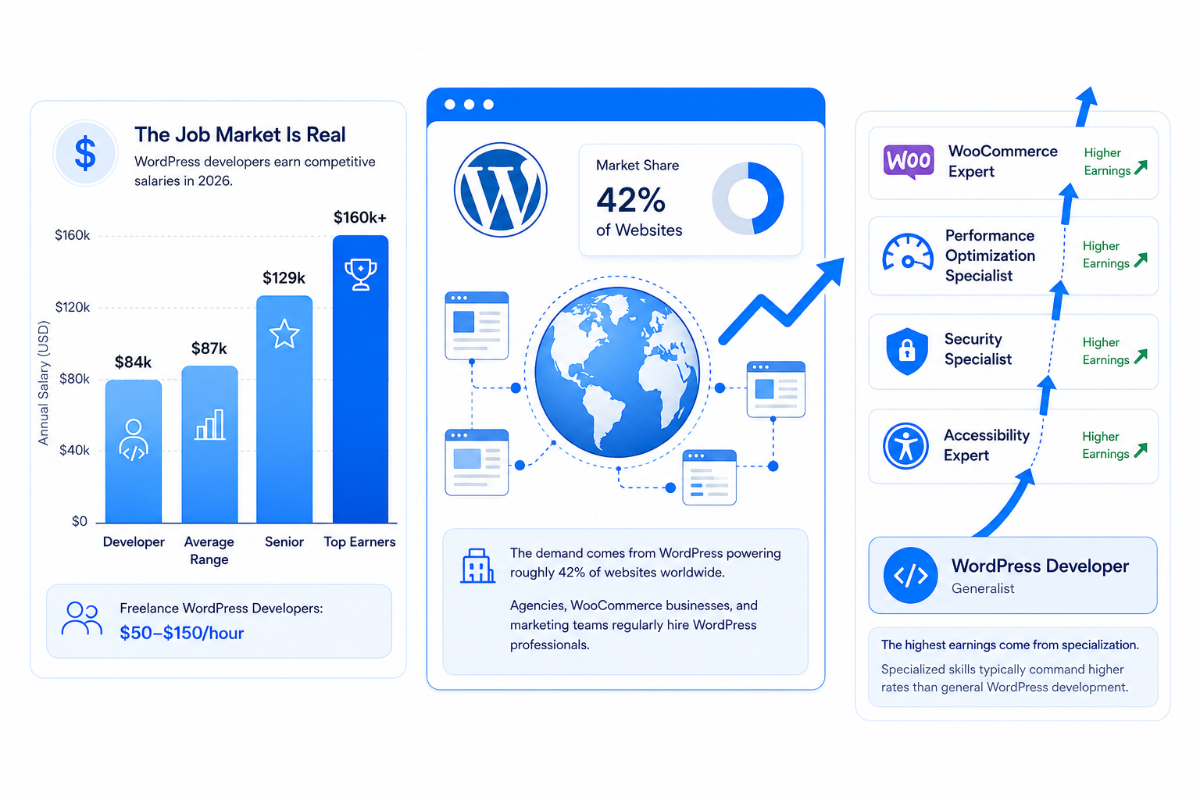
WordPress developer salaries in the US average around $84,477 per year, according to ZipRecruiter data from early 2026. Glassdoor puts the average slightly higher at $86,988.
Senior developers average $128,636. Top earners clear $160,000. On Upwork, experienced WordPress developers charge $50 to $150 per hour. The rate depends on their area of specialization.
That demand ties directly to the platform’s reach. When roughly four in every ten websites you visit run on WordPress, there’s no shortage of sites that need building, maintaining, and fixing. Agencies hire for it consistently. Businesses running WooCommerce stores need developers on retainer. Marketing teams need someone who knows the platform when the site breaks the night before a product launch.
Here’s what job boards don’t show clearly: The market rewards specialization more than broad knowledge. A developer who understands WooCommerce deeply, from custom checkout flows to payment gateway integration to order management, earns more than someone who can “build WordPress sites” in general terms. The same applies to performance optimization, accessibility, and security hardening. Pick a lane early.
Where WordPress Falls Short
Most articles on this topic skip this section. Here’s the straight answer.
WordPress is not the right tool for every project. Building a SaaS app with real-time features and a heavy API layer? A framework like Laravel or a modern JavaScript stack is a better fit. WordPress can handle many of these things; plugins exist for almost everything. But you’ll be fighting the CMS architecture the whole time.
Security is a real concern. Over 90% of hacked WordPress sites are compromised through outdated plugins or themes, according to Wordfence research. That’s partly a plugin dependency problem, but it does mean WordPress projects require ongoing maintenance attention. If a client expects a zero-maintenance solution, have that conversation before the contract is signed.
Performance requires planning, too. A site with 40 plugins on cheap shared hosting will be slow. Research from Digital Applied’s 2026 WordPress statistics report shows managed hosting makes WordPress sites 2.4x faster than shared hosting. Caching alone produces a 41% speed improvement. These are solvable problems, but they don’t solve themselves.
The website builder vs coding debate has a real answer now. Tools like Webflow and Wix have improved enough that for simple sites, they’re a legitimate alternative. WordPress wins on control, flexibility, and cost at scale. The alternatives win on setup speed and lower maintenance burden for non-technical owners. Both things are true at once.
Who Should Learn WordPress in 2026
Not everyone should. Here’s a plain breakdown by use case.
- Freelancers and agency developers: Yes. Demand is consistent, and pay holds up well for a skill with a manageable learning curve. The question of whether you can make a living with WordPress on Upwork has a clear answer: yes, with specialization.
- Small business owners manage their own site: Learning the basics is worthwhile. You’ll save money on simple updates and understand your site well enough to work with a developer when something breaks.
- Developers building ecommerce stores: WooCommerce holds around 28% of the global ecommerce market. It pairs naturally with WordPress’s content management strengths. If you’re asking whether WordPress is good for eCommerce, WooCommerce is where the interesting answer lives.
- Developers targeting enterprise clients: Mixed. Large organizations often run on WordPress. Enterprise projects bring bigger demands: custom plugin development, multisite configuration, and strong performance under high traffic. That’s a specialty, not a starting point.
- People who want to build and sell plugins: This is an underrated angle. The WordPress plugin market is active, and building specialized tools for WooCommerce problems generates real, recurring revenue. Store owners pay for tools that solve a specific problem cleanly. Something like the WooCommerce loyalty plugin works well because the alternative for store owners is custom development that costs five times as much.
The AI Question (The Honest Version)
Everyone’s asking it. Here’s the unvarnished answer.
AI website builders exist. They can spin up a basic WordPress site quickly. They also produce generic results that can’t handle the specific customizations most real clients need.
Developers who stick to basic setup work will struggle. Installing themes, tweaking settings, and adding plugins is becoming easier to automate. Developers who understand the platform deeply will do fine. They can fix what AI tools get wrong and customize what generic builders can’t produce.
AI tools are making competent developers faster, not replacing them. Tasks that used to take an hour, like writing custom hooks or debugging plugin conflicts, now take minutes with a good AI assist.
This applies directly to WooCommerce. Building a store is getting easier. Maintaining it, integrating it with inventory systems and payment providers, and debugging it when it breaks at 11 pm, that still requires someone who understands how WordPress and WooCommerce work. That gap is not closing as fast as the AI hype suggests.
Conclusion
WordPress is worth learning in 2026, with one condition: be clear about which level of skill you’re building and why. For freelancers, the market is active, and the pay is real.
For business owners, basic knowledge saves money and removes headaches. For developers going deep into WooCommerce or plugin development, there’s genuine long-term demand. The platform powers 42% of the web and has kept growing for over two decades.
Learn the fundamentals, specialize quickly, and pay attention to how headless WordPress develops. That’s where the more complex, better-paid work is heading.
Frequently Asked Questions
Q1. How long does it take to learn WordPress well enough to get paid?
For basic freelance work, building simple sites for small businesses, most people are ready within 2 to 3 months of consistent practice. For WooCommerce development or plugin work, expect 6 to 12 months before you’re producing work that clients will pay well for.
Q2. Is PHP required to learn WordPress in 2026?
Not for beginners, but yes for professional-level work. You can configure plugins, build block-based sites, and manage content without writing PHP. The moment you need to customize theme behavior, extend WooCommerce, or build anything custom, PHP becomes necessary. Learning the basics alongside WordPress from the start speeds up the path to higher-paying work considerably.
Q3. Is WordPress losing ground to AI website builders?
Not based on current data. WordPress’s market share has held around 42% of all websites globally as of 2026. Many AI-assisted tools output WordPress sites, so they’re often working alongside the platform rather than replacing it. Entry-level setup work is getting easier to automate, which puts more value on deeper WordPress skills, not less.
Q4. Does learning WordPress prepare you for WooCommerce development?
Yes, directly. WooCommerce runs on WordPress and uses the same hook system, template structure, and database. Learning WordPress properly gives you 60 to 70% of what you need for WooCommerce projects. The rest is specific to WooCommerce: product types, order lifecycle, payment gateway integration, and the settings API.
Q5. What should you learn alongside WordPress to be more hireable?
PHP first. Add basic JavaScript, Git for version control, and the WordPress REST API. Then learn at least one performance workflow, caching setup, image optimization, or hosting configuration. These skills turn basic WordPress knowledge into a full development profile that agencies and ecommerce businesses actually hire for.