
The best AI SEO tools for small business are mostly free, led by Google Search Console and the free tiers of ChatGPT, Gemini and Perplexity. Semrush, Ahrefs and Surfer add free checkers. Paid plans start around $20 a month and climb past $100, so most small stores should start free and pay only for one gap.
We checked nine tools in October 2026, starting with our own Search Console data for devdiggers.com. Then we gave ChatGPT, Gemini and Perplexity the same keyword prompt for a small leather wallet store. Every price below comes from the vendor’s own pricing page, checked the same month.
The sections below cover what these tools do, a price table, and each tool with its free tier, paid price and best use. After that you get our side-by-side AI chat test, which tools keep historical data, and how to build a cheap stack.
What Are AI SEO Tools for Small Business?
AI SEO tools for small business are apps that use AI to speed up keyword research, content briefs and page checks. Some are chat assistants that draft ideas, and others are SEO platforms with AI features on their own data. Both kinds now help with rank tracking and AI Overview monitoring.
Some tools sit in between. Google Search Console has no chat at all, yet it is the data source every AI suggestion should be checked against. Rank Math Content AI is a chat-style writer that lives inside WordPress.
The split matters because the two kinds do different jobs. A chat assistant like ChatGPT can suggest 10 keyword ideas in seconds, but it does not know how many people search each one. An SEO platform like Semrush or Ahrefs has search volume data, but most of it sits behind a paid plan.
Most small businesses use these tools for five jobs:
- Keyword ideas and clustering: Group related searches so one page targets one topic.
- Content briefs: Outline what a page must cover before anyone writes it.
- On-page checks: Test titles, meta descriptions and headings against the search results.
- Rank tracking: Watch where your pages sit for the searches that matter.
- AI Overview monitoring: See whether AI answers mention your brand at all.
If you are new to how AI answers pick sources, our guide to AI search visibility explains how to measure it. The tools below cover the other four jobs too.
The Best AI SEO Tools for Small Business Compared
The best AI SEO tools on a small budget are Google Search Console for real data and one free AI chat for ideas. Add a paid platform only when you need search volumes or rank tracking. The table lists each tool’s free tier and lowest paid plan as of October 2026.
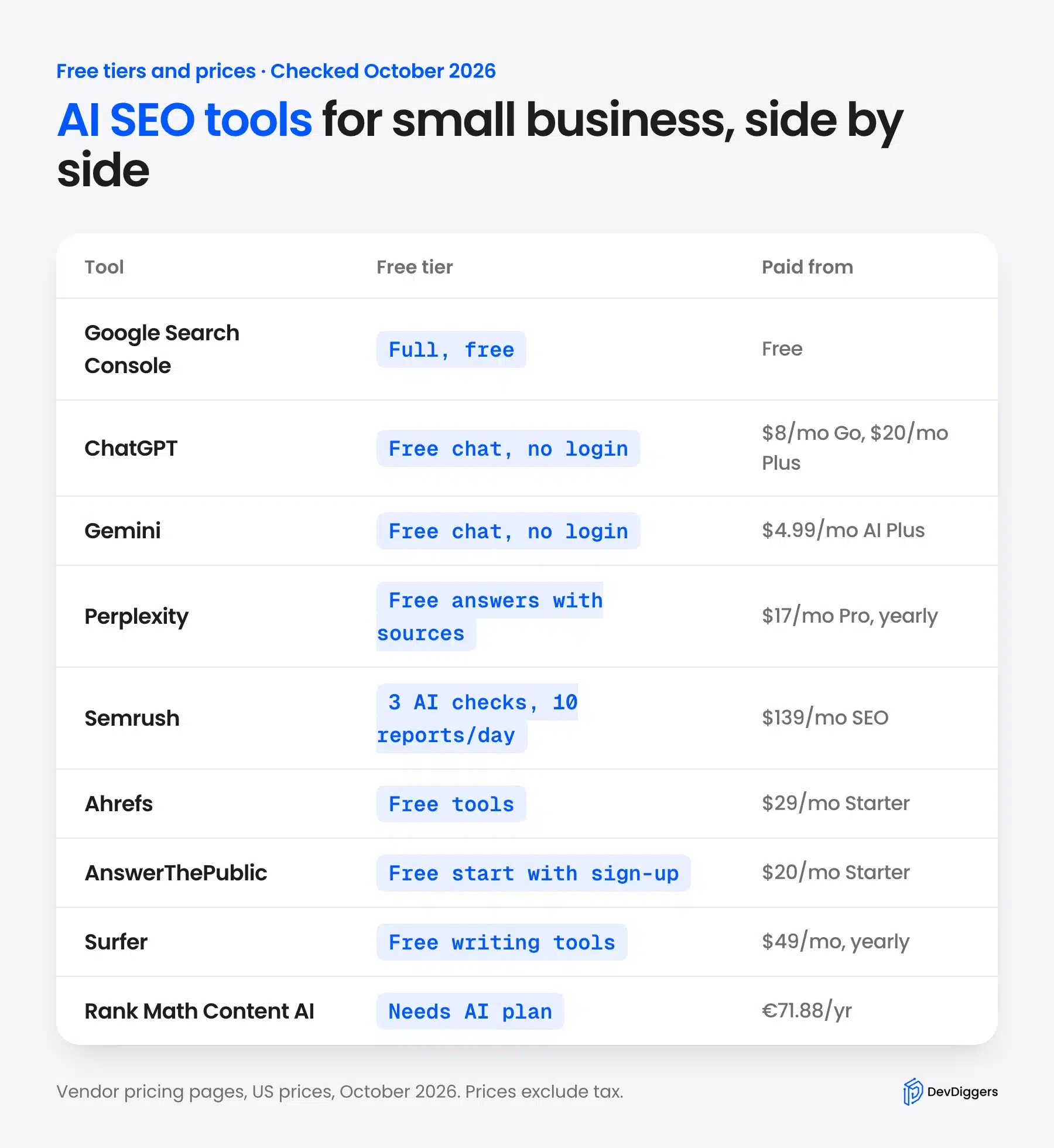
Two things stand out in that table. Three of the nine tools give a usable answer with no login at all.
And Semrush’s SEO plan at $139 a month is the priciest entry point on the list. Ahrefs Starter at $29 is the cheapest way into a full SEO platform.
Read the “Paid from” column with care. Several vendors quote yearly billing as a monthly figure, so the price you pay on a monthly plan can be higher. Prices also change often, which is why each one carries the month we checked it.
These are also the top AI SEO tools small businesses can try today without a card. Every free tier in the table worked in a browser with no payment details, though some need an email sign-up.
So the order in this list follows what a small business should try first. Free tools with real data come first, AI chats second, and paid platforms last.
9 AI SEO Tools We Checked in October 2026
These nine AI SEO tools cover the jobs a small business needs, from free Google data to paid content platforms. Each entry gives what we found, the key features from the vendor, the price we checked, and the kind of business it suits. We ran the same prompt in all three AI chats.
The prompt was the same in every chat. A small US store selling handmade leather wallets for men asks for 10 keyword ideas with the search intent of each. That kept the test fair and the answers easy to compare.
1. Google Search Console
Google Search Console is the one free SEO tool every small business should set up first. It shows real searches, clicks and positions from Google itself.
It is not an AI tool in the chat sense. But it gives the data that tells you whether any AI suggestion is worth acting on.
We pulled 28 days of our own data for devdiggers.com, from September 13 to October 11, 2026. The site earned 223 clicks from 51,282 impressions at an average position of 40.8. Sorting the 500 top queries by position found six with 30 or more impressions sitting between positions 8 and 20.
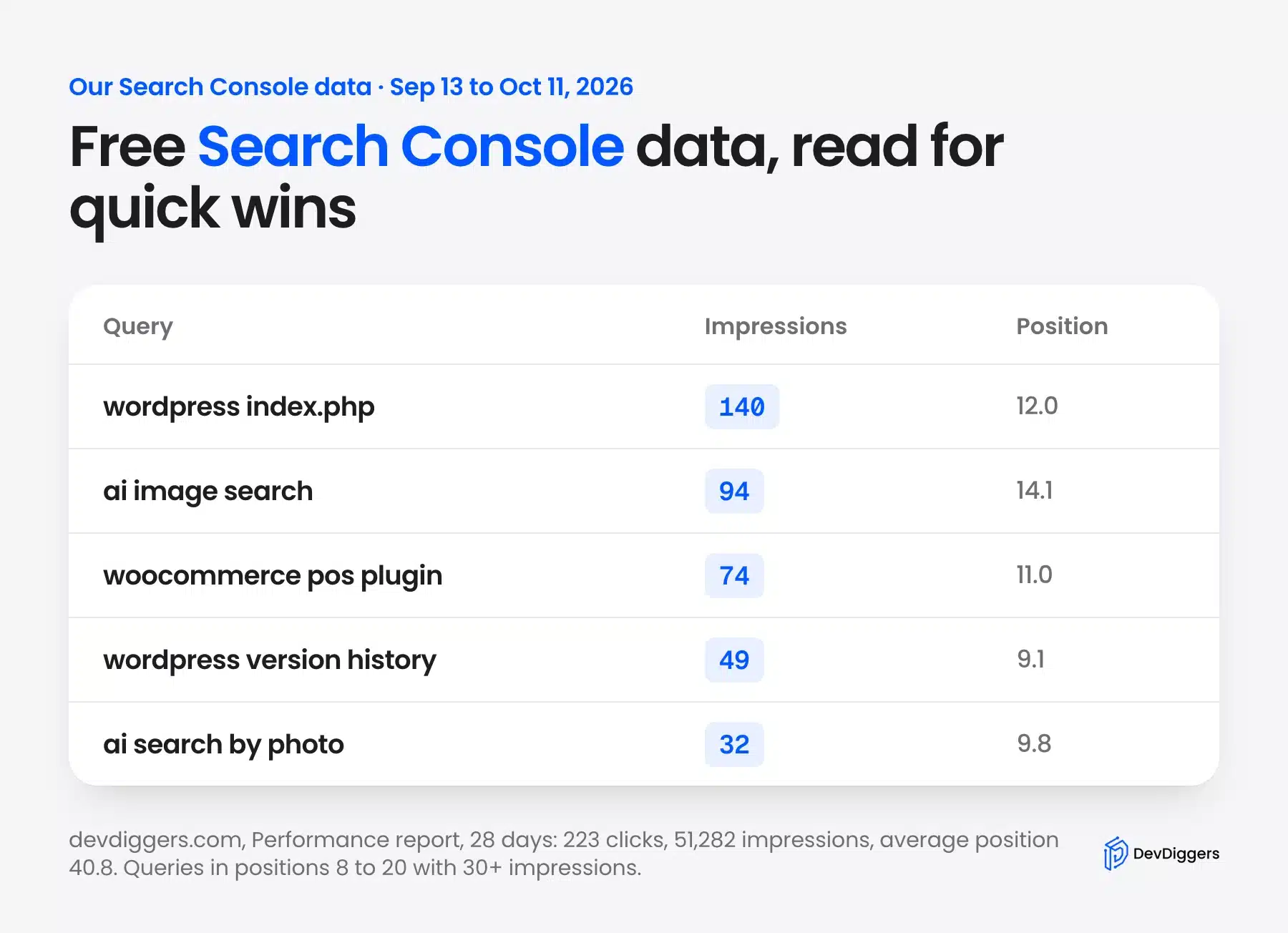
Those six queries are the quick wins.
The query for a WooCommerce POS plugin sat at position 11.0 with 74 impressions. A small improvement to that page could move it onto page one. No AI tool can find that for you without this data.
- Performance report: Clicks, impressions, click-through rate and position for every query and page.
- URL Inspection: Shows whether Google has indexed a page and when it last crawled it.
- Core Web Vitals report: Field data on page speed and stability from real Chrome users.
- History: Keeps 16 months of performance data, per Google’s Performance report help.
Pricing: Free, checked October 2026.
Best for: Every small business with a website. Set it up before you pay for anything else.
2. ChatGPT Free
ChatGPT’s free plan is a fast way to brainstorm keyword ideas, outlines and meta descriptions for a small business. It works without a login in the US, and it can search the web. It does not give search volumes, so treat its keyword lists as ideas to check.
Our prompt returned 10 keywords in a table with search intent and a suggested page type for each. The list ran from “handmade leather wallets for men” to “how to care for a handmade leather wallet”. It cited three sources and added a clear warning that the list was “not a guarantee of ranking difficulty or search volume”.
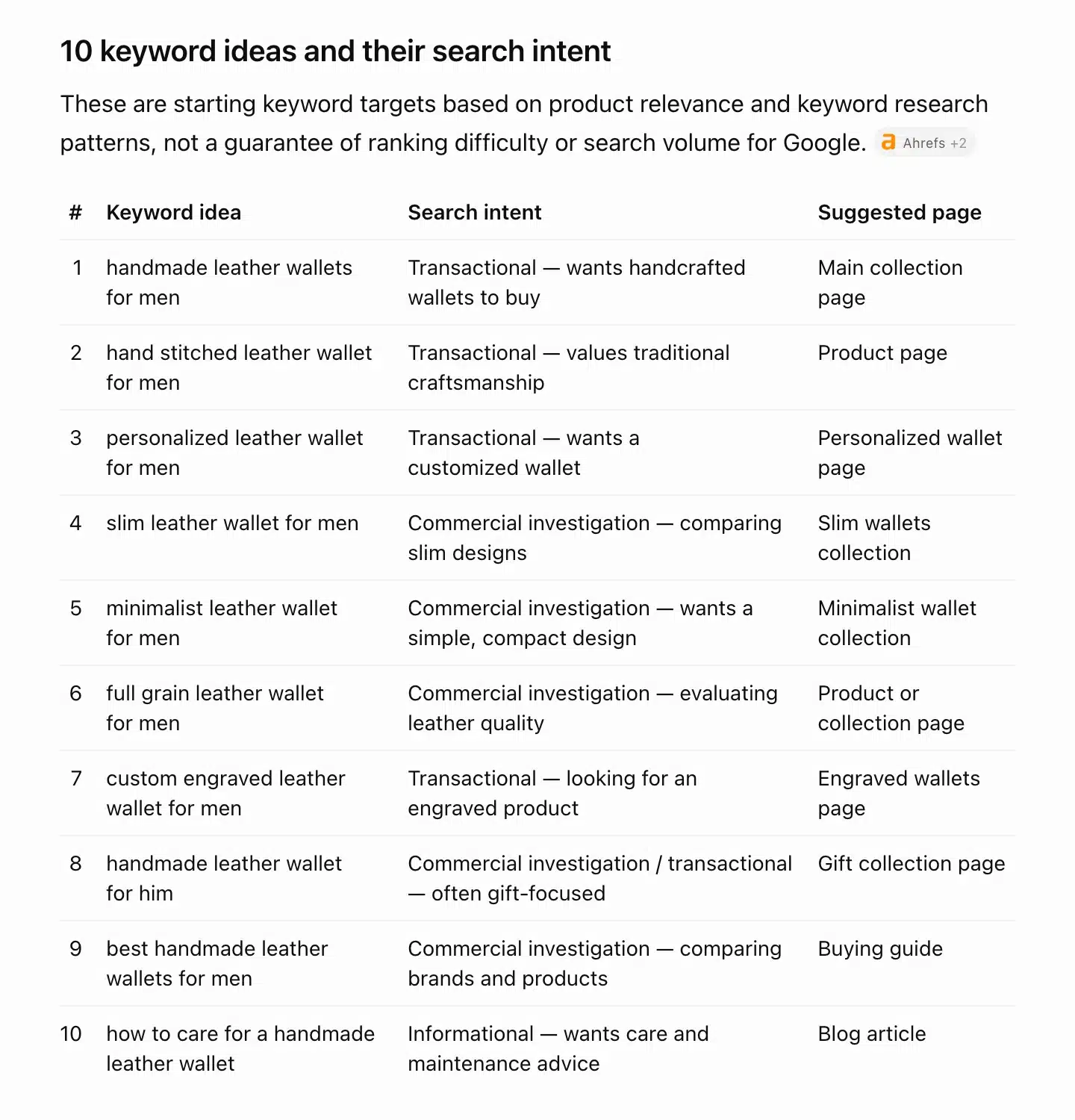
We ran the same prompt three times, and each run changed the list. Between our second and third runs, eight ideas stayed and two were swapped.
That is normal for a chat model. It is also the reason to check every idea in Search Console or a keyword tool before you build a page on it.
- Web search: Pulls current pages into the answer and shows the sources it used.
- Tables and outlines: Formats keyword lists and content briefs on request.
- Meta descriptions and titles: Drafts options you can then test for length.
- Free without login: Text chats work logged out, per the ChatGPT pricing page.
Pricing: Free. Go costs $8 a month and Plus $20 a month in the US, checked October 2026.
Best for: Owners who need ideas and drafts fast and will check them against real data.
3. Gemini
Gemini is Google’s free AI assistant, and it handles SEO brainstorming much like ChatGPT. It works logged out and writes its answers in clear groups. Like other chats, it gives no search volumes.
Gemini returned 10 keyword ideas grouped under three intent headings. The grouping was easy to read, but it slipped once. It put “Best handmade leather wallets for men” under Transactional, then described the same keyword as commercial research two lines later.
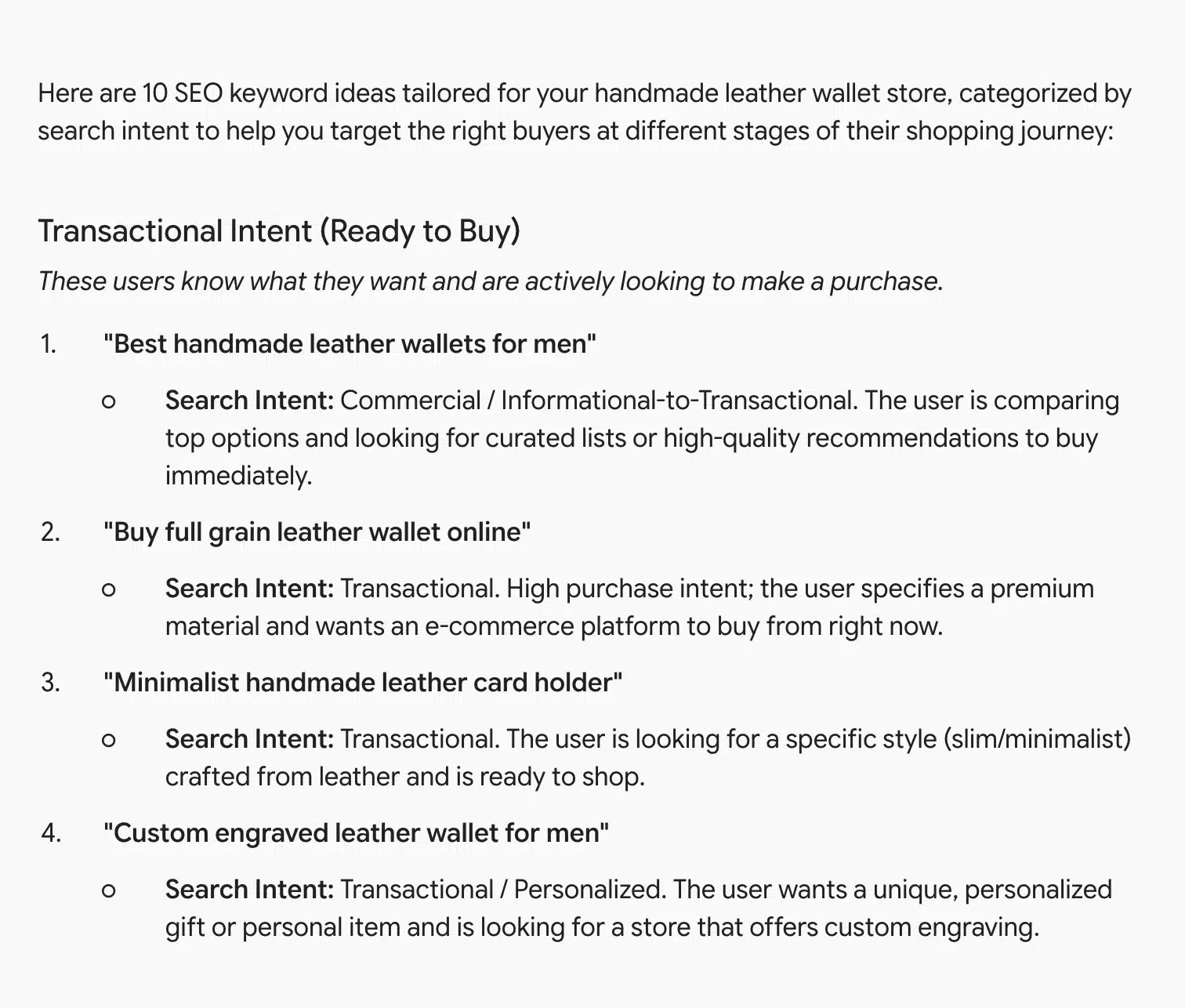
It showed no sources in our run. For a small business that matters: you cannot see where an idea came from, so you have to check every one yourself.
- Free plan: Includes Deep Research, Canvas and Gems, per the Gemini subscriptions page.
- Intent grouping: Sorted our ideas into buying, comparing and research stages without being asked.
Pricing: Free. Google AI Plus costs $4.99 a month and Google AI Pro $19.99 a month in the US, checked October 2026.
Best for: Small businesses already working in Google Workspace that want a second opinion on ideas.
4. Perplexity
Perplexity is an AI answer engine that searches the web for every reply and lists its sources. That makes it the most checkable of the three free chats for SEO research. It works logged out, and its free answers include links you can open.
Our prompt returned 10 keyword ideas in a table with search intent and the best page type for each. It listed 10 sources, the most of the three chats. It leaned on “made in USA” angles, adding two keywords with USA in them that the store never mentioned.
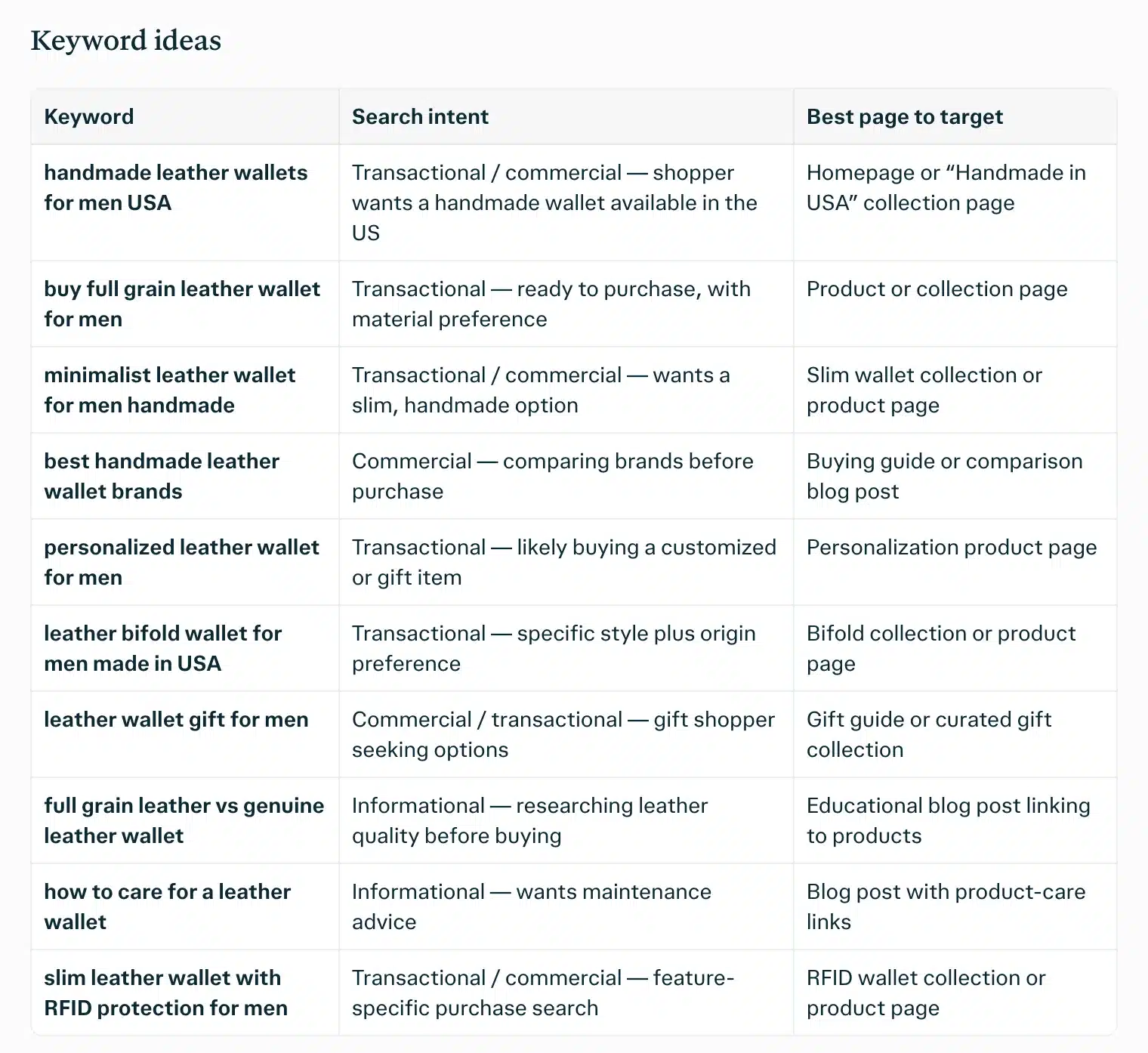
The sources are the real value. You can open each one and see whether the advice comes from a store owner, a tool vendor or a content farm.
- Cited answers: Every reply links the pages it used.
- Follow-up questions: Suggests related questions, such as how to check search volume.
- Free use without login: Answers work logged out, with sign-in for saved threads.
Pricing: Free. Pro costs $17 a month billed yearly, per the Perplexity Pro page, checked October 2026.
Best for: Owners who want AI research they can verify, source by source.
5. Semrush Free AI Visibility Checker
Semrush’s free AI Visibility Checker reports how often AI platforms mention a brand. It covers ChatGPT, Gemini, Google AI Mode and AI Overviews. Enter a domain and it returns a visibility score, mention counts and the pages that earn citations, with three free checks.
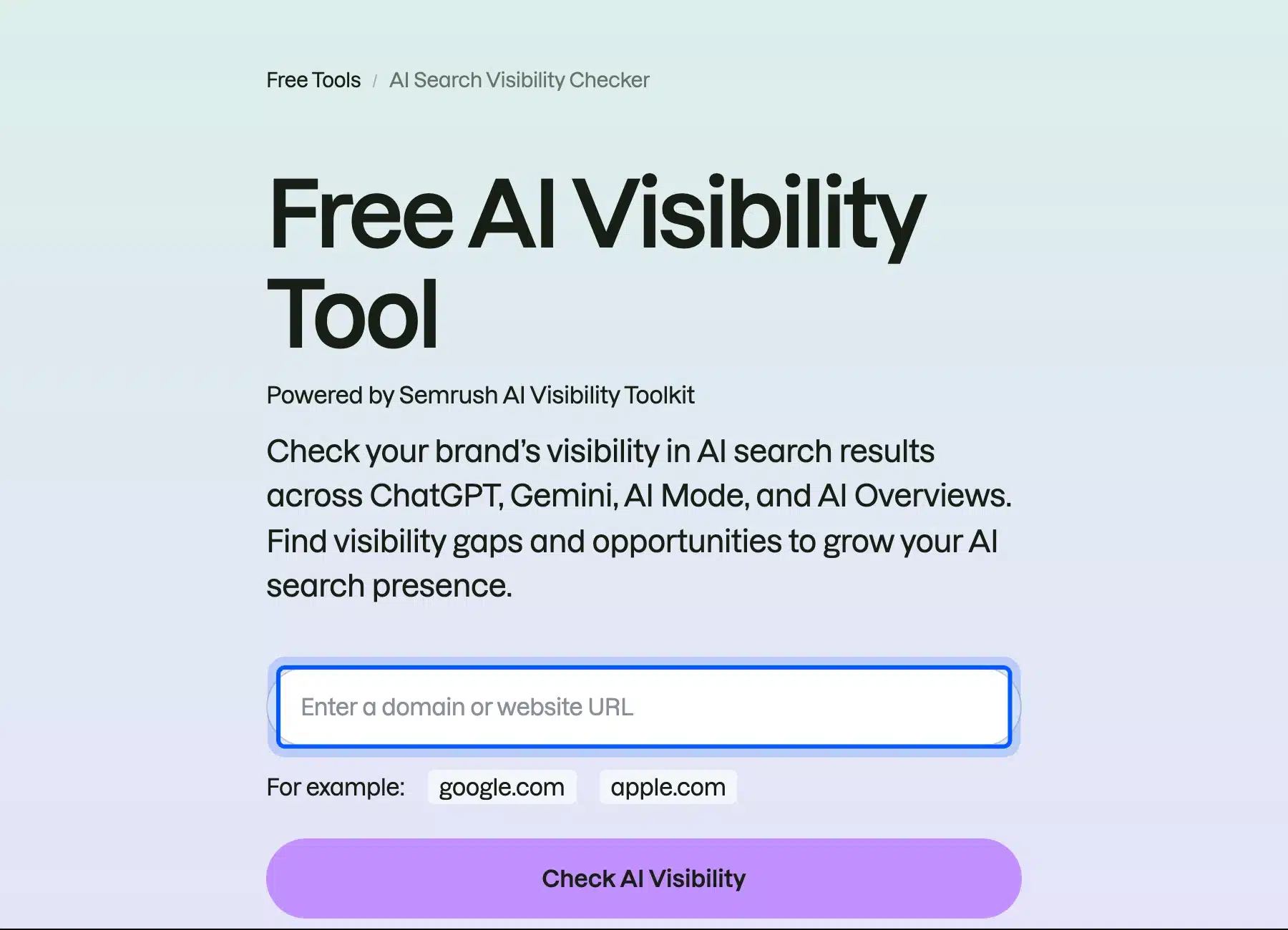
In our October 2026 test we entered devdiggers.com. Each run took one of the three free checks, but no report loaded on any of them, and the counter now reads “0/3”. Treat the free checker as a quick look that may not load, and keep a paid trial in reserve for real tracking.
Use the three checks with care. One for your own domain shows where you stand. The other two work best on the competitor that ranks above you and on a larger brand in your niche.
- AI visibility score: One number across the AI platforms Semrush checks.
- Mention breakdown: Splits mentions between ChatGPT, Gemini and Google results.
- Cited pages: Lists the pages on your site that AI answers cite most.
- Topics and prompts: Shows where your brand appears, per the Semrush free tools page.
Pricing: Free checker with three checks, and a free account with 10 reports a day. The SEO plan costs $139 a month billed monthly, per the Semrush pricing page, checked October 2026.
Best for: Businesses that want a one-off look at their AI visibility before paying for tracking.
6. Ahrefs Free Keyword Generator
Ahrefs’ free Keyword Generator turns one seed keyword into a list of ideas with search volume estimates. Volume is the data the AI chats leave out. It covers Google, Bing, YouTube and Amazon on the Ahrefs Keyword Generator page, with a country picker.
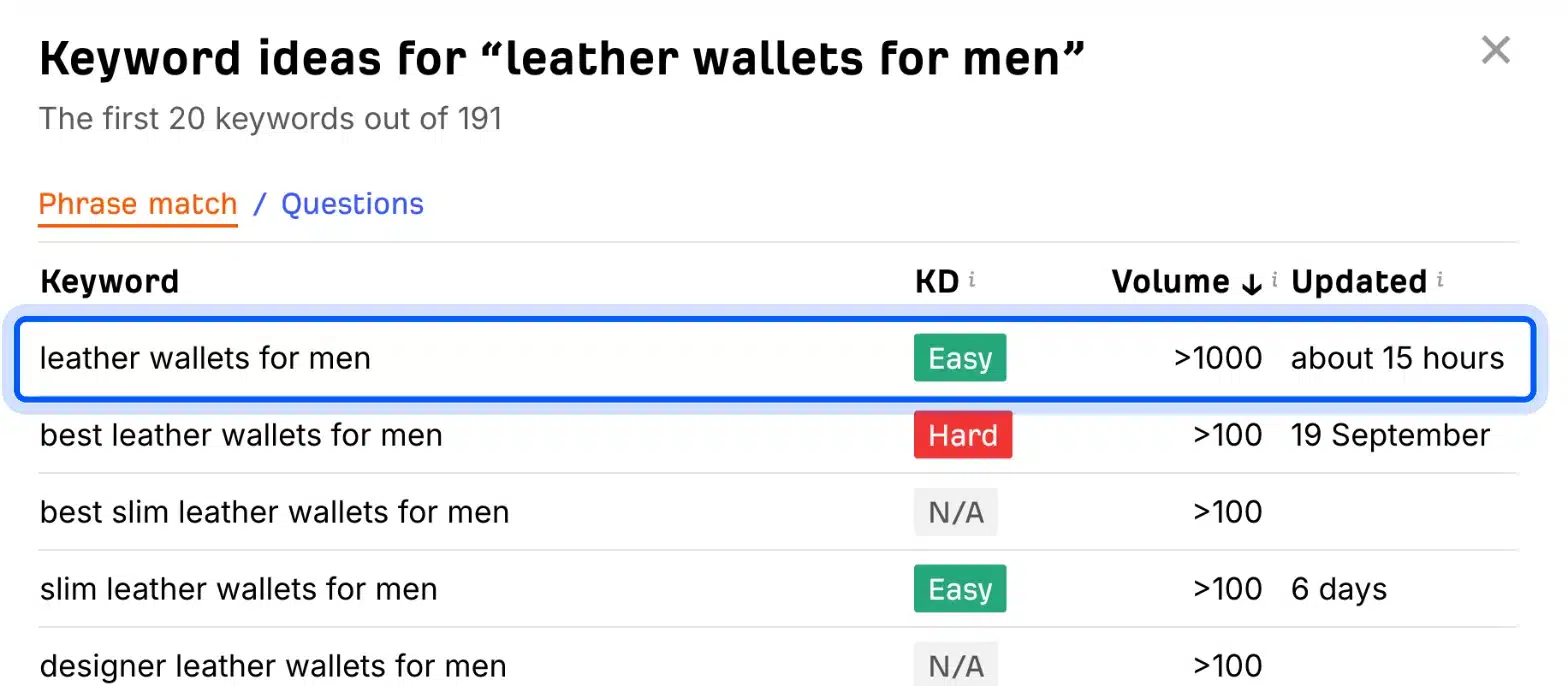
Our test used the seed “leather wallets for men” for the US. It returned 191 ideas and showed the first 20 free. The seed itself showed more than 1,000 searches with an “Easy” difficulty, while “best leather wallets for men” was marked “Hard”.
For a small store, this is the natural next step after an AI chat. Paste the ChatGPT or Perplexity ideas in one at a time and see which ones real people search.
A simple routine works well here. Take the five ideas that two or more AI chats agreed on, check each one, and drop any with no measurable volume. What is left is a short list worth a page each.
- Six idea reports: Phrase match, same terms, also rank for, search suggestions and questions.
- Search engines: Google, Bing, YouTube and Amazon from one box.
- Country filter: Pick the market your customers search in.
- Free extras: SEO tools, an AI Visibility Checker and AI writing tools, per the Ahrefs pricing page.
Pricing: Free tools. Starter costs $29 a month and Lite $129 a month, checked October 2026.
Best for: Owners who have AI-made keyword ideas and need volumes to choose between them.
7. AnswerThePublic
AnswerThePublic turns one keyword into the questions and phrases people type around it. That makes it a good feed for FAQs and blog topics. It now also pitches AI mentions, with a homepage that promises help getting a brand named on Gemini.
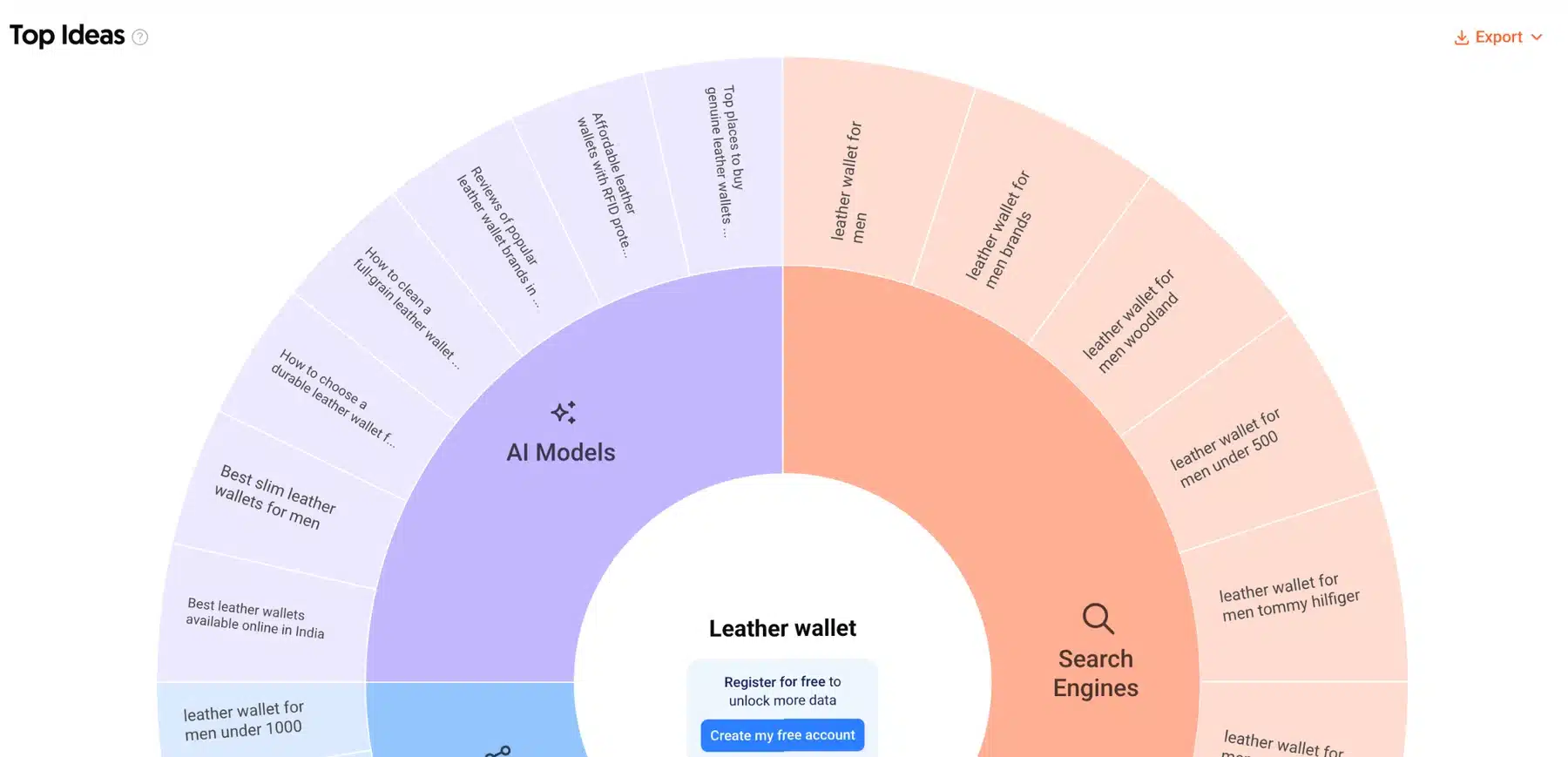
Our free search for “leather wallet” ran for the India market, since the free plan allows one search a day. It reported 5.4K monthly searches and a $0.05 cost per click. The AI Models ring suggested questions like how to clean a full-grain leather wallet.
For a small business, the question lists are the useful part. A store selling wallets can turn the best of those questions into an FAQ block.
- Question maps: Groups searches by who, what, why, how and other question words.
- Comparisons and prepositions: Shows “vs” and “for” phrases around a keyword.
- Language and country: Lets you pick both before searching.
- Content Studio: A newer feature for creating content with AI.
Pricing: Starter costs $20 a month, per the AnswerThePublic pricing page, checked October 2026.
Best for: Businesses planning FAQ sections and blog posts around real questions.
8. Surfer Free AI Writing Tools
Surfer offers a set of free AI writing tools with no signup. They include an outline generator, a meta description generator, a paraphraser and an AI detector. Its paid plans add AI search analytics and content tools on top.
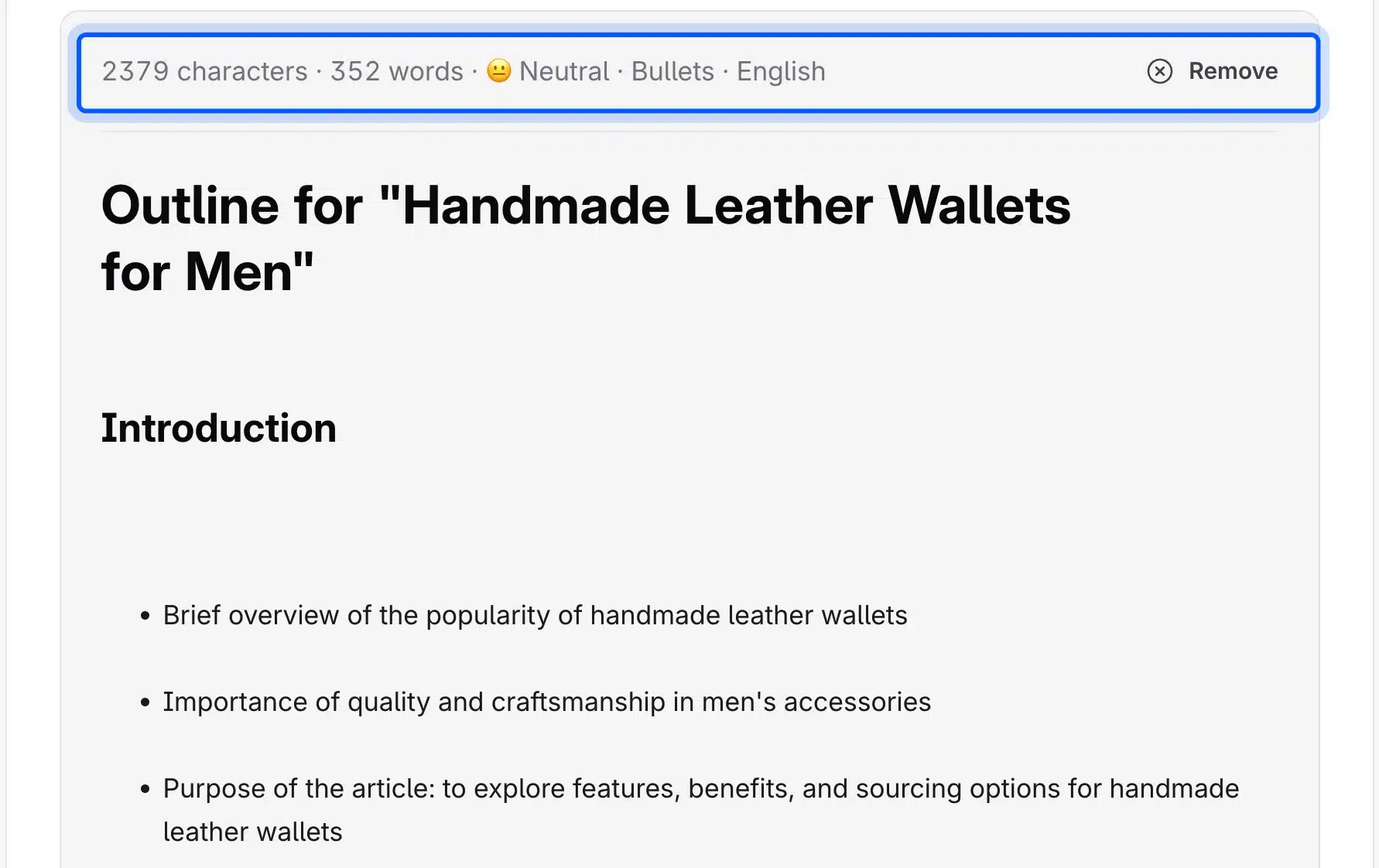
We gave the outline generator the topic “handmade leather wallets for men” with no account. It returned a 352 word bulleted outline in about 10 seconds, starting with sections on craftsmanship and wallet types. It had no search data, so check the headings against real queries.
The free outline and meta description generators fit a small business best. They give a starting brief and a first draft of a snippet. You still test the snippet length yourself.
- Outline generator: Builds a structured outline from a topic.
- Meta description generator: Drafts snippet text for a page.
- AI detector: Flags text that reads as machine-written.
- Free AI visibility audit: Listed on the Surfer free tools page.
Pricing: Free writing tools. Paid plans start at $49 a month billed yearly, per the Surfer pricing page, checked October 2026.
Best for: Owners who write their own pages and want a quick outline and snippet draft.
9. Rank Math Content AI
Rank Math Content AI is an AI writing assistant that works inside the WordPress editor. It is the option on this list built for WordPress sites. It writes titles, meta descriptions, outlines and product copy where you already edit pages.
Using it needs a Rank Math account connected to a WordPress site, plus a Content AI plan. That is the trade for having it inside the editor. If you run WordPress, that convenience can matter more than any single feature.
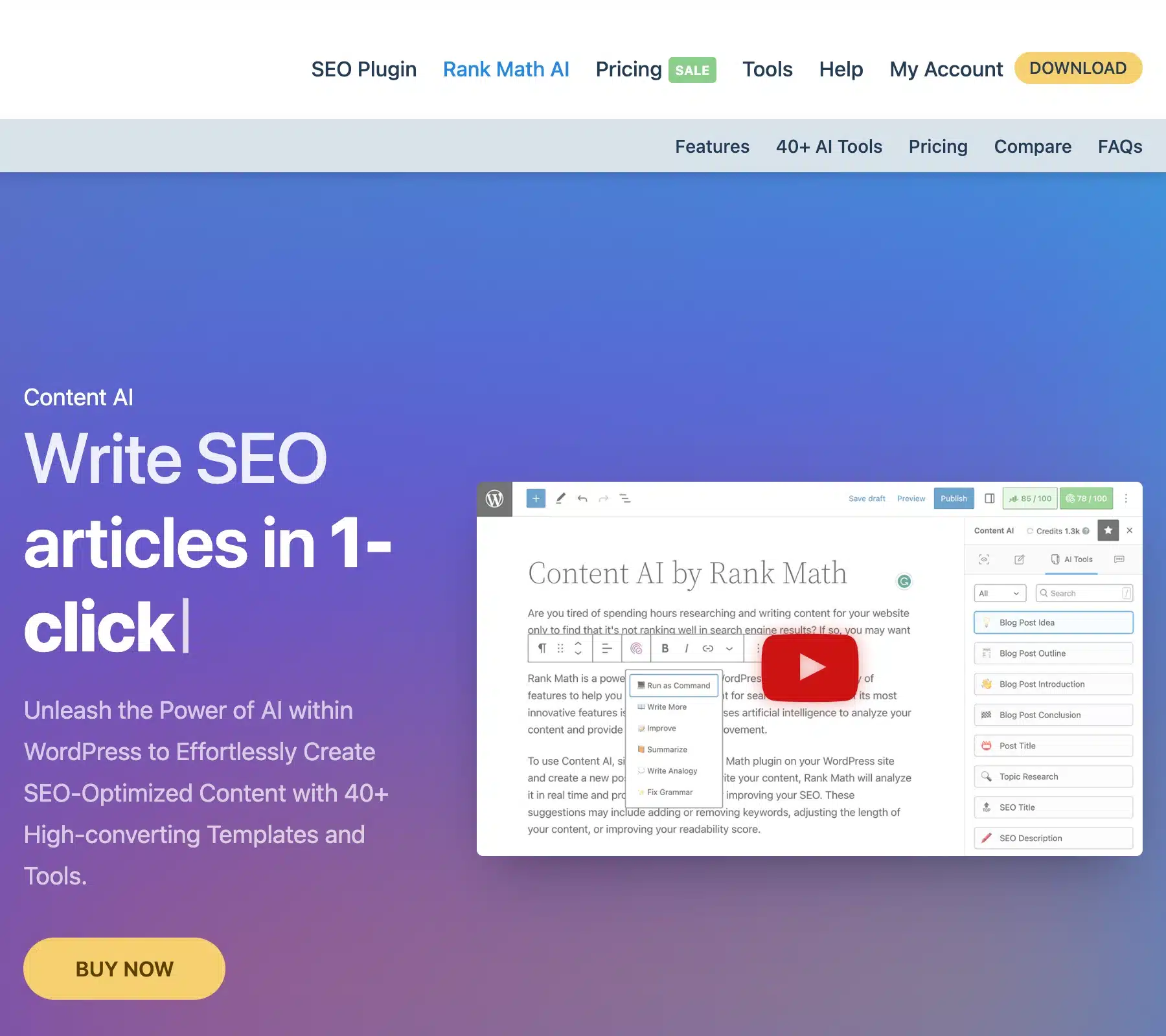
- 40+ AI tools: Ideas, outlines, intros, titles, SEO meta and product copy.
- Bulk SEO meta: Generates titles, descriptions and alt text across many posts.
- Fix SEO tests with AI: Rewrites copy to pass Rank Math’s own checks.
- 30+ languages: Writes in more than 30 languages, per the Rank Math Content AI page.
Pricing: €71.88 a year, excluding tax, checked October 2026. It needs an active Content AI plan even with the free Rank Math plugin.
Best for: WordPress and WooCommerce stores that want AI help inside the editor.
What Our Free AI Chat Test Showed
Our free AI chat test gave the same keyword prompt to ChatGPT, Gemini and Perplexity in October 2026. All three returned 10 usable keyword ideas with search intent. None gave search volumes, and only two showed their sources, so every list still needed a check against real data.
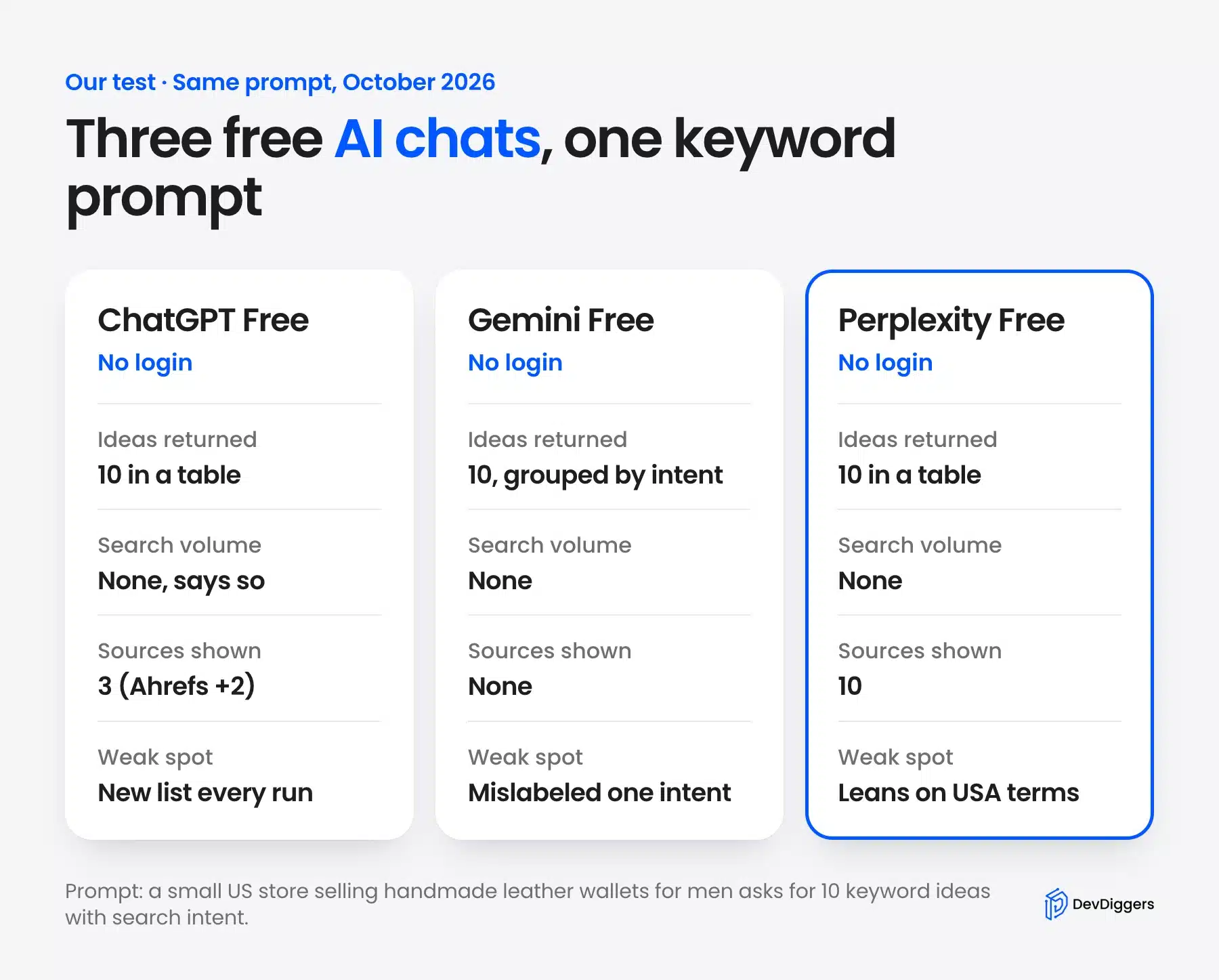
The overlap was the most useful signal. All three suggested a full-grain leather keyword, a personalized or engraved wallet keyword, and a “best handmade leather wallets” comparison. When three models agree on an idea, it is a good first keyword to check.
The differences were just as clear. ChatGPT gave a new list on every run, so treat one run as a sample. Gemini mislabeled one intent.
Perplexity cited 10 sources but added a “made in USA” angle nobody asked for. That came from its sources, which shows why reading them matters.
Response format differed too. ChatGPT and Perplexity both built a table with a page type column, which maps straight onto a site plan. Gemini wrote a numbered list with a short reason under each idea, which reads better but takes longer to scan.
None of the three asked a follow-up question about the store’s prices, location or products. A human SEO would ask those first. That gap is why the AI list is a starting point and your own sales data decides the order.
Tip: Paste every AI keyword idea into Search Console’s Performance report and a free volume tool. Keep only the ones with real searches or existing impressions on your site.
Which AI Search Optimization Tools Have Top Historical Data?
The AI search optimization tools with the deepest historical data are the paid SEO platforms, led by Semrush with US history back to January 2012. Google Search Console keeps 16 months for your own site, free. AI chat tools keep no ranking history at all.
The Semrush historical data guide says that history needs a higher paid plan. It covers 11 databases back to January 2012, including the US, the UK and Canada.
For a small business, Search Console’s 16 months is usually enough. It covers a full year plus a season, so you can compare this October with last October. Export it every few months if you want a longer record, because Google drops data older than 16 months.
To keep more than 16 months of your own data, export the Performance report to a spreadsheet each quarter. It takes two minutes and gives you year-over-year comparisons that no free AI tool can rebuild later.
History also matters for seasonal stores. A wallet shop sees gift demand before December, and only a year of data shows how early that demand starts. Search Console’s 16 months is enough to see last year’s rise and plan this year’s pages ahead of it.
AI visibility tracking is newer, so its history is short everywhere. Free checkers like Semrush’s give a one-day snapshot. Paid tracking builds history only from the day you start it.
How to Pick AI-Based SEO Tools on a Small Budget
The cheapest working stack of AI-based SEO tools for a small business costs nothing. It pairs Search Console for real data with one free AI chat for ideas and one free keyword tool for volumes. Pay for a platform only when you need rank tracking or volume data every week.
Here is the order we would set it up in:
- Connect Search Console: Verify your site and wait a few days for data. Nothing else on this list replaces it.
- Pick one AI chat: Perplexity if you want sources, ChatGPT or Gemini if you want speed.
- Check ideas for volume: Run each AI keyword through a free keyword tool before writing.
- Write and test the page: Use a free outline tool, then test the title and meta in a SERP preview.
- Track for a month: Watch impressions and position in Search Console for the target query.
That stack covers the five jobs from the start of this post. Search Console handles rank tracking for your own pages. The AI chat handles ideas, clustering and content briefs, and the free checkers cover AI Overview monitoring.
When to pay is a simple test. If you check rankings or volumes more than once a week, a $29 to $139 monthly plan saves more time than it costs. If you check once a month, free tools cover it.
Most small sites also see more gain from fixing basics than from new tools. Our post on how many keywords to use for SEO shows why one page should target one main topic. For a WooCommerce shop, our guide to using AI for WooCommerce product descriptions shows where AI copy needs a human edit.
Where AI SEO Tools Fall Short
AI SEO tools fall short on data they do not have, on judgment about your business, and on technical problems. A chat model guesses at search demand, and a platform knows demand but not your margins. Neither one can fix a slow page or a broken index.
Our test showed the first gap plainly. Three chats gave 30 keyword ideas and zero search volumes. The ideas were sensible, but sensible is not the same as searched.
The second gap is fit. An AI tool cannot know which wallets sell best, which ones have stock, or which customers return. Only you can choose between two keywords on those grounds.
The third gap is technical. If Google cannot crawl or index a page, no AI copy will rank it.
Our comparison of technical SEO vs content SEO explains how the two fit. Our GEO vs SEO guide covers what changes when AI answers enter the results.
There is also a fourth gap: trust. AI answers cite brands that other sites already mention and link to. No tool on this list builds those mentions for you, so reviews, partner pages and local listings still matter.
If your site has indexing, speed or structure problems, a tool subscription will not fix them. Our WordPress SEO services cover the technical side first, so the AI-made content has a site that can rank.
Conclusion
AI SEO tools for small business work best as a free stack. Pair Search Console for real data with one AI chat for ideas and a free keyword tool for volumes. Our test found all three free chats useful for ideas and none useful for demand.
Start free and add one paid tool only for a gap you hit every week. Check every AI suggestion against your own Search Console data before you build a page on it.
Frequently Asked Questions (FAQs)
Q1. Are AI SEO tools worth it for a small business?
The free ones are. Search Console, ChatGPT, Gemini and Perplexity cost nothing and save hours on research and drafts. Paid platforms pay off only when you check rankings or volumes every week.
Q2. Can ChatGPT do SEO for my website?
It can draft keyword ideas, outlines and meta descriptions, but it cannot see your rankings or real search volumes. In our test it said so itself. Use it for ideas and check them in Search Console.
Q3. What is the best free AI SEO tool?
Google Search Console is the best free SEO tool because it shows real Google data for your site. For AI help, Perplexity’s free plan was the easiest to check in our test because it cited 10 sources.
Q4. Which AI tools do predictive SEO suggestions?
Paid platforms such as Semrush and Ahrefs estimate traffic potential and keyword difficulty from their own databases. AI chats make suggestions but do not predict traffic. Treat any forecast as an estimate and confirm it in Search Console.
Q5. Will AI-written content hurt my rankings?
Google’s guidance on AI-generated content says it rewards helpful content however it is made. Content made mainly to manipulate rankings breaks its spam policies. Edit AI drafts with your own facts and product knowledge.
Q6. How do I track if my business appears in AI answers?
Start with a free check such as Semrush’s AI Visibility Checker, which allows three checks. Then ask ChatGPT, Gemini and Perplexity the questions your customers ask and note whether you appear. Paid tracking only makes sense once you are mentioned.